Welcome Guest ( Log In | Register )

Outline · [ Standard ] · Linear+

 Some advice on system setup and cooling, 7950x with NZXT KRAKEN 360 and 128GB RAM

views
     
TSsakaic
post Feb 5 2024, 01:17 AM, updated 2y ago

Enthusiast
*****
Senior Member
936 posts

Joined: Jun 2005
Hi guys,

I used to build PCs and OC them etc but last time I did that was in the mid 2000s. Think AMD Barton/Throughbred time. Anyway, recently at work needed a much more powerful workstation for crunching large amounts of data and the gaming laptops we had in the office were simply not cutting any more. So I thought I could just wing it and put together a system to do the data crunching. A rough outline of the build is

CPU : 7950X
MB : ASROCK X670E PRO
GPU : ASUS RTX4070Ti
SSD 1 : ACER Predator 1TB PCIE4
SSD 2 : ACER Predator 2TB PCIE4
Casing : NZXT H9 Flow
RAM : KINGSTON Fury Beast RGB 64GB (32x2) x 2
PSU : ASUS 1200W
CPU Cooler : NZXT Kraken 360 RGB Black

The PC works out of the box and I am aware of the fundamental behaviour of the newer CPUs where they push power and clock speeds till hit max temp then throttle back but there are a few things that I am unsatisfied about. Hoping to get some pointers here

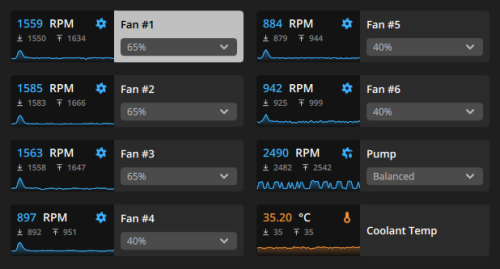
1) Its not the temperature of the CPU that bothers me, in fact I am expecting it to hit the 90+ deg C level but its how fast it reaches it. I tied the cooler fans and pump speed to the CPU temp so basically once its more than 60 deg C, the fans and pump are running at full tilt. Coolant temp never exceeds 32 deg C but the CPU reaches 90 in a very short time (like not more than 10 seconds). This happens only when I am crunching data. Could it be due to insufficient pressure between the pump and IHS? Or insufficient thermal paste? I just left whatever the came with the cooler on it and just used it.

2) I tried using the Ryzen master to try to come up with a profile. It came up with a -40 profile but once applied, the system would never boot up. So far I used a less aggressive number like -10 and its stable so far. I find that the temps still rocket to 90+ but just not so fast and it can hold all the cores at about 5.450 GHz about 50% longer. is there a detailed guide on how the voltages and clocks relate to each other. Its so confusing relative to 20 years before where it was just FSB x multiplier

3) I have all the RAM running but I can never get it past 4000 MT/s. I know I made the mistake of not making sure the RAM was AMD expo certified. Is it possible to manually push the 4 sticks to at least 5200 speeds?

Just hoping for tips for troubleshooting and if possible any guides for modern system overclocking/tuning. I prefer PDFs to YT videos (old school mah)
Gargamel_gibson
post Feb 5 2024, 01:50 AM

On my way
****
Junior Member
526 posts

Joined: Feb 2021
QUOTE(sakaic @ Feb 5 2024, 01:17 AM)
Hi guys,

I used to build PCs and OC them etc but last time I did that was in the mid 2000s. Think AMD Barton/Throughbred time. Anyway, recently at work needed a much more powerful workstation for crunching large amounts of data and the gaming laptops we had in the office were simply not cutting any more. So I thought I could just wing it and put together a system to do the data crunching. A rough outline of the build is

CPU : 7950X
MB : ASROCK X670E PRO
GPU : ASUS RTX4070Ti
SSD 1 : ACER Predator 1TB PCIE4
SSD 2 : ACER Predator 2TB PCIE4
Casing : NZXT H9 Flow
RAM : KINGSTON Fury Beast RGB 64GB (32x2) x 2
PSU : ASUS 1200W
CPU Cooler : NZXT Kraken 360 RGB Black

The PC works out of the box and I am aware of the fundamental behaviour of the newer CPUs where they push power and clock speeds till hit max temp then throttle back but there are a few things that I am unsatisfied about. Hoping to get some pointers here

1) Its not the temperature of the CPU that bothers me, in fact I am expecting it to hit the 90+ deg C level but its how fast it reaches it. I tied the cooler fans and pump speed to the CPU temp so basically once its more than 60 deg C, the fans and pump are running at full tilt. Coolant temp never exceeds 32 deg C but the CPU reaches 90 in a very short time (like not more than 10 seconds). This happens only when I am crunching data. Could it be due to insufficient pressure between the pump and IHS? Or insufficient thermal paste? I just left whatever the came with the cooler on it and just used it.


Sounds like mounting pressure issue or just not correctly mounted. I'd redo the CPU cooler mounting with new thermal paste. Get Kryonaut, or Kryonaut extreme if you feeling fancy. I suspect you mount bracket wrongly, or you didn't peel the sticker hahaha.

2) I tried using the Ryzen master to try to come up with a profile. It came up with a -40 profile but once applied, the system would never boot up. So far I used a less aggressive number like -10 and its stable so far. I find that the temps still rocket to 90+ but just not so fast and it can hold all the cores at about 5.450 GHz about 50% longer. is there a detailed guide on how the voltages and clocks relate to each other. Its so confusing relative to 20 years before where it was just FSB x multiplier

can't help you here. You should probably  solve your temp issues before you do oc. Again, YouTube has loads of profiles for your CPU, I'd say start from there.


3) I have all the RAM running but I can never get it past 4000 MT/s. I know I made the mistake of not making sure the RAM was AMD expo certified. Is it possible to manually push the 4 sticks to at least 5200 speeds?

Did you update your mobo bios? There should be an option in bios settings for XMP/EXPO/DOCP

Just hoping for tips for troubleshooting and if possible any guides for modern system overclocking/tuning. I prefer PDFs to YT videos (old school mah)
*
lawrencesha
post Feb 5 2024, 06:38 AM

Enthusiast
*****
Junior Member
882 posts

Joined: Nov 2004


deleted.

This post has been edited by lawrencesha: Feb 5 2024, 06:39 AM
TSsakaic
post Feb 5 2024, 07:28 AM

Enthusiast
*****
Senior Member
936 posts

Joined: Jun 2005
QUOTE(Gargamel_gibson @ Feb 5 2024, 01:50 AM)

*
Will start with the first thing on ethe list later. Thanks

Pretty sure I took off the plastic cover off lol.
TSsakaic
post Feb 5 2024, 07:36 AM

Enthusiast
*****
Senior Member
936 posts

Joined: Jun 2005
QUOTE(sakaic @ Feb 5 2024, 07:28 AM)
Will start with the first thing on ethe list later. Thanks

Pretty sure I took off the plastic cover off lol.
*
BIOS is updated to the latest version. I know 4 stock
AthrunIJ
post Feb 5 2024, 07:44 AM

Look at all my stars!!
*******
Senior Member
2,992 posts

Joined: Feb 2015

NZXT CAM software is working OK? Auto boot up?

Apparently, it might affect it. The fan curve settings.

Online peeps getting well while gaming around 70 Celsius.

With your CPU intensive calculation and Malaysian weather I say 90 Celsius is expected. Ramping up short time seems expected if cpu is 100% utilize. 7950x is designed to until 95 Celsius.

This post has been edited by AthrunIJ: Feb 5 2024, 07:49 AM
alexei
post Feb 5 2024, 10:25 AM

Biker Mice from Mars
******
Senior Member
1,879 posts

Joined: Jan 2003
From: Medan, ID
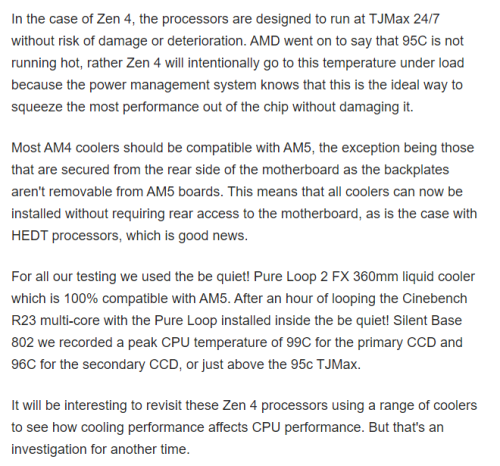
user posted image
https://www.techspot.com/review/2535-amd-ryzen-7950x/
alexei
post Feb 5 2024, 10:26 AM

Biker Mice from Mars
******
Senior Member
1,879 posts

Joined: Jan 2003
From: Medan, ID
@TS: you can try profile the Vcore to temp, and see if the BIOS is intentionally pushing the temp to ~95C and then 'play/operate' there
alexei
post Feb 5 2024, 10:29 AM

Biker Mice from Mars
******
Senior Member
1,879 posts

Joined: Jan 2003
From: Medan, ID
user posted image
https://www.techpowerup.com/review/amd-ryze...mal-throttling/
babylon52281
post Feb 5 2024, 03:31 PM

Look at all my stars!!
*******
Senior Member
2,682 posts

Joined: Apr 2017
QUOTE(sakaic @ Feb 5 2024, 01:17 AM)
Hi guys,

I used to build PCs and OC them etc but last time I did that was in the mid 2000s. Think AMD Barton/Throughbred time. Anyway, recently at work needed a much more powerful workstation for crunching large amounts of data and the gaming laptops we had in the office were simply not cutting any more. So I thought I could just wing it and put together a system to do the data crunching. A rough outline of the build is

CPU : 7950X
MB : ASROCK X670E PRO
GPU : ASUS RTX4070Ti
SSD 1 : ACER Predator 1TB PCIE4
SSD 2 : ACER Predator 2TB PCIE4
Casing : NZXT H9 Flow
RAM : KINGSTON Fury Beast RGB 64GB (32x2) x 2
PSU : ASUS 1200W
CPU Cooler : NZXT Kraken 360 RGB Black

The PC works out of the box and I am aware of the fundamental behaviour of the newer CPUs where they push power and clock speeds till hit max temp then throttle back but there are a few things that I am unsatisfied about. Hoping to get some pointers here

1) Its not the temperature of the CPU that bothers me, in fact I am expecting it to hit the 90+ deg C level but its how fast it reaches it. I tied the cooler fans and pump speed to the CPU temp so basically once its more than 60 deg C, the fans and pump are running at full tilt. Coolant temp never exceeds 32 deg C but the CPU reaches 90 in a very short time (like not more than 10 seconds). This happens only when I am crunching data. Could it be due to insufficient pressure between the pump and IHS? Or insufficient thermal paste? I just left whatever the came with the cooler on it and just used it.

2) I tried using the Ryzen master to try to come up with a profile. It came up with a -40 profile but once applied, the system would never boot up. So far I used a less aggressive number like -10 and its stable so far. I find that the temps still rocket to 90+ but just not so fast and it can hold all the cores at about 5.450 GHz about 50% longer. is there a detailed guide on how the voltages and clocks relate to each other. Its so confusing relative to 20 years before where it was just FSB x multiplier

3) I have all the RAM running but I can never get it past 4000 MT/s. I know I made the mistake of not making sure the RAM was AMD expo certified. Is it possible to manually push the 4 sticks to at least 5200 speeds?

Just hoping for tips for troubleshooting and if possible any guides for modern system overclocking/tuning. I prefer PDFs to YT videos (old school mah)
*
What I understand (and AIO/WC kakis can correct me if Im wrong), water does not have efficient instantanous heat transference properties, so a sudden burst of workload will create a surge of CPU heat but that could not be efficiently transfered from the coldplate to the water medium.

This is why WC setups dont work well with sudden load surges however because of the mass flow of water constantly taking heat away it has overall better cooling properties if a high heatload is sustained (this is reason why WC can handle hotter CPU and not throttle for hours of use).

Also IINM because of the above reason, WC needs a higher fan curve to keep up the heat transference out of the rad or else set the fan to constantly run at higher speeds. As much as it takes longer for heat to transfer from coldplate to water its also takes longer for heat to transfer from water to rad and out from system. If that heat is not efficiently evacuated, the water temp within might have been higher which leads to less efficiency of heat being transfered out.

As for running 4x RAM sticks at XMP/EXPO, I heard about Ryzen being picky about RAM setups & timings. You could try troubleshoot in stages by running 1x stick at XMP, then 2X stick, then try 4X sticks again. If XMP speed works at certain points that means the system cannot handle 4x sticks at XMP or else you have to do some manual tuning.
TSsakaic
post Feb 6 2024, 01:43 PM

Enthusiast
*****
Senior Member
936 posts

Joined: Jun 2005
QUOTE(babylon52281 @ Feb 5 2024, 03:31 PM)
What I understand (and AIO/WC kakis can correct me if Im wrong), water does not have efficient instantanous heat transference properties, so a sudden burst of workload will create a surge of CPU heat but that could not be efficiently transfered from the coldplate to the water medium.

This is why WC setups dont work well with sudden load surges however because of the mass flow of water constantly taking heat away it has overall better cooling properties if a high heatload is sustained (this is reason why WC can handle hotter CPU and not throttle for hours of use).

Also IINM because of the above reason, WC needs a higher fan curve to keep up the heat transference out of the rad or else set the fan to constantly run at higher speeds. As much as it takes longer for heat to transfer from coldplate to water its also takes longer for heat to transfer from water to rad and out from system. If that heat is not efficiently evacuated, the water temp within might have been higher which leads to less efficiency of heat being transfered out.

As for running 4x RAM sticks at XMP/EXPO, I heard about Ryzen being picky about RAM setups & timings. You could try troubleshoot in stages by running 1x stick at XMP, then 2X stick, then try 4X sticks again. If XMP speed works at certain points that means the system cannot handle 4x sticks at XMP or else you have to do some manual tuning.
*
That's why I tied the fan and pump curve to CPU temp and not the coolant temp. At least if it spikes, the system tries to catch up as soon as possible. But still worrying that I cannot hold the temps low enough.

I knew the RAM speed wouldn't be that high although the ones that I am using are listed in the motherboard certified lost but only for 2 units. But to do what you said like manual tweaking, I wanted to find a guide so that I can increase the signalling voltage to see if it improves anything. Also looking for information on drive strength. From the manual, it's just a number. Is it in mA? Or just a scalar number?
babylon52281
post Feb 7 2024, 10:34 AM

Look at all my stars!!
*******
Senior Member
2,682 posts

Joined: Apr 2017
QUOTE(sakaic @ Feb 6 2024, 01:43 PM)
That's why I tied the fan and pump curve to CPU temp and not the coolant temp. At least if it spikes, the system tries to catch up as soon as possible. But still worrying that I cannot hold the temps low enough.

I knew the RAM speed wouldn't be that high although the ones that I am using are listed in the motherboard certified lost but only for 2 units. But to do what you said like manual tweaking, I wanted to find a guide so that I can increase the signalling voltage to see if it improves anything. Also looking for information on drive strength. From the manual, it's just a number. Is it in mA? Or just a scalar number?
*
Its the spike which your having problem since its too high for your liking, try to limit the system either thru lower CPU clock or undervolt. Or else gradually step in the surge so as not to overload the cooling system.

Otherwise just set rad fans to a constant high speed.

Cant really help you on RAM tweaking as I barely understand all the intricacies myself, you will have to go down a rabbit hole on this from the net. Buildzoid youtube has lots on RAM tweaks. If you want the advertised speed you may have to run only 2x sticks as per the QVL, anything above is not guaranteed to work at the speed or even if it will work after tweaking.

This post has been edited by babylon52281: Feb 7 2024, 10:35 AM
myway1985
post Feb 7 2024, 11:38 AM

10k Club
********
All Stars
12,089 posts

Joined: Jun 2014
From: Kuchai Lama


QUOTE(sakaic @ Feb 5 2024, 01:17 AM)
Hi guys,

I used to build PCs and OC them etc but last time I did that was in the mid 2000s. Think AMD Barton/Throughbred time. Anyway, recently at work needed a much more powerful workstation for crunching large amounts of data and the gaming laptops we had in the office were simply not cutting any more. So I thought I could just wing it and put together a system to do the data crunching. A rough outline of the build is

CPU : 7950X
MB : ASROCK X670E PRO
GPU : ASUS RTX4070Ti
SSD 1 : ACER Predator 1TB PCIE4
SSD 2 : ACER Predator 2TB PCIE4
Casing : NZXT H9 Flow
RAM : KINGSTON Fury Beast RGB 64GB (32x2) x 2
PSU : ASUS 1200W
CPU Cooler : NZXT Kraken 360 RGB Black

The PC works out of the box and I am aware of the fundamental behaviour of the newer CPUs where they push power and clock speeds till hit max temp then throttle back but there are a few things that I am unsatisfied about. Hoping to get some pointers here

1) Its not the temperature of the CPU that bothers me, in fact I am expecting it to hit the 90+ deg C level but its how fast it reaches it. I tied the cooler fans and pump speed to the CPU temp so basically once its more than 60 deg C, the fans and pump are running at full tilt. Coolant temp never exceeds 32 deg C but the CPU reaches 90 in a very short time (like not more than 10 seconds). This happens only when I am crunching data. Could it be due to insufficient pressure between the pump and IHS? Or insufficient thermal paste? I just left whatever the came with the cooler on it and just used it.

2) I tried using the Ryzen master to try to come up with a profile. It came up with a -40 profile but once applied, the system would never boot up. So far I used a less aggressive number like -10 and its stable so far. I find that the temps still rocket to 90+ but just not so fast and it can hold all the cores at about 5.450 GHz about 50% longer. is there a detailed guide on how the voltages and clocks relate to each other. Its so confusing relative to 20 years before where it was just FSB x multiplier

3) I have all the RAM running but I can never get it past 4000 MT/s. I know I made the mistake of not making sure the RAM was AMD expo certified. Is it possible to manually push the 4 sticks to at least 5200 speeds?

Just hoping for tips for troubleshooting and if possible any guides for modern system overclocking/tuning. I prefer PDFs to YT videos (old school mah)
*
hehe.. my designer studio client built almost same thing.. i tell u.. EXPO problem more than u can image.. rather take 5600MHZ value ram than EXPO certified RAM.. n B650 Tomahawk BEAT most of the RM2k below mobo..

open to other quote??
babylon52281
post Feb 7 2024, 01:53 PM

Look at all my stars!!
*******
Senior Member
2,682 posts

Joined: Apr 2017
QUOTE(myway1985 @ Feb 7 2024, 11:38 AM)

open to other quote??
*
I think the bro here ady has the system but needs help getting EXPO working, thats all sweat.gif
babylon52281
post Feb 7 2024, 01:56 PM

Look at all my stars!!
*******
Senior Member
2,682 posts

Joined: Apr 2017
Reddit user has something quite similar to TS system also with XMP/EXPO issue
https://www.reddit.com/r/ASRock/comments/16...r_sticks_is_it/
myway1985
post Feb 7 2024, 03:37 PM

10k Club
********
All Stars
12,089 posts

Joined: Jun 2014
From: Kuchai Lama


QUOTE(babylon52281 @ Feb 7 2024, 01:53 PM)
I think the bro here ady has the system but needs help getting EXPO working, thats all  sweat.gif
*
EXPO problem unending
babylon52281
post Feb 7 2024, 07:55 PM

Look at all my stars!!
*******
Senior Member
2,682 posts

Joined: Apr 2017
QUOTE(myway1985 @ Feb 7 2024, 03:37 PM)
EXPO problem unending
*
TS can only pray that constantly updating Agesa bioses will eventually fix his problem before it screws up and brick the mobo. Otherwise just stay with 2x sticks of RAM.
TSsakaic
post Feb 7 2024, 08:08 PM

Enthusiast
*****
Senior Member
936 posts

Joined: Jun 2005
QUOTE(myway1985 @ Feb 7 2024, 11:38 AM)
hehe.. my designer studio client built almost same thing.. i tell u.. EXPO problem more than u can image.. rather take 5600MHZ value ram than EXPO certified RAM.. n B650 Tomahawk BEAT most of the RM2k below mobo..

open to other quote??
*
QUOTE(babylon52281 @ Feb 7 2024, 01:53 PM)
I think the bro here ady has the system but needs help getting EXPO working, thats all  sweat.gif
*
QUOTE(babylon52281 @ Feb 7 2024, 01:56 PM)
Reddit user has something quite similar to TS system also with XMP/EXPO issue
https://www.reddit.com/r/ASRock/comments/16...r_sticks_is_it/
*
QUOTE(babylon52281 @ Feb 7 2024, 07:55 PM)
TS can only pray that constantly updating Agesa bioses will eventually fix his problem before it screws up and brick the mobo. Otherwise just stay with 2x sticks of RAM.
*
Thanks for the link. Will go through it slowly later.

Like Babylon said, the system is working. It's just I want to try and fine-tune the performance as I am using the system to do map processing. I roughly process about 100k images at a go resulting in chunks of maps about 30-50gb each. So I am hoping if tweaking the system a bit will improve the performance as typical processing time for one block is about 5 days non stop so every little bit helps.

myway1985
post Feb 7 2024, 10:52 PM

10k Club
********
All Stars
12,089 posts

Joined: Jun 2014
From: Kuchai Lama


QUOTE(sakaic @ Feb 7 2024, 08:08 PM)
Thanks for the link. Will go through it slowly later.

Like Babylon said, the system is working. It's just I want to try and fine-tune the performance as I am using the system to do map processing. I roughly process about 100k images at a go resulting in chunks of maps about 30-50gb each. So I am hoping if tweaking the system a bit will improve the performance as typical processing time for one block is about 5 days non stop so every little bit helps.
*
i can tell u.. the problem wont END.. my client still run mission critical machine with intel.. AMD screw up on n off... especially if u run on win 11
babylon52281
post Feb 8 2024, 12:43 AM

Look at all my stars!!
*******
Senior Member
2,682 posts

Joined: Apr 2017
QUOTE(sakaic @ Feb 7 2024, 08:08 PM)
Thanks for the link. Will go through it slowly later.

Like Babylon said, the system is working. It's just I want to try and fine-tune the performance as I am using the system to do map processing. I roughly process about 100k images at a go resulting in chunks of maps about 30-50gb each. So I am hoping if tweaking the system a bit will improve the performance as typical processing time for one block is about 5 days non stop so every little bit helps.
*
On the positive side, it appears that Ryzen 8000 series seems to like much higher speeds DDR5 and since AM5 is forward upgradeable perhaps your other hope is upgrade to a 8950X (when it comes) and hope its IMC is much better at taking 4x sticks of RAM to be stable at higher speeds. Just my 2sen.
TSsakaic
post Feb 8 2024, 02:02 AM

Enthusiast
*****
Senior Member
936 posts

Joined: Jun 2005
QUOTE(myway1985 @ Feb 7 2024, 10:52 PM)
i can tell u.. the problem wont END.. my client still run mission critical machine with intel.. AMD screw up on n off... especially if u run on win 11
*
Care to explain a bit more? I mean it would be good to know what kind of problems he is facing till he surrender
TSsakaic
post Feb 8 2024, 02:04 AM

Enthusiast
*****
Senior Member
936 posts

Joined: Jun 2005
QUOTE(babylon52281 @ Feb 8 2024, 12:43 AM)
On the positive side, it appears that Ryzen 8000 series seems to like much higher speeds DDR5 and since AM5 is forward upgradeable perhaps your other hope is upgrade to a 8950X (when it comes) and hope its IMC is much better at taking 4x sticks of RAM to be stable at higher speeds. Just my 2sen.
*
Luckily for me this machine was asked to be put together by a client and I use to process his data. Later will have to give him back this machine when the project is over. I was using this to see if I should go with consumer CPU or something like a threadripper for own purchase
babylon52281
post Feb 8 2024, 08:30 AM

Look at all my stars!!
*******
Senior Member
2,682 posts

Joined: Apr 2017
QUOTE(sakaic @ Feb 8 2024, 02:04 AM)
Luckily for me this machine was asked to be put together by a client and I use to process his data. Later will have to give him back this machine when the project is over. I was using this to see if I should go with consumer CPU or something like a threadripper for own purchase
*
If you doing prosumer/ professional work application stuff, you really shouldnt be mucking about with OCing or EXPO/XMP stuff. If you want 5200MHZ you really should be getting RAMS rated at its JEDEC speed to 5200MHZ.

This post has been edited by babylon52281: Feb 8 2024, 08:34 AM
TSsakaic
post Feb 8 2024, 09:25 AM

Enthusiast
*****
Senior Member
936 posts

Joined: Jun 2005
QUOTE(babylon52281 @ Feb 8 2024, 08:30 AM)
If you doing prosumer/ professional work application stuff, you really shouldnt be mucking about with OCing or EXPO/XMP stuff. If you want 5200MHZ you really should be getting RAMS rated at its JEDEC speed to 5200MHZ.
*
They are jedec at 5200........when only 2 sticks. If you look at the AMD Ryzen website for all the 7xxx CPUs, the CPU is supposed to run 2 sticks at 5200 and 4 at 3200. But I have also found people having success at getting their systems running 5200 with 4 sticks. Not without getting some work done though. And sorry for sounding like some old faggot but having more than 20 different voltages with no proper description in the bios and in the bios manual doesn't help me tweak what I want to tweak safely.
babylon52281
post Feb 8 2024, 11:25 AM

Look at all my stars!!
*******
Senior Member
2,682 posts

Joined: Apr 2017
QUOTE(sakaic @ Feb 8 2024, 09:25 AM)
They are jedec at 5200........when only 2 sticks. If you look at the AMD Ryzen website for all the 7xxx CPUs, the CPU is supposed to run 2 sticks at 5200 and 4 at 3200. But I have also found people having success at getting their systems running 5200 with 4 sticks. Not without getting some work done though. And sorry for sounding like some old faggot but having more than 20 different voltages with no proper description in the bios and in the bios manual doesn't help me tweak what I want to tweak safely.
*
In that case, I ran out of ideas to help you mate. Since officially AMD only vetted to run 4 sticks of dual rank DDR5 at 3600MHZ, thats the speed your guaranteed. Anything above that is OC and this will depend on your luck of the silicon lottery.

Yes there are ppl who somehow could run them at full XMP/EXPO but they might have been lucky with IMC, or got really good kit, or slog thru a lot of timing settings, or all of the above.
myway1985
post Feb 8 2024, 12:48 PM

10k Club
********
All Stars
12,089 posts

Joined: Jun 2014
From: Kuchai Lama


QUOTE(sakaic @ Feb 8 2024, 02:02 AM)
Care to explain a bit more? I mean it would be good to know what kind of problems he is facing till he surrender
*
1. Ddr5 gear 2 ratio problems
2. AMD expo problem

This 2 cukup 1... Just imagine if expo fail 1 time.. u HV to memory train again... Which took u bout 1hr
lolzcalvin
post Feb 8 2024, 08:23 PM

shibe in predicament
******
Senior Member
1,591 posts

Joined: Mar 2014
From: 75°26'11.6"S, 136°16'16.0"E


QUOTE(sakaic @ Feb 5 2024, 01:17 AM)
Hi guys,

I used to build PCs and OC them etc but last time I did that was in the mid 2000s. Think AMD Barton/Throughbred time. Anyway, recently at work needed a much more powerful workstation for crunching large amounts of data and the gaming laptops we had in the office were simply not cutting any more. So I thought I could just wing it and put together a system to do the data crunching. A rough outline of the build is

CPU : 7950X
MB : ASROCK X670E PRO
GPU : ASUS RTX4070Ti
SSD 1 : ACER Predator 1TB PCIE4
SSD 2 : ACER Predator 2TB PCIE4
Casing : NZXT H9 Flow
RAM : KINGSTON Fury Beast RGB 64GB (32x2) x 2
PSU : ASUS 1200W
CPU Cooler : NZXT Kraken 360 RGB Black

The PC works out of the box and I am aware of the fundamental behaviour of the newer CPUs where they push power and clock speeds till hit max temp then throttle back but there are a few things that I am unsatisfied about. Hoping to get some pointers here

1) Its not the temperature of the CPU that bothers me, in fact I am expecting it to hit the 90+ deg C level but its how fast it reaches it. I tied the cooler fans and pump speed to the CPU temp so basically once its more than 60 deg C, the fans and pump are running at full tilt. Coolant temp never exceeds 32 deg C but the CPU reaches 90 in a very short time (like not more than 10 seconds). This happens only when I am crunching data. Could it be due to insufficient pressure between the pump and IHS? Or insufficient thermal paste? I just left whatever the came with the cooler on it and just used it.

2) I tried using the Ryzen master to try to come up with a profile. It came up with a -40 profile but once applied, the system would never boot up. So far I used a less aggressive number like -10 and its stable so far. I find that the temps still rocket to 90+ but just not so fast and it can hold all the cores at about 5.450 GHz about 50% longer. is there a detailed guide on how the voltages and clocks relate to each other. Its so confusing relative to 20 years before where it was just FSB x multiplier

3) I have all the RAM running but I can never get it past 4000 MT/s. I know I made the mistake of not making sure the RAM was AMD expo certified. Is it possible to manually push the 4 sticks to at least 5200 speeds?

Just hoping for tips for troubleshooting and if possible any guides for modern system overclocking/tuning. I prefer PDFs to YT videos (old school mah)
*
on 3)
ur stressing the IMC (memory controller) with 4 sticks of double sided (dual rank) RAM, therefore it doesn't end well, and never ends well. when people wanna run RAM at high MT/s with good timings, they run it on a 2-slot DIMM motherboard (like Asus Maximus Apex for Intel CPUs). keyword is 2-slot, means 2 RAM sticks only, easy to hit high freq, because putting all 4 sticks into the 4 DIMM slots is really stressful for the IMC. don't ever consider trying to run them at 1:1 ratio (UCLK:MCLK) also lol
IMC is always hit or miss, it's another round of silicon lottery. but still, it's nearly impossible to drive a 4 stick dual rank RAM at even close to full speed, EXPO certified or not, golden IMC or not
TSsakaic
post Feb 8 2024, 09:24 PM

Enthusiast
*****
Senior Member
936 posts

Joined: Jun 2005
ok.....guess I'm SOL on the RAM side. then I'll focus on the CPU side
TristanX
post Feb 9 2024, 08:57 AM

Where is my stars?
Group Icon
Elite
24,340 posts

Joined: Nov 2004
From: Setapak, Kuala Lumpur


If you want max performance, you will need 420 or 480 aio and casing that can fit it. Custom loop water cooling for even more performance. There is direct die cold plate (will void warranty) as well.
TSsakaic
post Feb 9 2024, 02:40 PM

Enthusiast
*****
Senior Member
936 posts

Joined: Jun 2005
QUOTE(TristanX @ Feb 9 2024, 08:57 AM)
If you want max performance, you will need 420 or 480 aio and casing that can fit it. Custom loop water cooling for even more performance. There is direct die cold plate (will void warranty) as well.
*
Too bad I cannot pout multiple AIO rads in series
chocobo7779
post Feb 9 2024, 07:14 PM

Power is nothing without control
********
All Stars
14,673 posts

Joined: Sep 2010
QUOTE(sakaic @ Feb 5 2024, 01:17 AM)
Hi guys,

I used to build PCs and OC them etc but last time I did that was in the mid 2000s. Think AMD Barton/Throughbred time. Anyway, recently at work needed a much more powerful workstation for crunching large amounts of data and the gaming laptops we had in the office were simply not cutting any more. So I thought I could just wing it and put together a system to do the data crunching. A rough outline of the build is

CPU : 7950X
MB : ASROCK X670E PRO
GPU : ASUS RTX4070Ti
SSD 1 : ACER Predator 1TB PCIE4
SSD 2 : ACER Predator 2TB PCIE4
Casing : NZXT H9 Flow
RAM : KINGSTON Fury Beast RGB 64GB (32x2) x 2
PSU : ASUS 1200W
CPU Cooler : NZXT Kraken 360 RGB Black

The PC works out of the box and I am aware of the fundamental behaviour of the newer CPUs where they push power and clock speeds till hit max temp then throttle back but there are a few things that I am unsatisfied about. Hoping to get some pointers here

1) Its not the temperature of the CPU that bothers me, in fact I am expecting it to hit the 90+ deg C level but its how fast it reaches it. I tied the cooler fans and pump speed to the CPU temp so basically once its more than 60 deg C, the fans and pump are running at full tilt. Coolant temp never exceeds 32 deg C but the CPU reaches 90 in a very short time (like not more than 10 seconds). This happens only when I am crunching data. Could it be due to insufficient pressure between the pump and IHS? Or insufficient thermal paste? I just left whatever the came with the cooler on it and just used it.

2) I tried using the Ryzen master to try to come up with a profile. It came up with a -40 profile but once applied, the system would never boot up. So far I used a less aggressive number like -10 and its stable so far. I find that the temps still rocket to 90+ but just not so fast and it can hold all the cores at about 5.450 GHz about 50% longer. is there a detailed guide on how the voltages and clocks relate to each other. Its so confusing relative to 20 years before where it was just FSB x multiplier

3) I have all the RAM running but I can never get it past 4000 MT/s. I know I made the mistake of not making sure the RAM was AMD expo certified. Is it possible to manually push the 4 sticks to at least 5200 speeds?

Just hoping for tips for troubleshooting and if possible any guides for modern system overclocking/tuning. I prefer PDFs to YT videos (old school mah)
*
QUOTE
RAM : KINGSTON Fury Beast RGB 64GB (32x2) x 2
Are you running quad DIMMs? Quad DIMMs can be a pain to run properly, even buildzoid actually recommends going only with 2 DIMMs on DDR5:


This post has been edited by chocobo7779: Feb 9 2024, 07:16 PM
TSsakaic
post Feb 9 2024, 11:35 PM

Enthusiast
*****
Senior Member
936 posts

Joined: Jun 2005
QUOTE(chocobo7779 @ Feb 9 2024, 07:14 PM)
Are you running quad DIMMs?  Quad DIMMs can be a pain to run properly, even buildzoid actually recommends going only with 2 DIMMs on DDR5:

*
Needed a lot of ram as I was running out of RAM on my older system which was running 64gb. And even now with 128gb I can occasionally run out of RAM with larger datasets. Actually considering to get a threadripper system just for the RAM capacity.
TSsakaic
post May 2 2024, 11:29 PM

Enthusiast
*****
Senior Member
936 posts

Joined: Jun 2005
Sorry if unhappy to unnecro an old thread. Just an update. Updated MB to latest AGESA (ComboAM5 1.1.0.3)

Now able to hit 4800MT/s. Basically I have set the timing parameters to match XMP @ 5200 so the CAS and other timings set to match the XMP values even the voltages. But only difference is I have set the clock speed to 4800. So far stable running all banks firing meaning the RAM is 100% utilised and have been running for about a week non-stop. Once current batch of data delivered, I will see if can push to 5200.
babylon52281
post May 3 2024, 12:43 PM

Look at all my stars!!
*******
Senior Member
2,682 posts

Joined: Apr 2017
QUOTE(sakaic @ May 2 2024, 11:29 PM)
Sorry if unhappy to unnecro an old thread. Just an update. Updated MB to latest AGESA (ComboAM5 1.1.0.3)

Now able to hit 4800MT/s. Basically I have set the timing parameters to match XMP @ 5200 so the CAS and other timings set to match the XMP values even the voltages. But only difference is I have set the clock speed to 4800. So far stable running all banks firing meaning the RAM is 100% utilised and have been running for about a week non-stop. Once current batch of data delivered, I will see if can push to 5200.
*
Alwiz i see Agesa updates is the improve RAM compatibility so its a good to see things are improving for you. 4800MHZ is DDR5 base JEDEC spec so its already an achievement to run stably on all 4 sticks of dual ranks. You might eventually be able to run at 5200MHZ but i doubt it would be so soon after reaching 4800. i may be wrong tho still better to back up your entire Windows as I had hard crash due to RAM instability causing Windows corruption.
SUSifourtos
post May 3 2024, 12:53 PM

Look at all my stars!!
*******
Senior Member
2,256 posts

Joined: Feb 2012


Clearly you are really not informed about latest hardware.


Intel 13/14th Degradation even on STOCK Setting : https://www.google.com/search?q=intel+14th+...nt=gws-wiz-serp


4090 still melted at 75% power limit
https://www.tomshardware.com/pc-components/...ing-at-75-power

Setting to stabilize your 7950x.

Undervolt. Downclock.
~-5% overall perf.
but temp stay under 60

» Click to show Spoiler - click again to hide... «


Most Top END hardware today work intented within warranty period. 1 or 2 years.

Thats all.

Stock setting = crazy setting.

TSsakaic
post May 3 2024, 01:06 PM

Enthusiast
*****
Senior Member
936 posts

Joined: Jun 2005
QUOTE(ifourtos @ May 3 2024, 12:53 PM)
Clearly you are really not informed about latest hardware.
Intel 13/14th Degradation even on STOCK Setting : https://www.google.com/search?q=intel+14th+...nt=gws-wiz-serp
4090 still melted at 75% power limit
https://www.tomshardware.com/pc-components/...ing-at-75-power

Setting to stabilize your 7950x.

Undervolt. Downclock.
~-5% overall perf.
but temp stay under 60

» Click to show Spoiler - click again to hide... «

Most Top END hardware today work intented within warranty period. 1 or 2 years.

Thats all.

Stock setting = crazy setting.

*
That's ok....we calculated costs with intention to amortize the machine in 2 years. So in 2 years we should already ROI this machine and anything extra is bonus. I just want to extract the maximum performance from the machine to increase profitability. More data I can process in this 2 years means make more money.
SUSifourtos
post May 3 2024, 01:16 PM

Look at all my stars!!
*******
Senior Member
2,256 posts

Joined: Feb 2012


QUOTE(sakaic @ May 3 2024, 01:06 PM)
That's ok....we calculated costs with intention to amortize the machine in 2 years. So in 2 years we should already ROI this machine and anything extra is bonus. I just want to extract the maximum performance from the machine to increase profitability. More data I can process in this 2 years means make more money.
*
what are your usage?
rending farm?


if -10% peak performance, but last another 3 years.
i think that only consider "Optimized"
TSsakaic
post May 3 2024, 01:41 PM

Enthusiast
*****
Senior Member
936 posts

Joined: Jun 2005
QUOTE(ifourtos @ May 3 2024, 01:16 PM)
what are your usage?
rending farm?
if -10% peak performance, but last another 3 years.
i think that only consider "Optimized"
*
Something like a rendering farm but for data from drones.

PCs get faster all the time. They also become more efficient every few years. Plus cooling system wear and tear. We decided to shorten life expectancy for machines to 3 years
myway1985
post May 3 2024, 03:06 PM

10k Club
********
All Stars
12,089 posts

Joined: Jun 2014
From: Kuchai Lama


QUOTE(sakaic @ May 3 2024, 01:41 PM)
Something like a rendering farm but for data from drones.

PCs get faster all the time. They also become more efficient every few years. Plus cooling system wear and tear. We decided to shorten life expectancy for machines to 3 years
*
got updated budget n usage?? i hv some precision good deal
kingkingyyk
post May 3 2024, 05:18 PM

10k Club
Group Icon
Elite
15,694 posts

Joined: Mar 2008
QUOTE(sakaic @ May 3 2024, 01:06 PM)
I just want to extract the maximum performance from the machine to increase profitability. More data I can process in this 2 years means make more money.
*
It is better for production machine to be stable instead of messing around.

Have you actually benchmarked with your data under different configurations, instead of just being fussy at the clock speed? wink.gif

Electricity bill does come into play too. Now we are under the realm of TCO.
TSsakaic
post May 3 2024, 08:40 PM

Enthusiast
*****
Senior Member
936 posts

Joined: Jun 2005
QUOTE(myway1985 @ May 3 2024, 03:06 PM)
got updated budget n usage?? i hv some precision good deal
*
No thanks. Used to be running on a precision cluster. The machines were ok but the fact we couldn't tweak more performance out of them made me a bit annoyed.
TSsakaic
post May 3 2024, 08:52 PM

Enthusiast
*****
Senior Member
936 posts

Joined: Jun 2005
QUOTE(kingkingyyk @ May 3 2024, 05:18 PM)
It is better for production machine to be stable instead of messing around.

Have you actually benchmarked with your data under different configurations, instead of just being fussy at the clock speed? wink.gif

Electricity bill does come into play too. Now we are under the realm of TCO.
*
So far through benchmarks, we found about a 2-3% in certain phase of processing especially where RAM usage is very high. In some others not so much as the software is GPU dependent in some phases. Of course the largest improvement was in improving the cooling of the system by tweaking the airflow though the casing and AIO and also improving the contact between the heat block and CPU. The CPU stayed at higher clock speeds for longer resulting in almost 5% everywhere.

The software somehow responds better to higher clock speeds than more parallel cores. Before this when we were using precisions, we had a 8 core 3.8ghz Xeon running on ddr3 and a 22 core 2.x GHz running on ddr4. We found the 8 core still churning out data faster than the 22 core. That's why my quest to have stable and higher clock speeds as opposed to more cores.
kingkingyyk
post May 3 2024, 08:56 PM

10k Club
Group Icon
Elite
15,694 posts

Joined: Mar 2008
QUOTE(sakaic @ May 3 2024, 08:52 PM)
So far through benchmarks, we found about a 2-3% in certain phase of processing especially where RAM usage is very high. In some others not so much as the software is GPU dependent in some phases. Of course the largest improvement was in improving the cooling of the system by tweaking the airflow though the casing and AIO and also improving the contact between the heat block and CPU. The CPU stayed at higher clock speeds for longer resulting in almost 5% everywhere.

The software somehow responds better to higher clock speeds than more parallel cores. Before this when we were using precisions, we had a 8 core 3.8ghz Xeon running on ddr3 and a 22 core 2.x GHz running on ddr4. We found the 8 core still churning out data faster than the 22 core. That's why my quest to have stable and higher clock speeds as opposed to more cores.
*
Do you know how many cores can your code scales? biggrin.gif
myway1985
post May 3 2024, 09:01 PM

10k Club
********
All Stars
12,089 posts

Joined: Jun 2014
From: Kuchai Lama


QUOTE(sakaic @ May 3 2024, 08:40 PM)
No thanks. Used to be running on a precision cluster. The machines were ok but the fact we couldn't tweak more performance out of them made me a bit annoyed.
*
but amd with EXPO with giv u even more headache.. n its unending
TSsakaic
post May 3 2024, 09:31 PM

Enthusiast
*****
Senior Member
936 posts

Joined: Jun 2005
QUOTE(kingkingyyk @ May 3 2024, 08:56 PM)
Do you know how many cores can your code scales?  biggrin.gif
*
Commercial software. Closed source. But the preference of clock speeds over core count was verified by the developer. All cores can be used but I believe the algorithm is highly iterative in nature
TSsakaic
post May 3 2024, 09:39 PM

Enthusiast
*****
Senior Member
936 posts

Joined: Jun 2005
QUOTE(myway1985 @ May 3 2024, 09:01 PM)
but amd with EXPO with giv u even more headache.. n its unending
*
So far the stability is something that is understood and can be solved. Actually dell also has precision with AMD. Just not sold here. A friendly company who does the same software processing in the states tested and Vs intel and prefers AMD so we follow their recommendation.

Also I don't know why your experience with amd is so bad. Mine after a bios rest has never taken more than 10 minutes for a ram relearn and my interns made mistakes in assembling resulting in a slower machine. Slow but stable. Even when they forgot to connect the main connector into the heat pump block on the CPU, the system just immediately shutdown. But nothing as chronic as what you described.

This post has been edited by sakaic: May 3 2024, 10:41 PM
TristanX
post May 3 2024, 10:35 PM

Where is my stars?
Group Icon
Elite
24,340 posts

Joined: Nov 2004
From: Setapak, Kuala Lumpur


QUOTE(ifourtos @ May 3 2024, 12:53 PM)
Clearly you are really not informed about latest hardware.
Intel 13/14th Degradation even on STOCK Setting : https://www.google.com/search?q=intel+14th+...nt=gws-wiz-serp
4090 still melted at 75% power limit
https://www.tomshardware.com/pc-components/...ing-at-75-power
*
Stock settings crash? Just RMA. Clearly faulty CPU. Stock settings does not fix CPU already got degraded from mobo's out of spec boosting.
SUSifourtos
post May 3 2024, 10:39 PM

Look at all my stars!!
*******
Senior Member
2,256 posts

Joined: Feb 2012


QUOTE(TristanX @ May 3 2024, 10:35 PM)
Stock settings crash? Just RMA. Clearly faulty CPU. Stock settings does not fix CPU already got degraded from mobo's out of spec boosting.
*
is a widespread issue now

more will come, bcoz 14th gen still very new
TristanX
post May 3 2024, 10:45 PM

Where is my stars?
Group Icon
Elite
24,340 posts

Joined: Nov 2004
From: Setapak, Kuala Lumpur


QUOTE(ifourtos @ May 3 2024, 10:39 PM)
is a widespread issue now

more will come, bcoz 14th gen still very new
*
Lucky me didn't let the mobo decide. Already running at stock with undervolt from the beginning.
SUSifourtos
post May 3 2024, 10:47 PM

Look at all my stars!!
*******
Senior Member
2,256 posts

Joined: Feb 2012


QUOTE(TristanX @ May 3 2024, 10:45 PM)
Lucky me didn't let the mobo decide. Already running at stock with undervolt from the beginning.
*
how u know this earlier??

usually buy high end , people tend to boost clock, overclock.
TristanX
post May 3 2024, 10:49 PM

Where is my stars?
Group Icon
Elite
24,340 posts

Joined: Nov 2004
From: Setapak, Kuala Lumpur


QUOTE(ifourtos @ May 3 2024, 10:47 PM)
how u know this earlier??

usually buy high end , people tend to boost clock, overclock.
*
12900K to 13900K got significant boost with performance using same process node. Big clock speed boost too. 13900K is technically an "overclocked" CPU at stock. Pushing it further will degrade it faster.

This post has been edited by TristanX: May 3 2024, 10:50 PM
babylon52281
post May 3 2024, 11:21 PM

Look at all my stars!!
*******
Senior Member
2,682 posts

Joined: Apr 2017
QUOTE(ifourtos @ May 3 2024, 10:39 PM)
is a widespread issue now

more will come, bcoz 14th gen still very new
*
There are a lot of Asus, & MSI mobo users (these 2 are the main culprits that automatically enable 4095W power limit setting when detect Ksku)

If faulty just RMA, when get back the replacement just set in Bios to follow baseline power limit and all is good again.
myway1985
post May 4 2024, 11:25 AM

10k Club
********
All Stars
12,089 posts

Joined: Jun 2014
From: Kuchai Lama


QUOTE(sakaic @ May 3 2024, 09:39 PM)
So far the stability is something that is understood and can be solved. Actually dell also has precision with AMD. Just not sold here. A friendly company who does the same software processing in the states tested and Vs intel and prefers AMD so we follow their recommendation.

Also I don't know why your experience with amd is so bad. Mine after a bios rest has never taken more than 10 minutes for a ram relearn and my interns made mistakes in assembling resulting in a slower machine. Slow but stable. Even when they forgot to connect the main connector into the heat pump block on the CPU, the system just immediately shutdown. But nothing as chronic as what you described.
*
See mobo.. mid range n above less trouble.. the 1 giv me unending headache use x670p.. while the b650 tomahawk less issue ..but memory training still occur.. expo certified ram worse compatibility than xmp ram

U building more pc? I got AMD target to meet.. haha
TSsakaic
post May 4 2024, 04:30 PM

Enthusiast
*****
Senior Member
936 posts

Joined: Jun 2005
QUOTE(myway1985 @ May 4 2024, 11:25 AM)
See mobo.. mid range n above less trouble.. the 1 giv me unending headache use x670p.. while the b650 tomahawk less issue ..but memory training still occur.. expo certified ram worse compatibility than xmp ram

U building more pc? I got AMD target to meet.. haha
*
Not this quarter. Depends on what contracts we get. probably will need more hardware during Q4 if we win tender smile.gif
TSsakaic
post May 14 2024, 10:52 PM

Enthusiast
*****
Senior Member
936 posts

Joined: Jun 2005
Hi Guys,

Just an update to show where my "bottleneck" and main cause for concern is

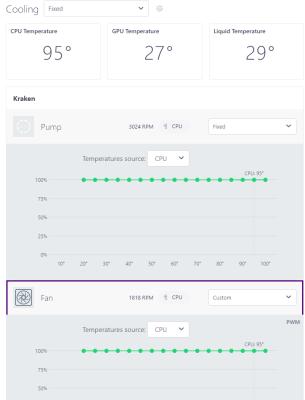
Attached Image

Here you can see the loading of the CPU. The casing is a NZXT H9 Flow with the 360 radiator at the top and fans blowing out. The rear fan blows out and the bottom 3 and side 3 blow in.

Attached Image

Despite setting all the fans to run at 100% including the pump and radiator fans, you can see the large difference between coolant and CPU temp. I am worried I didn't install the pump properly or does anyone here have any tips to improve the cooler performance?
PRSXFENG
post May 15 2024, 01:32 PM

Look at all my stars!!
*******
Senior Member
2,608 posts

Joined: Nov 2020


QUOTE(sakaic @ May 14 2024, 10:52 PM)
Hi Guys,

Just an update to show where my "bottleneck" and main cause for concern is

Attached Image

Here you can see the loading of the CPU. The casing is a NZXT H9 Flow with the 360 radiator at the top and fans blowing out. The rear fan blows out and the bottom 3 and side 3 blow in.

Attached Image

Despite setting all the fans to run at 100% including the pump and radiator fans, you can see the large difference between coolant and CPU temp. I am worried I didn't install the pump properly or does anyone here have any tips to improve the cooler performance?
*
95 is.. abnormal?

check the thermal paste
babylon52281
post May 16 2024, 06:50 AM

Look at all my stars!!
*******
Senior Member
2,682 posts

Joined: Apr 2017
QUOTE(PRSXFENG @ May 15 2024, 01:32 PM)
95 is.. abnormal?

check the thermal paste
*
This is Ryzen AM5, 95C is absolutely 'normal' according to AMD
babylon52281
post May 16 2024, 08:44 AM

Look at all my stars!!
*******
Senior Member
2,682 posts

Joined: Apr 2017
QUOTE(sakaic @ May 14 2024, 10:52 PM)
Hi Guys,

Just an update to show where my "bottleneck" and main cause for concern is

Here you can see the loading of the CPU. The casing is a NZXT H9 Flow with the 360 radiator at the top and fans blowing out. The rear fan blows out and the bottom 3 and side 3 blow in.

Despite setting all the fans to run at 100% including the pump and radiator fans, you can see the large difference between coolant and CPU temp. I am worried I didn't install the pump properly or does anyone here have any tips to improve the cooler performance?
*
Did not see that I should reply to you; Ryzen AM5, 95C is absolutely 'normal' according to AMD

babylon52281
post May 16 2024, 08:49 AM

Look at all my stars!!
*******
Senior Member
2,682 posts

Joined: Apr 2017
BUT there is a way to bring it down by undervolting & underclocking the CPU and here is how

TSsakaic
post May 16 2024, 10:34 AM

Enthusiast
*****
Senior Member
936 posts

Joined: Jun 2005
QUOTE(babylon52281 @ May 16 2024, 08:44 AM)
Did not see that I should reply to you; Ryzen AM5, 95C is absolutely 'normal' according to AMD

*
The 95 is not the issue. My worry is the massive difference between the coolant temp and CPU temp. You can use GPU temp kinda like ambient temp in the casing

This post has been edited by sakaic: May 16 2024, 10:35 AM
babylon52281
post May 16 2024, 02:02 PM

Look at all my stars!!
*******
Senior Member
2,682 posts

Joined: Apr 2017
QUOTE(sakaic @ May 16 2024, 10:34 AM)
The 95 is not the issue. My worry is the massive difference between the coolant temp and CPU temp. You can use GPU temp kinda like ambient temp in the casing
*
Erm if I were in your shoes I would not be too much worried. It seems to be 'normal' AM5 behaviour to me tho.

Reading around I found somewhere this comment is apt for your concern: "Keep in mind that a single temperature metric from Ryzen is typically the hottest part of the processor. The average die or package temp may be well below that. On top of that, a decent cooling system won't even reach 95C anyway.

To put in another way, car engines can have hot spots well past 500C, but the coolant is expected to be around 90-95C.

Remember: how much power the chip is consuming will determine how much heat is dumped into your room. If you're using a 105W TDP chip already, a 7600X is going to dump roughly the same amount of heat, even if it's temperature reporting is 90+"
TSsakaic
post May 20 2024, 04:56 PM

Enthusiast
*****
Senior Member
936 posts

Joined: Jun 2005
QUOTE(PRSXFENG @ May 15 2024, 01:32 PM)
95 is.. abnormal?

check the thermal paste
*
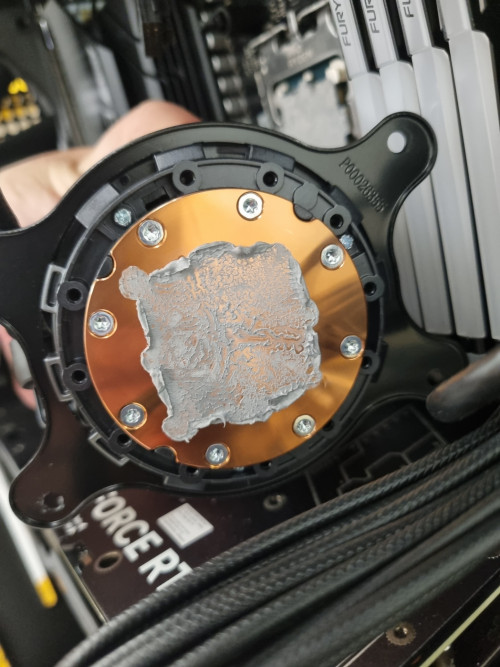
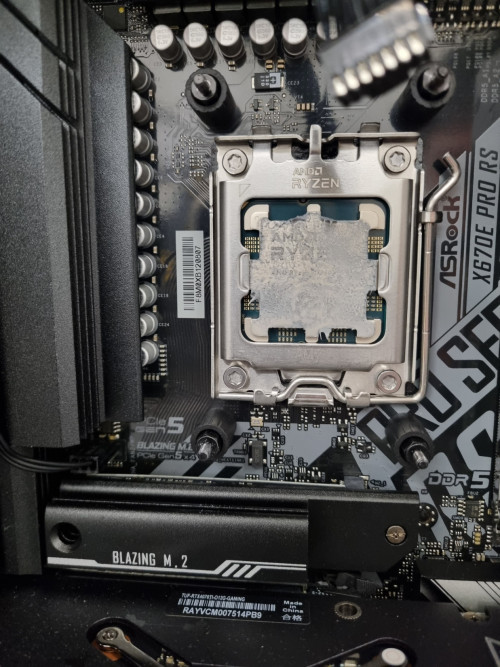
user posted image

user posted image

Thermal paste OK?
overfloe
post May 21 2024, 09:13 AM

Ain't nothing but a thang..
*******
Senior Member
2,207 posts

Joined: Jan 2003
From: stankonia
QUOTE(sakaic @ May 20 2024, 05:56 PM)
Thermal paste OK?
*
Looks fine to be honest.

just curious, have you tried to use any of the Performance Preset in the bios? if not, try a modest preset (PBO, Tjmax 85, Curve Optimizer -10). it will adjust the voltage curve to lower the temperature without affecting performance. ensure the SOC voltage is below 1.3v
lolzcalvin
post May 21 2024, 07:44 PM

shibe in predicament
******
Senior Member
1,591 posts

Joined: Mar 2014
From: 75°26'11.6"S, 136°16'16.0"E


QUOTE(sakaic @ May 20 2024, 04:56 PM)
Thermal paste OK?
*
it may be uneven, but if after u reapplied the TIM and properly sat the pump, and still getting same variance between the coolant temp and CPU temp during load, then perhaps there's nothing wrong at all. the pump itself seems to be working also as indicated from the rpm numbers.
as a reference, my coolant temp is always above 30°C. this is the temp at ~33°C ambient. but 13900K is a hot chip so not an apple to apple comparison.
user posted image

THAT being said, the coolant temp of 29°C,
1. how long did u do the load test?
2. what kind of load ur giving to the CPU to reach 95c?
3. what's ur room temp? what's the radiator orientation (front mounted, top mounted etc)?

and since 95°C is acceptable for 7950X as it's designed that way, the performance scaling is not exactly throttling performance down when it reaches 95, but it targets 95 and scale the performance from there.
for example, if u have shit cooler, it shoots up to 95°C, and u may be getting 4.5GHz on all core load.
if u have good cooler, it still shoots up to 95°C, but u are now getting a better frequency on all core load, say 5.1GHz.

so what is the scaling look like on ur end when u stress all the threads? u mentioned that it can sustain 5.4GHz during all core load.

my initial thinking is that we might be overthinking. it looks like it's working just fine. CPU shooting up to 90+°C immediately is very normal in these few generations. even older generations if u idle at 30°C, and started a heavy load, the temp would shoot to 70-80°C under a few seconds.
TSsakaic
post May 21 2024, 09:03 PM

Enthusiast
*****
Senior Member
936 posts

Joined: Jun 2005
QUOTE(lolzcalvin @ May 21 2024, 07:44 PM)
it may be uneven, but if after u reapplied the TIM and properly sat the pump, and still getting same variance between the coolant temp and CPU temp during load, then perhaps there's nothing wrong at all. the pump itself seems to be working also as indicated from the rpm numbers.
as a reference, my coolant temp is always above 30°C. this is the temp at ~33°C ambient. but 13900K is a hot chip so not an apple to apple comparison.
user posted image

THAT being said, the coolant temp of 29°C,
1. how long did u do the load test?
2. what kind of load ur giving to the CPU to reach 95c?
3. what's ur room temp? what's the radiator orientation (front mounted, top mounted etc)?

and since 95°C is acceptable for 7950X as it's designed that way, the performance scaling is not exactly throttling performance down when it reaches 95, but it targets 95 and scale the performance from there.
for example, if u have shit cooler, it shoots up to 95°C, and u may be getting 4.5GHz on all core load.
if u have good cooler, it still shoots up to 95°C, but u are now getting a better frequency on all core load, say 5.1GHz.

so what is the scaling look like on ur end when u stress all the threads? u mentioned that it can sustain 5.4GHz during all core load.

my initial thinking is that we might be overthinking. it looks like it's working just fine. CPU shooting up to 90+°C immediately is very normal in these few generations. even older generations if u idle at 30°C, and started a heavy load, the temp would shoot to 70-80°C under a few seconds.
*
Let me answer one by one

1) The load is typically at least 1-2 hours long
2) It is mostly doing what is the equivalent to render work. Other times it's doing watershed and flooding simulations
3) that data was captured with the CPU facing a 2hp AC unit set to 25°C and the radiator is top mounted with fans blowing out

Cooler is a nzxt kraken z73. Like I said, I am well aware that the CPUs are set to run up to 95 but what I am not used to is the massive delta between the coolant temp and CPU temp. Is it normal for the temperature difference to be so large? I am worried there is a problem with the heat block/pump module that it's not sucking up and transferring heat to the water.

babylon52281
post May 21 2024, 10:21 PM

Look at all my stars!!
*******
Senior Member
2,682 posts

Joined: Apr 2017
QUOTE(sakaic @ May 21 2024, 09:03 PM)
Let me answer one by one

1) The load is typically at least 1-2 hours long
2) It is mostly doing what is the equivalent to render work. Other times it's doing watershed and flooding simulations
3) that data was captured with the CPU facing a 2hp AC unit set to 25°C and the radiator is top mounted with fans blowing out

Cooler is a nzxt kraken z73. Like I said, I am well aware that the CPUs are set to run up to 95 but what I am not used to is the massive delta between the coolant temp and CPU temp. Is it normal for the temperature difference to be so large? I am worried there is a problem with the heat block/pump module that it's not sucking up and transferring heat to the water.
*
I oso of the opinion with lolzcalvin that you might be overthinking too much on small details, like say if you run a CPU burntest maybe Cinebench R20/23 for 3-4 hours and you dont see a big change in CPU temps, coolant temps, & clockspeed by much it would tell me your CPU isnt throttling at all and your AIO is capable to handle it.

But if you still doubt that AIO, maybe its best to settle your mind and get another AIO (the best is Arctic LF2 or 3) to do comparison test. If they perform around the same then at least you know.
lolzcalvin
post May 21 2024, 10:27 PM

shibe in predicament
******
Senior Member
1,591 posts

Joined: Mar 2014
From: 75°26'11.6"S, 136°16'16.0"E


QUOTE(sakaic @ May 21 2024, 09:03 PM)
Let me answer one by one

1) The load is typically at least 1-2 hours long
2) It is mostly doing what is the equivalent to render work. Other times it's doing watershed and flooding simulations
3) that data was captured with the CPU facing a 2hp AC unit set to 25°C and the radiator is top mounted with fans blowing out

Cooler is a nzxt kraken z73. Like I said, I am well aware that the CPUs are set to run up to 95 but what I am not used to is the massive delta between the coolant temp and CPU temp. Is it normal for the temperature difference to be so large? I am worried there is a problem with the heat block/pump module that it's not sucking up and transferring heat to the water.
*
during load, u say it barely reaches 32°C right? the previous 29°C coolant temp was also 1-2 hours long load? if that's the case then it doesn't seem the heat is transferred properly, or the coolant in the AIO is magical.
what TIM r u using? Kryonaut? PTM7950?

there may still be a chance the contact between the pump and ur CPU is uneven, or there's a problem with the paste (which is unusual).
if pump malfunctions, can be easily tested by touching the 2 tubes to ur radiator if u suspect the rpm number is a lie. if one is hotter than the other then there ain't got no malfunction.

if ur reseating the pump, wipe the thermal paste away with alcohol pad then reapply it, preferably stuffs like Noctua NT-H2, Honeywell PTM7950, Corsair XTM70 etc. can use Kryonaut if u have it, just that it has issues of pumping out down the road after a while, essentially degrading performance.
no need to apply too much, more thermal paste does not equate to better heat transfer. better yet just make a fine thin layer on the IHS with a spreader.
when u mount ur pump make sure to put even pressure to all 4 corners, criss-cross pattern (top-left -> bottom-right -> top-right -> bottom-left and repeat). using ur screwdriver, just fasten until ur 2 fingers turning the screwdriver no longer has the force to turn the screw on all 4 corners.
then it's time to actually tighten it, again criss-cross pattern, with even revolution. like spin 3 times on each side and repeat.
but don't overtighten it to the point u have a hard time turning the screws with ur wrist. just tighten them to the point of the force of ur wrist (not the force of ur arm). when it feels like it's stopping, just stop.

then recheck the coolant temp during load, see how slow or fast it passes 30°C


TSsakaic
post May 22 2024, 01:06 AM

Enthusiast
*****
Senior Member
936 posts

Joined: Jun 2005
QUOTE(babylon52281 @ May 21 2024, 10:21 PM)
I oso of the opinion with lolzcalvin that you might be overthinking too much on small details, like say if you run a CPU burntest maybe Cinebench R20/23 for 3-4 hours and you dont see a big change in CPU temps, coolant temps, & clockspeed by much it would tell me your CPU isnt throttling at all and your AIO is capable to handle it.

But if you still doubt that AIO, maybe its best to settle your mind and get another AIO (the best is Arctic LF2 or 3) to do comparison test. If they perform around the same then at least you know.
*
The CPU will slowly increase the clock speed to about 5.2 - 5.5GHz and when it reaches 95°C then the clock speeds drop to around 4.8 and then the cycle starts again. Up then down then up then down. I was hoping to slow down this cyclic behaviour by improving cooling so that it will stay at higher clock speeds longer.


QUOTE(lolzcalvin @ May 21 2024, 10:27 PM)
during load, u say it barely reaches 32°C right? the previous 29°C coolant temp was also 1-2 hours long load? if that's the case then it doesn't seem the heat is transferred properly, or the coolant in the AIO is magical.
what TIM r u using? Kryonaut? PTM7950?

there may still be a chance the contact between the pump and ur CPU is uneven, or there's a problem with the paste (which is unusual).
if pump malfunctions, can be easily tested by touching the 2 tubes to ur radiator if u suspect the rpm number is a lie. if one is hotter than the other then there ain't got no malfunction.

if ur reseating the pump, wipe the thermal paste away with alcohol pad then reapply it, preferably stuffs like Noctua NT-H2, Honeywell PTM7950, Corsair XTM70 etc. can use Kryonaut if u have it, just that it has issues of pumping out down the road after a while, essentially degrading performance.
no need to apply too much, more thermal paste does not equate to better heat transfer. better yet just make a fine thin layer on the IHS with a spreader.
when u mount ur pump make sure to put even pressure to all 4 corners, criss-cross pattern (top-left -> bottom-right -> top-right -> bottom-left and repeat). using ur screwdriver, just fasten until ur 2 fingers turning the screwdriver no longer has the force to turn the screw on all 4 corners.
then it's time to actually tighten it, again criss-cross pattern, with even revolution. like spin 3 times on each side and repeat.
but don't overtighten it to the point u have a hard time turning the screws with ur wrist. just tighten them to the point of the force of ur wrist (not the force of ur arm). when it feels like it's stopping, just stop.

then recheck the coolant temp during load, see how slow or fast it passes 30°C
*
At first I used the TIM that came with the AIO. Then I tried changing the mounting position by rotating it 90° so that the pipes come out from the side and not the bottom. When I did that, I switched to Cooler Master Mastergel Pro V2 as I had some left over. I am actually interested to try the PTM7950 but worried buying fake stuff. Any recomendded sources?

lolzcalvin
post May 22 2024, 02:19 PM

shibe in predicament
******
Senior Member
1,591 posts

Joined: Mar 2014
From: 75°26'11.6"S, 136°16'16.0"E


QUOTE(sakaic @ May 22 2024, 01:06 AM)
The CPU will slowly increase the clock speed to about 5.2 - 5.5GHz and when it reaches 95°C then the clock speeds drop to around 4.8 and then the cycle starts again. Up then down then up then down. I was hoping to slow down this cyclic behaviour by improving cooling so that it will stay at higher clock speeds longer.
At first I used the TIM that came with the AIO. Then I tried changing the mounting position by rotating it 90° so that the pipes come out from the side and not the bottom. When I did that, I switched to Cooler Master Mastergel Pro V2 as I had some left over. I am actually interested to try the PTM7950 but worried buying fake stuff. Any recomendded sources?
*
legitimate PTM7950 is hard to find because a seller needs to buy them in bulk from honeywell instead of 1pc. a lot ppl say the pads sourced from china are legit but many actually couldn't tell whether it's legit or not other than the pads do actually reduce temps like what any pad would've done.
I know MODDIY and LTT store sell legit PTM7950 sourced directly from honeywell USA but they're NA stores so not much choice over here. however I notice that both stores are selling them at 0.25mm thickness and have emphasized as such. and yes, they're more expensive than aliexpress' counterparts.

if u feel like it's risky then go for safer route such as Noctua NT-H2 which is better than PTM7950 (yes u didn't hear that wrong)
if sked NT-H2 also fake then I show u one of the legitimate stores that's selling it

This post has been edited by lolzcalvin: May 22 2024, 02:23 PM
babylon52281
post May 22 2024, 02:34 PM

Look at all my stars!!
*******
Senior Member
2,682 posts

Joined: Apr 2017
QUOTE(sakaic @ May 22 2024, 01:06 AM)
The CPU will slowly increase the clock speed to about 5.2 - 5.5GHz and when it reaches 95°C then the clock speeds drop to around 4.8 and then the cycle starts again. Up then down then up then down. I was hoping to slow down this cyclic behaviour by improving cooling so that it will stay at higher clock speeds longer.
At first I used the TIM that came with the AIO. Then I tried changing the mounting position by rotating it 90° so that the pipes come out from the side and not the bottom. When I did that, I switched to Cooler Master Mastergel Pro V2 as I had some left over. I am actually interested to try the PTM7950 but worried buying fake stuff. Any recomendded sources?
*
Hmm not sure if that is AM5 normal behaviour but if your worried, maybe better to get another AIO to make comparison?

As for PTM, LTT did a review where they bought from a seller in Ebuy7 so if its legit to them maybe you can search for the same seller. But if you really want total peace of mind for authenticity, why not consider TG Kyrosheet? Their about the same performance and can be reused.


Just remember to cut to size as you dont want it to contact the LGA ILM in case of short.

This post has been edited by babylon52281: May 22 2024, 02:35 PM
TSsakaic
post Jun 4 2024, 02:00 AM

Enthusiast
*****
Senior Member
936 posts

Joined: Jun 2005
QUOTE(babylon52281 @ May 22 2024, 02:34 PM)
Hmm not sure if that is AM5 normal behaviour but if your worried, maybe better to get another AIO to make comparison?

As for PTM, LTT did a review where they bought from a seller in Ebuy7 so if its legit to them maybe you can search for the same seller. But if you really want total peace of mind for authenticity, why not consider TG Kyrosheet? Their about the same performance and can be reused.


Just remember to cut to size as you dont want it to contact the LGA ILM in case of short.
*
QUOTE(lolzcalvin @ May 22 2024, 02:19 PM)
legitimate PTM7950 is hard to find because a seller needs to buy them in bulk from honeywell instead of 1pc. a lot ppl say the pads sourced from china are legit but many actually couldn't tell whether it's legit or not other than the pads do actually reduce temps like what any pad would've done.
I know MODDIY and LTT store sell legit PTM7950 sourced directly from honeywell USA but they're NA stores so not much choice over here. however I notice that both stores are selling them at 0.25mm thickness and have emphasized as such. and yes, they're more expensive than aliexpress' counterparts.

if u feel like it's risky then go for safer route such as Noctua NT-H2 which is better than PTM7950 (yes u didn't hear that wrong)
if sked NT-H2 also fake then I show u one of the legitimate stores that's selling it
*
Thanks for the recommendations. Will buy the Kryosheet as can get in shop nearby. If not then will order the Noctua stuff later. Thanks for the recommendations
PRSXFENG
post Jun 4 2024, 10:50 AM

Look at all my stars!!
*******
Senior Member
2,608 posts

Joined: Nov 2020


QUOTE(sakaic @ May 22 2024, 01:06 AM)
The CPU will slowly increase the clock speed to about 5.2 - 5.5GHz and when it reaches 95°C then the clock speeds drop to around 4.8 and then the cycle starts again. Up then down then up then down. I was hoping to slow down this cyclic behaviour by improving cooling so that it will stay at higher clock speeds longer.
At first I used the TIM that came with the AIO. Then I tried changing the mounting position by rotating it 90° so that the pipes come out from the side and not the bottom. When I did that, I switched to Cooler Master Mastergel Pro V2 as I had some left over. I am actually interested to try the PTM7950 but worried buying fake stuff. Any recomendded sources?
*
my go to source for PTM7950 is from 极客温控 on taobao

https://shop272403322.taobao.com

https://item.taobao.com/item.htm?id=632208664079
babylon52281
post Jun 4 2024, 06:09 PM

Look at all my stars!!
*******
Senior Member
2,682 posts

Joined: Apr 2017
QUOTE(sakaic @ Jun 4 2024, 02:00 AM)
Thanks for the recommendations. Will buy the Kryosheet as can get in shop nearby. If not then will order the Noctua stuff later. Thanks for the recommendations
*
TG stuff at least for now is not popular for ciplaks unlike so many other solutions where whoever you buy also you scared if ori or not.

If all else doesnt work Id still say to get another AIO just to make comparison and be sure. At least if its a faulty unit, can return for RMA and if not you can always keep it for another build or sell it.


Change to:
| Lo-Fi Version
0.0429sec    0.51    6 queries    GZIP Disabled
Time is now: 8th December 2025 - 02:56 PM