Welcome Guest ( Log In | Register )

Outline · [ Standard ] · Linear+

 Some advice on system setup and cooling, 7950x with NZXT KRAKEN 360 and 128GB RAM

views
     
babylon52281
post May 16 2024, 02:02 PM

Look at all my stars!!
*******
Senior Member
2,683 posts

Joined: Apr 2017
QUOTE(sakaic @ May 16 2024, 10:34 AM)
The 95 is not the issue. My worry is the massive difference between the coolant temp and CPU temp. You can use GPU temp kinda like ambient temp in the casing
*
Erm if I were in your shoes I would not be too much worried. It seems to be 'normal' AM5 behaviour to me tho.

Reading around I found somewhere this comment is apt for your concern: "Keep in mind that a single temperature metric from Ryzen is typically the hottest part of the processor. The average die or package temp may be well below that. On top of that, a decent cooling system won't even reach 95C anyway.

To put in another way, car engines can have hot spots well past 500C, but the coolant is expected to be around 90-95C.

Remember: how much power the chip is consuming will determine how much heat is dumped into your room. If you're using a 105W TDP chip already, a 7600X is going to dump roughly the same amount of heat, even if it's temperature reporting is 90+"
TSsakaic
post May 20 2024, 04:56 PM

Enthusiast
*****
Senior Member
936 posts

Joined: Jun 2005
QUOTE(PRSXFENG @ May 15 2024, 01:32 PM)
95 is.. abnormal?

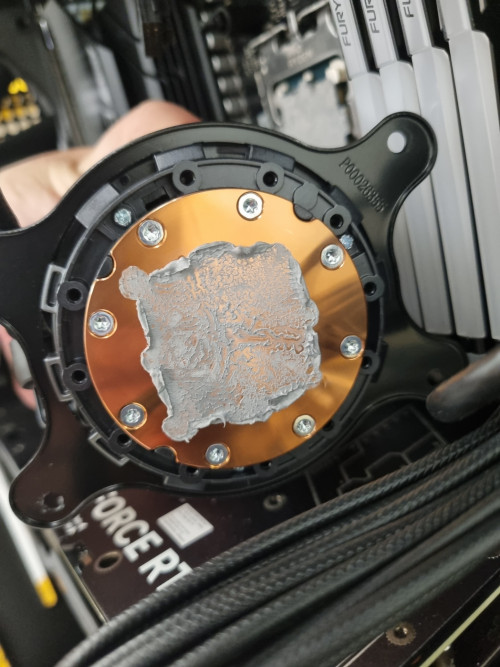
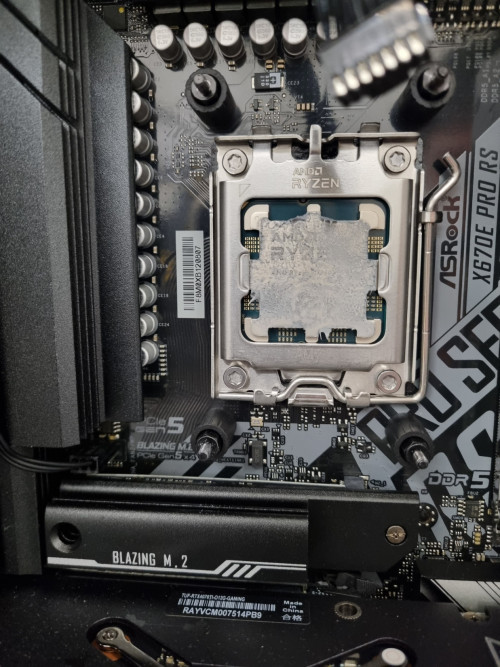
check the thermal paste
*
user posted image

user posted image

Thermal paste OK?
overfloe
post May 21 2024, 09:13 AM

Ain't nothing but a thang..
*******
Senior Member
2,207 posts

Joined: Jan 2003
From: stankonia
QUOTE(sakaic @ May 20 2024, 05:56 PM)
Thermal paste OK?
*
Looks fine to be honest.

just curious, have you tried to use any of the Performance Preset in the bios? if not, try a modest preset (PBO, Tjmax 85, Curve Optimizer -10). it will adjust the voltage curve to lower the temperature without affecting performance. ensure the SOC voltage is below 1.3v
lolzcalvin
post May 21 2024, 07:44 PM

shibe in predicament
******
Senior Member
1,591 posts

Joined: Mar 2014
From: 75°26'11.6"S, 136°16'16.0"E


QUOTE(sakaic @ May 20 2024, 04:56 PM)
Thermal paste OK?
*
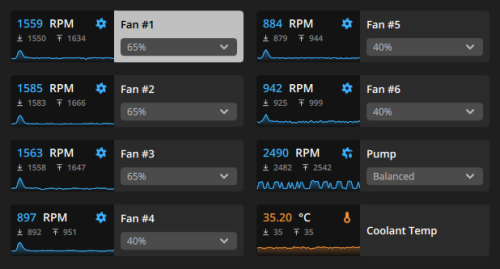
it may be uneven, but if after u reapplied the TIM and properly sat the pump, and still getting same variance between the coolant temp and CPU temp during load, then perhaps there's nothing wrong at all. the pump itself seems to be working also as indicated from the rpm numbers.
as a reference, my coolant temp is always above 30°C. this is the temp at ~33°C ambient. but 13900K is a hot chip so not an apple to apple comparison.
user posted image

THAT being said, the coolant temp of 29°C,
1. how long did u do the load test?
2. what kind of load ur giving to the CPU to reach 95c?
3. what's ur room temp? what's the radiator orientation (front mounted, top mounted etc)?

and since 95°C is acceptable for 7950X as it's designed that way, the performance scaling is not exactly throttling performance down when it reaches 95, but it targets 95 and scale the performance from there.
for example, if u have shit cooler, it shoots up to 95°C, and u may be getting 4.5GHz on all core load.
if u have good cooler, it still shoots up to 95°C, but u are now getting a better frequency on all core load, say 5.1GHz.

so what is the scaling look like on ur end when u stress all the threads? u mentioned that it can sustain 5.4GHz during all core load.

my initial thinking is that we might be overthinking. it looks like it's working just fine. CPU shooting up to 90+°C immediately is very normal in these few generations. even older generations if u idle at 30°C, and started a heavy load, the temp would shoot to 70-80°C under a few seconds.
TSsakaic
post May 21 2024, 09:03 PM

Enthusiast
*****
Senior Member
936 posts

Joined: Jun 2005
QUOTE(lolzcalvin @ May 21 2024, 07:44 PM)
it may be uneven, but if after u reapplied the TIM and properly sat the pump, and still getting same variance between the coolant temp and CPU temp during load, then perhaps there's nothing wrong at all. the pump itself seems to be working also as indicated from the rpm numbers.
as a reference, my coolant temp is always above 30°C. this is the temp at ~33°C ambient. but 13900K is a hot chip so not an apple to apple comparison.
user posted image

THAT being said, the coolant temp of 29°C,
1. how long did u do the load test?
2. what kind of load ur giving to the CPU to reach 95c?
3. what's ur room temp? what's the radiator orientation (front mounted, top mounted etc)?

and since 95°C is acceptable for 7950X as it's designed that way, the performance scaling is not exactly throttling performance down when it reaches 95, but it targets 95 and scale the performance from there.
for example, if u have shit cooler, it shoots up to 95°C, and u may be getting 4.5GHz on all core load.
if u have good cooler, it still shoots up to 95°C, but u are now getting a better frequency on all core load, say 5.1GHz.

so what is the scaling look like on ur end when u stress all the threads? u mentioned that it can sustain 5.4GHz during all core load.

my initial thinking is that we might be overthinking. it looks like it's working just fine. CPU shooting up to 90+°C immediately is very normal in these few generations. even older generations if u idle at 30°C, and started a heavy load, the temp would shoot to 70-80°C under a few seconds.
*
Let me answer one by one

1) The load is typically at least 1-2 hours long
2) It is mostly doing what is the equivalent to render work. Other times it's doing watershed and flooding simulations
3) that data was captured with the CPU facing a 2hp AC unit set to 25°C and the radiator is top mounted with fans blowing out

Cooler is a nzxt kraken z73. Like I said, I am well aware that the CPUs are set to run up to 95 but what I am not used to is the massive delta between the coolant temp and CPU temp. Is it normal for the temperature difference to be so large? I am worried there is a problem with the heat block/pump module that it's not sucking up and transferring heat to the water.

babylon52281
post May 21 2024, 10:21 PM

Look at all my stars!!
*******
Senior Member
2,683 posts

Joined: Apr 2017
QUOTE(sakaic @ May 21 2024, 09:03 PM)
Let me answer one by one

1) The load is typically at least 1-2 hours long
2) It is mostly doing what is the equivalent to render work. Other times it's doing watershed and flooding simulations
3) that data was captured with the CPU facing a 2hp AC unit set to 25°C and the radiator is top mounted with fans blowing out

Cooler is a nzxt kraken z73. Like I said, I am well aware that the CPUs are set to run up to 95 but what I am not used to is the massive delta between the coolant temp and CPU temp. Is it normal for the temperature difference to be so large? I am worried there is a problem with the heat block/pump module that it's not sucking up and transferring heat to the water.
*
I oso of the opinion with lolzcalvin that you might be overthinking too much on small details, like say if you run a CPU burntest maybe Cinebench R20/23 for 3-4 hours and you dont see a big change in CPU temps, coolant temps, & clockspeed by much it would tell me your CPU isnt throttling at all and your AIO is capable to handle it.

But if you still doubt that AIO, maybe its best to settle your mind and get another AIO (the best is Arctic LF2 or 3) to do comparison test. If they perform around the same then at least you know.
lolzcalvin
post May 21 2024, 10:27 PM

shibe in predicament
******
Senior Member
1,591 posts

Joined: Mar 2014
From: 75°26'11.6"S, 136°16'16.0"E


QUOTE(sakaic @ May 21 2024, 09:03 PM)
Let me answer one by one

1) The load is typically at least 1-2 hours long
2) It is mostly doing what is the equivalent to render work. Other times it's doing watershed and flooding simulations
3) that data was captured with the CPU facing a 2hp AC unit set to 25°C and the radiator is top mounted with fans blowing out

Cooler is a nzxt kraken z73. Like I said, I am well aware that the CPUs are set to run up to 95 but what I am not used to is the massive delta between the coolant temp and CPU temp. Is it normal for the temperature difference to be so large? I am worried there is a problem with the heat block/pump module that it's not sucking up and transferring heat to the water.
*
during load, u say it barely reaches 32°C right? the previous 29°C coolant temp was also 1-2 hours long load? if that's the case then it doesn't seem the heat is transferred properly, or the coolant in the AIO is magical.
what TIM r u using? Kryonaut? PTM7950?

there may still be a chance the contact between the pump and ur CPU is uneven, or there's a problem with the paste (which is unusual).
if pump malfunctions, can be easily tested by touching the 2 tubes to ur radiator if u suspect the rpm number is a lie. if one is hotter than the other then there ain't got no malfunction.

if ur reseating the pump, wipe the thermal paste away with alcohol pad then reapply it, preferably stuffs like Noctua NT-H2, Honeywell PTM7950, Corsair XTM70 etc. can use Kryonaut if u have it, just that it has issues of pumping out down the road after a while, essentially degrading performance.
no need to apply too much, more thermal paste does not equate to better heat transfer. better yet just make a fine thin layer on the IHS with a spreader.
when u mount ur pump make sure to put even pressure to all 4 corners, criss-cross pattern (top-left -> bottom-right -> top-right -> bottom-left and repeat). using ur screwdriver, just fasten until ur 2 fingers turning the screwdriver no longer has the force to turn the screw on all 4 corners.
then it's time to actually tighten it, again criss-cross pattern, with even revolution. like spin 3 times on each side and repeat.
but don't overtighten it to the point u have a hard time turning the screws with ur wrist. just tighten them to the point of the force of ur wrist (not the force of ur arm). when it feels like it's stopping, just stop.

then recheck the coolant temp during load, see how slow or fast it passes 30°C


TSsakaic
post May 22 2024, 01:06 AM

Enthusiast
*****
Senior Member
936 posts

Joined: Jun 2005
QUOTE(babylon52281 @ May 21 2024, 10:21 PM)
I oso of the opinion with lolzcalvin that you might be overthinking too much on small details, like say if you run a CPU burntest maybe Cinebench R20/23 for 3-4 hours and you dont see a big change in CPU temps, coolant temps, & clockspeed by much it would tell me your CPU isnt throttling at all and your AIO is capable to handle it.

But if you still doubt that AIO, maybe its best to settle your mind and get another AIO (the best is Arctic LF2 or 3) to do comparison test. If they perform around the same then at least you know.
*
The CPU will slowly increase the clock speed to about 5.2 - 5.5GHz and when it reaches 95°C then the clock speeds drop to around 4.8 and then the cycle starts again. Up then down then up then down. I was hoping to slow down this cyclic behaviour by improving cooling so that it will stay at higher clock speeds longer.


QUOTE(lolzcalvin @ May 21 2024, 10:27 PM)
during load, u say it barely reaches 32°C right? the previous 29°C coolant temp was also 1-2 hours long load? if that's the case then it doesn't seem the heat is transferred properly, or the coolant in the AIO is magical.
what TIM r u using? Kryonaut? PTM7950?

there may still be a chance the contact between the pump and ur CPU is uneven, or there's a problem with the paste (which is unusual).
if pump malfunctions, can be easily tested by touching the 2 tubes to ur radiator if u suspect the rpm number is a lie. if one is hotter than the other then there ain't got no malfunction.

if ur reseating the pump, wipe the thermal paste away with alcohol pad then reapply it, preferably stuffs like Noctua NT-H2, Honeywell PTM7950, Corsair XTM70 etc. can use Kryonaut if u have it, just that it has issues of pumping out down the road after a while, essentially degrading performance.
no need to apply too much, more thermal paste does not equate to better heat transfer. better yet just make a fine thin layer on the IHS with a spreader.
when u mount ur pump make sure to put even pressure to all 4 corners, criss-cross pattern (top-left -> bottom-right -> top-right -> bottom-left and repeat). using ur screwdriver, just fasten until ur 2 fingers turning the screwdriver no longer has the force to turn the screw on all 4 corners.
then it's time to actually tighten it, again criss-cross pattern, with even revolution. like spin 3 times on each side and repeat.
but don't overtighten it to the point u have a hard time turning the screws with ur wrist. just tighten them to the point of the force of ur wrist (not the force of ur arm). when it feels like it's stopping, just stop.

then recheck the coolant temp during load, see how slow or fast it passes 30°C
*
At first I used the TIM that came with the AIO. Then I tried changing the mounting position by rotating it 90° so that the pipes come out from the side and not the bottom. When I did that, I switched to Cooler Master Mastergel Pro V2 as I had some left over. I am actually interested to try the PTM7950 but worried buying fake stuff. Any recomendded sources?

lolzcalvin
post May 22 2024, 02:19 PM

shibe in predicament
******
Senior Member
1,591 posts

Joined: Mar 2014
From: 75°26'11.6"S, 136°16'16.0"E


QUOTE(sakaic @ May 22 2024, 01:06 AM)
The CPU will slowly increase the clock speed to about 5.2 - 5.5GHz and when it reaches 95°C then the clock speeds drop to around 4.8 and then the cycle starts again. Up then down then up then down. I was hoping to slow down this cyclic behaviour by improving cooling so that it will stay at higher clock speeds longer.
At first I used the TIM that came with the AIO. Then I tried changing the mounting position by rotating it 90° so that the pipes come out from the side and not the bottom. When I did that, I switched to Cooler Master Mastergel Pro V2 as I had some left over. I am actually interested to try the PTM7950 but worried buying fake stuff. Any recomendded sources?
*
legitimate PTM7950 is hard to find because a seller needs to buy them in bulk from honeywell instead of 1pc. a lot ppl say the pads sourced from china are legit but many actually couldn't tell whether it's legit or not other than the pads do actually reduce temps like what any pad would've done.
I know MODDIY and LTT store sell legit PTM7950 sourced directly from honeywell USA but they're NA stores so not much choice over here. however I notice that both stores are selling them at 0.25mm thickness and have emphasized as such. and yes, they're more expensive than aliexpress' counterparts.

if u feel like it's risky then go for safer route such as Noctua NT-H2 which is better than PTM7950 (yes u didn't hear that wrong)
if sked NT-H2 also fake then I show u one of the legitimate stores that's selling it

This post has been edited by lolzcalvin: May 22 2024, 02:23 PM
babylon52281
post May 22 2024, 02:34 PM

Look at all my stars!!
*******
Senior Member
2,683 posts

Joined: Apr 2017
QUOTE(sakaic @ May 22 2024, 01:06 AM)
The CPU will slowly increase the clock speed to about 5.2 - 5.5GHz and when it reaches 95°C then the clock speeds drop to around 4.8 and then the cycle starts again. Up then down then up then down. I was hoping to slow down this cyclic behaviour by improving cooling so that it will stay at higher clock speeds longer.
At first I used the TIM that came with the AIO. Then I tried changing the mounting position by rotating it 90° so that the pipes come out from the side and not the bottom. When I did that, I switched to Cooler Master Mastergel Pro V2 as I had some left over. I am actually interested to try the PTM7950 but worried buying fake stuff. Any recomendded sources?
*
Hmm not sure if that is AM5 normal behaviour but if your worried, maybe better to get another AIO to make comparison?

As for PTM, LTT did a review where they bought from a seller in Ebuy7 so if its legit to them maybe you can search for the same seller. But if you really want total peace of mind for authenticity, why not consider TG Kyrosheet? Their about the same performance and can be reused.


Just remember to cut to size as you dont want it to contact the LGA ILM in case of short.

This post has been edited by babylon52281: May 22 2024, 02:35 PM
TSsakaic
post Jun 4 2024, 02:00 AM

Enthusiast
*****
Senior Member
936 posts

Joined: Jun 2005
QUOTE(babylon52281 @ May 22 2024, 02:34 PM)
Hmm not sure if that is AM5 normal behaviour but if your worried, maybe better to get another AIO to make comparison?

As for PTM, LTT did a review where they bought from a seller in Ebuy7 so if its legit to them maybe you can search for the same seller. But if you really want total peace of mind for authenticity, why not consider TG Kyrosheet? Their about the same performance and can be reused.


Just remember to cut to size as you dont want it to contact the LGA ILM in case of short.
*
QUOTE(lolzcalvin @ May 22 2024, 02:19 PM)
legitimate PTM7950 is hard to find because a seller needs to buy them in bulk from honeywell instead of 1pc. a lot ppl say the pads sourced from china are legit but many actually couldn't tell whether it's legit or not other than the pads do actually reduce temps like what any pad would've done.
I know MODDIY and LTT store sell legit PTM7950 sourced directly from honeywell USA but they're NA stores so not much choice over here. however I notice that both stores are selling them at 0.25mm thickness and have emphasized as such. and yes, they're more expensive than aliexpress' counterparts.

if u feel like it's risky then go for safer route such as Noctua NT-H2 which is better than PTM7950 (yes u didn't hear that wrong)
if sked NT-H2 also fake then I show u one of the legitimate stores that's selling it
*
Thanks for the recommendations. Will buy the Kryosheet as can get in shop nearby. If not then will order the Noctua stuff later. Thanks for the recommendations
PRSXFENG
post Jun 4 2024, 10:50 AM

Look at all my stars!!
*******
Senior Member
2,608 posts

Joined: Nov 2020


QUOTE(sakaic @ May 22 2024, 01:06 AM)
The CPU will slowly increase the clock speed to about 5.2 - 5.5GHz and when it reaches 95°C then the clock speeds drop to around 4.8 and then the cycle starts again. Up then down then up then down. I was hoping to slow down this cyclic behaviour by improving cooling so that it will stay at higher clock speeds longer.
At first I used the TIM that came with the AIO. Then I tried changing the mounting position by rotating it 90° so that the pipes come out from the side and not the bottom. When I did that, I switched to Cooler Master Mastergel Pro V2 as I had some left over. I am actually interested to try the PTM7950 but worried buying fake stuff. Any recomendded sources?
*
my go to source for PTM7950 is from 极客温控 on taobao

https://shop272403322.taobao.com

https://item.taobao.com/item.htm?id=632208664079
babylon52281
post Jun 4 2024, 06:09 PM

Look at all my stars!!
*******
Senior Member
2,683 posts

Joined: Apr 2017
QUOTE(sakaic @ Jun 4 2024, 02:00 AM)
Thanks for the recommendations. Will buy the Kryosheet as can get in shop nearby. If not then will order the Noctua stuff later. Thanks for the recommendations
*
TG stuff at least for now is not popular for ciplaks unlike so many other solutions where whoever you buy also you scared if ori or not.

If all else doesnt work Id still say to get another AIO just to make comparison and be sure. At least if its a faulty unit, can return for RMA and if not you can always keep it for another build or sell it.

4 Pages « < 2 3 4Top
 

Change to:
| Lo-Fi Version
0.0146sec    0.90    6 queries    GZIP Disabled
Time is now: 9th December 2025 - 04:59 PM