I used to build PCs and OC them etc but last time I did that was in the mid 2000s. Think AMD Barton/Throughbred time. Anyway, recently at work needed a much more powerful workstation for crunching large amounts of data and the gaming laptops we had in the office were simply not cutting any more. So I thought I could just wing it and put together a system to do the data crunching. A rough outline of the build is
CPU : 7950X MB : ASROCK X670E PRO GPU : ASUS RTX4070Ti SSD 1 : ACER Predator 1TB PCIE4 SSD 2 : ACER Predator 2TB PCIE4 Casing : NZXT H9 Flow RAM : KINGSTON Fury Beast RGB 64GB (32x2) x 2 PSU : ASUS 1200W CPU Cooler : NZXT Kraken 360 RGB Black
The PC works out of the box and I am aware of the fundamental behaviour of the newer CPUs where they push power and clock speeds till hit max temp then throttle back but there are a few things that I am unsatisfied about. Hoping to get some pointers here
1) Its not the temperature of the CPU that bothers me, in fact I am expecting it to hit the 90+ deg C level but its how fast it reaches it. I tied the cooler fans and pump speed to the CPU temp so basically once its more than 60 deg C, the fans and pump are running at full tilt. Coolant temp never exceeds 32 deg C but the CPU reaches 90 in a very short time (like not more than 10 seconds). This happens only when I am crunching data. Could it be due to insufficient pressure between the pump and IHS? Or insufficient thermal paste? I just left whatever the came with the cooler on it and just used it.
2) I tried using the Ryzen master to try to come up with a profile. It came up with a -40 profile but once applied, the system would never boot up. So far I used a less aggressive number like -10 and its stable so far. I find that the temps still rocket to 90+ but just not so fast and it can hold all the cores at about 5.450 GHz about 50% longer. is there a detailed guide on how the voltages and clocks relate to each other. Its so confusing relative to 20 years before where it was just FSB x multiplier
3) I have all the RAM running but I can never get it past 4000 MT/s. I know I made the mistake of not making sure the RAM was AMD expo certified. Is it possible to manually push the 4 sticks to at least 5200 speeds?
Just hoping for tips for troubleshooting and if possible any guides for modern system overclocking/tuning. I prefer PDFs to YT videos (old school mah)
What I understand (and AIO/WC kakis can correct me if Im wrong), water does not have efficient instantanous heat transference properties, so a sudden burst of workload will create a surge of CPU heat but that could not be efficiently transfered from the coldplate to the water medium.
This is why WC setups dont work well with sudden load surges however because of the mass flow of water constantly taking heat away it has overall better cooling properties if a high heatload is sustained (this is reason why WC can handle hotter CPU and not throttle for hours of use).
Also IINM because of the above reason, WC needs a higher fan curve to keep up the heat transference out of the rad or else set the fan to constantly run at higher speeds. As much as it takes longer for heat to transfer from coldplate to water its also takes longer for heat to transfer from water to rad and out from system. If that heat is not efficiently evacuated, the water temp within might have been higher which leads to less efficiency of heat being transfered out.
As for running 4x RAM sticks at XMP/EXPO, I heard about Ryzen being picky about RAM setups & timings. You could try troubleshoot in stages by running 1x stick at XMP, then 2X stick, then try 4X sticks again. If XMP speed works at certain points that means the system cannot handle 4x sticks at XMP or else you have to do some manual tuning.
That's why I tied the fan and pump curve to CPU temp and not the coolant temp. At least if it spikes, the system tries to catch up as soon as possible. But still worrying that I cannot hold the temps low enough.
I knew the RAM speed wouldn't be that high although the ones that I am using are listed in the motherboard certified lost but only for 2 units. But to do what you said like manual tweaking, I wanted to find a guide so that I can increase the signalling voltage to see if it improves anything. Also looking for information on drive strength. From the manual, it's just a number. Is it in mA? Or just a scalar number?
hehe.. my designer studio client built almost same thing.. i tell u.. EXPO problem more than u can image.. rather take 5600MHZ value ram than EXPO certified RAM.. n B650 Tomahawk BEAT most of the RM2k below mobo..
open to other quote??
QUOTE(babylon52281 @ Feb 7 2024, 01:53 PM)
I think the bro here ady has the system but needs help getting EXPO working, thats all
TS can only pray that constantly updating Agesa bioses will eventually fix his problem before it screws up and brick the mobo. Otherwise just stay with 2x sticks of RAM.
Thanks for the link. Will go through it slowly later.
Like Babylon said, the system is working. It's just I want to try and fine-tune the performance as I am using the system to do map processing. I roughly process about 100k images at a go resulting in chunks of maps about 30-50gb each. So I am hoping if tweaking the system a bit will improve the performance as typical processing time for one block is about 5 days non stop so every little bit helps.
On the positive side, it appears that Ryzen 8000 series seems to like much higher speeds DDR5 and since AM5 is forward upgradeable perhaps your other hope is upgrade to a 8950X (when it comes) and hope its IMC is much better at taking 4x sticks of RAM to be stable at higher speeds. Just my 2sen.
Luckily for me this machine was asked to be put together by a client and I use to process his data. Later will have to give him back this machine when the project is over. I was using this to see if I should go with consumer CPU or something like a threadripper for own purchase
If you doing prosumer/ professional work application stuff, you really shouldnt be mucking about with OCing or EXPO/XMP stuff. If you want 5200MHZ you really should be getting RAMS rated at its JEDEC speed to 5200MHZ.
They are jedec at 5200........when only 2 sticks. If you look at the AMD Ryzen website for all the 7xxx CPUs, the CPU is supposed to run 2 sticks at 5200 and 4 at 3200. But I have also found people having success at getting their systems running 5200 with 4 sticks. Not without getting some work done though. And sorry for sounding like some old faggot but having more than 20 different voltages with no proper description in the bios and in the bios manual doesn't help me tweak what I want to tweak safely.
If you want max performance, you will need 420 or 480 aio and casing that can fit it. Custom loop water cooling for even more performance. There is direct die cold plate (will void warranty) as well.
Are you running quad DIMMs? Quad DIMMs can be a pain to run properly, even buildzoid actually recommends going only with 2 DIMMs on DDR5:
Needed a lot of ram as I was running out of RAM on my older system which was running 64gb. And even now with 128gb I can occasionally run out of RAM with larger datasets. Actually considering to get a threadripper system just for the RAM capacity.
Sorry if unhappy to unnecro an old thread. Just an update. Updated MB to latest AGESA (ComboAM5 1.1.0.3)
Now able to hit 4800MT/s. Basically I have set the timing parameters to match XMP @ 5200 so the CAS and other timings set to match the XMP values even the voltages. But only difference is I have set the clock speed to 4800. So far stable running all banks firing meaning the RAM is 100% utilised and have been running for about a week non-stop. Once current batch of data delivered, I will see if can push to 5200.
Undervolt. Downclock. ~-5% overall perf. but temp stay under 60
» Click to show Spoiler - click again to hide... «
Most Top END hardware today work intented within warranty period. 1 or 2 years.
Thats all. Stock setting = crazy setting.
That's ok....we calculated costs with intention to amortize the machine in 2 years. So in 2 years we should already ROI this machine and anything extra is bonus. I just want to extract the maximum performance from the machine to increase profitability. More data I can process in this 2 years means make more money.
what are your usage? rending farm? if -10% peak performance, but last another 3 years. i think that only consider "Optimized"
Something like a rendering farm but for data from drones.
PCs get faster all the time. They also become more efficient every few years. Plus cooling system wear and tear. We decided to shorten life expectancy for machines to 3 years
got updated budget n usage?? i hv some precision good deal
No thanks. Used to be running on a precision cluster. The machines were ok but the fact we couldn't tweak more performance out of them made me a bit annoyed.
It is better for production machine to be stable instead of messing around.
Have you actually benchmarked with your data under different configurations, instead of just being fussy at the clock speed?
Electricity bill does come into play too. Now we are under the realm of TCO.
So far through benchmarks, we found about a 2-3% in certain phase of processing especially where RAM usage is very high. In some others not so much as the software is GPU dependent in some phases. Of course the largest improvement was in improving the cooling of the system by tweaking the airflow though the casing and AIO and also improving the contact between the heat block and CPU. The CPU stayed at higher clock speeds for longer resulting in almost 5% everywhere.
The software somehow responds better to higher clock speeds than more parallel cores. Before this when we were using precisions, we had a 8 core 3.8ghz Xeon running on ddr3 and a 22 core 2.x GHz running on ddr4. We found the 8 core still churning out data faster than the 22 core. That's why my quest to have stable and higher clock speeds as opposed to more cores.
Commercial software. Closed source. But the preference of clock speeds over core count was verified by the developer. All cores can be used but I believe the algorithm is highly iterative in nature
but amd with EXPO with giv u even more headache.. n its unending
So far the stability is something that is understood and can be solved. Actually dell also has precision with AMD. Just not sold here. A friendly company who does the same software processing in the states tested and Vs intel and prefers AMD so we follow their recommendation.
Also I don't know why your experience with amd is so bad. Mine after a bios rest has never taken more than 10 minutes for a ram relearn and my interns made mistakes in assembling resulting in a slower machine. Slow but stable. Even when they forgot to connect the main connector into the heat pump block on the CPU, the system just immediately shutdown. But nothing as chronic as what you described.
This post has been edited by sakaic: May 3 2024, 10:41 PM
See mobo.. mid range n above less trouble.. the 1 giv me unending headache use x670p.. while the b650 tomahawk less issue ..but memory training still occur.. expo certified ram worse compatibility than xmp ram
U building more pc? I got AMD target to meet.. haha
Not this quarter. Depends on what contracts we get. probably will need more hardware during Q4 if we win tender
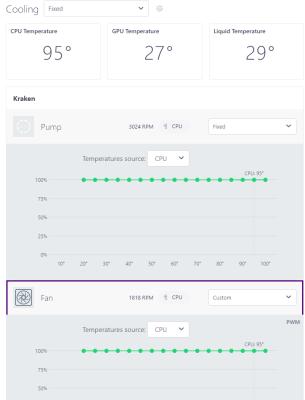
Just an update to show where my "bottleneck" and main cause for concern is
Here you can see the loading of the CPU. The casing is a NZXT H9 Flow with the 360 radiator at the top and fans blowing out. The rear fan blows out and the bottom 3 and side 3 blow in.
Despite setting all the fans to run at 100% including the pump and radiator fans, you can see the large difference between coolant and CPU temp. I am worried I didn't install the pump properly or does anyone here have any tips to improve the cooler performance?


 Feb 5 2024, 01:17 AM, updated 2y ago


 Quote
Quote



 0.0247sec
 0.39
0.39
 7 queries
 GZIP Disabled