Outline ·
[ Standard ] ·
Linear+
Unifi Official TM UniFi High Speed Broadband Thread V42, READ 1ST PAGE FOR RELEVANT WIFI INFO!
|
yenchenje
|
 Mar 20 2024, 02:33 PM Mar 20 2024, 02:33 PM
|

|
QUOTE(Jjuggler @ Mar 20 2024, 02:21 PM) NAS... sweet old buddy. My Asustor NAS went kaput after lightning. Thinking of investing into Synology NAS. Then do the do doing.  I have Xpenology in a Hypervisor, now testing unRAID. But also have Minecraft server running so my downgrade has to be to something recent like 9th gen intel or smth |
|
|
|
|
|
yenchenje
|
Mar 20 2024, 05:19 PM
|
|
|
QUOTE(Jjuggler @ Mar 20 2024, 04:47 PM) How much bandwidth you are using monthly lol? 9th Gen? i5 or i7? Express review on unRAID? I get'cha man. That is another next level customization and of course, and better flexibility. Currently looking at nStat on OPNSense.. about 5-10TB monthly? I think Probably i9-9700K + Supermicro X11SCA-F from current E5-2680 v4 + Gigabyte MU70-SU0 I bought unRAID but I haven’t started using it fully yet as I’m still ordering HDD slowly (20 bays x 18TB possibly) to populate RAID6 in there. Also possibly upgrade my synology to full 18TB as well from the currently 8+6+4 mix of HDD, not sure when it will be fully done as I just bought the Unifi Pro Max 24 PoE for about 4.2K, so maybe next month or the month after the next Still have my WiFi to upgrade to full WiFi 7 for fun as well, that’s another pit of money LOL |
|
|
|
|
|
yenchenje
|
Mar 20 2024, 10:00 PM
|
|
|
QUOTE(Jjuggler @ Mar 20 2024, 09:41 PM) Networking admin or hobbyist? Bukan calang calang.  Hobbyist, even my customers doesn't use stuff this expensive  Just checked back my stat on my router 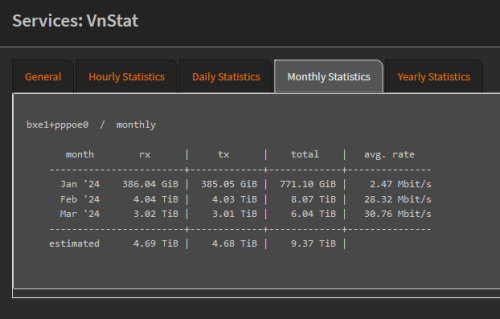 This post has been edited by yenchenje: Mar 20 2024, 11:33 PM This post has been edited by yenchenje: Mar 20 2024, 11:33 PM |
|
|
|
|
|
yenchenje
|
Mar 21 2024, 11:29 AM
|
|
|
QUOTE(simmarjit @ Mar 21 2024, 10:05 AM) You can look at SPD for drives if wanna save money Might as well go for 12th gen i5 or newer for your CPU as it has 2 media engines. Yep, I’m planning to either import from SPD or TB, depends on the price I didn’t go anything higher than 9th gen cuz motherboard with IPMI on anything above than LGA1151 is damn exp, that’s why I named the Supermicro X11SCA-F cuz it’s only about RM300, X12SCA-F is about RM900, X13SAE-F is about RM2k  |
|
|
|
|
|
yenchenje
|
Mar 22 2024, 07:28 AM
|
|
|
QUOTE(Jjuggler @ Mar 21 2024, 11:55 PM) Dud hardcore user la you. Even my monthly usage hardly reach 1TB. hahaha Exactly, which is why I’m waiting for my 2G upgrade to use even more  |
|
|
|
|
|
yenchenje
|
Mar 22 2024, 11:48 AM
|
|
|
QUOTE(karenzayn @ Mar 22 2024, 09:57 AM)  Dem, I'm still in 1-2TB range  Tbf I do torrent on my NAS box so.. |
|
|
|
|
|
yenchenje
|
Mar 22 2024, 03:37 PM
|
|
|
QUOTE(Jjuggler @ Mar 22 2024, 12:14 PM) The fcuk. Hahaha. But I believe there will be some user who maybe reach over 10TB and above. I am still light user lorh. That's the beauty of NAS. Little buddy do the work. Just set a VPN, that's it. I don’t even use a VPN tbh, I should! But I’m still too lazy to set it up My private trackers don’t like VPN as well afaik |
|
|
|
|
|
yenchenje
|
Mar 22 2024, 11:22 PM
|
|
|
QUOTE(Jjuggler @ Mar 22 2024, 07:20 PM) need to check and balance it according to torrenting use-case (if any) lor. I prefer to setup hide my NAS behind a VPN. Just let it run. That's how I did previously for my NAS. I plan to air gap my outgoing Xpenology NAS and it won’t reach inside my network, so any traffic that comes through won’t affect my network so I don’t need to worry about opening up ports. Got my Pro Max 24 PoE fully setup, gonna tinker with some L3 routing stuff later or tmr hopefully |
|
|
|
|
|
yenchenje
|
Mar 28 2024, 09:49 PM
|
|
|
Still waiting for TM to flip a switch for 2G upgrade from 1G This post has been edited by yenchenje: Mar 28 2024, 09:49 PM |
|
|
|
|
|
yenchenje
|
Mar 28 2024, 11:56 PM
|
|
|
QUOTE(surrodox2001 @ Mar 28 2024, 10:16 PM) It'd be best to have tm upgrade 1g to 2 with 2.5g lan port ont/router, but then they have to upgrade existing 2g users too so :confused: I doubt they’ll bring out 2.5G ONU by this year, will probably stick with FX3060V for a year more at least But hopefully it’s soon since I alr have custom solution for utilizing it in a non aggregation way |
|
|
|
|
|
yenchenje
|
Mar 28 2024, 11:57 PM
|
|
|
QUOTE(alloyion @ Mar 28 2024, 11:47 PM) Yes, L2 managed switch but the problem is ..i removed all the switches and AP. Just use back all to default Unifi router. Then plug direct from my laptop to the router DPN-FX3060V and I am getting the same 400 mbps yet the WIFI from the router giving me 1gbps. In the router admin portal, showing the internet is on own vlan. Connection [0]. All the LAN when connect showing 1000/1000. :confused: So direct connection from combo box via RJ45 is also 400mbps max? Sounds like potentially a bad ONR.. |
|
|
|
|
|
yenchenje
|
Apr 1 2024, 12:02 PM
|
|
|
QUOTE(soul_gamerz @ Apr 1 2024, 12:01 PM) Does anybody using Unifi 300mbps plan no longer getting public IP? I think starting last week, suddenly my game server and webserver not able to be accessed from outside world anymore. When chatting with unifi agent, he confirm I still getting Public IP my case still not able to access my server from outside. then he just disconnect before I'm able to confirm. How to check if we get Public or Private IP ya? Unless you have prior approval to get public, 500Mbps and above is public only Check in router page, if 100.X then public, anything other than that is public |
|
|
|
|
|
yenchenje
|
Apr 6 2024, 08:57 PM
|
|
|
QUOTE(laihuhng @ Apr 6 2024, 11:02 AM) Are we able to remote access Dlink DPN-FX3060V from outside? If yes, mind sharing how to get it done? Thanks in advance. Yeah, if you don't care about security, just port forward your router directly to the internet, but be prepared to people to constantly try and break in to your network. Generally good practices is to use VPN, and put it behind that to access. But unless absolutely necessary only that you expose your internal network, especially router |
|
|
|
|
|
yenchenje
|
Apr 8 2024, 08:29 AM
|
|
|
QUOTE(laihuhng @ Apr 8 2024, 07:30 AM) I have and using a VPN. That said, I just have no idea how to get this done. Use a VPN =/= using a VPN with your router Basically you need to create a private VPN in your router/network, you connect to said private VPN and you go to your router through that Im not referring to normal VPN apps like Nord/Express/PIA etc to access By doing this, you only need to expose your VPN’s port and not your actual router, which enhances security |
|
|
|
|
|
yenchenje
|
Apr 8 2024, 01:37 PM
|
|
|
QUOTE(neekun @ Apr 8 2024, 12:14 PM) Technician is at my place with dlink ax3000 router and modem combo. I need help to configure the dlink as bridge so it can work with my Asus router. I intend to maintain pppoe at my router and wifi too on my router. Technicians not necessarily know also how to do |
|
|
|
|
|
yenchenje
|
Apr 18 2024, 11:02 PM
|
|
|
QUOTE(Maxieos @ Apr 18 2024, 10:20 PM) Is it my router issue or TM international line issue ? Any fix ? I restart router also the same getting high ping.It always happen at 9:30 until midnight. » Click to show Spoiler - click again to hide... «
--- 202.181.90.248 ping statistics ---
66 packets transmitted, 48 received, 27% packet loss, time 65386ms
rtt min/avg/max/mdev = 1245.457/1374.640/1451.613/46.084 ms, pipe 2
traceroute to 202.181.90.248 (202.181.90.248), 30 hops max, 60 byte packets
1 100.118.255.254 (100.118.255.254) 2.546 ms 2.961 ms 3.269 ms
2 10.233.65.54 (10.233.65.54) 4.690 ms 4.755 ms 3.896 ms
3 10.55.100.246 (10.55.100.246) 13.163 ms 10.55.100.244 (10.55.100.244) 14.505 ms 10.55.100.246 (10.55.100.246) 13.908 ms
4 203.116.89-53.unknown.starhub.net.sg (203.116.89.53) 35.462 ms 35.963 ms 34.444 ms
5 203.116.3-74.unknown.starhub.net.sg (203.116.3.74) 33.010 ms 32.976 ms 36.583 ms
6 203.116.31.78 (203.116.31.78) 1473.787 ms 1473.885 ms *
7 143.92.108.198 (143.92.108.198) 1275.746 ms * 143.92.108.202 (143.92.108.202) 1282.998 ms
8 * 143.92.119.142 (143.92.119.142) 1275.735 ms *
9 143.92.119.141 (143.92.119.141) 1277.080 ms * 143.92.119.137 (143.92.119.137) 1273.173 ms
10 * 10.254.241.167 (10.254.241.167) 1283.996 ms 10.254.241.185 (10.254.241.185) 1472.004 ms
11 10.254.1.217 (10.254.1.217) 1470.823 ms 10.254.0.217 (10.254.0.217) 1249.103 ms 10.254.2.217 (10.254.2.217) 1466.690 ms
12 * * *
Any solution ? 1Gbps plan here, no issues at all, Johor area |
|
|
|
|
|
yenchenje
|
Apr 23 2024, 07:32 AM
|
|
|
QUOTE(yolldddd @ Apr 23 2024, 05:43 AM) Guys on public ip have you notice some sites are really slow I not sure whether bcus of public ip or my router config but some sites like imgur load video very slow but i switch to digi mobile data very fast Shopee also at about 9pm to 12am its very slow and some unifi user also reported this...funny thing is just after 12am its fast again Got other unifi user report this on feb https://forum.lowyat.net/topic/5439468I dun know wut is going on... most famous site are fast like netflix youtube etc Like recently i updated a game called genshin and the 9gb was downloaded pretty fast. Its only some of those less famous site very slowww It use to be ok but this year thinga really sloww Any ideas? Is they any unifi tech here could you pls fix this? Don’t remember encountering any issues with latency here, 1Gbps, PPPoE uptime around a month now since my last redial on it |
|
|
|
|
|
yenchenje
|
Apr 24 2024, 10:18 AM
|
|
|
QUOTE(sHawTY @ Apr 24 2024, 09:46 AM) I'm not quite sure. It's unfortunate that TM doesn't provide this knowledge to all their onsite technicians, especially when it's crucial information for customers who ask for it. But hey, since I'm only getting 1Gb/s anyway, I can simply repurpose the old BTU. Plus, my home Wi-Fi is still operating on Wi-Fi AC, so I wouldn't be able to fully leverage the 1Gb/s speed anyway! If the technician can't handle it, I'll simply give it a shot myself. I mean you have to remember that most TM technicians are considered out sourced and rarely is trained by TM professionally. I also had to play around with it to bridge it for my OPNSense before any guides ever came out, asked technician and had no idea, this was back when SWU 3.0 was the main “cheaper” plan User interface was kinda ass and definitely wasn’t helping to make it easier Now time to wait for my 2Gbps upgrade 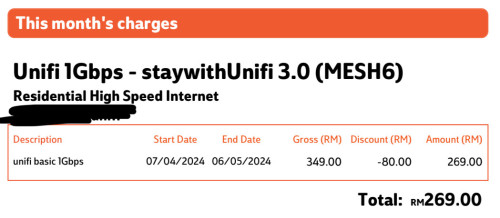 |
|
|
|
|
|
yenchenje
|
Apr 24 2024, 09:10 PM
|
|
|
QUOTE(Epic_winner091 @ Apr 24 2024, 08:49 PM) Can we opt out of the 1 Gbps upgrade because I don't think it's that huge of an improvement. Plus not a big fan on the BTU situation. Why not just give us a 2.5 Gbps ONU? IIRC, Maxis is using a 2.5 Gbps ONU for their 1 Gbps and 2 Gbps plans on TM infrastructure. I mean you’re only gaining and not losing much, 200mbps more DL and 300mbps UL It can still be reprogrammed into a bridge ONU, and basically works the same as your previous old ONU that isn’t an ONR As to why not 2.5G ONR with POTS, you must be new to TM practices unless absolutely necessary. |
|
|
|
|
|
yenchenje
|
Apr 24 2024, 09:11 PM
|
|
|
QUOTE(sHawTY @ Apr 24 2024, 10:37 AM) I am aware of that, but TM ought to enforce bridge setup training for all their outsourced contractors. While bridge mode might not be a concern for typical home users, it becomes crucial in office environments. Given that many offices rely on their own routers/firewalls that does the PPPoE dial up & DHCP management. They probably have a dedicated team for business setups. I feel like most business opts for static IP connection from UnifiBiz and they probably have their own internal contractor to install those services compared to residential connection. |
|
|
|
|



 Quote
Quote
 0.0334sec
 0.87
0.87
 7 queries
 GZIP Disabled