Outline ·
[ Standard ] ·
Linear+
Unifi Official TM UniFi High Speed Broadband Thread V42, READ 1ST PAGE FOR RELEVANT WIFI INFO!
|
NagaK
|
 May 16 2024, 04:32 PM May 16 2024, 04:32 PM
|

|
QUOTE(toytoy @ May 16 2024, 11:54 AM) Hi All, just received call from TM that my 800Mbps package will be upgraded to 1Gpbs. They told me only the router will be changed and modem will be changed only if required. I m currently having the Huawei modem, will they change it? Also i m using Xiaomi AX3600 mesh routers now with 1G LAN Port. Possible to get full 1Gbps speed? Thanks. I'm using Fiberhome modem + TP LINK AX73 with 1G Lan port max I can reach was 930 to 950mbps. Keep Dlink Black ONR as backup option If they said your Huawei Modem can support just stay with it keep your new modem+router for future use This post has been edited by NagaK: May 16 2024, 04:34 PM |
|
|
|
|
|
NagaK
|
May 18 2024, 01:47 PM
|
|
|
QUOTE(Ashren @ May 18 2024, 01:10 PM) They did push firmware update for some of their equipment but only for bugfixes stability and security fixes but never new features. The present white dlink ONR is missing its 2.5gbe controller chip the RTL8221B so i doubt any firmware update will turn the present LAN1 to 2.5gbe on that model. Also they separate the wifi chip for each 2.4ghz and 5ghz (RTL8832CR & RTL8192CR) on the new black ONR and slap a good chunck of heatsink on it meaning the present white ONR runs quite hot handling wifi using it's single chip (RTL8852CE). Any new feature enabled by firmware upgrade on the white ONR (especially enabling 2.5gbe without a dedicated controller chip) will push the device even hotter. They also remove one POTS in favor of a usb since who needs 2 POTS over usb. The black ONR clearly not a cost cutting hardware revision in fact it costs more to produce than the white one. Edit: On the bridge mode issue I doubt it's disabled only on that particular black model because if it's a ToS policy by TM it will be done on OLT auth level nationwide and not on certain devices only (there's bridge mode setup on that black ONR by TM). And if they don't allow bridging on their network, all present subscribers bridge setup from 30mbps to 2gbps cannot connect by now including the white ONR. So it has to be a bug or misconfig on that model. My upgrade installation is next week I'll update when it's done on the bridge issue. Try to update if your black box can enable bridge mode or not after installation |
|
|
|
|
|
NagaK
|
May 19 2024, 11:46 PM
|
|
|
QUOTE(Jjuggler @ May 19 2024, 09:43 PM) Thats the problem which I personally want to solve for. No point using the hardware provided by the ISP, especially brands like D-Link which has a very bad track record in terms of security. Got this from TM Unifi Members facebook page. According to the OP, 100 to 800Mbps users will receive this. Edit: Only for new subscribers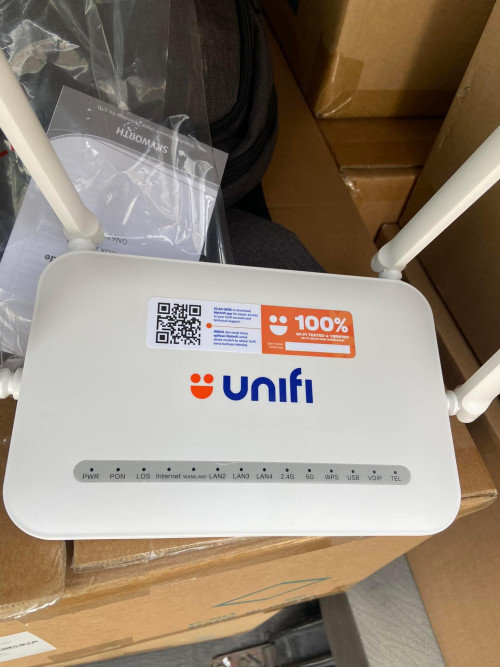 Only 1Gbps and 2gbps getting better combo box it seems. It's good when all in one box instead seperate But one negative is either TM is allow to use bridge mode or not is question mark now |
|
|
|
|
|
NagaK
|
May 23 2024, 03:12 PM
|
|
|
QUOTE(Ashren @ May 23 2024, 01:03 PM) My installer took the long and hard way today he came with the white Skyworth AX3000 I told him that's for 100-800mbps, he told me it's a new model they just got it this week I told him I know but I want the black D-Link not this. So he called his boss and they confirm Ultra plan D-Link, Pro plan Skyworth. He said sorry and went back to office to get the stock and he's on the way again. Very nice fella 😂 Let's hope I can bridge that little brat to my Asus. Edit: I can bridge to my Asus no problem at all and I can use my previous Huawei EG8240H5 also, both authenticate normally so no binding. They gave me the PLOAM pass too just in case for safe keeping. Kudos to the installer I gave them 10/10 feedback when they send me the sms link. Going back and forth to get the D-Link and very fast too 😂 What is PLOAM pass? I didn't get it. Did you bridge your router just your own or installer did it? I will try to install D Link ONR to just how stable fiber connection was |
|
|
|
|
|
NagaK
|
May 23 2024, 04:45 PM
|
|
|
QUOTE(Ashren @ May 23 2024, 03:29 PM) I bridged the D-Link myself but I told the installer beforehand and he said no problem he even show me how to do the bridge mode setup. It's exactly how other fellow members here taught us. The PLOAM pass is the pass the ONR/ONU use to authenticate itself to the OLT before we can dial to the service. Usually the pass are generated with the serial num of the device. If the pass and serial doesnt match the profile on the OLT, the ONR/ONU cannot be used to dial PPPoE or even access the line. If they bind a particular ONU/ONR to the OLT you can only use that device to connect. If no bind, can use any ONR/ONU provided each device has its own PLOAM pass generated to match it's serial in the settings. Some called this ONU pass, even my installer refer to it as ONU pass. So if you hard reset your D-Link you need to enter PLOAM pass again in settings just like your PPPoE pass. Example from Anime post ⬇️ 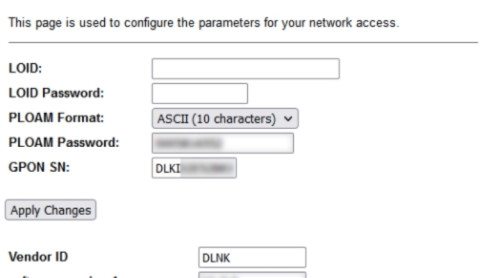 So If I contact to Unifi can I get PLOAM pass again? Installer said that if want to install new ONR call Unifi or contact him personally he said will assist |
|
|
|
|
|
NagaK
|
May 23 2024, 11:59 PM
|
|
|
QUOTE(aniq8676 @ May 23 2024, 11:28 PM) Hope TM upgrade 1Gbps to 10gbps in future 😂 but depend on politics administration only during PH PKR administration days we gets fiber upgrade |
|
|
|
|
|
NagaK
|
May 24 2024, 06:59 PM
|
|
|
Who is the that the app developer for the unifi app it's really frustrating every time keep logging out logging out again and negative even though I save to remember the device.
Loading apps also took me to 3G days..
After revamped whole app also still sucks... Chatbot another level wait queue like MCO days
This post has been edited by NagaK: May 24 2024, 07:00 PM
|
|
|
|
|
|
NagaK
|
May 25 2024, 01:25 PM
|
|
|
QUOTE(Jjuggler @ May 25 2024, 01:31 AM) Whichever companies that comes with lowest bidding price lorh. That company must have a fake portfolios. I mean, most software development companies display fake portfolios. So, these days, to get a good software development company that do the work for you is really hard to find. I prefer to go for the really good one with high price than low and cheap quality. Maxis app is way better. I had Maxis connection in my home every thing can control with app no hassle. |
|
|
|
|
|
NagaK
|
May 25 2024, 09:21 PM
|
|
|
QUOTE(Ashren @ May 25 2024, 08:09 PM) After few days of uptime since the 1gbps upgrade I can confirm no speed fluctuation observed at least for me. Same here no speed fluctuation. Getting good speed all time with wifi extender roughly gets 230mbps around mark still low when compared to main router as 940mbps but that's draw with extender Will upgrade to Deco mesh system soon |
|
|
|
|
|
NagaK
|
May 25 2024, 11:39 PM
|
|
|
QUOTE(Ashren @ May 25 2024, 09:26 PM) Extender always like that will cut more than half of the actual wifi throughput but still better than nothing if thats the only setup you can go for now. Glad you get consistent speed too. Surprisingly the black ONR is not as bad as I thought it would be. I'm not using black ONR I'm retains my Fiberhome ONU still getting 1gbps speed. Another help experts Does Deco mesh system will help my wifi coverage better..?? I placed Router AX6000 TP-Link on bedroom near door. Got 2 other room below 1 room with big hall. So 3/2 Deco will help coverage too help.. I'm newbie in mesh system will survey before invest high price on Deco . Aiming to get Deco XE75 This post has been edited by NagaK: May 25 2024, 11:39 PM |
|
|
|
|
|
NagaK
|
May 26 2024, 12:17 AM
|
|
|
QUOTE(Ashren @ May 26 2024, 12:00 AM) Yes it will greatly help your wifi coverage across the house but pay attention on your placement. Always do zig-zag placement for vertical deployment ie double/triple storey houses. Don't put the mesh directly above each other on different floors or your wifi speed will suffer despite the excellent coverage. It has to be on the opposite far side of each other, far enough as long as it still get good signal from the other node/main router. If you can do ethernet backhaul to all the nodes that's even better so it won't share the same wifi throughput for the main connection. I do ethernet backhaul to my nodes so I get full wifi speed and full lan speed on all of them but sometimes if let say node A is hogging the wifi, all the other nodes wifi even the main router's wifi lagging a bit since they all share the same channel, mine's 161. It's like the inteference you get from your neighbor when both of you share the same airwaves. With mesh setup you cannot set the wifi channels individually across all the nodes. To me wired AP backhaul still the best and you're not tied to only one brand and free to configure each AP nodes. That's just my 2 cents. Very true I'm using my old TP LINK AX20 as AP and connect LAN via basic gigabit switch for TV Astro plug n play and PS5. Problem is Wifi took time for connect main router from AP. I want deco mesh giving great wireless for my IP camera and Air-conditioner. If I connect 2nd node as LAN does Deco Wifi will still can be use?? |
|
|
|
|
|
NagaK
|
May 27 2024, 09:00 PM
|
|
|
QUOTE(toytoy @ May 27 2024, 03:07 PM) Finally upgraded from 800Mbps to 1Gbps today. The installer came with white Dlink and I asked him if he’s got the black one. He said got and went back to his van to take. Since I’m using my own router he offered to setup GPON for me but he said never tried before. So I asked him to use back the old Huawei modem and give me the Black Dlink for backup. At first he was hesitant as he said dunno Huawei can work or not. I told him many ppl tried before and can work. So he just upgraded my speed and my existing connection just worked. Managed to get 940Mbps. Then he setup the Black Dlink to try and got the same speed. Luckily I followed this forum. Else I would’ve been stuck with the old ONR. Nice. My installer doesn't hesitate straight away upgrade by using my Fiberhome ONR. Still keep Dlink as backup |
|
|
|
|
|
NagaK
|
May 30 2024, 10:14 PM
|
|
|
Hi peeps does anyone give me step by step instructions as how to install D Link ONR combo box. With bridge mode setup to use own router..
I got PLOAM pass I know to install router but zero knowledge on ONR that's why
Thanks in advance
|
|
|
|
|
|
NagaK
|
May 31 2024, 01:24 AM
|
|
|
QUOTE(Ashren @ May 30 2024, 11:37 PM) Connect to the ONR either with LAN or Wifi. Click Setup tab, in GPON settings fill in your PLOAM pass, Device Type choose Router, OMCI OLT Mode choose Default Mode. Click Wizard tab, choose GPON Bridge in the WAN Mode section. Key in your VOIP ID and password if you want to enable it. Can skip if you want. Then apply and connect your own router to LAN1. Thanks bro. I don't have VOIP ID but I'm using phone life. Does TM can provide to us? Also can I switch back to my old ONR if I dlink had issues as some members report that ONR tied with account This post has been edited by NagaK: May 31 2024, 01:26 AM |
|
|
|
|
|
NagaK
|
May 31 2024, 02:12 PM
|
|
|
QUOTE(Ashren @ May 31 2024, 02:11 AM) You're welcome. You can ask your VOIP pass from the installer. I got mine through whatsapp from them. You can switch back and forth anytime no problem it's legal and it's allowed. Just like how the installer let you continue using your current BTU after the upgrade. Usually they don't bind the BTU/ONU/ONR to our account, very rare occurence if they do. Only 1 fellow member here got his ONR binded so far it's RViN. I have no idea why they bind his account to allow only one BTU/ONU/ONR to connect. He choose the DLink and they bind it for him so he cannot use back his Fiberhome BTU. But he's fine with it eventhough he's stuck with the DLink forever he get 1gbps speed test so he should be fine. 😂 Maybe it's OLT dependent like ZTE/Alcatel-Nokia/Huawei/Fiberhome limitation I'm not sure. I think some OLT can only have 1 ONU profile registered so maybe that's why the installer have to bind his ONR in order to connect to the OLT. That's the reason why we use the PLOAM password, to authorize our BTU/ONU/ONR to the OLT before we can establish a link and dial PPPoE. Different areas use different OLT so it's down to luck. As per Anime research, Fiberhome OLT is the most troublesome. Example info from sifu Anime. 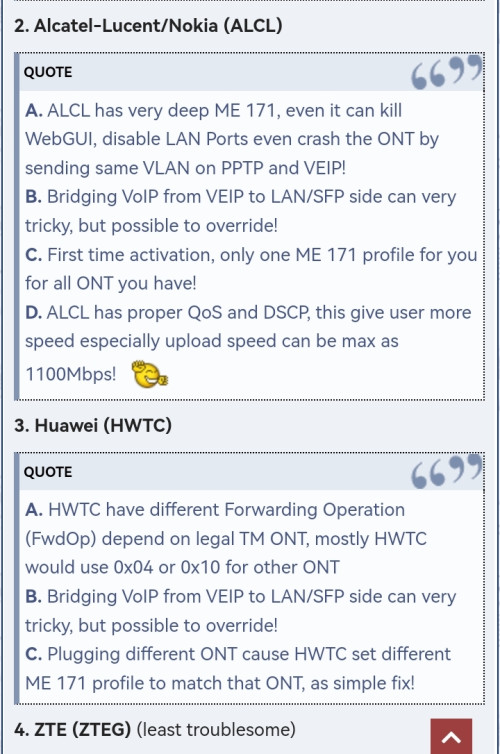 https://forum.lowyat.net/index.php?showtopi...ost&p=109782422 https://forum.lowyat.net/index.php?showtopi...ost&p=109782422Thanks for details explaination. Will setup on weekend and let you know. |
|
|
|
|
|
NagaK
|
Jun 1 2024, 11:45 AM
|
|
|
QUOTE(Ashren @ May 31 2024, 05:34 PM) One dude what is LOID and LOID password. I don't know either blame the installer or not giving ID password incomplete thing such a headache |
|
|
|
|
|
NagaK
|
Jun 1 2024, 11:48 AM
|
|
|
QUOTE(hussain @ May 30 2024, 11:44 AM) HI Guys.. Need some help.. I just got a call from unifi that finally i will get free upgrade from 800mbps to 1gbps. but they said have to installl their own router. Cant i continue to use my own router coz mine is new and is wifi 6 TP link Archer AX 73. My house is kinda large so previously using mesh did not help but after using this router speeds everywhere in the house is quite good even without mesh.. will their upgraded router be any better ?..appreciate some sifu advice.. thanks Also will unifi be better or moving altogether to celcom fibre 1gbps? Ask your installer if they can install and and set up as bridge mode. If yes do it right away and you can use back your router. My case is different since I'm gotted first batch of black box my installer doesn't know about bridge setup on new box so he simply use back Fiberhome ONU but now with AX73 my speed limit was 930mbps. No full 1gbps If they said can't .Keep your existing ONU ask them PLOAM password and VoIP ID and Password and do install yourself and set up in brigde mode Here's method on previous post https://forum.lowyat.net/topic/5424552/+2800#This post has been edited by NagaK: Jun 1 2024, 12:05 PM |
|
|
|
|
|
NagaK
|
Jun 1 2024, 07:29 PM
|
|
|
QUOTE(Ashren @ Jun 1 2024, 03:21 PM) Leave it blank. Just key in the PLOAM pass. VoIP details can input later? As my installer haven't send me the password |
|
|
|
|
|
NagaK
|
Jun 2 2024, 01:36 AM
|
|
|
Done installing new black combo box . After install new box still getting under 980mbps speed on LAN maybe my router limiting speed as still 1Gbps Wan Port.
But now when I install old fiber home ONU can't connect anymore. PON keep blinking looks like after setup my acc register on new ONR it seems.
How to login combo box to set up VoIP ID to set??
This post has been edited by NagaK: Jun 2 2024, 01:37 AM
|
|
|
|
|
|
NagaK
|
Jun 2 2024, 09:18 AM
|
|
|
QUOTE(Ashren @ Jun 2 2024, 04:20 AM) You cant connect back using your Fiberhome ONU? Usually the binding has to be done manually by the installer (they need to call hq to bind it to the OLT on their end). Plugging and unplugging shouldn't be a problem. As for the speed yeah that's expected with 1gbps LAN because of overhead eventhough it's coming from a 2.5gbe LAN (the ONR). Try leaving your Fiberhome ONU for a while after plugging it in it should connect I don't see why it won't. To access the black ONR after setting it to bridge just plug in your PC/Laptop to the LAN1 of the ONR and access it as usual. I leaves Fiberhome ONU for almost 3 hours (went for quick movie) it was fine first. After comeback the PON light start keep blinking and no internet access for Router. After switch to black box internet can be access. I tried to access but can't Black box IP same as before right 192.168.0.1? |
|
|
|
|



 Quote
Quote


 0.7835sec
 0.36
0.36
 7 queries
 GZIP Disabled