Outline ·
[ Standard ] ·
Linear+
Unifi Official TM UniFi High Speed Broadband Thread V42, READ 1ST PAGE FOR RELEVANT WIFI INFO!
|
NagaK
|
 Jun 22 2024, 11:02 PM Jun 22 2024, 11:02 PM
|

|
QUOTE(wiwi @ Jun 22 2024, 10:56 PM) Hi , Just installed 300mbs Unifi. The given router+modem (skyworth GN630V) has poor coverage imo. Went to get an Asus AX1800HP and plug it to the Skyworth. Effect seems same. Did I miss something? Do I need to do some settings changes? Thanks in advance Try to change bridge mode on Skyworth or disable Wifi on Skyworth |
|
|
|
|
|
NagaK
|
Jun 23 2024, 01:28 AM
|
|
|
QUOTE(wiwi @ Jun 22 2024, 11:07 PM) I tried to change Skyworth to bridge mode , Skyworth WAN/LAN1 connect to my Asus router WAN . subsequently my pc can detect wifi only..no internet. I'm not sure what went wrong? I received D-Link combo box but I set it up myself to get work. Set up bridge mode then connect LAN 1 to router and Internet is UP. If you have PLOAM pass so reset and set up back or easy way switch bridge mode to router mode disable wifi and connect your own router as AP |
|
|
|
|
|
NagaK
|
Jun 24 2024, 01:29 PM
|
|
|
QUOTE(wiwi @ Jun 24 2024, 10:02 AM) I actually changed the Unifi Skyworth Network to "Bridge". My new Asus router, i set in PPPOE pw and user. Weird no internet. I attached some pics. Did I miss any setting? Thanks 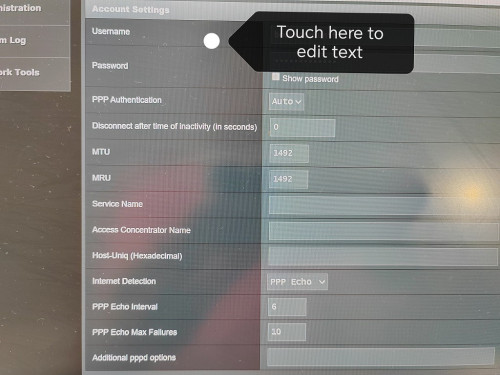 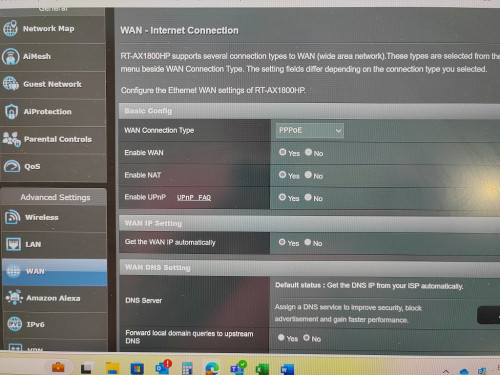 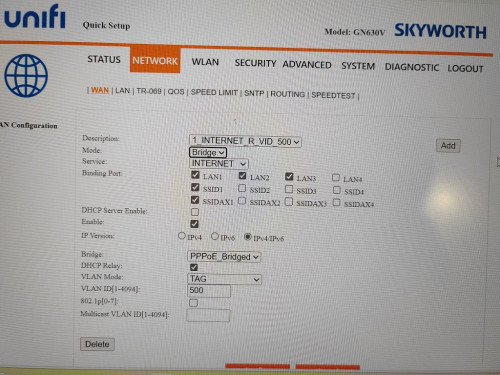 On IPTV profile set to Unifi profile then it will connect internet |
|
|
|
|
|
NagaK
|
Jul 1 2024, 11:55 PM
|
|
|
Still speed issue Is back after 30 days with Black Box bridge mode. Capping 300mbps down 70mbps up but subscribed 1Gbps .Called TM reset port also issue doesn't solved. Tomorrow evening technician come over to check.
Either black box is culprit or outside issue will be known.
Also I'm mention them after black box this issue happened not with old Fiber home modem
|
|
|
|
|
|
NagaK
|
Jul 2 2024, 12:09 AM
|
|
|
QUOTE(cHiLdHo0drEaMz @ Jul 2 2024, 12:03 AM) Hope its not the black box. Please provide us the feedback after tommorow visit Will update I guess either outside port issue or setup might conflict. Sure won't be combo box This post has been edited by NagaK: Jul 2 2024, 12:10 AM |
|
|
|
|
|
NagaK
|
Jul 2 2024, 07:20 PM
|
|
|
QUOTE(sHawTY @ Jul 2 2024, 03:53 PM) Hot damn! I'm going to TM Point to try and get this. Hopefully, I can secure that offer. I'm currently paying RM189 per month for 1Gbps. Does new customers ( just changed ownership from dad as his no more) eligible for SWU? no contract for now |
|
|
|
|
|
NagaK
|
Jul 2 2024, 08:41 PM
|
|
|
QUOTE(cHiLdHo0drEaMz @ Jul 2 2024, 12:03 AM) Hope its not the black box. Please provide us the feedback after tommorow visit Done with Unifi as expected Black box is culprit I'm guessing manufacturer defect. Almost spend 1 hour no issue solved. As results they just replaced with Skyworth combo box and issue resolved. But technician offered me either reuse my old fiberhome modem/ use combo box as bridge. I'm just went for old modem + router setup. Re-setup ONU to gain internet access Speed back to 930mbps will monitor for month. This post has been edited by NagaK: Jul 2 2024, 08:42 PM |
|
|
|
|
|
NagaK
|
Jul 2 2024, 10:12 PM
|
|
|
QUOTE(cHiLdHo0drEaMz @ Jul 2 2024, 09:35 PM) They should have replaced with dlink combo box . Why did the tech opted for skyworth instead,? Hope it's resolved for good He said he don't have that model now also TM ordered Skyworth for 1Gbps users. He also say his pain that combo box is been hassle to them so many issues. Currently not using skyworth opted for old setup. |
|
|
|
|
|
NagaK
|
Jul 8 2024, 08:44 PM
|
|
|
QUOTE(TubeNRibbon @ Jul 8 2024, 03:25 PM) Something is wrong with TM. The internet suddenly drop below 300Mbps from 1G package. The technician changed the modem from white ONR to black ONR. I requested them to try a new router unfortunately still not solve my problem. Guys, check your speedtest occasionally I'm not alone looks like. I too faced to this issue gets 300mbps down. Raise complain to TM. Technician came and spend almost hour. Finally change from D blink black box to Skyworth combo box even tho speed is up I requested to reuse my Fiber home modem as I need use own router so. Problem solved. Skyworth combo box keep in store |
|
|
|
|
|
NagaK
|
Jul 9 2024, 10:05 PM
|
|
|
QUOTE(TubeNRibbon @ Jul 9 2024, 07:08 PM) The speed worst after changed to D-Link Black box. Seem like they having an issue with the network. They wanted to use the fiberhome but i requested for the black box unfortunately the problem not solve. It's might issue with black box since equipment is very new. My advice is better stuck with Fiberhome modem and use own router/ mesh |
|
|
|
|
|
NagaK
|
Jul 19 2024, 12:11 AM
|
|
|
QUOTE(blacktubi @ Jul 18 2024, 10:28 PM) For those who got the Skyworth GN630V combo router, it's super easy to turn that thing into bridge mode and still use PPPOE at your own router. You should definitely do that as any decent third party router should have a much faster CPU than the GN630V. My settings below:  Note: VLAN tagging / IPTV Profile / VLAN profile not needed on your router with this configuration! Remember to switch off the WiFi function once that's done. Thanks for tip. For 1Gbps user Asus AX6000 Tuf gaming is good ? I'm eyeing for goof Asus router since lot of functions compared to my trustworthy TP Link routers |
|
|
|
|
|
NagaK
|
Jul 19 2024, 01:19 AM
|
|
|
QUOTE(xCryptik @ Jul 19 2024, 12:29 AM) Why so many people queue up for TM Live chat until queue number is 132 at this time. 😭 Give me chance please. That's why I called them straight 😂 |
|
|
|
|
|
NagaK
|
Jul 22 2024, 12:09 AM
|
|
|
QUOTE(aa123aa @ Jul 21 2024, 11:23 PM) 1gbps user with black dlink combo (set to bridge mode) + asus ax3000 router. having issue with speed drop to only 200download/100upload (both lan and wifi also same speed) + tested with laptop with wifi6E. Have to keep restarting modem to get the usual speed after 2/3 hours everytime. Anyone experience similar issue ? any solution to this? thanks. I'm the one affected with that.When I plug my old modem not worked TM technician came and changed to Skyworth combo box . But I keep and resetup and re use Fiberhome modem and live with 940mbps. So far no issues speed also consistent This post has been edited by NagaK: Jul 22 2024, 12:11 AM |
|
|
|
|
|
NagaK
|
Jul 22 2024, 02:29 AM
|
|
|
QUOTE(aa123aa @ Jul 22 2024, 12:29 AM) still need to do any setting for the white fiberhome modem? or just plug in the cable already can use? is it due to the black dlink faulty unit? Mine they said when they changed black box my profile binded with new combo box so they reset back. But others can reuse their old modem without setup by plug fiber cable. Try it if works means luck |
|
|
|
|
|
NagaK
|
Jul 22 2024, 01:04 PM
|
|
|
QUOTE(aa123aa @ Jul 22 2024, 11:56 AM) have to keep restarting the modem every 30min coz the speed drop to around 100mbps only. something is wrong with dlink black box thing. technician got no solution to this. if use back fiberhome as modem (instead of the black combo), the max speed:- wifi - 700+-mbps lan - 800+- mbps are these speed consider normal due to hardware limitation? tq Mostly hardware issue I give back black box to TM and re use fiber home modem no issue. |
|
|
|
|
|
NagaK
|
Jul 22 2024, 03:21 PM
|
|
|
QUOTE(aa123aa @ Jul 22 2024, 02:03 PM) 👍 mind sharing roughly what’s is ur current speed you are getting on the fiberhome? Both WiFi and lan. Tq LAN 930Mbps down 550mbps up WIFI 850 to 900Mbps range |
|
|
|
|
|
NagaK
|
Jul 30 2024, 09:56 PM
|
|
|
3 months after of upgraded 1Gbps speed changed black box back to Fiberhome modem this is what 90% of speeds get.. Looks like we won't get full 1Gbps speed from TM anyday. Just to drop 800mbps from package they increased upload speeds and selling as 1gbps plan Attached thumbnail(s)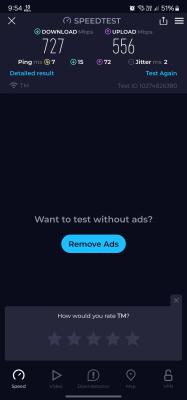
|
|
|
|
|
|
NagaK
|
Jul 30 2024, 10:36 PM
|
|
|
QUOTE(yenchenje @ Jul 30 2024, 10:25 PM) 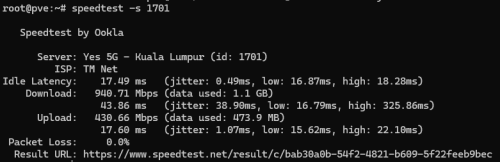 Testing via WiFi not exactly indicative  How to test like this ah teach me? If this CMD right? |
|
|
|
|
|
NagaK
|
Jul 31 2024, 02:34 PM
|
|
|
QUOTE(RViN @ Jul 31 2024, 02:29 PM) When I told the technicians to remove the hardware bind they told me cannot, so I sort of speculated (together with some other members here) that it could be that the OLT I'm unfortunately connected to requires some kind of hardware bind.  Not sure but I my technician came for fix black box 1 indian guy after spend almost 30 mins he gave up and give me 2 choice either replace black box combo with Skyworth use bridge or router or 2nd use old modem. They reset fiberhome modem and redone the setup to work |
|
|
|
|
|
NagaK
|
Aug 8 2024, 06:11 PM
|
|
|
Guys help for this price is actually worth? I'm planning to upgrade from TP Link AX73 Normal price is about RM1000.00 I guess This post has been edited by NagaK: Aug 8 2024, 06:13 PM Attached thumbnail(s)
|
|
|
|
|



 Quote
Quote
 0.0322sec
 0.62
0.62
 7 queries
 GZIP Disabled