Welcome Guest ( Log In | Register )

Bump Topic Topic Closed RSS Feed
14 Pages « < 6 7 8 9 10 > » Bottom

Outline · [ Standard ] · Linear+

Unifi Official TM UniFi High Speed Broadband Thread V42, READ 1ST PAGE FOR RELEVANT WIFI INFO!

views
     
soonwai
post Sep 4 2024, 08:00 AM


********
All Stars
11,456 posts

Joined: Oct 2007
From: KL


QUOTE(Omochao @ Sep 4 2024, 07:01 AM)
best saver of the day. Everything running and working well. even has adguard filter list built into the dns.

Just registered an account with them, link the IP with my account and whole network has inbuilt ad filtering as well..no need private dns.

By the way, just out of curiosity, do you use external "device" to filter like how EVERY SIFU does in here?? Because according to one wizard here, EVERY SIFU MUST HAVE pihole.
» Click to show Spoiler - click again to hide... «

*
I use Adguard Home running on my Mikrotik ax3. Just started last year when Mikrotik added container support. Nothing prior to that because didn't want to setup another device just for Adguard Home or Pihole.
soonwai
post Sep 4 2024, 08:07 AM


********
All Stars
11,456 posts

Joined: Oct 2007
From: KL


QUOTE(Quantum Geist @ Sep 4 2024, 07:06 AM)
out of curiosity, dnscrypt is blocked too I presume?
*
I know almost zero about dnscrypt but yes, if using dnscrypt with e.g. opendns then it'll be blocked unless the dnscrypt resolver is on a different IP address that's not the usual opendns IPs.
soonwai
post Sep 4 2024, 08:54 AM


********
All Stars
11,456 posts

Joined: Oct 2007
From: KL


QUOTE(Omochao @ Sep 4 2024, 08:43 AM)
If by that logical sense, according to smart and sifu guy ,you must be at extraordinary level then.

If you already have that hardware setup, then yes of course it makes sense to use that full capacity of mikrotik. I don't think you are using any of those consumer grade router with fancy GUI Pairing to your mikrotik right ?

I prefer a more straightforward approach by using home consumer grade gui , don't want manual coding
More like how many people will start bombarding tm customer service how come suddenly no internet connection while not realising dns getting blocked. on tm fb group the post about dns not working is slowly surfacing but they are doing their best to not approve any post about dns.
*
Is this, https://www.facebook.com/groups/tmunifimembers, the fb group you're referring to?
soonwai
post Sep 4 2024, 02:02 PM


********
All Stars
11,456 posts

Joined: Oct 2007
From: KL


QUOTE(tng55 @ Sep 4 2024, 11:52 AM)
can you check my google DNS Result

[attachmentid=11502116]
*
Yours no problem. Penang right? The zombie wave haven’t reached there yet. sweat.gif
soonwai
post Sep 4 2024, 04:50 PM


********
All Stars
11,456 posts

Joined: Oct 2007
From: KL


QUOTE(roams.behinds @ Sep 4 2024, 04:06 PM)
I can confirm quad9 doh also blocked at Cheras area
*
Confirm that. All the 9.9.9.9 now belongs to TMz.

QUOTE(PRSXFENG @ Sep 3 2024, 10:27 PM)
So that's how Quad9 got by unaffected tongue.gif
*
All PRSXFENG's fault. mad.gif

Sorry TM, I bluff bluff only. Not actually using Quad9 here. biggrin.gif
soonwai
post Sep 4 2024, 04:54 PM


********
All Stars
11,456 posts

Joined: Oct 2007
From: KL


QUOTE(Omochao @ Sep 4 2024, 04:10 PM)
On router level or browser settings?
Again, was it at router level or browser?
*
On the internet level. 9.9.9.9 now goes to a TM server. Laziest way to block everything.
soonwai
post Sep 4 2024, 05:05 PM


********
All Stars
11,456 posts

Joined: Oct 2007
From: KL


QUOTE(waja7968 @ Sep 4 2024, 03:18 PM)
I know Adguard's DoH is 100% block. Not sure about other resolvers DoH.
*
Just checked, seems to be ok here but not using Adguard so can't really monitor it.
soonwai
post Sep 4 2024, 05:11 PM


********
All Stars
11,456 posts

Joined: Oct 2007
From: KL


QUOTE(waja7968 @ Sep 4 2024, 03:04 PM)
Try --> https://www.olevod.tv/ (website to watch most recent movies) to verify.

If your browser just spining and timeout then 100% it is block. Use DoH also no help on some DNS resolvers
, need to find those resolvers  not so well known and might have the chance to bypass the block.

Most mobile operators block it and Unifi fiber block it starting today
*
olevod ok here. But yes, blocked. Both 8.8.8.8 & 9.9.9.9 in affected areas are returning 175.139.142.25
soonwai
post Sep 4 2024, 05:14 PM


********
All Stars
11,456 posts

Joined: Oct 2007
From: KL


QUOTE(blacktubi @ Sep 4 2024, 03:11 PM)
You cannot access this site even via DoH with public resolver e.g. Google DNS now?
*
Google cannot because Google's 8.8.8.8 & 8.8.4.4 are no longer going to Google. I think going to Brickfields now.
soonwai
post Sep 4 2024, 05:46 PM


********
All Stars
11,456 posts

Joined: Oct 2007
From: KL


QUOTE(heLL_bOy @ Sep 4 2024, 05:18 PM)
i had no issue accessing all listed website above using CF or Q9 DOH method.  dry.gif  dry.gif
*
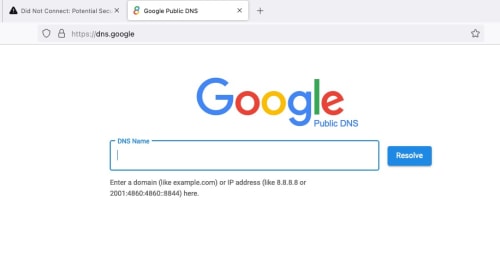
Can you access https://8.8.8.8 ? If can, then your area not affected yet.
user posted image


This post has been edited by soonwai: Sep 4 2024, 05:46 PM
soonwai
post Sep 4 2024, 05:50 PM


********
All Stars
11,456 posts

Joined: Oct 2007
From: KL


QUOTE(countingcrows @ Sep 4 2024, 05:18 PM)
How's the ping to hijacked 8.8.8.8?
*
Very good.
CODE
ping -c 5 8.8.8.8      
PING 8.8.8.8 (8.8.8.8): 56 data bytes
64 bytes from 8.8.8.8: icmp_seq=0 ttl=59 time=5.357 ms
64 bytes from 8.8.8.8: icmp_seq=1 ttl=59 time=4.316 ms
64 bytes from 8.8.8.8: icmp_seq=2 ttl=59 time=4.279 ms
64 bytes from 8.8.8.8: icmp_seq=3 ttl=59 time=4.330 ms
64 bytes from 8.8.8.8: icmp_seq=4 ttl=59 time=3.133 ms


Should be the same as ping to 210.187.85.34

CODE
% traceroute to 8.8.8.8 (8.8.8.8), 64 hops max, 40 byte packets
1  10.0.1.1 (10.0.1.1)  1.843 ms  0.453 ms  0.405 ms
2  175.138.112.126 (175.138.112.126)  4.057 ms  3.756 ms  3.519 ms
3  10.55.49.1 (10.55.49.1)  4.910 ms
   10.55.49.3 (10.55.49.3)  4.735 ms
   10.55.49.1 (10.55.49.1)  4.331 ms
4  10.55.52.26 (10.55.52.26)  8.159 ms
   10.55.52.30 (10.55.52.30)  6.883 ms  6.257 ms
5  10.55.52.54 (10.55.52.54)  7.101 ms
   10.55.52.90 (10.55.52.90)  5.746 ms
   10.55.52.54 (10.55.52.54)  5.510 ms
6  dns.google (8.8.8.8)  4.498 ms  3.138 ms  3.664 ms

% traceroute 210.187.85.34
traceroute to 210.187.85.34 (210.187.85.34), 64 hops max, 40 byte packets
1  10.0.1.1 (10.0.1.1)  2.888 ms  0.469 ms  0.418 ms
2  175.138.112.126 (175.138.112.126)  9.473 ms  3.764 ms  3.336 ms
3  10.55.49.3 (10.55.49.3)  4.826 ms
   10.55.49.1 (10.55.49.1)  5.893 ms
   10.55.49.3 (10.55.49.3)  4.631 ms
4  10.55.52.30 (10.55.52.30)  6.064 ms
   10.55.52.26 (10.55.52.26)  6.851 ms  6.605 ms
5  10.55.52.90 (10.55.52.90)  6.210 ms
   10.55.52.54 (10.55.52.54)  6.530 ms
   10.55.52.90 (10.55.52.90)  5.299 ms
6  dns.tm.net.my (210.187.85.34)  5.001 ms  4.143 ms  3.876 ms

% traceroute 1.1.1.1      
traceroute to 1.1.1.1 (1.1.1.1), 64 hops max, 40 byte packets
1  10.0.1.1 (10.0.1.1)  2.519 ms  0.540 ms  0.434 ms
2  175.138.112.126 (175.138.112.126)  4.121 ms  3.198 ms  3.130 ms
3  10.55.49.1 (10.55.49.1)  4.777 ms
   10.55.49.3 (10.55.49.3)  4.750 ms
   10.55.49.1 (10.55.49.1)  4.086 ms
4  10.55.52.26 (10.55.52.26)  6.788 ms
   10.55.52.30 (10.55.52.30)  6.863 ms  5.844 ms
5  10.55.52.54 (10.55.52.54)  6.664 ms
   10.55.52.90 (10.55.52.90)  7.259 ms
   10.55.52.54 (10.55.52.54)  5.813 ms
6  one.one.one.one (1.1.1.1)  4.843 ms  4.034 ms  4.103 ms


Got one more IP for TM DNS
CODE
% traceroute 210.187.85.69
traceroute to 210.187.85.69 (210.187.85.69), 64 hops max, 40 byte packets
1  10.0.1.1 (10.0.1.1)  3.419 ms  0.464 ms  0.411 ms
2  175.138.112.126 (175.138.112.126)  3.450 ms  2.958 ms  3.095 ms
3  10.55.49.1 (10.55.49.1)  4.402 ms
   10.55.49.3 (10.55.49.3)  4.002 ms
   10.55.49.1 (10.55.49.1)  3.683 ms
4  10.55.52.26 (10.55.52.26)  6.502 ms
   10.55.52.30 (10.55.52.30)  6.641 ms  76.468 ms
5  10.55.52.29 (10.55.52.29)  74.446 ms
   10.55.52.52 (10.55.52.52)  7.449 ms
   10.55.52.29 (10.55.52.29)  109.706 ms
6  dns.tm.net.my (210.187.85.69)  4.271 ms  2.555 ms  3.512 ms


This post has been edited by soonwai: Sep 4 2024, 05:56 PM

soonwai
post Sep 4 2024, 05:59 PM


********
All Stars
11,456 posts

Joined: Oct 2007
From: KL


QUOTE(Epic_winner091 @ Sep 4 2024, 05:50 PM)
No problems here on Maxis 5G.
*
Digi 4G also can. I guess Digi/Maxis still got some sane network engineers in the team.
soonwai
post Sep 4 2024, 06:10 PM


********
All Stars
11,456 posts

Joined: Oct 2007
From: KL


QUOTE(BladeRider88 @ Sep 4 2024, 05:22 PM)
My mobile operator Digi with DoH 8.8.8.8 & 9.9.9.9 can access olevod. May i know your affected area are using Mobile Operator or Fiber ISP?
*
Unifi, Digi & Hotlink all cannot access olevod.tv with ISPs DNS. I don't use DoH on my phones, just stock telco config.

On wifi (Unifi), can since using my own DNS server.

My area, all affected, Unifi, Digi and Hotlink.
soonwai
post Sep 4 2024, 06:19 PM


********
All Stars
11,456 posts

Joined: Oct 2007
From: KL


QUOTE(Hikari Natsumi @ Sep 4 2024, 05:51 PM)
so TM now Black Hole Route?
do you think TM will filter TLS1.3 and block E-SNI and only allow TLS1.2 ??
*
Probably not, I don't think their network engineers have gone for that course yet. smile.gif Static route and 1to1 NATting, no problem.
But seriously, I dunno, but I think no because that's probably too much work and sounds complicated.
soonwai
post Sep 4 2024, 06:44 PM


********
All Stars
11,456 posts

Joined: Oct 2007
From: KL


QUOTE(annoymous1234 @ Sep 4 2024, 06:29 PM)
guys, is BiliBili block too?? i still can access torrent site, but BiliBili app is not working
*
bilibili should be OK

dig +short www.bilibili.com @8.8.8.8
a.w.bilicdn1.com.
i.w.bilicdn1.com.
164.52.39.42
164.52.39.43
164.52.39.44
103.151.151.133
103.151.151.134
164.52.28.62

Answers from Google Brickfields.

www.bilibili.cn also ok.

This post has been edited by soonwai: Sep 4 2024, 06:45 PM
soonwai
post Sep 4 2024, 07:13 PM


********
All Stars
11,456 posts

Joined: Oct 2007
From: KL


Turkey 2014. Sound familiar?

https://www.internetsociety.org/blog/2014/0...d-dns-security/
QUOTE
As we noted ten days ago, ISPs in Turkey started out attempting to implement the government’s ban by simply blocking those sites in DNS. When Turkish citizens tried to go to those social media...

QUOTE
Turkish citizens found they could get around this block by simply changing their devices’ DNS settings to point to open public DNS resolvers such as those operated by Google.

QUOTE
Starting this past Saturday, March 29, though, reports started coming in that the Turkish ISPs were taking this to a whole new level by hijacking routing of the Border Gateway Protocol (BGP) and pretending to be Google’s Public DNS servers (and the servers of other similar services).

QUOTE
The Turkish ISPs went a step further, though, in that they set up their own DNS servers that answered as if they were Google’s Public DNS servers.  As Andree Toonk wrote on the BGPmon blog:

QUOTE
Turk Telekom went one step further, instead of null routing this IP address they brought up servers with the IP addresses of the hijacked DNS servers and are now pretending to be these DNS servers.  These new fake servers are receiving traffic for 8.8.8.8 and other popular DNS providers and are answering DNS queries for the incoming DNS requests.


This post has been edited by soonwai: Sep 4 2024, 07:31 PM
soonwai
post Sep 4 2024, 08:53 PM


********
All Stars
11,456 posts

Joined: Oct 2007
From: KL


QUOTE(k-rolll @ Sep 4 2024, 08:28 PM)
I can confirmed both unencrypted, DOH and DOT blocked by TM. Im from Alor Setar.
Last night my internet stop working and cause by DNS (DOH) on my Mikrotik router.

Here list of well known DNS (53/DoH/Dot) blocked by TM tested on my Mikrotik and Android phone:

Google = blocked

Cloudflare
1.1.1.1 = blocked
1.1.1.2 = blocked
1.1.1.3 = not blocked

Opendns
208.67.222.222 = blocked
208.67.222.123 (family) = not blocked
208.67.222.2 (sandbox) = not blocked

Quad9
9.9.9.9 = blocked
9.9.9.10 = not blocked
9.9.9.11 = not blocked
9.9.9.12 = not blocked

Adguard
94.140.14.14 = blocked
94.140.14.140 (unfiltered) = not blocked
94.140.14.15 (family) = not blocked
Private (Nextdns like) = not blocked

Controld freedns = not blocked

Mullvad DoH and DoT = not blocked

Nextdns = Not blocked

Cheers!!
*
Thank you. Will pass them on.

QUOTE(DreamShe3p @ Sep 4 2024, 08:50 PM)
Hmm... you giving all the details, if someone share this to TM, sure very fast will kena blocked soon...  icon_rolleyes.gif
*
Maybe coincidence but yesterday somebody mentioned Quad9, today TM already took control.

This post has been edited by soonwai: Sep 4 2024, 08:55 PM
soonwai
post Sep 5 2024, 12:30 AM


********
All Stars
11,456 posts

Joined: Oct 2007
From: KL


QUOTE(QuantumEdge @ Sep 4 2024, 09:48 PM)
user posted image
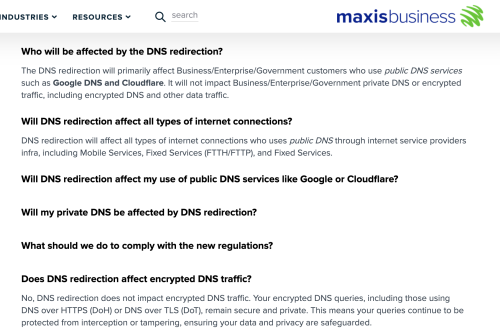
https://www.business.maxis.com.my/en/faq/da...ns-redirection/

Congrats TM
According to this, Maxis is not going to touch DoT DoH
They even push users to use encrypted DNS, Lmao
*
TM says we never touch DNS also, we just pinjam 8.8.8.8 (and 9999 & 1111) for awhile. smile.gif
soonwai
post Sep 5 2024, 02:08 AM


********
All Stars
11,456 posts

Joined: Oct 2007
From: KL


QUOTE(blackbox14 @ Sep 5 2024, 01:25 AM)
After some consideration I will take your word for it.

The events today with TM blocking Q9 and Cloudflare WARP makes me think they are actively monitoring LYF as one of their sources for things to block, so I'm wary of putting up anything they can use to block more methods.

Also the person did say that the DNS functioned as intended, which is the most important part. It's just that the resolvers are different when going through AWS.
*
I thought I read the same about Warp. Just gave it a try. OK working.
soonwai
post Sep 5 2024, 03:19 AM


********
All Stars
11,456 posts

Joined: Oct 2007
From: KL


QUOTE(blackbox14 @ Sep 5 2024, 02:26 AM)
Makes me think it's also a regional thing as some people already affected are reporting certain DNS providers working, DoH/DoT still working, while others are saying none of those work. The other thing is that it is hard to tell what is really functioning and what isn't because there are so many different configs that people use.

Interestingly, if the Maxis business page is true (and not just meant to reassure businesses), then the DoH and DoT blocking may not actually be part of MCMC guidelines, or just a special thing for TM Unifi as they are the biggest guy around.
*
It was raynman who posted about Warp and who's practically my neighbour. So geographically, if he kena, me too, I guess.

https://forum.lowyat.net/index.php?showtopi...ost&p=110389824

Yeah, TM seems have jumped into all this quite haphazardly. Not sure if that's by design or just being incompetently efficient. Have to say they did meet their goals of pushing 8888, 9999, 1111, etc... back to the Internet Stone Age.


14 Pages « < 6 7 8 9 10 > » Top
Topic ClosedOptions
 

Change to:
| Lo-Fi Version
0.0568sec    0.35    7 queries    GZIP Disabled
Time is now: 4th December 2025 - 07:17 PM