Outline ·
[ Standard ] ·
Linear+
Unifi Official TM UniFi High Speed Broadband Thread V42, READ 1ST PAGE FOR RELEVANT WIFI INFO!
|
soonwai
|
 Sep 3 2024, 03:16 PM Sep 3 2024, 03:16 PM
|

|
QUOTE(blackbox14 @ Sep 3 2024, 01:05 PM) The posters above answered that the only way to block DoH is by blocking the Domain and IP of the public DNS provider so no one can make queries. I understand if they blocked DoT by blocking the associated port, but how is it possible that they are blocking DoH AND DoT but only for specific users? Transparent Proxy should only apply if you are using neither DoT nor DoH, to my understanding. My house is using Adguard Home as the DNS. Upstream is DoH to quad9. No problems yet. I used to redirect UDP port 53 back to the local DNS to prevent devices from using their own DNS. That's all I know about this. Is this the equiv of transparent DNS proxy? This post has been edited by soonwai: Sep 3 2024, 03:19 PM |
|
|
|
|
|
soonwai
|
Sep 3 2024, 07:42 PM
|
|
|
QUOTE(blackbox14 @ Sep 3 2024, 06:50 PM) Yeah the ONU given to new SWU contractees is definitely suspect as some have said. Other factors could be the region (which state) and the IP address range. Hopefully more people experiencing this come forward and we can start seeing what they have in common. I'm FSU 2023/2024 not SWU. Still using the old Huawei ONT so it's probably not that. Likely region based before TM rolls it out fully. So far I've seen dns.google, dns.opendns.com and dns.cloudflare.com being "hijacked" and ports for DoH & DoT blocked. I'm in Kajang using ibse01.bgi. This post has been edited by soonwai: Sep 3 2024, 07:47 PM |
|
|
|
|
|
soonwai
|
Sep 3 2024, 07:54 PM
|
|
|
QUOTE(wai57 @ Sep 3 2024, 07:15 PM) Anyone's internet not able to go into iherb, torrent, XX stuffs despite using 8888 or 1111 dns anymore? I assume you meant "despite not using". Anyway my.iherb, murraywalker, pornhub all ok so far. When not using 8888 or 1111. This post has been edited by soonwai: Sep 3 2024, 07:56 PM |
|
|
|
|
|
soonwai
|
Sep 3 2024, 08:57 PM
|
|
|
QUOTE(blackbox14 @ Sep 3 2024, 07:49 PM) ... I may be wrong but they can't block the port for DoH, so they must be blocking the IP/domain/hostname or whatever you call it. DoT has a dedicated port so yeah, that can be blocked. Are you seeing posts about this on socmed or are you now affected as well? Not affected since I was using DoH but not Google nor Cloudflare. First read about it here a few days ago. Yeah, correct. DoH, as you already know, is using HTTPS port 443 so TM cannot blanket block that port so they just hijack a few of the popular DNS servers. For example, traffic to google 8.8.8.8 is rerouted to their own server. I see a few of the identifier strings has brf in them. Maybe Brickfields? |
|
|
|
|
|
soonwai
|
Sep 3 2024, 09:00 PM
|
|
|
QUOTE(issac99289928 @ Sep 3 2024, 08:14 PM) What is the most widely used DNS server? Some of the most popular free DNS servers include: Google DNS. OpenDNS. Cloudflare DNS. Quad9 DNS. smart ones use Quad9 DNS . understood ? Shhhh. Bet it gets hijacked in a jiffy. |
|
|
|
|
|
soonwai
|
Sep 3 2024, 09:05 PM
|
|
|
QUOTE(wai57 @ Sep 3 2024, 08:03 PM) Just tried the DoH on browser, nothing loads. As for my DNS, i was using 8.8.8.8, now changed to 1.1.1.1, restarted both times, changed back same same. Internet works except those websites that gahmen deemed haram. My router's DNS has always been 8.8.8.8 for years XD. It was fine last week visiting torrents sites. Now... all gone, just like when I was using unifi's DNS Yup, just checked with "8.8.8.8", the eleet to rrent site is going to 175.139.142.25 which is TM's DNS purgatory somewhere in Brickfields. |
|
|
|
|
|
soonwai
|
Sep 3 2024, 09:33 PM
|
|
|
QUOTE(blackbox14 @ Sep 3 2024, 09:24 PM) The way the block is implemented doesnt seem to be consistent either. The others from earlier said DoH quad9 doesnt work for them, and wai57 above said some of the sites you can go to just fine are blocked for him. Ya weird, maybe caching. But here Quad9 working with ml.iherb.com. IP addresses should 172.64.149.245 & 104.18.38.11. wai57 try a bit later, see if you access https://ml.iherb.com. |
|
|
|
|
|
soonwai
|
Sep 3 2024, 09:34 PM
|
|
|
QUOTE(tng55 @ Sep 3 2024, 09:32 PM) me no issue i can access xx stuff and torrent without problem i set my own router 8888 google dns works fine Which area are you in? |
|
|
|
|
|
soonwai
|
Sep 3 2024, 09:59 PM
|
|
|
QUOTE(tng55 @ Sep 3 2024, 09:39 PM) See got any other Penang ppl affected yet. Pls report in. Those affected so far, are you all in Klang Valley? |
|
|
|
|
|
soonwai
|
Sep 3 2024, 10:01 PM
|
|
|
QUOTE(Pip_X @ Sep 3 2024, 09:54 PM) Seems dns over https set on chrome / edge dont work too. I guess the easiest free way is now with Cloudflare Warp VPN. DoH in Chrome/Edge with which server? Update: LOL, TM hijacked cleanbrowsing DNS also. Looks like when they needed a guide on what to hijack, they looked at Chrome's Settings. hahaha Chrome has Google, OpenDNS, Cloudflare and CleanBrowsing as predefined options for DoH. This post has been edited by soonwai: Sep 3 2024, 10:06 PM |
|
|
|
|
|
soonwai
|
Sep 3 2024, 10:34 PM
|
|
|
QUOTE(PRSXFENG @ Sep 3 2024, 10:27 PM) So that's how Quad9 got by unaffected  now u jinxed it. :-) Anyway: Cleanbrowsing-Family kena kaw kaw. Cleanbrowsing-Adult only 1 of 2 IPs kena. Cleanbrowsing-Security not affected. |
|
|
|
|
|
soonwai
|
Sep 3 2024, 10:52 PM
|
|
|
QUOTE(Quantum Geist @ Sep 3 2024, 10:33 PM) Yours getting hijacked? How does it look like? dns respond from tm server instead of cleanbrowsing when tracert? or the browser drop the dns answers because dnssec not matching? At the moment, I'm just looking at the answers, if 175.139.142.25, the IP that TM returns for blocked sites then confirm the DNS has been hijacked. For CleanBrowsing-Adult, the DNS IPs are 185.228.168.10 & 185.228.168.11. 10 is hijacked and 11 is not. (Of course, don't test with adult sites since they are blocked by this DNS) 10 has a ping of 4ms while 11 has a ping of 70ms. I bet a traceroute will show that 10 never goes out of TM's network. 11 goes to SG, I think. This post has been edited by soonwai: Sep 3 2024, 10:52 PM |
|
|
|
|
|
soonwai
|
Sep 3 2024, 11:08 PM
|
|
|
QUOTE(countingcrows @ Sep 3 2024, 10:49 PM) It's not blocked for me. Using naked non-DOH plain jane 8.8.8.8 can still access iherb no problem. Are you in a location other Klang Valley? TNG55 in Penang not affected. Seems like only certain regions for now. Anyway for me, Kajang: dig ml.iherb.com @8.8.8.8 returns 175.139.142.25 Legit IPs should be: 172.64.149.245 104.18.38.11 QUOTE(dev/numb @ Sep 3 2024, 10:56 PM) They just don’t deem it “evil” enough to hijack/redirect 8.8.8.8 queries. Not “evil” like Uncle Murray who they deem enemy of the state for some reason.. You can try turning off 8.8.8.8 and using ISP DNS and see if it loads. I know during the height of Covid it wouldn’t load under TM’s own DNS. But after iHerb created a ml.iherb domain for us I’m not sure if any alternative DNS was ever truly needed. TM not just hijacking DNS queries though. They're rerouting & NATting 8.8.8.8 to their own server. Go to https://8.8.8.8 and you can see their dns.tm.net.my SSL cert. This post has been edited by soonwai: Sep 3 2024, 11:21 PM |
|
|
|
|
|
soonwai
|
Sep 3 2024, 11:45 PM
|
|
|
QUOTE(PJng @ Sep 3 2024, 11:38 PM) just know got another DNS, so far i tested now, before this all the time using 1.1.1.1 DNS, cannot load murray site, DNS leak test all show TM i change to quad9 DNS, can load murray site and above iherb, and DNS leak test  yes i using windows 11, ON auto template DNS over HTTPS (this what you all say DoH right?) Yup, same as me. I use Q9. I suspect Quad9 also will be gone soon. |
|
|
|
|
|
soonwai
|
Sep 3 2024, 11:58 PM
|
|
|
Another way to check is to go to https://dns.google. Nothing to do with DNS queries here. If All your 8888s are belongs to TM, you'll see this: 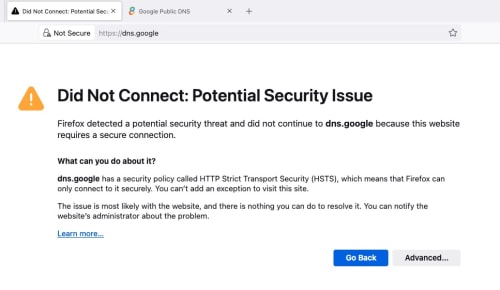 You can also click Advanced to look at the SSL cert. If A-OK then: 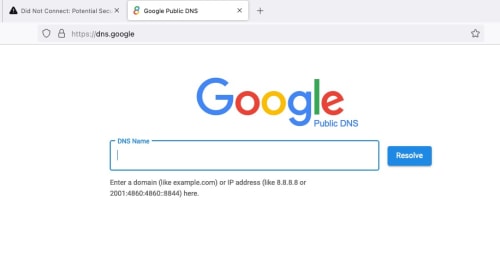 *Using Firefox. This post has been edited by soonwai: Sep 3 2024, 11:59 PM |
|
|
|
|
|
soonwai
|
Sep 4 2024, 12:06 AM
|
|
|
QUOTE(countingcrows @ Sep 3 2024, 11:34 PM) Ya, PJ, Klang Valley. 104.18.38.11 So far we got: Kajang ❌❌ Kuching ✅ Penang ✅ PJ ✅✅ This post has been edited by soonwai: Sep 4 2024, 01:18 AM |
|
|
|
|
|
soonwai
|
Sep 4 2024, 12:24 AM
|
|
|
QUOTE(karenzayn @ Sep 4 2024, 12:11 AM) Uh, quick question Do i run dig on a DoH or non-DoH enviroment? Doesn't really matter, both also can. If dig @8.8.8.8, it's going to query the legit 8.8.8.8 or TM's 8.8.8.8 if you're affected by TM's shenanigans. If just dig, it will use whatever you have already setup, DoH or not, whether it's on your PC, router or your DNS server like Adguard Home or Pihole. |
|
|
|
|
|
soonwai
|
Sep 4 2024, 12:48 AM
|
|
|
Here's a porn site: www.porno hammer.com (remove space, don't click, for research purposes only)
• that is blocked by the legit Cleanbrowsing-Adult (185.228.168.11)
• but enabled by TM's hijacked Cleanbrowsing-Adult (185.228.168.10).
So if you're using Cleanbrowsing-adult, TM just gave your kids a free porn site.
*Now to explain to my wife why I'm browsing porn sites in the middle of the night.
|
|
|
|
|
|
soonwai
|
Sep 4 2024, 12:56 AM
|
|
|
QUOTE(karenzayn @ Sep 4 2024, 12:35 AM) Kuching w/ CF DoH Active AC name: ibse01.kch 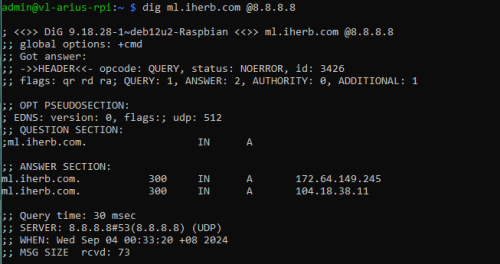 Kuching looks OK |
|
|
|
|
|
soonwai
|
Sep 4 2024, 01:23 AM
|
|
|
QUOTE(olivur @ Sep 4 2024, 01:06 AM) loads for now pj klang valley ... QUOTE(HayateAyakasi8 @ Sep 4 2024, 01:09 AM) Am on SWU 3.0, using Fiberhome modem (not combo). Public IP. Checked DNS leak test and working as expected. Went to https://one.one.one.one/help/ and tested to see DoT and DNS working DoT on ASUS router via Cloudflare and Google DNS working fine, checked those restricted websites and also seems to be working fine so far. Seremban, Negeri Sembilan PJ ok, Seremban OK. So far only me & raynman in Kajang kena. Maybe because TM need to demo to Anwar at his house in Sg Long. Kajang ❌❌ Kuching ✅ Penang ✅ PJ ✅✅✅ Seremban ✅ |
|
|
|
|



 Quote
Quote
 0.0260sec
 0.68
0.68
 7 queries
 GZIP Disabled