Welcome Guest ( Log In | Register )

Bump Topic Topic Closed RSS Feed
11 Pages « < 6 7 8 9 10 > » Bottom

Outline · [ Standard ] · Linear+

Unifi Official TM UniFi High Speed Broadband Thread V42, READ 1ST PAGE FOR RELEVANT WIFI INFO!

views
     
go626201
post Feb 11 2025, 11:03 PM

Regular
******
Senior Member
1,882 posts

Joined: Sep 2017
QUOTE(kwss @ Feb 11 2025, 11:00 PM)
Just a hunch. If you put back the old ONU, does the problem go away?
I find it hard to believe TM BNG is this shitty because they are selling L3 services to all ISP, using the same BNG.
*
Good question,let me test it midnight later. notworthy.gif
I thought GN630V 2.5G is better than crap Dlink black 2.5G combo box.
So i ask for it. doh.gif
go626201
post Feb 12 2025, 02:44 AM

Regular
******
Senior Member
1,882 posts

Joined: Sep 2017
QUOTE(kwss @ Feb 12 2025, 02:20 AM)
go626201
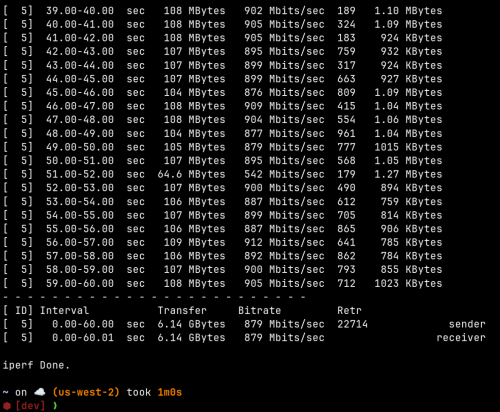
I decided to do the same experiment myself but using AWS and iperf3.
Server: iperf3 -s -p 60000
Client: iperf3 -c 2406:da10:<snip> -p 60000 -t 60 -b 910M
I use 910M to simulate QoS without actually having any QoS on my router. It shouldn't matter as I am testing upstream.
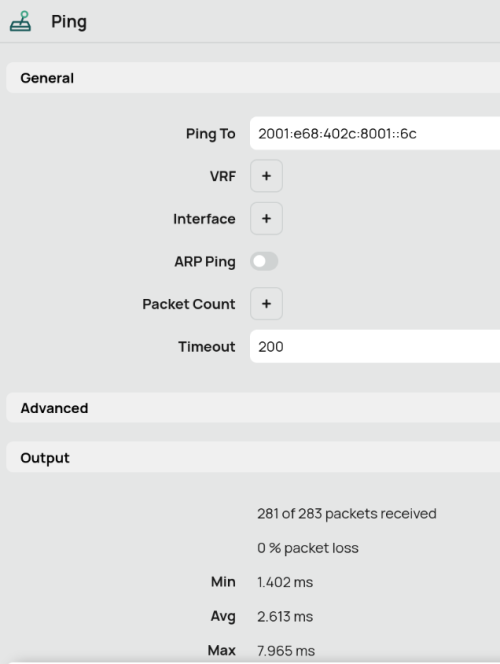
With 5 ping/sec, it is a lot denser than your current 1 ping/sec.

I only started the ping after the upload speed shoot past 900Mbps and hit Stop right when it stopped. So it is not measuring idle internet.
Total ping packet: 283
Only 2 packets exceeded 200ms and timeout.
Worst case 7.965ms with average 2.613ms

user posted image

user posted image

Full run client:
» Click to show Spoiler - click again to hide... «


Full run server:
» Click to show Spoiler - click again to hide... «

*
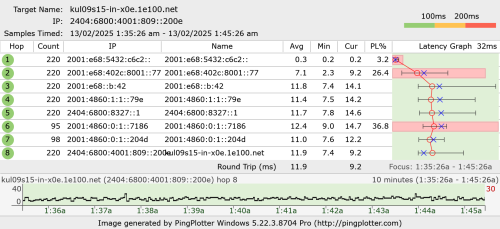
I just restart all my device including RPi,and kill some of the ipv6 connection. Now the connection is abit better,let me observe tomorrow 1st and see. Thanks for helping.
Although spikes still occurs but not 400ms or above is an improvement for now.

user posted image

This post has been edited by go626201: Feb 12 2025, 02:46 AM
go626201
post Feb 12 2025, 05:06 PM

Regular
******
Senior Member
1,882 posts

Joined: Sep 2017
QUOTE(kwss @ Feb 12 2025, 04:03 PM)
You might not like to hear it but I kind of sus your Mikrotik is broken. Either physically broken or you configured it wrongly.
Look at all the packet loss you have on your Mikrotik. It is abnormally high. I launch a ping flood on mine and it is 0 packet lost.

Maybe try swapping out network cable as a start. Then configure your ONR as router and try it out.
If you have a switch or anything in between your device and Mikrotik, they are automatic a sus too.

EDIT:
I just pulled a fast ping on you. Assuming you didn't disconnect and your Mikrotik is still using the same IPv6 address, it is looking good. So the problem is internal to your house.

user posted image
*
Emm,yesterday i tried to switch to ether2(I was using for few years with 800M),and line better again.
But after that i switch back to ether1(2.5G port) with another Ugreen Cat 8 cable,and came out with the last screenshot result that posted midnight.

I am partially agree with your assumption about the RB5009 Ether1(2.5G) or Ethernet cable(which already use with 100M-800M plan for 5years).

I might get another new proper shorter Cat6A cable to replace the Ugreen Cat8 cable,as it is very tough to bend for the curve to placing.
Let me observe for another few days. Maybe the previous problem is causing be the cable aging and poor contact while replacing the new ONR.

And last,thanks for helping me to find the problem.

This post has been edited by go626201: Feb 12 2025, 05:11 PM
go626201
post Feb 12 2025, 09:27 PM

Regular
******
Senior Member
1,882 posts

Joined: Sep 2017
QUOTE(kwss @ Feb 12 2025, 05:32 PM)
I am just curious, how do you get more than 1gig when the rb5009 only have one 2.5gig port?
Are you using the SFP+ port or you MLAG 2x1gig to a switch?

Based on my ping test, everything from your ONU to Mikrotik is fine. In fact I get better result pinging from far away than you pinging your own router.
Just focus on everything that goes from Mikrotik to your internal network.
*
I using SFP+ with 2.5G switch(SFP+ connected). Ether1(2.5G) connected to GN630V 2.5G Port.
Just now i try to tinkering again,and there are still having some small issue but not longer with uploading file with high speed.
As i mention before,i always have some similar issue with torrenting (With low speed torrenting,mean speed never hit more than 50-100mbps).

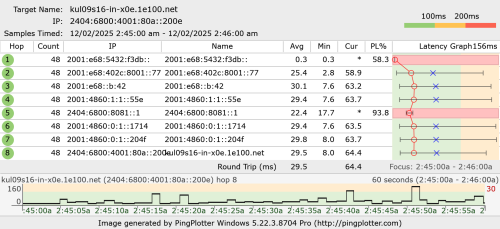
Below is my latest pingplotter result with torrenting and uploading at the same time and 517M limit.
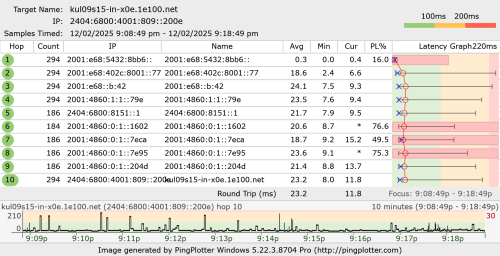
user posted image

user posted image

You can try to ping test to my ipv6 address again now. (I restart my router again just now,now didn't see 800ms spikes anymore which is a big improvement,but torrenting causing small spikes-40ms now)
I just tried with my SG VPS,and seeing similar latency spikes connected to my unifi ipv6.
user posted image

Which i still believe the problem is causing by Unifi QoS rule. (connection number limit?,my torrenting connection less than 100 connection only)
I having this torrenting issue for few years already,thats why 75% of my smokeping that having very short time of spikes that only occurs once or twice per month might due to my pc running torrenting.

Without torrenting and before FSU,99% of time is totally latency fine.

Edited:Added a mikrotik firewall connection screenshot of total connection number IPv4 and IPv6. (at least half of of connection used for smokeping)
user posted image

This post has been edited by go626201: Feb 12 2025, 09:39 PM

go626201
post Feb 12 2025, 11:25 PM

Regular
******
Senior Member
1,882 posts

Joined: Sep 2017
QUOTE(kwss @ Feb 12 2025, 10:37 PM)
go626201
Fast ping result:
CODE

--- 2001:e68:5432:8bb6:: ping statistics ---
15374 packets transmitted, 15373 received, 0.00650449% packet loss, time 492368ms
rtt min/avg/max/mdev = 7.860/37.606/158.960/36.281 ms, pipe 10, ipg/ewma 32.028/46.030 ms

It is pretty decent.

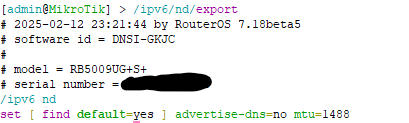
Can you get me the following output from your Mikrotik?
CODE

/ipv6/nd/export


Also from 7.18 changelog:
CODE
*) queue - prevent CAKE bandwidth config from potentially causing lost connectivity to a device;


Maybe you want to give my cake QoS another go and see if it helps?
*
QUOTE(kwss @ Feb 12 2025, 11:11 PM)
Testing Unifi 2Gbps reserved bandwidth.
Since I found out the latency and jitter is so much more amazing compared to 1Gbps package, lets find out how much reserved bandwidth I actually have. Reserved bandwidth here means I get absolutely zero packet retransmit at a given transmission rate.

The test is using iperf3 udp packet test and see how much we can stream without a missing packet. Once we are past equilibrium, there should be zero packet drop. That is our reserved bandwidth.

Test at 600Mbps
CODE

[ ID] Interval           Transfer     Bitrate         Jitter    Lost/Total Datagrams
[  5]   0.00-1.00   sec  65.6 MBytes   549 Mbits/sec  0.030 ms  4199/53021 (7.9%)  
[  5]   1.00-2.00   sec  71.5 MBytes   600 Mbits/sec  0.020 ms  0/53275 (0%)  
[  5]   2.00-3.00   sec  71.5 MBytes   600 Mbits/sec  0.028 ms  0/53268 (0%)  
[  5]   3.00-4.00   sec  71.5 MBytes   600 Mbits/sec  0.033 ms  0/53266 (0%)  
[  5]   4.00-5.00   sec  71.5 MBytes   600 Mbits/sec  0.032 ms  0/53260 (0%)  
[  5]   5.00-6.00   sec  71.5 MBytes   600 Mbits/sec  0.025 ms  0/53279 (0%)  
[  5]   6.00-7.00   sec  71.5 MBytes   600 Mbits/sec  0.033 ms  0/53252 (0%)  
[  5]   7.00-8.00   sec  71.5 MBytes   600 Mbits/sec  0.040 ms  0/53272 (0%)  
[  5]   8.00-9.00   sec  71.5 MBytes   600 Mbits/sec  0.022 ms  0/53271 (0%)  
[  5]   9.00-10.00  sec  71.5 MBytes   600 Mbits/sec  0.033 ms  4/53268 (0.0075%)  
[  5]  10.00-10.01  sec   268 KBytes   512 Mbits/sec  0.013 ms  0/195 (0%)  
- - - - - - - - - - - - - - - - - - - - - - - - -
[ ID] Interval           Transfer     Bitrate         Jitter    Lost/Total Datagrams
[  5]   0.00-10.01  sec   710 MBytes   595 Mbits/sec  0.013 ms  4203/532627 (0.79%)  receiver
-----------------------------------------------------------


Test at 700Mbps
CODE

[ ID] Interval           Transfer     Bitrate         Jitter    Lost/Total Datagrams
[  5]   0.00-1.00   sec  74.7 MBytes   626 Mbits/sec  0.024 ms  6201/61868 (10%)  
[  5]   1.00-2.00   sec  83.5 MBytes   700 Mbits/sec  0.010 ms  9/62159 (0.014%)  
[  5]   2.00-3.00   sec  83.4 MBytes   700 Mbits/sec  0.011 ms  9/62142 (0.014%)  
[  5]   3.00-4.00   sec  83.4 MBytes   700 Mbits/sec  0.011 ms  2/62144 (0.0032%)  
[  5]   4.00-5.00   sec  83.4 MBytes   700 Mbits/sec  0.013 ms  14/62149 (0.023%)  
[  5]   5.00-6.00   sec  83.4 MBytes   700 Mbits/sec  0.009 ms  17/62149 (0.027%)  
[  5]   6.00-7.00   sec  83.4 MBytes   700 Mbits/sec  0.026 ms  10/62128 (0.016%)  
[  5]   7.00-8.00   sec  83.4 MBytes   700 Mbits/sec  0.011 ms  12/62155 (0.019%)  
[  5]   8.00-9.00   sec  83.4 MBytes   700 Mbits/sec  0.032 ms  3/62131 (0.0048%)  
[  5]   9.00-10.00  sec  83.4 MBytes   700 Mbits/sec  0.025 ms  7/62149 (0.011%)  
[  5]  10.00-10.00  sec   311 KBytes   656 Mbits/sec  0.011 ms  0/226 (0%)  
- - - - - - - - - - - - - - - - - - - - - - - - -
[ ID] Interval           Transfer     Bitrate         Jitter    Lost/Total Datagrams
[  5]   0.00-10.00  sec   826 MBytes   693 Mbits/sec  0.011 ms  6284/621400 (1%)  receiver


Since we are having some drop at 700M, let's try 650M
CODE

[ ID] Interval           Transfer     Bitrate         Jitter    Lost/Total Datagrams
[  5]   0.00-1.00   sec  70.1 MBytes   588 Mbits/sec  0.010 ms  5239/57428 (9.1%)  
[  5]   1.00-2.00   sec  77.6 MBytes   650 Mbits/sec  0.008 ms  0/57755 (0%)  
[  5]   2.00-3.00   sec  77.4 MBytes   650 Mbits/sec  0.011 ms  3/57657 (0.0052%)  
[  5]   3.00-4.00   sec  76.9 MBytes   645 Mbits/sec  0.017 ms  441/57740 (0.76%)  
[  5]   4.00-5.00   sec  77.5 MBytes   650 Mbits/sec  0.017 ms  0/57717 (0%)  
[  5]   5.00-6.00   sec  77.5 MBytes   650 Mbits/sec  0.015 ms  0/57694 (0%)  
[  5]   6.00-7.00   sec  77.5 MBytes   650 Mbits/sec  0.015 ms  0/57710 (0%)  
[  5]   7.00-8.00   sec  77.5 MBytes   650 Mbits/sec  0.025 ms  0/57698 (0%)  
[  5]   8.00-9.00   sec  77.5 MBytes   650 Mbits/sec  0.012 ms  0/57726 (0%)  
[  5]   9.00-10.00  sec  77.5 MBytes   650 Mbits/sec  0.015 ms  0/57697 (0%)  
[  5]  10.00-10.00  sec   264 KBytes   581 Mbits/sec  0.011 ms  0/192 (0%)  
- - - - - - - - - - - - - - - - - - - - - - - - -
[ ID] Interval           Transfer     Bitrate         Jitter    Lost/Total Datagrams
[  5]   0.00-10.00  sec   767 MBytes   643 Mbits/sec  0.011 ms  5683/577014 (0.98%)  receiver


Conclusion:
The price I get for my 2Gbps is equivalent to a 600-650Mbps leased line.
*
user posted image
About cake i will try it later or tomorrow.
Can i know what command that you using with iperf3?
I got 10+ SG VPS can test with it and i will screenshot some that can hit more than 500mbps.
go626201
post Feb 12 2025, 11:31 PM

Regular
******
Senior Member
1,882 posts

Joined: Sep 2017
QUOTE(kwss @ Feb 12 2025, 11:28 PM)
It is:
iperf3 -c 2406:da10:8a99:4e02:cc0a:6fc7:2359:aae7 -u -b 650M

Can you verify the MTU you configured in your ND advertisement is the same as the MTU in your PPPoE client status? 1488 is a weird number for RouterOS
*
Yes 1488,because i cant get 1492 with unifi. and the default from unifi is 1480.
go626201
post Feb 12 2025, 11:51 PM

Regular
******
Senior Member
1,882 posts

Joined: Sep 2017
QUOTE(kwss @ Feb 12 2025, 11:28 PM)
It is:
iperf3 -c 2406:da10:8a99:4e02:cc0a:6fc7:2359:aae7 -u -b 650M

Can you verify the MTU you configured in your ND advertisement is the same as the MTU in your PPPoE client status? 1488 is a weird number for RouterOS
*
Iperf3 with UDP -b 480M
This is get from the VPS that unifi upload send to the VPS.

VPS1
CODE
[ ID] Interval           Transfer     Bitrate         Jitter    Lost/Total Datagrams
[  5]   0.00-1.00   sec  44.5 MBytes   374 Mbits/sec  0.025 ms  5384/38095 (14%)
[  5]   1.00-2.00   sec  52.5 MBytes   441 Mbits/sec  0.018 ms  86/38662 (0.22%)
[  5]   2.00-3.00   sec  51.2 MBytes   429 Mbits/sec  0.018 ms  194/37779 (0.51%)
[  5]   3.00-4.00   sec  51.5 MBytes   432 Mbits/sec  0.035 ms  3347/41152 (8.1%)
[  5]   4.00-5.00   sec  50.1 MBytes   420 Mbits/sec  0.040 ms  5170/41942 (12%)
[  5]   5.00-6.00   sec  50.9 MBytes   427 Mbits/sec  0.028 ms  4676/42054 (11%)
[  5]   6.00-7.00   sec  51.2 MBytes   430 Mbits/sec  0.043 ms  4539/42147 (11%)
[  5]   7.00-8.00   sec  50.1 MBytes   420 Mbits/sec  0.019 ms  5120/41911 (12%)
[  5]   8.00-9.00   sec  51.0 MBytes   428 Mbits/sec  0.039 ms  4644/42077 (11%)
[  5]   9.00-10.00  sec  51.9 MBytes   435 Mbits/sec  0.018 ms  3891/42003 (9.3%)
[  5]  10.00-10.06  sec  2.00 MBytes   300 Mbits/sec  0.057 ms  1043/2513 (42%)
- - - - - - - - - - - - - - - - - - - - - - - - -
[ ID] Interval           Transfer     Bitrate         Jitter    Lost/Total Datagrams
[SUM]  0.0-10.1 sec  23 datagrams received out-of-order
[  5]   0.00-10.06  sec   507 MBytes   423 Mbits/sec  0.057 ms  38094/410335 (9.3%)  receiver


VPS2
CODE
[ ID] Interval           Transfer     Bitrate         Jitter    Lost/Total Datagrams
[  5]   0.00-1.00   sec  45.0 MBytes   378 Mbits/sec  0.020 ms  7741/40792 (19%)
[  5]   1.00-2.00   sec  56.9 MBytes   477 Mbits/sec  0.021 ms  330/42107 (0.78%)
[  5]   2.00-3.00   sec  56.8 MBytes   477 Mbits/sec  0.017 ms  290/42024 (0.69%)
[  5]   3.00-4.00   sec  54.3 MBytes   456 Mbits/sec  0.017 ms  64/39964 (0.16%)
[  5]   4.00-5.00   sec  52.7 MBytes   442 Mbits/sec  0.035 ms  247/38948 (0.63%)
[  5]   5.00-6.00   sec  53.5 MBytes   449 Mbits/sec  0.349 ms  427/39697 (1.1%)
[  5]   6.00-7.00   sec  54.2 MBytes   455 Mbits/sec  0.015 ms  805/40608 (2%)
[  5]   7.00-8.00   sec  53.6 MBytes   449 Mbits/sec  0.020 ms  1888/41229 (4.6%)
[  5]   8.00-9.00   sec  54.3 MBytes   455 Mbits/sec  0.017 ms  2235/42073 (5.3%)
[  5]   9.00-10.00  sec  53.7 MBytes   451 Mbits/sec  0.026 ms  2572/42024 (6.1%)
[  5]  10.00-10.02  sec  1.14 MBytes   483 Mbits/sec  0.017 ms  25/860 (2.9%)
- - - - - - - - - - - - - - - - - - - - - - - - -
[ ID] Interval           Transfer     Bitrate         Jitter    Lost/Total Datagrams
[SUM]  0.0-10.0 sec  195 datagrams received out-of-order
[  5]   0.00-10.02  sec   536 MBytes   449 Mbits/sec  0.017 ms  16624/410326 (4.1%)  receiver


go626201
post Feb 12 2025, 11:56 PM

Regular
******
Senior Member
1,882 posts

Joined: Sep 2017
QUOTE(hsbb @ Feb 12 2025, 11:53 PM)
Yes. 1480 is default MTU for PPPoE over fiber.
*
I though MTU1492 is the default one?
Soonwai's thread wrote something about it before.
https://forum.lowyat.net/topic/4206500

Edited:
Add another link
https://community.fortinet.com/t5/FortiGate...iFi/ta-p/196973

This post has been edited by go626201: Feb 12 2025, 11:58 PM
go626201
post Feb 13 2025, 12:22 AM

Regular
******
Senior Member
1,882 posts

Joined: Sep 2017
QUOTE(kwss @ Feb 13 2025, 12:06 AM)
Are you testing it on a quiet network? As in at least your torrent is not running.
You need to keep lowering the Mbps until you see 0 in at least half the row.

Anyway this test is end to end... Meaning from your house all the way to VPS. It will show the lowest reserved bandwidth along the path.
*
Second test with all 0% lost. (Torrent off)

VPS1
CODE
[ ID] Interval           Transfer     Bitrate         Jitter    Lost/Total Datagrams
[  5]   0.00-1.00   sec  15.3 MBytes   129 Mbits/sec  0.054 ms  0/11271 (0%)
[  5]   1.00-2.00   sec  16.6 MBytes   139 Mbits/sec  0.086 ms  0/12180 (0%)
[  5]   2.00-3.00   sec  16.6 MBytes   139 Mbits/sec  0.045 ms  0/12174 (0%)
[  5]   3.00-4.00   sec  16.6 MBytes   139 Mbits/sec  0.054 ms  0/12156 (0%)
[  5]   4.00-5.00   sec  16.6 MBytes   139 Mbits/sec  0.095 ms  0/12169 (0%)
[  5]   5.00-6.00   sec  16.6 MBytes   139 Mbits/sec  0.088 ms  0/12163 (0%)
[  5]   6.00-7.00   sec  16.6 MBytes   139 Mbits/sec  0.061 ms  0/12168 (0%)
[  5]   7.00-8.00   sec  16.6 MBytes   139 Mbits/sec  0.045 ms  0/12178 (0%)
[  5]   8.00-9.00   sec  16.6 MBytes   139 Mbits/sec  0.048 ms  0/12162 (0%)
[  5]   9.00-10.00  sec  16.6 MBytes   139 Mbits/sec  0.060 ms  0/12174 (0%)
[  5]  10.00-10.06  sec  1.01 MBytes   135 Mbits/sec  0.063 ms  0/742 (0%)
- - - - - - - - - - - - - - - - - - - - - - - - -
[ ID] Interval           Transfer     Bitrate         Jitter    Lost/Total Datagrams
[SUM]  0.0-10.1 sec  11 datagrams received out-of-order
[  5]   0.00-10.06  sec   166 MBytes   138 Mbits/sec  0.063 ms  0/121537 (0%)  receiver


VPS2
CODE
[ ID] Interval           Transfer     Bitrate         Jitter    Lost/Total Datagrams
[  5]   0.00-1.00   sec  15.5 MBytes   130 Mbits/sec  0.452 ms  0/11396 (0%)
[  5]   1.00-2.00   sec  16.0 MBytes   134 Mbits/sec  0.247 ms  0/11731 (0%)
[  5]   2.00-3.00   sec  16.0 MBytes   134 Mbits/sec  0.447 ms  0/11725 (0%)
[  5]   3.00-4.00   sec  16.0 MBytes   134 Mbits/sec  0.049 ms  0/11764 (0%)
[  5]   4.00-5.00   sec  15.9 MBytes   134 Mbits/sec  0.222 ms  0/11704 (0%)
[  5]   5.00-6.00   sec  16.0 MBytes   134 Mbits/sec  0.091 ms  0/11730 (0%)
[  5]   6.00-7.00   sec  16.0 MBytes   134 Mbits/sec  0.049 ms  0/11735 (0%)
[  5]   7.00-8.00   sec  16.0 MBytes   134 Mbits/sec  0.094 ms  0/11733 (0%)
[  5]   8.00-9.00   sec  16.0 MBytes   134 Mbits/sec  0.089 ms  0/11717 (0%)
[  5]   9.00-10.00  sec  16.0 MBytes   134 Mbits/sec  0.049 ms  0/11752 (0%)
[  5]  10.00-10.02  sec   350 KBytes   131 Mbits/sec  0.051 ms  0/251 (0%)
- - - - - - - - - - - - - - - - - - - - - - - - -
[ ID] Interval           Transfer     Bitrate         Jitter    Lost/Total Datagrams
[SUM]  0.0-10.0 sec  6 datagrams received out-of-order
[  5]   0.00-10.02  sec   160 MBytes   134 Mbits/sec  0.051 ms  0/117238 (0%)  receiver


And the strange part is i start getting disconnect from unifi multiple time started yesterday and just now once.

This post has been edited by go626201: Feb 13 2025, 12:25 AM
go626201
post Feb 13 2025, 12:38 AM

Regular
******
Senior Member
1,882 posts

Joined: Sep 2017
QUOTE(kwss @ Feb 13 2025, 12:26 AM)
This is the most conservative. You can bump it up until you only get packet drop at the beginning.
It also depends on what's your VPS peering policy. AWS and Equinix has a policy they will never use more than 50% of any link. That means if you test against them, you will surely hit your ISP or any intermediary AS limit first.
Mileage vary, just like leased line. They only guarantee you for that endpoint.
*
My VPS1 is 10G port,and VPS2 is 1G port...
I have other VPS but didn't install iperf3,if needed will install later to test.

I dont think this bandwidth test can prove anything about my problem,but for what you said dedicate distribute bandwidth yes,i agree. It might possible.

I really think something wrong between my unifi to TM local exchange centre.
I already having disconnect from unifi twice after 12am.
go626201
post Feb 13 2025, 12:40 AM

Regular
******
Senior Member
1,882 posts

Joined: Sep 2017
QUOTE(hsbb @ Feb 13 2025, 12:35 AM)
IPsec will fragmented packet data when over 1500bytes if you use VPN because it add extra data for encryption & make bigger size than original. You can see different ping result if compare by vpn or not by vpn.
*
I didn't use VPN,as the problem is on pure unifi without VPN.
It might be temp fix with VPN,but i want to know what the real problem for this issue,and try to mitigate without VPN.
And if really causing by TM,i will report to them to ask them to fix it.
go626201
post Feb 13 2025, 12:42 AM

Regular
******
Senior Member
1,882 posts

Joined: Sep 2017
QUOTE(kwss @ Feb 13 2025, 12:40 AM)
go626201
Now only I see your updated post about disconnection.
You mean in your PPPoE client you see the count increase?
Not sure if your ONU has this function where it will show you all the VLAN uptime. Try to check it out and match if the ONU cut off.
Nokia ONU, for example, will drop the Ethernet if it loses O5 Operational status. Not sure if your ONU also implement this. You can check your Mikrotik log to see if the Ethernet drop.
*
PPPoE client show the number yes.
I can access GN630V web panel,but i dont think there is a stat counter for connect or disconnect.
Ethernet didn't drop,as i check the mikrotik log show twice tonight after 12am. (No ethernet drop)
user posted image

user posted image

user posted image

Got one GPON Uptime on second picture.

This post has been edited by go626201: Feb 13 2025, 12:46 AM
go626201
post Feb 13 2025, 12:49 AM

Regular
******
Senior Member
1,882 posts

Joined: Sep 2017
QUOTE(kwss @ Feb 13 2025, 12:46 AM)
Well I am not sure about your ONU. If you disconnect, I say just open a report.
But you really need to be persistent to have them look into it.

What's your current fiber reading?

Also I realize whenever TM want to perform maintenance work, they will do it past midnight, which is now. If you only disconnect after midnight, you can just monitor it for a few days.
*
Normally maintenance work at my area will just cut off the line for few hours. I never see TM just disconnect and reconnect in seconds for maintenance at my area.

Fiber reading showed on the picture.
go626201
post Feb 13 2025, 12:58 AM

Regular
******
Senior Member
1,882 posts

Joined: Sep 2017
QUOTE(kwss @ Feb 13 2025, 12:51 AM)
go626201
Reading is within spec. If the uptime really means it stays O5, that means it is not L2 problem for your disconnect.
However, I notice you have HEC error, although the number is small. Should be zero in a perfectly fine network. Maybe you monitor this number and see how many counts it increases every 24 hours, or any time of day where it increases the fastest.

EDIT:
Did you restart you ONU after you swap your network cable? I still see all the error counts for your LAN

EDIT 2:
Check all your Mikrotik interface status / statistic for error too.
*
Yes,the uptime restart this evening,that i replace the cable again with another cable.
you mean which interface? pppoe vlan500 or the wan port interface?

user posted image user posted image

user posted imageuser posted image


This post has been edited by go626201: Feb 13 2025, 01:03 AM
go626201
post Feb 13 2025, 01:17 AM

Regular
******
Senior Member
1,882 posts

Joined: Sep 2017
QUOTE(kwss @ Feb 13 2025, 01:03 AM)
In the first screenshot under Ethernet. You can see there's still some serious number of error. This is your RJ45 cable error

In second screenshot, last line. That is the fiber error.

EDIT:
Maybe reboot your ONU again and see if the error come back.
Seems weird Mikrotik didn't register any error but the ONU did.

EDIT 2:
Did you try your old ONU again?
*
Emm 3 different cable all showing error?
1 Non-brand(5e), 1 Ugreen(Cat 8), 1 Vention(Cat6/7/8 not sure).
I dont think cable fault,as i use for so long time with non-brand one,and never have so serious issue.

ONU already restart few time today.

This evening got swap back,but after few min i swap back to new ONU.later i will try to swap again.

Edited:
And i disconnect again just now from unifi...

This post has been edited by go626201: Feb 13 2025, 01:19 AM
go626201
post Feb 13 2025, 01:23 AM

Regular
******
Senior Member
1,882 posts

Joined: Sep 2017
QUOTE(kwss @ Feb 13 2025, 01:20 AM)
The thing is we just discovered your ONU is registering error.
We never check this before. So now when you swap cable, you gotta look out for this number.
Also check if your old ONU is registering any error.

Can you check your Mikrotik interface connecting to the ONU, is Flow Control OFF?

EDIT:
Which cable are you using now? Maybe stick to Ugreen and see how?
*
I just swap to old ONU,and yes flow control 1000% off.i check before.
Now using Ugreen again.
old ONU cant check detail,for ALCT I240G-T.
go626201
post Feb 13 2025, 01:34 AM

Regular
******
Senior Member
1,882 posts

Joined: Sep 2017
QUOTE(hsbb @ Feb 13 2025, 01:30 AM)
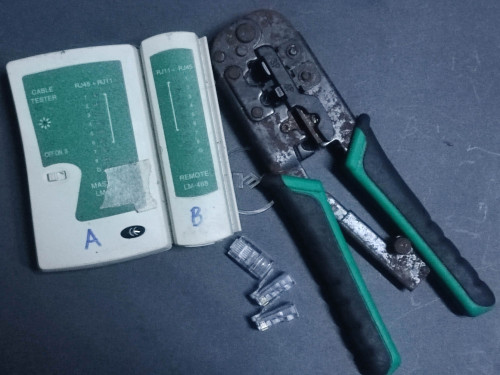
You need this to play around with LAN cable. RJ45 header pin can can easily worn out if always plug & play.

user posted image
*
I actually got this tester one. cool2.gif
But i dont think all cable is broken,as the branded 2 only use a few time only. Ugreen one just taken from TV and AP.
Vention one just use for sometime testing.

QUOTE(kwss @ Feb 13 2025, 01:31 AM)
I think he need a professional Fluke Network Cable Tester. The one that came with calibration certificate
bruce.gif
*
Fluke too expensive cant lah... brows.gif

And the quick update:
No seeing latency spikes so far with the old ONU. doh.gif
Whether i spam full upload or not.
With GN630V,as i only upload to google drive will show the latency spikes but of course not like 2days ago 800ms,but like 40ms yes.

1050M with new ONU is quite attractive leh... hmm.gif
If stick with old onu really not acceptable... (900M)

This post has been edited by go626201: Feb 13 2025, 01:38 AM
go626201
post Feb 13 2025, 01:40 AM

Regular
******
Senior Member
1,882 posts

Joined: Sep 2017
Is it the time to call Anime4000 step in? brows.gif
But the only reason i still cant use his custom-made ONU,is because my family still need the dect phone to work...

Let me observer for 1days 1st. in this case i can totally disable queue for use.

This post has been edited by go626201: Feb 13 2025, 01:42 AM
go626201
post Feb 13 2025, 01:45 AM

Regular
******
Senior Member
1,882 posts

Joined: Sep 2017
QUOTE(kwss @ Feb 13 2025, 01:42 AM)
I believe his ONU can force forward VLAN 400. Check with him.
Then use my method in his ONU stick thread to connect any Android phone.
*
Emm actually i dont mind to get a ATA adapter if this work with unifi and his ONU.
But i worry that upload latency spikes issue occurs again with his ONU,and in the end might wasting money...

user posted image

Update:
What the hell,i dc again...
Let see how many time i will disconnect tonight to morning.
From 12/02/24 7PM to Now 13/02/24 2AM 6 time. (1 time is changing ONU)

This post has been edited by go626201: Feb 13 2025, 01:52 AM
go626201
post Feb 13 2025, 01:50 AM

Regular
******
Senior Member
1,882 posts

Joined: Sep 2017
QUOTE(hsbb @ Feb 13 2025, 01:48 AM)
No need fluke, use cheap multimeter to test cable connectivity or diy buzzer. Human handling basically can make everything can't use.
*
Emm i believe those cable should made by machine.
Those are not clamp by myself,just buy and use only.

11 Pages « < 6 7 8 9 10 > » Top
Topic ClosedOptions
 

Change to:
| Lo-Fi Version
0.0863sec    0.57    7 queries    GZIP Disabled
Time is now: 13th December 2025 - 05:38 AM