Welcome Guest ( Log In | Register )

Bump Topic Topic Closed RSS Feed
11 Pages « < 5 6 7 8 9 > » Bottom

Outline · [ Standard ] · Linear+

Unifi Official TM UniFi High Speed Broadband Thread V42, READ 1ST PAGE FOR RELEVANT WIFI INFO!

views
     
go626201
post Jan 28 2025, 10:17 AM

Regular
******
Senior Member
1,882 posts

Joined: Sep 2017
QUOTE(krofal @ Jan 28 2025, 09:45 AM)
Anyone here still waiting for the free speed upgrade? I'm currently running on 800Mbps and has filed a complain to MCMC June last year. They just reply that the upgrade will be done in stages and MCMC closed the case as resolved. Since then I'm still waiting for my supposed free speed upgrade lol
*
I am still waiting too,order created.Now wait for appointment call.
u should fill the form that sent by Dec 2024 for 800M to 1G FSU user.
TM will call back within 2weeks.
go626201
post Jan 28 2025, 11:26 AM

Regular
******
Senior Member
1,882 posts

Joined: Sep 2017
QUOTE(krofal @ Jan 28 2025, 10:40 AM)
Was there a form like that? Was it sent by TM to user's email? There was initially an order created in my Unifi profile as well, but no appointment call made then eventually it just lapsed and disappeared altogether.
*
I not sure email got or not.
My family' Whatsapp received twice on Dec,and i submit the form 2weeks ago.
You might try to livechat and ask for the update status,if no status at all,just ask for report number.
And use that report number to pursue for the update.
go626201
post Feb 3 2025, 01:26 PM

Regular
******
Senior Member
1,882 posts

Joined: Sep 2017
Just now TM contractors come to complete the 1G FSU.
But they said their system didn't have the equipment change(CPE) for the modem!!!
And now I am upgraded to 1G without new ONU/ONR...
They said they will report back and send another team to do it again....
How come the TM like this, change 1G should be mean new ONR will be given,but the system didn't have it,so cant change for me...

Update:
Just now they already install the Skyworth GN630V 2.5G ONR,but before they leave,suddenly they just said they need to take back,cant change for me!!! bangwall.gif

This post has been edited by go626201: Feb 3 2025, 01:32 PM
go626201
post Feb 3 2025, 03:13 PM

Regular
******
Senior Member
1,882 posts

Joined: Sep 2017
QUOTE(MarcoFromTropoja @ Feb 3 2025, 02:21 PM)
by right you should get a new ONU either the black dlink or the black skyworth which both have 2.5gbe port
*
Ya lah...The contractor just said he cant do anything,he neeed to report back,and ask another team come again...
And i am worry about later they not giving me the skyworth GN630V 2.5G ONU/ONR.
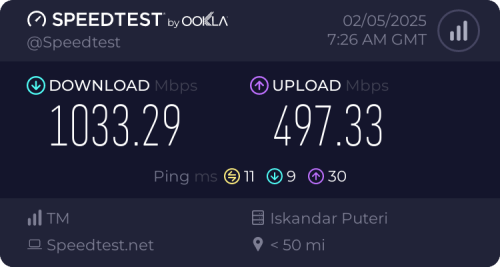
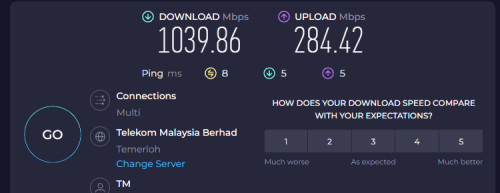
Just now already done the speedtest with skyworth,can hit 1G+ DL.
Now using existing Alcatel Lucent i240g,speed upgraded but not consistent...
Actual use cant hit more than 900mbps download and 300+mbps upload.
Speedtest on speedtest.net and fast can hit max speed. (Current BTU too old already,more heat than before with 1G even with fan)

Update:
And the most important,because of the higher speed,i am getting more packet lost spikes than before as the BTU cant support the 2.5G Router and 2.5G PC....
I dont want enable QoS /Queue as i should be getting higher speed and not using the same speed as before...

This post has been edited by go626201: Feb 3 2025, 03:17 PM
go626201
post Feb 5 2025, 03:27 PM

Regular
******
Senior Member
1,882 posts

Joined: Sep 2017
Update about my 1G FSU complain 2days ago:
Unifi Team did call back yesterday and said will send another team to come to replace the modem,and i livechat after the call to ask for the GN630V 2.5G preferred to get.
And today another team came and replace the modem and set to bridge mode for me.
So now i already have my 1G FSU upgrade with new ONU. and wait for this month bill to see got free 3 months waived or not.

user posted image

Does anyone know how to access the GN630V 2.5G which was set as bridge mode? (I tried disconnect the fiber optic,the web interface is not accessible)

go626201
post Feb 5 2025, 08:57 PM

Regular
******
Senior Member
1,882 posts

Joined: Sep 2017
QUOTE(hsbb @ Feb 5 2025, 08:21 PM)
Use lan port 4 & manual config your pc IP.
*
Thanks.It works.
go626201
post Feb 6 2025, 12:07 AM

Regular
******
Senior Member
1,882 posts

Joined: Sep 2017
QUOTE(MarcoFromTropoja @ Feb 5 2025, 10:16 PM)
grats

anyway what is your previous package and how much u pay for it ?
coz u mention wait this month bill got 3 month waived or not. FSU got that bundle ?
*
Same with Soonwai. previously 800M with RM159 (Without SST)

TM did sent whatsapp to 800M users in December twice,for us to submit form for being the last group upgrade FSU and will waive for 3 months after upgrade.

But They did edited the submission completed page without the waive information. And i screenshot before that edited which had included a text:
Upon successful processing,you will receive a three (3)-month waiver on your next bill.

So i will complain to TM if following 3 months didn't receive the monthly fee waive.

This post has been edited by go626201: Feb 6 2025, 12:08 AM
go626201
post Feb 10 2025, 12:04 PM

Regular
******
Senior Member
1,882 posts

Joined: Sep 2017
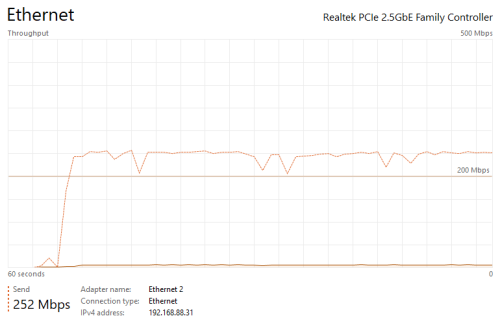
I have some strange issue with uploading after 1GFSU upgrade.
I was uploading file to Google drive at full speed first,and after that the second consistent small spike uploading to Onedrive(speed around 30-50mbps).

And the latency is keep spiking while upload file.
I think i was facing similar issue with torrenting before FSU. (Even with low upload speed)
user posted image
go626201
post Feb 10 2025, 12:56 PM

Regular
******
Senior Member
1,882 posts

Joined: Sep 2017
QUOTE(countingcrows @ Feb 10 2025, 12:42 PM)
Just tested with 1GB test file.
Google Drive full speed all the way, uploaded in less than 1 min.
Microsoft OneDrive stalls or has hiccups but still uploaded in less than 2 mins
*
I think u misunderstood my problem.
I am asking about the heavy packets lost and latency spikes while uploading data.

QUOTE(heLL_bOy @ Feb 10 2025, 12:30 PM)
i also encounter same issue sometime on speedtest when using VPN.
*
I using unifi only to upload,non-vpn.Since uploading to Google and onedrive should be okay without vpn.

This post has been edited by go626201: Feb 10 2025, 12:58 PM
go626201
post Feb 10 2025, 01:57 PM

Regular
******
Senior Member
1,882 posts

Joined: Sep 2017
QUOTE(blacktubi @ Feb 10 2025, 01:35 PM)
This is a buffer bloat and traffic shaping issue with their 1Gbps plan.

Configure QoS at your router limitting upload speed to 500Mbps will solve this issue. Even better if your equipment support fq_codel/cake or ASUS AdaptiveQoS if it's OEM.
*
Oh okay thanks,i am using mikrotik RB5009 if enable QoS/Queue then fasttrack gone... doh.gif
go626201
post Feb 10 2025, 02:41 PM

Regular
******
Senior Member
1,882 posts

Joined: Sep 2017
QUOTE(syahpian @ Feb 10 2025, 02:14 PM)
you can hack it to enable both through  biggrin.gif
*
QUOTE(blacktubi @ Feb 10 2025, 02:19 PM)
You can setup fq_codel as interface queue which will keep fastrack enabled and it should address your issue too.

Tricky to configure though. Have fun trying!

https://help.mikrotik.com/docs/spaces/ROS/p...-InterfaceQueue
*
Actually I already "hack" it before. tongue.gif (But i disable last week after FSU,because at that time the main reason i enable queue is for DL bufferbloat,but now occurs to upload hmm.gif )
Cake queue also partially working with fasttrack.
But it only partially fasttrack,but after the ipv6 fasttrack update live,i not sure this work well or not.
Because before that update,the ipv6 is a problem without fasttrack while running high speed with ipv6.
RB5009 could not work 100% properly with ipv6 non-fasttrack.

I know Anime4000 said before that his RB5009 work well with ipv6 and queue (without fasttrack).
go626201
post Feb 10 2025, 03:19 PM

Regular
******
Senior Member
1,882 posts

Joined: Sep 2017
QUOTE(blacktubi @ Feb 10 2025, 02:45 PM)
Technically RB5009 can support 1Gbps+ with cake enabled but NOT with the 2.5G ETH port as that interface is bugged on physical hardware interconnect level

BUT, if you use SFP+ port with a GPON module then yes, you can use cake and still get over 1Gbps

Cake interface queue is buggy, that's why I suggest fq_codel on interface level instead
*
Sorry for asking again.
You mean use the fq_codel or cake on interface queue?
And not using on queue tree?

Use on pppoe interface or all port interface?

This post has been edited by go626201: Feb 10 2025, 03:19 PM
go626201
post Feb 10 2025, 10:25 PM

Regular
******
Senior Member
1,882 posts

Joined: Sep 2017
QUOTE(kwss @ Feb 10 2025, 09:07 PM)
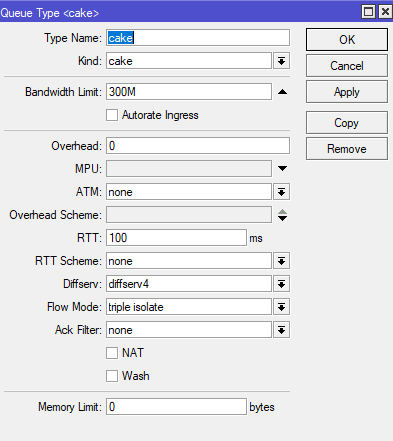
In Queue -> Queue Type
Add
Kind: cake
Bandwidth Limit: 500M
NAT: true
<Changing any of the Overhead specifier will impact Fasttrack>

In Queue -> Interface Queue
Change your physical interface from "only-hardware-queue" to the queue type you just created.

Everything else under Simple Queue and Queue Tree is empty.

CLARIFICATION:
Only change the physical port that's connected to the ONU
*
Thanks. I tried 1st.
Just add to the WAN Ethernet interface only right?
Or add to all WAN and LAN interface including the SFP+ interface?
go626201
post Feb 11 2025, 12:55 AM

Regular
******
Senior Member
1,882 posts

Joined: Sep 2017
QUOTE(blacktubi @ Feb 10 2025, 02:45 PM)
Technically RB5009 can support 1Gbps+ with cake enabled but NOT with the 2.5G ETH port as that interface is bugged on physical hardware interconnect level

BUT, if you use SFP+ port with a GPON module then yes, you can use cake and still get over 1Gbps

Cake interface queue is buggy, that's why I suggest fq_codel on interface level instead
*
QUOTE(kwss @ Feb 10 2025, 10:31 PM)
Just the physical WAN port. Don't apply it for any other port.

What this simple rule does is create an egress buffer and apply the cake algorithm.
If you want to maximize your runway, you can try 550M.

If TM still follow the practice of allowing 10% extra headroom in their HQoS config, it should work best without hitting their policer. Trial and error from 500M to 550M
*
Not sure what's the problem.
I tried the Queue enabled with either cake or fq_codel.
The latency will spike to 800ms while uploading file to Google Drive,and it also affect most ipv6 connection. Even the upload speed didn't hit full 500mbps,the speed not consistent, fluctuate between 200-400mbps. (IPv6)
I didn't see similar issue while speedtest.

user posted image

This post has been edited by go626201: Feb 11 2025, 01:51 AM
go626201
post Feb 11 2025, 11:54 AM

Regular
******
Senior Member
1,882 posts

Joined: Sep 2017
QUOTE(kwss @ Feb 11 2025, 04:08 AM)
What if you set the limit to some low value like 300M or 100M? Confirm with speedtest.net the limiter is working correctly. Can you still reproduce the issue?

Can you confirm in IPv4 > Settings and IPv6 > Settings the Fasttrack counter is increasing as well?
*
Fasttrack counter
user posted image

Speedtest with 300M limit.
user posted image
user posted image

Speedtest with 350M limit.
user posted image

Upload file to Google Drive with 400M limit.
user posted image

Upload Google Drive with 470M limit. More spikes occurs.

user posted image

Upload to GD with 505M limit. More spikes ++ occurs with higher latency.
user posted image

And Last upload to GD with 255M limit. Also occurs 2 spikes.
user posted image

For IPv4,yesterday night i tried,i cant upload to GD with higher speed,in my memory can only upload with 200+mbps,so no latency spike occurs.

Edited:
While doing this upload test,it is also affecting some of my ipv4 connection.
user posted image

Although i not sure why it only affect some connection only,as the smokeping should ping test to all the same group of the server list,but only some is affected.

Edited 2:
Just tried to upload with ipv4 only to 3 server at the same time.
And i think something wrong with the Unifi IPv4 upload speed. I can only upload with around 250mbps MAX.
user posted image
And after that pure speedtest only show the same result. (too many picture cant upload)

This post has been edited by go626201: Feb 11 2025, 12:11 PM
go626201
post Feb 11 2025, 12:13 PM

Regular
******
Senior Member
1,882 posts

Joined: Sep 2017
QUOTE(blacktubi @ Feb 11 2025, 12:08 PM)
go626201 already told you not to use cake on interface queue as it is buggy

Use fq_codel

Show your queue interface print output
*
Okay let me try to do the same test with fq_codel. Thanks for the info.
I was following kwss msg. smile.gif
Now try fq_codel.

user posted image

This post has been edited by go626201: Feb 11 2025, 12:15 PM
go626201
post Feb 11 2025, 01:16 PM

Regular
******
Senior Member
1,882 posts

Joined: Sep 2017
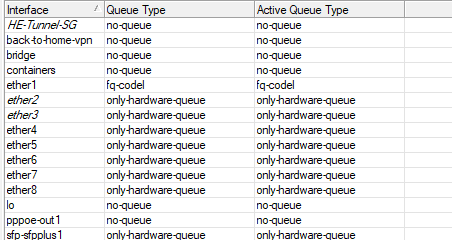
fq_Codel queue setting. (fq_Codel Interface queue for WAN port enabled)
user posted image

IPv4 only Speedtest With no speed limit. (While upload test, IPv6 totally packet lost)
user posted image

IPv6 speedtest to same server with no speed limit. Show similar result to ipv4 speedtest.

fq_Codel queue tree-pppoe interface with 1040M/500M speed limit.
user posted image

fq_Codel queue tree-pppoe interface with 1040M/400M speed limit. (Still got one big spike at start upload test)
user posted image

Upload to 3 server at once with 500M speed limit.
user posted image

Upload to GD with 470M speed limit and bucket-size=0.0001. Still cant mitigate the spikes.
user posted image

This post has been edited by go626201: Feb 11 2025, 01:16 PM
go626201
post Feb 11 2025, 05:12 PM

Regular
******
Senior Member
1,882 posts

Joined: Sep 2017
Update to my upload packet lost and high latency issue:
I tried to upload the file through my SG VPN.
And i didn't have the same issue with VPN. (Either IPv4 or IPv6 VPN)
i can hit 400Mbps upload with VPN ,and the packet lost or high latency issue does not occurs.
So i think the problem is on TM routing end.

Edited:
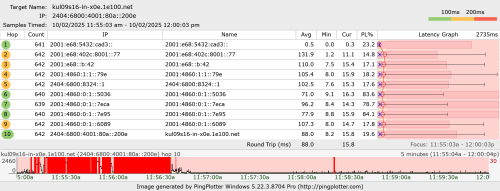
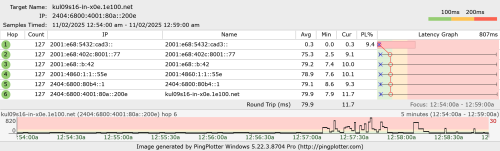
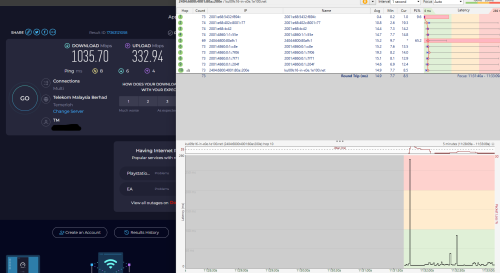
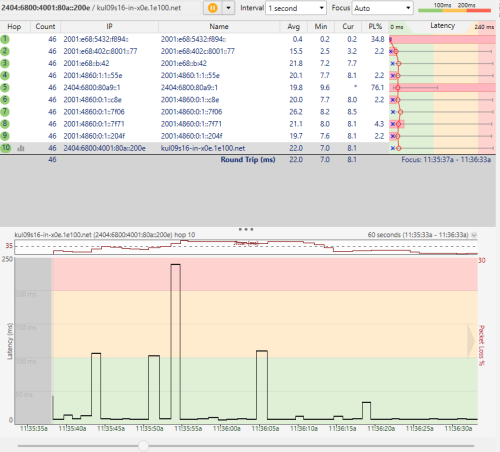
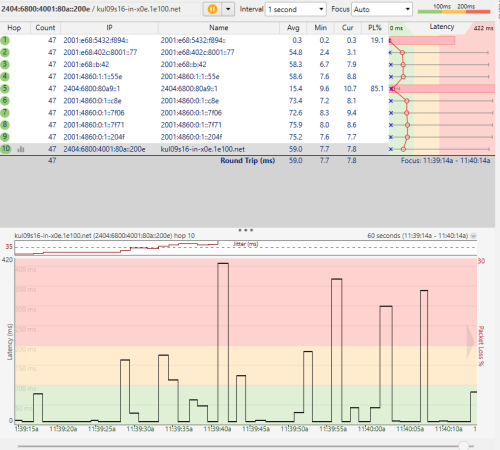
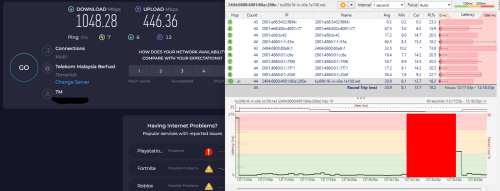
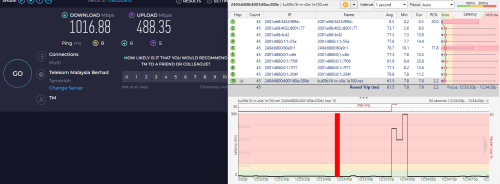
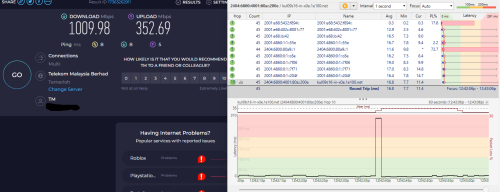
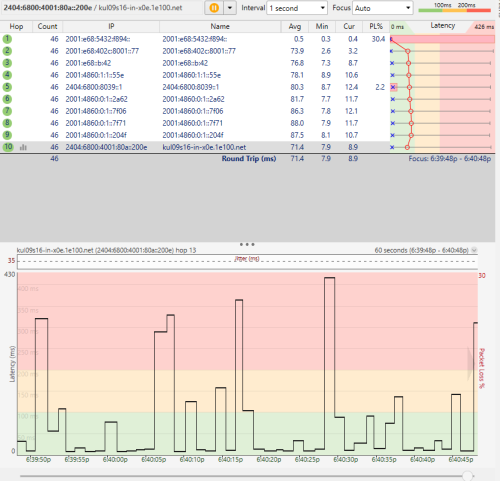
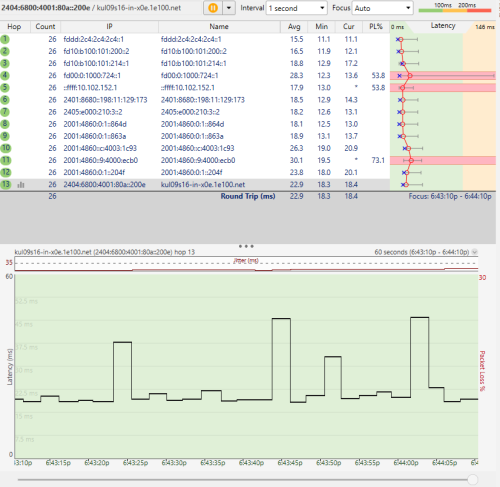
Add a pingplotter screenshot

Without VPN- Pure Unifi only
user posted image

With VPN -IPv6 VPN
user posted image

This post has been edited by go626201: Feb 11 2025, 06:47 PM
go626201
post Feb 11 2025, 08:53 PM

Regular
******
Senior Member
1,882 posts

Joined: Sep 2017
QUOTE(kwss @ Feb 11 2025, 08:17 PM)
go626201
I'm starting to suspect it is your upstream problem. Either to your BNG (2001:e68:402c:8001::77)
OR
MPLS circuit in between (2001:e68::b:42)

Instead of pinging all the way to Google, can you bi-sect it by pinging your BNG first? If it still happen then it is between you and the BNG.
Next test the MPLS circuit by pinging 2001:e68::b:42.

Also, can you just check your CPU are not bottlenecking? Go to Tools > Profile and monitor it.

Are you running container on your router? Can you stop them if you do?

EDIT:
We will deal with the IPv4 problem later. I suspect that one is due to MPLS circuit too but it is very difficult to test them as an outsider. If you can get me some traceroute to:
Group 1. Affected servers
Group 2: Not affected servers

Then I might be able to come out with a guess which place to ping.

blacktubi
Can you describe what problem is cake having? I just want to get a mental model to understand if it is related to his current problem.
*
Hi Thanks for helping me to find out the issue.
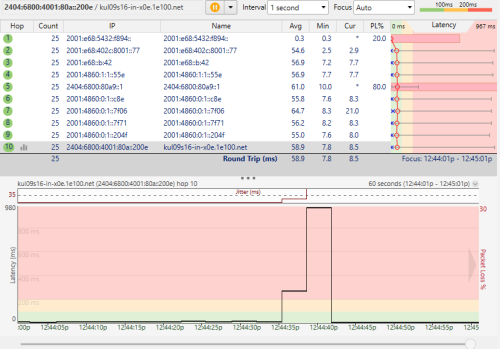
I tried to speedtest and uploading again,and pinging to the hop at the same time.
Both Google and second hop showing the similar spikes at the time i uploading.
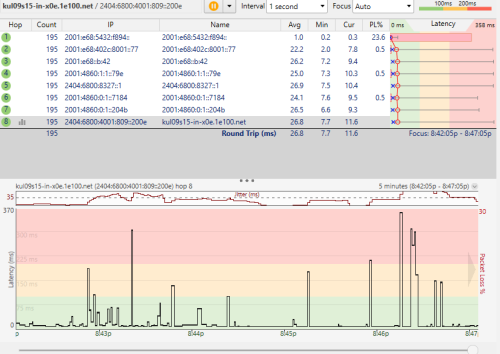
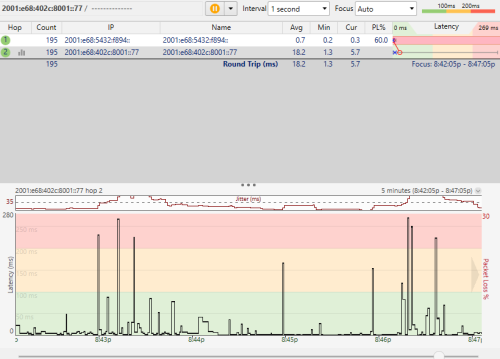
user posted image

user posted image

The 2001:e68::b:42 is not replying ICMP. So cant get the result.

CPU no bottleneck, i never have my RB5009 at 100% usage before.
No container running.

Affected servers currently not sure. As far i test,i found out as long as i am uploading,the latency will spike whether i using full speed or not. (Especially uploading more than 200+mbps)

Edited:
As for the cake queue,i not sure currently is the issue affecting the speed or not or the cake really buggy that this morning i test can only get 200+mbps upload. (This might need a retest after the issue fix)

So far i am agree about your suspicion on the BNG.
(Actually i was facing similar issue with torrenting-low torrent speed also occurs before FSU,but at that time i using Queue was due to the bufferbloat on download side,but now download didn't have bufferbloat issue anymore,and this upload issue came after FSU,and i think it only occurs after hitting more than 200mbps on upload side)

This post has been edited by go626201: Feb 11 2025, 09:02 PM

go626201
post Feb 11 2025, 10:34 PM

Regular
******
Senior Member
1,882 posts

Joined: Sep 2017
QUOTE(kwss @ Feb 11 2025, 10:22 PM)
Just to clarify, this is cake setup as how I prescribed right? Nothing in Simple Queue and Queue Tree.
What limit you use in this graph?

Seeing that you have problem with the BNG itself already, you can fine tune your cake a bit.
In your Queue Type, set your cake RTT: 10

Since this configuration already bring massive improvement for you, I say just keep it. There is nothing much you can do about the BNG
*
Nope.I already change to fq_codel. (Since blacktubi said Cake is not working well on RB5009 2.5G Ethernet Interface)
And I dont think the problem is on router qos.
Since the problem is occurs on default unifi route without full speed,as i said in last replies,the problem also occurs with 200+mbps.
And with VPN on,the problem does not occurs with 500mbps.

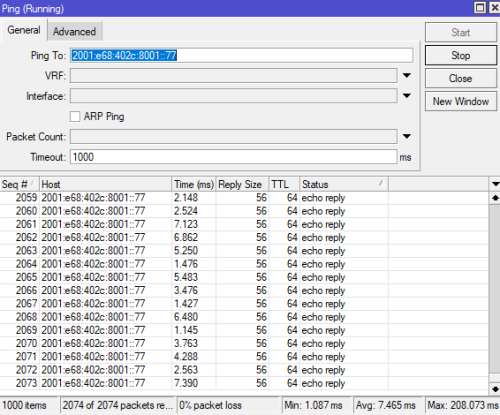
Routeros ping to ipv6 gateway also having latency spikes.
user posted image

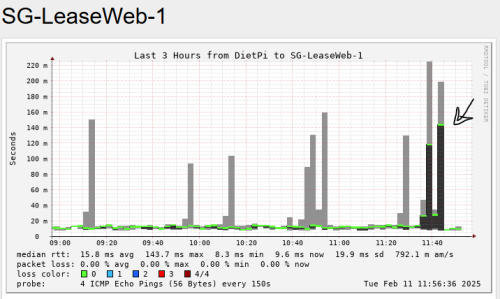
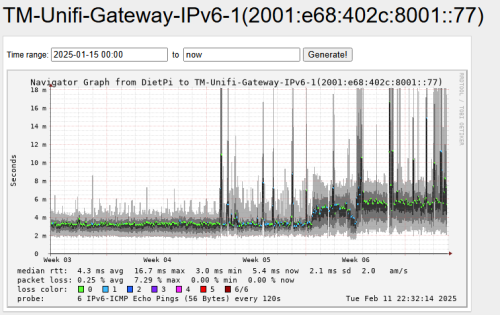
And i check my smokeping graph:
Looks like this problem really happens(Or can said it because serious)started recently(Maybe after FSU).
user posted image

Edited:
And you said at last about the config.
The only improvement for enable queue after FSU(Or yesterday) is only fixing the 100% packet lost on uploading,but the latency issue is still affecting my unifi usage... doh.gif
Now my smokeping will show sudden serious spikes.


This post has been edited by go626201: Feb 11 2025, 10:39 PM

11 Pages « < 5 6 7 8 9 > » Top
Topic ClosedOptions
 

Change to:
| Lo-Fi Version
0.0315sec    0.82    7 queries    GZIP Disabled
Time is now: 12th December 2025 - 11:25 PM