Welcome Guest ( Log In | Register )

Bump Topic Topic Closed RSS Feed
11 Pages « < 8 9 10 11 >Bottom

Outline · [ Standard ] · Linear+

Unifi Official TM UniFi High Speed Broadband Thread V42, READ 1ST PAGE FOR RELEVANT WIFI INFO!

views
     
go626201
post Feb 13 2025, 10:50 PM

Regular
******
Senior Member
1,882 posts

Joined: Sep 2017
QUOTE(kwss @ Feb 13 2025, 10:40 PM)
Did you restart the ONU after switching to HEX? These error should all be 0. Under no circumstances it should be more than that in all the network I ever run. It is a subtle way of screaming hardware problem.

All your device have IPv6 except your Windows?
*
I think i haven't reboot after switching. Although the error still adding more.
I usually use ipv6 on my pc and rpi.
I can see RPi ipv6 working well as smokeping didn't have any issue.
go626201
post Feb 13 2025, 11:04 PM

Regular
******
Senior Member
1,882 posts

Joined: Sep 2017
QUOTE(kwss @ Feb 13 2025, 10:53 PM)
Either your new ONU is a lemon or...
Did you run your network cable in parallel with power cable?

Did you try to disable all power saving for your NIC? I suspect it's chewing your packet
*
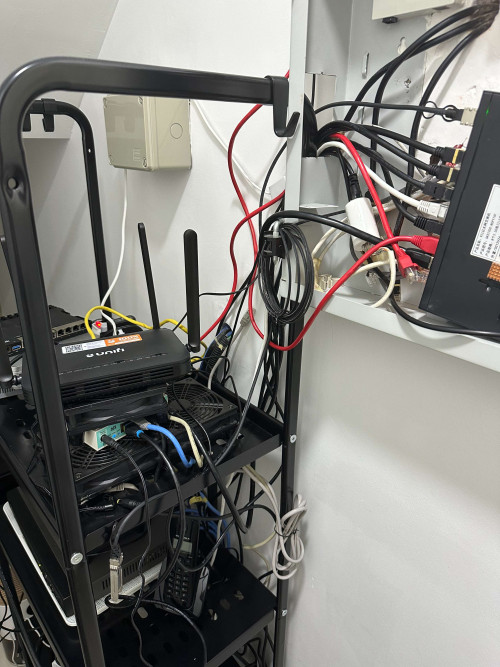
Like this not sure is parallel or not.
user posted image

I think power saving is disabled as i installing the non power saving driver.
go626201
post Feb 13 2025, 11:14 PM

Regular
******
Senior Member
1,882 posts

Joined: Sep 2017
QUOTE(kwss @ Feb 13 2025, 11:09 PM)
This one is okay. Did you use your rb5009 power brick for your HEX as well? Now I sus your power brick is broken
*
No.i use my hEX adapter.
And i was not using rb5009 power adapter,as mine is the first batch release machine,that support 12-57v, so i just connected with my 12v ups. And use for few months already. (I mean i had use the rb5009 for few years)
Original adapter also got the problem. I had tested.

This post has been edited by go626201: Feb 13 2025, 11:15 PM
go626201
post Feb 13 2025, 11:25 PM

Regular
******
Senior Member
1,882 posts

Joined: Sep 2017
QUOTE(kwss @ Feb 13 2025, 11:18 PM)
Well, when the TM guy come, request for another brand of ONU.
Or if he has a few ONU, try them on the spot and see if they got any error counter.

Other than that, I have no idea what is wrong already. Obviously the error is on the internal network side.

Unless you also want to consider your UPS is broken. Try connecting to main power instead?
*
Actually i close up the report already..
Since i already confirm it is my device fault.
The TM guy came 1000% said no problem,and will charge rm53...
So i just close up. and going to buy a new mikrotik router to replace 1st.
go626201
post Feb 13 2025, 11:29 PM

Regular
******
Senior Member
1,882 posts

Joined: Sep 2017
QUOTE(kwss @ Feb 13 2025, 11:27 PM)
It can't be both Mikrotik also broken with frame error. They are totally different family, different SoC, different instruction set.
Try to remove the UPS from the rack and power everything directly?
*
Ya now GN630V and hEX is on their own power adapter.
Only 2.5G switch is on 12v ups.

This post has been edited by go626201: Feb 13 2025, 11:30 PM
go626201
post Feb 13 2025, 11:34 PM

Regular
******
Senior Member
1,882 posts

Joined: Sep 2017
QUOTE(kwss @ Feb 13 2025, 11:32 PM)
Okay, did the error count still go up?
*
Ya.

user posted image
go626201
post Feb 13 2025, 11:52 PM

Regular
******
Senior Member
1,882 posts

Joined: Sep 2017
QUOTE(kwss @ Feb 13 2025, 11:47 PM)
Since we have swapped everything already, the only thing left is the ONU + network cable combination.
Are you still using the Ugreen now?

EDIT:
Actually can you try another port on the ONU?
*
No i change to vention cable.
No another port not supported for WAN.
go626201
post Feb 14 2025, 12:02 AM

Regular
******
Senior Member
1,882 posts

Joined: Sep 2017
QUOTE(kwss @ Feb 13 2025, 11:55 PM)
Okay.
Can try change to Ugreen again and see if error still increases?
If yes then change to another cable and see if it still increases?

If still yes, I think I will ask for a different brand of ONU.
*
Now i didn't have internet problem,so hard to ask for ONU changes.
And the most problem is there is not better choice for the changes.
As anime4000 said before DLink have flaws,thats why i ask for Skyworth GN630V... rclxub.gif
go626201
post Feb 14 2025, 12:11 AM

Regular
******
Senior Member
1,882 posts

Joined: Sep 2017
QUOTE(kwss @ Feb 14 2025, 12:04 AM)
So you tried different cable and it still have error?
Is there an option in the ONU to force port speed to 1gig full duplex?
*
I didn't find the option.
I was also wonder is it 2.5G port can run as 1G port or not this evening.
go626201
post Feb 14 2025, 12:30 AM

Regular
******
Senior Member
1,882 posts

Joined: Sep 2017
QUOTE(kwss @ Feb 14 2025, 12:15 AM)
Well, that's a difficult situation now. Either live with it since I see your smokeping result are all OK.
Or you force your rb5009 to not advertise 2.5G and see if you still dc. But you said if you use other port on rb5009 you get absolutely 0 error right? Can you confirm my understanding of your statement?
*
Emm the evening i try to connect Ether 4 with GN630V,and also occurs disconnection within 10mins.
And before that i was testing with tplink router.
So i just make assumption that my RB5009 Ethernet is broken. Since the internet just randomly disconnected with Ether 1 2 4.
Before i wake up it didn't have disconnection issue,but the problem just occurs after 11am or 12pm.
And after 4pm it keeps dc me from unifi every 5-10mins. very random. And no ether down log at all.
Although i did see a few 2.5G ether down log from GN630V log.

So currently my final thought is RB5009 is broken in someway,but i could not said the accurate root cause.
I would try to connect RB5009 tomorrow as last try to see any chance that normal again.
But i dont think so,since 1 tplink plus 1 hEX can work without any issue,then it is very highly chance that issue is on RB5009.

Update:
At last afternoon,i was thinking any possibility that i damage the fiber optic. But after using the tplink and hEX, i can said no possibility on this anymore.

This post has been edited by go626201: Feb 14 2025, 12:32 AM

go626201
post Feb 14 2025, 12:34 AM

Regular
******
Senior Member
1,882 posts

Joined: Sep 2017
QUOTE(kwss @ Feb 14 2025, 12:32 AM)
Not necessary. The bug could only show up when negotiating 2.5G speed.
That's why I recommend configuring your rb5009 to not advertise that speed when you test it again.

BTW, did you get latency spike when doing upload and torrent using HEX (without Queue)?
*
The RB5009 only have Ether1 as 2.5G port,others is 1G port.
Which mean it will nego as 1G to work with GN630V.

So far latency okay i think,as 940M limit,and upload so far no big spikes.
But i haven't try to upload to Google drive.

This post has been edited by go626201: Feb 14 2025, 12:35 AM
go626201
post Feb 14 2025, 12:38 AM

Regular
******
Senior Member
1,882 posts

Joined: Sep 2017
QUOTE(kwss @ Feb 14 2025, 12:35 AM)
Make sense!
Try without the UPS + original power brick then. If still drop, buy a new one with L3HW Offload.
*
Thats why i said RB5009 might be broken. mega_shok.gif
Which mikrotik model u recommended. Must be powerful than RB5009 but prefer home usage ..haha
I use alot of wireguard tunnel,so cpu better will be useful for me.

Too many core also not useful for home usage.

Before RB5009 occurs this issue,i was thinking to get new one after mikrotik release the latest Ampere one in future. cool2.gif
Now cant wait ... SAD!!! cry.gif

Edited:
Not sure why my ipv6 will drop on windows if i start the pingplotter.
It was working for atleast 30min before i start pingplotter.

This post has been edited by go626201: Feb 14 2025, 12:46 AM
go626201
post Feb 14 2025, 12:48 AM

Regular
******
Senior Member
1,882 posts

Joined: Sep 2017
QUOTE(kwss @ Feb 14 2025, 12:45 AM)
Oh man... You definitely do not want to ask me that question as I am not qualified.
As of now I like their CRS520-4XS-16XQ-RM. 100gig baby!

But they are gonna launch some new product with Ampere high core count CPU, sure as hell won't be cheap and they will most likely be 100gig or more as well.

For home use, nothing beats 5009. But then RouterOS do not use any of the HW Offload for this SoC as it is too limited. Plus the packet buffer is also very shallow. It is okay for home use.

VPN wise, I don't do them on router. Do it on a PC with AES-NI.

Anything with fan will have noise yea. So consider that too.
*
Which model is the upper level of RB5009.
I am going get that one.
But the sadness is i also need to get a separate UPS for it. sweat.gif
go626201
post Feb 14 2025, 01:05 AM

Regular
******
Senior Member
1,882 posts

Joined: Sep 2017
QUOTE(kwss @ Feb 14 2025, 12:53 AM)
I consider CCR2004-1G-12S+2XS to be one step above 5009. It is fanless too.
But since it is all SPF+/28 port, you need to buy a module to do RJ45 (GTek score very high in Serve The Home test)

-OR-

Do Router on a stick setup (ROAS) with your switch (if it support VLAN)
*
Emm not suitable for home usage.
Price abit high.
I was thinking to get something lower grade like hAX3(similar cpu grade) to wait for new successor and buy. (Roughly budget within RM1000-RM1600)
Since i can cope with this hEX for abit more,but this is temporary,as i already promise my cousin that i will give them the hEX for their home network. (And this is abit old cpu,not enough for me to use for daily usage)

Currently didn't have plan for custom diy router. and no vlan switch used.

This post has been edited by go626201: Feb 14 2025, 01:06 AM
go626201
post Feb 14 2025, 01:12 AM

Regular
******
Senior Member
1,882 posts

Joined: Sep 2017
QUOTE(kwss @ Feb 14 2025, 01:09 AM)
Sorry, that model has fan with a huge heatsink. I missed it for another older pure fanless model which is no longer listed.

AX3 works too. Just that it only have a single 2.5gig port. So all your device is going to have 1gig max but they can all share 2.5gig to ONU. You do get wifi with it although it only support 80MHz max instead of 160MHz.

However, you can still do ROAS setup with the AX3 if your switch can do VLAN. Then all your device can get at least half duplex 2.5gig. Still a win!
*
Shit i forgot i need the SFP+ for the 2.5G switch,as i already didn't have enough ethernet port... doh.gif
Maybe a second ethernet only switch is better choice? (Or second 2.5G Switch drool.gif )
I only need abit more port for low bandwidth device like CCTV NVR,RPi, Zigbee hub,and 2 AP...
2.5G is reserved for PC and NAS...

Ah wait only 1 2.5G port mean i can only choose either WAN or LAN... shocking.gif
Then i might need a VLAN 2.5G switch now. doh.gif

This post has been edited by go626201: Feb 14 2025, 01:16 AM
go626201
post Feb 14 2025, 01:19 AM

Regular
******
Senior Member
1,882 posts

Joined: Sep 2017
QUOTE(kwss @ Feb 14 2025, 01:17 AM)
Erm... Those can be done but they involves buying even more stuff which sort of defeat the purpose?
By the time maybe you are looking at 10gig upgrade.
Maybe just buy another 5009? The one with all port PoE and just call it an upgrade?
*
Emm it might really be the choice...and the simplest way to solve my problem... hmm.gif
But i didn't use PoE...any improvement beside the PoE? Or switch chip better?
go626201
post Feb 14 2025, 01:30 AM

Regular
******
Senior Member
1,882 posts

Joined: Sep 2017
QUOTE(kwss @ Feb 14 2025, 01:24 AM)
Nope. There is nothing to improve in the 5009. They already maximized the SoC. If you read the SoC datasheet, Mikrotik has absolutely connected everything they can to it already.
So just get another 5009 then.

The rest of the router family don't have 2.5gig + SFP+ port either.
Those switching family don't have powerful enough CPU.
*
Okay Thanks.
Let me test tomorrow for the final chance or life for RB5009.
If still not okay,then i will contact Subtel to see possible to repair or not.
If not then i might get a new one... unsure.gif
go626201
post Feb 14 2025, 01:38 AM

Regular
******
Senior Member
1,882 posts

Joined: Sep 2017
QUOTE(kwss @ Feb 14 2025, 01:34 AM)
Just a suggestion. Whenever it dc, generate a supout file and send to Mikrotik.
Who knows it is a firmware issue with the switch chip.
Mention that the ONU detected the port flapping.

You save yourself a lot of agony buying another 5009 with the same bug.

But er... If it is happening with your old ONU too, I say don't put a high hope.
*
95% of disconnection didn't have any ether down log ,just dc with no symptom. blush.gif
go626201
post Feb 14 2025, 01:52 AM

Regular
******
Senior Member
1,882 posts

Joined: Sep 2017
QUOTE(kwss @ Feb 14 2025, 01:51 AM)
Slowly think about it yea. I understand the feeling of buying the exact same model number as a replacement don't give you excitement.

Maybe buy a HEX Refresh and do 1gig till Ampere comes.
Trust me you are not really missing much on that last 100meg of bandwidth.
*
hAX cpu better right?
go626201
post Feb 14 2025, 12:46 PM

Regular
******
Senior Member
1,882 posts

Joined: Sep 2017
QUOTE(kwss @ Feb 14 2025, 01:59 AM)
Yes it is. Just different price point. If you don't need the wifi then you are paying double the money just to get the last 100meg. Even that cannot be used directly on a single stream.

There is no right and wrong way of going about it.

Either you go for maximum economy, and only upgrade when TM gives another FSU.
or
Purchase the exact same hardware as direct replacement
or
"Upgrade" now. The word "upgrade" is subjective. If you need wifi, AX3 is an upgrade. If not, then i don't really consider it a worthy upgrade.

You might very well need an upgrade anyway for next FSU if TM change to XGPON or 50G-PON. They might need 10gig RJ45 or they go straight to SFP+ port. Only time will tell.
*
Just test again with RB5009 today.
And i recording a video when the port flapping only occurs between RB5009 and GN630V. (New Ethernet Cable being use before recording)
And the video shows that other port on RB5009 is fine,but whatever port that connected to GN630V will have the issue.
https://www.youtube.com/embed/3VmlxiypJyQ?s...Kw6IvtXC2ryOjiy

Edited:
Now i trying to use Old onu with RB5009 with different ether port. And 15mins already so far no dc. Need to observe for hours before conclusion.
But maybe RB5009 2.5G port also got some issue,because yesterday afternoon i test with old onu also got some issue.

If this works,then RB5009 not die,mean that it is not compatible with GN630V,and i might need to buy ONU and fiber optic converter with Anime4000.

This post has been edited by go626201: Feb 14 2025, 01:20 PM

11 Pages « < 8 9 10 11 >Top
Topic ClosedOptions
 

Change to:
| Lo-Fi Version
0.0280sec    0.61    7 queries    GZIP Disabled
Time is now: 12th December 2025 - 11:23 PM