

QUOTE(sadlyfalways @ Feb 3 2025, 01:28 PM)
what is your setup im struggling to reach 1gb even with the skyworth and deco with 2.5gbps

Deco always got some sort of QoS that cant really be fully disabledYou can try to put the QoS to 2000 / 2000
Unifi Official TM UniFi High Speed Broadband Thread V42, READ 1ST PAGE FOR RELEVANT WIFI INFO!
|
|
 Feb 3 2025, 10:20 PM Feb 3 2025, 10:20 PM
Return to original view | Post
#141
|
 
Elite
8,430 posts Joined: Jul 2008  
|
QUOTE(sadlyfalways @ Feb 3 2025, 01:28 PM) what is your setup im struggling to reach 1gb even with the skyworth and deco with 2.5gbps Deco always got some sort of QoS that cant really be fully disabledYou can try to put the QoS to 2000 / 2000 |
|
|
|
|
|
Feb 6 2025, 04:42 PM
Return to original view | Post
#142
|
|
Elite
8,430 posts Joined: Jul 2008
|
QUOTE(kenrock2 @ Feb 6 2025, 04:39 PM) KL area has many options and very competitive price as compare to unifi. TIME is a decent but I wouldn't say the same about Yes / YTL Fibre If Time or Yes Fiber is available in my area, i would have applied for it. Family of mine staying at YTL properties suffered a miserable life for years until Unifi got in eventually |
|
|
Feb 6 2025, 04:54 PM
Return to original view | Post
#143
|
|
Elite
8,430 posts Joined: Jul 2008
|
QUOTE(PJng @ Feb 6 2025, 04:48 PM) About stability, i dunno how stable for other ISP on my area, before covid my flat only got unifi, just recently 2 or 3 years got TIME and MAXIS If your area comes with Maxis own infra or they call it NGBB, it's worth to try as the price is very goodAnd with unifi if no maintainence, up time can over 100 days, still stable 300mbps Rates are not published publicly and only available through their agent |
|
|
Feb 7 2025, 09:02 AM
Return to original view | Post
#144
|
|
Elite
8,430 posts Joined: Jul 2008
|
QUOTE(z720 @ Feb 6 2025, 05:32 PM) anyone manage to change your own ONT ? I found Huawei optiXstar F50 fiber + wifi 7 router in China market and not expensive. If can change the ONT then it benefit a lot. 1st space, 2ndly I guess latency lost (even not much) but fiber and router in 1 piece definitely can gain something. Don't botherMost China gear already running on XGPON or 10G-EPON and they dont include backwards compatibility with GPON Edit: Most china stuffs are "locked" to their own ISP to prevent it from being sold overseas This post has been edited by blacktubi: Feb 7 2025, 09:12 AM |
|
|
Feb 7 2025, 10:36 AM
Return to original view | Post
#145
|
|
Elite
8,430 posts Joined: Jul 2008
|
QUOTE(z720 @ Feb 7 2025, 10:09 AM) locked I dont worry , the seller are those telecom guy they even can help to change the serial number and mac address. Just worry this unit already XGPON/10G-EPON as you said might not be backward compatible only. Please report back if you manage to get it to work with Unifi  |
|
|
Feb 7 2025, 04:37 PM
Return to original view | Post
#146
|
|
Elite
8,430 posts Joined: Jul 2008
|
QUOTE(wiraone @ Feb 7 2025, 04:36 PM) Got my 10 years old ONU replaced with the GN630V (Skyworth) and was setup as bridge. Yay! Now the limit is my devices, my PC has only gigabit, so not reaching 1000Mbps when doing speed test. I guess that should be fine. My switch also 1000Mbps, but my Mesh is 2.5GBps ports. Gigabit port limited to 940Mbps |
|
|
|
|
|
Feb 10 2025, 01:35 PM
Return to original view | Post
#147
|
|
Elite
8,430 posts Joined: Jul 2008
|
QUOTE(go626201 @ Feb 10 2025, 12:04 PM) I have some strange issue with uploading after 1GFSU upgrade. This is a buffer bloat and traffic shaping issue with their 1Gbps plan. I was uploading file to Google drive at full speed first,and after that the second consistent small spike uploading to Onedrive(speed around 30-50mbps). And the latency is keep spiking while upload file. I think i was facing similar issue with torrenting before FSU. (Even with low upload speed) 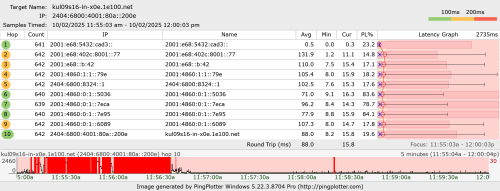 Configure QoS at your router limitting upload speed to 500Mbps will solve this issue. Even better if your equipment support fq_codel/cake or ASUS AdaptiveQoS if it's OEM. |
|
|
Feb 10 2025, 02:19 PM
Return to original view | Post
#148
|
|
Elite
8,430 posts Joined: Jul 2008
|
QUOTE(go626201 @ Feb 10 2025, 01:57 PM) Oh okay thanks,i am using mikrotik RB5009 if enable QoS/Queue then fasttrack gone... You can setup fq_codel as interface queue which will keep fastrack enabled and it should address your issue too. Tricky to configure though. Have fun trying! https://help.mikrotik.com/docs/spaces/ROS/p...-InterfaceQueue |
|
|
Feb 10 2025, 02:45 PM
Return to original view | Post
#149
|
|
Elite
8,430 posts Joined: Jul 2008
|
QUOTE(go626201 @ Feb 10 2025, 02:41 PM) Actually I already "hack" it before. Technically RB5009 can support 1Gbps+ with cake enabled but NOT with the 2.5G ETH port as that interface is bugged on physical hardware interconnect level (But i disable last week after FSU,because at that time the main reason i enable queue is for DL bufferbloat,but now occurs to upload (But i disable last week after FSU,because at that time the main reason i enable queue is for DL bufferbloat,but now occurs to upload  ) )Cake queue also partially working with fasttrack. But it only partially fasttrack,but after the ipv6 fasttrack update live,i not sure this work well or not. Because before that update,the ipv6 is a problem without fasttrack while running high speed with ipv6. RB5009 could not work 100% properly with ipv6 non-fasttrack. I know Anime4000 said before that his RB5009 work well with ipv6 and queue (without fasttrack). BUT, if you use SFP+ port with a GPON module then yes, you can use cake and still get over 1Gbps Cake interface queue is buggy, that's why I suggest fq_codel on interface level instead |
|
|
Feb 11 2025, 12:08 PM
Return to original view | Post
#150
|
|
Elite
8,430 posts Joined: Jul 2008
|
go626201 already told you not to use cake on interface queue as it is buggy
Use fq_codel Show your queue interface print output This post has been edited by blacktubi: Feb 11 2025, 12:11 PM |
|
|
Feb 20 2025, 10:17 AM
Return to original view | Post
#151
|
|
Elite
8,430 posts Joined: Jul 2008
|
QUOTE(muhammadnajmi96 @ Feb 20 2025, 10:09 AM) Hi, can we apply for swu5.0 at unifi store instead of tmpoint? since most of tmpoint is open on weekday only? Yes, if you are referring to the official Unifi Store like the one at KLCC |
|
|
Feb 20 2025, 10:51 AM
Return to original view | Post
#152
|
|
Elite
8,430 posts Joined: Jul 2008
|
QUOTE(aspire2oo6 @ Feb 20 2025, 10:47 AM) Can I ask No, couldn't use it as access point and modem bridge mode at the same timeblacktubi I tested this and awesome it really works but I have a question. Can I use both router as wifi access point. Because now after I restart the unifi router modem i cannot connect to the wifi its just connecting then fail. How do I access the unifi router if I cannot connect to the wifi to change setting? use LAN cable? What settings should I do to have both working? My Asus router ip is 192.168.50.1 Asus is the dialer connect to unifi router through bridge mode to LAN 1 My unifi router modem ip is 192.168.0.1 |
|
|
Feb 20 2025, 10:56 AM
Return to original view | Post
#153
|
|
Elite
8,430 posts Joined: Jul 2008
|
QUOTE(aspire2oo6 @ Feb 20 2025, 10:53 AM) so if I want to access the admin page of the unifi router I just turn off the asus router first? The first time I connect I was able to access both asus router and unifi router but after I restart the unifi router then I can't access anymore 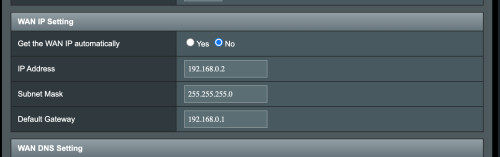 Try this on ASUS WAN config |
|
|
|
|
|
Feb 20 2025, 11:18 AM
Return to original view | Post
#154
|
|
Elite
8,430 posts Joined: Jul 2008
|
QUOTE(aspire2oo6 @ Feb 20 2025, 10:57 AM) with this I can use both as router? or I can access the unifi router ip? Only let you to access setting page, again you cant use it as modem and AP at the same thing |
|
|
Feb 24 2025, 11:21 AM
Return to original view | Post
#155
|
|
Elite
8,430 posts Joined: Jul 2008
|
QUOTE(aspire2oo6 @ Feb 24 2025, 10:48 AM) Just sharing if you plan to use your own router with Unifi Skyworth GN630V Modem router combo Weird, cause it's working perfectly on my endGuys, last week I tried using Blacktubi to set my Unifi modem and router to bridge mode, but it messed up my whole network and internet. It worked for the first 12 hours then suddenly connected to the internet but no internet. A TM technician came to fix it and told me that the Unifi Skyworth GN630V is set as a combo device, meaning it can’t be just switch it to modem. He said he needed to change the settings in the ONU to switch it to modem mode. It was messing it for nearly 30minutes, reset, reconfigure, reset again, reconfigure keep referring his phone on UNIFI website I asked for the password, but he said he couldn’t give it. After he adjusted some settings, everything worked perfectly again. So, if you’re planning to use your own router, make sure to ask the technician to set the ONU to "combo router to modem mode" so your router can work properly. Also, if you’re using an existing ONU, you can request Unifi’s technician to maintain it for you. Hope this helps! Lastly the best is its free of charge he didn't even charge me a dime Any idea what they did differently? Edit: Seems like they stopped giving PLOAM password This post has been edited by blacktubi: Feb 24 2025, 11:21 AM |
|
|
Feb 24 2025, 12:40 PM
Return to original view | Post
#156
|
|
Elite
8,430 posts Joined: Jul 2008
|
QUOTE(go626201 @ Feb 24 2025, 11:28 AM) But i think still can login the ONR to get the password ourself. Not visible in plain text on every ONU / ONR model |
|
|
Feb 24 2025, 01:32 PM
Return to original view | Post
#157
|
|
Elite
8,430 posts Joined: Jul 2008
|
QUOTE(go626201 @ Feb 24 2025, 01:11 PM) Ya but GN630V can get the password with F12 type=text. Yea I know it's visible on GN630V, what I mean is other modelsIt's not visible on some ZTE / Fiberhome models |
|
|
Feb 24 2025, 02:37 PM
Return to original view | Post
#158
|
|
Elite
8,430 posts Joined: Jul 2008
|
QUOTE(klame @ Feb 24 2025, 02:34 PM) Hi, Do not use special ISP requirement on your ASUS router if you follow my guide as the VLAN 500 is already handled by the modemI am using Asus AX6000. Followed this step and exact configuration. Set my PPPoE via the standard Asus wizard setup and able to get to router main page. But I am still not able to get it working and the internet LED on router still red. Anything I should be looking at further?. I've double confirm the PPPoE password and it's the same as the one in GN630V. Only managed to get internet when switch back the skyworth to router mode. Appreciate any input. waja7968 liked this post
|
|
|
Mar 16 2025, 08:52 PM
Return to original view | Post
#159
|
|
Elite
8,430 posts Joined: Jul 2008
|
QUOTE(netmatrix @ Mar 14 2025, 01:16 PM) Need a little help here. Which model is your ONR and how you change it to bridge mode?Unifi ONR has VOIP. Upgraded to Asus AX-6000 router because Unifi ONR cannot handle too much wifi clients. Changed ONR setting from router to bridge. But this causes VOIP not working because it is not routing VOIP anymore. Should i call TM to solve this or i can do it myself in UNIF ONR or AX-6000? I could just change Unifi ONR back to router and make the AX6000 as AP. But it seems like wastage of performance from the router. Guidance needed. QUOTE(theberry @ Mar 15 2025, 09:07 PM) can u turn off the skyworth gn630v led status? Allow me to introduce you to black electrical tapeBlocks out 99.9% of the light and cost RM2 at Mr DIY vincent_ng86 liked this post
|
|
|
Mar 16 2025, 11:42 PM
Return to original view | Post
#160
|
|
Elite
8,430 posts Joined: Jul 2008
|
QUOTE(ryuzaki_L @ Mar 16 2025, 11:20 PM) Is the swu 5.0 can only be applied via TM point/ Unifi store? Where is the official source from TM regarding swu 5.0? Like every SWU, it's never official. Don't expect official guidelines. It's supposed to be a retention plan. Yes, only available at official TM stores, not availble on dealer stores. Just walk in and ask for yourself. |
|
Topic ClosedOptions
|
| Change to: |  0.0396sec 0.0396sec
 1.78 1.78
 7 queries 7 queries
 GZIP Disabled GZIP Disabled
Time is now: 24th December 2025 - 03:46 PM |
 Quote
Quote