

QUOTE(soonwai @ Oct 22 2023, 04:08 PM)

DLink DIR-X3060Z Router Speedtests & Tips, Oh. So. Free.
|
|
 Apr 1 2024, 02:36 PM Apr 1 2024, 02:36 PM
Show posts by this member only | IPv6 | Post
#81
|
 
Senior Member
1,902 posts Joined: Sep 2012 
|
QUOTE(soonwai @ Oct 22 2023, 04:08 PM) |
|
|
|
|
|
Apr 30 2024, 05:07 PM
|

Newbie
5 posts Joined: Oct 2012
|
Seems like the ZTE ZX279128R shares its SDK with Broadcom BCM53xx
https://www.chinadsl.net/thread-166731-1-1.html QUOTE ZX279128架构与bcm53xx的相同,借用它的SDK |
|
|
May 7 2024, 07:06 PM
Show posts by this member only | IPv6 | Post
#83
|
|
Junior Member
23 posts Joined: Aug 2012
|
Sifu sifu
I got x5460, dra ac1300 and this x3060z 3060 as primary, 5460 as extend mode (wired), both WiFi ssid is same. But I got issue with 5460 WiFi, and the WiFi range, low speed and no stable. Any solution for this? This post has been edited by xFr3sHx: May 8 2024, 12:02 AM |
|
|
May 8 2024, 02:28 PM
|

Junior Member
334 posts Joined: Oct 2006  
|
QUOTE(nick.remember.u @ Mar 8 2024, 08:56 PM) Hi, i cant remote access Dlink 3000z router Anyone can share how to connect to the DLink App with this stupid Unifi Dlink? hahahttps://play.google.com/store/apps/details?...ink.quickconfig Using Dlink wifi connect apps  |
|
|
 Jul 4 2024, 12:16 PM Jul 4 2024, 12:16 PM
Show posts by this member only | IPv6 | Post
#85
|
|
Junior Member
25 posts Joined: Jan 2003
|
Need help with setting MAC filtering..
How can i set MAC filering such that all unrecognized devices will be blocked by default, and i need to explicitly allow access for it to be connected? I found the page in the Router setting where I can chose Deny or Allow and key in MAC address but i don't quite understand how it's supposed to work.. is it Deny all or Allow all by default? Thank you. |
|
|
Sep 15 2024, 08:52 AM
Show posts by this member only | IPv6 | Post
#86
|

Senior Member
4,390 posts Joined: Oct 2004 From: Cheras, Malaysia
|
something funny with my DIR3060Z, lately when I try to speedtest, i only get less than 100 Mbps, i tried to change LAN cable thinking a bad handshake speed, but it's still the same.
If i direct connect to my main router (EdgerouterX) i can get the full 500Mbps I am supposed to get. I even tried to use the 3060z to be the main router but I am still getting 80Mbps with lan or wireless connection. Anyone faced such issue? OK, i found out the router is simply faulty, not sure why, i swap with my upstairs mesh unit and were able to get 500Mbps again This post has been edited by Sky.Live: Sep 15 2024, 09:12 AM |
|
|
|
|
|
Dec 12 2024, 10:19 PM
|

Junior Member
12 posts Joined: Mar 2022
|
Can i use DIR3060Z as a modem only and use asus as my primary router?
|
|
|
Feb 1 2025, 11:42 AM
|

Junior Member
422 posts Joined: Apr 2010
|
I have my own wifi6 setup already. Got a pair of these last year when we renewed Unifi contract.
I was wondering if anyone knows how to put this into emergency mode to upload openwrt firmware instead? Wanted to check some parental control feature in openwrt. |
|
|
Feb 1 2025, 04:19 PM
Show posts by this member only | IPv6 | Post
#89
|
|
Senior Member
2,608 posts Joined: Nov 2020
|
QUOTE(quikstep @ Feb 1 2025, 11:42 AM) I have my own wifi6 setup already. Got a pair of these last year when we renewed Unifi contract. Don't think it's supported by OpenWRT?I was wondering if anyone knows how to put this into emergency mode to upload openwrt firmware instead? Wanted to check some parental control feature in openwrt. |
|
|
Feb 3 2025, 10:56 AM
|
|
Junior Member
422 posts Joined: Apr 2010
|
QUOTE(PRSXFENG @ Feb 1 2025, 04:19 PM) Don't think it's supported by OpenWRT? Basically it supports DIR-3060. Should be similar. Hopefully someone knows how to put this router into recovery mode. |
|
|
Feb 3 2025, 11:38 AM
|
|
Junior Member
422 posts Joined: Apr 2010
|
or maybe someone knows the ssh root password?
|
|
|
Feb 3 2025, 02:14 PM
Show posts by this member only | IPv6 | Post
#92
|
|
Senior Member
2,608 posts Joined: Nov 2020
|
QUOTE(quikstep @ Feb 3 2025, 10:56 AM) Basically it supports DIR-3060. Should be similar. DIR-3060 is a AC Wireless routerHopefully someone knows how to put this router into recovery mode. using Mediatek CPU DIR X3060Z, or it's non TM Branded, X3000Z uses a ZTE CPU and has completely different specs So no, it's not even close, and will not work |
|
|
Feb 3 2025, 03:50 PM
|
|
Junior Member
422 posts Joined: Apr 2010
|
QUOTE(PRSXFENG @ Feb 3 2025, 02:14 PM) DIR-3060 is a AC Wireless router Thanks for the kind explanation using Mediatek CPU DIR X3060Z, or it's non TM Branded, X3000Z uses a ZTE CPU and has completely different specs So no, it's not even close, and will not work  Dropped the idea now. PRSXFENG liked this post
|
|
|
|
|
|
Feb 4 2025, 03:55 PM
|
|
Senior Member
7,951 posts Joined: Sep 2005
|
QUOTE(quikstep @ Feb 1 2025, 11:42 AM) I have my own wifi6 setup already. Got a pair of these last year when we renewed Unifi contract. Unless you want to develop openwrt yourself, the SoC has zero support with openwrt. ZXIC never released their source code, never mind D-Link.I was wondering if anyone knows how to put this into emergency mode to upload openwrt firmware instead? Wanted to check some parental control feature in openwrt. A few posts above got mentioned about the ZXIC SoC using the BCM53xx SDK, but that's just the beginning. You'll need to hack job the wifi drivers, figure out what bootloader it uses, how to access the bootlader, flash and memory modules, modding the dts, etc etc. You're better off buying an openwrt-ready router. |
|
|
Feb 4 2025, 09:42 PM
Show posts by this member only | IPv6 | Post
#95
|

Junior Member
76 posts Joined: Sep 2010 From: Kuala Lumpur
|
hi everyone, may i ask, does anyone knows a way to set this router ipv6 dns address to local cidr (fe80:: range) as i setup docker and runs pihole so i want to point router dhcp dns ip to this pihole instead, there is no issue for me to set ipv4 to local ip (192.168.xxx.xxx) but I cant set the ipv6's one to local cidr.
whenever i try to set the ipv6 dns to static local ip i get this error 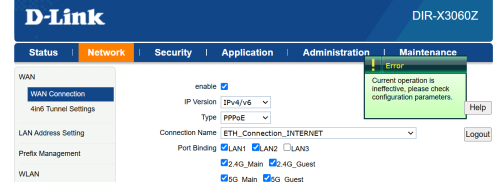 |
|
|
Apr 27 2025, 09:46 PM
|
|
Senior Member
1,902 posts Joined: Sep 2012
|
QUOTE(quikstep @ Feb 1 2025, 11:42 AM) I have my own wifi6 setup already. Got a pair of these last year when we renewed Unifi contract. I was wondering if anyone knows how to put this into emergency mode to upload openwrt firmware instead? Wanted to check some parental control feature in openwrt. QUOTE(Sky.Live @ Sep 15 2024, 08:52 AM) something funny with my DIR3060Z, lately when I try to speedtest, i only get less than 100 Mbps, i tried to change LAN cable thinking a bad handshake speed, but it's still the same. I must say that this stock d-link DIR3060Z router degrade quite fast. was helping my neighbor last week, the router is only 1 year plus, got frequent wifi disconnect especially at night. I kasi borrow him my old asus AC68u, which apparently works well ( even though the router is almost 10 years already ) for 2 days, after that I suggest him to get a better asus router.If i direct connect to my main router (EdgerouterX) i can get the full 500Mbps I am supposed to get. I even tried to use the 3060z to be the main router but I am still getting 80Mbps with lan or wireless connection. Anyone faced such issue? OK, i found out the router is simply faulty, not sure why, i swap with my upstairs mesh unit and were able to get 500Mbps again for those who think can save money by using this free stock router, forget it, save your sanity, ditch the router cheap cheap in carousell or fb, get a better router instead. This post has been edited by JimbeamofNRT: Apr 27 2025, 09:51 PM |
|
|
May 1 2025, 02:12 PM
Show posts by this member only | IPv6 | Post
#97
|
|
Senior Member
4,390 posts Joined: Oct 2004 From: Cheras, Malaysia
|
QUOTE(JimbeamofNRT @ Apr 27 2025, 09:46 PM) I must say that this stock d-link DIR3060Z router degrade quite fast. was helping my neighbor last week, the router is only 1 year plus, got frequent wifi disconnect especially at night. I kasi borrow him my old asus AC68u, which apparently works well ( even though the router is almost 10 years already ) for 2 days, after that I suggest him to get a better asus router. at least tahan 1 year, i been using 1 unit 2 years without mesh now.. still ok..for those who think can save money by using this free stock router, forget it, save your sanity, ditch the router cheap cheap in carousell or fb, get a better router instead. |
|
|
May 1 2025, 03:39 PM
Show posts by this member only | IPv6 | Post
#98
|
|
Senior Member
1,902 posts Joined: Sep 2012
|
QUOTE(Sky.Live @ May 1 2025, 02:12 PM) at least tahan 1 year, i been using 1 unit 2 years without mesh now.. still ok.. it is like you pay for ron100 but using kancil 660should have fully utilise it |
|
|
May 4 2025, 01:51 PM
Show posts by this member only | IPv6 | Post
#99
|
|
Senior Member
4,390 posts Joined: Oct 2004 From: Cheras, Malaysia
|
QUOTE(JimbeamofNRT @ May 1 2025, 03:39 PM) it is like you pay for ron100 but using kancil 660 my lan backhaul has some problem.. lazy to fix it..should have fully utilise it |
|
|
May 26 2025, 01:10 PM
Show posts by this member only | IPv6 | Post
#100
|

Senior Member
2,901 posts Joined: Nov 2004
|
Hey guys, this router does not have firewall for IPv6 right? I cannot find it anywhere in the router settings.
|
| Change to: |  0.0258sec 0.0258sec
 0.19 0.19
 5 queries 5 queries
 GZIP Disabled GZIP Disabled
Time is now: 6th December 2025 - 09:51 AM |
 Quote
Quote