Welcome Guest ( Log In | Register )

Bump Topic Topic Closed RSS Feed
456 Pages « < 441 442 443 444 445 > » Bottom

Outline · [ Standard ] · Linear+

Unifi Official TM UniFi High Speed Broadband Thread V41, READ 1ST PAGE FOR RELEVANT WIFI INFO

views
     
1stLaksamana
post Nov 24 2023, 05:12 PM

Getting Started
**
Junior Member
277 posts

Joined: Jul 2007


Been reading this threat for few months now. just got the time to go TM Point 2 hours ago to change my unifi plan. i walked in without any port out request from competitor.

the plan i used previously was 500mbps (turbo upgrade 2018) with unifi tv - rm169 exlc tax. recently free upgrade to 800mpbs for same price and tv package. Im the only user so i dont need 800mbps


Current SWU 3.0 Offer :-

1) 100mbps rm89, free 6 months bill. no equipment. 24 months contract

2) 500mbps rm119, free 6 months bill. Wifi 6 mesh. 24 months contract

Conditions :-

1) must be free of contract. 6 months and below can try. 1 year and below can apply to be considered by HQ.

2) cannot already on a SWU plan (any).


i took 2nd option. she also mentioned a package lower than 100mbps but i stopped her as i wasnt interested. when inquired about 300mbps, she said it is now called 500mbps since the free upgrade is perpetual (forever). there are also SWU plans higher than 500mbps and with tv combos. go walk in to a tm point.
Oltromen Ripot
post Nov 24 2023, 05:17 PM

👍 999999 person Likes this member
*******
Senior Member
4,034 posts

Joined: Dec 2019
QUOTE(1stLaksamana @ Nov 24 2023, 05:12 PM)
Been reading this threat
*
spilt my drink. sweat.gif
username checks out.


PJng
post Nov 24 2023, 05:31 PM

10k Club
********
All Stars
12,039 posts

Joined: Oct 2017


QUOTE(1stLaksamana @ Nov 24 2023, 05:12 PM)
Been reading this threat for few months now. just got the time to go TM Point 2 hours ago to change my unifi plan. i walked in without any port out request from competitor.

the plan i used previously was 500mbps (turbo upgrade 2018) with unifi tv - rm169 exlc tax. recently free upgrade to 800mpbs for same price and tv package. Im the only user so i dont need 800mbps
Current SWU 3.0 Offer :-

1) 100mbps rm89, free 6 months bill. no equipment. 24 months contract

2) 500mbps rm119, free 6 months bill. Wifi 6 mesh. 24 months contract

Conditions :-

1) must be free of contract. 6 months and below can try. 1 year and below can apply to be considered by HQ.

2) cannot already on a SWU plan (any).
i took 2nd option. she also mentioned a package lower than 100mbps but i stopped her as i wasnt interested. when inquired about 300mbps, she said it is now called 500mbps since the free upgrade is perpetual (forever). there are also SWU plans higher than 500mbps and with tv combos. go walk in to a tm point.
*
So did you know plus unifi tv, how much the fee?
Still same as before?
enduser
post Nov 24 2023, 06:42 PM

Regular
******
Senior Member
1,280 posts

Joined: Jan 2003
QUOTE(Oltromen Ripot @ Nov 24 2023, 05:17 PM)
spilt my drink. sweat.gif
username checks out.
*
Not on purpose la, sometime coz of auto correct or auto wat not
xngjn
post Nov 24 2023, 08:24 PM

Regular
******
Senior Member
1,239 posts

Joined: Sep 2008
QUOTE(1stLaksamana @ Nov 24 2023, 05:12 PM)
Been reading this threat for few months now. just got the time to go TM Point 2 hours ago to change my unifi plan. i walked in without any port out request from competitor.

the plan i used previously was 500mbps (turbo upgrade 2018) with unifi tv - rm169 exlc tax. recently free upgrade to 800mpbs for same price and tv package. Im the only user so i dont need 800mbps
Current SWU 3.0 Offer :-

1) 100mbps rm89, free 6 months bill. no equipment. 24 months contract

2) 500mbps rm119, free 6 months bill. Wifi 6 mesh. 24 months contract

Conditions :-

1) must be free of contract. 6 months and below can try. 1 year and below can apply to be considered by HQ.

2) cannot already on a SWU plan (any).
i took 2nd option. she also mentioned a package lower than 100mbps but i stopped her as i wasnt interested. when inquired about 300mbps, she said it is now called 500mbps since the free upgrade is perpetual (forever). there are also SWU plans higher than 500mbps and with tv combos. go walk in to a tm point.
*
swu3.0 got for 800 or 1 gbps without hypptv?
xngjn
post Nov 24 2023, 08:25 PM

Regular
******
Senior Member
1,239 posts

Joined: Sep 2008
QUOTE(Xploit Machine @ Nov 24 2023, 02:17 AM)
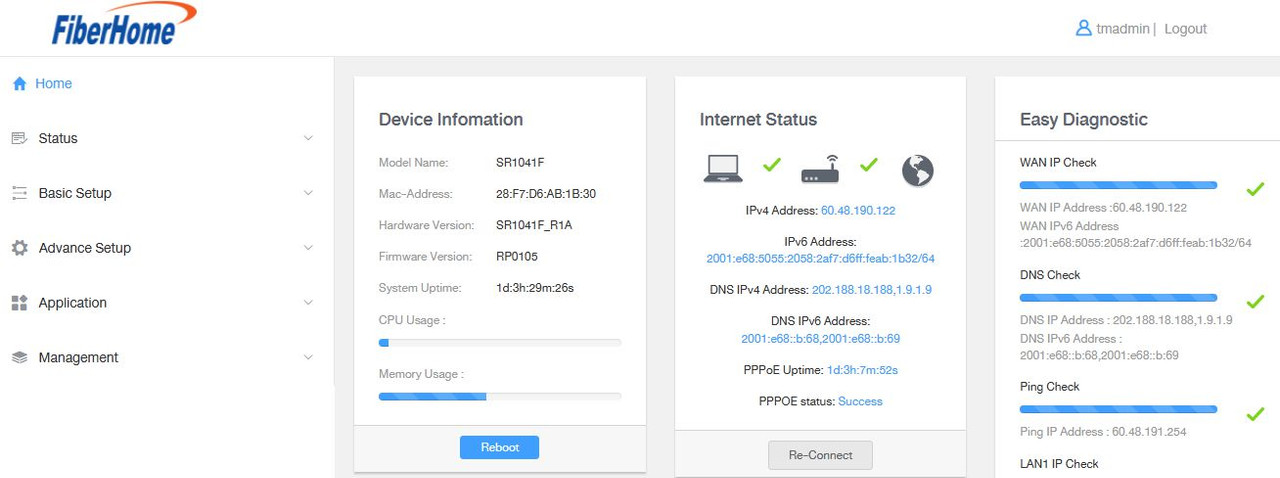
anyone knows SR1041F supervisor password? hmm.gif

i tried change the DNS but not updating in Home screen ..

user posted image
user posted image
*
can try fiberhome and password fiberhome
Xploit Machine
post Nov 24 2023, 08:55 PM

❤️ 孤独な旅行者 ❤️​
*******
Senior Member
7,247 posts

Joined: Nov 2008
From: SINGAPORE💃

QUOTE(xngjn @ Nov 24 2023, 08:25 PM)
can try fiberhome and password fiberhome
*
are u blind? refer my replies before anwering .. dont act smart doh.gif
westlife
post Nov 24 2023, 09:05 PM

10k Club
********
All Stars
14,256 posts

Joined: Jan 2011
for a newly completed service apartment that has the the fibre point ready inside the unit itself, to install fibre service, does it require any drilling of holes or lay cable to the unit itself?
BenYeeHua
post Nov 24 2023, 10:02 PM

Regular
******
Senior Member
1,873 posts

Joined: Nov 2010


QUOTE(Xploit Machine @ Nov 24 2023, 08:55 PM)
are u blind? refer my replies before anwering .. dont act smart  doh.gif
*
Just wonder, did ur DHCPv6/SLAAC or DHCPv4 DNS don't get changed?
Unless you wanna setup NAS/ftp etc via USB on your own router's firmware, it should not affected too much?

I also prefer letting device connect to the DNS directly, so it allow to enabled secure DNS(TLS or https whatever)instead of router's DNS.
Unless you also want DNS caching by router? hmm.gif

And to change default DNS of your PPPoE, it might also be on the PPPoE setup, try check that one. icon_rolleyes.gif
BenYeeHua
post Nov 24 2023, 10:13 PM

Regular
******
Senior Member
1,873 posts

Joined: Nov 2010


After 1 month, plan name still stay 30M instead of 100M, guess because it is not 30 days yet lol.

See how next month. smile.gif
eoahud
post Nov 25 2023, 04:21 AM

Getting Started
**
Junior Member
109 posts

Joined: Apr 2015
QUOTE(Tokik Siwok @ Oct 11 2023, 01:39 PM)
Hi,

Have anyone tried to terminate Unifi while under contract without paying penalty?

A friend managed to applied for relocate to Kampung address without Unifi coverage and TM just say since no coverage and let him terminate for free while still under contract. However this was few years ago.

Not sure if this is the standard practice or up to the staff to decide.
*
Hi, have you manage to terminate while under contract without paying penalty? I still have almost a year remaining but planning to terminate it.

Is it possible to change address and pay the same if say I'm reallocating to another work location with unifi coverage?
westlife
post Nov 25 2023, 07:27 AM

10k Club
********
All Stars
14,256 posts

Joined: Jan 2011
QUOTE(eoahud @ Nov 25 2023, 04:21 AM)
Hi, have you manage to terminate while under contract without paying penalty? I still have almost a year remaining but planning to terminate it.

Is it possible to change address and pay the same if say I'm reallocating to another work location with unifi coverage?
*
nowadays no such thing as terminate with no coverage anymore. worst case scenario, they will also force u to sign up unifi air that uses 5G, unless ur area also has no 5G coverage. i am sure there will be exceptional case one.

of course u can relocate ur current unifi to somewhere else. no relocation fee at all, it is free. u will pay the same price as what u paid now and the contract will continue.
Xploit Machine
post Nov 25 2023, 08:05 AM

❤️ 孤独な旅行者 ❤️​
*******
Senior Member
7,247 posts

Joined: Nov 2008
From: SINGAPORE💃

QUOTE(BenYeeHua @ Nov 24 2023, 10:02 PM)
Just wonder, did ur DHCPv6/SLAAC or DHCPv4 DNS don't get changed?
Unless you wanna setup NAS/ftp etc via USB on your own router's firmware, it should not affected too much?

I also prefer letting device connect to the DNS directly, so it allow to enabled secure DNS(TLS or https whatever)instead of router's DNS.
Unless you also want DNS caching by router? hmm.gif

And to change default DNS of your PPPoE, it might also be on the PPPoE setup, try check that one. icon_rolleyes.gif
*
meand i have to change DHCPv6/SLAAC or DHCPv4

where to change this?

FYI im using direct modem / router .. no mesh or AP hmm.gif

TQ for guiding .. hope u can guide me more hmm.gif
BenYeeHua
post Nov 25 2023, 08:11 AM

Regular
******
Senior Member
1,873 posts

Joined: Nov 2010


QUOTE(Xploit Machine @ Nov 25 2023, 08:05 AM)
meand i have to change DHCPv6/SLAAC or DHCPv4

where to change this?

FYI im using direct modem / router .. no mesh or AP  hmm.gif

TQ for guiding .. hope u can guide me more  hmm.gif
*
After you applied your screenshot, check your phone's wifi and your PC's IP address and DNS, it should be the one you setup. icon_rolleyes.gif

So it will be bypassing your router DNS relay, and connect directly to the DNS server.

Also remember, setup for IPv6 as well, because, by default all device will try IPv6 DNS to obtain both IPv6 and IPv4 address, only if IPv6 is down, then it will be IPv4 DNS. thumbsup.gif
Xploit Machine
post Nov 25 2023, 09:00 AM

❤️ 孤独な旅行者 ❤️​
*******
Senior Member
7,247 posts

Joined: Nov 2008
From: SINGAPORE💃

QUOTE(BenYeeHua @ Nov 25 2023, 08:11 AM)
After you applied your screenshot, check your phone's wifi and your PC's IP address and DNS, it should be the one you setup. icon_rolleyes.gif

So it will be bypassing your router DNS relay, and connect directly to the DNS server.

Also remember, setup for IPv6 as well, because, by default all device will try IPv6 DNS to obtain both IPv6 and IPv4 address, only if IPv6 is down, then it will be IPv4 DNS. thumbsup.gif
*
wic part of the menu? hmm.gif
westlife
post Nov 25 2023, 09:06 AM

10k Club
********
All Stars
14,256 posts

Joined: Jan 2011
if i still have 7 months contract to go for my current plan, can i transfer to another person who is also under 2 years unifi contract?
BenYeeHua
post Nov 25 2023, 09:11 AM

Regular
******
Senior Member
1,873 posts

Joined: Nov 2010


QUOTE(Xploit Machine @ Nov 25 2023, 09:00 AM)
wic part of the menu?  hmm.gif
*
For PC
https://www.wikihow.com/Find-the-IP-Address...s-Settings-Menu

For android
Hmm...
Just google by typing system name(EMUI or MIUI) + how to check dns wifi.
Or, install this one, it will showing the DNS server for IPv4 and IPv6. smile.gif
https://play.google.com/store/apps/details?...analyzerlite.an

If you means which router setting for the DNS.
The one you screenshot.

QUOTE(Xploit Machine @ Nov 24 2023, 02:17 AM)
anyone knows SR1041F supervisor password? hmm.gif

i tried change the DNS but not updating in Home screen ..

user posted image
user posted image
*
Got LAN - IPv4 Configuration and LAN - IPv6 Configuration, right?

Change both, then confirm by checking the provided DNS ip address on your device.
Remember to reconnect your device's WiFi, so it will auto obtain new one, or reboot router also can. icon_rolleyes.gif

If not working, then hmm...
Need others with fiberhome to help you check la... sweat.gif

This post has been edited by BenYeeHua: Nov 25 2023, 09:18 AM
ycs
post Nov 25 2023, 10:09 AM

MEMBER
*******
Senior Member
4,229 posts

Joined: Jan 2003
From: Selangor


change on your PC/laptop

user posted image

This post has been edited by ycs: Nov 25 2023, 10:09 AM
DroppedJaw
post Nov 25 2023, 10:16 AM

Getting Started
**
Junior Member
171 posts

Joined: Apr 2012
QUOTE(Xploit Machine @ Nov 24 2023, 02:17 AM)
anyone knows SR1041F supervisor password? hmm.gif

i tried change the DNS but not updating in Home screen ..

user posted image
user posted image
*
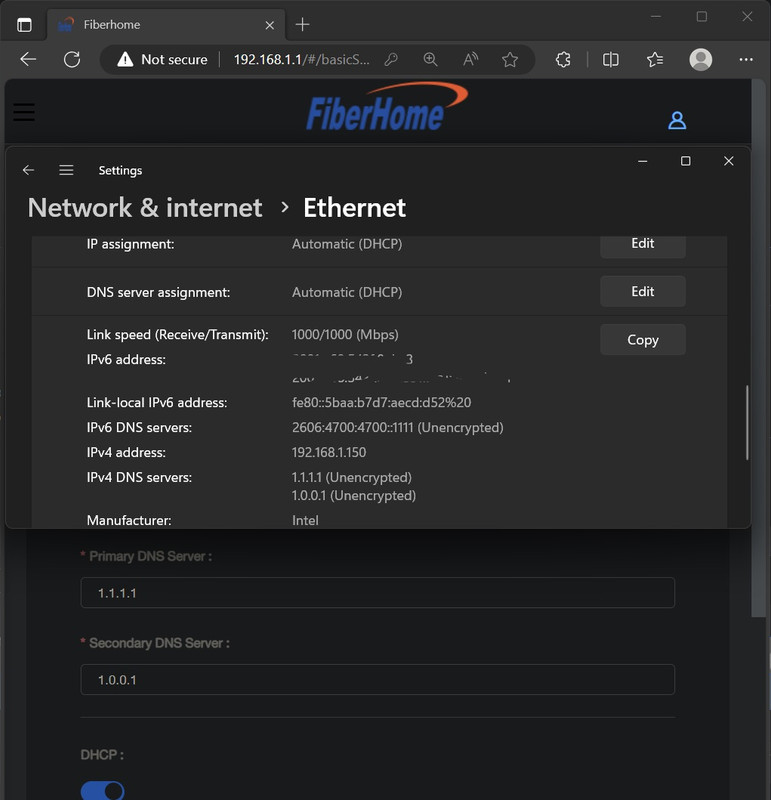
Fiberhome main page DNS status is just the router pinging TM's DNS server, not the DNS you are using.

Why not use device's DoH/DoT?

When using DNS from router:
user posted image


BenYeeHua
post Nov 25 2023, 01:10 PM

Regular
******
Senior Member
1,873 posts

Joined: Nov 2010


lol, just found out the orange router hang, I was only found it out because the strange low WiFi performance.
Guess too many WiFi interference hang it, as others still works, just WiFi weak + WebUI refuse for connect.

So this router not suitable for 100M la, specially someone using laptop WiFi 24/7 hours... doh.gif
But funny he use 2.4 GHz 150Mbps, guess this router's 5 GHz signal too weak for use in room lol. tongue.gif

This post has been edited by BenYeeHua: Nov 25 2023, 01:13 PM

456 Pages « < 441 442 443 444 445 > » Top
Topic ClosedOptions
 

Change to:
| Lo-Fi Version
0.0397sec    0.38    6 queries    GZIP Disabled
Time is now: 6th December 2025 - 05:28 AM