Outline ·
[ Standard ] ·
Linear+
Unifi Official TM UniFi High Speed Broadband Thread V41, READ 1ST PAGE FOR RELEVANT WIFI INFO
|
soonwai
|
 Oct 11 2023, 11:50 AM Oct 11 2023, 11:50 AM
|

|
QUOTE(NimalKumar @ Oct 11 2023, 11:38 AM) My status since yesterday is Appointment Scheduled. My appointment is set for tomorrow @ 9.30 AM ... But still I haven't received any SMS confirming my appointment or any. Should I be worried? Don't be. My neighbour also no SMS. Only received call from installer about an hour before appointed time and asking to come in the next 15mins. This post has been edited by soonwai: Oct 11 2023, 11:50 AM |
|
|
|
|
|
cyberic
|
Oct 11 2023, 11:50 AM
|
|
|
QUOTE(soonwai @ Oct 11 2023, 11:47 AM) My neighbour's bill coming soon on the 13th. Good. They can find out what is the new name for the plan. |
|
|
|
|
|
Ginta0516
|
Oct 11 2023, 11:51 AM
|
Getting Started

|
QUOTE(greyshadow @ Oct 11 2023, 08:26 AM) Batu Lintang? |
|
|
|
|
|
NimalKumar
|
Oct 11 2023, 11:52 AM
|
Getting Started
|
QUOTE(joehann @ Oct 11 2023, 11:41 AM) Check your order in unifi app. Should have the installer phone number. If don't have, you better report to TM through live chat. Thing is I can't open the order through the app. In website its fine. I'm just unsure if the TM Point just haven't update or they just wanna come without any details. |
|
|
|
|
|
nebula87
|
Oct 11 2023, 11:53 AM
|
|
|
Guys, I wonder why I got the SMS and Unifi In-App notification for the speed upgrade and It asked me to turn off everything and turn on again.
But the speed still remains the same, speed same as current speed 300mbps.
What should i do next?
|
|
|
|
|
|
soonwai
|
Oct 11 2023, 11:55 AM
|
|
|
QUOTE(cyberic @ Oct 11 2023, 11:50 AM) Good. They can find out what is the new name for the plan. Hers already updated from YEP 2019 to SWU3.0 as per ss before install. 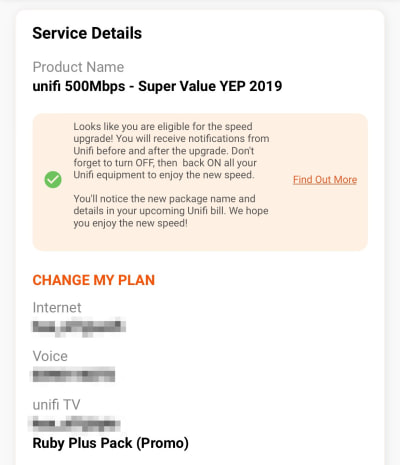 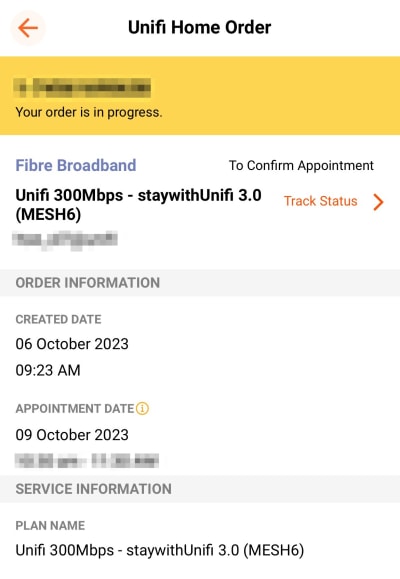 |
|
|
|
|
|
greyshadow
|
Oct 11 2023, 11:55 AM
|
|
|
QUOTE(Ginta0516 @ Oct 11 2023, 11:51 AM) there's only one tmpoint in Kch  |
|
|
|
|
|
PJng
|
Oct 11 2023, 11:56 AM
|
|
|
There is update on app, correct word on upgrade info, no more html code  And, i also sure is not correct, less that 200GB? 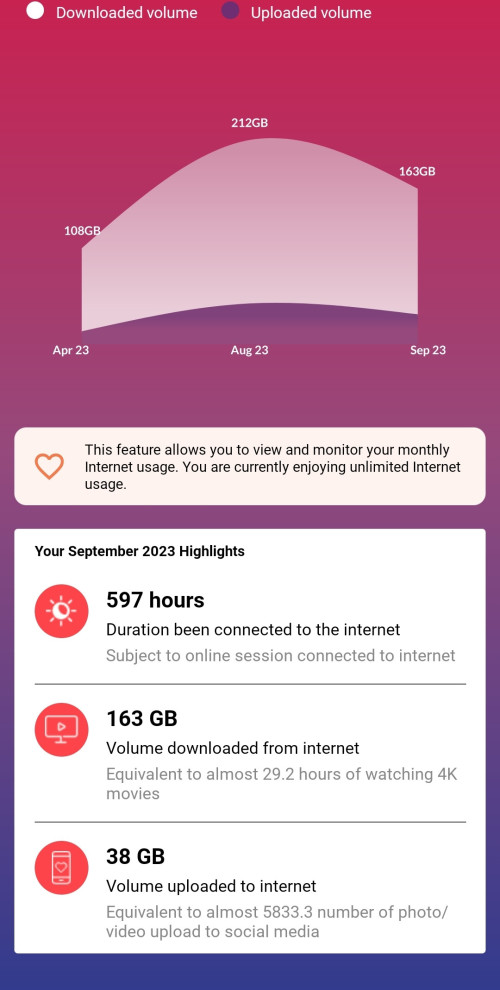 This post has been edited by PJng: Oct 11 2023, 11:57 AM This post has been edited by PJng: Oct 11 2023, 11:57 AM |
|
|
|
|
|
BenYeeHua
|
Oct 11 2023, 11:57 AM
|
|
|
QUOTE(cyberic @ Oct 11 2023, 11:49 AM) More channels give you more bandwidth. 5GHz wifi with 80Mhz, give your higher connection speed but if your area is congested, it affects the stability. That explain why sometimes you get lower speed. For congested area, maybe choose 40Mhz for stability, sacrificing top speed. Yes, 80mhz means 1/2 power of 40mhz, not just thinking about hitting other wifi around la. https://community.meraki.com/t5/Wireless-LA...t-boy/m-p/81354--- For the best, ipref for local testing first, then do speed test. compare both different, and try on different distance, like toilet and kitchen.  |
|
|
|
|
|
BenYeeHua
|
Oct 11 2023, 11:57 AM
|
|
|
QUOTE(nebula87 @ Oct 11 2023, 11:53 AM) Guys, I wonder why I got the SMS and Unifi In-App notification for the speed upgrade and It asked me to turn off everything and turn on again. But the speed still remains the same, speed same as current speed 300mbps. What should i do next? Same upload? If upload boosted, means need call them set again port speed. |
|
|
|
|
|
cyberic
|
Oct 11 2023, 11:58 AM
|
|
|
QUOTE(soonwai @ Oct 11 2023, 11:55 AM) Hers already updated from YEP 2019 to SWU3.0 as per ss before install. Just curious that message mentioned about package name and detail will be in new bill. My current bill state advance plus 500. |
|
|
|
|
|
holyleonard
|
Oct 11 2023, 11:58 AM
|
Getting Started
|
so SWU is only 300mbps?
got SWU for 500mbps?
|
|
|
|
|
|
soonwai
|
Oct 11 2023, 12:02 PM
|
|
|
QUOTE(holyleonard @ Oct 11 2023, 11:58 AM) so SWU is only 300mbps? got SWU for 500mbps? Got, SWU3 500(800) RM179 |
|
|
|
|
|
BenYeeHua
|
Oct 11 2023, 12:05 PM
|
|
|
QUOTE(soonwai @ Oct 11 2023, 12:02 PM) I think most already saw we got so much wifi performance, thinking going to 800M will solve wifi limitation is kind of...  better wait net 5 year, when u get WIFI8, or you are using cable for pc and console to download game la. |
|
|
|
|
|
kunimi
|
Oct 11 2023, 12:05 PM
|
|
|
Technician just came today for setting up the mesh. My package still yet to me reflected though but mine is swu 300mbps with 500 upgrade.
I was in 300 Mbps and got a free upgrade last week
|
|
|
|
|
|
soonwai
|
Oct 11 2023, 12:09 PM
|
|
|
I think I managed to convince my left and right neighbours to go for 100Mbps RM89 instead of waiting for 300 and 500 upgrade. Fingers crossed. Savings of about RM80-RM100 each month. Their kids may not be too happy though.
This post has been edited by soonwai: Oct 11 2023, 12:10 PM
|
|
|
|
|
|
stranger88
|
Oct 11 2023, 12:09 PM
|
|
|
just done swu 3.0 installation, btw, unifi app will reflect plan instant or need time? still showing old plan name but installation is showing new plan name
|
|
|
|
|
|
BenYeeHua
|
Oct 11 2023, 12:10 PM
|
|
|
QUOTE(soonwai @ Oct 11 2023, 12:09 PM) I think I managed to convince my left and right neighbours to go for 100Mbps RM89 instead of waiting for 300 and 500 upgrade. Fingers crossed. Unless they need to moving, it will be enough saving, give u free call and 1 new router as well. |
|
|
|
|
|
soonwai
|
Oct 11 2023, 12:12 PM
|
|
|
QUOTE(stranger88 @ Oct 11 2023, 12:09 PM) just done swu 3.0 installation, btw, unifi app will reflect plan instant or need time? still showing old plan name but installation is showing new plan name My neighbour's myunifi app updated with new plan name around 6pm. Installation was completed at 3pm. |
|
|
|
|
|
BenYeeHua
|
Oct 11 2023, 12:13 PM
|
|
|
QUOTE(soonwai @ Oct 11 2023, 12:12 PM) My neighbour's myunifi app updated with new plan name around 6pm. Installation was completed at 3pm. Ya, installer also told u, don't turn off modem last 24 hours if u can, lol.  |
|
|
|
|



 Quote
Quote





 0.0380sec
 0.67
0.67
 6 queries
 GZIP Disabled