


The counter lady was shocked when I mentioned SWU 3.0 and show her the list I've gotten from here, but nonetheless I'm still able to change my package

Unifi Official TM UniFi High Speed Broadband Thread V41, READ 1ST PAGE FOR RELEVANT WIFI INFO
|
|
 Oct 10 2023, 03:41 PM Oct 10 2023, 03:41 PM
Return to original view | Post
#1
|
 
Senior Member
1,844 posts Joined: Jan 2003 From: Kingdom of Sarawak   
|
Just done applied for SWU 3.0 at tmpoint, downgraded/upgraded my ancient RM129 100Mbps + Unifi TV package to RM119 300Mbps package, which I was told I'll get 500Mbps when the installer came
The counter lady was shocked when I mentioned SWU 3.0 and show her the list I've gotten from here, but nonetheless I'm still able to change my package |
|
|
|
|
|
Oct 11 2023, 08:26 AM
Return to original view | Post
#2
|
|
Senior Member
1,844 posts Joined: Jan 2003 From: Kingdom of Sarawak
|
QUOTE(adri4n @ Oct 10 2023, 05:52 PM) location tmpoint? Kuching |
|
|
Oct 11 2023, 08:41 AM
Return to original view | Post
#3
|
|
Senior Member
1,844 posts Joined: Jan 2003 From: Kingdom of Sarawak
|
for those upgrading/"downgrading" using SWU3.0
they'll still need to schedule the technician to come over for configuration, but what need to be configured actually? Don't TM just need to switch their port speed from their side and us just need to re-start the modem?  I still be using the same BTU right ? since I'm just upgrading from 100Mbps to 300Mbps Can the technician just pass the mesh wifi to my family member at home and let them sign and cabut? the rest I can kautim myself when I'm home from work? |
|
|
Oct 11 2023, 09:06 AM
Return to original view | Post
#4
|
|
Senior Member
1,844 posts Joined: Jan 2003 From: Kingdom of Sarawak
|
QUOTE(silencer @ Oct 11 2023, 08:49 AM) They need to configure the router and to ensure the connection under your new subscription has been successfully established and verified in line with the advertised speed. guess have no choice again but wait for their appt and ponteng kerja for few hours thenlast time mine was super unreliable, took whole day off on appt day just to wait for them, end up no show blasted them kau-kau only then reschedule to next day morning, said mine will be their first case, end up they only show up in the afternoon end up used up my 2 days leave just for this upgrade |
|
|
Oct 11 2023, 11:55 AM
Return to original view | Post
#5
|
|
Senior Member
1,844 posts Joined: Jan 2003 From: Kingdom of Sarawak
|
QUOTE(Ginta0516 @ Oct 11 2023, 11:51 AM) Batu Lintang? there's only one tmpoint in Kch |
|
|
Oct 13 2023, 10:08 AM
Return to original view | Post
#6
|
|
Senior Member
1,844 posts Joined: Jan 2003 From: Kingdom of Sarawak
|
QUOTE(decavalera @ Oct 13 2023, 10:07 AM) Need an advice from sifus here:- if current setup has no issues/deadzone then just keep it collecting dust or sell it off cheap cheapI have my old ASUS AC1900 which i stopped using after TM installed 2pc Dlink AX3000 where 1 as main & 1 as mesh downstair. Is there anyway that i can utilize back the AC1900 to improve my currect setup or better to just leave as it is by using both AX3000 only?? if got deadzone, put there as repeater decavalera liked this post
|
|
|
|
|
|
Oct 13 2023, 10:20 AM
Return to original view | Post
#7
|
|
Senior Member
1,844 posts Joined: Jan 2003 From: Kingdom of Sarawak
|
those got the new router (either dlink 3060 or the fiberhome) from tm, do they still lock the SSID name with locked @unifi suffix that you're unable to change?
Currently am using own Tplink AX50 |
|
|
Oct 13 2023, 10:59 AM
Return to original view | Post
#8
|
|
Senior Member
1,844 posts Joined: Jan 2003 From: Kingdom of Sarawak
|
QUOTE(cyberic @ Oct 13 2023, 10:49 AM) For 300 plan, I see unifi 500. How do you guys conclude it is permanent? Because no more 6 or 12 months speed upgrade wording? the CS at the counter told me it's permanent bcos of the recent speed upgrade exercisethe rest reported similar msg from the CS as well |
|
|
Oct 16 2023, 01:52 PM
Return to original view | Post
#9
|
|
Senior Member
1,844 posts Joined: Jan 2003 From: Kingdom of Sarawak
|
Applied SWU3.0 RM119 last week, and the technician came today
Asked him thru whatsapp if possible can avoid coming to house or not, as I'll need to go home from office, as mine is just speed upgrade. Told me cannot as he need to take snapshot of modem and speedtest result, so no choice to go home at appointed time. Technician arrived earlier and they're already waiting outside house when I arrived. Took them only 15mins to swap out my old white BTU to a new ZTE one, plug and play only, didn't even need to go into BTU setting to configure anything. Speedtest thru wifi 5G, managed to get 300Mbps, asked him where's my 500Mbps? was told they'll change it tonight. Now I got 2 Homefiber Mesh wifi as extra... wondering what to do with them? |
|
|
Oct 16 2023, 02:27 PM
Return to original view | Post
#10
|
|
Senior Member
1,844 posts Joined: Jan 2003 From: Kingdom of Sarawak
|
QUOTE(Lurker @ Oct 16 2023, 02:20 PM) sorry if this has been asked b4, SWU 3.0 is only 500Mbps internet? Do no include unifitv/freecalls? TQ 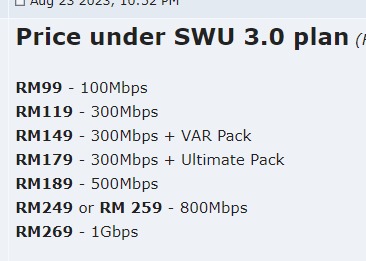 refer to this mine RM119 one still comes with freecalls Lurker liked this post
|
|
Topic ClosedOptions
|
| Change to: |  0.2614sec 0.2614sec
 0.39 0.39
 7 queries 7 queries
 GZIP Disabled GZIP Disabled
Time is now: 15th December 2025 - 01:57 PM |
 Quote
Quote