Welcome Guest ( Log In | Register )

Bump Topic Topic Closed RSS Feed
7 Pages < 1 2 3 4 5 > » Bottom

Outline · [ Standard ] · Linear+

Unifi Official TM UniFi High Speed Broadband Thread V41, READ 1ST PAGE FOR RELEVANT WIFI INFO

views
     
yenchenje
post Oct 9 2023, 08:30 PM

Enthusiast
*****
Junior Member
932 posts

Joined: Dec 2019
QUOTE(neekun @ Oct 9 2023, 06:59 PM)
Assuming my upgraded speed is 1gbps, i can set dlink as bridge and let my current Asus ax11000 handle pppoe and make use of the 2.5g port on my Asus as wan port. Correct Ka?
*
Yes, just as usual, gigabit port overhead so you can never reach true 1GBe
QUOTE(lamusiqa @ Oct 9 2023, 07:22 PM)
On the ONR supplied by TM, yes. I'm asking if I can get the 2gbps connection on a single cable if I were to replace the provided ONR with a 3rd party ONR that has 2.5g or 10g ethernet ports.
*
TM’s ONU control quite tight on which can connect to their OLT. Currently there’s a 2.5Gbps GPON VSOL ONU that is out but isn’t compatible.

Most GPON ONU that you can purchase easily from overseas only 1G with GPON, >2.5GBe is EPON/XPON which is not compatible with TM’s Wavelength

Currently only known way to get 2Gbps combined is ONU SFP.
yenchenje
post Oct 10 2023, 12:38 PM

Enthusiast
*****
Junior Member
932 posts

Joined: Dec 2019
QUOTE(mywife @ Oct 10 2023, 12:08 PM)
Tried my luck requesting swu3 by chat line, no luck, the agent said still in contract (got 6 months left). Later on on TM point also no luck but this time the counter lady explained since I'm from previous swu package I need to complete the 2 years term.
If I wasn't from any swu package, she can proceed even with that 6 months left in contract. So she said nicely I can try come again April next year and see what's TM has in store for me. Adoiiiii......
*
TM Pelangi staff quite friendly, can go there and give it a try. Front counter first before actual counter inside
yenchenje
post Oct 10 2023, 12:58 PM

Enthusiast
*****
Junior Member
932 posts

Joined: Dec 2019
QUOTE(soonwai @ Oct 10 2023, 12:56 PM)
Everybody has their own criteria. For wifi6, I only started buying wifi6 APs when I had about 3/5 of my devices on wifi6. Not including those old IOT stuff still on 2.4Ghz.

As for 6e and 7, I will be skipping 6e and just wait for 7+.
*
And not to mention semi decent AX hardware has been getting real affordable, getting a WiFi 5 device in 2023 just seems like an attempt at gaining a bit of profit or willingly giving money away tongue.gif

And can agree on 6e, just skip it and wait for 7 biggrin.gif
yenchenje
post Oct 10 2023, 04:10 PM

Enthusiast
*****
Junior Member
932 posts

Joined: Dec 2019
QUOTE(jackytiong @ Oct 10 2023, 03:52 PM)
I subscribed 2Gbps business broadband only found out only provides 1Gbps for Lan1 and Lan2. Can I change the router so that I get 1 lan port for 2Gbps speed? The Unifi only provide 1 devide , fiber modem and router 2 in 1.
*
Changing to any premade ONU, no, most consumer ONU has serial/MAC that is not changeable. TM’s OLT is strict on what ONU they accept, so you need something that can spoof/disguise as your original ONR to report back to TM’s OLT as the original box they gave you.

GPON ONU SFP yes, you just need a router with SFP+ cage and 2.5G capability to get the full 2G in a single pipe.

https://github.com/Anime4000/RTL960x

Best option is buy a Mikrotik router from Shopee, buy the stick from Anime4000 and plug and play. Do note that you will need to setup your VoIP manually up if you need that, this can be done by putting your VoIP creds into IP phone/PABX if you have one, and bridge the VoIP VLAN to an Ethernet port.

So get your credentials from the ONR if you plan to move to this solution biggrin.gif
yenchenje
post Oct 10 2023, 10:23 PM

Enthusiast
*****
Junior Member
932 posts

Joined: Dec 2019
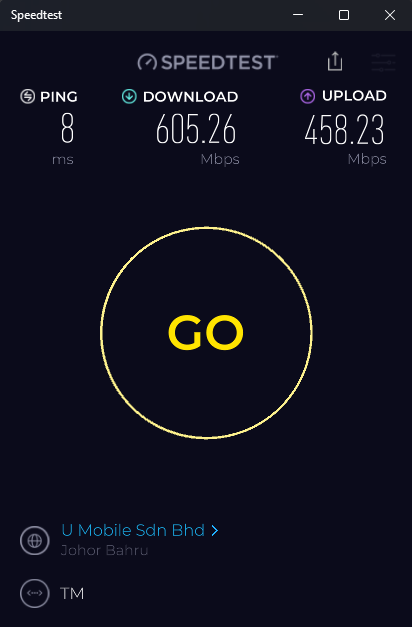
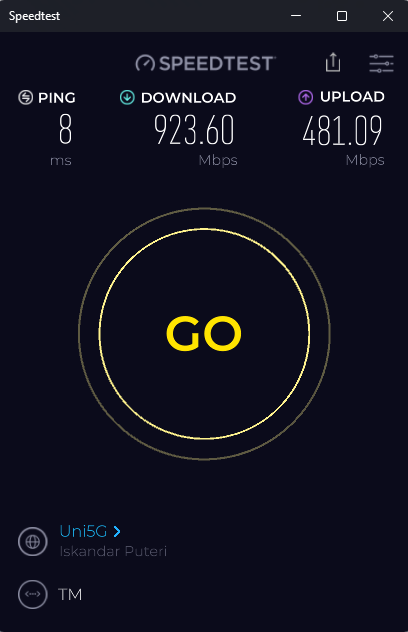
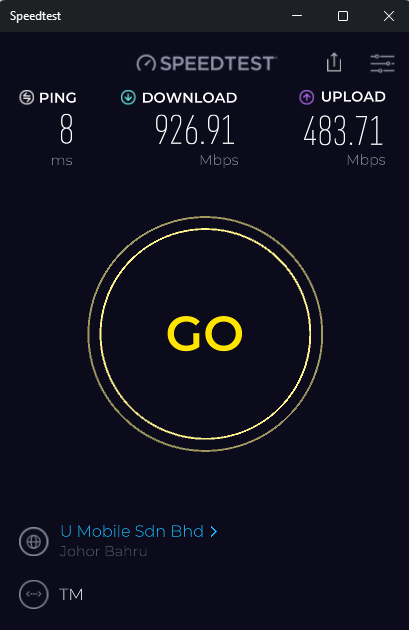
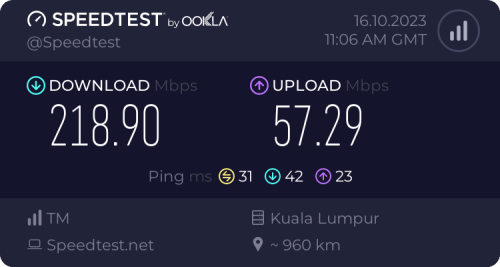
Everyone here showing their speed, meanwhile my 1Gbps struggle to reach anywhere past 400-500mbps if I'm using anything other than Uni5G servers doh.gif , on all other servers averaging only 400-600DL and 300-400UL

user posted image
user posted image

No time to do more diagnostics on the connection atm, suspecting bad routing with assigned IP, maybe only testing more during the weekends

user posted image

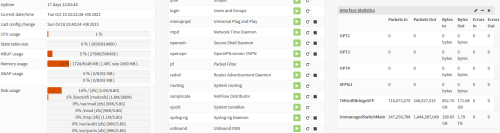
Almost 1TB with only 2 weeks + of uptime thumbup.gif


This post has been edited by yenchenje: Oct 10 2023, 10:27 PM
yenchenje
post Oct 12 2023, 10:48 PM

Enthusiast
*****
Junior Member
932 posts

Joined: Dec 2019
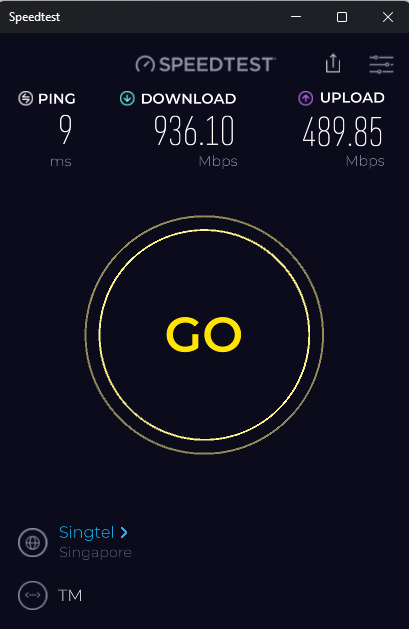
user posted image
user posted image

New IP swap after updating my OPNSense, much more stable now biggrin.gif

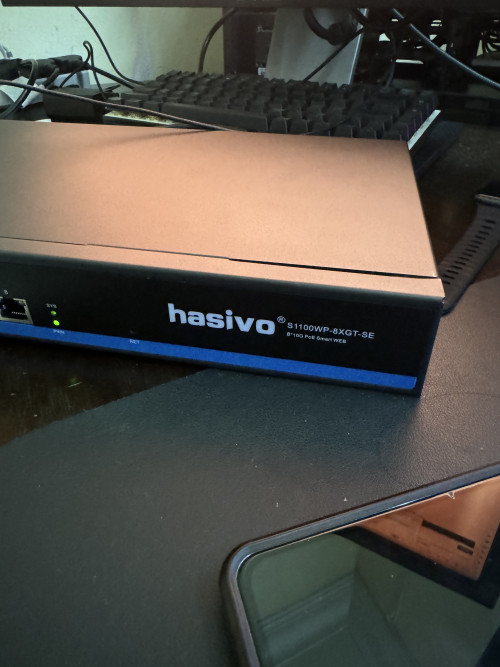
Also just got new 10GBe hardware in, partially preparing for the 2Gbps upgrade devil.gif

user posted image
Overkill? Very much so but laugh.gif
yenchenje
post Oct 12 2023, 11:51 PM

Enthusiast
*****
Junior Member
932 posts

Joined: Dec 2019
QUOTE(cyberic @ Oct 12 2023, 11:28 PM)
Using any POE AP?
*
EAP670, need to setup this switch for it. 2.5GB biggrin.gif
yenchenje
post Oct 13 2023, 12:17 AM

Enthusiast
*****
Junior Member
932 posts

Joined: Dec 2019
QUOTE(cyberic @ Oct 13 2023, 12:14 AM)
Speed done with eap670? How many unit?

Ubiquiti only have 1G port. TPLink product are pushing 2.5G and 10G port 😆
*
2x units atm, 700Dl/350UL on IP15Pro tongue.gif, connected currently via 1GB to a cheapo China PoE 1G unmanaged switch, will try again when I have the 10GB switch up and running to see if I can hit higher speeds biggrin.gif

This post has been edited by yenchenje: Oct 13 2023, 12:20 AM
yenchenje
post Oct 14 2023, 08:03 PM

Enthusiast
*****
Junior Member
932 posts

Joined: Dec 2019
QUOTE(Xanxeviera. @ Oct 14 2023, 04:35 PM)
35.213.152.13
*
TM 1Gbps getting also 150ms ish, probably just routing issue via TM in general
yenchenje
post Oct 16 2023, 07:32 AM

Enthusiast
*****
Junior Member
932 posts

Joined: Dec 2019
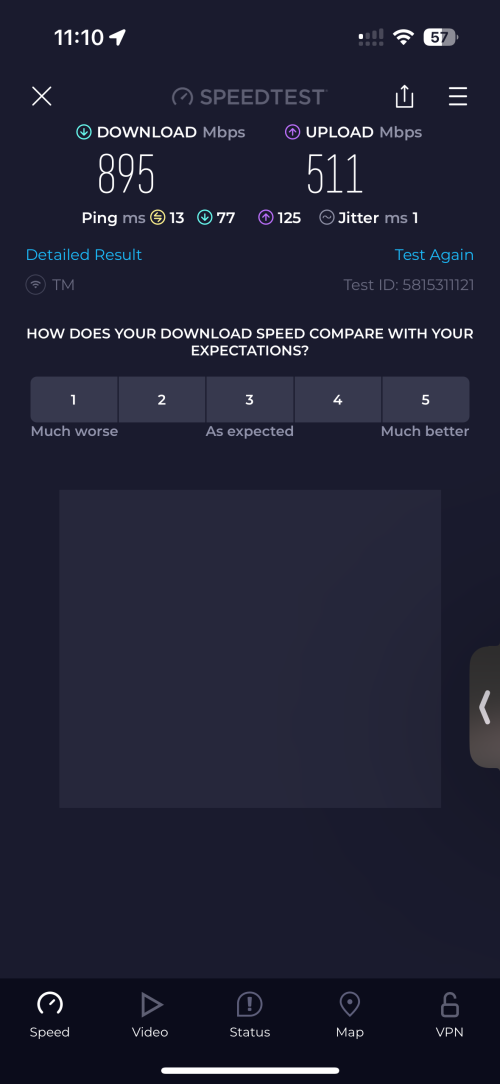
Not exactly sure what happened yesterday but it’s the first time that my 15 Pro was able to saturate the gigabit connection fully via WiFi 6 5GHz.. it never reached anything past 600-700mbps DL, this was also after the upgrade to a 2.5Gbps LAN connection hmm.gif user posted image

yenchenje
post Oct 16 2023, 11:06 AM

Enthusiast
*****
Junior Member
932 posts

Joined: Dec 2019
QUOTE(westlife @ Oct 16 2023, 07:47 AM)
Other the limitation of the wireless standard u are experiencing it, it is also impact of the overheads on ur current connection and this is the reason why u did not try higher speed earlier. Now with higher speed of ur plan, it just simply allows more overheads to be lost thus overall it is still faster than before.
*
Huh? I’ve been on 1Gbps for a bit, can pull near 930+ even with my family using it. But never have I seen near 900+ on pure WiFi is what I mean
QUOTE(JayceOoi @ Oct 16 2023, 08:21 AM)
Yes, same thing happens here during my local tests. 2.5G LAN does help some.
*
Interesting, what width are you running at? I’m a terrible neighbor and I hog it with 160 tongue.gif
yenchenje
post Oct 16 2023, 12:32 PM

Enthusiast
*****
Junior Member
932 posts

Joined: Dec 2019
QUOTE(JayceOoi @ Oct 16 2023, 11:20 AM)
160
*
Glad I’m not alone with 160 here biggrin.gif

QUOTE(NightFelix @ Oct 16 2023, 12:30 PM)
Side note:
Lan Cable Cat 5E, Cat 6, Cat 6A which can maximise 500Mbps? The default Cat 5E can right?
*
Cat5e can go up to GBe, and is the cheapest cable for that smile.gif
yenchenje
post Oct 16 2023, 02:45 PM

Enthusiast
*****
Junior Member
932 posts

Joined: Dec 2019
QUOTE(BladeRider88 @ Oct 16 2023, 01:27 PM)
Hello bros & sifu

Currently I am using 800M package with the White Huawei BTU. I understand that all 800M user will be upgraded to 1G speed in year 2024. Any ideas whether TM will replace our existing BTU to the newer all in one ONR?

I am not a fan of their all in one ONR to be honest... doh.gif
*
Yes, basically that’s the reason why 800Mbps/1Gbps upgrades are delayed as they HAVE to change to ONR, even though old BTU is still usable.

But their ONR can be placed into bridge mode to just serve as ONU if you still want to use your own router biggrin.gif
yenchenje
post Oct 16 2023, 02:52 PM

Enthusiast
*****
Junior Member
932 posts

Joined: Dec 2019
QUOTE(joehann @ Oct 16 2023, 02:47 PM)
189 a bit expensive if internet only. If got tv pack such as ultimate then still ok. This is to compare with my previous account 500mbps+aneka = RM159 which entitle for free upgrade to 800mbps but I opted to SWU3.0 RM119. 800mbps is kind of overkill for my parent house.
*
Not me paying 269 per month for 1Gbps BB only whistling.gif
yenchenje
post Oct 16 2023, 04:10 PM

Enthusiast
*****
Junior Member
932 posts

Joined: Dec 2019
QUOTE(BladeRider88 @ Oct 16 2023, 03:59 PM)
Oh nice!  notworthy.gif  rclxm9.gif
Best thing ever..cause this is package is under my father name, and i use it as offsite backup for my Linux ISOs, hence custom router is very important for me
*
The DLink ONR UI is a bit confusing, but you can play around with it when the upgrade eventually comes biggrin.gif
yenchenje
post Oct 16 2023, 06:34 PM

Enthusiast
*****
Junior Member
932 posts

Joined: Dec 2019
QUOTE(cklove96 @ Oct 16 2023, 06:30 PM)
free 6months waive 119 per month so average just 89 per month for 24months
*
119 for 800Mbps is what it should cost whistling.gif , enjoy the free upgrade!
yenchenje
post Oct 16 2023, 07:46 PM

Enthusiast
*****
Junior Member
932 posts

Joined: Dec 2019
QUOTE(Noice @ Oct 16 2023, 07:23 PM)
I just got upgraded, 100mbps > 300mbps. But dang can't even reach 300mbps 🤣

Is this anything to do with my trashcan stock router? (ethernet - DIR-850L)

user posted image
*
Considering changing to AX12/AX53 smile.gif , they’re a good investment considering the prices of AX router these days, 850L can be put aside for a child node AP
yenchenje
post Oct 16 2023, 08:14 PM

Enthusiast
*****
Junior Member
932 posts

Joined: Dec 2019
QUOTE(totally_skint @ Oct 16 2023, 07:54 PM)
Isn't there a 30 day cooling off period for cancelling and resubcribing to Unifi?
You should be getting the SWU plans.
Hence my question on recommended cable brands
*
For short patches, U Green, Vention
For longer rolls <50M, any spools with blue outer coating will work
For 305M spools, personally recommend Draka by Prysmanian Group/Hikvision/Schneider Electric

Or if it’s not too long, just buy those pre terminated cat7/cat8, those are generally more well built as they need to be specially terminated unlike Cat5e/Cat6
yenchenje
post Oct 17 2023, 10:47 AM

Enthusiast
*****
Junior Member
932 posts

Joined: Dec 2019
QUOTE(Feliex @ Oct 17 2023, 10:21 AM)
Im using 500Mbps:
1. Yes, full wifi speed using wifi 6, 5ghz. My iPad Pro 2022, iPhone13PM, Macbook Pro M2, PC ROG STRIX B660-A GAMING WIFI D4 - Wifi Intel all get full Speed.
Router: Asus RT-AX55 & RT-AX55 (Mesh).

2. Max Speed during speed test.

3. 1 wall and 3 walls all full speed.

But what I observe when I download the game on Xbox Series X and NAS Synology, is hard to maintain an average of 500Mbps,, mostly around 200Mbps - 300Mbps++ and it seems to take sometimes to reach 500Mbps... but a few moments it will back to 400Mbps (not very consistent when full speed during download)
*
Your pipe is huge doesn’t necessarily means it can pull the full pipe via their service. Usually downloads from non CDN/direct is susceptible to routing, I assume from your Synology you’re downloading either torrents/direct files from another host elsewhere on the internet, I use my Hetzner as a seed box to download to my local NAS but it’s always 1MB-4MB/s on average because of TM’s bad routing to international servers, only recently I’ve noticed it going up to 11MB-15MB on average, which is still well short of 1Gbps. Which is expected as I’m communicating directly with hetzner instead of going through AWS/Azure/Google/Akamai CDN or whichever CDN the services I’m connected to use.

For Xbox download, I’m pretty sure Microsoft has compressed their games on their server, so when you download it’s also decompressing real time on your Xbox, hence the speed, like how steam compresses their game, right now most new systems isn’t combatting with speed but their CPU power to decompress their game on your system tongue.gif , even semi new generation of chips Intel 9/10 gen still get pinned when downloading via gigabit from steam

For WiFi you can get full speed most of the time via Speedtest, but actual real world depends. Are you gonna be pulling 800Mbps all the time on your device? Probably not, unless you’re streaming like 16K, which the minimum is 300Mbps and maximum is 585Mbps. At that point, your phone decoding it is the bottleneck tongue.gif , not to mention if your neighbor is terrible (me), they set the width to 160, they’ll hog all the airtime and severely hamper your AP performance. So usually WiFi being able to run full speed is very subjective to interference. Best way to test is still via LAN when your network is quiet smile.gif
yenchenje
post Oct 17 2023, 12:22 PM

Enthusiast
*****
Junior Member
932 posts

Joined: Dec 2019
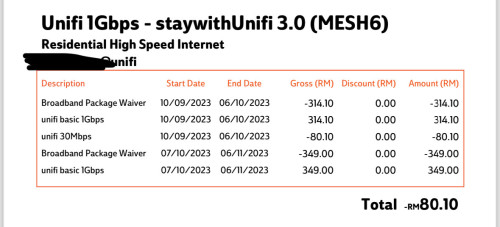
Gonna be patiently waiting for the 2Gbps tongue.gif

user posted image

7 Pages < 1 2 3 4 5 > » Top
Topic ClosedOptions
 

Change to:
| Lo-Fi Version
0.2898sec    0.40    7 queries    GZIP Disabled
Time is now: 11th December 2025 - 04:42 PM