Welcome Guest ( Log In | Register )

Bump Topic Topic Closed RSS Feed
7 Pages « < 2 3 4 5 6 > » Bottom

Outline · [ Standard ] · Linear+

Unifi Official TM UniFi High Speed Broadband Thread V41, READ 1ST PAGE FOR RELEVANT WIFI INFO

views
     
yenchenje
post Oct 17 2023, 04:33 PM

Enthusiast
*****
Junior Member
932 posts

Joined: Dec 2019
QUOTE(hasmidzul_jojo @ Oct 17 2023, 04:12 PM)
They will squeeze the life of that ONT before make the replacement.That the way i see it. ranting.gif
*
Doubt so, I can’t remember who here but someone stuck a piece of paper into the ONU to pretend that it’s dead to get a replacement. FOC cuz ONU is literally free to them cuz of how cheap it is tongue.gif
yenchenje
post Oct 17 2023, 06:19 PM

Enthusiast
*****
Junior Member
932 posts

Joined: Dec 2019
QUOTE(coolguy_0925 @ Oct 17 2023, 04:55 PM)
into the inlet connecting fiber from the pole?
*
Where the fiber plugs in yes

QUOTE(Verblassen @ Oct 17 2023, 05:08 PM)
I had to pay for mine in 2018 because of the Turbo Upgrade. Went from 50mbps to 500mbps. The old ONU could only support up to 100mbps (Fast Ethernet).
*
Interesting, ONU should be FOC tho, maybe not for upgrade but 1 unit is only like RM10+ for TM from what I heard, next time if need change it’s most likely from the installer and not TM officially, keep an eye out whistling.gif
yenchenje
post Oct 17 2023, 09:07 PM

Enthusiast
*****
Junior Member
932 posts

Joined: Dec 2019
QUOTE(coolguy_0925 @ Oct 17 2023, 08:07 PM)
wow 1 piece of BTU baru worth 10 ringgit?!
thumbsup.gif  devil.gif

so far my Alcatel Lucent (except the super bright LEDs) still serving me very well from 2017 so guess just keep it KIV first
*
Yep, ISP usually just buy bulk devices from OEM/Manufacturer, won't be surprised if it's even cheaper than that. And ONU is basically worthless since they're supposed to last quite a bit, so not much market is going to be there for these devices tongue.gif
yenchenje
post Oct 17 2023, 09:15 PM

Enthusiast
*****
Junior Member
932 posts

Joined: Dec 2019
QUOTE(Chiggah @ Oct 17 2023, 09:09 PM)
huawei echolife hg8240 fine ?
*
That's possibly one of the best option, mid of the road, LEDs not too bright, and doesn't feel too cheap looking compared to Fibrehome nod.gif
yenchenje
post Oct 17 2023, 10:15 PM

Enthusiast
*****
Junior Member
932 posts

Joined: Dec 2019
QUOTE(Oltromen Ripot @ Oct 17 2023, 09:41 PM)
the ultra ONR uses blue LED. I put in dining room (middle), and it lights up both kitchen and living room (adjoining rooms) as well.
*
Okay glad I wasn't the only one finding the Ultra ONR's light basically blinding, I had to cover it up with wrapping foam or else my whole living room is gonna be like a fucking rave during midnight rclxub.gif
yenchenje
post Oct 17 2023, 11:29 PM

Enthusiast
*****
Junior Member
932 posts

Joined: Dec 2019
QUOTE(Oltromen Ripot @ Oct 17 2023, 10:22 PM)
So you also found it blinding disturbing!

When new installed, I had it on the lowest rack in the living room. Just walking by is a pain, regardless of time. That's why I moved it to the dining, and purposely put a new shelf so that it is slightly higher than eye-level.
*
It’s so bad, my previous Fiberhome ONU was the best. This with the never ending LAN 1 blue light is fucking horrible. And no way to turn it off as well, good job D-Link. I love to have a party in my living room at midnight mad.gif
yenchenje
post Oct 18 2023, 07:21 AM

Enthusiast
*****
Junior Member
932 posts

Joined: Dec 2019
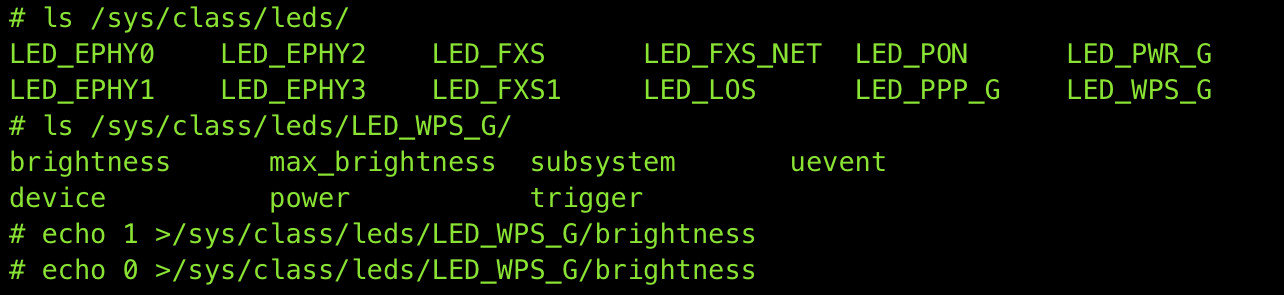
QUOTE(Oltromen Ripot @ Oct 17 2023, 11:39 PM)
no idea how to use this though.
Home Minister still using Internet, so me as Digital Minister can't reroute to do R&D yet.

user posted image

update;

hey, found it, at least this seems persistent when i applied "1" to WPS light (i disabled WPS, so it's off by default for me) and when i applied "0" to FXS (default on because it's the phone line).

user posted image

suddenly i have naughty urge to do a Kitt's running light... there is sleep command after all for delaying...

update;

eff. the sleep command only accept integer, cannot do miliseconds.

update;

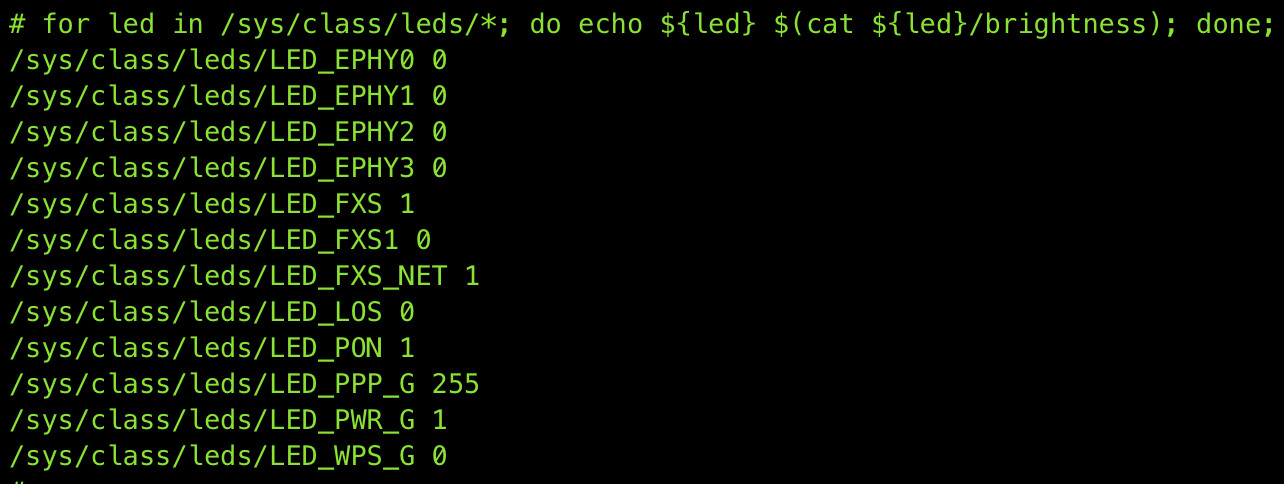
can script a for-do-done loop... to influence the lights.

user posted image
*
Time to disable all of them tonight whistling.gif

QUOTE(SwarmTroll @ Oct 18 2023, 01:13 AM)
Question, does the IP address affect the speedtest results? Should the router settings use IP address that is dynamically set by ISP or should we manually input one?
*
It might impact you, especially under CGNAT. As different IPs goes through different internal gateway, some gateway is congested and some isn’t
yenchenje
post Oct 18 2023, 01:57 PM

Enthusiast
*****
Junior Member
932 posts

Joined: Dec 2019
QUOTE(db07mufan @ Oct 18 2023, 01:54 PM)
the BTU is from unifi Huawei HG8240H, connected to Deco M9 one downstairs and one upstairs.

Just unplugged and replugged everything but looks like the same hmm.

My DECO APP has a message that says ABNORMAL WAN PORT SPD, please check WAN PORT CONNECTION.

Do i have crappy lan cables?

My laptop unfortunately does not have LAN port for me to test directly from the modem hmm.
*
Either your HG8240H is faulty, or your cables are bad.

Abnormal WAN Port speed whistling.gif
yenchenje
post Oct 19 2023, 09:48 AM

Enthusiast
*****
Junior Member
932 posts

Joined: Dec 2019
QUOTE(sckham @ Oct 19 2023, 08:42 AM)
Wifi
*
Always use LAN to test speed whistling.gif
yenchenje
post Oct 19 2023, 01:21 PM

Enthusiast
*****
Junior Member
932 posts

Joined: Dec 2019
QUOTE(Guenhwyvar @ Oct 19 2023, 11:16 AM)
Hi everyone, just wanna confirm after being upgraded, do you guys get consistent internet speed after the upgrade or only to certain serves? My family's house was upgraded to supposedly 300Mbps but when I tested it for some servers I only get like 100Mbps and some 200+ ish. Is this normal?
*
Some servers is congested, some servers routing is bad from your router to it, if you use WiFi it’s susceptible to interference.

You can try some known good servers with TM. Not sure where do you live but I’m in JB, Uni5G, U Mobile, Celcom, Singtel, StarHub, NewMedia and all gives me near my 1Gbps plan speeds under ideal conditions.

Remember, always test with LAN and never JUST WiFi.

This post has been edited by yenchenje: Oct 19 2023, 01:21 PM
yenchenje
post Oct 19 2023, 07:49 PM

Enthusiast
*****
Junior Member
932 posts

Joined: Dec 2019
QUOTE(neekun @ Oct 19 2023, 07:05 PM)
theoretically the existing Huawei modem for 800mbps user supposedly can be reused if it’s upgraded to 1gbps package since current Huawei is gigabit port as well.
*
Idk why exactly TM's giving the ONR when there's not even 2.5GB port actually, only reason I can think is for the inbuilt wifi 6 radio sweat.gif
yenchenje
post Oct 20 2023, 10:03 PM

Enthusiast
*****
Junior Member
932 posts

Joined: Dec 2019
QUOTE(RViN @ Oct 20 2023, 09:47 PM)
Ah ok.

So to properly use what we get, we need to pay TM for the shit ORT (RM188 or new 24 months contract), then buy a SFP converter + an actual proper router to replace the ORT.

And this needs a wifi setup that's separate but I guess we will all have that already so that cost doesn't need to be factored in.

Dunno to be happy or sad, "free" speed upgrade gonna result in large cost increase to use properly biggrin.gif
I guess when TM schedules the upgrade I'll have to have a think about this. Ideal would be letting me downgrade and pay less since I don't really use the 800Mbps download much these days anyway, though I could use better upload speeds. But we all know they're not going to allow that at all or make it easy.
*
Hate to be that guy but if you’re paying for 1Gbps/2Gbps you’re probably already have sufficient funds for a converter with SFP ONU for 2.5G WAN

Only reason that someone won’t do it is bc of Mr Otromen here, which has a completely valid reason, it’s just not for the typical consumer. The only reason I’m willing to dip into it is because I literally live with my parents and I can afford some time and money to tinker. You bet my ass that I’ll move everything back to TM’s default equipment if I don’t live with them. My fam won’t know jack shit about all these equipment other than the modem and router name, and remotely diagnosing with them, whether with me or TM, they’ll have to USE the original equipment from TM.

Yes the 2Gbps bandwidth will be wasted but the only ppl that’ll reasonably use up to that amount of bandwidth is tech geeks. Normal users will NEVER exceed 500 or even 300 under ideal conditions laugh.gif
yenchenje
post Oct 25 2023, 07:08 PM

Enthusiast
*****
Junior Member
932 posts

Joined: Dec 2019
QUOTE(xjoshualaw29 @ Oct 25 2023, 06:34 PM)
Okay... Please take it with a grain of salt.

I heard from a TM contractor when handling their technical issue as there was problems with the Unifi User ID in the wrong premise as I am just a normal IT tech personel.

He shared with me that there will be using TP-LINK modems soon to replace the D-Link BTUs with 2.5G ports which makes it an all-in-one router/BTU. It was just a recent briefing which I was surprised to get the information from him and was openly sharing with me when I was just enjoying on discussing on playing with networking as a hobby.  shocking.gif

Up to you guys if you want to take my word but he will share with me on the briefing and slides as well.

It makes me wonder is there a NDA policy on this. Doubts if other contractors will be so easy to get the information. blink.gif
*
Gotta love that they did this when I JUST upgraded to 1Gbps with D Link ONR, they better be giving that during the 2024 800Mbps/1Gbps user upgrades ranting.gif
yenchenje
post Oct 26 2023, 02:19 PM

Enthusiast
*****
Junior Member
932 posts

Joined: Dec 2019
QUOTE(Oltromen Ripot @ Oct 25 2023, 07:46 PM)
... inb4 contract reset to another 24mth
*
So far only 2nd month, if they tie again then whatever, as long as they give us proper equipment to fully utilize the allocated bandwidth and let me be a shitty neighbor in the neighborhood biggrin.gif

Taking all the bandwidth on their fiber and using 160Mhz for all my WiFi APs and hogging the bandwidth tongue.gif
yenchenje
post Oct 26 2023, 02:22 PM

Enthusiast
*****
Junior Member
932 posts

Joined: Dec 2019
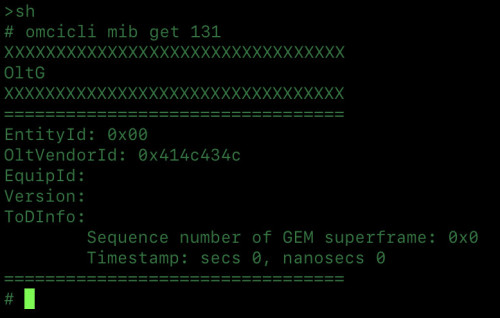
QUOTE(Anime4000 @ Oct 26 2023, 01:41 PM)
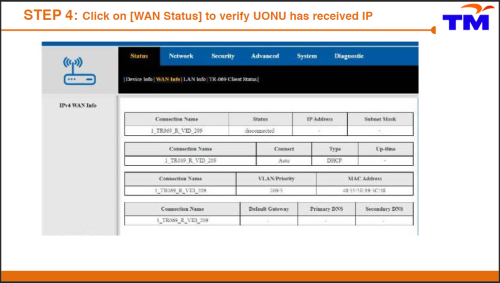
That's 414c434c ALCL Nokia/Alcatel-Lucent
no need to hide, those Vendor Id is public information

I not defending TM here,

TM actually held back 2.5GbE capable ONR until NGN Fiber is upgraded to XGPON (10/2.5) or if we lucky XGSPON (10/10) or 50G PON if Lab Testing has been materialize.

TM gather how many customers subscribe Ultra package to see NGN OLT should be upgraded or not

I have talked to many TM staff including who resell TM 2Gbps, no news on 2.5GbE ONR for Unifi.

The Ultra Plan 1G, 2G should be on 10G PON, if not, Ultra customer will eat all bandwidth to who on lower package.

Take note that GPON can co-exist with 10G/50G PON as different wavelength

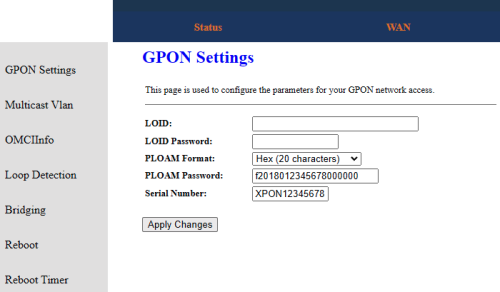
if TM has upgraded NGN OLT, just copy PLOAM Password to new ONR
*
Highly doubt that we’ll see NGN being deployed at a low income area/less dense area then sad.gif

My area (Ulu Tiram) most of the ppl here is just on 4G CPE, think my fam is the only one in the neighborhood having 1Gbps. My new place maybe more but still probably at most 500Mbps.

Will test if I’m connected to NGN later when I get back home since my ONR is not reachable within my internal network biggrin.gif
yenchenje
post Oct 26 2023, 08:16 PM

Enthusiast
*****
Junior Member
932 posts

Joined: Dec 2019
user posted image

Nokia/Alcatel-Lucent here
JB Ulu Tiram Area (White DB Box)
yenchenje
post Oct 27 2023, 07:02 PM

Enthusiast
*****
Junior Member
932 posts

Joined: Dec 2019
QUOTE(machoez @ Oct 27 2023, 06:53 PM)
anyone else got torrent throttled? using unifi before the speed upgrade can get normal speed for torrent. now only less than 1.5mbps
*
Downloading Linux ISO from HDChina, reached about 700Mbps on 1Gbps, Linux ISO from 1337 reached about 400Mbps-500Mbps peak on 1Gbps.

Do take note I also have public IP instead of CGNAT
yenchenje
post Oct 27 2023, 07:48 PM

Enthusiast
*****
Junior Member
932 posts

Joined: Dec 2019
QUOTE(machoez @ Oct 27 2023, 07:45 PM)
no worries. anyway anyone know how to know ur ip is public or private? and which 1 is good for torrent? my wan ip right now start with 100 is that public or private?
*
Private, you're under CGNAT, so that might be impacting your speeds a little bit. TM only assign public IP to 300Mbps and below if you have valid reason(CCTV, self hosting etc). Torrenting I don't think it's a valid reason for TM to assign you. Maybe try a seedbox?
yenchenje
post Oct 27 2023, 07:49 PM

Enthusiast
*****
Junior Member
932 posts

Joined: Dec 2019
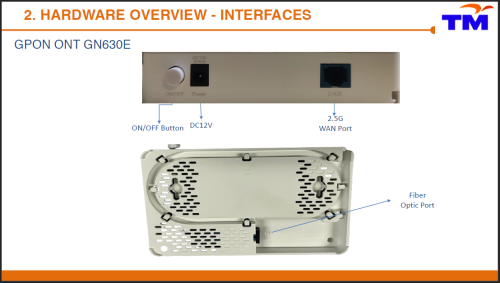
QUOTE(Anime4000 @ Oct 27 2023, 07:37 PM)
Yes, if you read back Post #7615

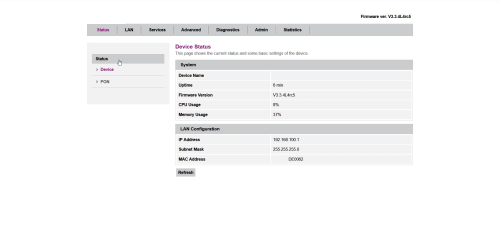
content of the deleted pdf
user posted image

user posted image

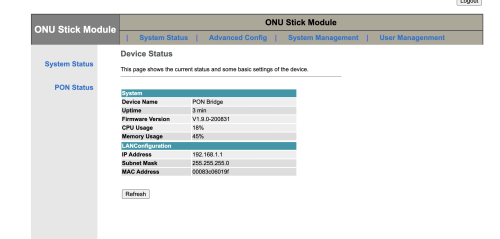
I can guess the Skyworth ONT is Realtek Based SoC
RTL9601CI
user posted image

RTL9601D
user posted image

Or even, look same like D-LINK DPN-FX3060V but this PON Stick
user posted image

For Unifi 2Gbps, it should be on NGN/NGBB (10G PON / 50G PON) in the future which don't know when, this is reason TM held back 2.5G ONT/ONR (user need self-upgrade)
For Maxis/Celcom/DiGi/etc... will be on GPON, Unifi Ultra on other PON in the future
*
No POTS? Are they planning to move to RJ45 VLAN based VoIP? whistling.gif
yenchenje
post Oct 27 2023, 07:50 PM

Enthusiast
*****
Junior Member
932 posts

Joined: Dec 2019
QUOTE(NickedAsy @ Oct 27 2023, 07:49 PM)
Used to be mostly <100mbps that get cgnat, you mean they now raised to <300mbps?
*
Typo, should be 100Mbps and below tongue.gif

7 Pages « < 2 3 4 5 6 > » Top
Topic ClosedOptions
 

Change to:
| Lo-Fi Version
0.2364sec    0.46    7 queries    GZIP Disabled
Time is now: 13th December 2025 - 07:29 AM