Welcome Guest ( Log In | Register )

Bump Topic Topic Closed RSS Feed
7 Pages < 1 2 3 4 > » Bottom

Outline · [ Standard ] · Linear+

Unifi Official TM UniFi High Speed Broadband Thread V41, READ 1ST PAGE FOR RELEVANT WIFI INFO

views
     
yenchenje
post Oct 6 2023, 12:27 PM

Enthusiast
*****
Junior Member
932 posts

Joined: Dec 2019
QUOTE(kucuboy @ Oct 6 2023, 12:18 PM)
30MB to 1GB?!?! What black magic you do bro?
*
QUOTE(Max2006 @ Oct 6 2023, 12:23 PM)
No black magic lah. As long as you are out of contract, you can switch to SWU easily. 100/300/500/800mbps or 1gbps, up to you to choose.

But I do admit. He jumps from 30mbps to 1gbps, that's a very huge jump. biggrin.gif
*
From Unifi TryMeBroadband to SWU 3.0 - 1Gbps (Mesh6)
I can afford the package and I’m the most heaviest user in the house with my servers, so only makes sense biggrin.gif

And since we’re moving soon, taking this and get the package and book the move after only makes sense for the most value possible
yenchenje
post Oct 6 2023, 12:32 PM

Enthusiast
*****
Junior Member
932 posts

Joined: Dec 2019
QUOTE(christina1 @ Oct 6 2023, 12:24 PM)
How much paying for 1Gbps now?
*
269, BB only with 6 months waiver, with I think 600M free calls

QUOTE(zeronehza @ Oct 6 2023, 12:25 PM)
whats the price of swu 3.0 1Gbps plan they offering u bro
*
269, BB only with 6 months waiver, with I think 600M free calls

QUOTE(BenYeeHua @ Oct 6 2023, 12:25 PM)
Yes.

30M: limiting u is 30M
500M: limiting u is your WiFi Speed(weak signal)

lol.
*
Not anymore, upgrading to 10G home equipment, 10G switch + 2x EAP670 with 2.5Gbps port, maybe moving to GPON ONU SFP soon as well

QUOTE(cyberic @ Oct 6 2023, 12:26 PM)
Go big with a bang! 😄 Time to upgrade hardware too
*
Already in progress, adding 10G to my servers, changing to 10G switch, connecting my EAP670 to 2.5Gbps

Do have to prefice, 30Mbps technically is enough but I’m not gonna say no to more bandwidth. My router reported about 1.5TB over the span of one month when I was on 30Mbps biggrin.gif
yenchenje
post Oct 6 2023, 12:35 PM

Enthusiast
*****
Junior Member
932 posts

Joined: Dec 2019
QUOTE(BenYeeHua @ Oct 6 2023, 12:29 PM)
Yes, most people the trouble is 24 months contract, but if it is dirty cheap like RM 119 500M, really no issues lol.
Moving anywhere will be another person cut off, then join your cheap RM 119 lol.
*
But can relocate the service, 269 vs 319 hmm.gif , RM50 per month savings

QUOTE(freedom2k @ Oct 6 2023, 12:29 PM)
The TM Point I went was TM Point Pelangi sweat.gif
no luck for me there  sad.gif

Were you still within contract?
Which counter did you talk to? The temporary counter at the door entrance, or the proper counter inside?
*
Talked to temp counter first before they confirmed for us for the proper counter to process. The kak I talked to at temp counter quite friendly, maybe diff ppl alr? hmm.gif
yenchenje
post Oct 6 2023, 12:37 PM

Enthusiast
*****
Junior Member
932 posts

Joined: Dec 2019
QUOTE(BenYeeHua @ Oct 6 2023, 12:33 PM)
ok la, RM 269 1G SWU 3.0. icon_rolleyes.gif
*
Yep, hopefully free upgrade soon

QUOTE(zeronehza @ Oct 6 2023, 12:34 PM)
269 with 6 month free... thats a good move
+ can get perpectual 2Gbps free speed upgrade ?
*
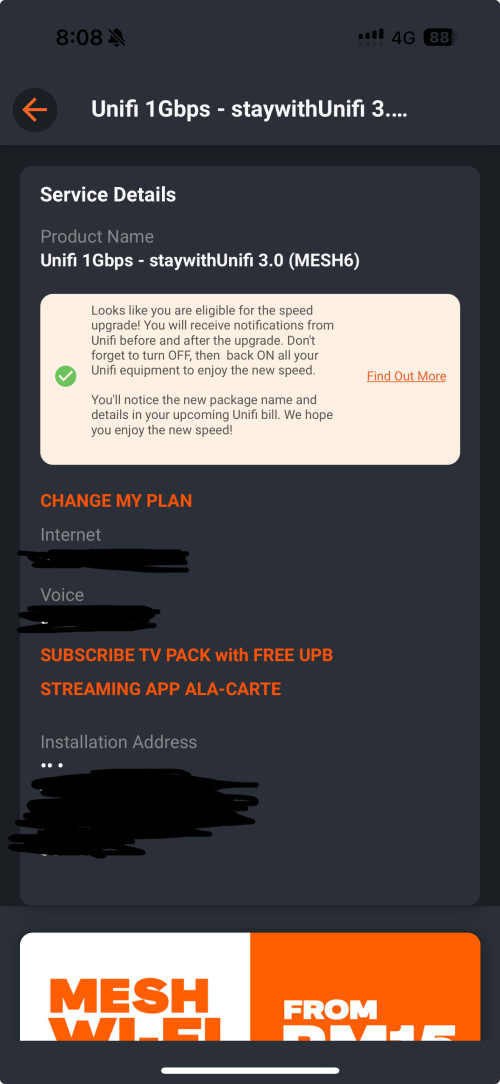
So far the app shows that I’m eligible, but no actual upgrading happening yet, no SMS either, account is under my mom so she’s receiving the messages
user posted image
Hopefully 2Gbps and can justify my further spending on network equipment biggrin.gif
yenchenje
post Oct 6 2023, 12:42 PM

Enthusiast
*****
Junior Member
932 posts

Joined: Dec 2019
QUOTE(BenYeeHua @ Oct 6 2023, 12:39 PM)
As you sign up for 1G, yes, it is 150% likely boost to 2G, soon. :thumbsup:
But I think might get delayed to 2024, as you need to change equipment(at the system's requirement la), even your current is enough to handle it.
*
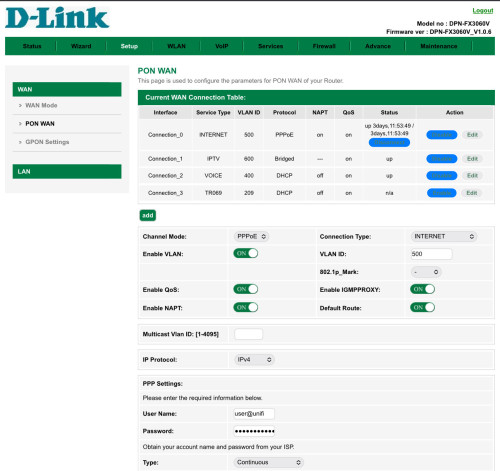
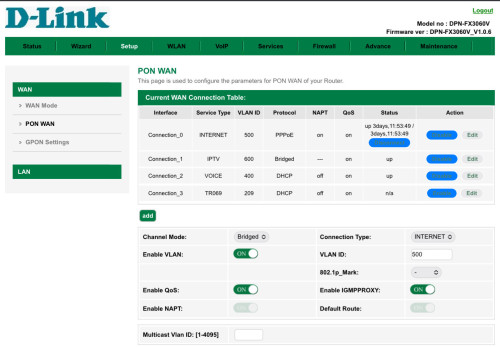
But isn’t 2Gbps 1+1? My D-Link ONU already in place, now just probably need instruction on how to add one more connection to the second LAN port out of the 4 LAN. Already tried to change the second port that’s bridged for IPTV to Internet with VLAN 500 but rejected cuz VLAN alr in use hmm.gif
yenchenje
post Oct 6 2023, 12:48 PM

Enthusiast
*****
Junior Member
932 posts

Joined: Dec 2019
QUOTE(BenYeeHua @ Oct 6 2023, 12:45 PM)
Yes, 2Gbps 1+1, so you already getting the 2G ONU la, then it should be upgrade soon.
The system check the fiber + router device listed inside system(which is given to you), if it is green light, then on la.

So far all 800M plan customers are waiting the greenlight to switch the ONU, which is 2024, only 30-500M get upgraded before end of 2024.
(means need manual key in system to arrange installer lol)
*
Yep already have hardware so just need remote config, will probably still have to wait since I’ll most likely need special instructions on how to set it up if the technician isn’t coming

QUOTE(freedom2k @ Oct 6 2023, 12:45 PM)
The staff I talked to was friendly, but she just told me since I was still under contract,
then couldn't change package, she said nanti system error, so need wait after contract finish.

Anyway, thanks for the info.
I will visit TM Point Skudai or Pasir Gudang to try my luck there.

This time I will insist to go to a proper counter,
and will tell them many people successfully change to SWU despite having 6 months contract left
*
Interesting, maybe you can give Kota Tinggi branch a try as well? Tho last time I went the staff wasn’t as friendly, but if you have time, could be worth it?
yenchenje
post Oct 6 2023, 12:50 PM

Enthusiast
*****
Junior Member
932 posts

Joined: Dec 2019
QUOTE(BenYeeHua @ Oct 6 2023, 12:49 PM)
Well, no special setup, if ONU already responsible for PPPoE dial-up, just regular dual-WAN at your router side connect to the ONU.
*
TR-069 remote for them to upgrade? I have yet to disable that tongue.gif
yenchenje
post Oct 6 2023, 01:00 PM

Enthusiast
*****
Junior Member
932 posts

Joined: Dec 2019
QUOTE(BenYeeHua @ Oct 6 2023, 12:55 PM)
Nope, just a reboot for reconnect of PPPoE, not even remote.
---
Quick checked, you need to buy yourself a Link Aggregation router, else, only WiFi on ONU can give you 2G.

Asus for example.
https://www.asus.com/my/support/FAQ/1016088/
*
Interesting I thought special is needed as the second port currently is still setup for bridged IPTV. I’ll wait for the message from SMS and on MyUnifi when it’s upgraded and I’ll report back

For LAGG, OPNSense can do that via LACP protocol, but I plan to go GPON soon to utilize the full bandwidth without aggregation. So I’m not that worried as of now biggrin.gif

This post has been edited by yenchenje: Oct 6 2023, 01:01 PM
yenchenje
post Oct 6 2023, 01:04 PM

Enthusiast
*****
Junior Member
932 posts

Joined: Dec 2019
QUOTE(BenYeeHua @ Oct 6 2023, 01:01 PM)
Yes, just fiber directly, problem solved(if you know how without TM marah you la lol) tongue.gif
*
Just buy from Anime4000 directly and problem solved tongue.gif

I just have to supply the right SFP+ cage biggrin.gif
yenchenje
post Oct 6 2023, 02:11 PM

Enthusiast
*****
Junior Member
932 posts

Joined: Dec 2019
QUOTE(Oltromen Ripot @ Oct 6 2023, 02:08 PM)
next months we will start complain why Malaysia broadband price still expensive compared to 50Gbps plan of a neighbour!
*
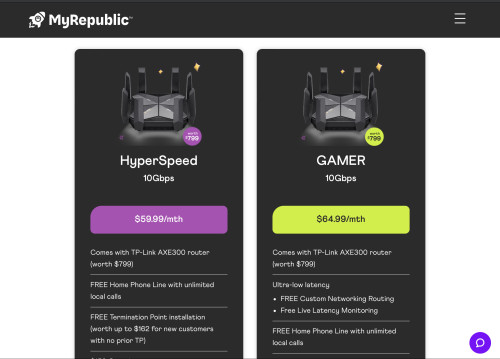
Look at Lion City, how I wish competition was as fierce as it is in MY compared to SG doh.gif

user posted image
yenchenje
post Oct 6 2023, 06:35 PM

Enthusiast
*****
Junior Member
932 posts

Joined: Dec 2019
user posted image

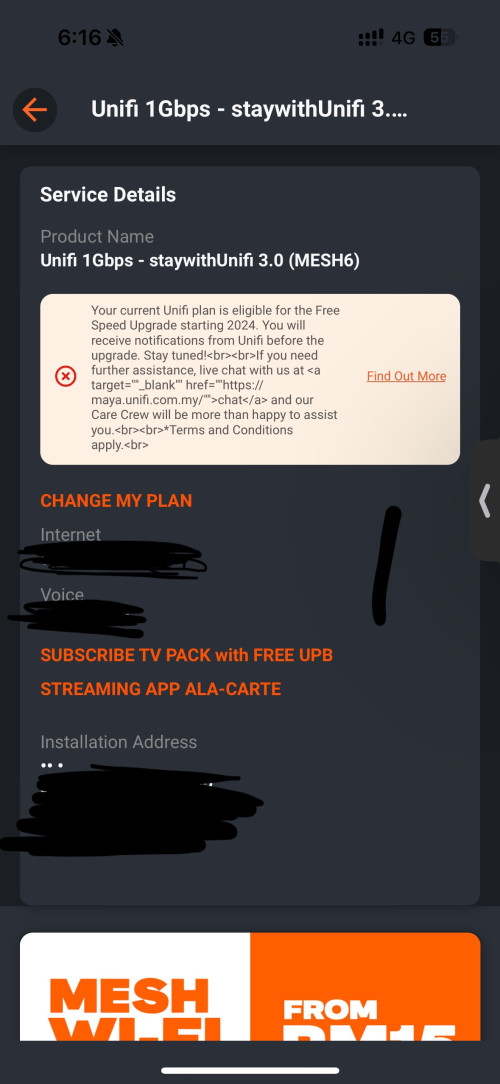
Unlucky
yenchenje
post Oct 6 2023, 08:41 PM

Enthusiast
*****
Junior Member
932 posts

Joined: Dec 2019
QUOTE(Max2006 @ Oct 6 2023, 06:39 PM)
Why unlucky? 2024 is not that far bro. Who knows. May be next year got big surprise for the Unifi Ultra users. smile.gif
*
Hopefully, wanted the faster speed tbh doh.gif , but I guess 2 months is not that far away
yenchenje
post Oct 7 2023, 01:59 AM

Enthusiast
*****
Junior Member
932 posts

Joined: Dec 2019
QUOTE(soonwai @ Oct 6 2023, 11:08 PM)
Patience. Last time Turbo 2018. Some got it in 2 months. Mine took 5 months. Saw TM laying cables month 2.
*
Yeah it's whatever, I'm still waiting on proper equipment for upgrade so
yenchenje
post Oct 7 2023, 02:23 PM

Enthusiast
*****
Junior Member
932 posts

Joined: Dec 2019
QUOTE(Neptern @ Oct 7 2023, 01:53 PM)
The new ONU for 1gbps and 2gbps can go to bridge mode without issues? So that I can use my own router.
*
Yes
yenchenje
post Oct 8 2023, 03:15 PM

Enthusiast
*****
Junior Member
932 posts

Joined: Dec 2019
QUOTE(cyberic @ Oct 8 2023, 11:40 AM)
WiFi 6E 6GHz supported in Malaysia? 6GHz channel should be less interference, much better than current 5GHz.
*
If Ubiquiti, can hack by changing region to any region that supports 6E. Think that SIRIM has already approved 6E frequency in Malaysia but no one so far has gotten to it yet.

Which tbf currently Wi-Fi 7 (BE) is already out anyway, just wait for those to come down in price for a little bit, or just go to 6E/6 tongue.gif

http://www.baclcorp.com.cn/show.asp?para=en_2_49_4325
yenchenje
post Oct 8 2023, 03:27 PM

Enthusiast
*****
Junior Member
932 posts

Joined: Dec 2019
QUOTE(cyberic @ Oct 8 2023, 03:20 PM)
Last time I checked, only Ubiquiti U6 enterprise support 6E. Others can hack??
*
690E HD, Catalyst 916x series, Aruba 630 etc, quite a bit of them, whether any of them purchasable? That's a diff story drool.gif
yenchenje
post Oct 8 2023, 03:53 PM

Enthusiast
*****
Junior Member
932 posts

Joined: Dec 2019
QUOTE(cyberic @ Oct 8 2023, 03:37 PM)
Oh I was referring to Ubiquiti product line, I like the management GUI. Not sure about other brand. 😄

U6 Enterprise not cheap too 😬
*
Yep for Ubiquiti only U6E, price is not bad for me at least, but currently I'm already on EAP670, should be good for 2-3 more years before the need to upgrade. Only phone in my house that can utilize 6E is my iPhone 15 Pro, all the other devices are 6 and below, so no point buying into 6E/7 atm tongue.gif
yenchenje
post Oct 9 2023, 11:42 AM

Enthusiast
*****
Junior Member
932 posts

Joined: Dec 2019
QUOTE(Cavino @ Oct 9 2023, 10:44 AM)
You mean the new Ultra ONR can be switched to Bridge Mode and still work as modem? I read a post on March 2023 that mentioned the switching to bridge mode hang thus has to switch back to router mode (or maybe just happen to the post author but other users can switch to bridge mode).

I'm currently on 800mbps plan using Asus GT-AX11000 that provided strong coverage to my entire 2 story house without mesh.
If I'm upgraded to 1GB plan, Unifi will provide 2 units of same ONR right?

If that is the case, then maybe I can ask the technician to setup 1 ONR as usual main modem/router that can be use as backup modem router if my Asus failed.
The other ONR can be setup as main modem/bridge and I can continue using my Asus router will all its features.

Also, just in case, can we just plug in the existing Huawei modem and Asus router, will it worked as usual if we are not using the Ultra ONR or once speed upgraded, the Huawei modem cannot work anymore?
*
Changing the connection to bridge, not the whole ONR.

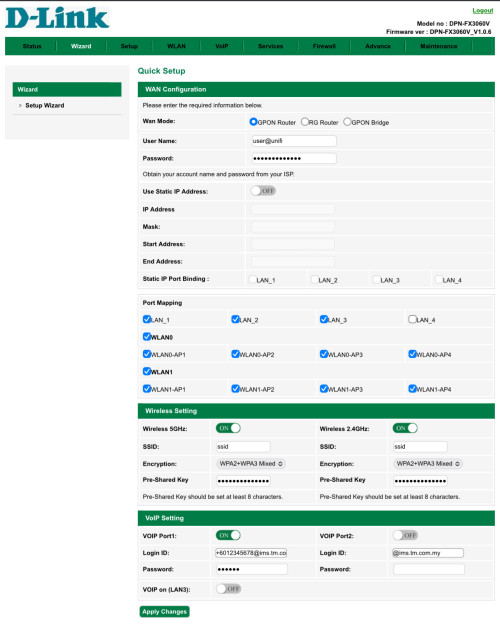
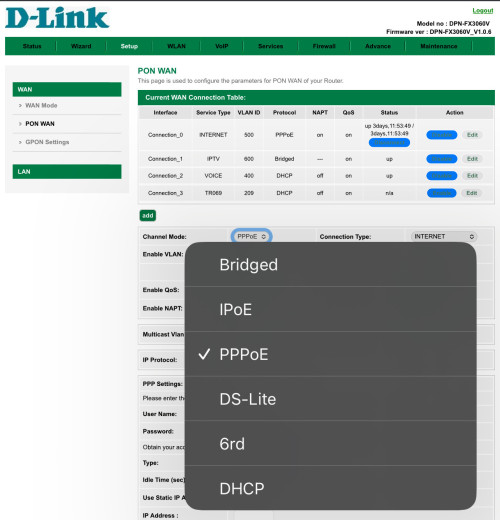
Currently my setup is DPN-FX3060V <-> Bridge to OPNSense

For backup as ONR or not, they provide two units for EasyMESH. Idk how exactly the modem can do backup router as from the webUI, it’s quite barebones. The only thing that I understood that’s possible is AIO ONR -Bridge> ASUS router. Backup(Failover) router is not possible as far as I know, cold spare maybe.

And whether your installer knows how to, is another story. Last time my technician only knows how to do PPPoE/VoIP/PON PLOAM settings, everything else “I x tau leh bang”, and I had to play around with the router to be able to switch it into Bridge.

Technically speaking your old Huawei ONU can probably be used back without much issues, since PLOAM and all those are the same, and my technician didn’t change any of the ONU mode in the DPN-FX3060V and left it at default, but you can try and let us know, and it’s probably better as there’s less overhead for the ONU to handle since the DPN-FX3060V has to handle AIO such as WiFi and all those, Huawei just handles ONU function, provisioned O5 with OLT and will automatically lock it out from being accessible from RFC1918.

If you want full speed, stick with the D-Link ONU as the main router, via AX(WiFi 6 AP) installer was able to pull about 1.2Gbps when it was first installed and tested. As the physical limitation here is the gigabit port on the ONU itself, so it will never reach full speed if you go bridge mode on it. Except if you want to play with GPON ONU SFP with 2.5G, which is not advisable for normal home user.

This post has been edited by yenchenje: Oct 9 2023, 11:44 AM

yenchenje
post Oct 9 2023, 12:31 PM

Enthusiast
*****
Junior Member
932 posts

Joined: Dec 2019
QUOTE(Oltromen Ripot @ Oct 9 2023, 12:24 PM)
already experimented twice - out of curiosity - to use back old ZTE ONU when I upgrade 500Mbps to 1Gbps, and when i upgrade to 2Gbps.
the old ZTE ONU can still work when used pre-Ultra set up with ASUS router, but for 2Gbps it will be a waste since the ONU port is 1Gbps.

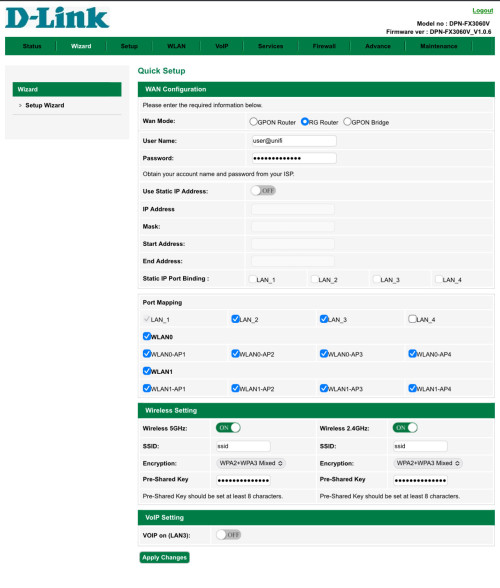
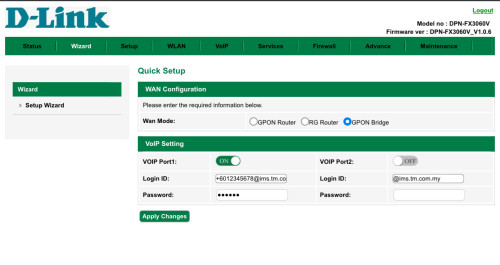
the ultra ONR, when i tested it, can have 3 modes
• GPON router (PPPoE dialer, WiFi, VoIP port)
• RG router (PPPoE dialer, WiFi)
• GPON bridge (the usual BTU/ONT/ONU/so-called-modem, with VoIP port)

Your set-up, instead of turning the ONR into a dumb BTU/ONT/ONU/so-called-modem,
is using bridge mode instead of PPPoE dialler, correct?

» Click to show Spoiler - click again to hide... «


» Click to show Spoiler - click again to hide... «

*
Yep, PPPoE change to Bridge, everything else leave as default. Don’t change mode and whatever

WAN mode leave as GPON router, and you can still access webUI if you leave the AP on, just DHCP will not work so you will have to set static IP to be able to access FX3060V web UI

This post has been edited by yenchenje: Oct 9 2023, 12:33 PM
yenchenje
post Oct 9 2023, 01:02 PM

Enthusiast
*****
Junior Member
932 posts

Joined: Dec 2019
QUOTE(Oltromen Ripot @ Oct 9 2023, 12:40 PM)
i was using ASUS Dual-WAN 1:1 round-robin. Manage to get up to 1.75Gbps/750Mbps, give or take. I think limited due to local exchange and congestion, so i am not gussy to milk every drop.

Anyway, already sold off my ASUS RT-AX86U to a ktard. I found the ultra ONR is stable enough to deal with ~2Gbps without much fuss. I got a 3rd unit of the ONR when I upgrade to 2Gbps, so I have 3 units altogether which I can later deploy in wider mesh mode if need to; hopefully will still be reliable. For now I disable the EasyMesh function.
*
Makes sense, honestly speaking from the short time I was running D-Link ONR, it was really fine, just controls was a bit limited.

If your setup isn’t really gonna be complicated, just leave it and it’s fine.

Still kinda annoyed that TM can’t afford a 2.5G ONU for the prices we pay but at this rate we’re just beating a dead horse down tongue.gif

7 Pages < 1 2 3 4 > » Top
Topic ClosedOptions
 

Change to:
| Lo-Fi Version
0.0351sec    0.56    7 queries    GZIP Disabled
Time is now: 11th December 2025 - 09:26 AM