

QUOTE(ericlaiys @ May 7 2023, 07:11 PM)
recommend get apple care. so u r covered for 3 years

The normal device without the device care is covered for how many years?[2023] MacBook Pro w/ M2 Pro/Max Discussion Thread, Mover. Maker. Boundary breaker.
|
|
 May 7 2023, 09:26 PM May 7 2023, 09:26 PM
|
 
Senior Member
6,724 posts Joined: Aug 2008  
|
QUOTE(ericlaiys @ May 7 2023, 07:11 PM) recommend get apple care. so u r covered for 3 years The normal device without the device care is covered for how many years? |
|
|
|
|
|
May 7 2023, 10:08 PM
|

Senior Member
7,576 posts Joined: May 2012 
|
QUOTE(miyakochan89 @ May 7 2023, 09:26 PM) The normal device without the device care is covered for how many years? 1y. my experienceafter 1 year and 6 month - battery bloated & exploded. causing top keyboard also need to replaced. Total repaired cost around 2k applecare bought 900. I bought coz so many bad review on my model. Either screen, battery, keyboard. So to have a piece of mind, i bought it. So worth it when i claimed warranty 2k. Now my macbook pro is 5year old. I just changed battery when realised that depleted faster. when open out, found battery bloated a bit. lucky not yet explode. This post has been edited by ericlaiys: May 7 2023, 10:15 PM |
|
|
May 7 2023, 10:52 PM
|
|
Senior Member
6,724 posts Joined: Aug 2008
|
QUOTE(ericlaiys @ May 7 2023, 10:08 PM) 1y. my experience Wow… so the battery bloated issue is quite common or serious or what wor…after 1 year and 6 month - battery bloated & exploded. causing top keyboard also need to replaced. Total repaired cost around 2k applecare bought 900. I bought coz so many bad review on my model. Either screen, battery, keyboard. So to have a piece of mind, i bought it. So worth it when i claimed warranty 2k. Now my macbook pro is 5year old. I just changed battery when realised that depleted faster. when open out, found battery bloated a bit. lucky not yet explode. |
|
|
May 8 2023, 07:13 AM
|
|
Senior Member
6,724 posts Joined: Aug 2008
|
QUOTE(xXDeaDXR3dDXx @ Feb 22 2023, 03:51 PM) Order placed, finally. Base model 14" MBP M2 to replace my 2015 15" MBP Retina. Just curious about your 2015 device, did it give you a lot of problems? I’m now considering which MacBook I should go to, and am thinking to take plunge into the 14” one since it has the all the best parts.Personally, 512GB is sufficient for me as I don't used for much for content creation work. Previously MBP also was 512GB which struggled a bit, but after the introduction of cloud based storage.. I barely go over the 300GB mark. I'm do a lot of documents with MS, make maps on Illustrator and Earth, as well as edit scout photos on Lightroom. Not into any high rendering stuff. Another reason to go for the 1TB is the faster read/write as Apple uses only one NAND Chip for the 512GB on the M2s. The older M1 had 2X256GB NAND Chips for 512GB. Anyway kudos to Apple's after sales service to be able to make an exception to refund the M1, I've ordered 6 days before the launch of M2. |
|
|
May 8 2023, 06:45 PM
|
|
Senior Member
7,576 posts Joined: May 2012
|
QUOTE(miyakochan89 @ May 7 2023, 10:52 PM) Wow… so the battery bloated issue is quite common or serious or what wor… it is common on all laptop, phone and tablet |
|
|
May 13 2023, 07:10 PM
|
|
Senior Member
6,724 posts Joined: Aug 2008
|
By the way, how do i close all the apps? Because i shut down every night and then when i switch on the next day all the apps are still on? And also can the keyboard or whatsoever be adjusted not be so sensitive? Cause after i switch it off, i use a cloth to wipe the keyboard or maybe it's the trackpad that senses the movements? the entire macbook pro switches on again.....
|
|
|
|
|
|
May 16 2023, 08:58 PM
Show posts by this member only | IPv6 | Post
#87
|

Junior Member
174 posts Joined: Jan 2005
|
QUOTE(miyakochan89 @ May 13 2023, 07:10 PM) By the way, how do i close all the apps? Because i shut down every night and then when i switch on the next day all the apps are still on? And also can the keyboard or whatsoever be adjusted not be so sensitive? Cause after i switch it off, i use a cloth to wipe the keyboard or maybe it's the trackpad that senses the movements? the entire macbook pro switches on again..... Q1: May be this link can help.Apple SupportQ2: ya, it kind of sensitive, may be is the power button on the top right, or the ambience sensor which sense from dark - bright, when you wipe the screen. You can lock screen and do the wipe if not shutting it down. |
|
|
May 17 2023, 10:25 PM
|
|
Senior Member
6,724 posts Joined: Aug 2008
|
QUOTE(AhJian @ May 16 2023, 08:58 PM) Q1: May be this link can help.Apple Support yeah lo, it looks like i have to wipe down while. my device is lock. Otherwise it always switches on so damn easily. haha!Q2: ya, it kind of sensitive, may be is the power button on the top right, or the ambience sensor which sense from dark - bright, when you wipe the screen. You can lock screen and do the wipe if not shutting it down. AhJian liked this post
|
|
|
May 28 2023, 02:23 PM
|
|
Senior Member
6,724 posts Joined: Aug 2008
|
Do you all buy the magic mouse or just use the trackpad? AhJian liked this post
|
|
|
May 28 2023, 02:44 PM
Show posts by this member only | IPv6 | Post
#90
|

All Stars
14,302 posts Joined: Jan 2011
|
QUOTE(miyakochan89 @ May 28 2023, 02:23 PM) Do you all buy the magic mouse or just use the trackpad? please dun use Magic Mouse. for god sake, buy a Logitech mouse instead. |
|
|
May 28 2023, 04:11 PM
|

Senior Member
4,676 posts Joined: Sep 2012
|
I already bought similar devices when I got my MBP 16" 2019, so these were unnecessary and self indulging splurges again after getting the MBP 14" 2023
 Currently already own: 1) Baseus Blade 100w Power Bank 2) Mcdodo 120w Charger 3) Samsung T5 1TB SSD Just recently bought: 1) Anker 737 140w Power Bank 2) Anker 736 Nano II 100W Charger 3) Samsung T7 2TB SSD |
|
|
May 28 2023, 06:16 PM
Show posts by this member only | IPv6 | Post
#92
|
|
All Stars
14,302 posts Joined: Jan 2011
|
QUOTE(Lego Warfare @ May 28 2023, 04:11 PM) I already bought similar devices when I got my MBP 16" 2019, so these were unnecessary and self indulging splurges again after getting the MBP 14" 2023 How are the power banks? Currently already own: 1) Baseus Blade 100w Power Bank 2) Mcdodo 120w Charger 3) Samsung T5 1TB SSD Just recently bought: 1) Anker 737 140w Power Bank 2) Anker 736 Nano II 100W Charger 3) Samsung T7 2TB SSD |
|
|
May 28 2023, 06:20 PM
|
|
Senior Member
4,676 posts Joined: Sep 2012
|
QUOTE(westlife @ May 28 2023, 06:16 PM) How are the power banks? The Baseus I find the efficiency not so good. Not to mention the footprint is so freaking wide. The Anker is only a few days old, but so far not bad. Can fully charge my MBP 14” 1 full charge. It is a heavy brick though brick though. |
|
|
|
|
|
May 28 2023, 07:04 PM
|
|
Senior Member
6,724 posts Joined: Aug 2008
|
QUOTE(westlife @ May 28 2023, 02:44 PM) please dun use Magic Mouse. for god sake, buy a Logitech mouse instead. why ler? |
|
|
May 28 2023, 07:55 PM
|
|
All Stars
14,302 posts Joined: Jan 2011
|
QUOTE(miyakochan89 @ May 28 2023, 07:04 PM) why ler? It is too flat to my likings. Maybe u will like it. If to use the Magic Mouse I would rather just stick to the touch pad which is nice to use. |
|
|
May 29 2023, 10:18 AM
Show posts by this member only | IPv6 | Post
#96
|
|
Junior Member
174 posts Joined: Jan 2005
|
QUOTE(miyakochan89 @ May 28 2023, 02:23 PM) Do you all buy the magic mouse or just use the trackpad? I do use MagicMouse many years until today.I like the swipe left/right to next/prev page and also swipe up/down to scroll on long page. You can try it at any physical store before you buy it.  |
|
|
May 29 2023, 01:49 PM
|
|
Senior Member
6,724 posts Joined: Aug 2008
|
QUOTE(westlife @ May 28 2023, 07:55 PM) It is too flat to my likings. Maybe u will like it. If to use the Magic Mouse I would rather just stick to the touch pad which is nice to use. Yeah I have been using trackpads for the past few weeks, seems ok so far. Hehe! Seriously might not need the extra device.QUOTE(AhJian @ May 29 2023, 10:18 AM) I do use MagicMouse many years until today. Alright thank you!I like the swipe left/right to next/prev page and also swipe up/down to scroll on long page. You can try it at any physical store before you buy it. This post has been edited by miyakochan89: May 29 2023, 01:49 PM AhJian liked this post
|
|
|
May 30 2023, 08:49 PM
Show posts by this member only | IPv6 | Post
#98
|
|
Junior Member
504 posts Joined: Jul 2015
|
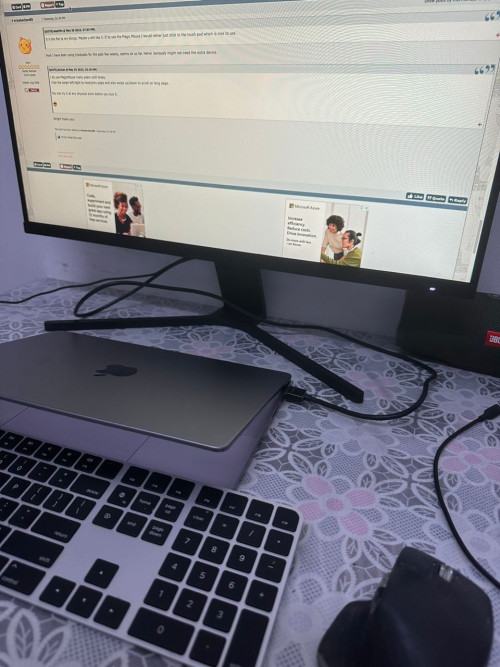 Just bought a Mac Book Pro M2 Pro with 1 TB. Working well and smooth! No more heat + noisy fan sound! potatobanana and AhJian liked this post
|
|
|
Jun 10 2023, 02:05 PM
|
|
Senior Member
6,724 posts Joined: Aug 2008
|
QUOTE(privatequity @ May 30 2023, 08:49 PM) Just bought a Mac Book Pro M2 Pro with 1 TB. Working well and smooth! No more heat + noisy fan sound! By the way, I have an issue with the popup blocker for safari, one of the ones that i installed doesn't seem to work. One of the torrent website that i goes to always have popup, never used to have this issue with ublock origins. I am using adblock Pro on my macbook same as my Safari on my iphone. |
|
|
Jun 10 2023, 05:54 PM
Show posts by this member only | IPv6 | Post
#100
|

Senior Member
7,106 posts Joined: Sep 2010
|
have this since Oct last year..
but now feel oudated LOL  why Apple doing this trend updating new processor every year now laa.. better like last time, wait many years only see major update even ipad pro got M2 proc.. now I shy with this laptop, although few months ago it was the most powerful laptop on earth  Attached thumbnail(s) 
|
| Change to: |  0.0284sec 0.0284sec
 0.79 0.79
 6 queries 6 queries
 GZIP Disabled GZIP Disabled
Time is now: 16th December 2025 - 06:33 AM |
 Quote
Quote