

Do you all use a monitor? What model?
[2023] MacBook Pro w/ M2 Pro/Max Discussion Thread, Mover. Maker. Boundary breaker.
[2023] MacBook Pro w/ M2 Pro/Max Discussion Thread, Mover. Maker. Boundary breaker.
|
|
 Aug 14 2023, 10:20 PM Aug 14 2023, 10:20 PM
|
 
Senior Member
6,724 posts Joined: Aug 2008  
|
Do you all use a monitor? What model?
|
|
|
|
|
|
Aug 15 2023, 09:47 PM
Show posts by this member only | IPv6 | Post
#142
|

Senior Member
3,892 posts Joined: Jan 2003 From: Back on earth!
|
QUOTE(miyakochan89 @ Aug 14 2023, 10:20 PM) Do you all use a monitor? What model? Just bought a 32" VA 4K BENQ monitor and regret it   I couldn't really use it on 4K, 2K is good though. Going to 4K, the scaling is surely not good, all things become too small. I couldn't really use it on 4K, 2K is good though. Going to 4K, the scaling is surely not good, all things become too small. |
|
|
Aug 15 2023, 10:07 PM
Show posts by this member only | IPv6 | Post
#143
|

All Stars
14,304 posts Joined: Jan 2011
|
QUOTE(wiraone @ Aug 15 2023, 09:47 PM) Just bought a 32" VA 4K BENQ monitor and regret it 4k resolution is too small for text I think unless u have even bigger display. I couldn't really use it on 4K, 2K is good though. Going to 4K, the scaling is surely not good, all things become too small. firdausbhari liked this post
|
|
|
Aug 15 2023, 10:39 PM
|
|
Senior Member
6,724 posts Joined: Aug 2008
|
QUOTE(wiraone @ Aug 15 2023, 09:47 PM) Just bought a 32" VA 4K BENQ monitor and regret it Oh wow! I didn’t know. I thought it’s just the sharpness difference ler. I just wanna watch some shows, I don’t use my MacBook Pro for work. Hahah! But yeah sometimes the monitor I can use when I’m working from home yes. I couldn't really use it on 4K, 2K is good though. Going to 4K, the scaling is surely not good, all things become too small. |
|
|
Aug 16 2023, 12:15 PM
Show posts by this member only | IPv6 | Post
#145
|

Senior Member
4,676 posts Joined: Sep 2012
|
QUOTE(miyakochan89 @ Aug 14 2023, 10:20 PM) Do you all use a monitor? What model? Using Lenovo g27q-20, was among the best price-performance during that time for a gaming monitor |
|
|
Aug 18 2023, 02:17 PM
Show posts by this member only | IPv6 | Post
#146
|
|
Senior Member
6,724 posts Joined: Aug 2008
|
QUOTE(Lego Warfare @ Aug 16 2023, 12:15 PM) Using Lenovo g27q-20, was among the best price-performance during that time for a gaming monitor You use your MacBook Pro to game?Who here owns a MacBook Pro and still do gaming? Now I’m starting to miss a bit of gaming. Haha but I’m supposed to spend more time reading!! 😅 |
|
|
|
|
|
Aug 18 2023, 09:32 PM
Show posts by this member only | IPv6 | Post
#147
|
|
Senior Member
4,676 posts Joined: Sep 2012
|
QUOTE(miyakochan89 @ Aug 18 2023, 02:17 PM) You use your MacBook Pro to game? Hahah not really, I did download some games but didn't even play them. I have a windows laptop that I use for games, but I stopped gaming few years back.Who here owns a MacBook Pro and still do gaming? Now I’m starting to miss a bit of gaming. Haha but I’m supposed to spend more time reading!! 😅 |
|
|
Aug 21 2023, 03:01 PM
Show posts by this member only | IPv6 | Post
#148
|

All Stars
29,777 posts Joined: Jan 2009 From: Johor, Malaysia. 
|
QUOTE(wiraone @ Aug 15 2023, 09:47 PM) Just bought a 32" VA 4K BENQ monitor and regret it 4K needs 42" for 100% scaling. I couldn't really use it on 4K, 2K is good though. Going to 4K, the scaling is surely not good, all things become too small.The 32" is actually a nice screen size but don't have good resolution for 100% scaling. 1440p is too big for it and 4K is too small for it. So 32" screen size is out from my listing for the moment. It is either go for 1440p in 27" or 4K in 42". |
|
|
Aug 21 2023, 03:03 PM
Show posts by this member only | IPv6 | Post
#149
|
|
All Stars
29,777 posts Joined: Jan 2009 From: Johor, Malaysia.
|
QUOTE(miyakochan89 @ Aug 14 2023, 10:20 PM) Do you all use a monitor? What model? Yes. I connect my MacBook Pro to LG OLED Flex, a 41.5" 4K 120hz display. |
|
|
Sep 2 2023, 07:03 PM
Show posts by this member only | IPv6 | Post
#150
|
|
Senior Member
6,724 posts Joined: Aug 2008
|
Hey wanna ask, let’s say the monitor comes with UBC-C display port, so I just need to connect usb-c cable to my MacBook Pro, that’s all right? Do I need to buy special adapter? Or still best to buy the hdmi adapter?
|
|
|
Sep 2 2023, 07:49 PM
|

Senior Member
7,587 posts Joined: May 2012
|
QUOTE(miyakochan89 @ Sep 2 2023, 07:03 PM) Hey wanna ask, let’s say the monitor comes with UBC-C display port, so I just need to connect usb-c cable to my MacBook Pro, that’s all right? Do I need to buy special adapter? Or still best to buy the hdmi adapter? usb c also work |
|
|
Sep 2 2023, 08:07 PM
|
|
Senior Member
6,724 posts Joined: Aug 2008
|
QUOTE(ericlaiys @ Sep 2 2023, 07:49 PM) usb c also work But they told me to check if it’s thunderbolt port or not wor. The dell monitor never writes if it’s thunderbolt or not. |
|
|
Sep 3 2023, 09:33 PM
Show posts by this member only | IPv6 | Post
#153
|

Senior Member
2,281 posts Joined: Feb 2012
|
QUOTE(miyakochan89 @ Sep 2 2023, 08:07 PM) But they told me to check if it’s thunderbolt port or not wor. The dell monitor never writes if it’s thunderbolt or not. USB-C Displayport will workIm using Predator X34gs ultra wide 1440p 180hz with USB-C. never had issues. This post has been edited by firdausbhari: Sep 3 2023, 09:34 PM |
|
|
|
|
|
Sep 3 2023, 10:04 PM
|
|
Senior Member
6,724 posts Joined: Aug 2008
|
QUOTE(firdausbhari @ Sep 3 2023, 09:33 PM) USB-C Displayport will work Oh okie so i don't need to buy extra adapter lah? Just normal USB-C cable will do?Im using Predator X34gs ultra wide 1440p 180hz with USB-C. never had issues. Ahh i just checked the monitor i ordered only has HDMI. damn!  |
|
|
Sep 4 2023, 02:16 AM
Show posts by this member only | IPv6 | Post
#155
|
|
Senior Member
2,281 posts Joined: Feb 2012
|
QUOTE(miyakochan89 @ Sep 3 2023, 10:04 PM) Oh okie so i don't need to buy extra adapter lah? Just normal USB-C cable will do? normal USB-C cable wont work. U need USB-C 3.1/3.2 Gen 2 cable or the easy way just get USB4 cable. its backward compatible.Ahh i just checked the monitor i ordered only has HDMI. damn! most monitor with USB-C port will included the cable. If only HDMI then u need an adapter for it or get a hub. Ugreen sells good & reliable USB-C hub. might wanna check it out. Most USB-C hub comes with HDMI 4K 30hz but be sure to get a hub with HDMI 4K 60Hz. but personally, sweet spot resolution for me is QHD (1440p). UHD (4K) scaling is too small like others mention. tried on my previous 4K monitor before. didnt like it. This post has been edited by firdausbhari: Sep 4 2023, 02:28 AM |
|
|
Sep 4 2023, 06:53 AM
|
|
Senior Member
6,724 posts Joined: Aug 2008
|
QUOTE(firdausbhari @ Sep 4 2023, 02:16 AM) normal USB-C cable wont work. U need USB-C 3.1/3.2 Gen 2 cable or the easy way just get USB4 cable. its backward compatible. Even for watching shows? The scaling is too small? But can adjust the scaling one right.most monitor with USB-C port will included the cable. If only HDMI then u need an adapter for it or get a hub. Ugreen sells good & reliable USB-C hub. might wanna check it out. Most USB-C hub comes with HDMI 4K 30hz but be sure to get a hub with HDMI 4K 60Hz. but personally, sweet spot resolution for me is QHD (1440p). UHD (4K) scaling is too small like others mention. tried on my previous 4K monitor before. didnt like it. |
|
|
Sep 4 2023, 11:32 AM
|
|
Senior Member
2,281 posts Joined: Feb 2012
|
QUOTE(miyakochan89 @ Sep 4 2023, 06:53 AM) Even for watching shows? The scaling is too small? But can adjust the scaling one right. for watching shows its fine. but if just want to watch shows i prefer to use streaming devices instead of computer. |
|
|
Sep 21 2023, 11:50 AM
|

Senior Member
1,638 posts Joined: Jan 2003 From: Subang Jaya
|
https://bjango.com/articles/macexternaldisplays/
this guide seems to be the best performance vs scaling i've seen. which leaves me stuck with my 34" UW at 3440x1440. been wanting to upgrade monitor for more juicy real estate but then this turned me off. 32 @4k eats away at your processing power. |
|
|
Sep 23 2023, 01:18 AM
Show posts by this member only | IPv6 | Post
#159
|
|
All Stars
29,777 posts Joined: Jan 2009 From: Johor, Malaysia.
|
QUOTE(miyakochan89 @ Sep 3 2023, 10:04 PM) Oh okie so i don't need to buy extra adapter lah? Just normal USB-C cable will do? If your MacBook Pro latest with M2 Pro chipset, it came with HDMI port, just buy a HDMI 2.1 cable and connect to your monitor HDMI port, it support 4K 120hz. If it is M2 chipset only, it still support 4K 60hz.Ahh i just checked the monitor i ordered only has HDMI. damn! No adapter or USB-C Thunderbolt 4 cable is required to use. if your MacBook Pro don't have HDMI port, then just buy a USB-C (Thunderbolt 4 compatible) to HDMI Cable will do. I buy PROMATE 8K @60Hz USB-C (Thunderbolt 4 compatible) to HDMI Cable Tested no issue running up to @ 4K 120hz with HDR. 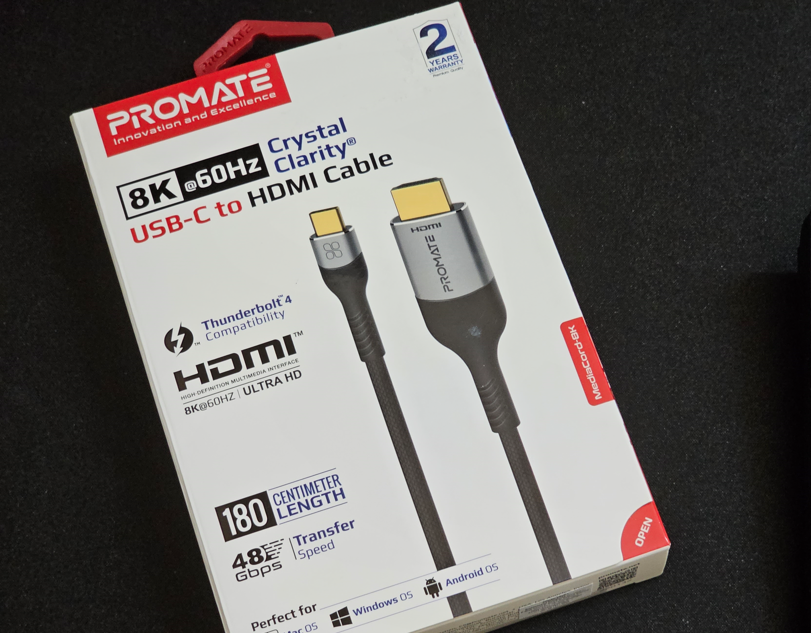 This post has been edited by Andrewtst: Sep 23 2023, 01:53 AM AhJian liked this post
|
|
|
Oct 10 2023, 05:54 PM
Show posts by this member only | IPv6 | Post
#160
|
|
Senior Member
6,724 posts Joined: Aug 2008
|
Wow. After a few months of using MacBook Pro, I really love it!! I love that it always stays cool, no fan noises, boot up really fast and it’s a super powerhouse! And also the speaker is absolutely breathtaking. Powerhouse thing I can’t really vouch for it because I realise that now I’m ended up with a super beast and meanwhile I’m just using it mostly for surfing and watching shows. Lol! Am thinking to resell it and get something cheaper like air, should have gotten an Air in hindsight. lol! I have been considering gaming laptop honestly but it seems like I can use GeForce now to play these days? Anyone tried it? This post has been edited by miyakochan89: Oct 10 2023, 05:55 PM AhJian liked this post
|
| Change to: |  0.4142sec 0.4142sec
 0.68 0.68
 6 queries 6 queries
 GZIP Disabled GZIP Disabled
Time is now: 17th December 2025 - 01:26 PM |
 Quote
Quote