Welcome Guest ( Log In | Register )

Outline · [ Standard ] · Linear+

 Configure Huawei ONT HG8145X6 as modem only, Time FB, Bridge Mode

views
     
TSspamfish
post Oct 31 2022, 11:55 PM, updated 2y ago

Getting Started
**
Junior Member
187 posts

Joined: May 2007
From: Penang
Anyone out there can lend a helping hand on how to disable the Huawei ONT as a router and make it into Modem mode only. As I want to use my own Asus XT8 to manage the wifi and PPOE settings.

This post has been edited by spamfish: Jul 13 2024, 12:00 PM
Sam Leong
post Nov 1 2022, 06:07 AM

On my way
****
Junior Member
679 posts

Joined: Mar 2016


QUOTE(spamfish @ Oct 31 2022, 11:55 PM)
Anyone out there can lend a helping hand on how to disable the Huawei ONT as a router and make it into Modem mode only.  As I want to use my own Asus XT8 to manage the wifi and PPOE settings.
*
call TIME cs to change to bridge mode

TSspamfish
post Nov 18 2022, 02:53 AM

Getting Started
**
Junior Member
187 posts

Joined: May 2007
From: Penang
QUOTE(Sam Leong @ Nov 1 2022, 06:07 AM)
call TIME cs to change to bridge mode
*
manage to call TIME cs to change the mode. After that I tried to plug in my router to LAN1 of the ONT with PPOE user name / pswd. Does not seem to work. Any hint?
Seng89
post Nov 18 2022, 04:42 PM

Look at all my stars!!
*******
Senior Member
2,687 posts

Joined: Sep 2012
QUOTE(spamfish @ Nov 18 2022, 02:53 AM)
manage to call TIME cs to change the mode. After that I tried to plug in my router to LAN1 of the ONT with PPOE user name / pswd.  Does not seem to work. Any hint?
*
I'm also want to know. Not sure how the cabiings to plug etc.
TSspamfish
post Nov 19 2022, 12:12 AM

Getting Started
**
Junior Member
187 posts

Joined: May 2007
From: Penang
QUOTE(Seng89 @ Nov 18 2022, 04:42 PM)
I'm also want to know. Not sure how the cabiings to plug etc.
*
cabling is straigh foward. Should be from your own brand router WAN port to the Huawei ONT LAN1. But it also depends on how you config the ONT port tagging. I cant still get it to work though.
SUSpetpenyubobo
post Nov 19 2022, 02:10 PM

Regular
******
Senior Member
1,030 posts

Joined: Jan 2022

QUOTE(spamfish @ Nov 18 2022, 02:53 AM)
manage to call TIME cs to change the mode. After that I tried to plug in my router to LAN1 of the ONT with PPOE user name / pswd.  Does not seem to work. Any hint?
*
No DO NOT set your 3rd party router using PPPoE for its WAN connection.

You need to set it as dynamic IP WAN type as authentication is already done by your TIME supplied Huawei router turned into bridged mode.

TIME does not use the obsolete PPPoE for authentication unlike TM Unifi. Authentication is done on its server side to assign IPs to its router/ONTs. We call this method IPoE.

https://vasexperts.com/resources/glossary/ipoe/
Gaara92
post Nov 19 2022, 03:39 PM

Herald
****
Junior Member
612 posts

Joined: Mar 2008


QUOTE(petpenyubobo @ Nov 19 2022, 02:10 PM)
No DO NOT set your 3rd party router using PPPoE for its WAN connection.

You need to set it as dynamic IP WAN type as authentication is already done by your TIME supplied Huawei router turned into bridged mode.

TIME does not use the obsolete PPPoE for authentication unlike TM Unifi. Authentication is done on its server side to assign IPs to its router/ONTs. We call this method IPoE.

https://vasexperts.com/resources/glossary/ipoe/
*
Some of them still using PPPoE, but with implemented VLAN id of 499. You may need to put VLAN id.
TSspamfish
post Nov 19 2022, 03:43 PM

Getting Started
**
Junior Member
187 posts

Joined: May 2007
From: Penang
QUOTE(Gaara92 @ Nov 19 2022, 03:39 PM)
Some of them still using PPPoE, but with implemented VLAN id of 499. You may need to put VLAN id.
*
i did read somewhere on reddit, u need to turn on vlan on 3rd party router to get it to work.
Gaara92
post Nov 19 2022, 03:55 PM

Herald
****
Junior Member
612 posts

Joined: Mar 2008


QUOTE(spamfish @ Nov 19 2022, 03:43 PM)
i did read somewhere on reddit, u need to turn on vlan on 3rd party router to get it to work.
*
TS should check on his Huawei ONT whether it have VLAN or not. It will show something like this 499/0
TSspamfish
post Nov 19 2022, 04:10 PM

Getting Started
**
Junior Member
187 posts

Joined: May 2007
From: Penang
QUOTE(petpenyubobo @ Nov 19 2022, 02:10 PM)
No DO NOT set your 3rd party router using PPPoE for its WAN connection.

You need to set it as dynamic IP WAN type as authentication is already done by your TIME supplied Huawei router turned into bridged mode.

TIME does not use the obsolete PPPoE for authentication unlike TM Unifi. Authentication is done on its server side to assign IPs to its router/ONTs. We call this method IPoE.

https://vasexperts.com/resources/glossary/ipoe/
*
thank you for the suggestion...let me try it out.
SUSpetpenyubobo
post Nov 19 2022, 04:20 PM

Regular
******
Senior Member
1,030 posts

Joined: Jan 2022

QUOTE(Gaara92 @ Nov 19 2022, 03:39 PM)
Some of them still using PPPoE, but with implemented VLAN id of 499. You may need to put VLAN id.
*
Usually if you're using an ISP other than TIME on their network then only you'd need to put in the VLAN to separate the traffic.

If you're using Time Fibre ISP just like Allo where you're using the incumbent ISP, City Broadband then no need VLAN. The IPoE authentication is already done and untagged by bridged device itself except the LAN routing part and DHCP assignment.
dengko
post Feb 15 2023, 05:44 PM

New Member
*
Junior Member
11 posts

Joined: Apr 2011
This is how i do it

Time modem HG8145X6
Tplink router AX73

step 1: call TIME cs ask to change to bridge mode
step 2: go to modem admin panel, disable wifi
step 3: connect LAN1 modem to WAN port router
step 4: inside router admin panel, change connection type to pppoe and insert your time user:pass credential

done
jsnkok
post Mar 10 2023, 11:12 AM

Casual
***
Junior Member
345 posts

Joined: Apr 2005
From: Kajang
QUOTE(dengko @ Feb 15 2023, 05:44 PM)
This is how i do it

Time modem HG8145X6
Tplink router AX73

step 1: call TIME cs ask to change to bridge mode
step 2: go to modem admin panel, disable wifi
step 3: connect LAN1 modem to WAN port router
step 4: inside router admin panel, change connection type to pppoe and insert your time user:pass credential

done
*
Yup this works for me as well. Same setup
nodeffect
post Sep 14 2023, 10:33 PM

Your past does not equal your future.
******
Senior Member
1,281 posts

Joined: Jan 2003
From: Private


QUOTE(dengko @ Feb 15 2023, 05:44 PM)
This is how i do it

Time modem HG8145X6
Tplink router AX73

step 1: call TIME cs ask to change to bridge mode
step 2: go to modem admin panel, disable wifi
step 3: connect LAN1 modem to WAN port router
step 4: inside router admin panel, change connection type to pppoe and insert your time user:pass credential

done
*
may I know why need to call them to change to bridge mode ? cuz I can change the mode in the modem settings.. pls enlighten me, thx
ChenKaiWen
post Sep 14 2023, 10:37 PM

Casual
***
Junior Member
376 posts

Joined: May 2019


QUOTE(nodeffect @ Sep 14 2023, 10:33 PM)
may I know why need to call them to change to bridge mode ? cuz I can change the mode in the modem settings.. pls enlighten me, thx
*
How can you change it? Majority of the settings including bridge mode is not available using the credentials on the sticker. It's only available through another username with a password only TIME knows and remote access by TIME themselves.

Me, myself had tried editing HTML. Plenty of settings were revealed. Doing anything will result in an error.
nodeffect
post Sep 14 2023, 11:02 PM

Your past does not equal your future.
******
Senior Member
1,281 posts

Joined: Jan 2003
From: Private


QUOTE(ChenKaiWen @ Sep 14 2023, 10:37 PM)
How can you change it? Majority of the settings including bridge mode is not available using the credentials on the sticker. It's only available through another username with a password only TIME knows and remote access by TIME themselves.

Me, myself had tried editing HTML. Plenty of settings were revealed. Doing anything will result in an error.
*
I dont know man, i ask the installer to give me the access to the modem, then he just give me... im quite sure that I can change it... thats why im curious why so many people here say we need to call... correct me if im wrong... pls see screenshot below

Attached Image
TSspamfish
post Sep 14 2023, 11:18 PM

Getting Started
**
Junior Member
187 posts

Joined: May 2007
From: Penang
QUOTE(nodeffect @ Sep 14 2023, 11:02 PM)
I dont know man, i ask the installer to give me the access to the modem, then he just give me... im quite sure that I can change it... thats why im curious why so many people here say we need to call... correct me if im wrong... pls see screenshot below

Attached Image
*
yes confirm need to call customer service and ask them to enable for you.
nodeffect
post Sep 14 2023, 11:32 PM

Your past does not equal your future.
******
Senior Member
1,281 posts

Joined: Jan 2003
From: Private


QUOTE(spamfish @ Sep 14 2023, 11:18 PM)
yes confirm need to call customer service and ask them to enable for you.
*
wait, i can change the settings there, still need to call ? im so confused
TSspamfish
post Sep 14 2023, 11:50 PM

Getting Started
**
Junior Member
187 posts

Joined: May 2007
From: Penang
QUOTE(nodeffect @ Sep 14 2023, 11:32 PM)
wait, i can change the settings there, still need to call ? im so confused
*
I change to Time fibre. their ONT is modem + router so they need to enable something from their side to make it work.
ChenKaiWen
post Sep 15 2023, 06:08 AM

Casual
***
Junior Member
376 posts

Joined: May 2019


QUOTE(nodeffect @ Sep 14 2023, 11:02 PM)
I dont know man, i ask the installer to give me the access to the modem, then he just give me... im quite sure that I can change it... thats why im curious why so many people here say we need to call... correct me if im wrong... pls see screenshot below

Attached Image
*
Nobody here had ever gotten access that's why. Can you tell us the username and password?
PRSXFENG
post Sep 15 2023, 11:55 PM

Look at all my stars!!
*******
Senior Member
2,608 posts

Joined: Nov 2020


QUOTE(ChenKaiWen @ Sep 15 2023, 06:08 AM)
Nobody here had ever gotten access that's why. Can you tell us the username and password?
*
Based on the main thread, staff/installers SOP is to not reveal said password
PRSXFENG
post Sep 16 2023, 12:04 AM

Look at all my stars!!
*******
Senior Member
2,608 posts

Joined: Nov 2020


But yes, indeed many settings do lurk in there...

user posted image
ChenKaiWen
post Sep 16 2023, 06:14 AM

Casual
***
Junior Member
376 posts

Joined: May 2019


QUOTE(PRSXFENG @ Sep 15 2023, 11:55 PM)
Based on the main thread, staff/installers SOP is to not reveal said password
*
Yeah. If somebody got it, I really wish they would share it with others.
QuantumEdge
post Sep 16 2023, 12:40 PM

Regular
******
Senior Member
1,597 posts

Joined: Jan 2016


QUOTE(ChenKaiWen @ Sep 16 2023, 06:14 AM)
Yeah. If somebody got it, I really wish they would share it with others.
*
The PWD is random, according to a guide to unlock the ONT using telnet and huawei's tool
Too bad the article is gone
ChenKaiWen
post Sep 16 2023, 12:48 PM

Casual
***
Junior Member
376 posts

Joined: May 2019


QUOTE(QuantumEdge @ Sep 16 2023, 12:40 PM)
The PWD is random, according to a guide to unlock the ONT using telnet and huawei's tool
Too bad the article is gone
*
I know there are a few guide to add your own user etc. But that require quite a bit of steps. It's kinda weird that some settings are exposed when it's in AP mode. I don't get why TIME would lock bridge mode from users.

Any idea what is the title of the article?
QuantumEdge
post Sep 16 2023, 05:30 PM

Regular
******
Senior Member
1,597 posts

Joined: Jan 2016


QUOTE(ChenKaiWen @ Sep 16 2023, 12:48 PM)
I know there are a few guide to add your own user etc. But that require quite a bit of steps. It's kinda weird that some settings are exposed when it's in AP mode. I don't get why TIME would lock bridge mode from users.

Any idea what is the title of the article?
*
https://www.jianshu.com/p/3eb2c8e1b728

There you go, not the same ONT but should be the same method
ChenKaiWen
post Sep 16 2023, 07:21 PM

Casual
***
Junior Member
376 posts

Joined: May 2019


QUOTE(QuantumEdge @ Sep 16 2023, 05:30 PM)
https://www.jianshu.com/p/3eb2c8e1b728

There you go, not the same ONT but should be the same method
*
Unfortunately, this is a similar guide found on other sites as well. The password is encrypted differently now.
flautoeng
post Nov 21 2023, 04:11 PM

New Member
*
Junior Member
11 posts

Joined: Feb 2010
Hi, like to share my experience.

I signed up for Time 500Mbps plan, which comes with 2x Huawei 8145X6-10 routers. The Time installer set up 1x as a 2-in-1 (Modem + Router), and another 1x with Mesh.
I already had my own TP-Link AX73 with Unifi, and I decided to use the Huawei 8145X6-10 as a modem only.

I called Time helpline, and the technical team called back within 2 hours.
Apparently it can set it physically with it, the settings (as a modem only) needed to be adjusted on Time end to switch from 2-in-1 to modem only.
At my AX73, I need to made sure the LAN cable was connected from Huawei 8145X6-10 (LAN1) to the AX73 WAN port. And AX73 set with PPPoE method with the login credentials provided by Time. It worked. Hope this helps~ smile.gif
EDD-ed
post Jul 12 2024, 01:58 PM

New Member
*
Junior Member
38 posts

Joined: Oct 2021
QUOTE(flautoeng @ Nov 21 2023, 04:11 PM)
Hi, like to share my experience.

I signed up for Time 500Mbps plan, which comes with 2x Huawei 8145X6-10 routers. The Time installer set up 1x as a 2-in-1 (Modem + Router), and another 1x with Mesh.
I already had my own TP-Link AX73 with Unifi, and I decided to use the Huawei 8145X6-10 as a modem only.

I called Time helpline, and the technical team called back within 2 hours.
Apparently it can set it physically with it, the settings (as a modem only) needed to be adjusted on Time end to switch from 2-in-1 to modem only.
At my AX73, I need to made sure the LAN cable was connected from Huawei 8145X6-10 (LAN1) to the AX73 WAN port. And AX73 set with PPPoE method with the login credentials provided by Time. It worked. Hope this helps~  smile.gif
*
Hi, I'm using an old Unifi Router (D-Link DIR842). I've changed the firmware to v3.13.

After Time CS, Changed my Modem to Bridge Mode.

I setup the router with the TIME PPPoE details, but it doesn't work at all.

Any suggestions?

Thanks


EDD-ed
post Jul 12 2024, 02:01 PM

New Member
*
Junior Member
38 posts

Joined: Oct 2021
QUOTE(dengko @ Feb 15 2023, 05:44 PM)
This is how i do it

Time modem HG8145X6
Tplink router AX73

step 1: call TIME cs ask to change to bridge mode
step 2: go to modem admin panel, disable wifi
step 3: connect LAN1 modem to WAN port router
step 4: inside router admin panel, change connection type to pppoe and insert your time user:pass credential

done
*
Hi, I'm using an old Unifi Router (D-Link DIR842).
I've changed the firmware to v3.13.
FYI, My router doesn't have TIME in the ISP List

After following your steps, it doesn't work for me.
I tried it with TM Firmware & now the latest firmware as well.

Thanks
ChenKaiWen
post Jul 12 2024, 03:14 PM

Casual
***
Junior Member
376 posts

Joined: May 2019


QUOTE(EDD-ed @ Jul 12 2024, 02:01 PM)
Hi, I'm using an old Unifi Router (D-Link DIR842).
I've changed the firmware to v3.13.
FYI, My router doesn't have TIME in the ISP List

After following your steps, it doesn't work for me.
I tried it with TM Firmware & now the latest firmware as well.

Thanks
*
VLAN is not needed for TIME after using bridge mode.
EDD-ed
post Jul 12 2024, 04:50 PM

New Member
*
Junior Member
38 posts

Joined: Oct 2021
QUOTE(ChenKaiWen @ Jul 12 2024, 03:14 PM)
VLAN is not needed for TIME after using bridge mode.
*
I tried without VLAN, but it didn't work as well.

The router auto-detected PPPoE.

I input the TIME username & password.

Then, it shows no internet
ChenKaiWen
post Jul 12 2024, 05:55 PM

Casual
***
Junior Member
376 posts

Joined: May 2019


QUOTE(EDD-ed @ Jul 12 2024, 04:50 PM)
I tried without VLAN, but it didn't work as well.

The router auto-detected PPPoE.

I input the TIME username & password.

Then, it shows no internet
*
Are you sure your ONT is in bridge mode? You should have no internet when it’s in bridge mode.
I assume the username and pass is obtained from TIME selfcare.
EDD-ed
post Jul 12 2024, 08:18 PM

New Member
*
Junior Member
38 posts

Joined: Oct 2021
QUOTE(ChenKaiWen @ Jul 12 2024, 05:55 PM)
Are you sure your ONT is in bridge mode? You should have no internet when it’s in bridge mode.
I assume the username and pass is obtained from TIME selfcare.
*
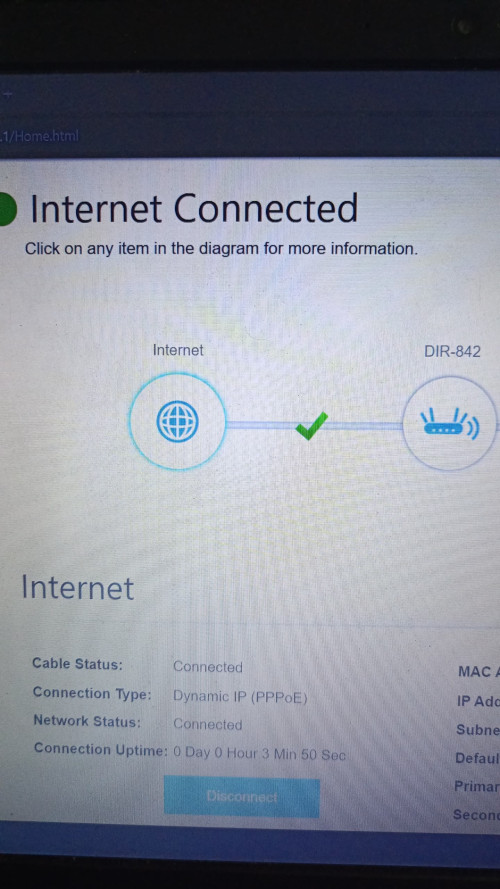
It's working now smile.gif

The only reason I can think of, is that I was using the router in AP mode, and it was plugged into the same slots.

Maybe the modem got confused, when TIME Customer Service changed to Bridge mode.

The internet was still working from the TIME Modem/Router even after they set Bridge mode.

Thanks for your help.

user posted image

This post has been edited by EDD-ed: Jul 12 2024, 09:39 PM
TSspamfish
post Jul 12 2024, 10:12 PM

Getting Started
**
Junior Member
187 posts

Joined: May 2007
From: Penang
The main TO DO here is need to call TiME Customer service to activate the bridge mode. This can only be done by them.
EDD-ed
post Jul 13 2024, 10:28 AM

New Member
*
Junior Member
38 posts

Joined: Oct 2021
QUOTE(ChenKaiWen @ Sep 15 2023, 06:08 AM)
Nobody here had ever gotten access that's why. Can you tell us the username and password?
*
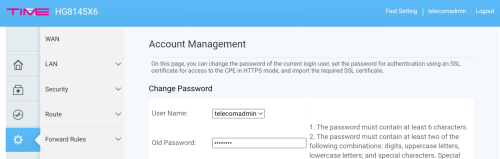
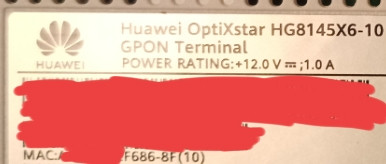
Username: telecomadmin
Password: TIMExxxx

xxxx being last 4 characters of ONT MAC Address, before the hyphen (-). In my case, the password is TIMEF686.

user posted image

This post has been edited by EDD-ed: Jul 13 2024, 10:41 AM
cabuk
post Aug 27 2024, 08:34 AM

New Member
*
Newbie
3 posts

Joined: Jul 2018


This what I done and working , NO need to call TIME customer services. If you want change the modem "YES"

TIME huawei OptiXstar HG8145B7N (modem + router)
ASUS RT-AX86U

step 1: go to modem admin panel, disable wifi and change to bridge mode.
Username: telecomadmin
Password: TIMExxxx

step 2: connect LAN1 huawei OptiXstar HG8145B7N (modem + router) to WAN port router ASUS RT-AX86U


step 3: Inside router ASUS RT-AX86U. WAN admin panel, change connection type to pppoe and insert your time user:pass credential

done thumbsup.gif

This post has been edited by cabuk: Aug 27 2024, 08:36 AM
ChenKaiWen
post Aug 27 2024, 09:07 AM

Casual
***
Junior Member
376 posts

Joined: May 2019


For those that did the bridge mode themselves, when TIME change their OLT, a new profile will be pushed to your ONR, which will disable bridge mode. Causing you to lose internet, happened once to me. Just have to enable it again if that ever happens.
QuantumEdge
post Aug 27 2024, 10:45 AM

Regular
******
Senior Member
1,597 posts

Joined: Jan 2016


QUOTE(cabuk @ Aug 27 2024, 08:34 AM)
This what I done and working , NO need to call TIME customer services. If you want change the modem "YES"

TIME huawei OptiXstar HG8145B7N (modem + router)
ASUS RT-AX86U

step 1: go to modem admin panel, disable wifi and change to bridge mode.
Username: telecomadmin
Password: TIMExxxx

step 2: connect LAN1 huawei OptiXstar HG8145B7N (modem + router) to WAN port router ASUS RT-AX86U
step 3: Inside router ASUS RT-AX86U. WAN admin panel, change connection type to pppoe and insert your time user:pass credential

done  thumbsup.gif
*
user posted image
Just change this into bridge?
PRSXFENG
post Aug 27 2024, 11:24 AM

Look at all my stars!!
*******
Senior Member
2,608 posts

Joined: Nov 2020


QUOTE(QuantumEdge @ Aug 27 2024, 10:45 AM)
user posted image
Just change this into bridge?
*
Also do disable the wifi on it
cabuk
post Aug 27 2024, 11:25 AM

New Member
*
Newbie
3 posts

Joined: Jul 2018


QUOTE(QuantumEdge @ Aug 27 2024, 10:45 AM)
user posted image
Just change this into bridge?
*
Yes.. change to bridge. make sure your setting configuration need to backup..
QuantumEdge
post Aug 27 2024, 11:45 AM

Regular
******
Senior Member
1,597 posts

Joined: Jan 2016


QUOTE(PRSXFENG @ Aug 27 2024, 11:24 AM)
Also do disable the wifi on it
*
QUOTE(cabuk @ Aug 27 2024, 11:25 AM)
Yes.. change to bridge. make sure your setting configuration need to backup..
*
I will give it a try next time, thinking about buying this to replace the stock wifi...

user posted image
QuantumEdge
post Oct 9 2024, 03:01 PM

Regular
******
Senior Member
1,597 posts

Joined: Jan 2016


QUOTE(cabuk @ Aug 27 2024, 11:25 AM)
Yes.. change to bridge. make sure your setting configuration need to backup..
*
user posted image
I just couldnt make it work somehow
Do I need to bind the VLAN to LAN port as well?
QuantumEdge
post Oct 9 2024, 04:02 PM

Regular
******
Senior Member
1,597 posts

Joined: Jan 2016


Ok, finally managed to setup this 2 in 1 into bridge mode
Step by step guide here:

1. Login to the router using admin username and pwd
Username: telecomadmin
Password: TIMExxxx

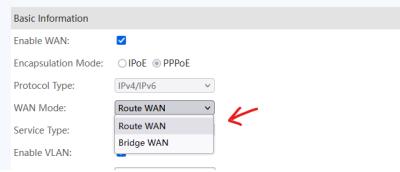
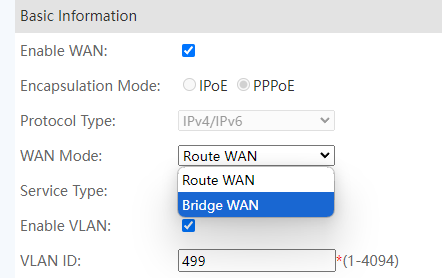
2. Under WAN, click Internet VLAN

3. WAN Mode change from Router WAN to Bridge WAN

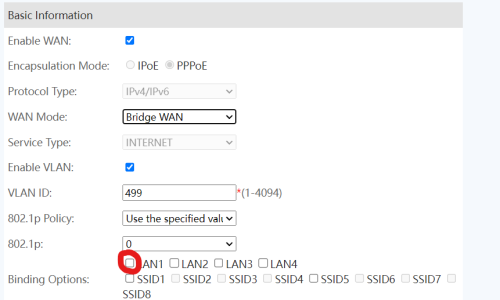
4. Binding Options tick the box LAN 1 (most important step)

5. Connect your router of choice to 2 in 1's LAN 1

6. Key in your PPPOE credentials, VLAN ID not required

7. Tada, enjoy your new router

One more thing, remember to turn off 2 in 1's WiFi
Can be done pressing the button beside the router

user posted image

This post has been edited by QuantumEdge: Oct 30 2024, 11:38 PM
yumm91
post Aug 9 2025, 05:17 PM

New Member
*
Newbie
1 posts

Joined: Dec 2013


QUOTE(QuantumEdge @ Oct 9 2024, 04:02 PM)
Ok, finally managed to setup this 2 in 1 into bridge mode
Step by step guide here:

1. Login to the router using admin username and pwd
Username: telecomadmin
Password: TIMExxxx

2. Under WAN, click Internet VLAN

3. WAN Mode change from Router WAN to Bridge WAN

4. Binding Options tick the box LAN 1 (most important step)

5. Connect your router of choice to 2 in 1's LAN 1

6. Key in your PPPOE credentials, VLAN ID not required

7. Tada, enjoy your new router

One more thing, remember to turn off 2 in 1's WiFi
Can be done pressing the button beside the router

user posted image
*
How do you access your modem again after you did this? Lets say you want to go back to router mode. Because once the device change to bridge mode, the device ip at 192.168.100.1 no longer accessable.
blacktubi
post Aug 9 2025, 05:20 PM

-
Group Icon
Elite
8,415 posts

Joined: Jul 2008

QUOTE(yumm91 @ Aug 9 2025, 05:17 PM)
How do you access your modem again after you did this? Lets say you want to go back to router mode. Because once the device change to bridge mode, the device ip at 192.168.100.1 no longer accessable.
*
You can access it, just configure manual IP on your computer
QuantumEdge
post Aug 9 2025, 05:44 PM

Regular
******
Senior Member
1,597 posts

Joined: Jan 2016


QUOTE(yumm91 @ Aug 9 2025, 05:17 PM)
How do you access your modem again after you did this? Lets say you want to go back to router mode. Because once the device change to bridge mode, the device ip at 192.168.100.1 no longer accessable.
*
user posted image
Use this method, just change the IP address to the one you are using
Double check your subnet as well, you can do that with any subnet calculator online


Change to:
| Lo-Fi Version
0.0356sec    0.68    6 queries    GZIP Disabled
Time is now: 11th December 2025 - 07:17 PM