Welcome Guest ( Log In | Register )

Outline · [ Standard ] · Linear+

 Configure Huawei ONT HG8145X6 as modem only, Time FB, Bridge Mode

views
     
nodeffect
post Sep 14 2023, 10:33 PM

Your past does not equal your future.
******
Senior Member
1,281 posts

Joined: Jan 2003
From: Private


QUOTE(dengko @ Feb 15 2023, 05:44 PM)
This is how i do it

Time modem HG8145X6
Tplink router AX73

step 1: call TIME cs ask to change to bridge mode
step 2: go to modem admin panel, disable wifi
step 3: connect LAN1 modem to WAN port router
step 4: inside router admin panel, change connection type to pppoe and insert your time user:pass credential

done
*
may I know why need to call them to change to bridge mode ? cuz I can change the mode in the modem settings.. pls enlighten me, thx
nodeffect
post Sep 14 2023, 11:02 PM

Your past does not equal your future.
******
Senior Member
1,281 posts

Joined: Jan 2003
From: Private


QUOTE(ChenKaiWen @ Sep 14 2023, 10:37 PM)
How can you change it? Majority of the settings including bridge mode is not available using the credentials on the sticker. It's only available through another username with a password only TIME knows and remote access by TIME themselves.

Me, myself had tried editing HTML. Plenty of settings were revealed. Doing anything will result in an error.
*
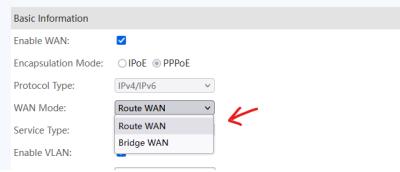
I dont know man, i ask the installer to give me the access to the modem, then he just give me... im quite sure that I can change it... thats why im curious why so many people here say we need to call... correct me if im wrong... pls see screenshot below

Attached Image
nodeffect
post Sep 14 2023, 11:32 PM

Your past does not equal your future.
******
Senior Member
1,281 posts

Joined: Jan 2003
From: Private


QUOTE(spamfish @ Sep 14 2023, 11:18 PM)
yes confirm need to call customer service and ask them to enable for you.
*
wait, i can change the settings there, still need to call ? im so confused


Change to:
| Lo-Fi Version
0.0142sec    0.98    7 queries    GZIP Disabled
Time is now: 18th December 2025 - 04:17 PM