

QUOTE(ChenKaiWen @ Sep 16 2023, 06:14 AM)
Yeah. If somebody got it, I really wish they would share it with others.

The PWD is random, according to a guide to unlock the ONT using telnet and huawei's toolToo bad the article is gone
Configure Huawei ONT HG8145X6 as modem only, Time FB, Bridge Mode
|
|
 Sep 16 2023, 12:40 PM Sep 16 2023, 12:40 PM
Return to original view | IPv6 | Post
#1
|
 
Senior Member
1,598 posts Joined: Jan 2016  
|
QUOTE(ChenKaiWen @ Sep 16 2023, 06:14 AM) Yeah. If somebody got it, I really wish they would share it with others. The PWD is random, according to a guide to unlock the ONT using telnet and huawei's toolToo bad the article is gone |
|
|
|
|
|
Sep 16 2023, 05:30 PM
Return to original view | IPv6 | Post
#2
|
|
Senior Member
1,598 posts Joined: Jan 2016
|
QUOTE(ChenKaiWen @ Sep 16 2023, 12:48 PM) I know there are a few guide to add your own user etc. But that require quite a bit of steps. It's kinda weird that some settings are exposed when it's in AP mode. I don't get why TIME would lock bridge mode from users. https://www.jianshu.com/p/3eb2c8e1b728Any idea what is the title of the article? There you go, not the same ONT but should be the same method |
|
|
Aug 27 2024, 10:45 AM
Return to original view | IPv6 | Post
#3
|
|
Senior Member
1,598 posts Joined: Jan 2016
|
QUOTE(cabuk @ Aug 27 2024, 08:34 AM) This what I done and working , NO need to call TIME customer services. If you want change the modem "YES" TIME huawei OptiXstar HG8145B7N (modem + router) ASUS RT-AX86U step 1: go to modem admin panel, disable wifi and change to bridge mode. Username: telecomadmin Password: TIMExxxx step 2: connect LAN1 huawei OptiXstar HG8145B7N (modem + router) to WAN port router ASUS RT-AX86U step 3: Inside router ASUS RT-AX86U. WAN admin panel, change connection type to pppoe and insert your time user:pass credential done  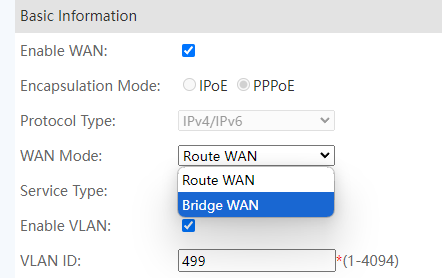 Just change this into bridge? |
|
|
Aug 27 2024, 11:45 AM
Return to original view | IPv6 | Post
#4
|
|
Senior Member
1,598 posts Joined: Jan 2016
|
QUOTE(PRSXFENG @ Aug 27 2024, 11:24 AM) Also do disable the wifi on it QUOTE(cabuk @ Aug 27 2024, 11:25 AM) Yes.. change to bridge. make sure your setting configuration need to backup.. I will give it a try next time, thinking about buying this to replace the stock wifi... |
|
|
Oct 9 2024, 03:01 PM
Return to original view | IPv6 | Post
#5
|
|
Senior Member
1,598 posts Joined: Jan 2016
|
QUOTE(cabuk @ Aug 27 2024, 11:25 AM) Yes.. change to bridge. make sure your setting configuration need to backup.. 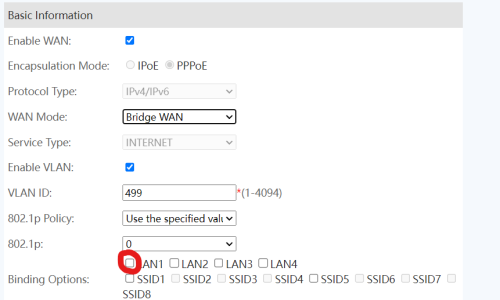 I just couldnt make it work somehow Do I need to bind the VLAN to LAN port as well? |
|
|
Oct 9 2024, 04:02 PM
Return to original view | Post
#6
|
|
Senior Member
1,598 posts Joined: Jan 2016
|
Ok, finally managed to setup this 2 in 1 into bridge mode
Step by step guide here: 1. Login to the router using admin username and pwd Username: telecomadmin Password: TIMExxxx 2. Under WAN, click Internet VLAN 3. WAN Mode change from Router WAN to Bridge WAN 4. Binding Options tick the box LAN 1 (most important step) 5. Connect your router of choice to 2 in 1's LAN 1 6. Key in your PPPOE credentials, VLAN ID not required 7. Tada, enjoy your new router One more thing, remember to turn off 2 in 1's WiFi Can be done pressing the button beside the router 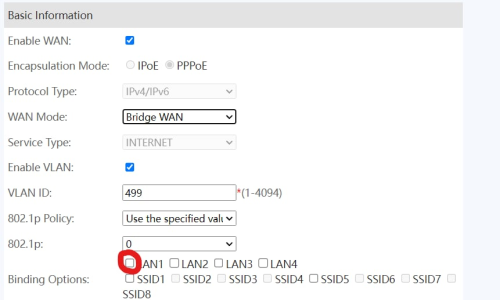 This post has been edited by QuantumEdge: Oct 30 2024, 11:38 PM |
|
|
Aug 9 2025, 05:44 PM
Return to original view | IPv6 | Post
#7
|
|
Senior Member
1,598 posts Joined: Jan 2016
|
QUOTE(yumm91 @ Aug 9 2025, 05:17 PM) How do you access your modem again after you did this? Lets say you want to go back to router mode. Because once the device change to bridge mode, the device ip at 192.168.100.1 no longer accessable.  Use this method, just change the IP address to the one you are using Double check your subnet as well, you can do that with any subnet calculator online |
| Change to: |  0.0193sec 0.0193sec
 0.72 0.72
 7 queries 7 queries
 GZIP Disabled GZIP Disabled
Time is now: 14th December 2025 - 05:18 AM |
 Quote
Quote