

QUOTE(ChenKaiWen @ Sep 15 2023, 06:08 AM)
Nobody here had ever gotten access that's why. Can you tell us the username and password?

Based on the main thread, staff/installers SOP is to not reveal said passwordConfigure Huawei ONT HG8145X6 as modem only, Time FB, Bridge Mode
|
|
 Sep 15 2023, 11:55 PM Sep 15 2023, 11:55 PM
Show posts by this member only | IPv6 | Post
#21
|
 
Senior Member
2,608 posts Joined: Nov 2020  
|
QUOTE(ChenKaiWen @ Sep 15 2023, 06:08 AM) Nobody here had ever gotten access that's why. Can you tell us the username and password? Based on the main thread, staff/installers SOP is to not reveal said password |
|
|
|
|
|
Sep 16 2023, 12:04 AM
Show posts by this member only | IPv6 | Post
#22
|
|
Senior Member
2,608 posts Joined: Nov 2020
|
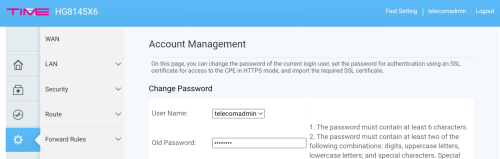
But yes, indeed many settings do lurk in there...
 |
|
|
Sep 16 2023, 06:14 AM
Show posts by this member only | IPv6 | Post
#23
|
|
Junior Member
376 posts Joined: May 2019
|
QUOTE(PRSXFENG @ Sep 15 2023, 11:55 PM) Based on the main thread, staff/installers SOP is to not reveal said password Yeah. If somebody got it, I really wish they would share it with others. |
|
|
Sep 16 2023, 12:40 PM
Show posts by this member only | IPv6 | Post
#24
|

Senior Member
1,597 posts Joined: Jan 2016
|
QUOTE(ChenKaiWen @ Sep 16 2023, 06:14 AM) Yeah. If somebody got it, I really wish they would share it with others. The PWD is random, according to a guide to unlock the ONT using telnet and huawei's toolToo bad the article is gone |
|
|
Sep 16 2023, 12:48 PM
Show posts by this member only | IPv6 | Post
#25
|
|
Junior Member
376 posts Joined: May 2019
|
QUOTE(QuantumEdge @ Sep 16 2023, 12:40 PM) The PWD is random, according to a guide to unlock the ONT using telnet and huawei's tool I know there are a few guide to add your own user etc. But that require quite a bit of steps. It's kinda weird that some settings are exposed when it's in AP mode. I don't get why TIME would lock bridge mode from users. Too bad the article is gone Any idea what is the title of the article? |
|
|
Sep 16 2023, 05:30 PM
Show posts by this member only | IPv6 | Post
#26
|
|
Senior Member
1,597 posts Joined: Jan 2016
|
QUOTE(ChenKaiWen @ Sep 16 2023, 12:48 PM) I know there are a few guide to add your own user etc. But that require quite a bit of steps. It's kinda weird that some settings are exposed when it's in AP mode. I don't get why TIME would lock bridge mode from users. https://www.jianshu.com/p/3eb2c8e1b728Any idea what is the title of the article? There you go, not the same ONT but should be the same method |
|
|
|
|
|
Sep 16 2023, 07:21 PM
Show posts by this member only | IPv6 | Post
#27
|
|
Junior Member
376 posts Joined: May 2019
|
QUOTE(QuantumEdge @ Sep 16 2023, 05:30 PM) Unfortunately, this is a similar guide found on other sites as well. The password is encrypted differently now. |
|
|
Nov 21 2023, 04:11 PM
Show posts by this member only | IPv6 | Post
#28
|

Junior Member
11 posts Joined: Feb 2010
|
Hi, like to share my experience. I signed up for Time 500Mbps plan, which comes with 2x Huawei 8145X6-10 routers. The Time installer set up 1x as a 2-in-1 (Modem + Router), and another 1x with Mesh. I already had my own TP-Link AX73 with Unifi, and I decided to use the Huawei 8145X6-10 as a modem only. I called Time helpline, and the technical team called back within 2 hours. Apparently it can set it physically with it, the settings (as a modem only) needed to be adjusted on Time end to switch from 2-in-1 to modem only. At my AX73, I need to made sure the LAN cable was connected from Huawei 8145X6-10 (LAN1) to the AX73 WAN port. And AX73 set with PPPoE method with the login credentials provided by Time. It worked. Hope this helps~  tgeoklin liked this post
|
|
|
Jul 12 2024, 01:58 PM
Show posts by this member only | IPv6 | Post
#29
|
|
Junior Member
38 posts Joined: Oct 2021
|
QUOTE(flautoeng @ Nov 21 2023, 04:11 PM) Hi, like to share my experience. Hi, I'm using an old Unifi Router (D-Link DIR842). I've changed the firmware to v3.13.I signed up for Time 500Mbps plan, which comes with 2x Huawei 8145X6-10 routers. The Time installer set up 1x as a 2-in-1 (Modem + Router), and another 1x with Mesh. I already had my own TP-Link AX73 with Unifi, and I decided to use the Huawei 8145X6-10 as a modem only. I called Time helpline, and the technical team called back within 2 hours. Apparently it can set it physically with it, the settings (as a modem only) needed to be adjusted on Time end to switch from 2-in-1 to modem only. At my AX73, I need to made sure the LAN cable was connected from Huawei 8145X6-10 (LAN1) to the AX73 WAN port. And AX73 set with PPPoE method with the login credentials provided by Time. It worked. Hope this helps~ After Time CS, Changed my Modem to Bridge Mode. I setup the router with the TIME PPPoE details, but it doesn't work at all. Any suggestions? Thanks |
|
|
Jul 12 2024, 02:01 PM
Show posts by this member only | IPv6 | Post
#30
|
|
Junior Member
38 posts Joined: Oct 2021
|
QUOTE(dengko @ Feb 15 2023, 05:44 PM) This is how i do it Hi, I'm using an old Unifi Router (D-Link DIR842). Time modem HG8145X6 Tplink router AX73 step 1: call TIME cs ask to change to bridge mode step 2: go to modem admin panel, disable wifi step 3: connect LAN1 modem to WAN port router step 4: inside router admin panel, change connection type to pppoe and insert your time user:pass credential done I've changed the firmware to v3.13. FYI, My router doesn't have TIME in the ISP List After following your steps, it doesn't work for me. I tried it with TM Firmware & now the latest firmware as well. Thanks |
|
|
Jul 12 2024, 03:14 PM
|
|
Junior Member
376 posts Joined: May 2019
|
QUOTE(EDD-ed @ Jul 12 2024, 02:01 PM) Hi, I'm using an old Unifi Router (D-Link DIR842). VLAN is not needed for TIME after using bridge mode.I've changed the firmware to v3.13. FYI, My router doesn't have TIME in the ISP List After following your steps, it doesn't work for me. I tried it with TM Firmware & now the latest firmware as well. Thanks |
|
|
Jul 12 2024, 04:50 PM
|
|
Junior Member
38 posts Joined: Oct 2021
|
QUOTE(ChenKaiWen @ Jul 12 2024, 03:14 PM) VLAN is not needed for TIME after using bridge mode. I tried without VLAN, but it didn't work as well. The router auto-detected PPPoE. I input the TIME username & password. Then, it shows no internet |
|
|
Jul 12 2024, 05:55 PM
|
|
Junior Member
376 posts Joined: May 2019
|
QUOTE(EDD-ed @ Jul 12 2024, 04:50 PM) I tried without VLAN, but it didn't work as well. Are you sure your ONT is in bridge mode? You should have no internet when it’s in bridge mode.The router auto-detected PPPoE. I input the TIME username & password. Then, it shows no internet I assume the username and pass is obtained from TIME selfcare. |
|
|
|
|
|
Jul 12 2024, 08:18 PM
Show posts by this member only | IPv6 | Post
#34
|
|
Junior Member
38 posts Joined: Oct 2021
|
QUOTE(ChenKaiWen @ Jul 12 2024, 05:55 PM) Are you sure your ONT is in bridge mode? You should have no internet when it’s in bridge mode. It's working now I assume the username and pass is obtained from TIME selfcare. The only reason I can think of, is that I was using the router in AP mode, and it was plugged into the same slots. Maybe the modem got confused, when TIME Customer Service changed to Bridge mode. The internet was still working from the TIME Modem/Router even after they set Bridge mode. Thanks for your help. 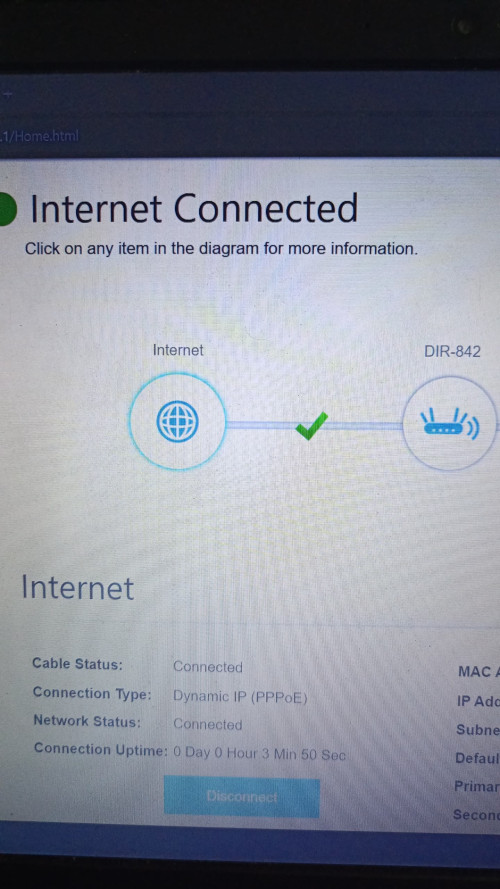 This post has been edited by EDD-ed: Jul 12 2024, 09:39 PM spamfish and ChenKaiWen liked this post
|
|
|
Jul 12 2024, 10:12 PM
|

Junior Member
187 posts Joined: May 2007 From: Penang
|
The main TO DO here is need to call TiME Customer service to activate the bridge mode. This can only be done by them.
|
|
|
Jul 13 2024, 10:28 AM
Show posts by this member only | IPv6 | Post
#36
|
|
Junior Member
38 posts Joined: Oct 2021
|
QUOTE(ChenKaiWen @ Sep 15 2023, 06:08 AM) Nobody here had ever gotten access that's why. Can you tell us the username and password? Username: telecomadminPassword: TIMExxxx xxxx being last 4 characters of ONT MAC Address, before the hyphen (-). In my case, the password is TIMEF686. 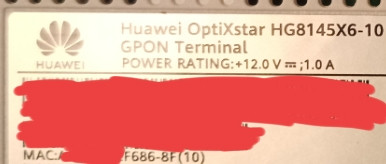 This post has been edited by EDD-ed: Jul 13 2024, 10:41 AM |
|
|
Aug 27 2024, 08:34 AM
|

Newbie
3 posts Joined: Jul 2018
|
This what I done and working , NO need to call TIME customer services. If you want change the modem "YES" TIME huawei OptiXstar HG8145B7N (modem + router) ASUS RT-AX86U step 1: go to modem admin panel, disable wifi and change to bridge mode. Username: telecomadmin Password: TIMExxxx step 2: connect LAN1 huawei OptiXstar HG8145B7N (modem + router) to WAN port router ASUS RT-AX86U step 3: Inside router ASUS RT-AX86U. WAN admin panel, change connection type to pppoe and insert your time user:pass credential done  This post has been edited by cabuk: Aug 27 2024, 08:36 AM Tanvir741 liked this post
|
|
|
Aug 27 2024, 09:07 AM
|
|
Junior Member
376 posts Joined: May 2019
|
For those that did the bridge mode themselves, when TIME change their OLT, a new profile will be pushed to your ONR, which will disable bridge mode. Causing you to lose internet, happened once to me. Just have to enable it again if that ever happens. PRSXFENG liked this post
|
|
|
Aug 27 2024, 10:45 AM
Show posts by this member only | IPv6 | Post
#39
|
|
Senior Member
1,597 posts Joined: Jan 2016
|
QUOTE(cabuk @ Aug 27 2024, 08:34 AM) This what I done and working , NO need to call TIME customer services. If you want change the modem "YES" TIME huawei OptiXstar HG8145B7N (modem + router) ASUS RT-AX86U step 1: go to modem admin panel, disable wifi and change to bridge mode. Username: telecomadmin Password: TIMExxxx step 2: connect LAN1 huawei OptiXstar HG8145B7N (modem + router) to WAN port router ASUS RT-AX86U step 3: Inside router ASUS RT-AX86U. WAN admin panel, change connection type to pppoe and insert your time user:pass credential done 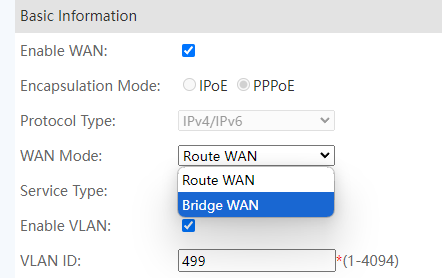 Just change this into bridge? |
|
|
Aug 27 2024, 11:24 AM
|
|
Senior Member
2,608 posts Joined: Nov 2020
|
QUOTE(QuantumEdge @ Aug 27 2024, 10:45 AM) Just change this into bridge? |
| Change to: |  0.0205sec 0.0205sec
 0.71 0.71
 6 queries 6 queries
 GZIP Disabled GZIP Disabled
Time is now: 11th December 2025 - 11:01 AM |
 Quote
Quote