Welcome Guest ( Log In | Register )

Bump Topic Topic Closed RSS Feed
11 Pages < 1 2 3 4 5 > » Bottom

Outline · [ Standard ] · Linear+

Unifi Official TM UniFi High Speed Broadband Thread V40, READ 1ST PAGE FOR RELEVANT WIFI INFO

views
     
tng55
post Jun 29 2022, 12:43 AM

Regular
******
Senior Member
1,440 posts

Joined: Sep 2021


QUOTE(westlife @ Jun 26 2022, 02:57 PM)
my unifi 100mbps plan i am still getting a public ip even though they said 100mbps plan and below will not get.

is it the same as u guys one?
*
i am 100mbps plan to i still getting public ip no problem happy smile.gif
tng55
post Jun 29 2022, 12:21 PM

Regular
******
Senior Member
1,440 posts

Joined: Sep 2021


QUOTE(westlife @ Jun 29 2022, 08:18 AM)
U are existing 100Mbps plan user before the change rite?

Same. I am on public ip too.
*
yes i am existing 100Mbps plan only no change and no upgrade
no apply 30mbps i apply 100mbps since may 2019
tng55
post Jul 8 2022, 01:29 PM

Regular
******
Senior Member
1,440 posts

Joined: Sep 2021


QUOTE(jerry123939 @ Jul 7 2022, 09:48 PM)
I found this unifi agent from facebook, 30mbps RM89+6 to 100mbps, RM89+22 to 300mbps, for contract ended customer only. This is even cheaper than staywithunifi promo. FB page: Queenstore Page.
*
seen like Maxis ??? but not unifi
tng55
post Jul 11 2022, 10:35 PM

Regular
******
Senior Member
1,440 posts

Joined: Sep 2021


QUOTE(tzxsean @ Jul 11 2022, 08:17 AM)
How’s the internet speed recently?

I just did speed test..

Only around 50mbps on 300 mbps contract
*
you own router or free tm router
if tm router u using that crap
tng55
post Jul 13 2022, 12:52 AM

Regular
******
Senior Member
1,440 posts

Joined: Sep 2021


QUOTE(YoungMan @ Jul 12 2022, 08:59 PM)
Try to PM those agent on FB for Maxis 300mbps at RM129, 6 months free. They are trying to get Unifi users over, so you can consider it.
It's their duty to upgrade, otherwise people can always jump to other providers after end of contract.
*
i will stay unifi i will not take maxis due block p0rm and etc google dns change also wont work its blocked some site
unifi change google dns now unblock can access


tng55
post Jul 13 2022, 12:53 PM

Regular
******
Senior Member
1,440 posts

Joined: Sep 2021


QUOTE(YoungMan @ Jul 13 2022, 08:32 AM)
Who ask you to change?
*
no just telling only noting wrong
tng55
post Jul 15 2022, 09:46 PM

Regular
******
Senior Member
1,440 posts

Joined: Sep 2021


QUOTE(nomadtube @ Jul 15 2022, 12:12 AM)
guys help me

after restating my btu after months of not restarting I finally got move to private ip as im on the 100mbps and my wan ip address does not match my whatismyipaddress on the internet

so what should I do go to tm center to ask them cause I need cctv or just call

any1 got experience in this

niama I think I change to maxis like this niama tm move me to private address

helppp
*
i am on 100mbps my still public ip no problem
tng55
post Jul 16 2022, 10:54 PM

Regular
******
Senior Member
1,440 posts

Joined: Sep 2021


QUOTE(belson0425 @ Jul 16 2022, 04:41 PM)
Hi gais/gals, Unifi just changed my router to zyxel ex3220, and after I configured the DNS blocked websites only work temporarily before it gets blocked again (binance, kucoin etc). I checked the router configuration and everything seems to check out. Not sure what is going on here?

user posted image
*
because you using free tm router zyxel ex3220 that not work if you change DNS website opened then suddenly blocked website again due its free tm router will back tm dns

mine asus router i had changed dns then mine can use binance, kucoin etc no more blocked website again

i can access binance, kucoin no longer blocked again

batter buy you own router problem solve
tng55
post Jul 25 2022, 09:39 PM

Regular
******
Senior Member
1,440 posts

Joined: Sep 2021


QUOTE(velarous @ Jul 25 2022, 06:55 PM)
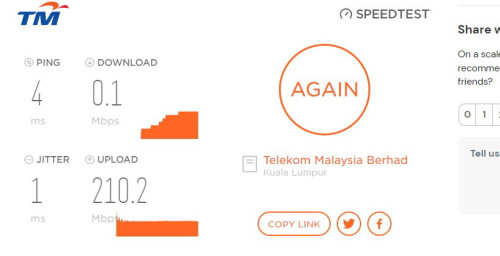
Yes there abouts. Always had uploads going above 200. But yes this is the problem.

user posted image
*
maybe router ??? hmm.gif
what brand you use router
tng55
post Jul 25 2022, 11:55 PM

Regular
******
Senior Member
1,440 posts

Joined: Sep 2021


QUOTE(velarous @ Jul 25 2022, 11:05 PM)
im using Asus ZenWiFi AX with 2 more nodes.

But as I said in my original post. VPN works well. Can get my download speeds to 190mbps
*
so you already swap tm default router without VPN speed still getting 0.1mbps and max 1mbps right ???

morning speed back 800mbps ??? after 7pm speed lower ???

please report TM Technical to come you house to check and show speed lower

i think fibre problem or Port ONT Problem outside rclxub.gif

once tm Technical come you house and show speed then bad speed you may request fiber ont port change outside
tng55
post Jul 26 2022, 02:17 AM

Regular
******
Senior Member
1,440 posts

Joined: Sep 2021


QUOTE(velarous @ Jul 26 2022, 01:25 AM)
Yes swapping router still same issue.

The timing seems to be morning to evening super slow speeds. It just got better after 7pm just now. So right now 1am it's still a useable 100+mbps.

I tried doing WFH stuff yesterday (monday) 9am - 12pm and gave up. Didn't check in the afternoon to evening.

Same thing happened on Sunday when the problem first happened. So basically Day time with and without VPN same issue 0.1 - 5mbps.
At night VPN starts helping a lot with over 100mbps, if no vpn at night then same 0.1-5mbps. It's so puzzling.

I've not seen full speeds (700-800mbps) since early Sunday morning.
*
QUOTE(velarous @ Jul 26 2022, 01:30 AM)
True that's possible but it's a low density area and even if heavy users did effect me, i don't think I should be getting 0.1-5mbps out of 800mbps. Maybe a 60-70% drop off I understand that's possible but this is more then a 99% drop off until it's similar to dial-up speeds.

Hopefully TM gets here soon. It's been about 39 hours since I reported.
*
so you reported TM already more then 24hours ++ over
you can claim RM50

once Technical come you house you must show then remember request ONT outside Port Change

maybe you current port ont unstable maybe rosak port so batter change Port then speedtest again verify must here Technical for verify imported

and ask Technical request change BTU very imported

This post has been edited by tng55: Jul 26 2022, 02:18 AM

tng55
post Jul 29 2022, 01:22 PM

Regular
******
Senior Member
1,440 posts

Joined: Sep 2021


QUOTE(PJng @ Jul 29 2022, 09:18 AM)
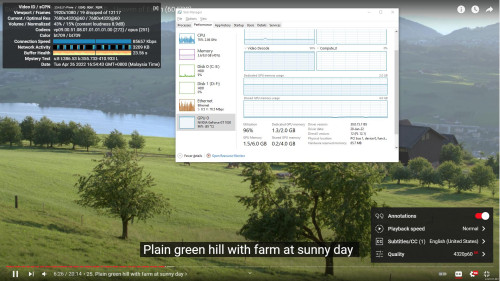
I repost my old screenshot, that i posted on other thread

user posted image
Cpu i5 2300
Plan 100mbps
See is vp9, if av1 cannot play
*
ram not enough just 8gb only
you need upgrade gpu 1650 ti or 1660 enough 8k with AV1 can played
you own gtx 1030 that why 96% unable handle 8K
tng55
post Jul 30 2022, 12:58 AM

Regular
******
Senior Member
1,440 posts

Joined: Sep 2021


QUOTE(PJng @ Jul 29 2022, 11:08 PM)
No, i just want to say, 100mbps speed is not a problem to play 8k video
But if laggy is pc cannot handle, i just give my example
I will not upgrade a 10 years old pc, better i buy new set
*
i not saying speed
i just saying you PC Spec ram not enough just 8gb only
you need upgrade gpu 1650 ti or 1660 enough 8k with AV1 can played
you own gtx 1030 that why 96% unable handle 8K

100mbps i am sure enough can handle speed 100mbps not a problem to play 8k 100% no problem

its you pc trouble

mine pc already old 10++ years not plan to buy new pc but need take my time
tng55
post Aug 9 2022, 09:57 PM

Regular
******
Senior Member
1,440 posts

Joined: Sep 2021


QUOTE(soonwai @ Aug 9 2022, 11:15 AM)
I kinda like the 175 range. Causing u probs?
*
i still like 175 range

now days daily 42.189.135 stuck

daily i off night

morning daily i turn on i always get stuck same 42.189.135

last year 2020 or 2021 i always get 175

now i miss 175 ranger

i hate that ip 42.189 cry.gif cry.gif

i am on 100mbps my area i did check other place like neighbor he getting 175 too for 100mbps

how i get 175 ranger

i already wait most 6 month never getting 175 ranger

so miss
tng55
post Aug 29 2022, 11:13 PM

Regular
******
Senior Member
1,440 posts

Joined: Sep 2021


QUOTE(QuantumEdge @ Aug 29 2022, 11:00 PM)
user posted image
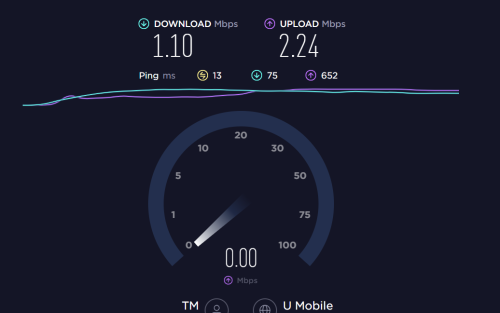
The F**K is wrong with TM tonight
*
try telekom server

don't use umobile server
tng55
post Sep 9 2022, 01:53 PM

Regular
******
Senior Member
1,440 posts

Joined: Sep 2021


QUOTE(Tampines @ Sep 9 2022, 01:21 PM)
I just subscribed to unifi fiber 100mbps with a tplink EC221-G3v router

any idea how do I apply VPN from namecheap to this router?

thank you
*
i think wont support setup vpn router

you can use software vpn connect PC or mobile apps vpn download mobile phone can connect vpn only

but router vpn can't
tng55
post Sep 17 2022, 01:04 PM

Regular
******
Senior Member
1,440 posts

Joined: Sep 2021


QUOTE(soonwai @ Sep 17 2022, 01:45 AM)
It varies. I'm paying RM159. 800Mbps RM99 + Ultimate Pack RM60. Also includes STD20.

Someone here managed to change Ultimate to Ruby so minus RM30 to RM129. Also got ppl on RM139 and RM149. Unsure how they arrived at that figure.
*
daam i wish RM159 800Mbps RM99 + Ultimate Pack RM60. Also includes STD20.

lucky you

i can't get like that i afford RM159

i am on 100mbps RM129 i contract finished
waiting 800mbps i wont upgrade 300mbps same price

batter wait if tm suddenly offering 800mbps but when we don't know
tng55
post Sep 17 2022, 01:06 PM

Regular
******
Senior Member
1,440 posts

Joined: Sep 2021


QUOTE(ycs @ Sep 17 2022, 11:57 AM)
my unifi port got problem, no connection, reported but technician can only come on monday; any other way to expedite? supposed to be within 24 hours
*
if you are 100mbps then can claim RM50 biggrin.gif
tng55
post Oct 6 2022, 04:52 PM

Regular
******
Senior Member
1,440 posts

Joined: Sep 2021


Real or scam found facebook
300mbps RM119 unifi its realy ?

Attached Image
tng55
post Oct 6 2022, 05:05 PM

Regular
******
Senior Member
1,440 posts

Joined: Sep 2021


QUOTE(Oltromen Ripot @ Oct 6 2022, 04:58 PM)
can i trust someone selling network-related but cannot even spell "rounter" properly?
*
I realy dont know maybe scam

11 Pages < 1 2 3 4 5 > » Top
Topic ClosedOptions
 

Change to:
| Lo-Fi Version
0.2852sec    0.37    7 queries    GZIP Disabled
Time is now: 4th December 2025 - 03:42 AM