Welcome Guest ( Log In | Register )

Bump Topic Topic Closed RSS Feed
14 Pages < 1 2 3 4 > » Bottom

Outline · [ Standard ] · Linear+

Unifi Official TM UniFi High Speed Broadband Thread V40, READ 1ST PAGE FOR RELEVANT WIFI INFO

views
     
soonwai
post May 13 2022, 05:03 PM


********
All Stars
11,458 posts

Joined: Oct 2007
From: KL


QUOTE(aniq8676 @ May 13 2022, 04:05 PM)
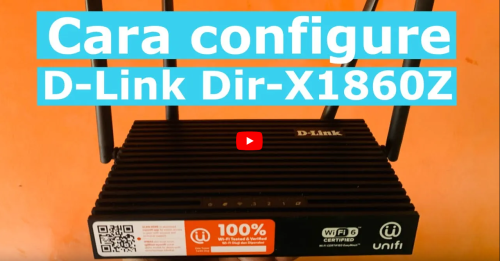
TM is now release a second model of WIFI6 router for new users 500mbps and 800mbps.
Currently available for new users in Kuala Lumpur only.

D-LINK DIR X1860Z with EASYMESH support

Youtube

user posted image
*
Nice, I like the boxy look but those antennas.

Retail version: https://www.dlink.com/en/products/dir-x1860...-wi-fi-6-router
Wonder if the hardware inside is the same.
owait: retail X1860 no mesh.
soonwai
post May 17 2022, 01:24 PM


********
All Stars
11,458 posts

Joined: Oct 2007
From: KL


QUOTE(fruitie @ May 17 2022, 11:54 AM)
I activated my no. for Astro Hotstar when it was rolled out last year. Then, at the same time, I have UniFi Ultimate Pack, which grants me a free Hotstar account. Last month, I already activated via UniFi, and instead of using my no. to activate for UniFi, I used my sister's no. I got an SMS after that it was successful but without mentioning it is for which no., I assumed it was for my sister's no. which I used for activation.

This morning, I received an SMS from UniFi that it is ready to use under my no. doh.gif

Now my Hotstar shows two sets of accounts (I think?).

Subscribed to Disney+ Hotstar Yearly
Subscription valid till: 31 May 2022

Subscription to Disney+ Hotstar 2 Years
Subscription valid till: 17 May 2024

How does this work now? I'm concerned about the no. of devices that can be connected at the same time...
*
Thanks for the info. I also have Astro Hotstar under the same number that's on record for my Unifi account. I was planning to do the same as you, activating Unifi Hotstar with a different number. Looks like that's not going to work.

I suppose changing the number that's on Unifi's record to a different number before activating Unifi Hotstar could work. But bet it will mess something up.

soonwai
post May 17 2022, 05:55 PM


********
All Stars
11,458 posts

Joined: Oct 2007
From: KL


QUOTE(MyProLife @ May 17 2022, 04:25 PM)
fruitie oltromen ripot soonwai ps: i know tag will lose it effectiveness after edit but want let you know anyway

user posted image

SOURCE FAQ.PDF
*
Thanks, I read the FAQ until #19 and then got tired. However I think fruitie did as what's stated in point #51 and still had Hotstar assigned to her mobile that's tied to her Unifi account. Typical TM of things not working quite right. Hope we can change it after 30 days.
soonwai
post May 27 2022, 07:35 PM


********
All Stars
11,458 posts

Joined: Oct 2007
From: KL


QUOTE(zzzhhhzzz @ May 27 2022, 09:11 AM)
Hi all, TM came to replace my faulty BTU recently and they charge me RM53 on site support. I thought that if the fault comes from TM, they shouldnt charge me this amount ? anyone has experience with this ?
*
Earlier this month, got someone replaced modem also. Tag him see if he got charged RM53 or not. Myself so far, replaced 2 x modems, no charge but was 3/4 yrs ago.

QUOTE(5p3ak @ May 1 2022, 08:39 PM)
nope but gotta wait for the bill to be sure
*
Macam mana? Did TM charge u for the modem replacement visit?
soonwai
post Jun 17 2022, 06:49 PM


********
All Stars
11,458 posts

Joined: Oct 2007
From: KL


QUOTE(Rhetoric @ Jun 17 2022, 03:52 PM)
speedtest.net okla = 300
Fast.com = 30

usually both same speed.
*
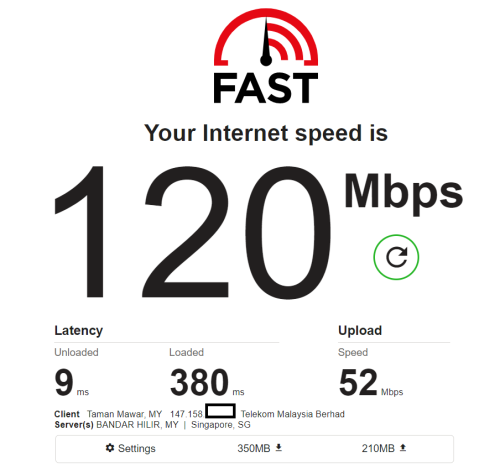
I like fast.com. Usually use when want to show off.
user posted image

Ookla bit slow.
user posted image

speedtest.tm.com.my. same old, same old. 8x0/2x0. No screenshot.

This post has been edited by soonwai: Jun 17 2022, 07:00 PM
soonwai
post Jun 20 2022, 08:59 PM


********
All Stars
11,458 posts

Joined: Oct 2007
From: KL


QUOTE(Brotherjoe @ Jun 20 2022, 04:37 PM)
How reliable is the unifi modem? Mine was the Huawei model.. kaput after 1 year and about 3 months.
...
*
So far, totally reliable. Huawei HG850a used from 2011-2017, PSU spoil once in 2015. TM replaced it in 2017 with new HG8240w. Then 2 weeks later got another HG8240w (for 100Mbps upgrade) which is so far ok from 2017-present.
soonwai
post Jun 29 2022, 11:33 AM


********
All Stars
11,458 posts

Joined: Oct 2007
From: KL


QUOTE(westlife @ Jun 29 2022, 08:19 AM)
Is there anyway to check if unifi is on public or private ip without going thru the wifi router to check?

Such as using traceroute etc. kind of commands.
*
Here's the least technical way I can think of.
1. Get your ipv4 from https://www.whatsmyip.org.
2. Ping the address from from your phone mobile data.
3. If can ping, then turn off your house wifi router.
4. If ping stops then your house is public IP.
5. If ping continues then your house is private IP.
soonwai
post Jun 30 2022, 12:13 AM


********
All Stars
11,458 posts

Joined: Oct 2007
From: KL


QUOTE(PRSXFENG @ Jun 29 2022, 09:13 PM)
Router may be blocking/ignoring pings as a security thing
*
Yes, possible.
soonwai
post Jun 30 2022, 12:27 AM


********
All Stars
11,458 posts

Joined: Oct 2007
From: KL


QUOTE(XeactorZ @ Jun 29 2022, 08:41 PM)
Hmm just tried visit the website by connecting home internet (LAN cable)
ping the address by connecting phone hotspot and unplug LAN cable
Unable to ping laugh.gif
...
*
Can be 2 possibility:
1. You're on public IP and your house router is ignoring ping. Possible but unlikely.
2. You're on private IP and the router doing CGNAT for you is ignoring pings. Highly likely.

So most probably, I'd say that you're on private IP.

QUOTE(westlife @ Jun 26 2022, 02:57 PM)
my unifi 100mbps plan i am still getting a public ip even though they said 100mbps plan and below will not get.

is it the same as u guys one?
*
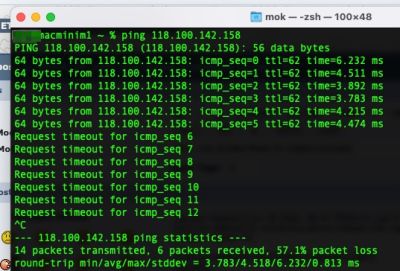
My neighbour on Unifi 100Mbps still getting public IP.
user posted image

Start to ping from my Unifi and then I reboot his router.
user posted image

This post has been edited by soonwai: Jun 30 2022, 12:50 AM
soonwai
post Jun 30 2022, 01:32 AM


********
All Stars
11,458 posts

Joined: Oct 2007
From: KL


QUOTE(failed.hashcheck @ Jun 30 2022, 01:31 AM)
Depends on router also. I think Asus router (at least for merlin) the default behavior is to ignore ping?
*
Possible. If ping not working then cannot use ping to test.
soonwai
post Jun 30 2022, 04:47 AM


********
All Stars
11,458 posts

Joined: Oct 2007
From: KL


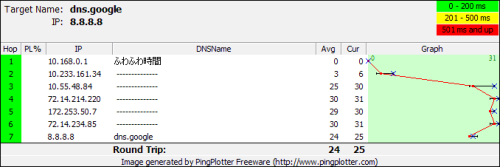
Oltromen Ripot has posted twice already with very good explanations. Perhaps examples will help westlife. Do a traceroute and see which of the below is closest to yours.

This is private IP. (Digi mobile data) whatismyip: 115.164.213.14
CODE
% traceroute 8.8.8.8 | column -t
traceroute to 8.8.8.8 (8.8.8.8), 64 hops max, 52 byte packets
1                172.20.10.1        (172.20.10.1)     6.706   ms  4.672   ms  4.312   ms
2                10.138.138.118     (10.138.138.118)  30.352  ms  33.715  ms  30.086  ms
3                *                  *                 *
4                10.132.47.46       (10.132.47.46)    28.326  ms  23.017  ms  19.999  ms
5                172.21.20.207      (172.21.20.207)   20.419  ms  20.631  ms  24.763  ms
6                *                  *                 *
7                172.21.2.250       (172.21.2.250)    40.436  ms  29.309  ms  28.952  ms
8                72.14.221.20       (72.14.221.20)    31.236  ms  22.789  ms  36.976  ms
9                108.170.250.1      (108.170.250.1)   25.200  ms
108.170.249.225  (108.170.249.225)  23.252            ms
108.170.250.1    (108.170.250.1)    30.591            ms
10               72.14.234.85       (72.14.234.85)    31.066  ms
142.250.62.57    (142.250.62.57)    23.950            ms
72.14.234.85     (72.14.234.85)     31.160            ms
11               dns.google         (8.8.8.8)         39.246  ms  28.082  ms  30.025  ms


This is public IP. (Unifi 800) whatismyip: 175.142.125.212 (see how this IP corresponds to #2 below)
CODE
% traceroute 8.8.8.8 | column -t
traceroute to 8.8.8.8 (8.8.8.8), 64 hops max, 52 byte packets
1              router.local      (10.0.1.1)         2.362  ms     0.415  ms  0.354  ms
2              175.142.125.254   (175.142.125.254)  3.025  ms     2.334  ms  2.364  ms
3              10.55.49.3        (10.55.49.3)       3.680  ms
10.55.49.1     (10.55.49.1)      4.882              ms     3.439  ms
4              10.55.48.14       (10.55.48.14)      5.563  ms
10.55.48.200   (10.55.48.200)    4.809              ms
10.55.48.18    (10.55.48.18)     5.102              ms
5              72.14.214.196     (72.14.214.196)    6.143  ms
72.14.214.220  (72.14.214.220)   5.354              ms
72.14.204.208  (72.14.204.208)   6.075              ms
6              *                 *                  *
7              dns.google        (8.8.8.8)          6.486  ms     4.652  ms  4.788  ms


* anything beginning with a 10 and 172.16 to 172.31 are private IPs.

This post has been edited by soonwai: Jun 30 2022, 05:20 AM
soonwai
post Jun 30 2022, 06:10 PM


********
All Stars
11,458 posts

Joined: Oct 2007
From: KL


QUOTE(XeactorZ @ Jun 30 2022, 05:13 PM)
I am using Asus router and on 300mbps plan, should be on public IP? hmm.gif
*
Ya, 300Mbps should be public IP. Check and see.
soonwai
post Jun 30 2022, 06:26 PM


********
All Stars
11,458 posts

Joined: Oct 2007
From: KL


QUOTE(asellus @ Jun 30 2022, 06:06 PM)
It isn't necessarily that the first hop after router must be public IP for users with public IP enabled.

user posted image

The one above is Unifi 500Mb.
*
Yeah, I've seen this a few times before where the IP given by PPPoE is a public IP but the gateway is not. Makes sense to save another ipv4 address but don't see it too often. I guess we can't rely on the traceroute test to be definitive.
soonwai
post Jun 30 2022, 09:20 PM


********
All Stars
11,458 posts

Joined: Oct 2007
From: KL


QUOTE(westlife @ Jun 26 2022, 02:57 PM)
my unifi 100mbps plan i am still getting a public ip even though they said 100mbps plan and below will not get.

is it the same as u guys one?
*
Earlier I mentioned my next door neighbour is on 100Mbps and is still being assigned a public IP. Just now I checked my other next door neighbour and hers is private IP. The difference is that the private ip one is a relatively new subscription, about 6 months old. The public ip one is quite an old subscription. I remember she went from 30 turbo to 300 then downgraded to 100Mbps.

QUOTE(XeactorZ @ Jun 30 2022, 08:00 PM)
That good, but any advantage on using public IP?
*
If you have to ask then probably you won't need any of the "features" that a public IP offers. Public IP basically allows other people (or yourself if you're outside) to connect to your house. For example, to connect to a CCTV or maybe a file server at home. Some software work better eg: Bittorrent can advertise your IP address and peers can connect to you. And of course, for gaming, you can host a Minecraft server and Playstation won't complain about your NAT level so much.

All these won't work without extra kung-fu if you're on private IP. It may be little bit slower bcos got extra layer of NAT. Some ppl here also reported performance drops after they were changed to private IP. Unsure if that's negative bias or what.

This post has been edited by soonwai: Jun 30 2022, 09:45 PM
soonwai
post Jul 3 2022, 12:52 AM


********
All Stars
11,458 posts

Joined: Oct 2007
From: KL


QUOTE(Bonjitettei @ Jul 2 2022, 12:51 PM)
Hi,

I am using Unifi 300Mbps for many years now, which comes with HyppTV package (additional RM30 per month).

Can I cancel the HyppTV only?
*
Dun think so. I asked if I can downgrade from Ultimate to Ruby, also cannot.

"Upon checking in our system, we found that your current package is unifi 800Mbps - Super Value YEP 2019 with monthly fee RM159 + VAS 1 - Mesh WiFi Deco M4 RM15.00 (after discount RM250.00).

Your package is a bundled triple play service offering High Speed Internet, unifi TV and Voice (phone line) for residential use. Kindly note that you are unable to subcribe only High Speed Internet.

Your current monthly fee for unifi package 800Mbps is already under the below market price. Thus, we unable to proceed with the changes due monthly fee for Ruby Plus pack only RM30 (exclude 6$ SST)."
soonwai
post Jul 3 2022, 11:58 AM


********
All Stars
11,458 posts

Joined: Oct 2007
From: KL


QUOTE(afif92 @ Jul 3 2022, 07:47 AM)
You are special case because they mistakenly overlapped your Ruby package with Ultimate when you got past promo. Then, you asked to remove your orignal Ruby package and reduced the price of course they prohibited want you to do second time.
*
Not me lah. TM remove one. During 100Mbps time. From RM189-RM159. 100Mbps so much cheaper now.
https://forum.lowyat.net/index.php?showtopi...post&p=91162278
soonwai
post Jul 3 2022, 03:54 PM


********
All Stars
11,458 posts

Joined: Oct 2007
From: KL


QUOTE(xxboxx @ Jul 3 2022, 11:39 AM)
Your one price so good already but still want to reduce. tongue.gif

I'm paying as much as you but only 300mbps and don't have HyppTV sad.gif
*
Try lor. Some ppl here lucky can get RM139 & RM149. Got one even lawyer up to remove HyppTV.
soonwai
post Jul 4 2022, 01:20 PM


********
All Stars
11,458 posts

Joined: Oct 2007
From: KL


QUOTE(shahruls @ Jul 4 2022, 12:15 PM)
Hi, need advise between unifi 100mbps rm129 and celcom unifi 300mbps  rm119 because I have Celcom mega account. Any problem with celcom unifi, they will use infra from tm right? So performance should be same with tm unifi?
*
Go for Celcom for sure. So much faster and cheaper.
soonwai
post Jul 16 2022, 02:48 PM


********
All Stars
11,458 posts

Joined: Oct 2007
From: KL


QUOTE(westlife @ Jul 16 2022, 12:13 PM)
user posted image
*
Your loaded latency is extremely high.

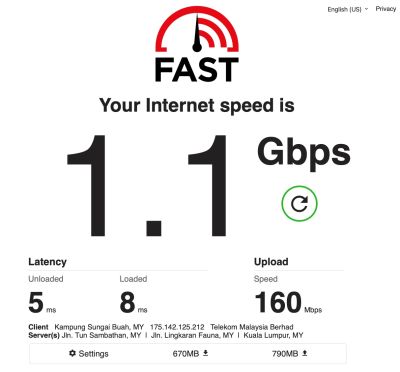
user posted image
Ignore the 1.1Gbps result, my Unifi is only 800Mbps.

Note that my test was on LAN.

This post has been edited by soonwai: Jul 16 2022, 04:50 PM
soonwai
post Jul 16 2022, 04:52 PM


********
All Stars
11,458 posts

Joined: Oct 2007
From: KL


QUOTE(coolguy_0925 @ Jul 16 2022, 03:51 PM)
wow 8ms very good ping

mine hovering at 30ms using phone
*
Forgot to mention that my test done on LAN.

My phone is 7ms, loaded 13ms.

QUOTE(akhito @ Jul 16 2022, 03:49 PM)
well that quite normal for wireless connected device i got from 6>442ms on lappy but strangely my phone just 9>12ms so more of wifi adapter thing. best if ts test with lan but no point if he not using lan always
*
ic ic. Just tested with phone. Later try with laptop.

user posted image

LAN test: Mikrotik RB5009 - Ethernet hardware queue only - Mac mini M1 1Gbps
Wifi phone test: Mikrotik hAP ac2 - Wifi sfq - iPhone 13 Pro

This post has been edited by soonwai: Jul 16 2022, 05:04 PM

14 Pages < 1 2 3 4 > » Top
Topic ClosedOptions
 

Change to:
| Lo-Fi Version
0.3042sec    1.96    7 queries    GZIP Disabled
Time is now: 14th December 2025 - 01:00 PM