QUOTE(kevinwcw @ Oct 29 2007, 01:21 AM)
lol.....iphone and ipod touch using crystal glass unscratces le... 

i know it is very scratch-resistant but it is NOT scratch-proof.iPod The iPod Touch Discussion Thread, All About iPod Touch
|
|
 Oct 29 2007, 01:18 PM Oct 29 2007, 01:18 PM
|
 
Senior Member
1,149 posts Joined: Jan 2007 
|
QUOTE(kevinwcw @ Oct 29 2007, 01:21 AM) lol.....iphone and ipod touch using crystal glass unscratces le... i know it is very scratch-resistant but it is NOT scratch-proof. |
|
|
|
|
|
Oct 29 2007, 01:25 PM
|

Senior Member
757 posts Joined: Aug 2007 
|
............There is nothing Scratch-proof .....
Unless you tell them to use diamond?? |
|
|
Oct 29 2007, 02:48 PM
|

Senior Member
5,252 posts Joined: Jan 2003 From: Apple MACland
|
QUOTE(kevinwcw @ Oct 29 2007, 01:21 AM) lol.....iphone and ipod touch using crystal glass unscratces le... I got a way to make it all the speculation of "scratch proof" go away   |
|
|
Oct 29 2007, 04:38 PM
|

Senior Member
1,695 posts Joined: Jan 2003 From: Ampang 
|
i tot ipod touch n iphone different surface le???
 |
|
|
Oct 29 2007, 05:11 PM
|

Senior Member
1,291 posts Joined: Jan 2003 From: -= Earth =-
|
is iPod Touch must use headphone to listen ?
Can it be listened without using headphone ? What else other cool features in iPod Touch ? I may plan to get one... |
|
|
Oct 29 2007, 05:24 PM
|
|
Senior Member
6,866 posts Joined: Feb 2005
|
QUOTE(friends @ Oct 29 2007, 05:11 PM) is iPod Touch must use headphone to listen ? Yeah, you can connect to external speaker. No speaker built in. Can it be listened without using headphone ? What else other cool features in iPod Touch ? I may plan to get one... Check http://www.apple.com/ipodtouch for more cool features you might wanna check out. Safari is the killer app in there! |
|
|
|
|
|
Oct 29 2007, 09:41 PM
|
|
Senior Member
1,291 posts Joined: Jan 2003 From: -= Earth =-
|
QUOTE(trafox10 @ Oct 15 2007, 06:18 PM) here are the instruction for jailbreaking yr Ipod: I think your steps shown here are actually SAME as this YouTube video !! Check it out....... go to this link: http://www.ipodtouchfans.com/forums/showthread.php?t=1954 and dl the installer for jailbreaker. then follow the instructions here: 1) first, go 2 http://jailbreak.toc2rta.com to crash yr safari browser. 2) run jailbreak.bat from the installer, when it starts , just press enter to start. 3) after a min or so, it'll prompt u 2 restart yr touch. Do it and press enter key to continue. 4) let jailbreak do its stuff.then restart yr ipod twice(turn off ,turn on,turn off,turn on.) 5) press enter again and enter your IPOD ip add when asked (wait for the wifi to come on after turning on yr touch b4 entering yr ip add). 6) when the whole installation finishes,the command prompt will shut down by itself.restart yr touch and you should see a "install" app on yr screen. Click it and install the program u want. u can go to the install app and then go to source, tab on refresh and install the community source..after that go to "install" and u should see alot of programs to install..! If u wanna have iphone apps, click on the youtube link of this link: http://www.ipodtouchfans.com/forums/showthread.php?t=2025 quite clear instructions given in YouTube video !! Rocks..... JailBreak IPod Touch on Windows Platform (Easiest Way) Also... check this out Multi-Apps for Multi-iPod Touch at Apps for iPod Touch ! This post has been edited by friends: Oct 29 2007, 09:56 PM |
|
|
Oct 29 2007, 09:51 PM
|

Senior Member
4,967 posts Joined: Jan 2003 From: Kuching,Sarawak Status: Same Same
|
Guys, may i ask what is Jail break?
|
|
|
Oct 29 2007, 09:57 PM
|
|
Senior Member
1,291 posts Joined: Jan 2003 From: -= Earth =-
|
QUOTE(abang brother @ Oct 29 2007, 09:51 PM) Guys, may i ask what is Jail break? JailBreak = Hack (sort of) or modify the original one !  |
|
|
Oct 29 2007, 10:22 PM
|
|
Senior Member
4,967 posts Joined: Jan 2003 From: Kuching,Sarawak Status: Same Same
|
As in, put more App(s), items and more>?
|
|
|
Oct 30 2007, 12:24 AM
|
|
Senior Member
1,149 posts Joined: Jan 2007
|
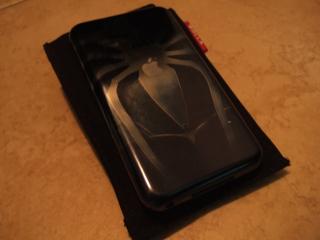
Juz gave the chrome back a spidey touch
» Click to show Spoiler - click again to hide... « |
|
|
Oct 30 2007, 03:17 AM
|
|
Senior Member
5,252 posts Joined: Jan 2003 From: Apple MACland
|
QUOTE(zc_squash @ Oct 30 2007, 12:24 AM) Juz gave the chrome back a spidey touch Is that a skin? selfmade? » Click to show Spoiler - click again to hide... «  |
|
|
Oct 30 2007, 03:37 AM
|
|
Senior Member
1,149 posts Joined: Jan 2007
|
I know the battery indicator is an estimation of how much the battery power is left, but this is insane! It shows me that the battery is full and barely 5 minutes into video it popped out warning telling me less than 20% of battery power left! It doesn't happen always. As far as i could remember, it had happen to me twice. That annoys me enough. I charge my touch using a USB charger but i don't think that is a problem, or is it?
Btw, any of you guys left ur touch charge overnight? As far as i'm concern, modern batteries (lithium-based) don't overcharge. It will just stop charging itself when it is fully charged. Correct me if i'm dreadfully wrong here. |
|
|
|
|
|
Oct 30 2007, 03:48 AM
|
|
Senior Member
5,252 posts Joined: Jan 2003 From: Apple MACland
|
QUOTE(zc_squash @ Oct 30 2007, 03:37 AM) I know the battery indicator is an estimation of how much the battery power is left, but this is insane! It shows me that the battery is full and barely 5 minutes into video it popped out warning telling me less than 20% of battery power left! It doesn't happen always. As far as i could remember, it had happen to me twice. That annoys me enough. I charge my touch using a USB charger but i don't think that is a problem, or is it? I leave mine on charging while i'm in bed and plug it out before i leave the house in the morning, so far no problem occured as mentioned above.Btw, any of you guys left ur touch charge overnight? As far as i'm concern, modern batteries (lithium-based) don't overcharge. It will just stop charging itself when it is fully charged. Correct me if i'm dreadfully wrong here. |
|
|
Oct 30 2007, 08:11 AM
|

Senior Member
3,749 posts Joined: Dec 2005 From: Sydney, AU
|
QUOTE(zc_squash @ Oct 30 2007, 03:37 AM) I know the battery indicator is an estimation of how much the battery power is left, but this is insane! It shows me that the battery is full and barely 5 minutes into video it popped out warning telling me less than 20% of battery power left! It doesn't happen always. As far as i could remember, it had happen to me twice. That annoys me enough. I charge my touch using a USB charger but i don't think that is a problem, or is it? Yes modern batteries with all the safeguards in place do not usually overcharge their batteries. One thing to note is that battery do not always reaches 100% (as in physical 100% tip top, filled to the brim). Most charging circuits uses a constant voltage and constant current method. It'll usually take 1-2hours to charge a lithium battery to more than 85%. This is the time where the charging circuits and battery is very hot. From there to more than 95%, it'll take a longer time because as the battery voltage increases, it'll lower the amount of current to it. You don't want to overcharge it. What happens here is that the charging circuit will constant trickle charge it with small amounts energy until it reaches a level the engineers are satisfied with. Of course they must be satisfied with the time it takes too. Once the battery is full, it'll implement a negative dBV cutoff (depending on implementation). Some will cutoff when it hits an overshot in temperature as safety measure. The battery indicator is just an estimation and a level perceived by the firmware of the device.Btw, any of you guys left ur touch charge overnight? As far as i'm concern, modern batteries (lithium-based) don't overcharge. It will just stop charging itself when it is fully charged. Correct me if i'm dreadfully wrong here. The problem are lithium batteries' characteristics. Lithium batteries cannot be over-discharged and overcharged. Meaning, you do not treat it like a NiCD of the olden days. You do not discharge it until empty before charging it. And also you do not charge it for extended periods of time. But this is usually taken care of because the charging controller will prevent this from happening. But you do not want to run the charging circuits extended period of time too. You'll want to prevent it from being overused so that it'll do its job. So there's a trade off here and there. For me, I'll pick the charge anytime, disconnect when finished approach. Hope this helps you. I cannot say your device is defective as I do not know. But I'll do a complete restore and run it stock for a few days just to monitor the level of drain before concluding anything. David. |
|
|
Oct 30 2007, 09:12 AM
|
|
Senior Member
1,695 posts Joined: Jan 2003 From: Ampang
|
QUOTE(zc_squash @ Oct 30 2007, 12:24 AM) Juz gave the chrome back a spidey touch mind sharing how or where u do it?? » Click to show Spoiler - click again to hide... «  |
|
|
Oct 30 2007, 01:08 PM
|
|
Senior Member
1,149 posts Joined: Jan 2007
|
» Click to show Spoiler - click again to hide... « Thank you for your detailed explanation. I don't think it is a battery problem but rather some "bug" appear in the firmware battery estimation. I'll have to run the battery test to find out. Thank you again  Added on October 30, 2007, 1:12 pm QUOTE(dragna @ Oct 29 2007, 02:48 PM) I got a way to make it all the speculation of "scratch proof" go away like i said, the glass front is not scratch-proof, it just has got a very high resistant to scratches but there are still some confused souls who wouldn't believe so please show us your 'way' to erase off such speculation  Added on October 30, 2007, 1:14 pm QUOTE(lil twist @ Oct 30 2007, 09:12 AM) mind sharing how or where u do it?? any skinz-wrapping stores? I got that design myself though. Well i DIDN'T design it, it is from the Spidey 3.Added on October 30, 2007, 1:17 pm QUOTE(friends @ Oct 29 2007, 09:41 PM) I think your steps shown here are actually SAME as this YouTube video !! Check it out....... I have included an even easier way to jailbreak the touch in my guide. It was out for awhile already but just found out cuz i don't follow the jailbreaking news anymore since mine is already jailbroken. Just happen to read about it last nite. The new way is completely fool-proof, i feel.quite clear instructions given in YouTube video !! Rocks..... JailBreak IPod Touch on Windows Platform (Easiest Way) Also... check this out Multi-Apps for Multi-iPod Touch at Apps for iPod Touch ! This post has been edited by zc_squash: Oct 30 2007, 04:45 PM |
|
|
Oct 30 2007, 03:49 PM
|

Senior Member
1,451 posts Joined: Jan 2003
|
alamak..
remember my touch have this stucked pixel but then it was OK in the end? now it came up again! dumb stupid stucked pixel! |
|
|
Oct 30 2007, 04:46 PM
|
|
Junior Member
316 posts Joined: Jan 2003
|
QUOTE(zc_squash @ Oct 30 2007, 03:37 AM) I know the battery indicator is an estimation of how much the battery power is left, but this is insane! It shows me that the battery is full and barely 5 minutes into video it popped out warning telling me less than 20% of battery power left! It doesn't happen always. As far as i could remember, it had happen to me twice. That annoys me enough. I charge my touch using a USB charger but i don't think that is a problem, or is it? I'm not sure whether this is due to problems on the battery itself. My previous unit of touch (which I returned and get a new one due to unresponsive screen) has the same problem. Even though I just put my touch to 'sleep' in the day, by evening the battery indicates it only has about 30% left. Mind you that I have everything disable (no wifi...no music playing...no video playing.....just put it to sleep).Btw, any of you guys left ur touch charge overnight? As far as i'm concern, modern batteries (lithium-based) don't overcharge. It will just stop charging itself when it is fully charged. Correct me if i'm dreadfully wrong here. My new touch does not seem to experience such problem. If I left my touch with 90% battery during morning, the battery indicator would still show the same when I return home in the evening after work. My new touch also has longer battery life compared to my previous. Now it can play music up to 20 hrs as oppose to the old one which barely made 13 hrs. |
|
|
Oct 30 2007, 07:11 PM
|
|
Senior Member
1,149 posts Joined: Jan 2007
|
i think i would seriously run a battery test to have a peace of mind
|
|
Topic ClosedOptions
|
| Change to: |  0.0271sec 0.0271sec
 0.96 0.96
 6 queries 6 queries
 GZIP Disabled GZIP Disabled
Time is now: 11th December 2025 - 10:03 AM |
 Quote
Quote