Outline ·
[ Standard ] ·
Linear+
Windows 11, To be announce on 24 June 2021
|
andrekua2
|
 Jan 22 2025, 10:36 AM Jan 22 2025, 10:36 AM
|

|
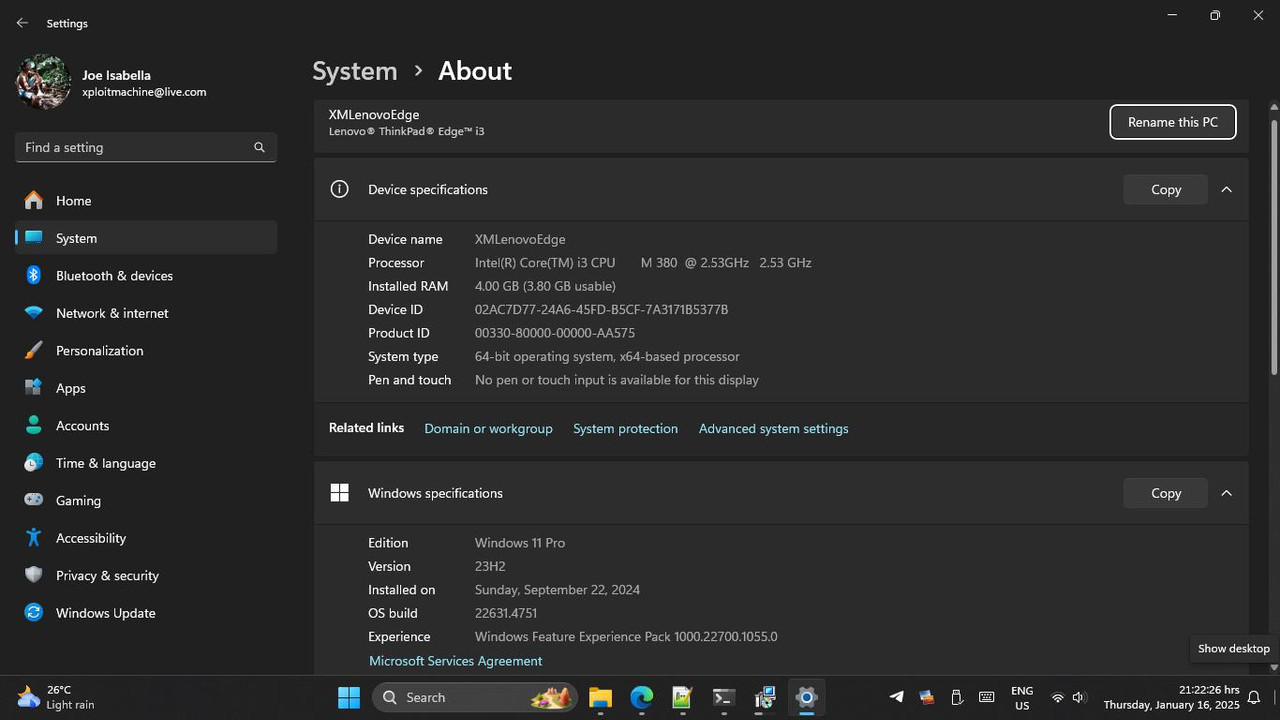
QUOTE(Xploit Machine @ Jan 16 2025, 09:26 PM) How did you tahan with this spec? |
|
|
|
|
|
PJng
|
Jan 22 2025, 11:01 AM
|
|
|
with this high RAM, i no need cut this cut that notice windows 11 24H2 use less RAM that 23H2 this is after clean boot, without open anything 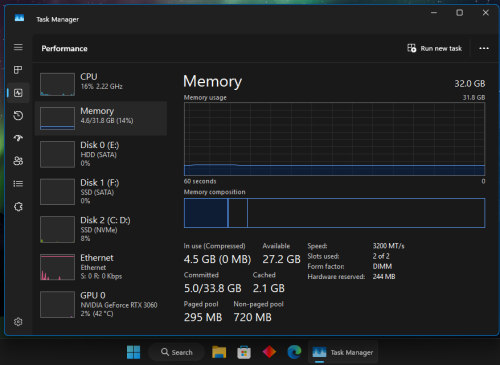 |
|
|
|
|
|
SUSXploit Machine
|
Jan 23 2025, 12:43 PM
|
|
|
QUOTE(andrekua2 @ Jan 22 2025, 10:36 AM) How did you tahan with this spec? smooth, no problem .. i made little tweaks myself, you can search the videos i made in this topic  |
|
|
|
|
|
UbuntuClient
|
Jan 24 2025, 11:54 AM
|
|
|
I notice Windows 11 Enterprise IOT run smoother than others version.
|
|
|
|
|
|
PJng
|
Jan 25 2025, 01:07 AM
|
|
|
how to prevent Program Files, XboxGames folder and .GamingRoot file keep show on non system drive? because is protected, i google found out need take owner/permission to delete, which i do it and able to delete, but next pc start up, windows auto create 3 items above. 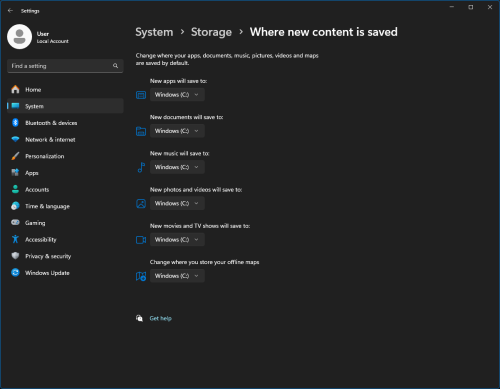 and google found out, ask to check are default installed location go change other drive, i check all is C drive as show above |
|
|
|
|
|
SUSXploit Machine
|
Jan 26 2025, 07:07 PM
|
|
|
This post has been edited by Xploit Machine: Jan 26 2025, 07:08 PM |
|
|
|
|
|
SUSXploit Machine
|
Jan 26 2025, 07:13 PM
|
|
|
when people teache .. listen, lu duduk Kopitiam je ok?
|
|
|
|
|
|
SUSXploit Machine
|
Jan 26 2025, 07:14 PM
|
|
|
QUOTE(PJng @ Jan 25 2025, 01:07 AM) how to prevent Program Files, XboxGames folder and .GamingRoot file keep show on non system drive? because is protected, i google found out need take owner/permission to delete, which i do it and able to delete, but next pc start up, windows auto create 3 items above. and google found out, ask to check are default installed location go change other drive, i check all is C drive as show above ask www.microsoft.cn  KNNCCB |
|
|
|
|
|
SUSXploit Machine
|
Jan 30 2025, 01:33 PM
|
|
|
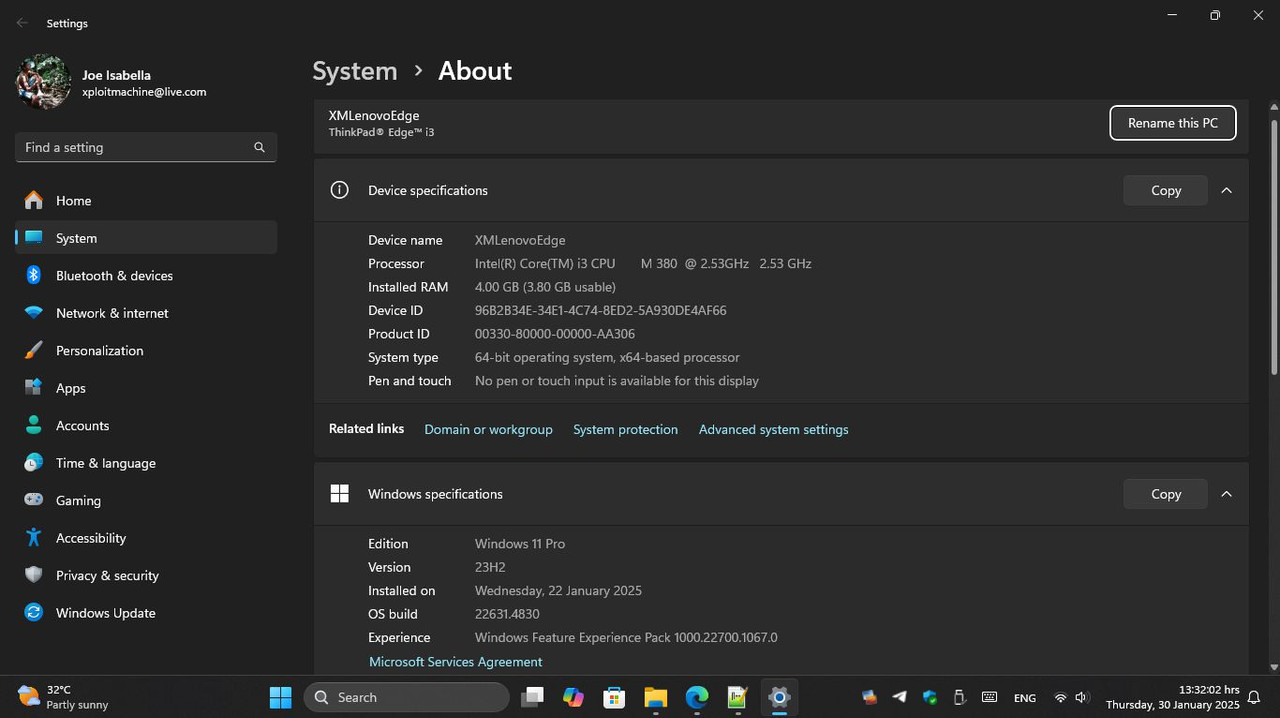
Windows 11 (226x1/2/3/4/5) Updates Overview (January 29. 2025)226x1.4830.1.17 (Public/Retail Channel) - x64 LCU - https://catalog.sf.dl.delivery.mp.microsoft...ef4dd56ab20.msuNDP35-481 - https://catalog.s.download.windowsupdate.co...16c77e8b8a1.msu
|
|
|
|
|
|
SUSXploit Machine
|
Jan 31 2025, 04:12 PM
|
|
|
You Can Soon Access Your iPhone Or Android Device Directly From Windows 11's Start MenuDay after day, Microsoft continues to develop Phone Link to make its use easier and simpler. Now, no matter what Android device, you can now enjoy iPhone-like usage with macOS and Windows 11. Recently, a new method that I think is more interesting is being tested. Specifically for Windows Insider users, Android or iPhone devices that have been tethered and connected to a Windows 11 device via Phone Link can access the device directly from the Start menu. In it, users can access SMS, make phone calls, send files quickly like AirDrop and more. This feature is said to be being tested on Windows 11 Insider Preview Build 4805 in the Beta Channel and 26120.3000 in the Dev Channel and above along with Phone Link version 1.24121.30.0. 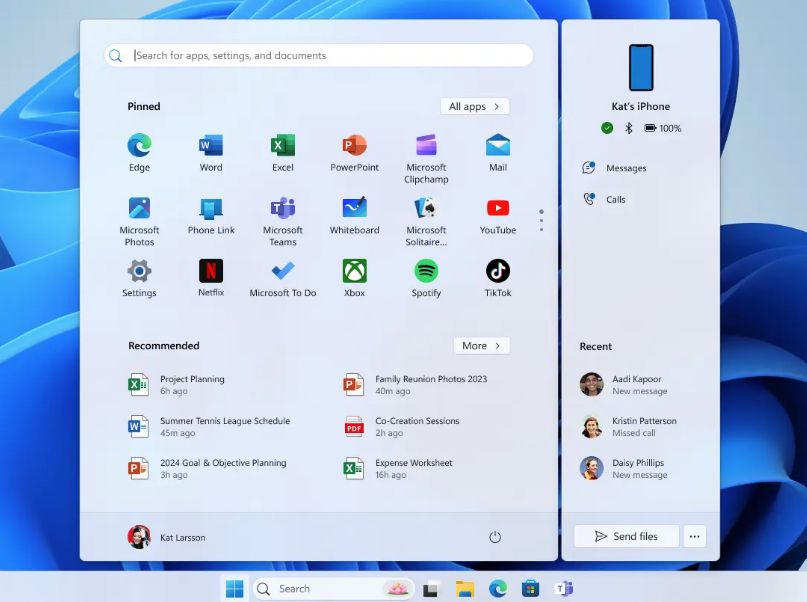 Source https://blogs.windows.com/windows-insider/2...ndows-insiders/
|
|
|
|
|
|
SUSXploit Machine
|
Feb 1 2025, 04:50 PM
|
|
|
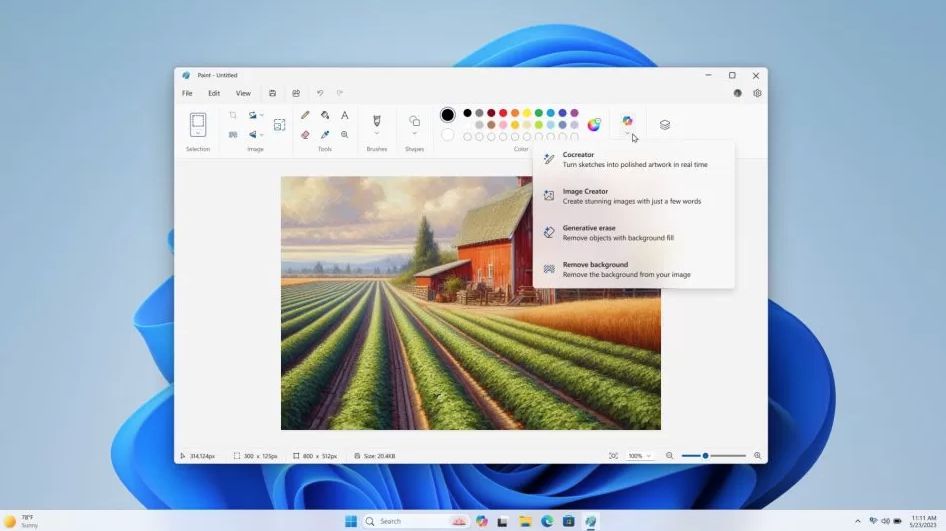
Microsoft Adds Co-Pilot Menu to Microsoft PaintMicrosoft Paint is one of the applications that comes built into Windows computers, offering facilities for sketching and basic image editing through it. Previously, Microsoft had introduced several artificial intelligence-powered features in Microsoft Paint, and through the latest update that is currently being tested in the development version, Microsoft is integrating the CoPilot button directly into Microsoft Paint. With this step, users can easily access a number of artificial intelligence-based features, and at the same time adopt the CoPilot brand. Under the button, when clicking on it, users will be given access to features such as CoCreator, Image Creator, Generateive Erase and also Remove Background. For your information, this CoPilot button is displayed when users are using a device certified with CoPilot+ PC certification only. This feature is currently being tested in the development stage of Windows 11, and may be expanded to all in stages in the next few months. Source https://blogs.windows.com/windows-insider/2...-beta-channels/
|
|
|
|
|
|
UbuntuClient
|
Feb 4 2025, 06:06 PM
|
|
|
Does powershell have this features when open multitab? 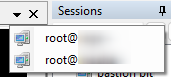 |
|
|
|
|
|
1024kbps
|
Feb 4 2025, 10:50 PM
|
|
|
QUOTE(UbuntuClient @ Feb 4 2025, 06:06 PM) Does powershell have this features when open multitab? 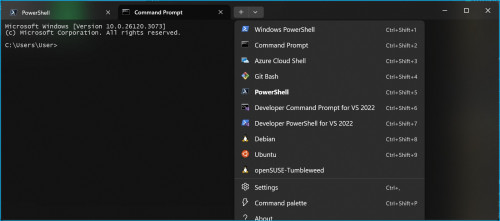 powershell is the scripting language Windows Terminal have it like for ages Another one is Fluent, but Fluent no longer updated, not much stable |
|
|
|
|
|
PJng
|
Feb 4 2025, 11:26 PM
|
|
|
about post #1705, one reddit post say, change drive letter, and then change back same drive letter, windows will 'forgot', 'ignore' the 'new' drive
so far after 2 days, those 3 items not yet appear on non system drive
|
|
|
|
|
|
SUSXploit Machine
|
Feb 5 2025, 08:33 AM
|
|
|
» Click to show Spoiler - click again to hide... « QUOTE(1024kbps @ Feb 4 2025, 10:50 PM) powershell is the scripting language Windows Terminal have it like for ages Another one is Fluent, but Fluent no longer updated, not much stable QUOTE(UbuntuClient @ Feb 4 2025, 06:06 PM) Does powershell have this features when open multitab? its common .. when first install Powershell will be the main command, after update it will switch to Terminal automatically .. actually both are the same function, I prefer to Terminal / Powershell (WINGET) rather than going to Windows Update .. POwershell can be customised according to user's preferences 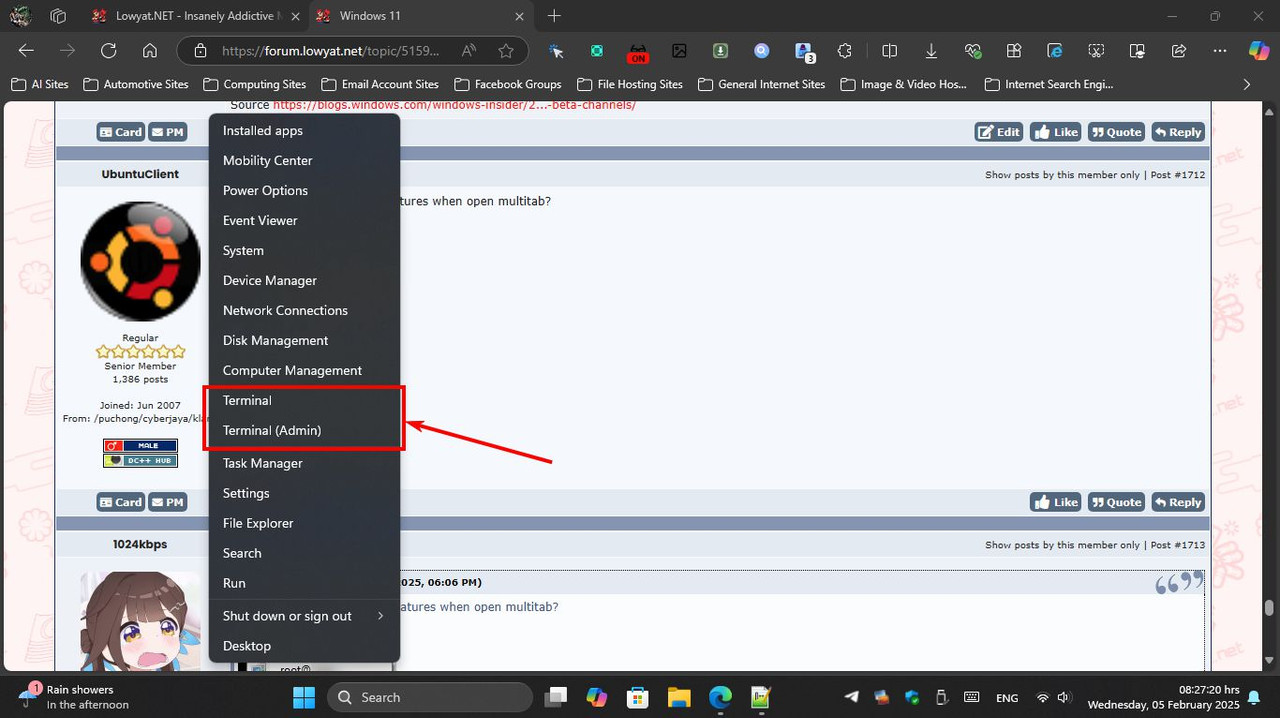  |
|
|
|
|
|
1024kbps
|
Feb 5 2025, 03:45 PM
|
|
|
QUOTE(Xploit Machine @ Feb 5 2025, 08:33 AM) » Click to show Spoiler - click again to hide... «
its common .. when first install Powershell will be the main command, after update it will switch to Terminal automatically .. actually both are the same function, I prefer to Terminal / Powershell (WINGET) rather than going to Windows Update .. POwershell can be customised according to user's preferences Terminal can manage all the shell and command processor/cmd/ps/wsl going forward Terminal should be the only default "Terminal" to manage all the script/command processor. I think MS will replace or remove the old terminal, there are too many dupes, it's waste of resource to code and manage the same thing. |
|
|
|
|
|
UbuntuClient
|
Feb 6 2025, 03:12 PM
|
|
|
I think you all missunderstand. I mean is dropdown with profile name like superputty.
|
|
|
|
|
|
SUSXploit Machine
|
Feb 6 2025, 11:49 PM
|
|
|
QUOTE(UbuntuClient @ Feb 6 2025, 03:12 PM) I think you all missunderstand. I mean is dropdown with profile name like superputty. you can create as u desired via below screnshot .. but dont compare SuperPutty with MS versions 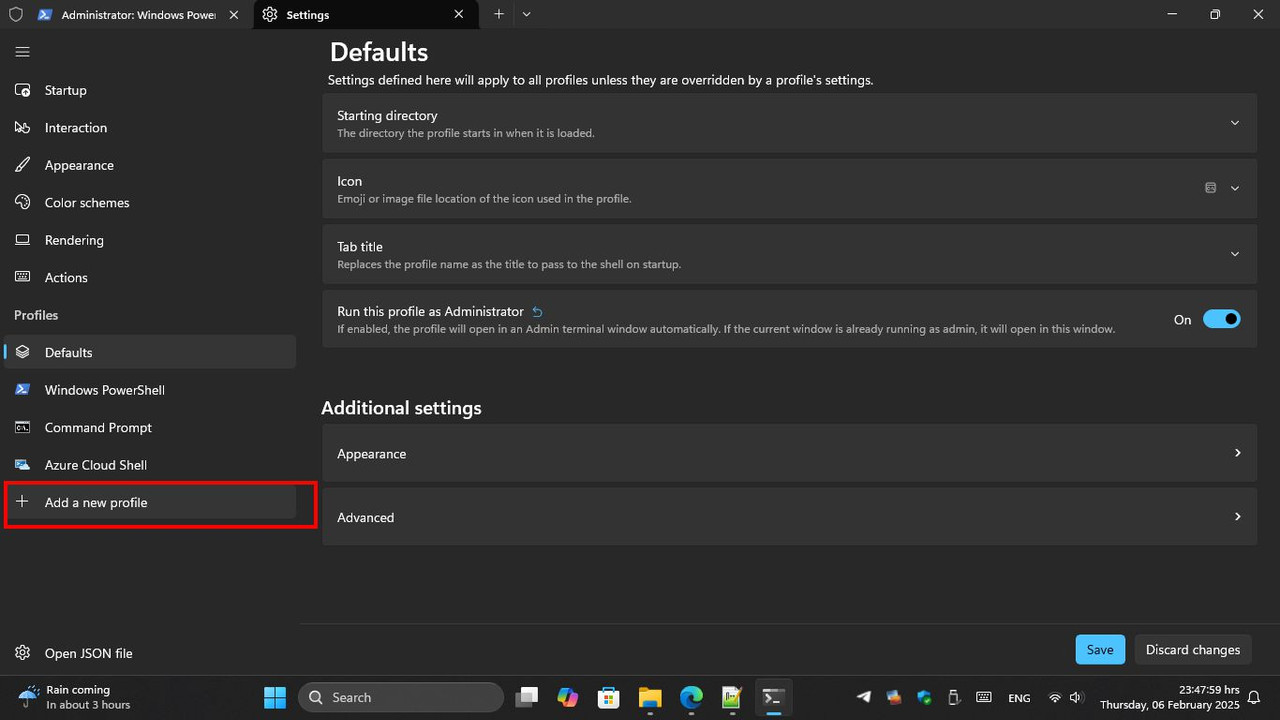 |
|
|
|
|
|
PJng
|
Feb 6 2025, 11:56 PM
|
|
|
QUOTE(UbuntuClient @ Feb 6 2025, 03:12 PM) I think you all missunderstand. I mean is dropdown with profile name like superputty. i almost no use termional, now i check cannot see got drop down list when multiple tab opened |
|
|
|
|
|
1024kbps
|
Feb 12 2025, 01:20 AM
|
|
|
QUOTE(UbuntuClient @ Feb 6 2025, 03:12 PM) I think you all missunderstand. I mean is dropdown with profile name like superputty. superputty is specialized program... Terminal is more of a general propose terminal emulator the best it can do just tabbed output...  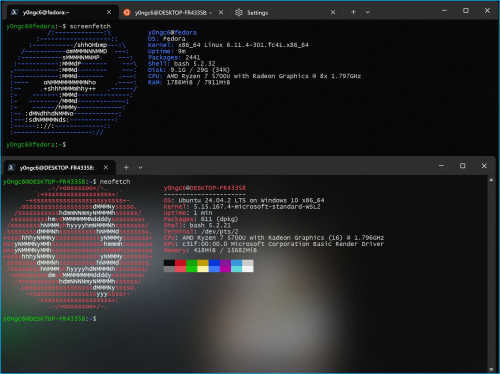 |
|
|
|
|




 Quote
Quote





 0.0276sec
 0.40
0.40
 6 queries
 GZIP Disabled