QUOTE(fisherman10 @ Apr 20 2021, 01:35 PM)
Both is fine. But just stick with AC66U_B1 so that LED works.

I see, if I use ac68u cfe, the firmware will just change to ac68u and no extra steps to install firmware afterwards?DIR-868L to ASUS RT-AC66U with AiMesh, Latest DIR-868L Migration Options
|
|
 Apr 20 2021, 01:48 PM Apr 20 2021, 01:48 PM
|
 
Senior Member
4,454 posts Joined: Apr 2006 
|
QUOTE(fisherman10 @ Apr 20 2021, 01:35 PM) Both is fine. But just stick with AC66U_B1 so that LED works. I see, if I use ac68u cfe, the firmware will just change to ac68u and no extra steps to install firmware afterwards? |
|
|
|
|
|
Apr 20 2021, 01:54 PM
|

Junior Member
250 posts Joined: May 2019
|
QUOTE(alucard89 @ Apr 20 2021, 01:46 PM) I'm using ac66u_b1 for both routers now, still can't get aimesh to work For aimesh to pair, Once it reaches 100% it just give me this error, already 3 times and the router just next to each other 1) power up the node, wait 3 mins, then press the reset button on the bottom until power led flashes for 10 secs, wait another 3 mins 2) at the main router, MUST turn on WPS in wireless tab 3) go to aimesh menu, and add node that is about it. If you flash to ac68u stock firmware, you can't get the led working for router, but for node, you can turn off and then turn on the led, and the internet led will on. If you power cycle the node, the led will be gone, need to off/on led in aimesh -> node management menu If you flash to ac68u merlin firmware, you can put a script in the jffs folder when startup and the led will be on automatically for main router. You need to search snb forum for the script. I remembered if no script, you can turn on the stealth mode and led will also work, but not so sure after power cycle the led will turn on or not. This post has been edited by BTS1501: Apr 20 2021, 01:58 PM |
|
|
Apr 20 2021, 01:54 PM
|
|
Junior Member
250 posts Joined: May 2019
|
QUOTE(alucard89 @ Apr 20 2021, 01:48 PM) I see, if I use ac68u cfe, the firmware will just change to ac68u and no extra steps to install firmware afterwards? yes |
|
|
Apr 20 2021, 02:15 PM
|

Probation
11 posts Joined: Feb 2021
|
So after fix 2.4ghz wifi how fast or max speed you guys reach?
|
|
|
Apr 20 2021, 02:25 PM
|
|
Senior Member
4,454 posts Joined: Apr 2006
|
QUOTE(BTS1501 @ Apr 20 2021, 01:54 PM) For aimesh to pair, Already done as listed but it's still failing for some reason 1) power up the node, wait 3 mins, then press the reset button on the bottom until power led flashes for 10 secs, wait another 3 mins 2) at the main router, MUST turn on WPS in wireless tab 3) go to aimesh menu, and add node that is about it. If you flash to ac68u stock firmware, you can't get the led working for router, but for node, you can turn off and then turn on the led, and the internet led will on. If you power cycle the node, the led will be gone, need to off/on led in aimesh -> node management menu If you flash to ac68u merlin firmware, you can put a script in the jffs folder when startup and the led will be on automatically for main router. You need to search snb forum for the script. I remembered if no script, you can turn on the stealth mode and led will also work, but not so sure after power cycle the led will turn on or not.  Could it be i need to update latest firmware first? Selecting update on the firmware page doesn't seem to do anything so I'll just have to manually upload the firmware This post has been edited by alucard89: Apr 20 2021, 02:27 PM |
|
|
Apr 20 2021, 02:55 PM
|

Senior Member
1,372 posts Joined: Dec 2007  
|
QUOTE(alucard89 @ Apr 20 2021, 01:46 PM) I'm using ac66u_b1 for both routers now, still can't get aimesh to work Did you change all 3 mac addresses and Secret code in the CFE? Once it reaches 100% it just give me this error, already 3 times and the router just next to each other 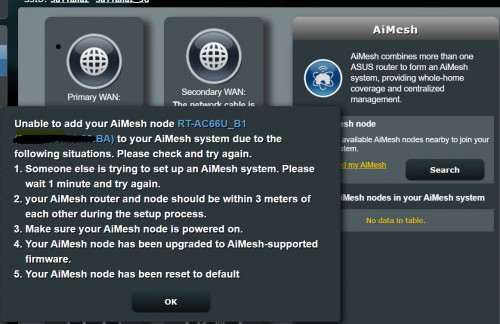 |
|
|
|
|
|
Apr 20 2021, 02:56 PM
|
|
Senior Member
1,372 posts Joined: Dec 2007
|
QUOTE(jonsalam @ Apr 20 2021, 02:15 PM) So after fix 2.4ghz wifi how fast or max speed you guys reach? Will be back to full speed as per before conversion. |
|
|
Apr 20 2021, 03:14 PM
|
|
Senior Member
4,454 posts Joined: Apr 2006
|
QUOTE(fisherman10 @ Apr 20 2021, 02:55 PM) Did you change all 3 mac addresses and Secret code in the CFE? Yes, I have changed all 3 mac address,Secret code is the WPS code correct? I'm just using the default one from your instructions I've updated both to latest firmware but doesn't look it's still working This post has been edited by alucard89: Apr 20 2021, 03:18 PM |
|
|
Apr 20 2021, 03:27 PM
|
|
Senior Member
1,372 posts Joined: Dec 2007
|
QUOTE(alucard89 @ Apr 20 2021, 03:14 PM) Yes, I have changed all 3 mac address, You can't use the default one. Default one is 123456789. You must use back the WPS code written on the sticker under your unit. Then only AiMesh can work.Secret code is the WPS code correct? I'm just using the default one from your instructions I've updated both to latest firmware but doesn't look it's still working |
|
|
Apr 20 2021, 06:46 PM
|

Junior Member
72 posts Joined: May 2014
|
QUOTE(alucard89 @ Apr 20 2021, 02:56 AM) misk94 Dear alucard89,I’ve successfully flashed my 1st unit, but I’m having some trouble with 2nd one. I’m on the last step to upload firmware on asustek cfe page, but i would either get timeout issues (within 1 minute) or just page unresponsive before firmware fully uploaded. I can see the upload progress going to 50-60% before timeout Any solution for this? I figured i would just keep uploading the firmware till it’s fully uploaded (similar problem on ws880 router) but I’m still stuck there Since the firmware quite big (35mb) and limited time before timeout, could i try something like this? Use cfe to install smaller firmware (like freshtomato at 12mb) then install asus firmware when I’m on freshtomato My apologies for late response. Busy with work lately. I noticed BTS1501 and fisherman10 helped to get your issue sorted out.   Regards, |
|
|
Apr 20 2021, 06:56 PM
|
|
Senior Member
4,454 posts Joined: Apr 2006
|
QUOTE(fisherman10 @ Apr 20 2021, 03:27 PM) You can't use the default one. Default one is 123456789. You must use back the WPS code written on the sticker under your unit. Then only AiMesh can work. Noted, i reupload cfe again with the secret code to the routersBut it's still the same problem error adding aimesh Maybe have a look in the logs? https://pastebin.com/HjwvsKzc |
|
|
Apr 20 2021, 07:13 PM
|
|
Senior Member
1,372 posts Joined: Dec 2007
|
QUOTE(alucard89 @ Apr 20 2021, 06:56 PM) Noted, i reupload cfe again with the secret code to the routers Are both routers using the correct mac address and WPS PIN as shown on their respective stickers?But it's still the same problem error adding aimesh Maybe have a look in the logs? https://pastebin.com/HjwvsKzc For the 3 mac addresses, did you use the same address for all 3? 1:macaddr is supposed to be a bit different than 0:macaddr and et0macaddr. |
|
|
Apr 21 2021, 08:41 AM
|
|
Junior Member
250 posts Joined: May 2019
|
QUOTE(alucard89 @ Apr 20 2021, 06:56 PM) Noted, i reupload cfe again with the secret code to the routers after re-flashing cfe, But it's still the same problem error adding aimesh Maybe have a look in the logs? https://pastebin.com/HjwvsKzc 1. you need to clear nvram using wps +power on until internet led flashes 10 secs, wait 3 mins, then try aimesh pairing. 2. if still can not, then reset button until power led flashes for 10 secs, wait 3 mins then try pairing again. |
|
|
|
|
|
Apr 21 2021, 09:50 AM
|
|
Senior Member
4,454 posts Joined: Apr 2006
|
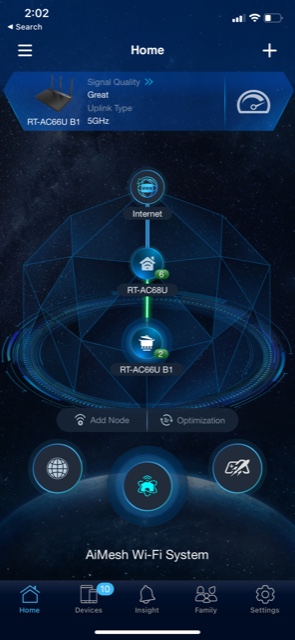
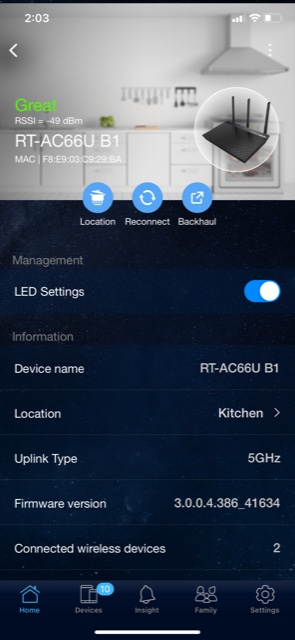
QUOTE(fisherman10 @ Apr 20 2021, 07:13 PM) Are both routers using the correct mac address and WPS PIN as shown on their respective stickers? For the 3 mac addressesFor the 3 mac addresses, did you use the same address for all 3? 1:macaddr is supposed to be a bit different than 0:macaddr and et0macaddr. I used the same mac address for all 3, after I verify using wifi app with the stock dlink firmware running (5ghz & 2.4ghz had the same mac address) For example this one: » Click to show Spoiler - click again to hide... « Also, I finally got it working by just connecting lan cable from WAN port to LAN for the main router. Once I disconnect the cable, it setups wifi connection to maintain the mesh |
|
|
Apr 21 2021, 09:51 AM
|
|
Senior Member
4,454 posts Joined: Apr 2006
|
QUOTE(BTS1501 @ Apr 21 2021, 08:41 AM) after re-flashing cfe, Yeah, i did that, but wireless setup doesn't seem to work for me, I ended just connecting LAN cable between 2 routers and success1. you need to clear nvram using wps +power on until internet led flashes 10 secs, wait 3 mins, then try aimesh pairing. 2. if still can not, then reset button until power led flashes for 10 secs, wait 3 mins then try pairing again. |
|
|
Apr 21 2021, 01:57 PM
|
|
Senior Member
1,372 posts Joined: Dec 2007
|
QUOTE(alucard89 @ Apr 21 2021, 09:50 AM) For the 3 mac addresses Cannot cannot. The MAC address has to be different.I used the same mac address for all 3, after I verify using wifi app with the stock dlink firmware running (5ghz & 2.4ghz had the same mac address) For example this one: » Click to show Spoiler - click again to hide... « Also, I finally got it working by just connecting lan cable from WAN port to LAN for the main router. Once I disconnect the cable, it setups wifi connection to maintain the mesh Follow the initial guide in the first page when you're doing the conversion. 2 of the MAC address is same number. The 3rd one need to +4. 1:macaddr needs to plus 4 on the last number. Otherwise your aimesh might not be using 5g backbone. Makes sense why LAN works because LAN is the correct macaddr. |
|
|
Apr 21 2021, 02:21 PM
|
|
Junior Member
250 posts Joined: May 2019
|
1:macaddr change to ..................29BC (original was ...........29B8)
|
|
|
Apr 21 2021, 02:28 PM
|
|
Senior Member
4,454 posts Joined: Apr 2006
|
QUOTE(fisherman10 @ Apr 21 2021, 01:57 PM) Cannot cannot. The MAC address has to be different. That’s the odd thing, when i use wifi scanning app. It shows the same mac address for both 2.4ghz and 5ghz for the router back when it was still on stock d-linkFollow the initial guide in the first page when you're doing the conversion. 2 of the MAC address is same number. The 3rd one need to +4. 1:macaddr needs to plus 4 on the last number. Otherwise your aimesh might not be using 5g backbone. Makes sense why LAN works because LAN is the correct macaddr. Should i use the mac address on sticker or the one scanned on wifi app? Current node status so far » Click to show Spoiler - click again to hide... « |
|
|
Apr 21 2021, 02:30 PM
|
|
Senior Member
4,454 posts Joined: Apr 2006
|
QUOTE(BTS1501 @ Apr 21 2021, 02:21 PM) 1:macaddr change to ..................29BC (original was ...........29B8) Router Sticker x.x.x:29:B8 Wifi scanner app x.x.x:29:BA (i use this one) Did i even input the correct mac the first time? |
|
|
Apr 21 2021, 02:44 PM
|
|
Senior Member
1,372 posts Joined: Dec 2007
|
QUOTE(alucard89 @ Apr 21 2021, 02:30 PM) Router Sticker 0:macaddr change to x.x.x:29:B8x.x.x:29:B8 Wifi scanner app x.x.x:29:BA (i use this one) Did i even input the correct mac the first time? et0macaddr change to x.x.x:29:B8 1:macaddr change to x.x.x:29:BC This post has been edited by fisherman10: Apr 21 2021, 02:45 PM |
| Change to: |  0.0267sec 0.0267sec
 0.31 0.31
 6 queries 6 queries
 GZIP Disabled GZIP Disabled
Time is now: 15th December 2025 - 02:27 AM |
 Quote
Quote