Outline ·
[ Standard ] ·
Linear+
Digi Fibre 50Mbps RM90/m. seems like on TM infra, read #1
|
supergen3
|
 Jun 12 2021, 10:10 PM Jun 12 2021, 10:10 PM
|
Getting Started


|
Hi, can any one tell me, what type of router Digi fibre supplies to it's subscribers in 2021? I am getting ready to sign up to Digi fibre service after Unifi has opened access of my taman FDP to other ISP.
Is the supplied router installed with retail firmware or a Digi specific firmware? Thanks to anyone answering.
|
|
|
|
|
|
supergen3
|
Jun 13 2021, 12:13 PM
|
Getting Started
|
QUOTE(aniq8676 @ Jun 12 2021, 10:40 PM) Thanks. |
|
|
|
|
|
supergen3
|
Jun 15 2021, 03:24 PM
|
Getting Started
|
QUOTE(aniq8676 @ Jun 12 2021, 10:40 PM) Got the model number for ZTE router? I wish to check it's physical design if it's suitable for wall mounting. Thanks again. |
|
|
|
|
|
supergen3
|
Jun 21 2021, 06:56 PM
|
Getting Started
|
Hi all.
Questions on installation.
Do I need to pay extra if I request the installation contractors to pull the fiber optic cable to the store room to the rear of the house?
Digi FAQ mentioned the a maximum of 15m fiber cable length from the house outer wall.
What is the cost for the contractor to pull fiber cable from under the rooftop tiles above the ceiling?
Digi fibre employ its own contractors for installation or unifi contractors are involved?
This post has been edited by supergen3: Jun 21 2021, 06:59 PM
|
|
|
|
|
|
supergen3
|
Jun 21 2021, 09:19 PM
|
Getting Started
|
QUOTE(YoungMan @ Jun 21 2021, 07:33 PM) Since Digi uses TM, Time and Allo infra, the contractor involve will depend on which infra used in your area. Also, anything that is out of the standard installation, you will need to pay. The amount you can nego with the contractor. Thanks. |
|
|
|
|
|
supergen3
|
Jun 23 2021, 05:14 PM
|
Getting Started
|
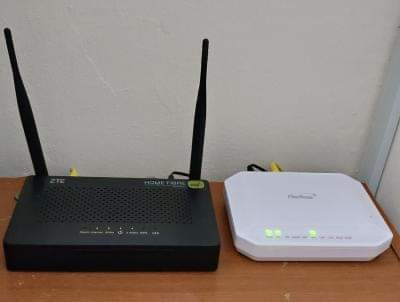
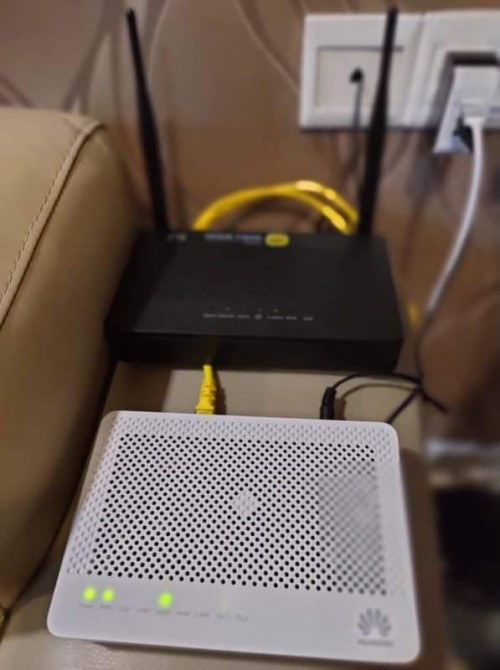
QUOTE(Avex @ Jun 23 2021, 04:09 PM) the more people coming in, stability is getting worst. Moving to other broadband next year. And support is horrible What router Digi supply to you? Can share picture of the equipment setup? |
|
|
|
|
|
supergen3
|
Jun 27 2021, 11:15 AM
|
Getting Started
|
QUOTE(DTorons @ Jun 27 2021, 09:09 AM) Hi, i'm thinking of applying the same package to replace my maxis fibre. Will they do installation during FMCO? I have applied through the online store. The email reply mentioned that they will call me within 3 working days to confirm my identity before arranging to have the installation team appointment. |
|
|
|
|
|
supergen3
|
Jun 27 2021, 01:47 PM
|
Getting Started
|
QUOTE(YoungMan @ Jun 27 2021, 12:08 PM) Yes. Forget that they can remote config our BTU. Keep us updated. Change ISP need to submit transfer ID to existing ISP, in your case Maxis. But see how this will work out for you. My case, it's a new installation. My Taman just got TM fibre optic network activation early this year after CNY holiday. Only now TM allowed Digi ISP to sell their services on their infra. Strange that only Digi is available on unifi in Kulim district, at new locations. Maxis is only available in Kulim hi-tech park, Kulim golf club and at giant Kulim. Astro broadband internet is using Allo fibre optic network in Kulim. |
|
|
|
|
|
supergen3
|
Jul 5 2021, 05:30 PM
|
Getting Started
|
QUOTE(supergen3 @ Jun 27 2021, 01:47 PM) My case, it's a new installation. My Taman just got TM fibre optic network activation early this year after CNY holiday. Only now TM allowed Digi ISP to sell their services on their infra. Strange that only Digi is available on unifi in Kulim district, at new locations. Maxis is only available in Kulim hi-tech park, Kulim golf club and at giant Kulim. Astro broadband internet is using Allo fibre optic network in Kulim. Hi, guys. Update on my Digi fibre registration. Summary, my application was rejected due to no available port from TM. I am disappointed with TM, as I can count there's only 5 fibre drop cables connection to the FDP facing my house. Looks like TM only entertaining ISP transfer request only. Guess I have to submit to TM and pay for 2 years of bondage. |
|
|
|
|
|
supergen3
|
Aug 20 2021, 05:54 PM
|
Getting Started
|
QUOTE(franson @ Aug 17 2021, 10:58 PM) Shit.. So many cons about Digi. I've applied the Digi 50mbps last 2 weeks and they feedback no more port. I think I shall cancel the application and go to Unifi? Or Celcom? From my experience, TM will reject new port application from Digi with the excuse of port unavailable. Only way to get Digi is applying for Unifi subscription first and pay for 2 years contract tenure, after contract expires transfer the existing port to Digi. I just signed up with Unifi just to get a port after Digi fibre rejected my application due to no port excuse from TM. The Unifi FDP nearest to my address has only used 5 ports, so no port excuse is just to keep other ISP out from new subscriber. Now my home fibre drop cable came from this FDP. This post has been edited by supergen3: Aug 20 2021, 05:55 PM |
|
|
|
|
|
supergen3
|
Sep 7 2021, 07:48 PM
|
Getting Started
|
QUOTE(failed.hashcheck @ Sep 7 2021, 06:30 PM) You know any of such agent that can handle digi or celcom in Kapar area? I got DP right in front of my house just 50 meter away. But until today my house still not covered. Every house around me already got  . Just search for Digi fibre/Celcom fibre users groups in Facebook. The agents will be happy to advertise their contact information and help get new customers. |
|
|
|
|
|
supergen3
|
Nov 30 2021, 02:25 PM
|
Getting Started
|
QUOTE(hellfried @ Nov 30 2021, 12:22 PM) From what I understand from the CS who attended to me at one of the Express Digi Store, if you have a pre-existing unifi account currently, port availability is not an issue as Digi will just use the same port. Just a matter of changing or porting over to Digi. Like porting over your phone line from one telco to another. I faced with this issue with Digi fibre registration previously, end up subbing with Unifi because all FDP ports in my taman are reserved for existing TM customers whether Streamyx or voice line. My home Unifi port actually runs on the reserved #9 slot. My next door neighbour had his Unifi installation a month later, his drop fiber cable was drawn from another FDP located 100 meters away despite there is an FDP directly opposite his house. |
|
|
|
|
|
supergen3
|
Dec 30 2021, 11:40 AM
|
Getting Started
|
QUOTE(june99990 @ Dec 30 2021, 01:44 AM) Anyone have solution for this? my firstfloor is the place where i put digi wifi router EX3300-T0. So i use another wifi router to set as access point to enhance coverage for ground floor. But the access point router keep restarting. Sometimes my cpu which use wifi adaptor also cannot connect and my window keep restart also. Sound like the access point is the cause of the problem. Could be overheating issue, are you using 3rd party router or an ISP stock router as an access point? This post has been edited by supergen3: Dec 30 2021, 11:42 AM |
|
|
|
|
|
supergen3
|
Jan 1 2022, 01:15 PM
|
Getting Started
|
QUOTE(june99990 @ Dec 30 2021, 01:47 PM) I using TIME wifi router as access point. I think you need to analyse the WiFi signal strength with a WiFi networks analyser app. Maybe the access point is behind more than 2 walls away from your PC or there is too many neighbours WiFi signals in the 2.4 GHz band causing your connection loss. You can Google on how to optimise your WiFi router settings. |
|
|
|
|
|
supergen3
|
Jan 1 2022, 01:17 PM
|
Getting Started
|
QUOTE(june99990 @ Dec 30 2021, 01:47 PM) I using TIME wifi router as access point. I think you need to analyse the WiFi signal strength with a WiFi networks analyser app. Maybe the access point is behind more than 2 walls away from your PC or there is too many neighbours WiFi signals in the 2.4 GHz band causing your connection loss. You can Google on how to optimise your WiFi router settings. |
|
|
|
|



 Quote
Quote

 0.0523sec
 0.27
0.27
 7 queries
 GZIP Disabled