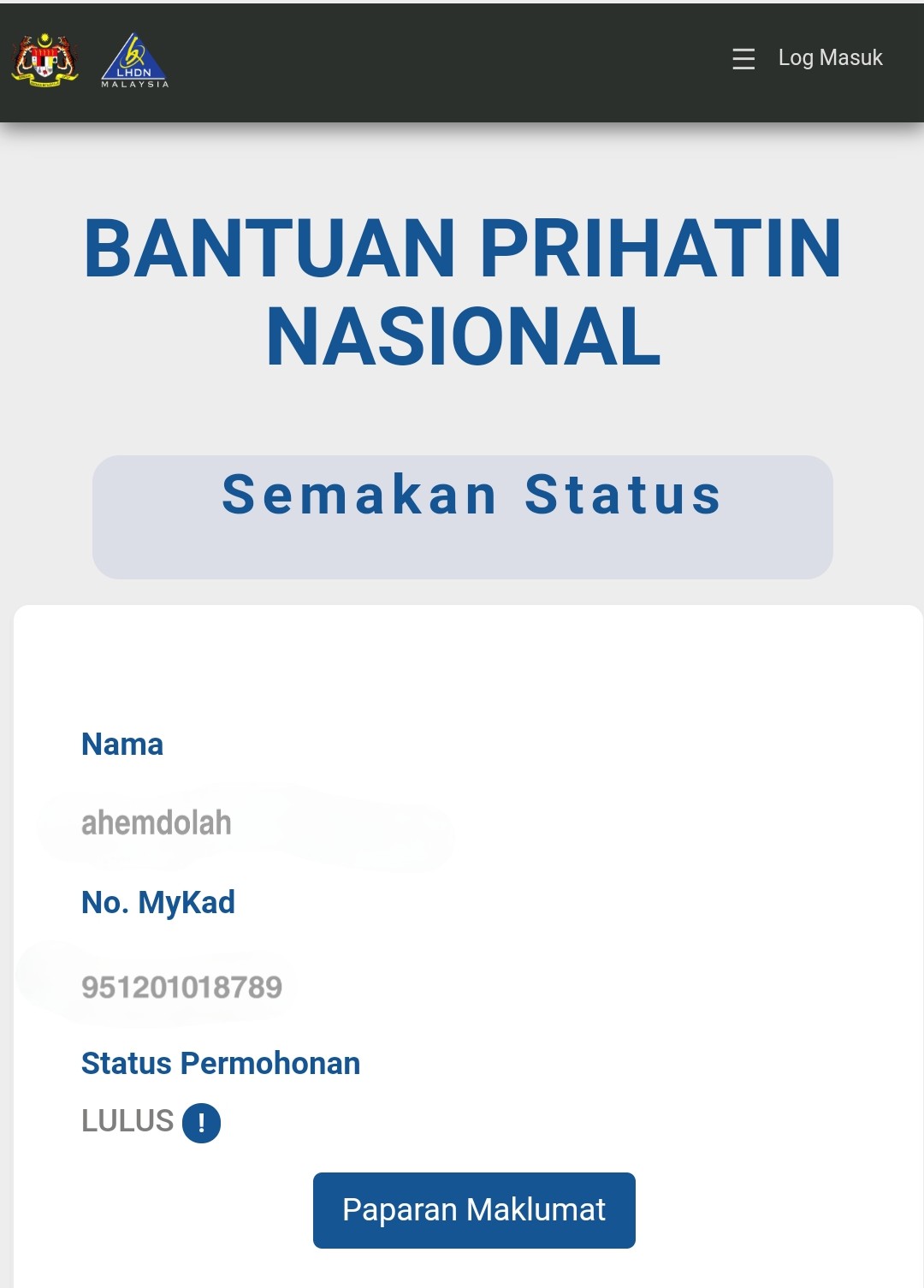
QUOTE(ahemdolah @ Apr 1 2020, 07:17 PM)
Thank you.


Just explain, they got session issues by tracking on the cookies, doing so can recreate a new session, so it will be inside the server memory and allow you to load the website. 
Bantuan Keluarga Malaysia (BKM) news update, check recent posts for news update
|
|
 Apr 1 2020, 07:20 PM Apr 1 2020, 07:20 PM
Return to original view | IPv6 | Post
#41
|
 
Senior Member
1,873 posts Joined: Nov 2010  
|
QUOTE(ahemdolah @ Apr 1 2020, 07:17 PM) Thank you. Just explain, they got session issues by tracking on the cookies, doing so can recreate a new session, so it will be inside the server memory and allow you to load the website. |
|
|
|
|
|
Apr 2 2020, 02:12 AM
Return to original view | IPv6 | Post
#42
|
|
Senior Member
1,873 posts Joined: Nov 2010
|
So after unrespond server, it becoming to 503 server lol.
 |
|
|
Apr 2 2020, 02:16 AM
Return to original view | IPv6 | Post
#43
|
|
Senior Member
1,873 posts Joined: Nov 2010
|
QUOTE(labtec @ Apr 2 2020, 02:16 AM) if i'm working in 2018 but resign and self-employed at end of 2019, will the system use my 2018 salary for guideline? Just semak with your IC, if lulus, go register to know the answer. |
|
|
Apr 2 2020, 02:52 AM
Return to original view | IPv6 | Post
#44
|
|
Senior Member
1,873 posts Joined: Nov 2010
|
QUOTE(wangpr @ Apr 2 2020, 02:33 AM) I give you all a new tips... Pls don't enter, yes enter bypass the server to verify the browser cache, but, it will not send the POST param to the server, only enter if you hang after the captha + semak, that one only get instead of post. If the page loading by 3 second, press stop at browser and refresh by press enter...... It will fully load the page sometimes....  |
|
|
Apr 2 2020, 03:03 AM
Return to original view | IPv6 | Post
#45
|
|
Senior Member
1,873 posts Joined: Nov 2010
|
QUOTE(PowerGadget @ Apr 2 2020, 02:52 AM) Anybody could help? 2 single RM 800 x2= 1 family RM 1600, no loss. Except something like you earn RM 2500 while your wife is RM 1000, then yes, it matter as it will be RM 800 + RM 500, RM 300 loss.  Just wait for 3 April, should allow to report issues, or kemas kini at later time. QUOTE(Zoo Howl @ Apr 2 2020, 03:01 AM) Bro, just apply and become LULUS. So i wait for end of month to receive the money? Yup, except you don't remember providing bank account to LHDNM. |
|
|
Apr 2 2020, 03:19 AM
Return to original view | IPv6 | Post
#46
|
|
Senior Member
1,873 posts Joined: Nov 2010
|
QUOTE(Loqacious @ Apr 2 2020, 03:15 AM) If my jumlah is rm 500 mean i get rm 250/250 for the two months? Yes, refer to the first image on first post. |
|
|
|
|
|
Apr 2 2020, 03:57 AM
Return to original view | IPv6 | Post
#47
|
|
Senior Member
1,873 posts Joined: Nov 2010
|
QUOTE(ydloh91 @ Apr 2 2020, 03:31 AM) I didn't apply BSH since it has an age limitation of 40 years old but i used to receive BR1M. When I check BPN status it says lulus? I need to renew my bank account details but it takes forever to load the registration page, and it requires "kata kunci keselamatan"? I'm confused. do I actually need to apply for bpn? Just saying, you can't renew the bank account details yet, it is locked for all accounts lol.  QUOTE(sora102 @ Apr 2 2020, 03:46 AM) Website jam gila ni. Try to access the website for an hour now but still cannot load !! For current status(midnight), just do this.Step 1, Open a new Incognito windows. If you don't wanna do this, just open https://bpn.hasil.gov.my/ , click on the padlock icon on the left of address bar, click on cookies, spam click on remove, and enter again. Step 2, If loading >3 seconds, it means it failed for processing, and you need to... Step 3, Click F5 if you are submitting a new request for NO RECORD in the system, and the server will NOT let you CETAK the maklumat after you submit to the server and asking you wanna yes for create account, no to exit, and CETAK for check the info. If you lulus and wanna create a new account, just CLICK AGAIN on the button(SETERUS) instead of F5 for filling the security question, answer and password. If hang forever, start from step one. Also please expect that, you will failed lot of time on captcha for the new request submitting, just f5 again if hang, and wait for dialog pop-out telling wrong captcha, just refill the captcha, verify again. As this required a full page loaded to pop-out a windows telling you to tick on it, so it required a full page loaded before you can hantar your maklumat, which is last step that allow you to F5, huray~  Hope this helps in midnight.  This post has been edited by BenYeeHua: Apr 2 2020, 04:07 AM |
|
|
Apr 2 2020, 04:09 AM
Return to original view | IPv6 | Post
#48
|
|
Senior Member
1,873 posts Joined: Nov 2010
|
QUOTE(keluarpattern @ Apr 2 2020, 04:04 AM) How do you check lulus or tidak lulus Key in your IC number here, if no record, need apply for it.https://bpn.hasil.gov.my/ QUOTE(RicoT @ Apr 2 2020, 04:06 AM) I got e-filing, but BPN says I haven't register. BPN account is not registered, as long as you got record on https://bpn.hasil.gov.my/ telling you Lulus, then you are ok to leave.Except you want to confirm how much you can get, and did the bank account is correct, then just go ahead and register it. QUOTE(purplecar @ Apr 2 2020, 04:08 AM) 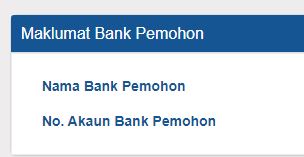 I have registered BPN and status is lulus, but my bank information is blank. Is this normal? I have LHDN account and received tax refund in my bank account but the bank account info is not displayed here. This post has been edited by BenYeeHua: Apr 2 2020, 04:10 AM |
|
|
Apr 2 2020, 04:11 AM
Return to original view | IPv6 | Post
#49
|
|
Senior Member
1,873 posts Joined: Nov 2010
|
QUOTE(XXXOOOXXXOOO @ Apr 2 2020, 04:09 AM) i find no place to create new account. First post, if no BPN account, it will tell you no account, please register.any direct link ? Login to BPN account (or to register BPN account): https://bpn.hasil.gov.my/Account/Login.aspx https://bpn.hasil.gov.my/LogMasuk (both link can be use to login) |
|
|
Apr 2 2020, 04:18 AM
Return to original view | IPv6 | Post
#50
|
|
Senior Member
1,873 posts Joined: Nov 2010
|
QUOTE(keluarpattern @ Apr 2 2020, 04:12 AM) Then apply.. Depend on how many people need to be processed, for my guessing, freelancer and B40 is stuck on NO RECORD, as they know nothing about LDHNHow long do you know you d result? So far jz stating there pemohonan diterima QUOTE(fridel @ Apr 2 2020, 04:12 AM) Very slow still zzzz See tips above, just F5 when it is hanging > 5s, and clear cookies if it never load after F5 >10 times.QUOTE(keluarpattern @ Apr 2 2020, 04:13 AM) Same bro..-.- Diterima means they are processing the request that you just submit, or maybe too many people and they still processing on imported corrupted data.QUOTE(keluarpattern @ Apr 2 2020, 04:14 AM) Good luck bro...did u done yet?u nid to patience and luck on refresh Yes, tips above, should take 5-15 mins for register for record to process, 3 mins for semak, 5-10 mins for register BPN account. QUOTE(XXXOOOXXXOOO @ Apr 2 2020, 04:15 AM) are u using Unifi or Maxis Fiber ? This is a example of server cache issues, just clear the cookies will solve this issues, or the server clear for you. i having problem with Maxis fiber for few hour, now switch to UNIFI, seem like no issue. Also can be the server failed to fetch the data in time, so it show blank white page to you, just wait like 5 mins, then clear cookies, and recheck again. |
|
|
Apr 2 2020, 04:23 AM
Return to original view | IPv6 | Post
#51
|
|
Senior Member
1,873 posts Joined: Nov 2010
|
QUOTE(Zoo Howl @ Apr 2 2020, 04:19 AM) My friend get PERMOHONAN DITERIMA, what does it means? Chances of 50 50 for approval? Still processing, if your friend got fill in the BSH, 100%, LDHN + < RM 4,000, 100%.More than that, 0% Unsure for student that just Graduate and unable to find jobs or freelancer, as they only disallow student to mohon for this. QUOTE(XXXOOOXXXOOO @ Apr 2 2020, 04:19 AM) There no create account button over there Checking using phone, please wait. 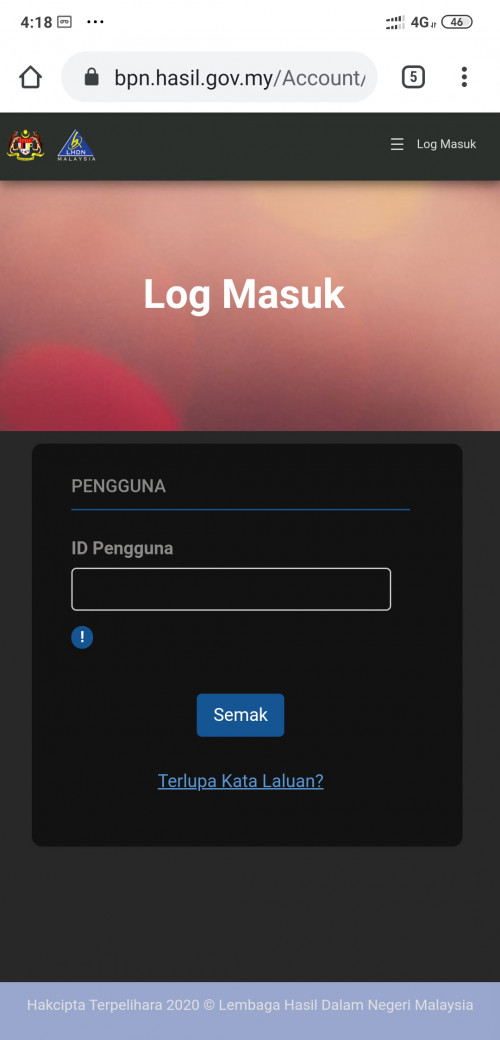  QUOTE(XXXOOOXXXOOO @ Apr 2 2020, 04:23 AM) i try on maxis fiber all no luck (i use 5 browser but none of it work on Maxis fiber) but maxis mobile work. Never trust Maxis fiber....  I guess when the OP wake up, he can add this info to the first post. This post has been edited by BenYeeHua: Apr 2 2020, 04:28 AM |
|
|
Apr 2 2020, 04:25 AM
Return to original view | IPv6 | Post
#52
|
|
Senior Member
1,873 posts Joined: Nov 2010
|
QUOTE(jishu @ Apr 2 2020, 04:23 AM) Thank you for this tips. Been waiting like an idiot it to load for like 10 minutes. Yup, midnight can just F5 if >5s, if daylight then you will be F5 like crazy and still hang on loading. Can simply refresh and the filled form still there. Hahaha QUOTE(XXXOOOXXXOOO @ Apr 2 2020, 04:23 AM) i try on maxis fiber all no luck (i use 5 browser but none of it work on Maxis fiber) but maxis mobile work. Guess QoS works, when too many people accessing a single point, ISP will throttle it to stop affecting other people, which is  |
|
|
Apr 2 2020, 04:27 AM
Return to original view | IPv6 | Post
#53
|
|
Senior Member
1,873 posts Joined: Nov 2010
|
QUOTE(ahemdolah @ Apr 2 2020, 04:24 AM) OMG! Thank you PN! » Click to show Spoiler - click again to hide... «  QUOTE(XXXOOOXXXOOO @ Apr 2 2020, 04:19 AM) There no create account button over there I am back, please semak your id first, then it will allow you to register. 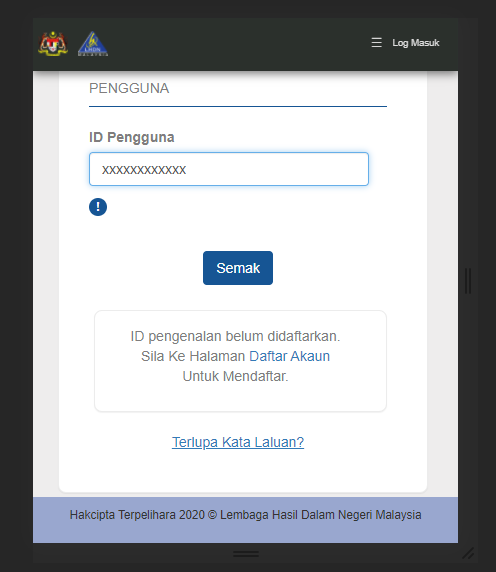 |
|
|
|
|
|
Apr 2 2020, 04:32 AM
Return to original view | IPv6 | Post
#54
|
|
Senior Member
1,873 posts Joined: Nov 2010
|
QUOTE(Zoo Howl @ Apr 2 2020, 04:27 AM) When will know the status? Nope, only if she is lucky and still recorded as single in the system(which will be lulus status by semak now), then she can get at least for the > 2k and < 4k single one. My friend is married, husband gross more than 10k but her gross salary is 2.1k , do u think can? If no record, surely 99% no, except human error. QUOTE(Rudd @ Apr 2 2020, 04:27 AM) My Status Permohonan If it tell that, go ahead, I guess need your bank account info.LULUS. but Paparan Maklumat: ID pengenalan belum didaftarkan. Sila Ke Halaman Daftar Akaun Untuk Mendaftar. so i should daftar again? QUOTE(XXXOOOXXXOOO @ Apr 2 2020, 04:27 AM) no create new account right ? Reply above.  QUOTE(fridel @ Apr 2 2020, 04:28 AM) At least ic no. kasi tutup la You should also remove the image, so after he edit the post can not see anymore. QUOTE(Jessysuieng @ Apr 2 2020, 04:32 AM) This post has been edited by BenYeeHua: Apr 2 2020, 04:33 AM |
|
|
Apr 2 2020, 04:40 AM
Return to original view | IPv6 | Post
#55
|
|
Senior Member
1,873 posts Joined: Nov 2010
|
If you getting stucked, close the windows and open another new incognito windows, or just clear the cookies.
First step is, successful loading on the home page https://bpn.hasil.gov.my/ , then head over to other page you want to go, like register, login etc, less chance to hang. QUOTE(fridel @ Apr 2 2020, 04:34 AM) Blank screen after login/semak It means you need to clear the cookies and retry, tips above. » Click to show Spoiler - click again to hide... « Zzzzzz If after doing the above tips still blank, means the server is currently loading your data, please wait for 5 mins, then retry the tips. QUOTE(jeff10012003 @ Apr 2 2020, 04:34 AM) Finally manage to register. Yes, yours are family. Damn the site really test my patience. Btw if I already registered my wife under pasangan, no need to submit another one for her correct? both of us displayed as Tiada Rekod.  QUOTE(Jessysuieng @ Apr 2 2020, 04:36 AM) My bank account is no longer active (I am a bankruptcy), what should I do next? Create a new account first, it is not laggy now, then wait for them to open for kemas kini of your data, or next instruction from the gov.As far as I can see, they don't allow kemas kini, only NO RECORD one can lol. QUOTE(Zoo Howl @ Apr 2 2020, 04:36 AM) 1. So actually is household income combine husband and wife? 1. Yes, only husband or wife, just like the BSH.2. Not individually wife means wife and husband means husband? 3. When the results will announced, is it by sms? 2. Yes, only husband or wife need to register to obtain for a family. 3. Unsure, they don't tell about that, but you can SEMAK again your IC, should be "in process" status now. This post has been edited by BenYeeHua: Apr 2 2020, 04:42 AM |
|
|
Apr 2 2020, 05:26 AM
Return to original view | IPv6 | Post
#56
|
|
Senior Member
1,873 posts Joined: Nov 2010
|
QUOTE(arcadicus @ Apr 2 2020, 04:44 AM) ayam married... but the system showed single.. Nothing if both of your earning is <rm 2000, and <rm 4000 as a family, or RM <4000 for both and <RM 8000 as a family, still get same amount as single.what should ayam do? QUOTE(Zoo Howl @ Apr 2 2020, 04:47 AM) Regarding this... if daytime very hard to load that page to SEMAK leh 😪 Just keep the cache by opening with a rare used browser in normal mode, the JS fille will be cached, just need to clear the cookies if any hang for >10 reload, and just 2 step, first is key in ic to show the captha, second step is key in the captha, third step is f5 like crazy, for these step you can reload if >30s no loading, for white page just clear cookies and start from step 1. QUOTE(jishu @ Apr 2 2020, 04:59 AM) I think LHDN database detect me as Bujang since dont know where to update the status as married The bujang one ayam exceeded the income d QUOTE(13th @ Apr 2 2020, 05:15 AM) Hmm my status now is B40 wife not working. But in the site it seems like still M40 and not refreshed. How eh Not open for kemas kini yet, wait for 3th April.QUOTE(fridel @ Apr 2 2020, 05:09 AM) Site still not working zz Give up liao.fak dis shit |
|
|
Apr 2 2020, 05:50 AM
Return to original view | IPv6 | Post
#57
|
|
Senior Member
1,873 posts Joined: Nov 2010
|
QUOTE(skyblack4492 @ Apr 2 2020, 05:45 AM) Rayuan how tidak lulus. Alasan, u are student lol. Jimmy help Wait for 3th April, will open for report. |
|
|
Apr 2 2020, 05:54 AM
Return to original view | IPv6 | Post
#58
|
|
Senior Member
1,873 posts Joined: Nov 2010
|
Last tips before sleep, just follow these steps.
Step 1, Open a new Incognito windows. If you don't wanna do this, just open https://bpn.hasil.gov.my/ , click on the padlock icon on the left of address bar, click on cookies, spam click on remove, and enter the link again. If you want to open much faster, use a rare used browser, then the js file cache will be there nearly forever, just for people that mohon and semak the record repeatly. Remember, after clearing the cookies, before going to other pages, always open this BPN home page first. Step 2, If loading take >N seconds, it means the server failed for processing, and you need to... For your refer, the N second will be 0300 AM - 0759AM, N=5 second 0800 AM - 1100AM, N=60 second other busy time, N=120 second You can shorten the time as you like, but at least 45 second should be given to the server at other busy time. Step 3, Click F5 if you are submitting a new request for NO RECORD in the system, and the server will NOT let you CETAK the maklumat after you submit to the server. This step if you wonder. » Click to show Spoiler - click again to hide... « If you lulus and wanna create a new account, just CLICK AGAIN on the button(SETERUS) instead of F5 for filling the security question, answer and password. » Click to show Spoiler - click again to hide... « Also please expect that, you will failed lot of time on captcha for the new request submitting, after you verify the captcha, it will require a full page completely loaded to pop-out a windows telling you to tick on it, so just wait for N second, or F5 to verify the captcha again, if it hang. This window if you wonder. » Click to show Spoiler - click again to hide... « After ticking it and get hang or failed, you can F5 as long as you want, the hardest step is passed.  After the page is completely loaded, then you can hantar your maklumat, this will be the last step that allow you to F5 repeatly, huray~  If submit for second times because of F5, it will showing your info instead of giving you choice to "Yes" for register account, "No" for exit, "Cetak" to check your submitted info. I will recommend you to exit, put trust on your eyes, and only semak for your IC number for waiting the "in process" status becoming passed, or you can register a account to check your submitted info. It will jumped to this for N+ times of repeat submission. » Click to show Spoiler - click again to hide... « You can also semak your IC again after each F5 for "Hantar", as you might submitted and waiting the server to let you "Cetak" your info. The Cetak will hang forever, better don't click and wait for it. If there is white page, please wait at least 5 mins, then start from step 1, the server is loading your data in the background which required time.  If you don't wait, it will be white page for you again and again, until the server loaded the data for you. PS:You can only F5 if the page becoming only left the header of the page, incomplete page, connection reset or timeout error page, or you will be F5ing the current status. This post has been edited by BenYeeHua: Apr 2 2020, 06:05 AM |
|
|
Apr 2 2020, 04:01 PM
Return to original view | IPv6 | Post
#59
|
|
Senior Member
1,873 posts Joined: Nov 2010
|
QUOTE(arefiq09 @ Apr 2 2020, 03:34 PM) I did tax filing, why no record. Now need to register somemore. Update: Ok I checked for second time, now LULUS edi Maybe because I turn off adblock.QUOTE(destiny017 @ Apr 2 2020, 03:51 PM) Wth why today i go check say no record ytday lulus already Simple reason, because the server is processing your data, after data processed, you semak again and it will show the correct one. So for those people that don't have record, recheck again after 30 mins - 1 hour. |
|
|
Apr 2 2020, 04:32 PM
Return to original view | IPv6 | Post
#60
|
|
Senior Member
1,873 posts Joined: Nov 2010
|
QUOTE(JustcallmeLarry @ Apr 2 2020, 04:02 PM) hi guys how is the site today? same as yesterday?? Yesterday in morning, just lag and loading icon, in night, 503 showing up, in midnight 3 - 7 AM, if nothing after 5 second, just a F5 will fix it.30 mins to settle for application of No Record user, and also register for BSH user. Today, service unavailable. QUOTE(Jitty @ Apr 2 2020, 04:05 PM) still cannot go in. Pls come back at later time, or later date. even tried incognito mode also cannot QUOTE(mishima2323 @ Apr 2 2020, 04:13 PM) The web technology is MASP. One of species dinosaur yg tunggu masa nak pupus. Gomen should hire new developer & not using this zaman tok Kaduk software for the server. Still better than PSP one, that one exposed your Bank account after you check your IC, and nothing happen when you submit for changing the bank account. QUOTE(Zoo Howl @ Apr 2 2020, 04:15 PM) This morning i applied it in the BPN website , it is LULUS, but i see on fb, many said that after u applied is become LULUS, suppose to receive a SMS? I didnt receive any SMS, should i be worry? So fast for the application?After you applied, it should be "in process", unsure what's happen after 24 hours, as I still waiting the website to let me semak again. Or you means you just semak? If just semak and result is lulus, then it is fine, got SMS or not don't affect you, just the informed SMS allow you to double confirm that you are lulus. Just like the recently gov sms, they just sms to double ensure the rakyat without internet know about latest news la. QUOTE(dean.ab25 @ Apr 2 2020, 04:30 PM) still cannot register. stuck at log in. able to keyed in IC number but there's a popup message stating that there's no record, need to register/update. BUT THERE'S NO LINK TO REGISTER. Based on other's info, you can semak at later time if you earn >2k or <4k, or you are a BSH receiver, because the server take like half an hours to query the result from database now, so you might get No Record status for your IC number, then get the correct result at later time. WHY DON'T JUST PROVIDE TWO SEPARATE FEATURES: REGISTER vs LOGIN FOR CURRENT USER ???????????????????????????????? who came up with this idea? This post has been edited by BenYeeHua: Apr 2 2020, 04:34 PM |
| Change to: |  0.0250sec 0.0250sec
 0.69 0.69
 7 queries 7 queries
 GZIP Disabled GZIP Disabled
Time is now: 10th December 2025 - 01:48 PM |
 Quote
Quote