QUOTE(seanlimys @ Feb 23 2008, 10:41 AM)
which is the most ocable?2140, 2160 or 2180?

So far I see 2140 the best.. 2160 and 2180 almost the same only..

Intel Pentium Dual Core E2140/E2160/E2180 Thread, Discussion & Compilation
|
|
 Feb 23 2008, 10:44 AM Feb 23 2008, 10:44 AM
Return to original view | Post
#41
|
 
Senior Member
3,377 posts Joined: Jul 2005 From: Klang   
|
QUOTE(seanlimys @ Feb 23 2008, 10:41 AM) which is the most ocable?2140, 2160 or 2180? So far I see 2140 the best.. 2160 and 2180 almost the same only.. |
|
|
|
|
|
Feb 23 2008, 11:06 AM
Return to original view | Post
#42
|
|
Senior Member
3,377 posts Joined: Jul 2005 From: Klang
|
Definitions of Cold Boot on the Web:
QUOTE - Start the computer by switching on the power. A cold boot recycles the computer's random access memory (RAM), thus removing any viruses that ... www.infosec.gov.hk/english/general/glossary.htm - The first time power is applied to a product, or a hard reset. www.symbian.com/developer/techlib/v70sdocs/doc_source/GlobalGlossary/GlossaryDocumentC.html - Starting the computer from a power-off status. If your computer is off, and you turn the switch on, you're performing a Cold Boot. www.pccomputernotes.com/pcterms/glossaryc.htm - One of two ways to boot the reader; compare to warm boot. A cold boot invokes the BIOS boot sequence, which verifies that the 256K flash system image is not corrupt, clears all memory, and performs a complete power-on self test (POST) to ensure that the hardware and peripherals are operational. ... - reloading a computer's operating system by turning the power to the computer off and then back on. www.angelfire.com/tx/antagonizer/glossarya.html - In computing, booting is a bootstrapping process that starts operating systems when the user turns on a computer system. A boot sequence is the set of operations the computer performs when it is switched on that load an operating system. en.wikipedia.org/wiki/Cold Boot - Starting the computer by turning power on. Turning power off and then back on again clears memory and many internal settings. Some program failures will lock up the computer and require a cold boot to use the computer again |
|
|
Feb 23 2008, 11:19 AM
Return to original view | Post
#43
|
|
Senior Member
3,377 posts Joined: Jul 2005 From: Klang
|
QUOTE(zulboydarn @ Feb 23 2008, 11:17 AM) so i need to lower my multi and increase fsb right?? What I am saying is ... If u can't get 3.0Ghz stable on stock Vcore.. Try other multiplier like 375*8 .. Don't just use x9.. how about my vcore? stick to the stock or increase a couple of notch? thanks mate. One more thing is I prefer lower multiplier with higher FSB setting.. Faster..  |
|
|
Feb 23 2008, 11:53 AM
Return to original view | Post
#44
|
|
Senior Member
3,377 posts Joined: Jul 2005 From: Klang
|
QUOTE(EQs @ Feb 23 2008, 11:24 AM) Ok. but now my problem is when i change the clocking features in my boot setup that mssge will appear. I had cold boot problem before.. Your setting is high for ur motherboard or PSU to handle.. when i just press F1 to continue cpu will running at stock speed 1.80Ghz not my overclocked speed. Even when i'm restarting my comp that mssge will appear again and again. If just luck i can boot without that msge and get my overclocked speed that i've been set. When cold boot happen to me.. I normally press DEL to enter bios setting. Then straight away SAVE & EXIT. No problem already.. IF yours happen everytime you start your PC. Consider lowering the clock speed or share wif us wat motherboard/psu that ur using.. This post has been edited by Amedion: Feb 23 2008, 11:54 AM |
|
|
Feb 23 2008, 01:19 PM
Return to original view | Post
#45
|
|
Senior Member
3,377 posts Joined: Jul 2005 From: Klang
|
QUOTE(EQs @ Feb 23 2008, 12:53 PM) I've do that. Sometimes it work but mostly not . Motherboard, J&W JW-IN7100-HD and psu, cooler master real power 450w. I don't know and never heard of ur motherboard.. Sorry for my n00biness..  Your PSU shud be ok.. Try lower the setting and use clockgen to set clock everytime u start windows..  QUOTE(valeron009 @ Feb 23 2008, 01:13 PM) This is mine now. I try 400x8 before, but restart after 3 hours orthos. Dunno how to increase again. Any recommendation? Wow.. Not bad wif that temperature.. [attachmentid=403165] I saw a lot of people can only run 1.4v stable in CPU-z reading for 3.2Ghz... Means ur BIOS must be 1.480+ becoz of undervolting.. |
|
|
Feb 23 2008, 01:37 PM
Return to original view | Post
#46
|
|
Senior Member
3,377 posts Joined: Jul 2005 From: Klang
|
QUOTE(valeron009 @ Feb 23 2008, 01:21 PM) i tried 1.4v before, but its not stable also. I will try 1.5v later. Is it recommended? Im afraid i'll burn my proc. Your load at 1.4v got good temperature at 59c.. Shud be ok if 1.5v .. Just to try how much ur processor can go.. For daily use.. Don't exceed 70c can already.. |
|
|
|
|
|
Feb 23 2008, 02:13 PM
Return to original view | Post
#47
|
|
Senior Member
3,377 posts Joined: Jul 2005 From: Klang
|
QUOTE(valeron009 @ Feb 23 2008, 02:09 PM) I tried 420x8, failed at POST screen, 415x8, BSOD before entering windows. Now 413x8, ok2 la. Haven't tried orthos yet. But on orthos for 5 mins to see the load temp, max at 64c, idle at 40c. Im sure i cant get far than this due to my ram. Im using cosair vs 667 only. Bro, ur temperature is OK. I guess you must be using good cooler.Yes, your corsair RAM cannot more than 800MHz speed I guess. Try to use divider or pump more vdimm. Over 400FSB. Try pump +0.01v to ur MCH or NorthBridge. |
|
|
Feb 23 2008, 02:19 PM
Return to original view | Post
#48
|
|
Senior Member
3,377 posts Joined: Jul 2005 From: Klang
|
QUOTE(valeron009 @ Feb 23 2008, 02:18 PM) Im using GeminII power with 1200RPM CM fans. Not that speed though. I guess for now i will settle with this. Im trying to invest in ram first then i'll continue to OC. Your motherboard don't like x9 multiplier? |
|
|
Feb 23 2008, 02:32 PM
Return to original view | Post
#49
|
|
Senior Member
3,377 posts Joined: Jul 2005 From: Klang
|
QUOTE(valeron009 @ Feb 23 2008, 02:25 PM) I tried before, but i cant go far with 9x. BSOD, Not boot itself, etc2, thats why im using 8x. Maybe i'll try 9x later. Hmm.. Every mobo also has their favourite multiplier.. Guess yours is x8...  Try use x6 multiplier.. Slowly increase to find the MAX FSB ur mobo can do... Then use divider to lower ur RAM clock and find our the processor's potential.. This post has been edited by Amedion: Feb 23 2008, 02:33 PM |
|
|
Feb 23 2008, 02:41 PM
Return to original view | Post
#50
|
|
Senior Member
3,377 posts Joined: Jul 2005 From: Klang
|
QUOTE(EQs @ Feb 23 2008, 02:35 PM) How to use clockgen to set the clock? it seems nothing to modify. No slider. Only show cpu and fsb speed at default. You need to identify ur mobo's chipset first.. |
|
|
Feb 23 2008, 03:26 PM
Return to original view | Post
#51
|
|
Senior Member
3,377 posts Joined: Jul 2005 From: Klang
|
QUOTE(EQs @ Feb 23 2008, 02:56 PM) how to identify? is it nVIDIA MCP73U/PV/V/D? Hmm.. I think clockgen more suitable for AMD .. I din use it for Intel though cause got better tuner by Gigabyte.. sorry for noob question..  If i've found the chipset. What to do next? when i run clockgen theres only two button clocks and option. no pll control things where i've seen over googling... Anyway, if I dunno which chipset it is.. I will choose one by one and press read clock.. Then if the clock is correct with my current clock.. I use it.. To overclock.. You need to use PLL Control.. |
|
|
Feb 23 2008, 03:29 PM
Return to original view | Post
#52
|
|
Senior Member
3,377 posts Joined: Jul 2005 From: Klang
|
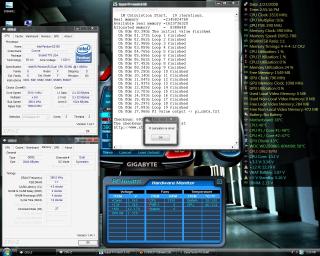
Neva tot I can boot and run SuperPI Mod 1m with that setting.. No BSOD or restart.. But i din stress wif orthos cause using stock cooler.. Sure fry.. OH yea guys, becareful when you set the vCore using EasyTune5 Pro.. Anything above 1.585v.. It will straight jump to 1.73v.. Luckily I not stressing.. If not straight KO.. |
|
|
Feb 23 2008, 06:34 PM
Return to original view | Post
#53
|
|
Senior Member
3,377 posts Joined: Jul 2005 From: Klang
|
QUOTE(¤~¤DaViD¤~¤ @ Feb 23 2008, 05:44 PM) hmm I still dont get how to OC in bios setup, I cant find the fsb or cpu options. or u guys setup with software Bro, based on ur signature.. The gigabyte mobo u purchased cost RM 169, rite? Sorry to say that anything under RM300 is really not suitable for OC.Yours I don't think have OC function at all. Time to change to new MOBO !  |
|
|
|
|
|
Feb 23 2008, 07:47 PM
Return to original view | Post
#54
|
|
Senior Member
3,377 posts Joined: Jul 2005 From: Klang
|
QUOTE(suicideroach @ Feb 23 2008, 07:06 PM) wow.. nice score Like i said.. If stress.. Sure fry.. Coz using stock cooler.. So, I have no idea on load temp..  using stock cooler some more. What is the load temp? using stock cooler some more. What is the load temp? QUOTE(iman_210 @ Feb 23 2008, 07:25 PM) nice scores dude. Thanks man...  I want to decrease the voltdrop for my mobo .. BUT need pencil mod.. anyone have experience? QUOTE Now, there are 2 mods you can do. If you're loading up the CPU heavy with voltage and high speeds, and if you notice that the voltage swings between idle and load is quite big, then you may consider the VDroop mod. Pencil the SMD capacitor seen below to reduce the droop. Alternatively, you can solder on a 500K ohms Variable resistor across the 2 points shown. Set at Max 500K ohms, Decrease resistance until you find very little droop in VCore. . http://resources.vr-zone.com.sg/Shamino/gigap35ds3/28.jpg For CPU Vcore, connect a 500K ohms Variable resistor to point shown, with other leg connected to ground. Set at Max 500K ohms, Decrease resistance to increase voltage. And there! Everything you need to kick-off a hardcore overclocking session. OR get lower temperature by removing IHS of the processor.. :- http://www.xtremesystems.org/forums/attach...=1&d=1203544128 http://www.xtremesystems.org/forums/attach...=1&d=1203544128 I've been stressing from morning till now already.. Few errors due to itchy hand.. Now still stressing.. Just now full load 65c~69c.. Now nite time is 52c~55c.. DAMN I HATE DAY TIME ! 10c Different !  This post has been edited by Amedion: Feb 23 2008, 07:50 PM |
|
|
Feb 23 2008, 08:28 PM
Return to original view | Post
#55
|
|
Senior Member
3,377 posts Joined: Jul 2005 From: Klang
|
QUOTE(suicideroach @ Feb 23 2008, 08:00 PM) ur room got aircond still can be affected by day time ar? ACtually not my room.. IT's my shop.. Open door 1.. So, it is affected.. Motherboard really got their favourite multiplier.. I use 380x8 fail orthos.. I use 342x9 no fail for 4 hours more and still running.. Haiz.. I prefer higher FSB cause performance better.. anyone can clarify that? Btw, can you all share ur processor's limit at stock vcore? I still stressing 3.1Ghz @ Stock vCore & 1.26v Cpu-z reading... This post has been edited by Amedion: Feb 23 2008, 08:45 PM |
|
|
Feb 24 2008, 09:42 AM
Return to original view | Post
#56
|
|
Senior Member
3,377 posts Joined: Jul 2005 From: Klang
|
Haiz... My processor got disease 1.. Yesterday stress 6 hours @ 3.1Ghz stock vcore no problem.. Today 3060mhz stress 1 minute already system reboot..
|
|
|
Feb 24 2008, 12:40 PM
Return to original view | Post
#57
|
|
Senior Member
3,377 posts Joined: Jul 2005 From: Klang
|
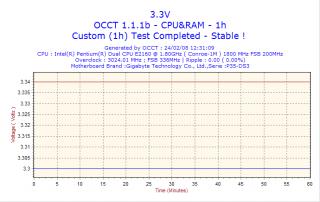
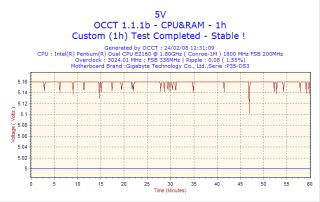
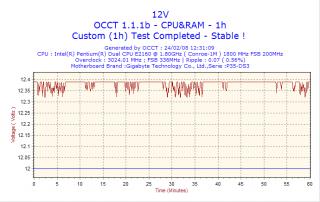
Tested just now 3014 @ stock vCore ...
Orthos ( CPU and Ram stress ) + OCCT ( CPU & RAM ) 1 hour stress = Complete Stable... Trying 3033 @ stock Vcore now.. Maybe tomorrow will fail again.. LOL |
|
|
Feb 24 2008, 01:43 PM
Return to original view | Post
#58
|
|
Senior Member
3,377 posts Joined: Jul 2005 From: Klang
|
QUOTE(a1098113 @ Feb 24 2008, 12:55 PM) u should be able to try 3.04Ghz to 3.1Ghz it should be stable till 3.1Ghz with stock Vcore.. keep on going dude Stressing tools all give me a lot of headache and confuse... 3033MHz @ Stock vcore ( 337 x 9 ) ... Orthos Failed in 40 minutes ... OCCT passed 2 times 1 hour stress ... Prime95 passed 2 hours and still running ... Which one to trust? AND does below graph tells my PSU not stable enuff ? » Click to show Spoiler - click again to hide... « |
|
|
Feb 24 2008, 03:15 PM
Return to original view | Post
#59
|
|
Senior Member
3,377 posts Joined: Jul 2005 From: Klang
|
QUOTE(a1098113 @ Feb 24 2008, 02:11 PM) it looks fine to me leh Oh i see.. Btw, Prime95 no fail at all now.. Where to view the time ? I don't know how long already... |
|
|
Feb 24 2008, 04:15 PM
Return to original view | Post
#60
|
|
Senior Member
3,377 posts Joined: Jul 2005 From: Klang
|
QUOTE(seanlimys @ Feb 24 2008, 04:05 PM) lol..4.3ghz for e2140..use clockgen tarik tarik..den snapshot...den do superpi..haha..den canot tahan ad...i 3.2ghz 24/7 is enuf ad..aiming 8200 if possible...den can hentam abit more. IS like dat 1 lar.. Very hot.. What to do.. Need dry ice to run that i think.. can u supply dry ice for 24/7 use? Anyway, guys.. Orthos or prime95 better? Haiz... |
|
Topic ClosedOptions
|
| Change to: |  0.0462sec 0.0462sec
 0.34 0.34
 7 queries 7 queries
 GZIP Disabled GZIP Disabled
Time is now: 9th December 2025 - 02:00 AM |
 Quote
Quote