Welcome Guest ( Log In | Register )

Bump Topic Topic Closed RSS Feed
5 Pages < 1 2 3 4 > » Bottom

Outline · [ Standard ] · Linear+

Unifi Official TM UniFi High Speed Broadband Thread V38, READ 1ST PAGE FOR TURBO SPEED INFO!

views
     
TSSilentVampire
post Dec 20 2019, 02:27 PM

Networking Enthusiast
*******
Senior Member
5,714 posts

Joined: Mar 2007


QUOTE(tomsulliven @ Dec 20 2019, 02:19 PM)
Hi all guru, may I ask where you guys put your modem and router?
I’m living a double storey house around 4850 sqft, downstairs living room TV maybe go for Astro, upstairs living room maybe go for tvbox, I’m in master bedroom on desktop computer.
*
Put it in a central location, and if you want consistent coverage in the house, use mesh wifi.
TSSilentVampire
post Dec 20 2019, 05:12 PM

Networking Enthusiast
*******
Senior Member
5,714 posts

Joined: Mar 2007


QUOTE(tomsulliven @ Dec 20 2019, 03:43 PM)
So my desktop pc need to wifi adapter? Do I need a wifi extender?
Yes, you will need a WiFi adapter for your desktop PC. You don't need a WiFi extender, if you're using mesh WiFi.
TSSilentVampire
post Dec 24 2019, 06:34 PM

Networking Enthusiast
*******
Senior Member
5,714 posts

Joined: Mar 2007


QUOTE(daudKilat @ Dec 24 2019, 11:37 AM)
Hi..I'm not sure if this is already been asked. I'm using 30Mbps of Unifi Plan and the router that currently being used is Netis..the connection is always intermittent where it says connected but no internet connection..is it because of the router? Please help  cry.gif
*
Time to buy new modem router. Go get a third party modem router.
TSSilentVampire
post Dec 26 2019, 10:08 AM

Networking Enthusiast
*******
Senior Member
5,714 posts

Joined: Mar 2007


QUOTE(daudKilat @ Dec 26 2019, 09:01 AM)
Can recommend good and affordable one?  sweat.gif
*
It's not expensive to buy one. This is for your reference only: https://www.lelong.com.my/store/ookas/catalog/c2/272631/1

Any modem router there on the page will do. Get it from Shopee or Lazada though lol.
TSSilentVampire
post Dec 28 2019, 06:21 PM

Networking Enthusiast
*******
Senior Member
5,714 posts

Joined: Mar 2007


QUOTE(zhi1437 @ Dec 28 2019, 04:27 PM)
Currently I am on TM Unifi RM129 plan, with 100Mbps.
Current wifi router is DLINK DIR-850L (Black short cylinder shape)
Double storey terrace - 20' x 60'
Wifi router locate at ground floor TV cabinet

My usage as below:
1. Stock trading
2. Normal browsing (Facebook / Taobao / Email)
3. Working at home (VPN / Cloud storage)
4. FM Radio Streaming
5. Youtube Music Streaming
6. TV Box HD Video Streaming (Occasionally)
7. 2 persons living in the premise

Current internet speed: Happy, no issue, satisfy
Current wifi router: Not happy, sometimes disconnect without reasons.

Sometime I share screen using laptop on my Smart TV:
1. Laptop on 5Ghz wifi frequency
2. Smart TV on Wired LAN

<Question 1>
Contract has just ended and planning the next steps:
1. To continue existing plan without renewing contract?
2. To renew contract with existing plan (maybe to get free wifi router)?
3. To downgrade to RM89 plan, with 30Mbps?

<Question 2>
Previously I was using 2.4Ghz wifi signal to screen sharing, very laggy and keep DC.
Then I changed to 5Ghz, it works greater, but I feel like a bit of delay. Especially when I moving my mouse pointer, very hard to select object precisely on TV due to pointer movement delay.
Disconnection of share screen happen occasionally, maybe 5%~10% of chance.
Current wifi router DLINK DIR-850L is running its 5Ghz at AC1200, if I upgrade to any router that greater than AC1200, let say AC1750, do you think it will solve this problem?

<Question 3>
My 2nd floor wifi signal very poor even using 2.4Ghz signal. However, I rectified it by adding additional WiFI extender (DLink DAP-1330).
Current wifi router DLINK DIR-850L is running its 2.4Ghz at 300Mpbs. If I upgrade any router that greater than 300Mbps, let say 450Mbps or 600Mbps, is the wireless range will be improve, or still remain?
Considering I do not wish to use wireless extender due to energy saving.
(In this case, wireless range is the key concern, speed not important)

<Question 4>
If I upgrade router myself, I will prefer ASUS, but which model is suit my usage but not overkill?
a) RT-AC86U
b) RT-AC66U
c) RT-AC68U
d) any other model?
*
Question 1:

Up to you on what speed you want, but I recommend 100Mbps at least if you have a lot of devices and doing all of that you mentioned. Don't bother getting free router from TM. TM router SUCKS.

Question 2:

The AC numbers does not matter if you want coverage. Don't look at the numbers. You need a good reliable router. It won't solve your issue if the AC numbers are extremely high, but the router is a bad one.

Question 3:

Again, don't look at the AC numbers. By the way, extender does not use a lot of energy. If you want consistent coverage, get WiFi mesh system, or if you can't afford it, get a good router.

Question 4:

If you want something good and reliable, and is quite new, get the Asus RT-AC86U. If you don't mind something older, get the Asus RT-AC68U. If you want to save more money, get the Asus RT-AC1300UHP.

QUOTE(y500 @ Dec 28 2019, 06:06 PM)
what router is that? hmm.gif

tm giving new router? hmm.gif
*
Looks like a rebranded TP-Link Archer VR1200V.

TSSilentVampire
post Dec 31 2019, 07:16 AM

Networking Enthusiast
*******
Senior Member
5,714 posts

Joined: Mar 2007


Read 1st page, 1st post, green text.
TSSilentVampire
post Jan 3 2020, 09:31 PM

Networking Enthusiast
*******
Senior Member
5,714 posts

Joined: Mar 2007


QUOTE(pikafaded @ Jan 3 2020, 07:07 PM)
Hi, I am looking for a new router for my single-storey house. My unifi speed is 300 Mbps and DIR-850 router is becoming worse as my wifi speed drops recently. Any router can suggest to me? For normal home use only.
*
Read 1st page, 1st post, green text, or the first stickied post on the forum.
TSSilentVampire
post Jan 9 2020, 09:47 PM

Networking Enthusiast
*******
Senior Member
5,714 posts

Joined: Mar 2007


QUOTE(hexcundie @ Jan 9 2020, 08:48 PM)
undersea internet cable is busted AGAIN, international connections are slow as hell, it's been like this for months.

for me reddit also very slow to load, and it's almost impossible to view videos and images on reddit.
*
Same here. Reddit is totally inaccessible and very slow.
TSSilentVampire
post Jan 10 2020, 01:53 PM

Networking Enthusiast
*******
Senior Member
5,714 posts

Joined: Mar 2007


QUOTE(Dylnyat @ Jan 10 2020, 01:42 PM)
Finally! Tomorrow TM contractor will come and apply Unifi at my home. I have been waiting for this. 😅

But ayam scared got charges wei.

I will just take the standard application@foc. Hopefully no charges laaa.

Hopefully!!!
*
This is not Kopitiam. You don't have to refer to yourself as ayam lol. There won't be any charges if it is a standard installation.
TSSilentVampire
post Jan 15 2020, 01:22 PM

Networking Enthusiast
*******
Senior Member
5,714 posts

Joined: Mar 2007


QUOTE(tomsulliven @ Jan 15 2020, 12:54 PM)
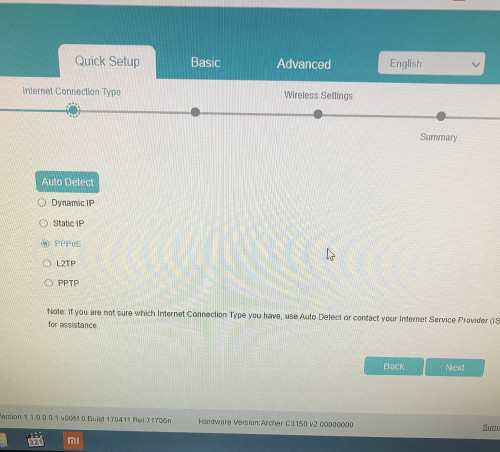
user posted image

Why I can’t find the additional isp setting?
*
I suggest reading Blacktubi's guide to set your connection up: https://www.blacktubi.com/tp-link-unifi-setup/
TSSilentVampire
post Jan 15 2020, 01:24 PM

Networking Enthusiast
*******
Senior Member
5,714 posts

Joined: Mar 2007


QUOTE(tomsulliven @ Jan 15 2020, 12:54 PM)
user posted image

Why I can’t find the additional isp setting?
*
By the way, based on your screenshot, you're using an old version of the firmware. Update your firmware via the upgrade firmware function on the router or flash it manually via this page here: https://www.tp-link.com/my/support/download...c3150/#Firmware

That could be the reason why you're having so many issues with the router.

This post has been edited by SilentVampire: Jan 15 2020, 01:26 PM
TSSilentVampire
post Jan 17 2020, 07:42 AM

Networking Enthusiast
*******
Senior Member
5,714 posts

Joined: Mar 2007


QUOTE(jkwanness @ Jan 17 2020, 12:30 AM)
After 10 freaking years since using the first unifi in KL, unifi finally reached my house in tanjung bungah penang.. set up appointment on 18 Jan saturday...

However i want to ask all the sifus here some suggestions:

1.) Maxis or unifi? (My fam of 5 uses maxis and have "one prime" unlimited data plans, however heard many stories about maxis fibre)

2.) 100mbs or 300mbs? (We have 7 PCs and 5 phones online.. running a home office here.. me and dad regulary game online, so ping is priority..)

3.) Should we upgrade to a different router? If so what router to recommend for best speeds and possibly reach? (Mostly wifi for all devices, 2,000 sqft two story house... Of course looking for best bang for buck.. we dont have millions lol)
Thank you all!!!
*
1) Unifi, purely and mainly for better service.

2) it is up to you, but to fully utilize the 300Mbps speed, you will need to consider mesh wifi. For 100Mbps, a single router should probably do it.

3) If you want coverage and speed, get mesh wifi. I would suggest Deco M9 Plus. Otherwise, if you're happy with one router, get Asus RT-AC86U.

TSSilentVampire
post Jan 19 2020, 05:53 PM

Networking Enthusiast
*******
Senior Member
5,714 posts

Joined: Mar 2007


QUOTE(Savor_Savvy @ Jan 19 2020, 05:16 PM)
Is it normal for 2.4Ghz to perform almost half of the performance of 5Ghz on Unifi 100mbps?
*
Yes, I suggest you read ALL the green text on 1st page, 1st post, of this thread.
TSSilentVampire
post Jan 20 2020, 12:58 PM

Networking Enthusiast
*******
Senior Member
5,714 posts

Joined: Mar 2007


QUOTE(Darrylx3 @ Jan 19 2020, 11:33 PM)
Hi guys, currently using zte single box provided by unifi, but recently keep refusing to connect and disconnect especially when a lot of devices connected.

So I wanted to replace it with a better router, can those "WiFi Modem Router" directly replace the zte single box without the need to get model + router? because I do not have a modem now.
*
Yes, it can. I would recommend that you change it to something better.
TSSilentVampire
post Jan 27 2020, 06:50 PM

Networking Enthusiast
*******
Senior Member
5,714 posts

Joined: Mar 2007


QUOTE(Kellicros @ Jan 27 2020, 04:44 PM)
Guys, I just subscribed to unifi 300mbps package on my new home, and due to the low wifi speed of the provided Netis router, i have since upgraded to TPLink Archer A9, all is good but I have some issue trying to connect to the new UnifiPlus tvbox via ethernet cable.

Here's my issues,

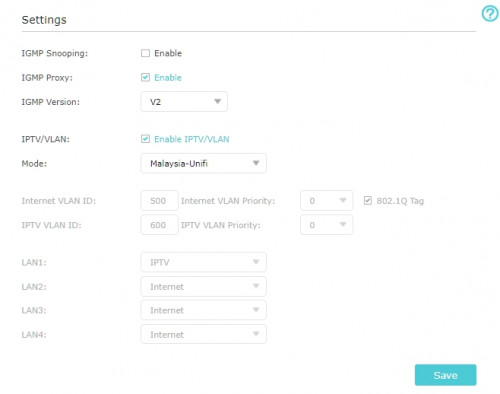
The Unifi Plus ATV box will not detect the Ethernet connection if I plug it to LAN1(which is for IPTV)

It will detect the connection and works fine if I plug it into any LAN ports other than LAN1.

Now I don't mind using it via WIFI cause I got pretty good speed with the new router,

The real problem is I can't use the LAN1 port for any other devices either. My Router is now crippled from 4 ports to 3 ports.
I can't make any changes in the router setting (like changing LAN1 from IPTV to Internet) because the options are grayed.

If I change the "Mode" from "Malaysia-Unifi" to any other settings I will get no internet.

If I disable IPTV/VLAN by unchecking the box, I will also get no internet.

user posted image
Here's what I believe is the issue, the IPTV protocol in the TPLink router is setup for the old Unifi TV Box and is incompatible for the new ATV box.

All I wanted is to make LAN1 working for other devices again, any help would be greatly appreciated.

EDIT: Using a custom setting and changed IPTV to Internet on LAN1 makes the port working again, but I'm wondering, doesn't UNIFI have the dedicated bandwith for UnifiTV? is this still the case if I connect via wifi or LAN setup for "Internet”?
*
They do have dedicated bandwidth for UnifiTV, as it is on a separate VLAN, even if it is on a custom setting. That only applies if you use it on LAN. But, not if you use it on WiFi.

This post has been edited by SilentVampire: Jan 27 2020, 06:51 PM
TSSilentVampire
post Feb 1 2020, 05:01 PM

Networking Enthusiast
*******
Senior Member
5,714 posts

Joined: Mar 2007


QUOTE(Syie9^_^ @ Feb 1 2020, 04:43 PM)
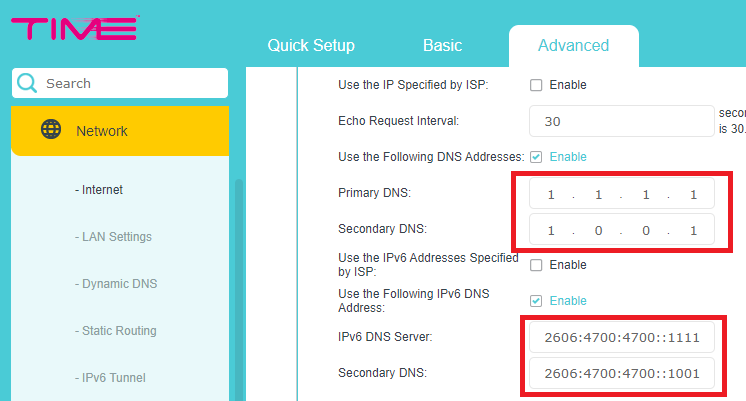
hi, can we do this on tm unifi? cheers.

user posted image
*
Yes, we can change DNS manually. Ideally, you would want to do this with your own third-party router though. You can still do it on TM router if you want.
TSSilentVampire
post Feb 2 2020, 04:24 PM

Networking Enthusiast
*******
Senior Member
5,714 posts

Joined: Mar 2007


QUOTE(Kellicros @ Feb 2 2020, 01:49 PM)
Damn it, there is no way to disable IPTV with VLAN enabled, I am starting to regret of buying this router sad.gif

[attachmentid=10418349]
*
As bro soonwai said, you CAN’T disable the IPTV mode. It will be the same thing for all routers. You will need VLAN tagging for Unifi to work.

QUOTE(judehow @ Feb 2 2020, 02:51 PM)
Yes, wired thing is if connect wifi also keep disconnect  if not hang, i am think change my pakge soon
*
Read 1st page, 1st post, green text. Read everything. That router is very ancient and is no longer optimal for use. I said that on the 1st page, 1st post.
TSSilentVampire
post Feb 2 2020, 11:24 PM

Networking Enthusiast
*******
Senior Member
5,714 posts

Joined: Mar 2007


QUOTE(judehow @ Feb 2 2020, 08:19 PM)
To be hornest since 1 st time tm have unifi fiber,  before  this I use streamyx
*
Get a new router. It is very easy to setup and if there are any issues, you can claim warranty directly yourself. Trust in your own skills and there are tutorials to set up your own router.
TSSilentVampire
post Feb 12 2020, 08:56 AM

Networking Enthusiast
*******
Senior Member
5,714 posts

Joined: Mar 2007


QUOTE(ericpires @ Feb 11 2020, 09:28 PM)
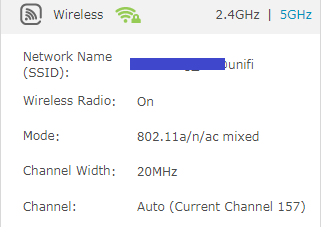
May I know what is the best 5GHz wifi setting for gaming? Example what channel, and etc. Currently using stock firmware for C1200 router

user posted image
*
My suggestion is to change router tongue.gif
TSSilentVampire
post Feb 12 2020, 09:44 AM

Networking Enthusiast
*******
Senior Member
5,714 posts

Joined: Mar 2007


QUOTE(sHawTY @ Feb 12 2020, 09:36 AM)
Bising la kau, macam Maxis kesayangan kau tak pernah buat masalah pulak
No ISP is perfect, but all of them asks for on-time payment. Do you say the same thing about all ISP in the world?
Do you complain about that with Maxis also? No. Every single complain threads about Maxis in here you label them as TM ambassador
To you, it's like there's no valid complain about Maxis at all, Maxis is perfect, Maxis tu macam abah kau punya, that's why die die you defend them like crazy

I don't see you attacking Time Fiber thread when a customer complaint in there
I don't see you attacking Maxis Fiber thread when a customer complain in there
I don't see you attacking Digi Fiber thread when a customer complain in there
I don't see you attacking Celcom Fiber thread when a customer complain in there

No, you only attack TM, whose the real ISP ambassador here?

Look at my previous post in here, I also complain about TM, because unlike you, I'm not a die hard fan of an ISP
Every ISP has their weaknesses, but I don't do what you do, attacking them relentlessly
*
Bro, ignore him. He is probably being paid by Maxis, whereas we are all volunteers and we're not being paid.

5 Pages < 1 2 3 4 > » Top
Topic ClosedOptions
 

Change to:
| Lo-Fi Version
0.1663sec    0.30    7 queries    GZIP Disabled
Time is now: 3rd December 2025 - 06:41 PM