Welcome Guest ( Log In | Register )

Bump Topic Topic Closed RSS Feed
5 Pages « < 2 3 4 5 >Bottom

Outline · [ Standard ] · Linear+

Unifi Official TM UniFi High Speed Broadband Thread V38, READ 1ST PAGE FOR TURBO SPEED INFO!

views
     
TSSilentVampire
post Mar 15 2020, 06:29 PM

Networking Enthusiast
*******
Senior Member
5,714 posts

Joined: Mar 2007


QUOTE(sHawTY @ Mar 15 2020, 01:11 PM)
SilentVampire we should create a topic that lists all places that has UniFi / Maxis Fiber & Time Fiber coverage
Also for UniFi & Maxis Fiber, we should separate between FTTH / VDSL

It can help people whose looking for internet coverage
*
I agree, but it would be quite hard to keep track of all the places tbh.

This post has been edited by SilentVampire: Mar 15 2020, 06:30 PM
TSSilentVampire
post Mar 16 2020, 09:22 PM

Networking Enthusiast
*******
Senior Member
5,714 posts

Joined: Mar 2007


QUOTE(Rhetoric @ Mar 16 2020, 02:27 PM)
im not well verse. what is some good brand?. Ugreen is branded?
*
You should read the 1st page, 1st post, green text. Get Dintek cables.

QUOTE(Dylnyat @ Mar 16 2020, 08:06 PM)
Sifu, again.
Any of you have experience this problem? ,

The problem is,

When I'm on gmail,twitter,mi home, and etc. When I'm on my unifi (50mbps @ router Nettis) the apps or the contain wont load or shows. Examples, when I'm on twitter. The image & videos wont loads. But when i change to Mobile data, the contain loads smoothly. This happen quite regularly.

So yesterday i make a report to TM, than today the technician came. And check2 all my connection etc. Hhe say, everything is in good condition.  My internet run fast, no problems. 

Why I'm facing this issue???

So , how do i fix this or what should tm do?

The tplink@tm out of stock. They can't change my router.
Sifuuu help! Any of you facing this problems.

This is frustrating......
*
Change your router la. Buy your own router, and change. You won’t have that problem anymore. That Netis router is shit.

TSSilentVampire
post Mar 18 2020, 10:18 PM

Networking Enthusiast
*******
Senior Member
5,714 posts

Joined: Mar 2007


QUOTE(nomercy1206 @ Mar 18 2020, 08:39 PM)
Hi guys,wanna ask a question.
Currently I'm using Unifi 300mbps package
Since 3 months ago,my home internet very unstable,sometime high ,sometime low. Especially when play my PS multiplayer game,fed up like wanna throw the controller.
Been called to TM center 3 times,they only can do is reset my plot, it ok with 3 to 4 days only,then back to same issue again.
Last week I ask for technician visit,they use their equipment do the testing and it show working fine.
I try to change the cables from BTU to router,change LAN channel,but issue still the same.
Anyone facing this kind issue before? Can provide assistant that how to solve?
Thanks in advance.
*
What router are you using? If it is TM stock router, that is the source of your problem. The only solution is to change router.
TSSilentVampire
post Mar 20 2020, 08:26 AM

Networking Enthusiast
*******
Senior Member
5,714 posts

Joined: Mar 2007


QUOTE(oec88 @ Mar 19 2020, 09:44 PM)
Just to share the technical issue I am facing today and I have discovered some workaround, but I believe it is not a permanent solution to the issue.

One week ago my home experienced no internet connectivity, basically my TP Link Archer AC1200 router cannot pick up any IP address and it keeps showing 0.0.0.0. I thought the issue is with the fiber optic cable connector, took them off and blow off dust then plugged back in, 20 minutes later they connected back to Internet without issue.

Today my AC1200 decided to do a self reboot and then same issue occurred. Today the issue became worst, I faced 4 hours of down time without internet and imagine I am working from home with current Restricted Movement policy. Immediately I borrowed another router from my cousin, D-Link DIR-850L. When connected for the first time, inside the DIR-850L router has my cousin details which already expired. Immediately I am given with private IP range starting with 172.24 and showing limited connection. So I changed it to my Unifi login details then internet starts to work again.

Due to the DIR-850L power plug was connected to the power outlet at inconvenience location, I turned the device off and moved the power plug to another power outlet replacing the AC1200. Turned back on and again it was not picking up any IP address and showing 0.0.0.0. I tried my best to recall back the original method I did to the DIR-850L, putting my cousin details back forcing it to connect to private IP 172.24, then switch to my account details, then it starts to working well again.

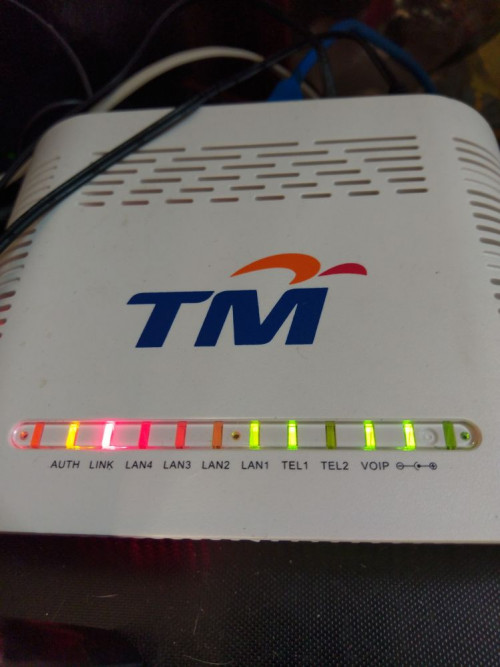
The main device that connected with Fiber Optic cable has TEL1, VOIP, AUTH and LINK LED turning on at all time. Whenever I unplugged the fiber optic cable, they went off. When I plugged the fiber optic cable back in, they came on again. I assume the fiber optic is working fine.

Contacted TM for assistance but they seem really lack of technical knowledge of their own internet service and configuration, all they did was helped to reset the port for 3 times in total and during the call with them, my side still not picking up any IP addresses.

Anyone has idea what is going on? The issue is with the fiber connection, or the station outside by house, or the TM itself?
*
It sounds like your original router which is crap, is failing and the new router is not a good one as well. I would suggest buying a new router.

TSSilentVampire
post Mar 22 2020, 07:51 PM

Networking Enthusiast
*******
Senior Member
5,714 posts

Joined: Mar 2007


QUOTE(nightshade_nova @ Mar 22 2020, 01:29 PM)
I think they are throttling some streaming sites. My Twitch is so laggy. I can only watch at a decent streaming rate after I installed a free VPN.

If this goes on, will probably sub to a VPN. But for now, just using the free ProtonVPN.
*
I wild suggest you pay for a VPN, instead of using a free VPN. If you are using it and it is free, you are the product. They are probably selling your data and your browsing information, as well as your personal information.

QUOTE(wkwong91 @ Mar 22 2020, 07:11 PM)
hi guys, any recommendation for wifi router to replace netis? currently on 100mbps. budget around RM100+
*
Your budget is way too low to get anything good. Increase your budget, and then you will have options.
TSSilentVampire
post Mar 25 2020, 12:26 PM

Networking Enthusiast
*******
Senior Member
5,714 posts

Joined: Mar 2007


QUOTE(Yoooo @ Mar 25 2020, 12:13 PM)
Hi All,

Would like to ask what router that TM will be provided for 100Mbps packages?

Because my existing Dlink DIR842 router got problem with the Wifi, cannot load the webpage, speed test also speed cut and stop halfway, only can be using with LAN cable connection (can get full speed without interruption).
I had reset the whole router, also same condition.

I have contacted TM via apps, the officer helped to re-flash the port, also cannot work. So they agreed that most likely is the router got problem. Unfortunately, the warranty has been over, the officer said can either renew the package to get a new router or buy a new router with them.

that is why would like check with you all what router that TM will be provided for 100Mbps package. And also whether is possible to upgrade the router with better option with paying additional to them.

thanks
*
It is possible to get the Deco P9 from them, if you pay extra. However, I would strongly recommend that you get your own router, and I recommend Asus. Don't bother getting a new one from them.
TSSilentVampire
post Apr 5 2020, 03:07 PM

Networking Enthusiast
*******
Senior Member
5,714 posts

Joined: Mar 2007


QUOTE(weezycheck @ Apr 4 2020, 09:56 PM)
Hi there, I would like to seek some advice regarding my wifi router setup.

Currently, I am using a Dlink DIR-842 C2 as the main router(located downstairs in the living room) and my Fibre Optic Modem is an old one provided by Unifi.
user posted image
user posted image

                                                      (Pictures taken from Google)


Based on my subscription,  my current max speed is 500mbps, but on a Wifi speed test connected to the 2.4ghz, I only get 30mbps from my room( which is upstairs located at the far end of the house).  I plan to have a setup to extend and have stable coverage both 2.4 and 5ghz connection around the house ( upstairs and downstairs ).

Currently in my thoughts is to ask Unifi to change my Fibre Modem( i believe the latest one is Huawei? I might be wrong) and get a Tenda router as the main router. Will that be sufficient?

Also, will Unifi charge a fee for the upgrade of the Fibre Modem? Looking forward to some advice, thank you
*
Why do you need to change your modem/BTU? Look at the bottom of your modem/BTU and see the model, and refer to the first thread on the first page, to see if your modem/BTU support 1Gbps speed. If it supports 1Gbps speed, then you don't need to change. However, your router needs to be changed.

Tenda won't be sufficient. I would suggest that you change to a mesh WiFi solution. Deco M9 Plus would be my suggestion. You can try AiMesh too. But, having one single Tenda router won't be sufficient.

QUOTE(MX510 @ Apr 5 2020, 02:39 PM)
*UPDATE*

NOC detected multiple links having traffic congestion pattern >90%. Congestion pattern observe started when Restriction Movement initiated on 18/3/2020.

*As 1/4/2020@1700hrs: Observed 220 links with >90% utilization.190 links already offloaded.*

*Next Action Plan:*
- To perform links capacity upgrade & offloading by prioritizing on links having flat trend traffic & complains.
- Next offload activity tonight 2/4/2020 for area (Labuan, Alor Akar, Bukit Anggerik, Kg. Tawas)

1. Links were offloaded on 19/3/2020 (Rawang, Semenyih, Meru, Bintang, Kulim, Kota Bharu, Lapangan Terbang Subang, Sungai Buloh). ✅

2. Links were offloaded 20/3/2020 (2 x Alor Setar, Kuching, Batu Pahat, Paser Puteh (Perak), 2 x Tawau, Sungai Buloh, Maluri, Bandar Utama Seremban, Gombak, Senawang, Sibu, Hiliran, Keramat, 2 x Elapora) ✅

3. Links were offloaded on 21/3/2020 (Seberang Kaya,Teluk intan,2 x Air Keroh,Bangi, 2 x Kajang,Kuang,Malim,Miri,Melati,Pandan,Seremban,Taman Petaling,Butterworth) ✅

4. Links were offloaded on 22/3/2020 ( Ria,K.Bahru,Teruntum,Kota Kinabalu,Selayang Baru,Semenyih)✅

5. Links were offloaded on 23/3/2020 (Lutong,Melaka,Melawati,Semenyih,Setiawan,Teluk Intan,Kangar,Bayan Baru,Kubang Kerian,Temerloh,Putrajaya, 2 x Klang,Tasek Ampang,Kota Kinabalu,Jalan Kebun, 2 xTasek) ✅

6. Links were offloaded on 24/3/2020 (Setapak,Kepong,Puchong,Selayang Baru,Serdang,Balakong,Sg.Plong,Subang Jaya,Kinrara,Tmn.Petaling & Skudai) ✅

7. Link were offloaded on 25/3/2020 (Alor Setar (x2),Jalan Langat,Salak Tinggi,Sg Petani,Jitra,Bkt Tengah,Bintulu) ✅

8. Link were offloaded on 26/3/2020 (Cheras, Sg. Way, Bukit Angerik, Batu, Kinrara, Tampoi, Kepong, Balakong, Jln. Kebun, Taman Petaling, Teruntum, Rasah (x3), Kluang (x5)) ✅

9. Link were offloaded on 27/3/2020 (Batu Pahat, Gong Badak, Gombak, Sg. Buluh, Maluri, Putrajaya, Taiping, Seremban, Terengganu, Semenyih, Setiawan) ✅

10. Link were offloaded on 28/3/2020 (Muar,Komtar,Melaka (x4),Kelang (x2),Tasek (x2) ✅

11.  Link were offloaded on 29/3/2020 HSBB (11) (Sg Petani , Salak Tinggi , Malim, Sg Buloh, Temerloh, Bintulu, 2x Puchong, Maluri, Petrajaya, Subang. HSBA (5) - Selayang Baru, Kajang, Shah Alam, Subang Jaya,Klang) ✅

12. Link were offloaded on 30/3/2020 (Rasah, Kuala Terengganu) ✅

13. Link were offloaded on 31/3/2020 (Saga, Serdang, Jalan Langat, Lapangan Terbang Subang, Taman Tun Dr. Ismail, Sentul, Kelana Jaya, Batu, Kepong, Pontian) ✅

14. Link were offloaded on 1/4/2020 (Johor Bahru, 2 x Kluang, Batu, Klang, RIA, Sg Petani,Salak Tinggi, Pontian) ✅
*Observation as of 1/4@1700hrs*

Impact: Unifi users at this area will experience slow browsing issue.

Central
-  Bukit Anggerik, Taman Petaling, Kelana Jaya, Subang Jaya, Jalan Kebun, Klang, Kinrara, Selayang Baru, Subang Jaya, Lapangan Terbang Subang, Taman Tun Dr. Ismail

East Malaysia
- Inanam

Northern
- Ria

Southern
- Batu Pahat, Muar

Eastern
- None

Impact : Streamyx users at these area will experience slow browsing issue.

Batu Pahat, Muar, Tasek, Klang, Jelapang, Mengelembu, Kota Bharu, Kluang

ACR as of 1/04@1700hrs
TMBAU : 55.35%
TMUC: 55.17%
CTT Closed: 630/630

SOCMED status: Received complaint on Slow Browsing issue

Thank You

This one from insider
*
It looks legit. Offloading links eh? I thought TM doesn't cap any traffic according to them smh.

TSSilentVampire
post Apr 8 2020, 11:12 AM

Networking Enthusiast
*******
Senior Member
5,714 posts

Joined: Mar 2007


QUOTE(Fantasia @ Apr 8 2020, 11:10 AM)
Is Asus RT-AX3000 the best router under RM 800?
*
Yes, it is at this current time.
TSSilentVampire
post Apr 8 2020, 10:01 PM

Networking Enthusiast
*******
Senior Member
5,714 posts

Joined: Mar 2007


QUOTE(Xnet @ Apr 8 2020, 01:09 PM)
Support AiMesh?
*
Yes.

QUOTE(dannielshazmeer @ Apr 8 2020, 09:33 PM)
why i cannot access https://www.mypad4k.com/live .. try anyone test this website ...
*
Unifi is blocking access.

QUOTE(michaelkkl @ Apr 8 2020, 09:37 PM)
Guys, enable your IPv6.
Some of the website load better with IPv6, especially cloudflare sites
*
Maybe it works for some.
TSSilentVampire
post Apr 10 2020, 03:07 AM

Networking Enthusiast
*******
Senior Member
5,714 posts

Joined: Mar 2007


QUOTE(dannielshazmeer @ Apr 10 2020, 02:21 AM)
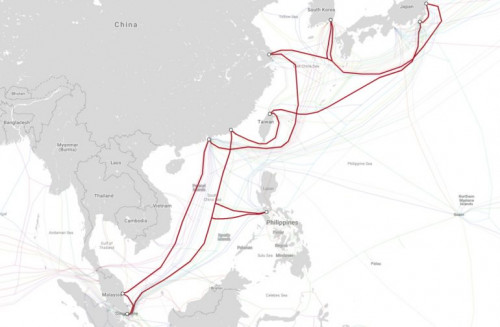
Submarine Cable Faults Are Causing Disruptions To Malaysia’s Internet Service
TM has revealed that faults have been detected on the Asia Pacific Cable Network 2 (APCN2) which is causing disruptions to Malaysia’s Internet service. The fault has been isolated to Segment 3 of the cable system, which is located between Lantau in Hong Kong and Chongming in China.

Malaysia’s connection is directly linked to Lantau through Segment 2 of APCN 2 from Kuantan. The faults are also affecting connections between Malaysia and the United States.

This has led to some service degradation when accessing websites and services that are hosted in Hong Kong and the US. The consortium behind APCN2 which also includes TM among its 45 members have kick started the effort to repair these faults.

At the same time, TM has also completed mitigation works as well as traffic rerouting and optimization in order reduce the impact on consumers. The outage is not great news during the on-going Movement Control Order (MCO) where traffic consumption is already at record highs, but as with previous incidences, its almost impossible to predict or mitigate a submarine cable fault.

Source from :https://www.lowyat.net/2020/210400/apcn-2-faults-disrupt-malaysia-internet/

user posted image
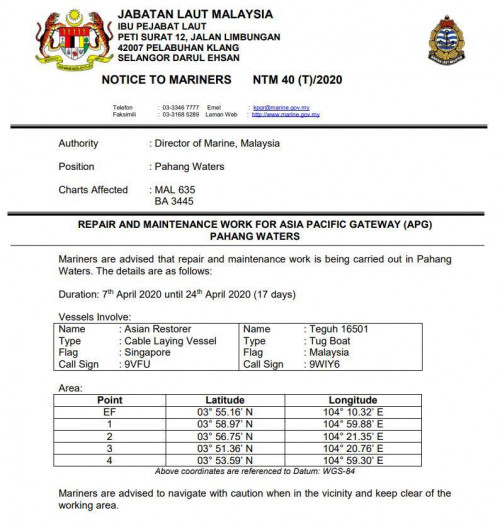
Restoration Work from 7 April to 24 April 2020

user posted image
*
This should be the main issue why the Internet is quite slow these past few days. Since it is already public, I'm actually aware of this and the fault actually occurred at 11am on 8th April 2020, which is two days ago. I'm a network engineer working in an enterprise MNC that are involved in maintenance and configuration of IPLC services for enterprise clients, and we get direct updates from the companies that manage these subsea cables, so I do know the inside scoop.

Anyway, since then, traffic have been affected for our clients, both local and international. It is no surprise that home users would be affected too. ETR will usually take about two to three weeks. Just wait till it is better, and hope that there is no delays. Per the article, they have rerouted the circuits, but it won't be as fast.

This post has been edited by SilentVampire: Apr 10 2020, 06:27 AM
TSSilentVampire
post Apr 10 2020, 01:00 PM

Networking Enthusiast
*******
Senior Member
5,714 posts

Joined: Mar 2007


QUOTE(loonsave @ Apr 10 2020, 10:25 AM)
So this explained why my smokeping graph started broken around 11:30am on 8 April 2020.  biggrin.gif
I believed due to the segment 3 was broken, most traffic rerouted to Singapore and caused the congestion.
Thanks for your info.  notworthy.gif
*
thumbup.gif

QUOTE(Ahmaz @ Apr 10 2020, 11:25 AM)
1. Undersea cables belong to a consortium comprising of multiple companies from various countries. It's not any one company/country's fault.
2. Current industry practices / limitations make it very difficult / nigh impossible to be predictive / proactive in maintenance of undersea cables, hence the reactionary measures in place.
*
I agree with this statement. You are exactly right in these two points.

QUOTE(Candy12 @ Apr 10 2020, 12:35 PM)
Alternative ISPs such as TIME dot com could avoid this by redirecting to another submarine cable links such as APG (30 Tbps) or even SJC (28 Tbps) if needed?

https://www.submarinenetworks.com/systems/intra-asia/apg
https://www.submarinenetworks.com/en/systems/intra-asia/sjc
*
They could, but they would have to go through some bureaucratic processes and some major configuration to do so. It is not that easy to just redirect traffic to different cable links.
TSSilentVampire
post Apr 17 2020, 02:39 PM

Networking Enthusiast
*******
Senior Member
5,714 posts

Joined: Mar 2007


QUOTE(achong09 @ Apr 17 2020, 02:06 PM)
i dont knw.. i just request for unifi mesh from TM. i dont know what they will be sending to me.. i have 500Mb/s line

Kindly advise?
*
It is not Unifi mesh. It is TP-Link Deco M4. It is good, but I prefer the Deco M5 or even M9 Plus. I would recommend you get the Deco M9 Plus by yourself. It is worth the price.
TSSilentVampire
post Apr 23 2020, 07:05 PM

Networking Enthusiast
*******
Senior Member
5,714 posts

Joined: Mar 2007


QUOTE(Yoooo @ Apr 23 2020, 05:33 PM)
Honestly, the one they provided to me (Dlink DIR842) really not lasting, just about 16 months, already has problem.

I have called TM for renew my contract to get a new, during that time, the TM officer can tell what my current router setting status as well (He knew that I have switch off the 2.4Ghz wifi signal). Means the stock TM firmware can be accessed by TM technician.
*
bangwall.gif bangwall.gif bangwall.gif

You should just bought your own router, as mentioned by bro sHawTY. No point renewing contract when all they give is a shitty router.
TSSilentVampire
post Apr 26 2020, 06:19 PM

Networking Enthusiast
*******
Senior Member
5,714 posts

Joined: Mar 2007


QUOTE(Kelvynlim @ Apr 26 2020, 03:55 PM)
Hi bro, thank you for the suggestion too.. may I know between TP link and ASUS, which is more stable? I am considering between RTAC66U vs TP link AC2300. Thank you in advance for your input.

I am not a tech savvy therefore ease of setting up is also my consideration too.
*
Neither. Get the Asus RT-AC68U. However, if you have to chose between the two, get the Asus RT-AC66U. It is very easy to set up and very straightforward.
TSSilentVampire
post Apr 29 2020, 04:49 PM

Networking Enthusiast
*******
Senior Member
5,714 posts

Joined: Mar 2007


QUOTE(Yoooo @ Apr 29 2020, 04:38 PM)
TM has sent me the wifi router, now they provide the Netis DL4480V1.
The internet is little bit smoother now because the Dlink DIR842 already got problem previously.

But this Netis wifi signal really crap... the signal strength detected stronger (3bars, sometimes 4bars) at upstairs than my Asus RT-N14UHP, but actually cannot load the internet at all. My Asus RT-N14UHP still can have around 10Mbps speed although just have 2 bars signal.

Really got to save money to have a better router. Asus AC66U compare to new AC59U, which 1 better?
*
We did warn you that TM's stock router is crap. Neither, I recommend AC68U. However, if you can only choose between both, AC66U should be better than AC59U.
TSSilentVampire
post Apr 30 2020, 12:12 PM

Networking Enthusiast
*******
Senior Member
5,714 posts

Joined: Mar 2007


QUOTE(Kelvynlim @ Apr 29 2020, 09:16 PM)
Comparing to AC68u, what about the AX3000? their price is almost the same.. any advice? I am looking for more long terms
*
AX3000 is a better buy if you’re looking for long term.
TSSilentVampire
post May 1 2020, 02:09 PM

Networking Enthusiast
*******
Senior Member
5,714 posts

Joined: Mar 2007


QUOTE(boner672 @ May 1 2020, 07:48 AM)
Hi guys, im using Dlink DIR-842 TM. Previously i set my router to auto reboot at 6am and the router doesnt have any problem to connect to the internet, but this past few days it having problem connecting to it.

I need to disconnect manually few times to get back the internet. Is it the router faulty or is there anyway around it?
*
My only advice to you is to change to your own third party router, and preferably Asus.
TSSilentVampire
post May 2 2020, 07:55 PM

Networking Enthusiast
*******
Senior Member
5,714 posts

Joined: Mar 2007


QUOTE(hustlerism @ May 2 2020, 07:16 PM)
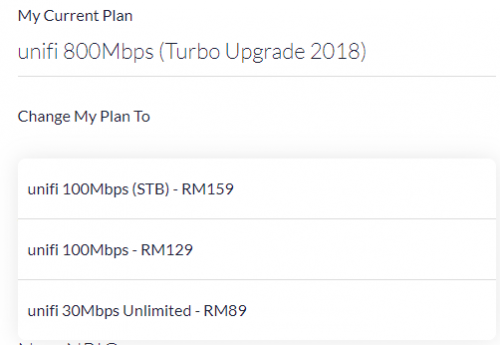
What is the difference between 100mbps (STB) and 100mbps?

what does STB stands for?

user posted image
*
STB stands for Set Top Box. With RM159, you will get the Unifi TV box that you can plug into your TV to watch UnifiTV. With the 100Mbps RM129, you won't get that box and you get the username and password that you can only use with the UnifiTV app.
TSSilentVampire
post May 3 2020, 11:35 AM

Networking Enthusiast
*******
Senior Member
5,714 posts

Joined: Mar 2007


QUOTE(hustlerism @ May 2 2020, 08:08 PM)
my current plan have a unifi tv box.

so what will happen if i downgrade my plan to 100mbps RM129?
*
I’m not sure.
TSSilentVampire
post May 5 2020, 05:35 PM

Networking Enthusiast
*******
Senior Member
5,714 posts

Joined: Mar 2007


QUOTE(Rhetoric @ May 5 2020, 04:47 PM)
If im buying new router which one do I change?, the Huawei box or the Netis box?.

Btw eli5 what is this 2 boxes actually is, router, modem, gateway?.
*
You change the Netis box. However, TM recently does some new installations which combined both modem and router, so you can't really change even if you want to.

If you want to know more, click the link on my signature and it will take you to the first page which have a lot of information about this. Refer to the green text. Good luck, and happy learning.

5 Pages « < 2 3 4 5 >Top
Topic ClosedOptions
 

Change to:
| Lo-Fi Version
0.1951sec    0.62    7 queries    GZIP Disabled
Time is now: 4th December 2025 - 12:28 PM