Welcome Guest ( Log In | Register )

Outline · [ Standard ] · Linear+

 Problem with Tp-link Deco M5

views
     
TSVio
post Apr 24 2019, 09:11 PM, updated 7y ago

Enthusiast
*****
Senior Member
829 posts

Joined: Jan 2007
From: KL
im tried following the tut video on how to setup but keep showing no connection.

Im currently on tp link ac1200

can anyone kindly advise what am i doing wrong here?

planned to use the deco to improve network coverage at my place.
SilentVampire
post Apr 24 2019, 09:28 PM

Networking Enthusiast
*******
Senior Member
5,714 posts

Joined: Mar 2007


QUOTE(Vio @ Apr 24 2019, 09:11 PM)
im tried following the tut video on how to setup but keep showing no connection.

Im currently on tp link ac1200

can anyone kindly advise what am i doing wrong here?

planned to use the deco to improve network coverage at my place.
*
Did you enable VLAN or configure the VLAN settings?
blacktubi
post Apr 24 2019, 11:02 PM

-
Group Icon
Elite
8,420 posts

Joined: Jul 2008

QUOTE(Vio @ Apr 24 2019, 09:11 PM)
im tried following the tut video on how to setup but keep showing no connection.

Im currently on tp link ac1200

can anyone kindly advise what am i doing wrong here?

planned to use the deco to improve network coverage at my place.
*


Make sure you watch the right video.
TSVio
post Apr 25 2019, 06:38 PM

Enthusiast
*****
Senior Member
829 posts

Joined: Jan 2007
From: KL
QUOTE(SilentVampire @ Apr 24 2019, 09:28 PM)
Did you enable VLAN or configure the VLAN settings?
*
i didnt enable nor configure anything, followed exactly what was instructed in the video

QUOTE(blacktubi @ Apr 24 2019, 11:02 PM)


Make sure you watch the right video.
*
i did bro, from ur website, but weird, all managed to setup but it keeps saying theres no connection
blacktubi
post Apr 25 2019, 07:37 PM

-
Group Icon
Elite
8,420 posts

Joined: Jul 2008

QUOTE(Vio @ Apr 25 2019, 06:38 PM)
i didnt enable nor configure anything, followed exactly what was instructed in the video
i did bro, from ur website, but weird, all managed to setup but it keeps saying theres no connection
*
Is it connected to LAN 1 of the BTU if you use Unifi.

Make sure the PPPOE ID and password is right.
TSVio
post Apr 26 2019, 10:03 AM

Enthusiast
*****
Senior Member
829 posts

Joined: Jan 2007
From: KL
QUOTE(blacktubi @ Apr 25 2019, 07:37 PM)
Is it connected to LAN 1 of the BTU if you use Unifi.

Make sure the PPPOE ID and password is right.
*
i dont have the BTU unit , my apologies, im on unifi lite i think, thats the reason why i dont have the BTU unit

may i ask if the 1st deco needs to be cable connected to the router at all times?

will this work with just 1? or works best with 2?
OOKAS
post Apr 26 2019, 10:31 AM

New Member
*
Newbie
47 posts

Joined: Sep 2012
From: South City Plaza
QUOTE(Vio @ Apr 24 2019, 09:11 PM)
im tried following the tut video on how to setup but keep showing no connection.

Im currently on tp link ac1200

can anyone kindly advise what am i doing wrong here?

planned to use the deco to improve network coverage at my place.
*
Hi, why not direct contact TP-Link customer service at 03-21414358? They should able to solve the issue.
blacktubi
post Apr 27 2019, 05:17 PM

-
Group Icon
Elite
8,420 posts

Joined: Jul 2008

QUOTE(Vio @ Apr 26 2019, 10:03 AM)
i dont have the BTU unit , my apologies, im on unifi lite i think, thats the reason why i dont have the BTU unit

may i ask if the 1st deco needs to be cable connected to the router at all times?

will this work with just 1? or works best with 2?
*
Your case will be very different if it is Unifi LITE.

For your case you just don't need to use PPPOE mode.

The easiest way to setup is to maintain the provided Unifi Lite NETIS router and connect your Deco M5 to the NETIS router. Reset your Deco M5 and resetup, it should be able to auto detect the Internet connection. smile.gif
TSVio
post Apr 29 2019, 12:27 PM

Enthusiast
*****
Senior Member
829 posts

Joined: Jan 2007
From: KL
QUOTE(OOKAS @ Apr 26 2019, 10:31 AM)
Hi, why not direct contact TP-Link customer service at 03-21414358? They should able to solve the issue.
*
I did try but not getting any response. Maybe because its after working hours.


QUOTE(blacktubi @ Apr 27 2019, 05:17 PM)
Your case will be very different if it is Unifi LITE.

For your case you just don't need to use PPPOE mode.

The easiest way to setup is to maintain the provided Unifi Lite NETIS router and connect your Deco M5 to the NETIS router. Reset your Deco M5 and resetup, it should be able to auto detect the Internet connection. smile.gif
*
Thanks got it running! Also does this also means my router becomes "obsolete" in a way where the signal is actually being broadcast by the deco?

Also when I unplug the cable the deco stops having connection. Shouldn't the deco function as an extender?

blacktubi
post Apr 29 2019, 12:57 PM

-
Group Icon
Elite
8,420 posts

Joined: Jul 2008

QUOTE(Vio @ Apr 29 2019, 12:27 PM)
I did try but not getting any response. Maybe because its after working hours.
Thanks got it running! Also does this also means my router becomes "obsolete" in a way where the signal is actually being broadcast by the deco?

Also when I unplug the cable the deco stops having connection. Shouldn't the deco function as an extender?
*
Yes, you should only be connected to the WiFi of the Deco now.

The Deco is not a WiFi repeater, as a mesh WiFi system, it still have a main unit connected to the internet source.
the_coxz
post Jul 13 2019, 08:03 PM

Getting Started
**
Junior Member
52 posts

Joined: Feb 2009
From: kepong,gombak


Hi, just want to ask...
If want to use m5 in ap mode,
Will the wifi range and speed different compare to use m5 as router?
My concern is , the LAN port on my tp-link archer c1200 is a lot more from m5 😅
SilentVampire
post Jul 13 2019, 08:22 PM

Networking Enthusiast
*******
Senior Member
5,714 posts

Joined: Mar 2007


QUOTE(the_coxz @ Jul 13 2019, 08:03 PM)
Hi, just want to ask...
If  want to use m5 in ap mode,
Will the wifi range and speed different compare to use m5 as router?
My concern is , the LAN port on my tp-link archer c1200 is  a lot more from m5 😅
*
No difference, and if you want more ports, just use a smart switch.
the_coxz
post Jul 22 2019, 08:43 AM

Getting Started
**
Junior Member
52 posts

Joined: Feb 2009
From: kepong,gombak


Hi guys, i just want to ask,
Is it possible to set static route on deco m5?
I tried to find the way to set but failed.
Normal tp-link route can be set..
Not sure about deco m5...
achong09
post Apr 13 2020, 04:58 PM

Regular
******
Senior Member
1,280 posts

Joined: Nov 2016
QUOTE(blacktubi @ Apr 25 2019, 07:37 PM)
Is it connected to LAN 1 of the BTU if you use Unifi.

Make sure the PPPOE ID and password is right.
*
Must connect to btu via cable?

What if i have a computer room downstairs, my btu and router is there then i want my back room to get the wifi connection possible? Currently without mesh backroom cannot access
jacktiew
post Apr 13 2020, 05:42 PM

Getting Started
**
Junior Member
289 posts

Joined: Sep 2012
QUOTE(achong09 @ Apr 13 2020, 04:58 PM)
Must connect to btu via cable?

What if i have a computer room downstairs, my btu and router is there then i want my back room to get the wifi connection possible? Currently without mesh backroom cannot access
*
Each deco comes with 2 or 3 node.

Assume you bought the two pack,
First node is wired to your router or BTU (depend you want setup in router mode or access point mode)

Second node you can put anywhere as long the location between backroom and main node is ideal that can covers your backroom.
achong09
post Apr 13 2020, 07:43 PM

Regular
******
Senior Member
1,280 posts

Joined: Nov 2016
QUOTE(jacktiew @ Apr 13 2020, 05:42 PM)
Each deco comes with 2 or 3 node.

Assume you bought the two pack,
First node is wired to your router or BTU (depend you want setup in router mode or access point mode)

Second node you can put anywhere as long the location between backroom and main node is ideal that can covers your backroom.
*
I just need it for my backroom access internet. Right now cannot cause my router is in the downstairs study room and coverage not strong to the back room...need to setup mesh.

If just need back room to access the internet i use 1 node enough put at upstairs hall the room should be able to access? So no need connect via able to btu?

jacktiew
post Apr 13 2020, 08:45 PM

Getting Started
**
Junior Member
289 posts

Joined: Sep 2012
QUOTE(achong09 @ Apr 13 2020, 07:43 PM)
I just need it for my backroom access internet. Right now cannot cause my router is in the downstairs study room and coverage not strong to the back room...need to setup mesh.

If just need back room to access the internet i use 1 node enough put at upstairs hall the room should be able to access? So no need connect via able to btu?
*
for mesh to work, you need at least two node. First node must wired to btu / router there. Second node maybe can put upstairs living room (wirelessly) maybe.

Not sure how big is your house, if too big then might need 3 node.

This post has been edited by jacktiew: Apr 13 2020, 08:50 PM
achong09
post Apr 14 2020, 08:59 AM

Regular
******
Senior Member
1,280 posts

Joined: Nov 2016
QUOTE(jacktiew @ Apr 13 2020, 08:45 PM)
for mesh to work, you need at least two node. First node must wired to btu / router there. Second node maybe can put upstairs living room (wirelessly) maybe.

Not sure how big is your house, if too big then might need 3 node.
*
I am staying in a double story house.... i have a small study room downstairs facing my car poarch. the back room is facing the kitchen area which is facing the back of the hse.. currently no access so i need to extend the wifi access...

from your description if i put the mesh node 1 in the router / btu ( which sits on my study room) then the 2nd node put upstairs can the signal beem all the way there??? the mesh node that strong?? currently i have some kind of repeater from tplink which i bought from lowyatt and its not really working effectively backroom still not able to access any internet... i just want to be sure before i commit to buy from TM.

jacktiew
post Apr 14 2020, 02:43 PM

Getting Started
**
Junior Member
289 posts

Joined: Sep 2012
QUOTE(achong09 @ Apr 14 2020, 08:59 AM)
I am staying in a double story house.... i have a small study room downstairs facing my car poarch. the back room is facing the kitchen area which is facing the back of the hse.. currently no access so i need to extend the wifi access...

from your description if i put the mesh node 1 in the router / btu ( which sits on my study room) then the 2nd node put upstairs can the signal beem all the way there??? the mesh node that strong?? currently i have some kind of repeater from tplink which i bought from lowyatt and its not really working effectively backroom still not able to access any internet... i just want to be sure before i commit to buy from TM.
*
You can buy it cheaper on lazada/shopee than TM.

I can't speak for you. Maybe the range might be limited if 2 units. But the good thing about mesh is you can add more nodes anytime. If you feel like the range still not good, then you can add another unit.
uputra81
post Apr 16 2020, 07:47 AM

Getting Started
**
Junior Member
287 posts

Joined: Jan 2003


Hi, i just bought deco M5.. i have problem connecting directly to unifi. i just follow current unifi id n password from old modem and choose PPOE but it says no internet connection. If i connect my deco m5 to old router using dynamic ip then it is ok. do i need to call tm for password reset??
uputra81
post Apr 16 2020, 08:47 AM

Getting Started
**
Junior Member
287 posts

Joined: Jan 2003


QUOTE(uputra81 @ Apr 16 2020, 07:47 AM)
Hi, i just bought deco M5.. i have problem connecting directly to unifi. i just follow current unifi id n password from old modem and choose PPOE but it says no internet connection. If i connect my deco m5 to old router using dynamic ip then it is ok. do i need to call tm for password reset??
*
I even tried both units.. is it because my unifi speed is 100mbps n not 500mbps?? wtf..
blacktubi
post Apr 16 2020, 09:17 AM

-
Group Icon
Elite
8,420 posts

Joined: Jul 2008

QUOTE(uputra81 @ Apr 16 2020, 08:47 AM)
I even tried both units.. is it because my unifi speed is 100mbps n not 500mbps?? wtf..
*
Do you select Unifi VLAN profile during setup?
uputra81
post Apr 16 2020, 09:34 AM

Getting Started
**
Junior Member
287 posts

Joined: Jan 2003


QUOTE(blacktubi @ Apr 16 2020, 09:17 AM)
Do you select Unifi VLAN profile during setup?
*
Nope.. now VLAN/IPTV disabled and I connect as DynamicIP to my old router.. then can.. if not all red color.. doh.gif
blacktubi
post Apr 16 2020, 09:37 AM

-
Group Icon
Elite
8,420 posts

Joined: Jul 2008

QUOTE(uputra81 @ Apr 16 2020, 09:34 AM)
Nope.. now VLAN/IPTV disabled and I connect as DynamicIP to my old router.. then can.. if not all red color.. doh.gif
*
If you want to connect to modem and use PPPOE mode, you must turn on VLAN and select Unifi profile.
uputra81
post Apr 16 2020, 09:46 AM

Getting Started
**
Junior Member
287 posts

Joined: Jan 2003


QUOTE(blacktubi @ Apr 16 2020, 09:37 AM)
If you want to connect to modem and use PPPOE mode, you must turn on VLAN and select Unifi profile.
*
I think tried already and is same.. will try again now.

blacktubi
post Apr 16 2020, 09:57 AM

-
Group Icon
Elite
8,420 posts

Joined: Jul 2008

QUOTE(uputra81 @ Apr 16 2020, 09:46 AM)
I think tried already and is same.. will try again now.
*
Make sure it is LAN 1 from Unifi modem to any port of main Deco.


uputra81
post Apr 16 2020, 10:05 AM

Getting Started
**
Junior Member
287 posts

Joined: Jan 2003


QUOTE(uputra81 @ Apr 16 2020, 09:46 AM)
I think tried already and is same.. will try again now.
*
Ok can! thanks!!! icon_rolleyes.gif do i need to enable IPv6?
uputra81
post Apr 16 2020, 10:27 AM

Getting Started
**
Junior Member
287 posts

Joined: Jan 2003


QUOTE(blacktubi @ Apr 16 2020, 09:57 AM)
Make sure it is LAN 1 from Unifi modem to any port of main Deco.
*
I added MAC address too.. I copy as in old router.. currently working..
PPPoE ID and Password, VLAN/IPTV enabled with unifi profile and MAC address..
IPv6 disabled.
blacktubi
post Apr 16 2020, 10:38 AM

-
Group Icon
Elite
8,420 posts

Joined: Jul 2008

QUOTE(uputra81 @ Apr 16 2020, 10:27 AM)
I added MAC address too.. I copy as in old router.. currently working..
PPPoE ID and Password, VLAN/IPTV enabled with unifi profile and MAC address..
IPv6 disabled.
*
Yup, must enable the VLAN profile else it will not connect to TM network.

alexleow81
post Apr 16 2020, 11:00 AM

Liverpool FC
*******
Senior Member
2,784 posts

Joined: Jul 2010


Wondering i am using Deco M5, but when i do the speedtest via deco app, i get full speed, while i use speedtest or fast.com, i am getting lesser speed. Anyone facing this issue?
blacktubi
post Apr 16 2020, 11:01 AM

-
Group Icon
Elite
8,420 posts

Joined: Jul 2008

QUOTE(alexleow81 @ Apr 16 2020, 11:00 AM)
Wondering i am using Deco M5, but when i do the speedtest via deco app, i get full speed, while i use speedtest or fast.com, i am getting lesser speed. Anyone facing this issue?
*
The Deco app will use the closest speedtest server based on the ping.

Besides, because the speedtest is done directly on the router, there will be no loss on transmission.
cnks
post Apr 16 2020, 11:04 AM

Getting Started
**
Junior Member
102 posts

Joined: May 2005


Just got myself a dual pack last week. Everything works well except 2 things.

1. My HyppTV Set Top Box won't work. It shows DMP Connection successful, but when I click into HyppTV, it is stuck at the Splash Screen forever.
2. My MiBox 3S China Edition could not connect to the WiFi.

Any sifu can help?
alexleow81
post Apr 16 2020, 11:05 AM

Liverpool FC
*******
Senior Member
2,784 posts

Joined: Jul 2010


QUOTE(blacktubi @ Apr 16 2020, 11:01 AM)
The Deco app will use the closest speedtest server based on the ping.

Besides, because the speedtest is done directly on the router, there will be no loss on transmission.
*
So meaning even if i do the speedtest externally, this is the speed is get when i connected to that node?
elmodistortion
post Apr 18 2020, 12:02 AM

Casual
***
Junior Member
493 posts

Joined: Nov 2008
From: Localhost : 127.0.0.1/24


QUOTE(blacktubi @ Apr 16 2020, 11:01 AM)
The Deco app will use the closest speedtest server based on the ping.

Besides, because the speedtest is done directly on the router, there will be no loss on transmission.
*
Help 😣

Hi bro, any idea why my deco ethernet backhaul not working
?


My setup is unifi btu - main deco (setup as router) - slave deco.

The slave seem connected thru wifi instead of ethernet.
Any idea? So far Network port for both deco is ok.

This post has been edited by elmodistortion: Apr 18 2020, 09:59 AM
blacktubi
post Apr 18 2020, 12:14 PM

-
Group Icon
Elite
8,420 posts

Joined: Jul 2008

QUOTE(elmodistortion @ Apr 18 2020, 12:02 AM)
Help 😣

Hi bro, any idea why my deco ethernet backhaul not working
?
My setup is unifi btu - main deco (setup as router) - slave deco.

The slave seem connected thru wifi instead of ethernet.
Any idea? So far Network port for both deco is ok.
*
Can you take a screenshot of the VLAN/IPTV setup screen on your Deco app?
elmodistortion
post Apr 18 2020, 12:38 PM

Casual
***
Junior Member
493 posts

Joined: Nov 2008
From: Localhost : 127.0.0.1/24


QUOTE(blacktubi @ Apr 18 2020, 12:14 PM)
Can you take a screenshot of the VLAN/IPTV setup screen on your Deco app?
*
user posted image

As attached. Use preset unifi vlan settings.
blacktubi
post Apr 18 2020, 12:40 PM

-
Group Icon
Elite
8,420 posts

Joined: Jul 2008

QUOTE(elmodistortion @ Apr 18 2020, 12:38 PM)
user posted image

As attached. Use preset unifi vlan settings.
*
Oh crap, you are running the latest firmware where they reserved the second LAN port for HyppTV and there's no way to disable it now. doh.gif

One possible way to solve this is to downgrade to an older firmware using the web interface.


This post has been edited by blacktubi: Apr 18 2020, 12:40 PM
elmodistortion
post Apr 18 2020, 01:00 PM

Casual
***
Junior Member
493 posts

Joined: Nov 2008
From: Localhost : 127.0.0.1/24


QUOTE(blacktubi @ Apr 18 2020, 12:40 PM)
Oh crap, you are running the latest firmware where they reserved the second LAN port for HyppTV and there's no way to disable it now.  doh.gif

One possible way to solve this is to downgrade to an older firmware using the web interface.
*
I saw there is custom in existing preset unifi. Can u have a look bro?

user posted image
elmodistortion
post Apr 18 2020, 01:02 PM

Casual
***
Junior Member
493 posts

Joined: Nov 2008
From: Localhost : 127.0.0.1/24


Anyway I'm also need unifi playtv as now unifi tv channel quite ok.
blacktubi
post Apr 18 2020, 01:16 PM

-
Group Icon
Elite
8,420 posts

Joined: Jul 2008

QUOTE(elmodistortion @ Apr 18 2020, 01:02 PM)
Anyway I'm also need unifi playtv as now unifi tv channel quite ok.
*
You can only choose one. Either Ethernet backhaul or Unifi TV. tongue.gif
elmodistortion
post Apr 18 2020, 02:15 PM

Casual
***
Junior Member
493 posts

Joined: Nov 2008
From: Localhost : 127.0.0.1/24


QUOTE(blacktubi @ Apr 18 2020, 01:16 PM)
You can only choose one. Either Ethernet backhaul or Unifi TV.  tongue.gif
*
Should i disable 2.4ghz and how wireless backhaul connect each deco m5 node? Can this 5ghz use for multiple user in house?


blacktubi
post Apr 18 2020, 02:44 PM

-
Group Icon
Elite
8,420 posts

Joined: Jul 2008

QUOTE(elmodistortion @ Apr 18 2020, 02:15 PM)
Should i disable 2.4ghz and how wireless backhaul connect each deco m5 node? Can this 5ghz use for multiple user in house?
*
No need to do anything special, the Deco M5 works well by default.

Of course it support multiple users.
elmodistortion
post Apr 18 2020, 09:48 PM

Casual
***
Junior Member
493 posts

Joined: Nov 2008
From: Localhost : 127.0.0.1/24


QUOTE(blacktubi @ Apr 18 2020, 02:44 PM)
No need to do anything special, the Deco M5 works well by default.

Of course it support multiple users.
*
Been using for 2 days now. Both deco is quite hot ya. Hotter than my standard unifi router. is it normal?
blacktubi
post Apr 18 2020, 10:29 PM

-
Group Icon
Elite
8,420 posts

Joined: Jul 2008

QUOTE(elmodistortion @ Apr 18 2020, 09:48 PM)
Been using for 2 days now. Both deco is quite hot ya. Hotter than my standard  unifi router. is it normal?
*
Yea, that's totally normal and it will not impact performance.

TP-Link is really trying to make it compact by squeezing a lot of things in a small package.
sunres14
post May 5 2020, 11:10 PM

Getting Started
**
Junior Member
100 posts

Joined: Aug 2013


Hello, Im planning to buy this mesh system and looking to see what would the best setup be?

Current setup: Unifi router connection have 1 connection to HyppTV, 1 connection to the Unifi Modem and 1 connection to CCTV

If I buy this mesh, whats the best way to connect. Should i directly connect the mesh m5 from the Unifi router and leave the hypptv and cctv at default, or should i make the Deco M5 to dial PPoE but then how would i setup the HyppTV and cctv considering theres only 2 ports.

I could think of getting a switch to expand it however, normal switches wont be able to assign VLAN tagging and stuff. Kindly advice
ju146
post May 10 2020, 11:58 PM

Regular
******
Senior Member
1,594 posts

Joined: Nov 2008
Hi, i managed to setup 2 Deco M5, [main] at living hall and [extended] at study room. It was working fine on that day

After few hours, the extended Deco M5 (at study room) turn into yellow light. I tried to reset this unit, delete both main and extended profile, download updated firmware, press the [Reset] button; but still the extended unit still stuck at yellow light.

Anyone encounter this issue before?
arkana
post May 14 2020, 10:15 PM

Getting Started
**
Junior Member
147 posts

Joined: Dec 2008
Hi I'm currently using TPLink MR200 4G LTE modem and using Yoodo as my simcard data.

Question:
Does Deco Mesh M4/M5 works if I'm using 4G LTE connection as my wifi? Or Deco Mesh only works with Home Fibre Broadband.

Appreciate & thanks for your help.
jacktiew
post May 16 2020, 03:49 PM

Getting Started
**
Junior Member
289 posts

Joined: Sep 2012
QUOTE(arkana @ May 14 2020, 10:15 PM)
Hi I'm currently using TPLink MR200 4G LTE modem and using Yoodo as my simcard data.

Question:
Does Deco Mesh M4/M5 works if I'm using 4G LTE connection as my wifi? Or Deco Mesh only works with Home Fibre Broadband.

Appreciate & thanks for your help.
*
Yes you may. Connect deco M5 to your MR200 LAN port and set it as access point mode will do.
jacktiew
post May 16 2020, 03:52 PM

Getting Started
**
Junior Member
289 posts

Joined: Sep 2012
QUOTE(ju146 @ May 10 2020, 11:58 PM)
Hi, i managed to setup 2 Deco M5, [main] at living hall and [extended] at study room. It was working fine on that day

After few hours, the extended Deco M5 (at study room) turn into yellow light. I tried to reset this unit, delete both main and extended profile, download updated firmware, press the [Reset] button; but still the extended unit still stuck at yellow light.

Anyone encounter this issue before?
*
Do you have faulty adapter? Try if other adapter works or not?

https://www.tp-link.com/us/support/faq/1464/
tailtwist
post May 20 2020, 08:21 PM

Regular
******
Senior Member
1,564 posts

Joined: Jan 2003
From: working@SG, hometown in Kay L


QUOTE(blacktubi @ Apr 18 2020, 12:40 PM)
Oh crap, you are running the latest firmware where they reserved the second LAN port for HyppTV and there's no way to disable it now.  doh.gif

One possible way to solve this is to downgrade to an older firmware using the web interface.
*
so meaning that there's no way to hook up the unused port of the main DECO unit to a switch(managed with the proper VLANs 500 for internet traffic and 600 for IPTV traffic)..correct?
Bumblebee2000 P
post May 26 2020, 10:00 PM

New Member
*
Probation
1 posts

Joined: Dec 2019
QUOTE(cnks @ Apr 16 2020, 11:04 AM)
Just got myself a dual pack last week. Everything works well except 2 things.

1. My HyppTV Set Top Box won't work. It shows DMP Connection successful, but when I click into HyppTV, it is stuck at the Splash Screen forever.
2. My MiBox 3S China Edition could not connect to the WiFi.

Any sifu can help?
*
Hi cnks,
I'm having the same issue. Just setup Deco M9 yesterday and exactly same problem. Had you found a solution?

Anyone can help here? Enabled VLAN, IPTV.

Thanks,
shirley.
cnks
post May 27 2020, 10:09 AM

Getting Started
**
Junior Member
102 posts

Joined: May 2005


QUOTE(Bumblebee2000 @ May 26 2020, 11:00 PM)
Hi cnks,
I'm having the same issue. Just setup Deco M9 yesterday and exactly same problem. Had you found a solution?

Anyone can help here? Enabled VLAN, IPTV.

Thanks,
shirley.
*
Hi there. Unfortunately no. I have sent in a feedback to TP-Link Customer Support as well but have not gotten any reply yet too.
calvinyeap
post May 28 2020, 03:44 PM

Getting Started
**
Junior Member
125 posts

Joined: Oct 2009
QUOTE(blacktubi @ Apr 18 2020, 12:40 PM)
Oh crap, you are running the latest firmware where they reserved the second LAN port for HyppTV and there's no way to disable it now.  doh.gif

One possible way to solve this is to downgrade to an older firmware using the web interface.
*
Unfortunetely unable to downgrade the firmware.
"Upgrade failed. Please select the latest version of firmware to upgrade."


QUOTE(elmodistortion @ Apr 18 2020, 01:00 PM)
I saw there is custom in existing preset unifi. Can u have a look bro?

user posted image
*
I also tried setting this manually, with only Internet VLAN and disable IPTV VLAN but it won't connect to the Internet.

Anyone found a solution to this?

elmodistortion
post May 31 2020, 05:10 PM

Casual
***
Junior Member
493 posts

Joined: Nov 2008
From: Localhost : 127.0.0.1/24


QUOTE(calvinyeap @ May 28 2020, 03:44 PM)
Unfortunetely unable to downgrade the firmware.
"Upgrade failed. Please select the latest version of firmware to upgrade."
I also tried setting this manually, with only Internet VLAN and disable IPTV VLAN but it won't connect to the Internet.

Anyone found a solution to this?
*
it wont connect to internet if we disable IPTV VLAN?
elmodistortion
post Jun 7 2020, 05:21 PM

Casual
***
Junior Member
493 posts

Joined: Nov 2008
From: Localhost : 127.0.0.1/24


I have use custome vlan 500 internet. But sad if i van setup second m5 deco to vlan 600 for second port will be great.
rofreak
post Jul 30 2020, 10:43 PM

Pembakar Tayar
****
Senior Member
596 posts

Joined: Sep 2004
From: localhost


Same here.. i tried to connect to hypptv and its not working.. anyonr have solutions yet?
rofreak
post Aug 2 2020, 10:25 AM

Pembakar Tayar
****
Senior Member
596 posts

Joined: Sep 2004
From: localhost


QUOTE(blacktubi @ Apr 18 2020, 10:29 PM)
Yea, that's totally normal and it will not impact performance.

TP-Link is really trying to make it compact by squeezing a lot of things in a small package.
*
Sifu.. another problem arise. When my smart tv sony connect to m5, it says wifi no Internet access? I cannot even cast to my tv? Any solution for this?
19 Degree South
post Aug 8 2020, 01:28 PM

Regular
******
Senior Member
1,682 posts

Joined: Oct 2012
QUOTE(rofreak @ Aug 2 2020, 10:25 AM)
Sifu.. another problem arise. When my smart tv sony connect to m5, it says wifi no Internet access? I cannot even cast to my tv? Any solution for this?
*
Have you found a solution to this yet? Thinking of M4 or M5 at the moment. smile.gif
cs_militia P
post Sep 12 2020, 02:46 PM

New Member
*
Probation
2 posts

Joined: Sep 2020
Hi guys.

Currently on Time Broadband 500Mbps, with Router Dlink DIR 850L, condo size 1900sqft.

If I change the router to deco M5 1 pack can solve weak wifi in the farthest corner?

Most of the time can only get around 5-15Mbps with a range extender.
Defoe18 P
post Nov 13 2020, 04:02 PM

New Member
*
Probation
2 posts

Joined: Nov 2020
[quote=calvinyeap,May 28 2020, 03:44 PM]
Unfortunetely unable to downgrade the firmware.
"Upgrade failed. Please select the latest version of firmware to upgrade."
I also tried setting this manually, with only Internet VLAN and disable IPTV VLAN but it won't connect to the Internet.

Anyone found a solution to this?
*

[/quote

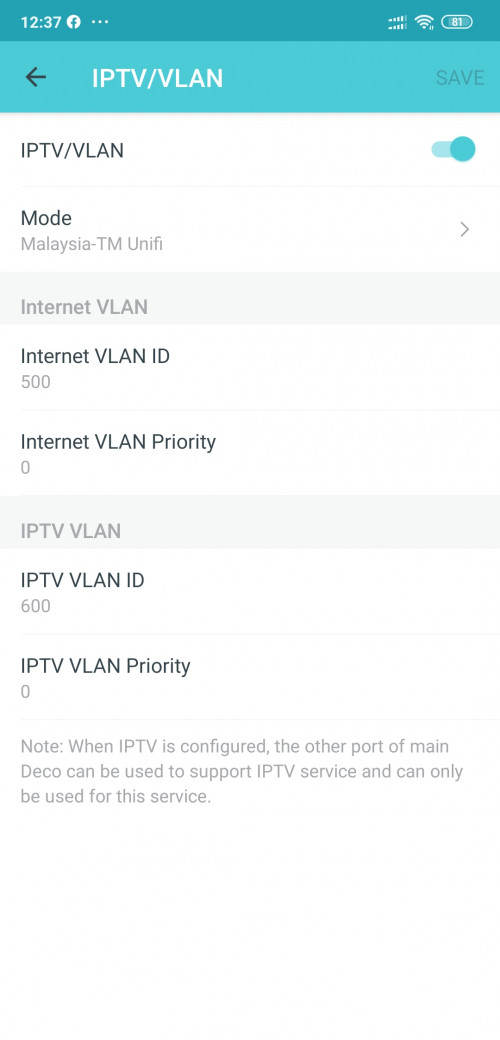
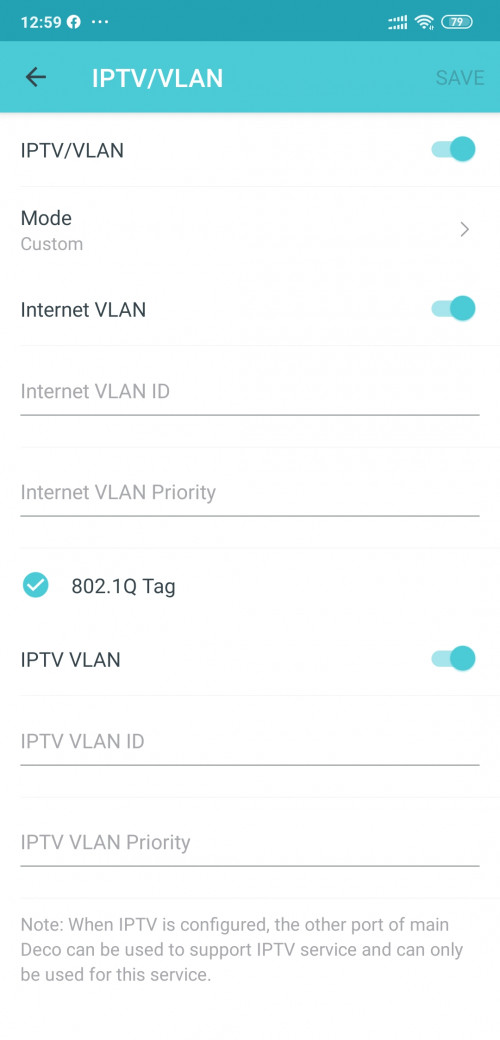
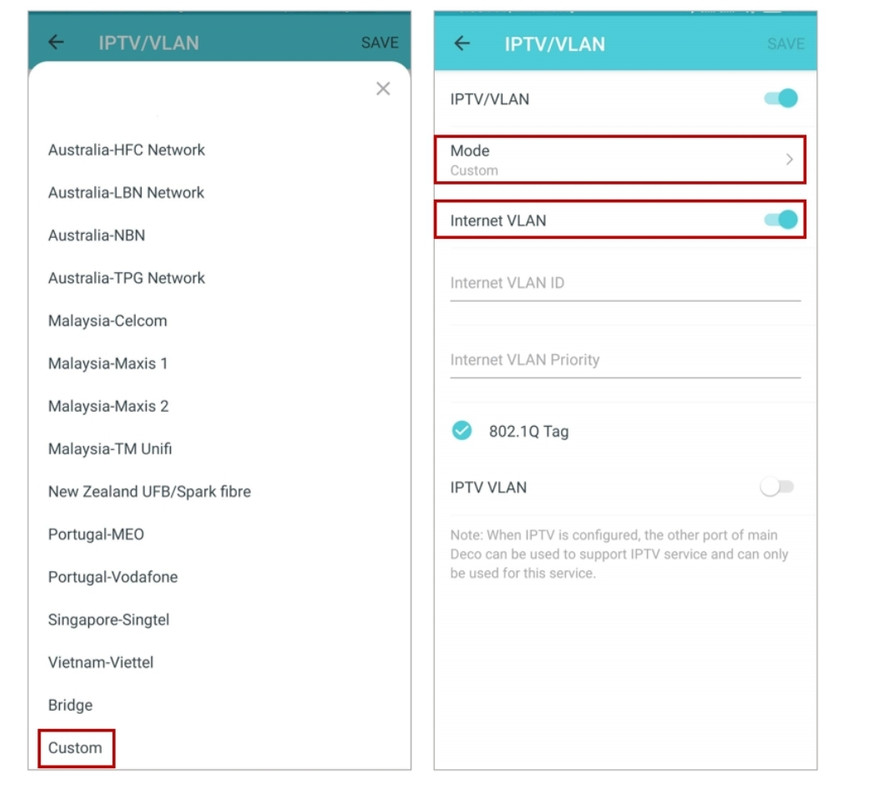
Set the VLAN/IPTV mode as “Custom” instead of “Malaysia-TM Unifi”; put in the internet VLAN ID as 500, priority 0; and tick the 802.1Q Tag. You need to disable the IPTV VLAN button at the bottom.
Anyone knows if this really works?
chengsiong80
post Nov 13 2020, 04:11 PM

Getting Started
**
Junior Member
218 posts

Joined: May 2007


[quote=Defoe18,Nov 13 2020, 04:02 PM]
[quote=calvinyeap,May 28 2020, 03:44 PM]
Unfortunetely unable to downgrade the firmware.
"Upgrade failed. Please select the latest version of firmware to upgrade."
I also tried setting this manually, with only Internet VLAN and disable IPTV VLAN but it won't connect to the Internet.

Anyone found a solution to this?
*

[/quote

Set the VLAN/IPTV mode as “Custom” instead of “Malaysia-TM Unifi”; put in the internet VLAN ID as 500, priority 0; and tick the 802.1Q Tag. You need to disable the IPTV VLAN button at the bottom.
Anyone knows if this really works?
*

[/quote]

Yes, I'm on maxis and i set to custom and disabled the iptv vlan is working fine for me.

This post has been edited by chengsiong80: Nov 13 2020, 04:11 PM

Defoe18 P
post Nov 13 2020, 04:25 PM

New Member
*
Probation
2 posts

Joined: Nov 2020
QUOTE(chengsiong80 @ Nov 13 2020, 04:11 PM)
Yes, I'm on maxis and i set to custom and disabled the iptv vlan is working fine for me.
*
I'm using unifi but I suppose this custom setting would also work for unifi. After using this custom preset, are we able to use the second port to a switch? Anyone tried this? Because I want to connect the other deco to this network switch.
cannavaro
post Nov 14 2020, 10:47 PM

CATTENACIO
*******
Senior Member
3,008 posts

Joined: Sep 2005
From: T.T.D.I, Bukit Damansara


QUOTE(Defoe18 @ Nov 13 2020, 04:25 PM)
I'm using unifi but I suppose this custom setting would also work for unifi.  After using this custom preset, are we able to use the second port to a switch? Anyone tried this? Because I want to connect the other deco to this network switch.
*
Yes it will work. Tested on M4 and M9 Plus
jasondc
post Nov 21 2020, 11:42 AM

New Member
*
Newbie
1 posts

Joined: Feb 2010


hi, i have installed the M5 to replace the TM issued router. Wifi is working fine. But i am not getting any network connection on the 2nd LAN port from the main M5 unit when testing it with my laptop … what is causing this issue, and how can i resolve it? hope someone here can assist me on this. thanks in advance!

[UPDATE] Solved this already, by doing custom settings for the IPTV/VLAN ...

This post has been edited by jasondc: Nov 21 2020, 01:07 PM
Abs0lute
post Dec 1 2020, 08:05 AM

Getting Started
**
Junior Member
50 posts

Joined: Oct 2018
Hi

I tried to setup my deco m4. But failed, it showed red light. I tried 2 methods, connect the cable directly to the modem and also connect it with the router but both method failed.

Any idea?
syler89
post Dec 4 2020, 09:36 PM

Getting Started
**
Junior Member
168 posts

Joined: Jul 2010


Hi all..

Current setup
BTU - Deco M5 - Hypp TV

Im just wondering my TV have been experiencing sudden disconnecting to deco via wireless..therefore i would like to change to wired connection..is there any ways i can add another connection on current setup? If i use switchs can i have an access to hypp tv?
tachlio
post Dec 5 2020, 10:38 AM

de~sign "ing"
*******
Senior Member
3,102 posts

Joined: May 2005
From: Penang *̡͌l̡*̡̡
QUOTE(Abs0lute @ Dec 1 2020, 08:05 AM)
Hi

I tried to setup my deco m4. But failed, it showed red light. I tried 2 methods, connect the cable directly to the modem and also connect it with the router but both method failed.

Any idea?
*
Make sure your deco connect to correct terminal's port.
Eg your old router is connect to port 1, then Deco also need to connect to port 1 to be on router mode.

If your Deco is used, perform hard reset first too.
Abs0lute
post Dec 5 2020, 12:58 PM

Getting Started
**
Junior Member
50 posts

Joined: Oct 2018
QUOTE(tachlio @ Dec 5 2020, 10:38 AM)
Make sure your deco connect to correct terminal's port.
Eg your old router is connect to port 1, then Deco also need to connect to port 1 to be on router mode.

If your Deco is used, perform hard reset first too.
*
okay, i managed to get it connected. thanks!
is it possible to connect the deco directly to the modem?
tachlio
post Dec 5 2020, 01:36 PM

de~sign "ing"
*******
Senior Member
3,102 posts

Joined: May 2005
From: Penang *̡͌l̡*̡̡
QUOTE(Abs0lute @ Dec 5 2020, 12:58 PM)
okay, i managed to get it connected. thanks!
is it possible to connect the deco directly to the modem?
*
Can, then Deco react like access point.
So you need to change the Modem SSID different with Deco or Turn Off Modem SSID else you having same SSID which could leading signal loss when moving around.

Do this only if your Modem is better in term of performance than Deco, else just use Deco as Router.
khieni
post Dec 20 2020, 02:38 PM

Getting Started
**
Junior Member
290 posts

Joined: Nov 2011
I just bought M5, and able to figuredout with ISP Maxis....

Setting follows the Deco app...connection likes below, if you are using Maxis Fibre:-

TM modem LAN2 to Maxis Router WAN...Maxis Router any LAN to Deco M5....

Lesson learnt, if you are Maxis Fibre,do not remove the Maxis Router.....else there is no internet connection
JobCareer
post Jan 18 2021, 04:18 PM

Getting Started
**
Junior Member
241 posts

Joined: Oct 2011
any idea how to check whether is the nodes is connected using ethernet ?
im connecting the nodes using ethernet backhaul but not sure whether its really ethernet or wireslessly...
jacktiew
post Jan 18 2021, 10:21 PM

Getting Started
**
Junior Member
289 posts

Joined: Sep 2012
QUOTE(JobCareer @ Jan 18 2021, 04:18 PM)
any idea how to check whether is the nodes is connected using ethernet ?
im connecting the nodes using ethernet backhaul but not sure whether its really ethernet or wireslessly...
*
Open the deco app, press on the internet icon in the middle. It will list out all the deco unit you have. Press on the unit you want to view, it should have show you're using wireless or wired backhaul.

JobCareer
post Jan 18 2021, 11:16 PM

Getting Started
**
Junior Member
241 posts

Joined: Oct 2011
QUOTE(jacktiew @ Jan 18 2021, 10:21 PM)
Open the deco app, press on the internet icon in the middle. It will list out all the deco unit you have. Press on the unit you want to view, it should have show you're using wireless or wired backhaul.
*
Found it, thanks
jackycrazy
post Feb 5 2021, 11:38 AM

Casual
***
Junior Member
302 posts

Joined: Nov 2010
Hi all, has anyone face this isssue before?

I have 2 Deco M9 Plus and I'm setting Main Deco as PPPoe to Unifi. I'm able to connect to internet via IPTV profile etc, but when I'm setting second Deco at 2nd floor, it alwayd connect to Main Deco via Wifi instead of the Ethernet Backhaul.

If I use the Main Deco connecting to the Original Unifi Router (Dynamic IP settings), then the 2nd unit is able to connect via Ethernet Backhaul.

Tried to upgrade or factory reset also cannot make 1st method work. Try googling around and can't find definite answer
cannavaro
post Feb 6 2021, 09:51 PM

CATTENACIO
*******
Senior Member
3,008 posts

Joined: Sep 2005
From: T.T.D.I, Bukit Damansara


QUOTE(jackycrazy @ Feb 5 2021, 11:38 AM)
Hi all, has anyone face this isssue before?

I have 2 Deco M9 Plus and I'm setting Main Deco as PPPoe to Unifi. I'm able to connect to internet via IPTV profile etc, but when I'm setting second Deco at 2nd floor, it alwayd connect to Main Deco via Wifi instead of the Ethernet Backhaul.

If I use the Main Deco connecting to the Original Unifi Router (Dynamic IP settings), then the 2nd unit is able to connect via Ethernet Backhaul.

Tried to upgrade or factory reset also cannot make 1st method work. Try googling around and can't find definite answer
*
Are you using tm's set top box for the iptv? If not, try using a custom vlan instead of the unifi profile
1 more thing, I remember reading in tp link forum, before you link the decos using ethernet, it is recommended to add the 2nd node to the network first via wifi.
jackycrazy
post Feb 7 2021, 01:21 AM

Casual
***
Junior Member
302 posts

Joined: Nov 2010
QUOTE(cannavaro @ Feb 6 2021, 09:51 PM)
Are you using tm's set top box for the iptv? If not, try using a custom vlan instead of the unifi profile
1 more thing, I remember reading in tp link forum, before you link the decos using ethernet, it is recommended to add the 2nd node to the network first via wifi.
*
Not quite sure what do you mean by top box. But our package don't have the IPTV or HyppTV. So they only provide us two equipments (FiberHome BTU + FiberHome Router).

I haven't try other custom vlan as I can see TM Malaysia profile within Deco List so I selected that one and able to reach internet. Maybe I can try again tomorrow.

I did tried linking the second deco using WiFi @ 1st floor. Then once I move the 2nd deco to 2nd floor, it is still trying to reach main deco via WiFi instead of the Ethernet Backhaul available.

Currently I need to use the Fiberhome as main Router, then the Main deco will be "Router" connecting to Fiberhome using Dynamic IP. Only through this connection, the 2nd deco unit able to connect to main deco via Ethernet Backhaul.
cannavaro
post Feb 7 2021, 02:23 AM

CATTENACIO
*******
Senior Member
3,008 posts

Joined: Sep 2005
From: T.T.D.I, Bukit Damansara


QUOTE(jackycrazy @ Feb 7 2021, 01:21 AM)
Not quite sure what do you mean by top box. But our package don't have the IPTV or HyppTV. So they only provide us two equipments (FiberHome BTU + FiberHome Router).

I haven't try other custom vlan as I can see TM Malaysia profile within Deco List so I selected that one and able to reach internet. Maybe I can try again tomorrow.

I did tried linking the second deco using WiFi @ 1st floor. Then once I move the 2nd deco to 2nd floor, it is still trying to reach main deco via WiFi instead of the Ethernet Backhaul available.

Currently I need to use the Fiberhome as main Router, then the Main deco will be "Router" connecting to Fiberhome using Dynamic IP. Only through this connection, the 2nd deco unit able to connect to main deco via Ethernet Backhaul.
*
set top box = referring to tm white colour iptv box
Since you don't have it, I believe your problem will be solved if you use custom vlan in the deco app
Like this
user posted image
Internet vlan id 500
Priority 0

jackycrazy
post Feb 7 2021, 11:21 PM

Casual
***
Junior Member
302 posts

Joined: Nov 2010
QUOTE(cannavaro @ Feb 7 2021, 02:23 AM)
set top box = referring to tm white colour iptv box
Since you don't have it, I believe your problem will be solved if you use custom vlan in the deco app
Like this
user posted image
Internet vlan id 500
Priority 0
*
I see..thanks for the info...will try it tomorrow...
NubPro
post Feb 9 2021, 03:42 PM

Casual
***
Junior Member
397 posts

Joined: Apr 2012


One of my Deco M5 LAN port went faulty, it is limited to 100Mbps only.
Lets see if I have any luck getting a RMA
eric8188
post Feb 13 2021, 02:09 PM

Getting Started
**
Junior Member
73 posts

Joined: Aug 2006


After using deco now I have 2 WiFi networks. 1 is deco 1 is front the modem router. What should I do towards the non deco WiFi network? Is there a way to turn it off?
tachlio
post Feb 13 2021, 04:22 PM

de~sign "ing"
*******
Senior Member
3,102 posts

Joined: May 2005
From: Penang *̡͌l̡*̡̡
QUOTE(eric8188 @ Feb 13 2021, 02:09 PM)
After using deco now I have 2 WiFi networks. 1 is deco 1 is front the modem router. What should I do towards the non deco WiFi network? Is there a way to turn it off?
*
If you using Deco as AP, then turn on Router Wifi signal.
But Deco can be router by it own.
hussain
post Mar 6 2021, 11:13 AM

Look at all my stars!!
*******
Senior Member
2,012 posts

Joined: Dec 2007
From: Malaysia


Guys ..I need some help ..I installed 2 m5 ..first I tried as direct to modem without router ..no internet connection..but when I connect m5 to router it works ,..can some kind soul share what settings to change to make m 5 as router ?

Also ..now I find after connect m5 to.router ..the original wifi signal become much stronger compared to connect to m5? Am.i missing something?
blacktubi
post Mar 6 2021, 11:14 AM

-
Group Icon
Elite
8,420 posts

Joined: Jul 2008

QUOTE(hussain @ Mar 6 2021, 11:13 AM)
Guys ..I need some help ..I installed 2 m5 ..first I tried as direct to modem without router ..no internet connection..but when I connect m5 to router it works ,..can some kind soul share what settings to change to make m 5 as router ?

Also ..now I find after connect m5 to.router ..the original wifi signal become much stronger compared to connect to m5?  Am.i missing something?
*
When you do a direct connection to the modem, make sure you have the PPPOE username and password from TM
hussain
post Mar 6 2021, 12:23 PM

Look at all my stars!!
*******
Senior Member
2,012 posts

Joined: Dec 2007
From: Malaysia


QUOTE(blacktubi @ Mar 6 2021, 11:14 AM)
When you do a direct connection to the modem, make sure you have the PPPOE username and password from TM
*
Sorry bro ..I'm really blur at this ..do you have the settings ?
jacktiew
post Mar 6 2021, 12:59 PM

Getting Started
**
Junior Member
289 posts

Joined: Sep 2012
QUOTE(hussain @ Mar 6 2021, 12:23 PM)
Sorry bro ..I'm really blur at this ..do you have the settings ?
*


This post has been edited by jacktiew: Mar 6 2021, 01:00 PM
hussain
post Mar 6 2021, 01:28 PM

Look at all my stars!!
*******
Senior Member
2,012 posts

Joined: Dec 2007
From: Malaysia


QUOTE(jacktiew @ Mar 6 2021, 12:59 PM)

*
Thanks bro ...one last question..to connect cctv to main deco 2nd port ..can it be done using the same way as connecting to hypptv method by enabling iptv?
jacktiew
post Mar 6 2021, 01:38 PM

Getting Started
**
Junior Member
289 posts

Joined: Sep 2012
QUOTE(hussain @ Mar 6 2021, 01:28 PM)
Thanks bro ...one last question..to connect cctv to main deco 2nd port ..can it be  done using the same way as connecting to hypptv method by enabling iptv?
*
If you want to use for CCTV, then you don't have to set the IPTV part. Otherwise the port can only use for IPTV.
johnnyg
post Mar 7 2021, 08:27 PM

Getting Started
**
Junior Member
290 posts

Joined: Jul 2008
Hi All,

I had setup a few M5 deco in my house and working fine. I have now got m9 from Unifi with the upgrade. How can I make one of the M9 unit become the main deco that is connected to the router?
tachlio
post Mar 7 2021, 10:24 PM

de~sign "ing"
*******
Senior Member
3,102 posts

Joined: May 2005
From: Penang *̡͌l̡*̡̡
QUOTE(johnnyg @ Mar 7 2021, 08:27 PM)
Hi All,

I had setup a few M5 deco in my house and working fine. I have now got m9 from Unifi with the upgrade. How can I make one of the M9 unit become the main deco that is connected to the router?
*
reset M5, and setup M9 as fresh router, then connect back m5
johnnyg
post Mar 7 2021, 10:35 PM

Getting Started
**
Junior Member
290 posts

Joined: Jul 2008
QUOTE(tachlio @ Mar 7 2021, 10:24 PM)
reset M5, and setup M9 as fresh router, then connect back m5
*
Do I need to reset all M5 in the house or just the one with the router?
jacktiew
post Mar 9 2021, 12:04 AM

Getting Started
**
Junior Member
289 posts

Joined: Sep 2012
QUOTE(johnnyg @ Mar 7 2021, 10:35 PM)
Do I need to reset all M5 in the house or just the one with the router?
*
No need. Just add the M9 to the current setup first.

Then open the deco app, press the internet icon, then press the 3 dots on the right corner and choose M9 as the main deco.

Voila.
johnnyg
post Mar 10 2021, 04:16 PM

Getting Started
**
Junior Member
290 posts

Joined: Jul 2008
QUOTE(jacktiew @ Mar 9 2021, 12:04 AM)
No need. Just add the M9 to the current setup first.

Then open the deco app, press the internet icon, then press the 3 dots on the right corner and choose M9 as the main deco.

Voila.
*
Hi Jack,

My current router (from TM long time ago) is connected using cable to the M5. I would then unplugged the M5 and then connect the M9 and it would work right?
jacktiew
post Mar 10 2021, 04:47 PM

Getting Started
**
Junior Member
289 posts

Joined: Sep 2012
QUOTE(johnnyg @ Mar 10 2021, 04:16 PM)
Hi Jack,

My current router (from TM long time ago) is connected using cable to the M5. I would then unplugged the M5 and then connect the M9 and it would work right?
*
1. Just add the deco m9 to the current setup.
2. Set M9 as main deco.
3. Unplug m5 and connect m9.
4. Done

Edit: Misunderstood your questions just now.

This post has been edited by jacktiew: Mar 10 2021, 07:23 PM
johnnyg
post Mar 10 2021, 08:16 PM

Getting Started
**
Junior Member
290 posts

Joined: Jul 2008
QUOTE(jacktiew @ Mar 10 2021, 04:47 PM)
1. Just add the deco m9 to the current setup.
2. Set M9 as main deco.
3. Unplug m5 and connect m9.
4. Done

Edit: Misunderstood your questions just now.
*
Thanks brother for the explanation. 🙏

skyp
post Mar 14 2021, 03:15 PM

Regular
******
Senior Member
1,289 posts

Joined: Apr 2012
Sorry guys, I also need help with setup my newly bought m5, replacing maxis router.

The setup completed earlier, then suddenly one of the secondary router disconnected.
Reset many times and still doesn't work.
It only work when I placed it next to another working m5 router.

ranger2020
post Jul 10 2021, 10:10 PM

Getting Started
**
Junior Member
214 posts

Joined: Sep 2013
QUOTE(jasondc @ Nov 21 2020, 11:42 AM)
hi, i have installed the M5 to replace the TM issued router. Wifi is working fine. But i am not getting any network connection on the 2nd LAN port from the main M5 unit when testing it with my laptop … what is causing this issue, and how can i resolve it? hope someone here can assist me on this. thanks in advance!

[UPDATE] Solved this already, by doing custom settings for the IPTV/VLAN ...
*
Hi what are the custom settings?

Thanks

cannavaro
post Jul 12 2021, 12:42 PM

CATTENACIO
*******
Senior Member
3,008 posts

Joined: Sep 2005
From: T.T.D.I, Bukit Damansara


QUOTE(ranger2020 @ Jul 10 2021, 10:10 PM)
Hi what are the custom settings?

Thanks
*
user posted image
arkana
post Jul 20 2021, 07:55 PM

Getting Started
**
Junior Member
147 posts

Joined: Dec 2008
Hi need help...

I just bought HP Deskjet Wireless 6475 printer.

I try to connect the printer to my wireless network link to DecoM5 but it seems that it unable to connect and complete the setup.

Anyone encounter before this issue or any advise to solve this issue is much appreciated.

Thank you in advance.
tachlio
post Jul 21 2021, 11:58 AM

de~sign "ing"
*******
Senior Member
3,102 posts

Joined: May 2005
From: Penang *̡͌l̡*̡̡
QUOTE(arkana @ Jul 20 2021, 07:55 PM)
Hi need help...

I just bought HP Deskjet Wireless 6475 printer.

I try to connect the printer to my wireless network link to DecoM5 but it seems that it unable to connect and complete the setup.

Anyone encounter before this issue or any advise to solve this issue is much appreciated.

Thank you in advance.
*
disable 5Ghz during setup
AnuarRahim el renggami P
post Aug 28 2021, 12:02 AM

New Member
*
Probation
2 posts

Joined: Aug 2021
Hie i have almost every post. Can someone guide how to use the m5 direct to the BTU. I cant find the vlan setting on PPPoe. Thanks
praetorion
post Aug 28 2021, 12:06 AM

Getting Started
**
Junior Member
289 posts

Joined: Jan 2003
From: MAS
If you watch the youtube video post, that should get to where you want. VLAN is at the Advanced setting. Look for IPTV/VLAN.

honestly, this thread helped me in more ways that tplink own support team, their forum and website. utter useless.
louis_ong
post Aug 29 2021, 06:04 PM

Getting Started
**
Junior Member
115 posts

Joined: May 2013
Hi…currently I am using router which come with Unifi package model tplink Archer C1200 n I have bought 2pcs of deco m5.

So, I am wondering is it possible to set these 3 : C1200 + 2pcs of M5 with same SSID?

N may I know what’s the best configuration with these equipment?is it better to use deco only instead of mixing these 2 equipments?

Thanks
PRSXFENG
post Aug 29 2021, 06:25 PM

Look at all my stars!!
*******
Senior Member
2,613 posts

Joined: Nov 2020


QUOTE(louis_ong @ Aug 29 2021, 06:04 PM)
Hi…currently I am using router which come with Unifi package model tplink Archer C1200 n I have bought 2pcs of deco m5.

So, I am wondering is it possible to set these 3 : C1200 + 2pcs of M5 with same SSID?

N may I know what’s the best configuration with these equipment?is it better to use deco only instead of mixing these 2 equipments?

Thanks
*
Use only deco better.
louis_ong
post Aug 30 2021, 08:10 AM

Getting Started
**
Junior Member
115 posts

Joined: May 2013
QUOTE(PRSXFENG @ Aug 29 2021, 06:25 PM)
Use only deco better.
*
Noted…thanks for yr suggestion

But b4 u get another set of deco, is it possible for me to set it up for same SSID for these 3 connection point?
SilentVampire
post Aug 30 2021, 09:50 AM

Networking Enthusiast
*******
Senior Member
5,714 posts

Joined: Mar 2007


QUOTE(louis_ong @ Aug 30 2021, 08:10 AM)
Noted…thanks for yr suggestion

But b4 u get another set of deco, is it possible for me to set it up for same SSID for these 3 connection point?
*
Yes, it is possible, but you would not want to do that because it is better for the whole network in your home to be Deco only.
hussain
post Aug 30 2021, 03:38 PM

Look at all my stars!!
*******
Senior Member
2,012 posts

Joined: Dec 2007
From: Malaysia


QUOTE(SilentVampire @ Aug 30 2021, 09:50 AM)
Yes, it is possible, but you would not want to do that because it is better for the whole network in your home to be Deco only.
*
sorry..i may have installed mine differently then..meaning i dont need to use the modem provided by unify and use my deco as the modem and mesh?
deepan84
post Aug 30 2021, 04:26 PM

White Rider
*******
Senior Member
2,200 posts

Joined: Mar 2006
From: OKR KL


QUOTE(hussain @ Aug 30 2021, 03:38 PM)
sorry..i may have installed mine differently then..meaning i dont need to use the modem provided by unify and use my deco as the modem and mesh?
*
Suggest you just store the stock router in the cupboard. Use deco alone. If not enough coverage, buy more deco nodes. Try to connect all via Ethernet backhaul. If can’t, wireless also ok. All will use single SSID.

Edit.

Modem = white device without antenna that must be retained.
Router = with antenna. Usually TPLink or Dlink. Can throw aside.

This post has been edited by deepan84: Aug 30 2021, 04:27 PM
PRSXFENG
post Aug 30 2021, 05:44 PM

Look at all my stars!!
*******
Senior Member
2,613 posts

Joined: Nov 2020


Modem usually Huawei / ZTE or FibreHome branded (some older areas may have Nokia Alacatel Lucent or something)

Router is TP-Link, D-Link, Aztech or some other brands.

hussain
post Aug 31 2021, 11:32 AM

Look at all my stars!!
*******
Senior Member
2,012 posts

Joined: Dec 2007
From: Malaysia


QUOTE(deepan84 @ Aug 30 2021, 04:26 PM)
Suggest you just store the stock router in the cupboard. Use deco alone. If not enough coverage, buy more deco nodes. Try to connect all via Ethernet backhaul. If can’t, wireless also ok. All will use single SSID.

Edit.

Modem = white device without antenna that must be retained.
Router = with antenna. Usually TPLink or Dlink. Can throw aside.
*
I tried this and removed my tm.tplink router but cannot get internet signal from my deco ...is there a particular setting I need to set on the deco app to recognize unify ? Spent hours ..simply doesnt work ..when connect back router instantly have wifi connection.. appreciate your help
deepan84
post Aug 31 2021, 11:36 AM

White Rider
*******
Senior Member
2,200 posts

Joined: Mar 2006
From: OKR KL


QUOTE(hussain @ Aug 31 2021, 11:32 AM)
I tried this and removed my tm.tplink router but cannot get internet signal from my deco ...is there a particular setting I need to set on the deco app to recognize unify ?  Spent hours ..simply doesnt work ..when connect back router instantly have wifi connection.. appreciate your help
*
Need to setting VLAN using UNIFI profile. Try to refer to this video. https://fb.watch/7JnjjJ4Rr-/
hussain
post Aug 31 2021, 01:18 PM

Look at all my stars!!
*******
Senior Member
2,012 posts

Joined: Dec 2007
From: Malaysia


QUOTE(deepan84 @ Aug 31 2021, 11:36 AM)
Need to setting VLAN using UNIFI profile. Try to refer to this video. https://fb.watch/7JnjjJ4Rr-/
*
Omg...this is way to complicated for me ..thanks for sharing though
karhoe
post Aug 31 2021, 05:35 PM

Look at all my stars!!
*******
Senior Member
6,238 posts

Joined: Sep 2005
From: Kuala Lumpur


QUOTE(arkana @ Jul 20 2021, 07:55 PM)
Hi need help...

I just bought HP Deskjet Wireless 6475 printer.

I try to connect the printer to my wireless network link to DecoM5 but it seems that it unable to connect and complete the setup.

Anyone encounter before this issue or any advise to solve this issue is much appreciated.

Thank you in advance.
*
I have this same issue with both my canon printers. In the end i got them to connect via WPS
louis_ong
post Sep 4 2021, 11:00 PM

Getting Started
**
Junior Member
115 posts

Joined: May 2013
QUOTE(SilentVampire @ Aug 30 2021, 09:50 AM)
Yes, it is possible, but you would not want to do that because it is better for the whole network in your home to be Deco only.
*
I have done to have my whole network to be Deco only…everything is fine except I can’t access my cctv from mobile phone…anyone faced this problem b4?
SilentVampire
post Sep 5 2021, 08:41 AM

Networking Enthusiast
*******
Senior Member
5,714 posts

Joined: Mar 2007


QUOTE(louis_ong @ Sep 4 2021, 11:00 PM)
I have done to have my whole network to be Deco only…everything is fine except I can’t access my cctv from mobile phone…anyone faced this problem b4?
*
You configured port forwarding correctly?
louis_ong
post Sep 5 2021, 04:03 PM

Getting Started
**
Junior Member
115 posts

Joined: May 2013
QUOTE(SilentVampire @ Sep 5 2021, 08:41 AM)
You configured port forwarding correctly?
*
Port forwarding to be configured in Deco app?

May I know how can it be done?

Thanks
louis_ong
post Sep 5 2021, 05:09 PM

Getting Started
**
Junior Member
115 posts

Joined: May 2013
May I know how to get the number of internal n external port?
SilentVampire
post Sep 6 2021, 10:36 AM

Networking Enthusiast
*******
Senior Member
5,714 posts

Joined: Mar 2007


QUOTE(louis_ong @ Sep 5 2021, 04:03 PM)
Port forwarding to be configured in Deco app?

May I know how can it be done?

Thanks
*
You can see here: https://community.tp-link.com/en/home/forum/topic/98900

QUOTE(louis_ong @ Sep 5 2021, 05:09 PM)
May I know how to get the number of internal n external port?
*
You need to check if your CCTV is configured as port forwarding or cloud. If port forwarding, you need to port forward on your Deco. If cloud, it could be another issue altogether and you need to contact your CCTV guy.
buqiuren
post Sep 6 2021, 02:19 PM

New Member
*
Junior Member
49 posts

Joined: Nov 2020
No offence, why still people buying AC1300 Mesh?
Learned many users, when come to upgrade router most of them are on AX but when come to Mesh, why still seeing many buy AC1200 / AC1300?
Worst still some buying Deco E4 which only come with 10/100 Mbps Ports.

Please share your thoughts.....thank you thank you....maybe something I can learn on from all sifu here.


dickybird
post Sep 9 2021, 12:41 AM

Look at all my stars!!
*******
Senior Member
2,093 posts

Joined: Apr 2005
Just pulled the trigger on a pair of Deco X20, which I will either link with my existing Archer C7 v5 or use it directly with the BTU .
Will need to find a way to use a smart switch to get more Ethernet ports and keep iptv access with Unifi.
khusyairi
post Sep 9 2021, 01:22 AM

Getting Started
**
Junior Member
147 posts

Joined: Dec 2011


QUOTE(dickybird @ Sep 9 2021, 12:41 AM)
Just pulled the trigger on a pair of Deco X20, which I will either link with my existing Archer C7 v5 or use it directly with the BTU .
Will need to find a way to use a smart switch to get more Ethernet ports and keep iptv access with Unifi.
*
Better u buy Deco M9+ rather than X20. Triple channel & faster.
Afterall, many unifi owner sell it cheap.

X90>X60>M9>X20>M5
dickybird
post Sep 9 2021, 01:44 AM

Look at all my stars!!
*******
Senior Member
2,093 posts

Joined: Apr 2005
QUOTE(khusyairi @ Sep 9 2021, 01:22 AM)
Better u buy Deco M9+ rather than X20. Triple channel & faster.
Afterall, many unifi owner sell it cheap.

X90>X60>M9>X20>M5
*
Thanks for the advice but that’s out of budget, was originally looking at the Deco HC4 but went instead for the X20 which is already more than the 500 I budgeted. Haha
And now I want to get a smart switch too.
tachlio
post Sep 10 2021, 12:35 PM

de~sign "ing"
*******
Senior Member
3,102 posts

Joined: May 2005
From: Penang *̡͌l̡*̡̡
QUOTE(khusyairi @ Sep 9 2021, 01:22 AM)
Better u buy Deco M9+ rather than X20. Triple channel & faster.
Afterall, many unifi owner sell it cheap.

X90>X60>M9>X20>M5
*
You should arrange in Wire & Wireless condition

Wire backhaul

X90 > X60 > X20 > M9 > M5

Wirelss will be follow your
khusyairi
post Sep 10 2021, 05:10 PM

Getting Started
**
Junior Member
147 posts

Joined: Dec 2011


QUOTE(tachlio @ Sep 10 2021, 12:35 PM)
You should arrange in Wire & Wireless condition

Wire backhaul

X90 > X60 > X20 > M9 > M5

Wirelss will be follow your
*
Even if wired it still
X90 > X60 > M9 > X20> M5.

U can see tp link guideline.

hussain
post Sep 26 2021, 11:19 PM

Look at all my stars!!
*******
Senior Member
2,012 posts

Joined: Dec 2007
From: Malaysia


Could anyone advice me an issue I am facing ..I used to have my cctv lan cable connected to my router ..and now I have deco M5 connected to my router ...I can't seem to get internet to my DVR anymore..can anyone advice how to solve this ..really appreciate it
sadlyfalways
post Sep 27 2021, 04:20 AM

Regular
******
Senior Member
1,185 posts

Joined: Nov 2020
QUOTE(hussain @ Sep 26 2021, 11:19 PM)
Could anyone advice me an issue I am facing ..I used to have my cctv lan cable connected to my router ..and now I have deco M5 connected to my router ...I can't seem to get internet to my DVR anymore..can anyone advice how to solve this ..really appreciate it
*
Hello, what do you mean ya? Why do you connect your M5 to your router when the m5 is in itself a router ? Are you using it in bridge mode?

If you are using the m5 as a router on TM unifi deco vlan settings, you might need to set it to manual because when you use unifi settings the port on the deco is reserve for hypptv iptv only
hussain
post Sep 27 2021, 08:42 AM

Look at all my stars!!
*******
Senior Member
2,012 posts

Joined: Dec 2007
From: Malaysia


I have not removed my router yet as the last time I did it it didn't work ..not so tech savvy ..so I just connected m5 to my router .... appreciate it if you can guide me how to set m5 as router and solve my cctv issue
hongli.11.hongli
post Sep 27 2021, 10:44 AM

Getting Started
**
Junior Member
54 posts

Joined: Sep 2017
QUOTE(hussain @ Sep 27 2021, 08:42 AM)
I have not removed my router yet as the last time I did it it didn't work ..not so tech savvy ..so I just connected m5 to my router .... appreciate it if you can guide me how to set m5 as router and solve my cctv issue
*
Maybe you need to check with your CCTV supplier, is the DDNS configured in your DVR already expired?
DaveMal P
post Sep 30 2021, 08:53 AM

New Member
*
Probation
2 posts

Joined: Sep 2021
https://pictr.com/images/2021/09/30/B1NvYB.jpg

https://pictr.com/images/2021/09/30/B1NFJc.jpg

I connect Deco via Ethernet of Router (stock unit from TM Unifi, as my HyppTV n TV Box connect to Router). I set it to Dynamic IP and VLan (Malaysia TM Unifi), but can’t establish the internet as the Deco turn red after asking to connect my devices. Then it state checking internet connection and internet can’t be established.

Where did I do wrongly?
Pls advise
PRSXFENG
post Sep 30 2021, 09:12 AM

Look at all my stars!!
*******
Senior Member
2,613 posts

Joined: Nov 2020


If Dynamic IP no need for VLAN...

Also your images are extremely low res
DaveMal P
post Sep 30 2021, 10:29 AM

New Member
*
Probation
2 posts

Joined: Sep 2021
QUOTE(PRSXFENG @ Sep 30 2021, 09:12 AM)

If Dynamic IP no need for VLAN...

Also your images are extremely low res
*


https://pictr.com/images/2021/09/30/B1UzoY.md.jpg
https://pictr.com/images/2021/09/30/B1U1qZ.md.jpg
https://pictr.com/images/2021/09/30/B1UGrJ.md.jpg
lactose_operon
post Nov 10 2021, 01:47 AM

[WTS] l.o.v.3
******
Senior Member
1,184 posts

Joined: Jan 2003
From: lactos3playland


Hi guys. Anybody here have successfully getting cctv xvr online thru deco? Ive been struggling to get mine online but always failed
loonsave
post Nov 10 2021, 10:45 AM

Regular
******
Senior Member
1,635 posts

Joined: May 2005


QUOTE(lactose_operon @ Nov 10 2021, 01:47 AM)
Hi guys. Anybody here have successfully getting cctv xvr online thru deco? Ive been struggling to get mine online but always failed
*
Do you get public IP, or CGNAT IP?
lactose_operon
post Nov 11 2021, 06:01 PM

[WTS] l.o.v.3
******
Senior Member
1,184 posts

Joined: Jan 2003
From: lactos3playland


QUOTE(loonsave @ Nov 10 2021, 10:45 AM)
Do you get public IP, or CGNAT IP?
*
just reverted back to public by TM.

and its working now. but the problem is my dvr won't detect the connection if i connect the cable to the main deco. only works if i connect the dvr to my secondary (node) deco.

Edited 15112021:
SOLVED. Thanks

This post has been edited by lactose_operon: Nov 15 2021, 09:59 AM
SevenTwentyOne
post Jan 15 2023, 08:02 PM

Casual
***
Junior Member
356 posts

Joined: Sep 2009


I'm setting the M5 as access point (BTU - router - M5 deco) but it doesn't connect to internet. i get error message of "IP address obtained but no internet access".

For the deco I'm using dynamic IP connection and disable VLAN. Any sifu can help on this? Have tried dynamic IP and enable VLAN but still doesn't work, with same error message and the deco LED is solid red.

This post has been edited by SevenTwentyOne: Jan 15 2023, 08:03 PM
jacktiew
post Jan 15 2023, 10:34 PM

Getting Started
**
Junior Member
289 posts

Joined: Sep 2012
QUOTE(SevenTwentyOne @ Jan 15 2023, 08:02 PM)
I'm setting the M5 as access point (BTU - router - M5 deco) but it doesn't connect to internet. i get error message of "IP address obtained but no internet access".

For the deco I'm using dynamic IP connection and disable VLAN. Any sifu can help on this? Have tried dynamic IP and enable VLAN but still doesn't work, with same error message and the deco LED is solid red.
*
Try replug Deco M5 to LAN port 2 or 3 of your existing router.

It's the best if you could directly replace your existing router with Deco M5

This post has been edited by jacktiew: Jan 15 2023, 10:34 PM
SevenTwentyOne
post Jan 16 2023, 11:35 AM

Casual
***
Junior Member
356 posts

Joined: Sep 2009


QUOTE(jacktiew @ Jan 15 2023, 10:34 PM)
Try replug Deco M5 to LAN port 2 or 3 of your existing router.

It's the best if you could directly replace your existing router with Deco M5
*
I managed to solve this issue by changing the mode for deco in the app to router mode, despite my set up is still access point mode.

Connection type in deco is Dynamic IP, disable VLAN.

I used deco as access point rather than direct to BTU because there is not enough LAN port in deco.


Change to:
| Lo-Fi Version
0.0905sec    1.02    5 queries    GZIP Disabled
Time is now: 17th December 2025 - 09:40 PM