Welcome Guest ( Log In | Register )

Outline · [ Standard ] · Linear+

 Problem with Tp-link Deco M5

views
     
jackycrazy
post Feb 5 2021, 11:38 AM

Casual
***
Junior Member
302 posts

Joined: Nov 2010
Hi all, has anyone face this isssue before?

I have 2 Deco M9 Plus and I'm setting Main Deco as PPPoe to Unifi. I'm able to connect to internet via IPTV profile etc, but when I'm setting second Deco at 2nd floor, it alwayd connect to Main Deco via Wifi instead of the Ethernet Backhaul.

If I use the Main Deco connecting to the Original Unifi Router (Dynamic IP settings), then the 2nd unit is able to connect via Ethernet Backhaul.

Tried to upgrade or factory reset also cannot make 1st method work. Try googling around and can't find definite answer
jackycrazy
post Feb 7 2021, 01:21 AM

Casual
***
Junior Member
302 posts

Joined: Nov 2010
QUOTE(cannavaro @ Feb 6 2021, 09:51 PM)
Are you using tm's set top box for the iptv? If not, try using a custom vlan instead of the unifi profile
1 more thing, I remember reading in tp link forum, before you link the decos using ethernet, it is recommended to add the 2nd node to the network first via wifi.
*
Not quite sure what do you mean by top box. But our package don't have the IPTV or HyppTV. So they only provide us two equipments (FiberHome BTU + FiberHome Router).

I haven't try other custom vlan as I can see TM Malaysia profile within Deco List so I selected that one and able to reach internet. Maybe I can try again tomorrow.

I did tried linking the second deco using WiFi @ 1st floor. Then once I move the 2nd deco to 2nd floor, it is still trying to reach main deco via WiFi instead of the Ethernet Backhaul available.

Currently I need to use the Fiberhome as main Router, then the Main deco will be "Router" connecting to Fiberhome using Dynamic IP. Only through this connection, the 2nd deco unit able to connect to main deco via Ethernet Backhaul.
jackycrazy
post Feb 7 2021, 11:21 PM

Casual
***
Junior Member
302 posts

Joined: Nov 2010
QUOTE(cannavaro @ Feb 7 2021, 02:23 AM)
set top box = referring to tm white colour iptv box
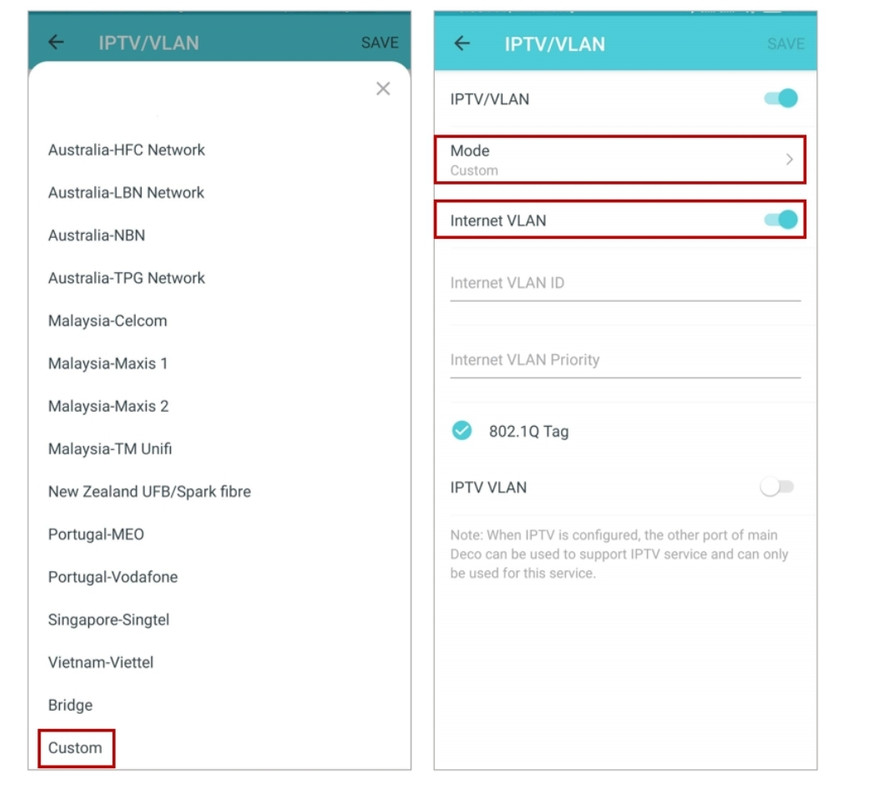
Since you don't have it, I believe your problem will be solved if you use custom vlan in the deco app
Like this
user posted image
Internet vlan id 500
Priority 0
*
I see..thanks for the info...will try it tomorrow...


Change to:
| Lo-Fi Version
0.0188sec    1.20    6 queries    GZIP Disabled
Time is now: 18th December 2025 - 04:45 PM