Outline ·
[ Standard ] ·
Linear+
ILLEGEAR Custom Performance Laptops v.4, AMD RYZEN 4800H with FREE AC Valhalla
|
Ryan@ILLEGEAR P
|
 Nov 5 2019, 07:12 PM Nov 5 2019, 07:12 PM
|
New Member


|
QUOTE(victorr @ Nov 5 2019, 06:48 PM) Does the 100% srgb and 144hz screen makes alot of difference on Raven SE? Got promo for rm50 off now. I mainly use for work, some video editing and light to medium gaming Yes sure, bro. Done PM you ya. Kindly check your inbox. |
|
|
|
|
|
fat cat
|
Nov 5 2019, 08:20 PM
|
|
|
QUOTE(ZM Fong @ Nov 1 2019, 09:29 AM) There is no audio software from what I noticed, might want to consider custom driver / equalizer what custom driver do you recommend? |
|
|
|
|
|
dylan_chng
|
Nov 6 2019, 12:49 PM
|
|
|
I have come to the conclusion that my Raven does not switch it's display off and does not switch the keyboard illumination off when the lid is close.
Not sure if this is intended behaviour or not.
Any comment on this?
|
|
|
|
|
|
AZIM@ILLEGEAR
|
Nov 6 2019, 01:58 PM
|
New Member
|
QUOTE(dylan_chng @ Nov 6 2019, 12:49 PM) I have come to the conclusion that my Raven does not switch it's display off and does not switch the keyboard illumination off when the lid is close. Not sure if this is intended behaviour or not. Any comment on this? Hi dylan_chng, I believe that a modification can be done on the Power Management to rectify the behaviour but in regards to this matter, I would recommend for you to consult with our Support Line directly for easier communication by using the WhatsApp number below: 018-2618599 (WhatsApp for ILLEGEAR Support Line) Will assist accordingly  |
|
|
|
|
|
dylan_chng
|
Nov 6 2019, 02:59 PM
|
|
|
My Raven has locked up 4 times already in the last 24 hours as I'm working on a relative demanding project.
DRIVER POWER STATE FAILURE is what the blue screen of death reports.
|
|
|
|
|
|
AZIM@ILLEGEAR
|
Nov 6 2019, 03:06 PM
|
New Member
|
QUOTE(dylan_chng @ Nov 6 2019, 02:59 PM) My Raven has locked up 4 times already in the last 24 hours as I'm working on a relative demanding project. DRIVER POWER STATE FAILURE is what the blue screen of death reports. Hi dylan_chng, sorry to learn about this! I could not confirm for certain via a remote diagnosis but this might be due to a driver conflict on your current Windows OS. No worries, our Support Line shall assist you accordingly. |
|
|
|
|
|
chilskater
|
Nov 7 2019, 11:44 AM
|
|
|
Tht is bad...
|
|
|
|
|
|
TW_tankengine95 P
|
Nov 7 2019, 02:28 PM
|
New Member
|
got special promo for onyx?
|
|
|
|
|
|
AZIM@ILLEGEAR
|
Nov 7 2019, 02:49 PM
|
New Member
|
QUOTE(TW_tankengine95 @ Nov 7 2019, 02:28 PM) got special promo for onyx? Hi TW_tankengine95, yes we do! For the Onyx model, we are offering the promotions listed below: Free 16G RAM upgrade (Worth RM239) Free Matmaster mousepad (Worth RM69) Free Thermal Grizzly Kryonaut (Worth RM99) Free Professional Color Calibration (Worth RM49) 50% Discount For 1TB NVME SSD Upgrade (RM165) The Onyx is priced at RM5985 based on the suggested specs but you can also customize the configuration further according to your requirements by using the link here http://store.illegear.com/extreme-performa...egear-onyx.html |
|
|
|
|
|
rorrimcalb
|
Nov 7 2019, 03:05 PM
|
New Member
|
Hi illegear team, i stumbled across this thread while i was researching your products. I have a budget range of around RM5k to 6k. What would you guys recommend for me?
|
|
|
|
|
|
STEVE@ILLEGEAR
|
Nov 7 2019, 04:02 PM
|
New Member
|
QUOTE(rorrimcalb @ Nov 7 2019, 03:05 PM) Hi illegear team, i stumbled across this thread while i was researching your products. I have a budget range of around RM5k to 6k. What would you guys recommend for me? Hi rorrimcalb, Noted on the budget. May i know if you have any preferred screen size? Or do you need long battery life? |
|
|
|
|
|
rorrimcalb
|
Nov 7 2019, 04:33 PM
|
New Member
|
QUOTE(STEVE@ILLEGEAR @ Nov 7 2019, 04:02 PM) Hi rorrimcalb, Noted on the budget. May i know if you have any preferred screen size? Or do you need long battery life? Hi Steve, thank you for reaching out to me. Wow it seems like illegear is quite active here. To answer your question, I don't mind the battery life actually because I don't mind carrying the power adapter along with me whenever I carry laptop. As for screen size, both 15" or 17" would be fine. Don't really have much preference, but of course looking for a 15" laptop since it will weight lighter since I am a student, so will be carrying the laptop around often. |
|
|
|
|
|
STEVE@ILLEGEAR
|
Nov 7 2019, 05:26 PM
|
New Member
|
QUOTE(rorrimcalb @ Nov 7 2019, 04:33 PM) Hi Steve, thank you for reaching out to me. Wow it seems like illegear is quite active here. To answer your question, I don't mind the battery life actually because I don't mind carrying the power adapter along with me whenever I carry laptop. As for screen size, both 15" or 17" would be fine. Don't really have much preference, but of course looking for a 15" laptop since it will weight lighter since I am a student, so will be carrying the laptop around often. Hi rorrimcalb, no worries. I see i see. May i know what are your usage for the laptop? Other than using for study purpose? We have a few models to choose from within your budget range and preferences. We do also have some models that are slim and lightweight laptop without compromising performance. |
|
|
|
|
|
rorrimcalb
|
Nov 8 2019, 10:58 AM
|
New Member
|
QUOTE(STEVE@ILLEGEAR @ Nov 7 2019, 05:26 PM) Hi rorrimcalb, no worries. I see i see. May i know what are your usage for the laptop? Other than using for study purpose? We have a few models to choose from within your budget range and preferences. We do also have some models that are slim and lightweight laptop without compromising performance. my usage will be for medium gaming, like csgo, apex legends, gta 5, and might play some intensive games soon. Especially looking forward to the steam winter sales. Also, using for editing works. |
|
|
|
|
|
STEVE@ILLEGEAR
|
Nov 8 2019, 01:36 PM
|
New Member
|
QUOTE(rorrimcalb @ Nov 8 2019, 10:58 AM) my usage will be for medium gaming, like csgo, apex legends, gta 5, and might play some intensive games soon. Especially looking forward to the steam winter sales. Also, using for editing works. We do have a few laptop models that might suit to your requirements. I would recommend the Raven SE-R, Prodigy, and Laguna SE for 15" screen or Rogue for 17" screen. Regarding on editing works, may i know what kind of editing works do you perform? More towards 2D or 3D editing/rendering? |
|
|
|
|
|
rorrimcalb
|
Nov 8 2019, 03:36 PM
|
New Member
|
QUOTE(STEVE@ILLEGEAR @ Nov 8 2019, 01:36 PM) We do have a few laptop models that might suit to your requirements. I would recommend the Raven SE-R, Prodigy, and Laguna SE for 15" screen or Rogue for 17" screen. Regarding on editing works, may i know what kind of editing works do you perform? More towards 2D or 3D editing/rendering? Oh nice. Mostly editing photos because i work as freelance photographer haha |
|
|
|
|
|
STEVE@ILLEGEAR
|
Nov 8 2019, 07:51 PM
|
New Member
|
QUOTE(rorrimcalb @ Nov 8 2019, 03:36 PM) Oh nice. Mostly editing photos because i work as freelance photographer haha I see. Presumably color accuracy and faster refresh rate would be one of your priority other than performance. As per recommendation, all the Raven SE-R, Prodigy, Laguna SE are equipped with 100% sRGB color accuracy with 144Hz refresh rate IPS screen. Prodigy is our lightest weight laptop currently in our line up, which weights at 1.75kg and 19mm thickness and it would be suitable for someone to carry the laptop around easily. Both Raven SE-R and Laguna SE weights at about 1.9kg and 20mm thickness but still consider lightweight. |
|
|
|
|
|
HoNeYdEwBoY
|
Nov 8 2019, 08:57 PM
|
|
|
I have a Laguna laptop, the battery sometime cannot detect the actual amount of capacity available. Sometime it shows 96% wear level, sometime it shows 30%... 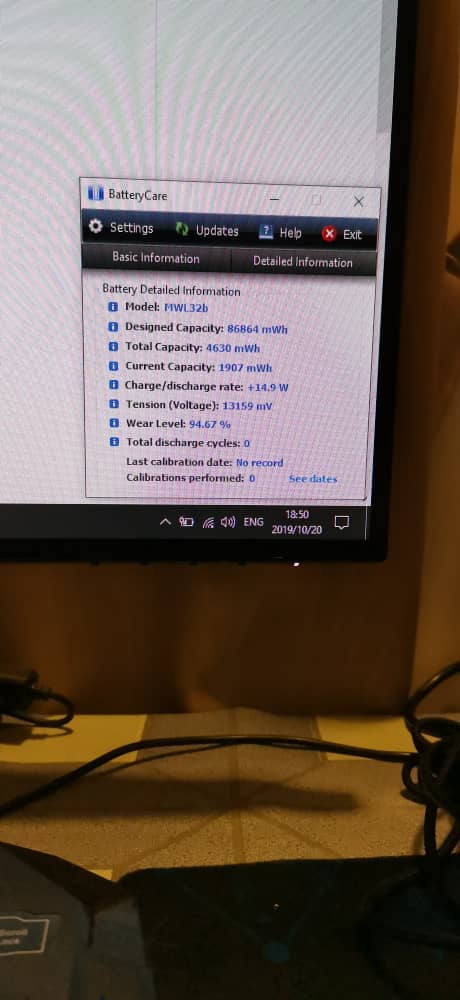 This post has been edited by HoNeYdEwBoY: Nov 8 2019, 09:00 PM This post has been edited by HoNeYdEwBoY: Nov 8 2019, 09:00 PM |
|
|
|
|
|
AZIM@ILLEGEAR
|
Nov 9 2019, 06:13 PM
|
New Member
|
QUOTE(HoNeYdEwBoY @ Nov 8 2019, 08:57 PM) I have a Laguna laptop, the battery sometime cannot detect the actual amount of capacity available. Sometime it shows 96% wear level, sometime it shows 30%... Hi HoNeYdEwBoY, sorry to learn about this! I could not confirm for certain via a remote diagnosis but it may be caused by a registry bug and a re-configuration/battery re-calibration might help to resolve the issue. May I also know if you have notified our Support Team? In regards to this matter, I would recommend for you to consult our Support Line directly as well for easier communication regarding this matter by using the contact number below: 018-261 8599 (WhatsApp) This post has been edited by AZIM@ILLEGEAR: Nov 9 2019, 06:15 PM |
|
|
|
|
|
hshern95
|
Nov 10 2019, 02:21 AM
|
Getting Started
|
Hi, is Onyx able to instal 2 m.2 ssd?? would like to install another one for my notebook
|
|
|
|
|



 Quote
Quote





 0.0192sec
 0.98
0.98
 6 queries
 GZIP Disabled