Welcome Guest ( Log In | Register )

Bump Topic Topic Closed RSS Feed
5 Pages < 1 2 3 4 5 >Bottom

Outline · [ Standard ] · Linear+

 ILLEGEAR Custom Performance Laptops v.4, AMD RYZEN 4800H with FREE AC Valhalla

views
     
Jared21
post Aug 10 2020, 11:44 PM

New Member
*
Newbie
2 posts

Joined: Aug 2015
QUOTE(Santau_GO @ Aug 10 2020, 11:18 PM)
Yes i am using turbo mode. But back then I was running 80C when he cpu power was around 25W. Never above 30W while ingame. Cpu clocks was around 3.5ghz at all cores.

I think back then my cpu was power throttled because of XTU installed. Eversince i uninstalled it's running on full power

Now my cpu running at full 45W then cpu can hit 99C while cpu clock can stay at 4.2ghz. But with occasional single core drop to around 800mhz for a second or so.

The heat is a bit worrying and uncomfortable but i prefer it running at full speed for the performance. I saw tech rodent's video on SE-R and he got a "toasty 100C". Not sure if theres a way around it
*
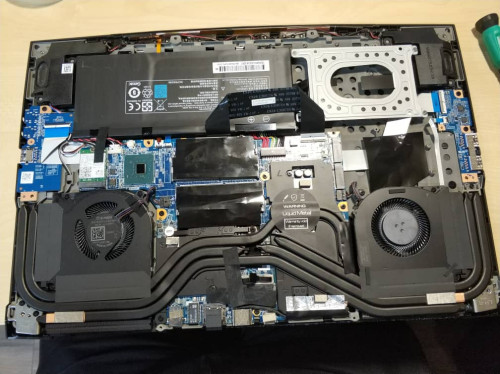
Damn that is bad. Are you able to send it to them for a repaste or do it yourself? A thicker paste is recommended if you can do it yourself. I find that TG Hydronaut works better than Kryo because of how uneven ODM heatsinks are so the thicker paste helps compensate for it. I personally use it on my Selenite's cpu and will be moving to TG Kryonaut Extreme once its available as its also thicker than the standard Kryonaut

Unless the cooling assembly is defective (which is incredibly doubtful) its most likely a bad paste application.

This post has been edited by Jared21: Aug 11 2020, 12:29 AM
Jared21
post Aug 11 2020, 03:32 PM

New Member
*
Newbie
2 posts

Joined: Aug 2015
QUOTE(Santau_GO @ Aug 11 2020, 02:58 AM)
Currently i only have arctic MX-4 lying around but im not sureif  it will make a difference. Might look into the hydronaut.
*
MX4 should be fine. Its a thicker paste than Kryonaut as well.
Jared21
post Aug 13 2020, 02:18 PM

New Member
*
Newbie
2 posts

Joined: Aug 2015
QUOTE(zhishuen00 @ Aug 12 2020, 07:36 PM)
Anyone here has used Illegear Rogue before? Ordered one from them last week but I am scared of the quality/sustainability being different from what I am being told.

I visited their showroom for the purchase, and I also tried the laptop out there itself. I am very satisfied with the build quality and the keyboard.

But I want to ask the Rogue users out there, how long have you been using yours, and have you encountered any issues? The sustainability is that worries me the most. I know that the chassis is from TongFang, and I have looked up on it online. I found inconsistent reviews where some people said theirs are perfectly fine even after years of usage, while some claimed that their laptops became faulty after a few months. I am really scared as I stay in Cyberjaya to study, and I only go back to KL on weekends. If my Rogue goes bad during the weekdays that means I would be stuck with a broken laptop until the weekends.

I have a few people around me that use Illegear laptops but none of them are using Rogue. And I can't really find reviews of the laptop online.

Answers from Rogue users would be really appreciated. Thank you.
*
https://www.notebookcheck.net/Schenker-XMG-...w.427706.0.html

this is the best review i can find of the same chassis. Assume higher or lower temps and noise levels depending on what specs you will configure yours with. Googling the model/chassis number should make it easier to find reviews since everyone brands theirs differently. For example, Illegear labels it the Rogue, XMG brands this chassis as the Core 17 while Eluktronics brands their version of the Selenite as the Mech G1R.

When it comes to resellers using Tongfang or Clevo chassis, you can use any review and they'll mostly say the same thing about the chassis in general. The main differences comes down to what spec you configure it with and possibly thermal performance (XMG, Eluktronics, Gentech and HIDEvolution have been offering liquid metal for quite a while) and customer support/service pre and post sale in general.

This post has been edited by Jared21: Aug 13 2020, 02:22 PM
Jared21
post Aug 13 2020, 02:25 PM

New Member
*
Newbie
2 posts

Joined: Aug 2015
Since Illegear now offers TG Conductonaut, can i repaste my machine with it..?? biggrin.gif

This post has been edited by Jared21: Aug 13 2020, 02:25 PM
Jared21
post Aug 13 2020, 06:08 PM

New Member
*
Newbie
2 posts

Joined: Aug 2015
QUOTE(Prince J @ Aug 13 2020, 05:13 PM)
Hi Jared21,
For now our liquid metal is applied at Tongfang (factory option) to have them cover the warranty, we might offer aftermarket application later.

user posted image
*
Oo i see. So its not applied in house at the Illegear office?

Warranty void if removed sticker huh... interesting. Will that apply to people who know how to safely remove and reapply liquid metal properly? Just curious

Also will you guys stock the new TG Kryonaut Extreme in the future? Its thicker than Kryonaut and should work better with the uneven heatsinks that ODMs are famous for as well as your custom desktop builds

This post has been edited by Jared21: Aug 13 2020, 06:13 PM
Jared21
post Aug 13 2020, 07:50 PM

New Member
*
Newbie
2 posts

Joined: Aug 2015
Supposedly the 10th gen models have flatter coldplates in order to use the liquid metal as well as larger fans as listed here: https://www.reddit.com/r/XMG_gg/comments/fu...s_refresh_2020/

If thats the case, would it be possible to move the cooling module of the 10th gen models on to older 9th or even 8th gen units? Would be nice to have the flatter heatsinks if the use of liquid metal is allowed in the future. The larger fans would be nice as they should move more air while spinning slower. Would it be possible to confirm this @Prince J?

Edit: Also i think Illegear should opt for the liquid metal on the GPU only in possible. From my own experience, using LM on the GPU did not net that big of a temperature drop as it does on a CPU. It is also more dangerous as there are SMDs right next to the GPU core and on the laptops i tried this on, i used 2 layers of conformal coating as well as very thin kapton tape in order to ensure that nothing shorts out on the GPU side. Just my two cents. Glad to see that Illegear is offering more options now thumbup.gif

This post has been edited by Jared21: Aug 13 2020, 10:33 PM
Jared21
post Aug 14 2020, 03:49 PM

New Member
*
Newbie
2 posts

Joined: Aug 2015
QUOTE(ChessRook @ Aug 14 2020, 01:58 PM)
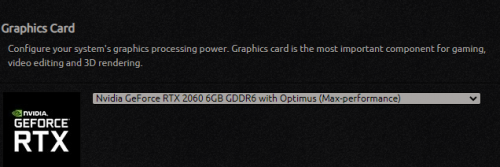
I am also wondering if the RTX2060 is it 80W or 115W version?

user posted image

This is for
https://store.illegear.com/onyx-series/226-...yx-v-ryzen.html
*
Usually if its the 115w part it will be stated in the configurator. This looks to be the 80w part
Jared21
post Aug 14 2020, 04:48 PM

New Member
*
Newbie
2 posts

Joined: Aug 2015
QUOTE(Prince J @ Aug 14 2020, 01:45 PM)
This is a grey area.

It's a sticker is made to inform our users this unit comes with liquid metal and do not remove the heatsink like our other models. Tongfang explicitly informed us do not remove the heatsink and only send the entire unit if we needed to RMA.

*
Thats fair enough. Also are the changes linked in the reddit thread by the XMG rep true? Did the 10th gen units get a different cooling solution with larger fans?
Jared21
post Aug 15 2020, 01:01 AM

New Member
*
Newbie
2 posts

Joined: Aug 2015
QUOTE(zhishuen00 @ Aug 14 2020, 09:58 PM)
To the heavy gamers, do you use the built-in keyboard to play games on your Illegear laptops, or do you use an external keyboard?

Am considering a Logitech keyboard but don't really like the idea of being super far away from my laptop, but at the same time I am also scared of me fucking up my built-in keyboard due to excessive gaming.

Any advices?
*
Personally dont like the one in my Selenite coming from proper desktop mechanical boards. Current one i use is listed in my sig. My keyboard has always had somewhat heavy switches and very tactile Zelios switches so I find that the keys are way too light and lack tactile feedback.

The keycaps also wobble quite a bit and the key font is honestly really bad. I would have much prefer the ones that XMG use on their Neo 17 with a nice, very clean font. I inquired about purchasing XMG keycaps but they only have the ISO layout available. Also grey lettering on black keycaps is such a bad idea. PLEASE GET A CLEANER FONT ILLEGEAR sad.gif sad.gif

The built in mic also does a terrible job canceling the keystrokes. If i do have to head out and i'm away from my main rig, i'll always bring my external board along.

This post has been edited by Jared21: Aug 15 2020, 01:06 AM
Jared21
post Aug 15 2020, 06:06 PM

New Member
*
Newbie
2 posts

Joined: Aug 2015
QUOTE(Prince J @ Aug 15 2020, 05:01 PM)
Let me get that info for you next week.
XMG engraves their own keycap to supply their systems to all Europe countries because every country uses different keyboard language.  notworthy.gif

We will feedback your letter change to ODM smile.gif
*
Many thanks rclxms.gif Would be nice if the changes that was stated by XMG to be true and hopefully can put on the 9th gen or older model.

time for doubleshot ABS or even dye sub PBT keycaps?? biggrin.gif

Would be nice if the shape of the keycaps was normal as well. IMO its a bit weird to type on coming from like the usual shaped keycaps on other laptops and external boards. Just my two cents
Jared21
post Aug 15 2020, 06:58 PM

New Member
*
Newbie
2 posts

Joined: Aug 2015
@Prince J

Just wanna check something. The RTX 2060 in the 9th gen Selenite is the 115w variant or the 80w?
Jared21
post Aug 16 2020, 03:38 PM

New Member
*
Newbie
2 posts

Joined: Aug 2015
QUOTE(ZM Fong @ Aug 15 2020, 10:09 PM)
115W, but you won't be able to read it via monitoring software
*
Thanks. Just wanted to check since i'm currently using XMG's control center and thought my power draw was unusually low at around the 80 to 90w range while hitting around 1900mhz
Jared21
post Aug 16 2020, 09:09 PM

New Member
*
Newbie
2 posts

Joined: Aug 2015
QUOTE(Vannus @ Aug 16 2020, 03:41 PM)
Went to test the keyboard last weekend, totally agreed the Selenite-G Mech Keyboard is wobbly which put me off to get  Selenite-G. Tested the rogue membrane keyboard too, feels a little wobbly as well but not as bad as the Selenite-G. End up chosen the firmer ultra-tactile membrane keyboard of Selenite-Pro which is acceptable to me.
Just to share my experience as I'm currently using lenovo Y545 membrane keyboard and it's amazingly good, hell yeh, wobbly word doesn't even exist on this budget laptop.  blush.gif
*
I almost went for the 9th gen Rogue because of the keyboard. But the backplate under the selenite keyboard makes it much nicer to type on.
Jared21
post Aug 17 2020, 10:47 PM

New Member
*
Newbie
2 posts

Joined: Aug 2015
QUOTE(Wazzzap @ Aug 17 2020, 07:22 PM)
Just want to share my experience here. I purchased an s5 laptop about 3 years ago (about RM7k). It has some problem lately and I send it back to Illegear for diagnostic. Apparently they told me that my mobo is faulty but when I ask which part of the mobo is faulty and what causes it they didnt answer me and told me to get a new laptop because it is not worth fixing or replacing.

So I wasn't satisfied with their way of handling this, I took back my laptop and send it to a specialist and he told me that it was the GPU problem and now I just need to spend a few hundred change the chip and good to go. Imagine if I didn't go for 2nd check I would have just burn my 7k down the drain??? This is so unprofessional and such poor service provided from their tech team. Disappointed. Never going to buy from them again.
*
The S5 chips are soldered aren't they? To source an entirely new gpu die and to desolder and resolder for a few hundred is uhhh impressive
Jared21
post Aug 18 2020, 01:24 AM

New Member
*
Newbie
2 posts

Joined: Aug 2015
Even though i would like to save some money if possible when repairing an electronic device, i personally would rather just take the hit to the wallet and get a new mainboard that has the chips properly soldered on from a genuine source

Unless that specialist is Rossmann, i really doubt it will hold up in the long run.
Jared21
post Aug 19 2020, 12:36 AM

New Member
*
Newbie
2 posts

Joined: Aug 2015
QUOTE(LeeroyJenkinss @ Aug 19 2020, 12:31 AM)
Sorry to say but I think your 3 years old s5 is not even worth RM2.5k now because IT and tech gadget depreciates super fast. I think what the tech tried to say is instead of spending huge money to replace motherboard, why not you just invest a new onyx v ryzen or lenovo legion 5 amd about 3k that can outperform your 3 year old s5 easily.

By the way, can intro the "specialist" who can fix gpu by few hundred bucks?
*
Agreed with this. The S5 is quite an old laptop now and the P650 (iirc) parts its based will cost more. Its a model that has been out on production for years now and parts will cost more if they aren't easily available. It would have been much more worth it IMO to have invested in a roughly 3 to 4k machine that can easily outperform your older laptop like @LeeroyJenkinss pointed out. On the flip side, perhaps the tech who pointed that out to you could have worded it differently

Plus, even if you did pay that price, spare parts and repairs can be made with genuine spares and ya know not have the core resoldered or reballed by someone of questionable skill just to save a few hundred only to have the possibility of that "repair" failing on you quickly. If you really don't want to buy a new machine then going with the motherboard replacement or a new machine would arguably be the safest option

This post has been edited by Jared21: Aug 19 2020, 12:39 AM
Jared21
post Aug 20 2020, 12:58 AM

New Member
*
Newbie
2 posts

Joined: Aug 2015
QUOTE(apekpro96 @ Aug 19 2020, 07:17 AM)
hi illegear,
just wanna ask .
recently saw ur post about ares x with desktop cpu like 10900k
is that beast same as the one that der8auer review on his yt channel..

link https://youtu.be/ysvZIcb3XAQ

i hope u can provide any review unit to any good malaysian tech reviewer, so can see how the benchmark, temperature  and cooling performance of that .
*
Yes it is. It doesnt matter who reviews it. Its literally the same chassis just under a different name. Any review with that chassis regardless if its from XMG, Eluktronics, Illegear etc will apply.

The only exception is if the unit is from HIDEvolution. Their review units should come with a delidded, undervolted and overclocked chip with liquid metal
Jared21
post Aug 21 2020, 01:35 PM

New Member
*
Newbie
2 posts

Joined: Aug 2015
QUOTE(chittyserv @ Aug 21 2020, 12:33 PM)
Quick question, if you are gaming on the laptop and electric trip for 1 second, will the laptop continue use battery or will it shutdown due to insufficient power for the graphics card to run?
*
It will continue working. You'll just have really bad frame rates. Think of the battery as a backup power source in this case.
Jared21
post Aug 23 2020, 01:17 PM

New Member
*
Newbie
2 posts

Joined: Aug 2015
QUOTE(apekpro96 @ Aug 23 2020, 12:21 PM)
hi, do ares x shipped with prema bios? plus do u guys partner with prema  like hidevolution,xoticpc did?
*
Man if only they did that. Prema bios when they still sold more Clevo chassis would have been amazing as well
Jared21
post Aug 23 2020, 09:34 PM

New Member
*
Newbie
2 posts

Joined: Aug 2015
QUOTE(arshad @ Aug 23 2020, 08:43 PM)
Anyone having issues with pops and crackling sound?
*
http://forum.notebookreview.com/threads/to...815943/page-462

Scroll all the way down and follow the steps outlined in the last post on this webpage. Does a much much better job than the soundblaster software

5 Pages < 1 2 3 4 5 >Top
Topic ClosedOptions
 

Change to:
| Lo-Fi Version
0.0863sec    0.47    7 queries    GZIP Disabled
Time is now: 13th December 2025 - 12:03 PM