Outline ·
[ Standard ] ·
Linear+
ILLEGEAR Custom Performance Laptops v.4, AMD RYZEN 4800H with FREE AC Valhalla
|
Jared21
|
 Oct 26 2020, 04:13 PM Oct 26 2020, 04:13 PM
|
New Member


|
Did another small test with the limited time i have at the moment using Folding@Home at full folding power
Folding with both CPU (-105mv) and GPU (Game mode), the CPU is around the high 70s on all 6 cores with about 3 to 5 degrees core differential. Its currently pulling about 50w of power according to HWinfo at 100% usage on all cores. Decreases drastically when a larger undervolt is applied
GPU is doing a comfortable low 60 ish degrees. Turbo mode is not needed for Folding.
TLDR: Kryo Extreme seems to be the real deal. Def reduced the core temp differentials quite a bit. Not the consistent 2 to 3 degree core delta i was expecting like on my desktop but still a great improvement
|
|
|
|
|
|
Jared21
|
Oct 29 2020, 05:26 PM
|
New Member
|
QUOTE(amir.asyraf @ Oct 29 2020, 01:48 PM) Hahaha yea it costs that much. I'm lucky to have been able to borrow some from a friend who runs a PC store here in Perth. |
|
|
|
|
|
Jared21
|
Nov 23 2020, 02:05 AM
|
New Member
|
QUOTE(TheStig123 @ Nov 21 2020, 08:50 PM) hi, my onyx v ryzen - gtx 1650ti doesn't have update for latest nvidia driver (currently 442.94). any fix? Always get the latest drivers from the manufacturer website if possible (in this case, nvidia) Illegear's driver page is not always up to date |
|
|
|
|
|
Jared21
|
Jan 1 2021, 01:28 AM
|
New Member
|
QUOTE(Nightstalker1993 @ Jan 1 2021, 01:15 AM) Actually I don't game, turbo mode for max performance when rendering video. Plus, already connected to the power outlet, don't really bother about power efficiency  All I know is that I tried rendering a video with the power unplugged and damn the speed dropped like 4 times. Rendering video GPU maxed out at around 25w if I remembered correctly which became a bottleneck so CPU utilization was low and only around 10w  Weird that the clock speed are way higher than Nvidia's official figures, thanks for the heads up! Thats typical battery performance haha. You could try to change some settings in the nvidia control panel to let the gpu boost higher if you need on battery but there will be a hard limit to how much it will boost without being plugged in to the wall |
|
|
|
|
|
Jared21
|
Jan 3 2021, 03:52 AM
|
New Member
|
QUOTE(Nightstalker1993 @ Jan 1 2021, 01:32 AM) Yeah didn't expect the performance hit to be THAT bad. Now the Macbook M1 seems ungodly now that it can maintain the performance even unplugged. Where in the Nvidia Control Panel can you set the GPU boost when unplugged? You should be able to set your gpu to prefer max performance for the specific app you want to run on battery. It wont give you the full power of the gpu but it should be better than letting Optimus determine how much power the gpu uses Attached thumbnail(s)
|
|
|
|
|
|
Jared21
|
Jan 11 2021, 03:14 PM
|
New Member
|
QUOTE(Nightstalker1993 @ Jan 9 2021, 02:39 PM) My Rogue Ryzen with Ryzen 7 4800h and 63wh battery after some startup tasks, services and task scheduler optimization  Followed this guide mostly https://www.reddit.com/r/thinkpad/comments/...tery_life_tips/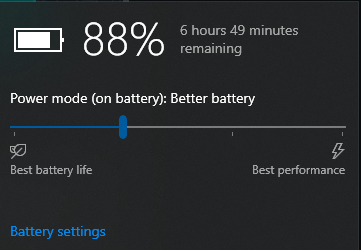 The 'Rate' column is the power draw in MilliWatts. Value of 8000 would mean 8W, so for a 63wh battery, if constant draw of 8watts would give you 7.8 Hours of battery life, but realistically while browsing the net the current draw ranges from 8-12watts and idles around 6 watts. With monitor off I recorded current draw of 3+ watts. Previously it was drawing 15+ watts on idle and while using it goes fro 15-20 watts. 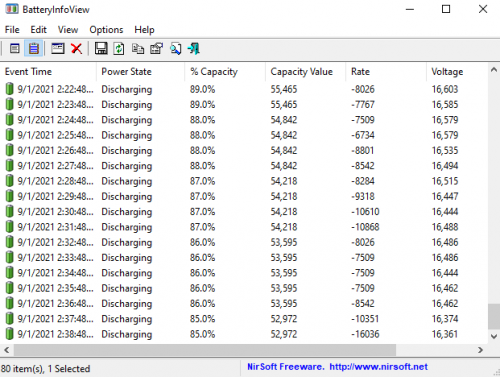 Very nice! My Selenite can do about 6 hours or so with an undervolt and some services disabled as well. Gonna try more of the tweaks in the post |
|
|
|
|
|
Jared21
|
Jan 17 2021, 03:50 PM
|
New Member
|
QUOTE(Nightstalker1993 @ Jan 17 2021, 11:45 AM) Your Selenite is Intel is it? AMD got no methods to undervolt AFAIK :sad:
Just be careful which service you disable. I accidentally disabled the service for THX audio and not sure which one to enable back, end up reinstalling it and needed to reinstall the thx app seperately as well Yep mine is 9th gen intel with the 2060. Initially had huge issues with c states thanks to an nvidia bug where the gpu was active all the time even when i was in MSHybrid mode but luckily a driver update using nvcleaninstall worked. I got rid of the THX/Creative software and just use the basic Realtek driver and windows equalizer. Much better than any software exp since its native to windows |
|
|
|
|
|
Jared21
|
Jan 19 2021, 11:03 AM
|
New Member
|
QUOTE(Nightstalker1993 @ Jan 17 2021, 09:28 PM) For me the THX software made alot of difference to listening on speakers. The Normalize function greatly increases the volume of soft videos like on netflix or series. Thats good then! For me the creative software on my 9th gen unit did improve the sound but the software was incredibly buggy esp after windows and driver updates. So i just got rid of it entirely and used a workaround to get the realtek eq back |
|
|
|
|
|
Jared21
|
Jan 23 2021, 12:11 AM
|
New Member
|
QUOTE(chittyserv @ Jan 22 2021, 11:47 PM) yeah i did that... just wondering why suddenly disappear windows being windows as usual. Its normal for an update to mess up some things |
|
|
|
|



 Quote
Quote

 0.0337sec
 0.54
0.54
 7 queries
 GZIP Disabled