

Hi just a quick question, Im using digi 150 infinite and planning to get this, from what i read i should get 65d, so just asking do i need to do some setup or just pnp? thanks.
Huawei B618 Router V2, We are back!
Huawei B618 Router V2, We are back!
|
|
 May 10 2019, 10:14 PM May 10 2019, 10:14 PM
|
 
Junior Member
7 posts Joined: Dec 2010  
|
Hi just a quick question, Im using digi 150 infinite and planning to get this, from what i read i should get 65d, so just asking do i need to do some setup or just pnp? thanks.
|
|
|
|
|
|
May 10 2019, 10:31 PM
|

Senior Member
1,757 posts Joined: Oct 2005 
|
QUOTE(IceToad @ May 10 2019, 10:14 PM) Hi just a quick question, Im using digi 150 infinite and planning to get this, from what i read i should get 65d, so just asking do i need to do some setup or just pnp? thanks. u can get both. the reason i told 65d compared to 22d is because the celcom set is locked. unless u want ehem which cant be state here. or else, it just the same for digi. pnp. just setup the router wifi if u plan to change the wifi ssid/password |
|
|
May 12 2019, 01:08 PM
Show posts by this member only | IPv6 | Post
#43
|

Junior Member
137 posts Joined: Mar 2006
|
I tried to update my phone apps with Playstore with wifi (using Huawei B618) but couldn't download. I switched back to my telco line, can update my apps just fine. Not sure if there's some setting problems or my Digi infinite.
|
|
|
May 12 2019, 02:08 PM
|
 
Staff
72,804 posts Joined: Sep 2005 From: KUL 
|
QUOTE(anthraxxxx @ May 12 2019, 01:08 PM) I tried to update my phone apps with Playstore with wifi (using Huawei B618) but couldn't download. I switched back to my telco line, can update my apps just fine. Not sure if there's some setting problems or my Digi infinite. No issue. Just updated my app on Playstore, using Digi Infinite 150 with B618 too. |
|
|
May 12 2019, 04:24 PM
Show posts by this member only | IPv6 | Post
#45
|
|
Junior Member
137 posts Joined: Mar 2006
|
QUOTE(fruitie @ May 12 2019, 02:08 PM) No issue. Just updated my app on Playstore, using Digi Infinite 150 with B618 too. Thanks for the reply. I have two DIGI numbers. Infinite is on my B618 router, my phone is using normal plan. Connected to wifi but cannot download, can surf net though. Once I switched the connection back to my regular number, can download. I wonder what is the problem. |
|
|
May 16 2019, 01:02 PM
|

Junior Member
312 posts Joined: Feb 2013
|
QUOTE(arecheese @ May 3 2019, 10:31 PM) 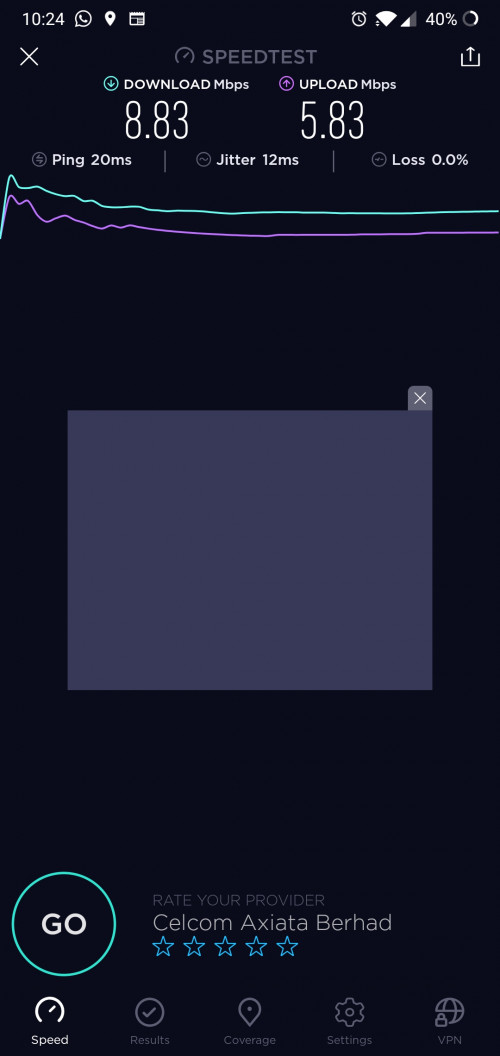 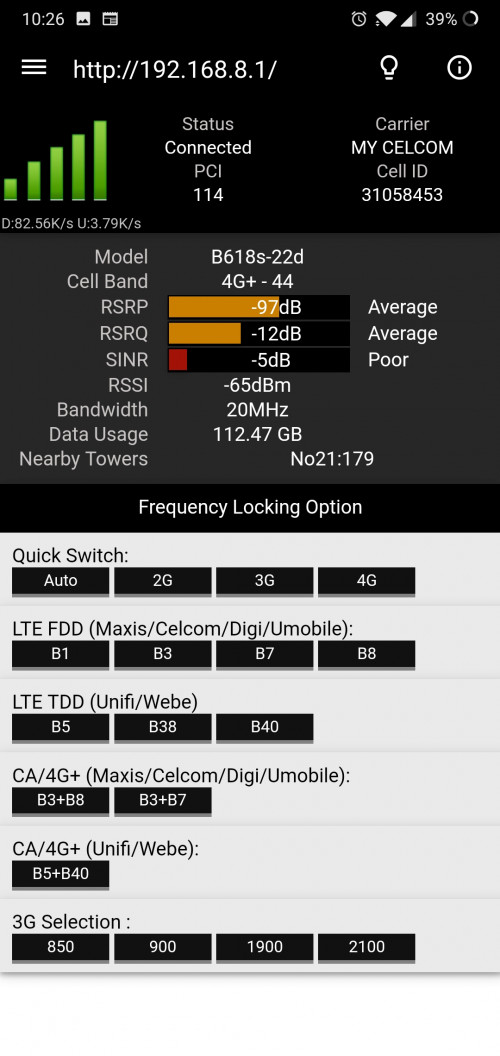 Hye guys. Just started using Celcom Wi-Fi. My speed especially at night is below 10mbps which is really disappointing. Any idea how to improve my speeds? Thanks in advance |
|
|
|
|
|
May 21 2019, 11:00 AM
|

Junior Member
393 posts Joined: Nov 2006
|
QUOTE(lopiop @ May 16 2019, 01:02 PM) Just wanted to ask, how do you use the hmanager app? Do use just click to change the band configurations? How to revert back to default? By clicking auto back? I tried logging in but unable to access. So gave up hope to modify it and have no choice to use as it is, which is running ard 8MB to 10MB, compared to previously of 40MB to 50MB.Also, i am using Celcom and noticed there are 2 signals, one with 5G and other one is normal. I clicked on both and both gives the same speed range. May i know why there is 2 signals bandwidth? Thanks |
|
|
May 22 2019, 10:44 AM
|

Junior Member
586 posts Joined: Apr 2019
|
great thread
 learn a lot learn a lot  |
|
|
May 22 2019, 11:34 AM
|
|
Senior Member
1,757 posts Joined: Oct 2005
|
QUOTE(7cantona @ May 22 2019, 10:44 AM) great thread :thumbsup: learn a lot The v1 was even better. Sadly it was taken down. |
|
|
May 22 2019, 11:48 AM
|
|
Junior Member
586 posts Joined: Apr 2019
|
QUOTE(fadzly @ May 22 2019, 11:34 AM) The v1 was even better. Sadly it was taken down. what ? why ?   very educational stuff  |
|
|
May 22 2019, 12:05 PM
|
|
Senior Member
1,757 posts Joined: Oct 2005
|
QUOTE(7cantona @ May 22 2019, 11:48 AM) what ? why ? hukhuk very educational stuff |
|
|
May 22 2019, 12:42 PM
|
|
Junior Member
586 posts Joined: Apr 2019
|
QUOTE(fadzly @ May 22 2019, 12:05 PM) hukhuk is that crying ?   sayang  lol lol  |
|
|
May 22 2019, 04:05 PM
|

Senior Member
4,582 posts Joined: Jan 2003 From: West johor
|
QUOTE(fadzly @ May 22 2019, 11:34 AM) The v1 was even better. Sadly it was taken down. who force you to open v2 ? |
|
|
|
|
|
May 22 2019, 05:01 PM
|
|
Staff
72,804 posts Joined: Sep 2005 From: KUL
|
No need to remember what's in V1, not worth talking anymore. Just move on and bring quality discussion into this thread.
|
|
|
May 23 2019, 12:34 PM
|

Junior Member
205 posts Joined: Aug 2009 From: Inside you 
|
Hi guys. Is anyone using the external antenna with this modem? Does it really improve your connection?
|
|
|
May 23 2019, 01:07 PM
|
|
Staff
72,804 posts Joined: Sep 2005 From: KUL
|
QUOTE(nazanto @ May 23 2019, 12:34 PM) Hi guys. Is anyone using the external antenna with this modem? Does it really improve your connection? Except your connection is very bad, else its internal antenna is already superior. For my case, without external antenna works better. |
|
|
May 23 2019, 01:52 PM
|
|
Junior Member
205 posts Joined: Aug 2009 From: Inside you
|
QUOTE(fruitie @ May 23 2019, 01:07 PM) Except your connection is very bad, else its internal antenna is already superior. For my case, without external antenna works better. The coverage wasn't that bad it just I believe the network in my place too congested. I can only get the advertised speed on early morning. Others than that no chance. Will the antenna help with this? |
|
|
May 23 2019, 01:53 PM
|
|
Staff
72,804 posts Joined: Sep 2005 From: KUL
|
QUOTE(nazanto @ May 23 2019, 01:52 PM) The coverage wasn't that bad it just I believe the network in my place too congested. I can only get the advertised speed on early morning. Others than that no chance. Will the antenna help with this? Probably because it will help to pull signal from other tower. |
|
|
May 23 2019, 02:18 PM
|
|
Junior Member
205 posts Joined: Aug 2009 From: Inside you
|
QUOTE(fruitie @ May 23 2019, 01:53 PM) Probably because it will help to pull signal from other tower. any recommendations on what antenna that I can look at? |
|
|
May 23 2019, 02:23 PM
|
|
Staff
72,804 posts Joined: Sep 2005 From: KUL
|
QUOTE(nazanto @ May 23 2019, 02:18 PM) any recommendations on what antenna that I can look at? The common external antenna for Huawei 4G routers is this: https://shopee.com.my/product/48807093/787791738?smtt=0.0.9Make sure you buy the red box, there's a similar type but packed in blue box which has a lower spec. |
| Change to: |  0.0324sec 0.0324sec
 0.61 0.61
 6 queries 6 queries
 GZIP Disabled GZIP Disabled
Time is now: 4th December 2025 - 12:13 AM |
 Quote
Quote