

 Apr 8 2020, 04:19 PM


QUOTE(backspace66 @ Apr 8 2020, 04:15 PM)
What i meant was, the proportion shown there lot/total lot or percentage allocation per etf correspond to the current portfolio you have right now?

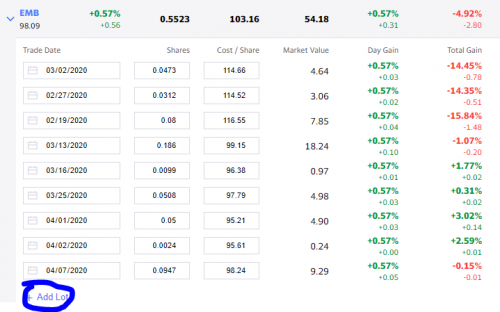
Just follow the buy/sell orders from the Transaction tab in the SAMY app.
1 Lot for 1 transaction. Key-in how many shares you bought and price per share and wallah there you go.
But I must warn following the prices everyday increases anxiety and gets your trigger finger more itchy to buy or sell more lol
Steps:
1. Add Symbol (EMB,VGK or anything)
2. Expand the symbol you added
3. Add lots according to the Transactions in your SAMY account. More transactions = more lots to add in haha
This post has been edited by stormseeker92: Apr 8 2020, 04:22 PM
 Quote
Quote




 0.4195sec
 0.48
0.48
 7 queries
 GZIP Disabled