

QUOTE(soonwai @ May 11 2019, 09:12 PM)
Mikrotik hAP AC2. Handles 800Mbps with NAT acceleration off.

Can handles 800mbps without fasttrack meh?My RB750Gr3 can only run for 300mbps without fasttrack connection...
Without Fasttrack

With Fasttrack

Unifi Official TM UniFi High Speed Broadband Thread V37, READ 1ST PAGE FOR TURBO SPEED INFO!
|
|
 May 12 2019, 12:13 PM May 12 2019, 12:13 PM
Return to original view | Post
#41
|
 
Senior Member
1,882 posts Joined: Sep 2017 
|
QUOTE(soonwai @ May 11 2019, 09:12 PM) Mikrotik hAP AC2. Handles 800Mbps with NAT acceleration off. Can handles 800mbps without fasttrack meh?My RB750Gr3 can only run for 300mbps without fasttrack connection... Without Fasttrack With Fasttrack |
|
|
|
|
|
May 13 2019, 04:03 PM
Return to original view | Post
#42
|
|
Senior Member
1,882 posts Joined: Sep 2017
|
QUOTE(cyruz @ May 13 2019, 09:30 AM) HOW TO SET FASTTRACK? I thought RouterOS already have the rule generated for fasttrack?See Your IP> Firewall and the first tab should already have a rule for fasttrack connection. |
|
|
May 14 2019, 12:43 PM
Return to original view | Post
#43
|
|
Senior Member
1,882 posts Joined: Sep 2017
|
QUOTE(samkian @ May 14 2019, 12:01 PM) I wonder if any mobile devices that can reach up to 800mbps on wifi... Flagship Phone from 2019 should can get 800mbps Update: (With decent router) (My family just bought p30 pro,and i only have ac66u(non-b1) can only run near 500mbps-cpu usage max problem) (Better router should can get almost 700+ mbps i think) This post has been edited by go626201: May 14 2019, 12:53 PM |
|
|
May 15 2019, 10:12 PM
Return to original view | Post
#44
|
|
Senior Member
1,882 posts Joined: Sep 2017
|
QUOTE(paradiseisland8 @ May 15 2019, 09:33 PM) My family bought next door house, possible to share internet next door? I'm thinking buy better router then place old router next door in repeater mode will this work? Direct use a 10gbps ethernet cable to next door better. just drill a hole from outside wall bottom dont let anyone know..haha |
|
|
May 16 2019, 10:47 PM
Return to original view | Post
#45
|
|
Senior Member
1,882 posts Joined: Sep 2017
|
QUOTE(MrSpeedy @ May 16 2019, 08:29 PM) https://amanz.my/2019205246/ If they just use TM infra for connecting user to their ViewQwest's own network for outgoing bandwidth,then that would be sufficient for good network routing.Hmmm interesting offers. But I doubt the connection quality if they leased on TM's infra. From my observation,the problem of unifi is just having a bad routing for outgoing international bandwidth,local networking routing should having good network performance. I just hoping ViewQwest using TM'infra for user and connect to JBIX and direct go to singapore ViewQwest's network for international bandwidth.  |
|
|
May 22 2019, 01:23 PM
Return to original view | Post
#46
|
|
Senior Member
1,882 posts Joined: Sep 2017
|
QUOTE(JohnLai @ May 22 2019, 10:47 AM) Did TM sell off our Unifi details to maxis? Already few years loh...I think is someone in the tm office sell customer details to maxis... I was doing some billing work stuff until I received a call from 03-5885 9335. The guy was asking if I am Mr xxx xxx xxx (my name). When I said yes. He asked if I live at Lot xxxxxx (my EXACT home address!) He even got my unifi subscription package correctly.  The moment he started to mention he is from Maxis, I stopped him and said I am still in contract with TM, can't change. Then he said, "No, I am not promoting maxis fibre, I am calling to ask if you encounter slow speed, high latency and issue with TM Unifi. Company wants to verify if TM fibre is stable for your area as maxis fibre is making use of TM fibre" I replied there is no issue with TM fibre so far other than the slowdown when the backbone fibre broke last time. Then the guy said he will put a remark on their database that my taman area fibre connectivity is stable and that is all. Something is fishy here.....  Every few week or months will received a call from maxis fiber reseller... Just told them you are using cheaper price then they will finish the call. |
|
|
|
|
|
May 23 2019, 01:13 PM
Return to original view | Post
#47
|
|
Senior Member
1,882 posts Joined: Sep 2017
|
QUOTE(soonwai @ May 22 2019, 11:13 PM) Something not right tonight.  I normally get.  Local test to http://testyourspeed.time.com.my and speedtest.tm.com.my are normal. I'm in Klang Valley. http://unifi-my.speedtestcustom.com/result...e4-6f48e0691044 QUOTE(doremon @ May 23 2019, 09:45 AM) How the speed consistency ? Monthly damage Mine at JB also upload speed slow |
|
|
May 24 2019, 01:02 AM
Return to original view | Post
#48
|
|
Senior Member
1,882 posts Joined: Sep 2017
|
Totally no problem for mine at JB with IP 115.135 tonight.
Twitch Facebook Youtube all full speed working well. Speedtest also no problem. |
|
|
May 24 2019, 10:31 PM
Return to original view | Post
#49
|
|
Senior Member
1,882 posts Joined: Sep 2017
|
Anyone conduct a traceroute?
Mine didn't have any dc or slow problem for unifi. But speed not full to international included Singapore network only.   Update: Shxt... I try change ip and some ip block got the problem that some of you facing... Just changing to 115.133 and normal again... This post has been edited by go626201: May 24 2019, 10:37 PM |
|
|
May 25 2019, 03:12 PM
Return to original view | Post
#50
|
|
Senior Member
1,882 posts Joined: Sep 2017
|
QUOTE(soonwai @ May 25 2019, 01:17 PM) Didn't save the treaceroute from yesterday. That upload speed problem already few days...Today Kajang to OVH SG. Quite OK but upload not full speed and fluctuates 100-150. On 175.141.x.x  Klang Valley sites are back to full speed.  Yesterday's problem may be related to this. 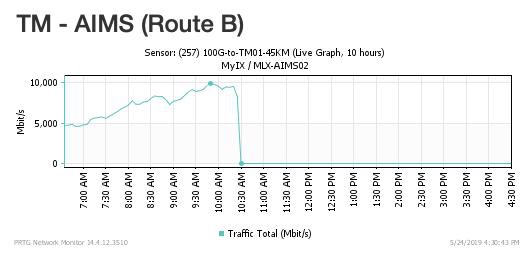 Yesterday 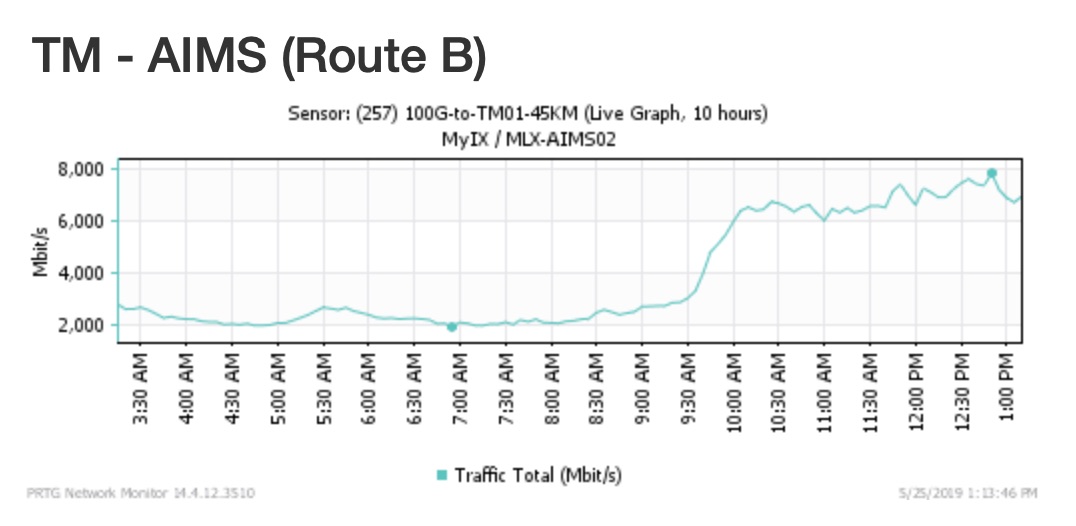 Today But overall some ip range is better than most ip range. Yesterday i crazy and try refresh ip,and suddenly first few ip range load twitch with super slow and no picture load... Actually i dont think is aims problem.Because it seems like it only happens within tm network. last night even speedtest to tm also slow. This post has been edited by go626201: May 25 2019, 03:16 PM |
|
|
May 27 2019, 08:36 AM
Return to original view | Post
#51
|
|
Senior Member
1,882 posts Joined: Sep 2017
|
QUOTE(yakumo @ May 27 2019, 02:01 AM) i also facing slow uploads , download using speedtest.net get like 500/800Mbps , upload get 60/200Mbps. TM might having bandwidth problem to worldwide network i think.what is happening actually? If you really need that upload speed,than contact tm for pressing them to solve the problem. Since i only use normal usage recently,so overall didn't affect my daily usage so far. But if you need more speedtest proof,i can speedtest for proof to TM. |
|
|
May 27 2019, 08:14 PM
Return to original view | Post
#52
|
|
Senior Member
1,882 posts Joined: Sep 2017
|
QUOTE(yakumo @ May 27 2019, 11:03 AM) my daily usage effected due to buffering on my animes..steamings, gaming, i suspected they ran out of bandwidth , but tm help line like to pusing alot streaming videos also buffering??then yours problem very serious oh... mine overall okay but if speedtest only half or 3/4 of 800mbps plan. Normal use will not found any abnormal. |
|
|
Jun 5 2019, 01:33 AM
Return to original view | Post
#53
|
|
Senior Member
1,882 posts Joined: Sep 2017
|
QUOTE(pakji @ Jun 5 2019, 12:16 AM) ok thanks Your request need a US VPS for setup a private VPN for your private usage.can you help me for me here my thread https://forum.lowyat.net/topic/4788427 if you don't know then i will wait someone response Try rent a server from DigitalOcean or Linode or Vultr or something else and setup with VPN software. If you dont know how to do it,i suggest you to pay someone to done for you. but need more money la... Overall the setup steps not hard,but if you dont know how to use Linux distribution then u need more time to learn lo. Different encryption get different performance so u need to consider from some encryption method. Some service will not allow server(non-consumer) IP address access their server,such as netflix they will block most ip from vpn or non-consumer ip of vps. Like Singapore Toggle,they block 90% of Singapore non-home and non-Singapore IP address to access their streaming service with Geo-Block. Edit: Added new comments: netflix hulu yupptv or something else,they just direct block the ip without letting you to access the server even the ip didn't access before. They already block the whole IP range to prevent non allow ip access. But sometimes some ips was "cold ip" that didn't normally use by vpn or server hosting company will able to access the service.But no easy to find lo. This post has been edited by go626201: Jun 5 2019, 01:41 AM |
|
|
|
|
|
Jun 5 2019, 02:11 PM
Return to original view | Post
#54
|
|
Senior Member
1,882 posts Joined: Sep 2017
|
QUOTE(pakji @ Jun 5 2019, 01:30 PM) any solution seen VPS DigitalOcean or Linode or Vultr they are shared If you need a real private IP u need hundred or thousand of US dollar to buy a small block of USA IP.looking US IP by own me only not other user same ip will not get banned and not shared connection too to get speed stable wont buffer very imported Dedicated connection will needed a dedicated server that will have a better dedicated bandwidth for your usage. Cloud VPS like DO Linode Vultr will get a dedicated ip but might be use by others before. Like Netflix or something,they already block alot of non-consumer IP to access their service. So u need more money to rent server to try that the accessible of the service. Every IP block already claim by different organisation that can be view from some ip database website. Those IP might be block from those geo-block service. Small Conclusion If you really want real "cool" dedicated ip, dedicated bandwidth than u need alot of money for your usage that not worth. TM-Unifi-MY to USA always get very very shit routing no matter. Every USA ISP get different routing and latency will be higher or lower. As far from my few years experience,the lowest that i can get is about 170+ms. But for speed it really depends on day or night time and the server bandwidth and hosting oversold or not. This post has been edited by go626201: Jun 5 2019, 02:19 PM |
|
|
Jun 5 2019, 02:45 PM
Return to original view | Post
#55
|
|
Senior Member
1,882 posts Joined: Sep 2017
|
QUOTE(Neptern @ Jun 5 2019, 02:34 PM) First world problem, when can get symmetrical 1gbps? Everytime i run speedtest feels kind of gimped. Viewqwest Malaysia already have symmetrical 1gbps..Time got 1gbps dl 500mbps up. |
|
|
Jun 5 2019, 11:03 PM
Return to original view | Post
#56
|
|
Senior Member
1,882 posts Joined: Sep 2017
|
QUOTE(MGM @ Jun 5 2019, 10:49 PM) I have been trying to find the IDD call rates to Singapore using fixed line but failed. Live chat with Unifi and was told it is at rm1.95/min, siow. Anyone can help? I thought calling to singapore is cheaper than other country.Cause many years ago,my family always call to singapore handphone. Now not sure.. Now i use Wechat Out to call others offline number,quite a good service but still need improvement... This post has been edited by go626201: Jun 5 2019, 11:05 PM |
|
|
Jun 5 2019, 11:35 PM
Return to original view | Post
#57
|
|
Senior Member
1,882 posts Joined: Sep 2017
|
QUOTE(soonwai @ Jun 5 2019, 11:17 PM) Iirc, it’s, probably not exact, RM0.10 per 3 seconds. After 7 or 8pm, is there still a reduced rate? About 50% less? Got that say meh... maybe many years ago SG telco and MY telco got better agreement?I think JB to SG is cheaper than rest of Malaysia. Is that still the case? Now dont know how much...haha Everyone using online call so only emergency call with offline call only..haha Maybe from this article date start expensive? many years ago my family always call with 02XXXXXXXX https://www.soyacincau.com/2017/03/31/malay...e-discontinued/ This post has been edited by go626201: Jun 5 2019, 11:38 PM |
|
|
Jun 19 2019, 11:00 AM
Return to original view | Post
#58
|
|
Senior Member
1,882 posts Joined: Sep 2017
|
QUOTE(naqib0307 @ Jun 19 2019, 09:40 AM) Got the internet back this morning. Not sure if its the equipment problem or not. Everytime they reset, the speed back to 100. Waiting for them to contact me If they are doing maintenance,then those 2-3weeks will having speed problem.I have speed drop problem last year about September, every night only having 10mbps or something. And it will recover after few hours later. |
|
|
Jun 24 2019, 11:03 PM
Return to original view | Post
#59
|
|
Senior Member
1,882 posts Joined: Sep 2017
|
QUOTE(sHawTY @ Jun 24 2019, 10:30 PM) Some corrections, I'm using UGREEN CAT 7 cables I thought some items from ugreen not so good...hahahttps://shopee.com.my/UGREEN-Ethernet-Netwo...3440.1126333148 In fact I only buy UGREEN for all my cables, type C, USB 3.0, HDMI, DisplayPort, RCA cable, Apple lightning cable, everything is UGREEN I don't even use the original Type C cable / Apple Lightning cable that comes with my Android phone / iPad  For me i still quite like ugreen stuff. But my brother used their usb type-c multi-adapter for macbook,he say when using it the wifi speed like bullshit,and detached the adapter speed recover again...i dont know him what happens..haha but from few months ago TM unifi thread also got someone say ugreen not very good in my memory. |
|
|
Jun 25 2019, 01:52 PM
Return to original view | Post
#60
|
|
Senior Member
1,882 posts Joined: Sep 2017
|
QUOTE(BenYeeHua @ Jun 25 2019, 11:39 AM) https://apple.stackexchange.com/questions/3...-who-s-to-blame Many Thanks for you link.Here is the answer, just move to 5G wifi as a workaround la. A long cable also solved the issues by moving the interference to a far location, as the antenna is located on top of the laptop screen.  Or a aluminum paper warped around it. https://apple.stackexchange.com/a/340849 I had sent the solution and the link to my brother. |
|
Topic ClosedOptions
|
| Change to: |  0.1693sec 0.1693sec
 0.80 0.80
 7 queries 7 queries
 GZIP Disabled GZIP Disabled
Time is now: 8th December 2025 - 04:36 PM |
 Quote
Quote