Welcome Guest ( Log In | Register )

Bump Topic Topic Closed RSS Feed
16 Pages « < 12 13 14 15 16 >Bottom

Outline · [ Standard ] · Linear+

Unifi Official TM UniFi High Speed Broadband Thread V37, READ 1ST PAGE FOR TURBO SPEED INFO!

views
     
TSSilentVampire
post Aug 25 2019, 09:03 PM

Networking Enthusiast
*******
Senior Member
5,714 posts

Joined: Mar 2007


QUOTE(cekpome @ Aug 25 2019, 08:27 PM)
you can nego? got any tips? feeling like changing to maxis, but i'll lose hyptv. I just watch a little and hypptv is good enough for me compared to astro
*
Just go there, explain that you have been paying a lot, and request for a change in plan. They will agree.
TSSilentVampire
post Aug 27 2019, 06:07 PM

Networking Enthusiast
*******
Senior Member
5,714 posts

Joined: Mar 2007


QUOTE(Max @ Aug 27 2019, 01:11 PM)
already submitted report for my turbo upgrade. see can get or not.. hmm.gif
if pass then will get new router    laugh.gif
*
Good luck. Sell that router and don't use it at all.

QUOTE(suri @ Aug 27 2019, 04:00 PM)
Hi, can I ask, do you mean you change from VDSL to fiber, at same place? My house currently still on VDSL, high rise building. Used to be unifi lite, but this year Time, Maxis also can be installed here, so they have fiber. I want to change from VDSL to fiber. How to do that? Currently on unifi advance 30mbps.
*
Go for TIME. Honestly, if TIME is available, go for TIME.
TSSilentVampire
post Aug 28 2019, 11:07 AM

Networking Enthusiast
*******
Senior Member
5,714 posts

Joined: Mar 2007


QUOTE(Slyke @ Aug 28 2019, 10:56 AM)
Set to 1000Mbps and still get 100Mbps, I tried the same cheap unknown 20m Cat6 cable brand on my laptop and it's able to achieve 400Mbps. I do think it's cable related problem because I tried on a short Cat6 cable and I'm able to achieve at least 750Mbps as I'm on 800Mbps, I'm currently waiting for Ugreen 20m Cat6 to be delivered and see if this is solved. I installed the latest network driver from Intel and there's 3 test there and I only failed the Cable Test.

TM tech told me (after they solved my router problem) that if I report this and it's not their end of the problem as in it's neither their modem nor router, I'll get charge RM53. So if anyone is facing the same problem as me, do buy a decent cable to test before reporting to TM.
*
You should have read the 1st page, 1st post, green text. There is a list of reliable cable brands. Never save money to get cheap cable. Get a good cable. I recommend Dintek actually, but Ugreen works too.
TSSilentVampire
post Aug 28 2019, 03:56 PM

Networking Enthusiast
*******
Senior Member
5,714 posts

Joined: Mar 2007


QUOTE(suri @ Aug 28 2019, 03:05 PM)
I'll do that. Will terminate tomorrow. I went to TM Point Kerinchi, asked them if possible to upgrade to fiber or higher speed. After checking in their system, they notify me that my house only can support up to 30mbps, VDSL only. But TIME and Maxis Fibre already here at my house. How can they support fibre, but TM don't?  bangwall.gif
*
The infra probably belongs to TIME. Maxis is leasing it. Get TIME.
TSSilentVampire
post Aug 28 2019, 08:40 PM

Networking Enthusiast
*******
Senior Member
5,714 posts

Joined: Mar 2007


QUOTE(cba5566 @ Aug 28 2019, 05:08 PM)
So my huawei hg8240h modem and tplink Archer C1200 wifi router were put at right side of the lcd tv.The tm technician already warned me not to touch rounded fibre join cable as it is sensitive and breakdown easily if pull it.

I will leave it as it is.
I checked the modem ,it is use WAN port cat5e cable.

I want to put tplink Archer C1200 at left side of the lcd tv.
I have one spare 2 meter ethernet lan rj45 cable.
I try plug in WAN port of the huawei hg8240h modem ,it is a bit hard to get it....
LAN port and WAN port same ?
*
Yes, same dimensions.
TSSilentVampire
post Sep 4 2019, 10:12 PM

Networking Enthusiast
*******
Senior Member
5,714 posts

Joined: Mar 2007


QUOTE(0806A68032 @ Sep 4 2019, 09:28 PM)
My house unifi keeps having problem.

I have UniFi latest TP-Link router, it was working fine initially, but now it keeps having connectivity issues.

Scenario:
1. My computer can connect to wifi and internet is working
2. iPhone A can connect to wifi and internet is working as too
3. iPhone B can connect to wifi but internet is not working
4. iPad can connect to wifi but internet is not working.

Sometimes my iPhones are able to connect to wifi and internet is working on browser only, but iPhone apps will not work.

I've tried restarting my unifi router and modem, but its always on and off...... its been months and still not resolved.

Thanks!
*
Just change your router. Get your own. Look at 1st page, 1st post, green text, for list of routers.
TSSilentVampire
post Sep 5 2019, 01:17 PM

Networking Enthusiast
*******
Senior Member
5,714 posts

Joined: Mar 2007


QUOTE(hellfried @ Sep 5 2019, 07:57 AM)
Has anyone tried to get their unifi user id and pw from TM? This is the reply I got from them:

"For your information we do not keep record of unifi password, so if you wish to get the password we will need to submit report to reset it and you will receive password within 24 hours via sms. Once receive password via sms internet will get disconnected and you will need to reconfigure the router to reconnect back."

Sounds like a very complicated process. Why do they make it so hard for customers to use their own router?
*
For security reasons.

QUOTE(westlife @ Sep 5 2019, 09:12 AM)
Which mesh wifi router has native support for unifi? really hope to get one to have house covered with good signal and constant surfing experience.
*
TP-Link and Asus have native support for Unifi.


QUOTE(wira1979 @ Sep 5 2019, 10:48 AM)
I am using this method for both my set-ups:

BTU > TM/Maxis wifi router > Mesh

I'm not that technologically savvy so don't know if the second BTU > Mesh option works.
*
It will work. The TP-Link Deco now supports VLAN tagging.

QUOTE(westlife @ Sep 5 2019, 11:24 AM)
icic. thanks. got it now.

i just wonder if the tp-link mesh wifi support pppoE connection so that unifi username and password can be entered to establish the connection directly on the mesh wifi to replace the need of tm/maxis wifi router totally.  if yes, it will be nice.

becos for this setup, the mesh wifi will function like a wireless switch/bridge from the tm/maxis wifi router via the wired connection.

at this moment,

my home is setup is

BTU -> tm wifi router -> home plug (wired) at downstair -> home plug (support wireless but i disable it) at upstair and connect to a old unused 2.4Ghz wifi router (with the same ssid as the tm wifi router 5Ghz wifi network name) to function like a repeater but it does not repeat the signal from downstair wifi it just act as a wifi router to get the connection from the wired connection of the home plug upstair to simulate as repeater.

so when i go upstair, most of the time it switch to the upstair wifi (with the same ssid as below) but sometimes it does not switch automatically.

if i can change it to mesh wifi, it will be seamless when i roam around the house.
*
Your home setup is very messy. Just get the Deco M5 or M9 Plus, and use that with the BTU. Both now supports VLAN tagging. Remove everything else from the network.

QUOTE(lukemanz @ Sep 5 2019, 12:41 PM)
From my TM member, the good news is these DECO M4 can be used as router or as repeater
The bad news is it does not have VLAN tagging. Thus, you need to let go HyppTV STB if you set is as router.  doh.gif
*
You need to update to the latest firmware to get VLAN tagging. It does support HyppTV now.

This post has been edited by SilentVampire: Sep 5 2019, 01:19 PM

TSSilentVampire
post Sep 6 2019, 12:40 PM

Networking Enthusiast
*******
Senior Member
5,714 posts

Joined: Mar 2007


QUOTE(Icehart @ Sep 6 2019, 10:29 AM)
Oh man! Saviour.
Changed this and my speedtest is now 600Mbps+- region.
*
Be aware that 80Mhz can cause significant interference on the 2.4GHz band though, for reference in the future.
TSSilentVampire
post Sep 6 2019, 04:31 PM

Networking Enthusiast
*******
Senior Member
5,714 posts

Joined: Mar 2007


QUOTE(cba5566 @ Sep 6 2019, 12:51 PM)
Since I am not satisfy with my lan cable....I mean the generic white color 15 meters lan cable.

I have read some info from the internet.

It is branded with " data cable cat5e UTP 24 awg 2pair "

I don't understand isn't sat5e cable mean more advance , yet still use 2 pairs of wire ?

Sricxm at lowyat plaza....don't sell poor quality ethernet lan cable to customer.... vmad.gif

u make customer suffer now .    vmad.gif

sometimes the download speed drop to 23M....

sometimes the upload speed  drop to 5.5M when doing tm speed test.
*
Refer to 1st page, 1st post, green text. Buy Ugreen or best of all, Dintek cable. Guaranteed to fit CAT ratings.
TSSilentVampire
post Sep 7 2019, 09:39 PM

Networking Enthusiast
*******
Senior Member
5,714 posts

Joined: Mar 2007


QUOTE(aa123aa @ Sep 7 2019, 04:21 PM)
Saw that there is asus router offer for 9.9 on lazada. And was thinking of getting one to replace my current router. Is asus 86u router RM899 worth buying? or still expensive? Any advise? outside IT shop sell slight higher price. Thanks.
*
Yes, it is worth buying.
TSSilentVampire
post Sep 8 2019, 09:32 PM

Networking Enthusiast
*******
Senior Member
5,714 posts

Joined: Mar 2007


QUOTE(aa123aa @ Sep 7 2019, 11:36 PM)
Thanks. Saw some china unit there too, and the price difference is quite great. Got difference? Apart from warranty. Any idea??? 🤔 TQ.
*
Yes. Get the Malaysian unit.
TSSilentVampire
post Sep 11 2019, 03:16 AM

Networking Enthusiast
*******
Senior Member
5,714 posts

Joined: Mar 2007


QUOTE(sl3ge @ Sep 10 2019, 09:31 PM)
Problem is my room is upstairs,
my modem is downstairs.
Any solution to enhance the wireless signal?
*
Change to a better router. TP-Link C2300 would be what I recommend.
TSSilentVampire
post Sep 13 2019, 03:48 PM

Networking Enthusiast
*******
Senior Member
5,714 posts

Joined: Mar 2007


QUOTE(cekpome @ Sep 13 2019, 02:37 PM)
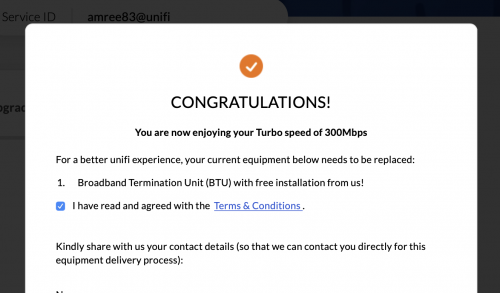
I got upgraded to 300Mbps without me clicking anything, but speed check said I'm definitely not even near to that speed. I was using Wifi to test and got 60Mbps as the result. So, I logged into my unifi account and check my turbo status. Apparently I need to agree to something. Will this help my speed?

user posted image
*
Read the 1st page, 1st post, green text. Read all of it.

This post has been edited by SilentVampire: Sep 13 2019, 03:49 PM
TSSilentVampire
post Sep 14 2019, 01:46 PM

Networking Enthusiast
*******
Senior Member
5,714 posts

Joined: Mar 2007


QUOTE(jimmy lai @ Sep 14 2019, 10:16 AM)
Hi sifu, my house have an wifi repeater in ground floor and main router at 1st floor. My problem is when every time i move from ground floor to 1st floor, my phone wifi are still link to repeater instead of router wifi signal. May i know what can I do to make my phone auto switch to main router?
*
Change router to something better and dump the extender, or use mesh wifi.
TSSilentVampire
post Sep 15 2019, 12:54 PM

Networking Enthusiast
*******
Senior Member
5,714 posts

Joined: Mar 2007


QUOTE(Singh93 @ Sep 15 2019, 11:14 AM)
How abt Asus RT AC86u? How is the coverage like and does it have hypptv issues?
*
The coverage is excellent, and the Unifi tv issue seems to have been fixed, with the latest firmware, so make sure you update to the latest one.
TSSilentVampire
post Sep 16 2019, 09:20 PM

Networking Enthusiast
*******
Senior Member
5,714 posts

Joined: Mar 2007


QUOTE(yakumo @ Sep 16 2019, 06:00 PM)
Hi, does RT-AC66U support 800Mbps unifi on cable?
Wifi not important
Thanks
*
Yes.
TSSilentVampire
post Sep 18 2019, 01:28 PM

Networking Enthusiast
*******
Senior Member
5,714 posts

Joined: Mar 2007


QUOTE(Max @ Sep 18 2019, 09:15 AM)
got my 300mbps turbo upgrade (after relocate).. from previous 30mb RYE package (vdsl)  thumbup.gif
tm give new router DLink 842 C2.
yesterday night 8pm TM came

however, the speed seems not consistent.. sometimes can reach 300mbps.. but most of the time 80-100mb (test on night time).  doh.gif
upload seems better hovering 30-50mbps
1gb lan to pc.

haven't test yet  on day time.
*
You need to be on 5GHz, and preferably a better router if you want consistent 5GHz coverage.
TSSilentVampire
post Sep 18 2019, 04:10 PM

Networking Enthusiast
*******
Senior Member
5,714 posts

Joined: Mar 2007


QUOTE(Max @ Sep 18 2019, 02:57 PM)
the test run on 1gb lan to PC. when TM come the test can reach 300mbps (evening), but night time i test it surely drop less than 100mbps  doh.gif

as for wifi, i understand the limitation.. even my phone only can support max ~150mbps  sweat.gif
*
Try with a different router. It could be a router issue, but most probably it is line issue.
TSSilentVampire
post Sep 20 2019, 10:37 PM

Networking Enthusiast
*******
Senior Member
5,714 posts

Joined: Mar 2007


QUOTE(Ivan_T @ Sep 20 2019, 02:21 PM)
I used to have Unifi 100mbps and then upgraded to 800mbps. During upgrade the modem has been replaced with a new Nokia modem but the router is still the same TP-link AC1200 with 2 antennas. I have done speedtest using laptop connected via ethernet cable and I get downlink ~800++Mbps which is very good and via WiFi 5GHz I managed to get ~400Mbps which is really good also.

However, the actual usage experience is not the same. The performance of the network for watching video and even normal internet browsing is bad. I have my TV connected to the router via ethernet cable and when I watch Youtube video on my TV and watching youtube also on 2 other mobile devices at the same time, I start to get buffering on either of these devices. Also a lot of times I'm getting lost of internet connection for the WiFi on my mobile phone when the WiFi signal is Excellent. The problem is resolved only after I power reset the modem and router. Then the same issue occur again after 1 or 2 days.

Called TM few times but they always just reset the port and asked to monitor again. Last time with the 100Mbps, the network performance was perfect, there was no need to reset the router or modem for months. I wonder what could be the problem.
*
Time to change to another router. Get the Asus RT-AC86U. Read 1st page, 1st post, green text lol. I explained that the TP-Link Archer C1200 is a crappy router.

TSSilentVampire
post Sep 21 2019, 04:25 PM

Networking Enthusiast
*******
Senior Member
5,714 posts

Joined: Mar 2007


QUOTE(4141 @ Sep 21 2019, 11:29 AM)
hi all,may i know how to check coverage for unifi? the link provided in the 1st page not working
*
Try this: https://highspeedinternet.my/fibre-internet...adband-coverage

16 Pages « < 12 13 14 15 16 >Top
Topic ClosedOptions
 

Change to:
| Lo-Fi Version
0.1736sec    0.55    7 queries    GZIP Disabled
Time is now: 8th December 2025 - 11:04 AM