Welcome Guest ( Log In | Register )

Bump Topic Topic Closed RSS Feed
16 Pages « < 13 14 15 16 >Bottom

Outline · [ Standard ] · Linear+

Unifi Official TM UniFi High Speed Broadband Thread V37, READ 1ST PAGE FOR TURBO SPEED INFO!

views
     
TSSilentVampire
post Sep 22 2019, 02:13 PM

Networking Enthusiast
*******
Senior Member
5,714 posts

Joined: Mar 2007


QUOTE(Tmj1920 @ Sep 22 2019, 11:04 AM)
Hi guys, i've recently bought a TP-Link Deco mesh kit for my setup and it says it supports Hypptv as well. However, i enabled the IPTV function but when i use my HyppTV all i see is a satellite icon and it doesnt load. Does anyone have similar problem or can help me solve this problem?
*
What port did you plug it in? You might have plug into the wrong port. VLAN500 is Unifi and VLAN600 is IPTV. Check the port.
TSSilentVampire
post Sep 22 2019, 06:13 PM

Networking Enthusiast
*******
Senior Member
5,714 posts

Joined: Mar 2007


QUOTE(wkc5657 @ Sep 22 2019, 04:54 PM)
I have this problem only started recent past 2-3 weeks. My connection on the ONU will drop off and have to wait a few moments to manually restart to gain back the connection. It happens sometimes daily, some times few days interval. The really weird thing is that it only happens during wee hours past 12am. Sometimes around 12.30am, sometimes 2 or 3am, the connection will drop.

My wife sometimes need to work at the wee hours due to timing differences or to catch up with work. The next morning, she will complain that no connection, cannot do work. Sometimes, i myself realise that problem the next morning when walking past the ONU box.

The LINK led is constantly lit, so i know that the optical cable and patch cord itself is fine but the AUTH led is blinking.

Any idea this is due to the Alcatel ONU box dying (less than 2 years old) or something wrong with the unifi backend server/switch port? My router (Asus RT AC86U) should still be fine, never dropped a connection on router end before and i'm on 300mbps plan. Advice/assistance much appreciated.
*
Time to check your line. You have to call TM for that.
TSSilentVampire
post Sep 23 2019, 06:44 PM

Networking Enthusiast
*******
Senior Member
5,714 posts

Joined: Mar 2007


QUOTE(Candy12 @ Sep 23 2019, 05:39 PM)
This thread front page needs updating.

This-->
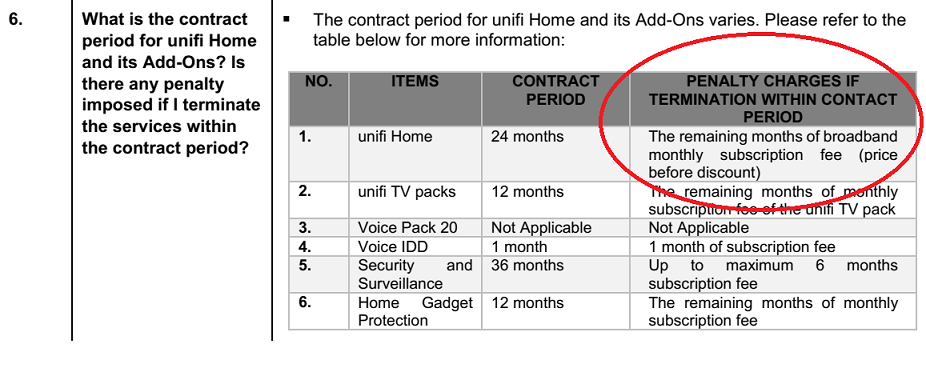
1. This service is a 24-month contract and a termination fee of RM500 is chargeable for termination of service within the contract period.

WRONG!
*
What is the right information then?
TSSilentVampire
post Sep 24 2019, 08:15 AM

Networking Enthusiast
*******
Senior Member
5,714 posts

Joined: Mar 2007


QUOTE(Candy12 @ Sep 23 2019, 10:45 PM)
Did they came and replace your router for the Turbo speed upgrade? If yes, 100% your contract has been renewed for another 2 years with the new UNFAIR policy.
user posted image
*
Cheers. The information on first page was copied over from previous writeups so TM have changed it. Good to know. Thank you.
TSSilentVampire
post Sep 24 2019, 04:58 PM

Networking Enthusiast
*******
Senior Member
5,714 posts

Joined: Mar 2007


QUOTE(safe118 @ Sep 24 2019, 03:57 PM)
Hi,

Would like to seek you guys opinion for the following issue,

My router was dead 2 weeks ago and called TM for advice. According to the TM operator, if my contract had already ended and need to replace a new router, they only charge me RM50 service fee with condition that I need to extend my existing contract for another year. Confirmed many times with tm operator that it was one yr and not 2 yrs and the tm operator confirmed it was one yr.

TM contractor came and installed the new router and further confirmed that my contract will extend one yr only.

Just now I went to TM Point to change the unifi account holder name. The staff there told me my unifi contract was further extended to another 2 yrs. I asked him how could this be since your tm operator & contractor kept telling me it was one yr. He cant answered & kept insist that was what the system shows.

He further told me if I need to change account holder name, I had to terminate the existing account and pay penalty of RM500 being early termination fee (After waiting for almost 10 minutes for him to google how much the penalty). So, who is right and wrong?  If I knew TM will extend another 2 yrs, I wont took that damn router.

I'm currrently paying 149 for 100 mbps whereby others are paying 129 only. Where's the fairness?

Shall I just accept what TM Point system shows or call 100 for further confirmation?
*
You made the major mistake of asking TM for their router. You should have bought your own. Honestly, buying your own router is MUCH better and highly recommended. Most of us here have bought our own and is using our own, either from the beginning or when the initial stock router goes kaput which is expected. Their router is honestly crap anyway.

At the moment, it is your word against them. Guess who will win? All in all, you can argue but you have nothing in writing.

TSSilentVampire
post Sep 25 2019, 08:56 AM

Networking Enthusiast
*******
Senior Member
5,714 posts

Joined: Mar 2007


QUOTE(stormaker @ Sep 25 2019, 08:48 AM)
My main usage is Netflix and was very satisfied with my Unifi 100Mbps for the past 10 months since installed.

But, for the past 1 month, TM decided to throttle my Netflix streaming at night and the quality fluctuate between 480p and 720p, occasionnaly get 1080p for few minutes and can forget about 4K on my Sony 4K TV and Apple TV 4K.

When test speed with Fast and Speedtest app, it's always show almost full speed of 100Mbps. Restart router numerous time but each time will only improved for a very short time.

Very frustrating, any advise on this ? I know by reporting this issue to Netflix and TM will only make them blame each other without any solution.

sad.gif  icon_question.gif
*
[QUOTE]

What router are you using? It could be a router issue more than anything else.
TSSilentVampire
post Sep 25 2019, 09:22 AM

Networking Enthusiast
*******
Senior Member
5,714 posts

Joined: Mar 2007


QUOTE(stormaker @ Sep 25 2019, 09:00 AM)
I'm still using the DLink router provided by TM.  But during daytime no problem at all. It's only started at around 9pm, while everything else like youtube 4K still fine.
*
Okay, you should try another router and see if that makes a difference. TM won't acknowledge the issue and will just say it is to be expected.
TSSilentVampire
post Sep 28 2019, 06:09 PM

Networking Enthusiast
*******
Senior Member
5,714 posts

Joined: Mar 2007


QUOTE(vknight @ Sep 28 2019, 06:02 PM)
Hi Guys. Just checking. If a condo recently have been installed with Time Fiber, ia there a possibility that TM will also install  Fiber? 

Cause I am paying quite high for 50 Mbps and planning to change to Time.  I asked TM but they are not giving any answer.
*
Don’t waste your time and switch to TIME ASAP!
TSSilentVampire
post Oct 1 2019, 06:37 PM

Networking Enthusiast
*******
Senior Member
5,714 posts

Joined: Mar 2007


QUOTE(wkc5657 @ Oct 1 2019, 04:54 PM)
Since there is no clear cut announcement, can SilentVampire help clarify whether if renew under paynothing promo, starting 01/01/2020, the monthly fee still remain the same or the new price as advertise.
*
Your guess is as good as mine. I am not working for TM lol. Just a user like you who is also wondering the same thing. One bit of advice though, make sure you clarify carefully with TM before doing anything. They have a tendency to change and not follow what they say previously.
TSSilentVampire
post Oct 6 2019, 10:55 AM

Networking Enthusiast
*******
Senior Member
5,714 posts

Joined: Mar 2007


QUOTE(Bagije @ Oct 6 2019, 01:23 AM)
Just want to share.
Bought online router mercusys mw325r,  but cannot pass 100mbps.
Spec router is 300mbps
Package 300mbps
Can anyone help
Checked cable cat6 and latest router.
Done test both wifi n lan. Only max 97mbps
My only guess router problem but called shop :say nothing
*
You screwed up by buying a router that has FE ports, so you can only get 100Mbps max.
TSSilentVampire
post Oct 8 2019, 03:30 PM

Networking Enthusiast
*******
Senior Member
5,714 posts

Joined: Mar 2007


QUOTE(Current Events guy @ Oct 8 2019, 03:25 PM)
What router should I get if I am mainly using my connection for gaming? I need one that offers lower latency compared to the default unifi d link router.

I am on the 100 mbps package and my PC is connected using a lan cable. Results from speed tests usually give the following results:

100 mbps down
50 mbps up
40 ms ping

Is it worth buying another router to replace the default one given with UniFi? If so, would it be really beneficial for me to go with something like an XR500 given my connection or should j settle with an Ac1200 router instead?
*
Your ping is very high. Try with a different cable. Cat 6 preferably. You can also change router but you don’t need something that good.

TSSilentVampire
post Oct 8 2019, 05:55 PM

Networking Enthusiast
*******
Senior Member
5,714 posts

Joined: Mar 2007


QUOTE(Current Events guy @ Oct 8 2019, 03:37 PM)
I'm with the understanding that Cat 6 is for 1 Gbps connections and Cat 5 is adequate for my speeds. I could get one to test it out since they're cheaper than buying a router though.
*
Yes, but the cable might not be good quality. So, get a good quality cable if possible.
TSSilentVampire
post Oct 8 2019, 06:36 PM

Networking Enthusiast
*******
Senior Member
5,714 posts

Joined: Mar 2007


QUOTE(neobie @ Oct 8 2019, 05:35 PM)
Today TM guys come to my house. They found out the problem is within Router and help to me change new Router.
As a result, I will be charged RM53 and renew contract of two years.

But, I have 2 units of exact same old D-LINK router (d-link dir-850l), and 2 units are tested by TM both can only go below 100Mbps. It is proven that the unit can't support such high speed (300mbps) themselves.
TM guys simply say that the "Router can support but maybe they are old already and got problem now".

How can I accept such explanation ? I suppose to get a free upgrade of Router after TURBO upgraded.

So how do I justify my self if I called to TM 100 ?
*
Just buy your own. You should not have got it from them. Most of us here buy our own.

QUOTE(Current Events guy @ Oct 8 2019, 06:09 PM)
How would I know if a cable is good quality or not?

I could use some pointers for buying cable especially with 10.10 sales coming.
*
I recommend Dintek cables. Get their Cat 6 ones. I am using that myself and I can confirm they are Cat 6.
TSSilentVampire
post Oct 12 2019, 01:06 PM

Networking Enthusiast
*******
Senior Member
5,714 posts

Joined: Mar 2007


QUOTE(jimmy lai @ Oct 12 2019, 12:31 PM)
Hi All, is Tenda AC18 still consider a good router? I need a router with good wifi coverage for my double storey house
*
Yes, but I would recommend the TP-Link A9 router over the Tenda AC18 as TP-Link A9 has newer hardware. See Blacktubi’s review: https://www.blacktubi.com/review/tp-link-archer-a9/

This post has been edited by SilentVampire: Oct 12 2019, 01:06 PM
TSSilentVampire
post Oct 13 2019, 10:30 AM

Networking Enthusiast
*******
Senior Member
5,714 posts

Joined: Mar 2007


QUOTE(JuneResources @ Oct 13 2019, 10:21 AM)
Oh, I see. Thanks for your information.
But what about if the plan is without tv box?
I got the unifi tv box (from my friend already terminate the account), then can I bind the Mac address to tv box?

Thanks a lot.
*
You can call them to bind the MAC address of the tv box to our account if you have a 2nd hand box. That should work, even if you have a plan without the TV box.
TSSilentVampire
post Oct 21 2019, 05:04 PM

Networking Enthusiast
*******
Senior Member
5,714 posts

Joined: Mar 2007


QUOTE(sHawTY @ Oct 21 2019, 04:38 PM)
Same here. That's why I didn't apply for the promo
Also, couldn't care less since the place that I'm working for is the one paying for my home internet anyway laugh.gif
*
I agree with this sentiment too. Did not apply for the promo. You only save 3 or 4 months, but have to commit to a 24 months contract, with the penalty of the total fee of remaining months left on the contract if you terminate the contract early doh.gif
TSSilentVampire
post Oct 23 2019, 03:12 PM

Networking Enthusiast
*******
Senior Member
5,714 posts

Joined: Mar 2007


QUOTE(Cloud2322 @ Oct 23 2019, 02:30 PM)
Guys.. I don't understand what's the YEP and perpetual that you guys are talking about..

In this case I am getting monthly fees waived till year end right? My package is RM189/month also what is the RM80 discount?

Thanks

user posted image
*
YEP is Year End Plan which is Unifi Promo, and Perpetual is Promo Discount Perpetual, which is what you are getting now. RM80 discount is the discount that you have and it seems like it is perpetual. Yes, montly fees waived till year end, and promo discount is perpetual or forever.
TSSilentVampire
post Oct 29 2019, 12:02 PM

Networking Enthusiast
*******
Senior Member
5,714 posts

Joined: Mar 2007


QUOTE(Candy12 @ Oct 29 2019, 11:05 AM)
The public thinks TM, Maxis and the other operators sponsor this forum for free one issit?
Of course they've their staffs posted here to promote their products and answer your technical questions pretending to be regular posters especially in their own created threads.

Malaysians got so dumb and mentally challenged not to have noticed this or forum users are less intelligent?
*
Lol, I’m not working for any of the major companies, and definitely not TM, even though I’m the OP of this thread. You seem to be implying that, but I might be mistaken. Funny story though, I got accused once by someone here that I’m working for TP-Link , which is quite funny as I was only recommending their products as a budget option for other users.

There are a lot of users here who are networking enthusiasts and is more than happy to help others, so I wouldn’t be so cynical if I were you.
TSSilentVampire
post Oct 31 2019, 10:27 PM

Networking Enthusiast
*******
Senior Member
5,714 posts

Joined: Mar 2007


QUOTE(SDOP-Bear @ Oct 31 2019, 10:17 PM)
Hi All, I having a issues that a few Japanese Game and website unable to login after 7pm Everyday.Is happen about 2 weeks already. Called TM/Unifi they say nothing happen at their site.Anyone have the way to fix it??

Thanks
*
Disable IPv6.


QUOTE(tzxsean @ Oct 31 2019, 10:20 PM)
anyone still facing issue on reddit?
*
Disable IPv6.

This post has been edited by SilentVampire: Oct 31 2019, 10:28 PM
TSSilentVampire
post Nov 4 2019, 11:51 AM

Networking Enthusiast
*******
Senior Member
5,714 posts

Joined: Mar 2007


QUOTE(mylinear @ Nov 4 2019, 11:09 AM)
This is a Unifi thread. That is the topic. Users talk about Unifi stuff here. Who is complimenting ? Who is promoting? I'm not interested in what the LYN forum itself does, like get paid or carry adverts or whatever. I'm interested in the threads, the topics, the interactions between users, the content. You keep attacking the users here who are just having discussions.

Here is one of you complimenting and promoting Maxis, Digi and Celcom. There are others complementing Celcom too.  Are you being paid by them? Or you're doing it for free out of spite?

https://forum.lowyat.net/index.php?showtopi...post&p=93265275

For past 1 month, the posts have been mainly about the YEP as users are unsure what to do. So info is being shared, questions being answered.  Its called helping each other.

You think users will only complain on threads because that is what you do. You are disatisfied and you want to complain and you want to try to make sure other users feel like you do so that you don't feel so alone in your own disatisfaction.  You don't believe users here are trying to help each other, because that is not what you do.

I thought since you didn't post for past couple of days, you had stopped. Not because of a loss or win, but because maybe you had come to your senses. But again, this morning you post trying to provoke others again. I guess I was wrong giving you the benefit of the doubt.

Candy12, it is clear you are very unhappy with TM. Anyone who has read your previous posts can see this. How many remaining months do you have of Unifi contract? Seems like you feel "trapped" and are lashing out as seen from the last 2 paragraphs on this post of yours.

https://forum.lowyat.net/index.php?showtopi...post&p=94408824

Why don't you try to help some users here. Like from post #6223 and #6224.  Show us you are capable of doing so. Would be interesting to see how you give a descent answer rather than spiteful ones.
*
Bro, just ignore him. He's a troll. He is either trying to get us to react for fun, or he is really serious and delusional. Either way, just ignore him.

16 Pages « < 13 14 15 16 >Top
Topic ClosedOptions
 

Change to:
| Lo-Fi Version
0.1860sec    0.34    7 queries    GZIP Disabled
Time is now: 5th December 2025 - 01:28 PM