Welcome Guest ( Log In | Register )

Outline · [ Standard ] · Linear+

 Adata XPG SX8200 Pro 512GB NVME SSD, Affordable alternative for high speed

views
     
TSxxboxx
post Dec 25 2018, 06:34 PM, updated 3y ago

The mind is for having ideas, not holding them
*******
Senior Member
5,261 posts

Joined: Oct 2004
From: J@Y B33


EDIT: Adata Switches to Slower Controller, NAND on SX8200 Pro
This review does not represent current SX8200 Pro performance anymore after they revised it. I'm sure the current model is still fast, but there will be difference from my review. Original review below:

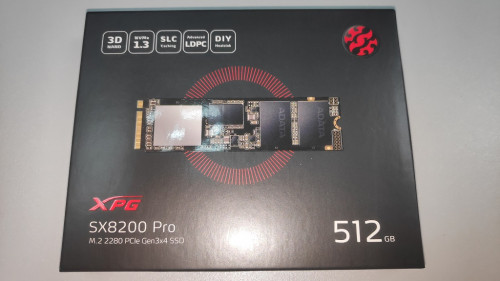
When it comes to NVME SSD, people always think about Samsung 970 Pro as the best NVME drive. But being the best also means the most expensive. Most seller is selling 512GB drive for almost RM1500. The cheapest I saw is from one seller for RM920. Is there any other drive that can give almost similar performance without paying that much? After reading around I think I found such drive. Enter Adata XPG SX8200 Pro. I bought it for RM440, that’s even less than half price compared to the cheapest seller of 970 Pro. But is it any good?
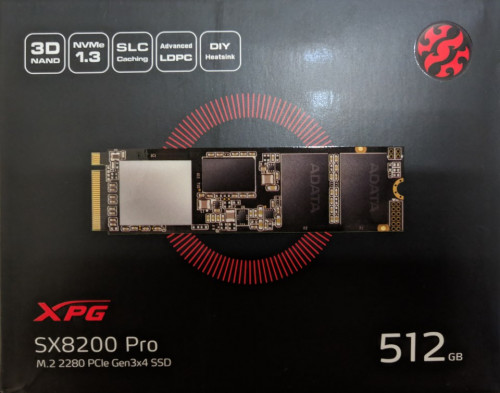
user posted image
NVME, 512GB size, M.2 2280 length, PCIe Gen 3x4 SSD

It promises read speed up to 3500MB/s and write speed up to 2300MB/s. Lets find out how it performs.
I’ll compare it to Samsung 850 Evo 250GB SATA SSD and Western Digital 3TB HDD. Both is connected on SATA 3 (6Gb/s speed)

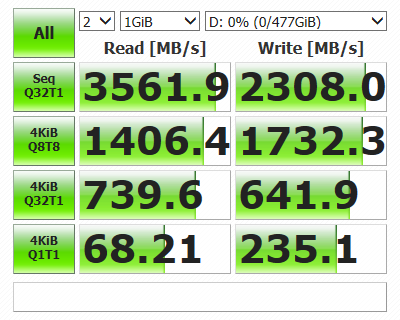
First test is Crystal DiskMark. For 970 Pro benchmark result I taken from guru3D review (https://www.guru3d.com/articles-pages/samsung-970-pro-m-2-512gb-nvme-ssd-review.html)
Although my system used is different then theirs, the result I believe should be not much different.
user posted image
Samsung 970 Pro 512GB

user posted image
Adata XPG SX8200 Pro 512GB

user posted image
Samsung 850 Evo 250GB

user posted image
Western Digital 3TB

From these results can see that 970 Pro faster by 200MB/s on sequential read than SX8200 Pro, that’s translate to about 6%. Sequential write speed almost similar on both. 4KBQ8T8 read is similar while write sees 970 Pro faster 334MB/s, which about 24%. 4KBQ32T1 show 970 Pro faster on read and write by about 74% and 66%. 4KBQ1T1 is almost similar on both drive.

SX8200 Pro is faster on everything compared to 850 Evo. Limitation of SATA speed is apparent when it’s about sequential read and write. SX8200 Pro tops read speed by 6 times! Write speed is a bit more modest 4.3 times faster. 4KBQ32T1 test show SX8200 Pro faster by 21% on read and 19% on write. SX8200 Pro able to double the speed on both read and write for 4KBQ1T1.

As for HDD, well it’s really not a competitor at all to any of the drive. The sole reason for continue using HDD will be it’s the cheapest for GB per Ringgit ratio.

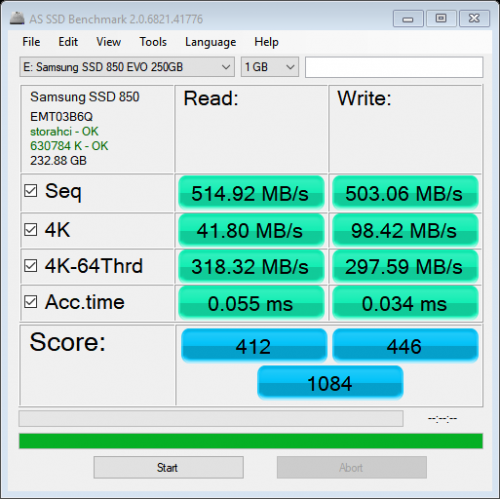
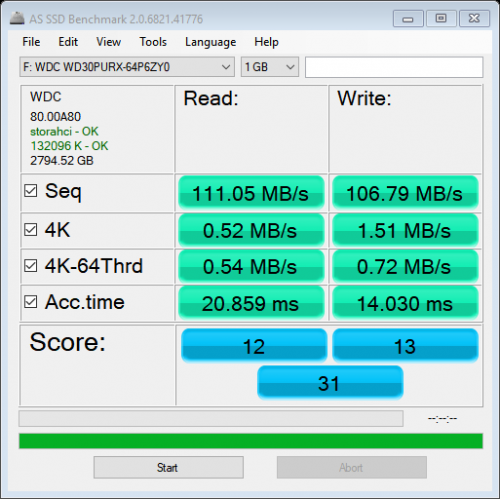
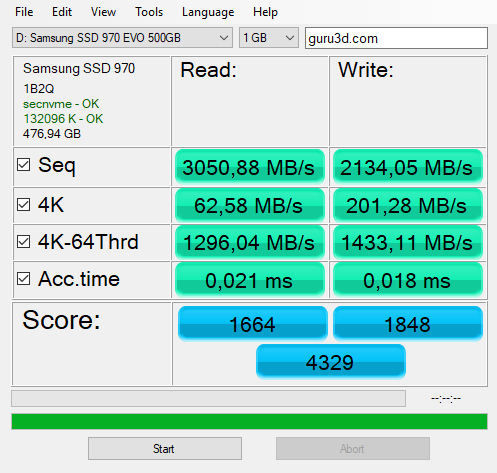
Next benchmark would be on AS SSD program.
user posted image
Samsung 970 Pro 512GB

user posted image
Adata XPG SX8200 Pro 512GB

user posted image
Samsung 850 Evo 250GB

user posted image
Western Digital 3TB

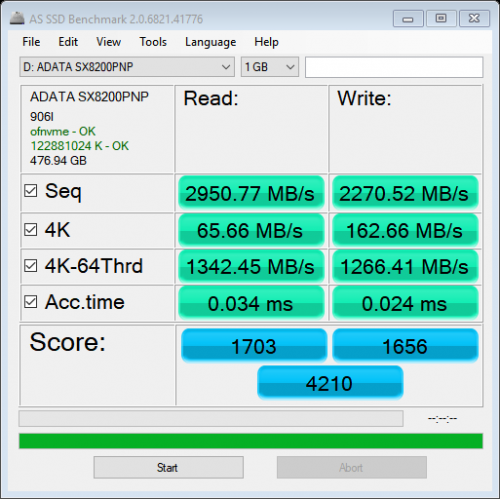
In this benchmark SX8200 Pro shows that it can also give back punches to 970 Pro. Sequential read for 970 Pro only faster by 3% while for write SX8200 Pro is faster by about 6%. For 4K read SX8200 Pro marginally faster by 5% but write sees 970 Pro pull ahead by 24%. 4K-64Thrd write 970 Pro again pull ahead by 13%. Overall score gives 970 Pro a lead by only 3%.

Compared to 850 Evo, SX8200 Pro shows again it’s faster on everything. 4K test shows the smallest difference but even that SX8200 Pro tops by 57% read and 65% write.

This post has been edited by xxboxx: Jan 16 2021, 01:49 PM
TSxxboxx
post Dec 25 2018, 06:35 PM

The mind is for having ideas, not holding them
*******
Senior Member
5,261 posts

Joined: Oct 2004
From: J@Y B33


Samsung Magician which is SSD management also can do performance benchmark. Again it shows how NVME is better than SATA.
user posted image


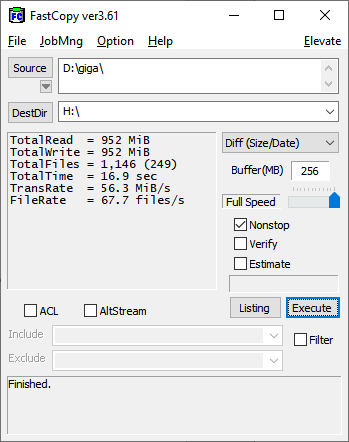
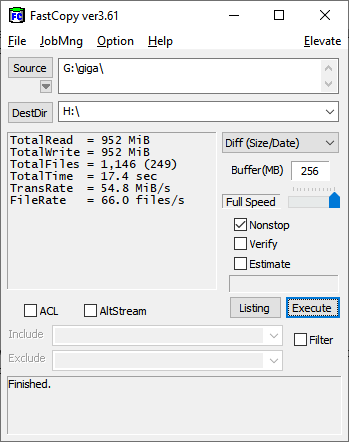
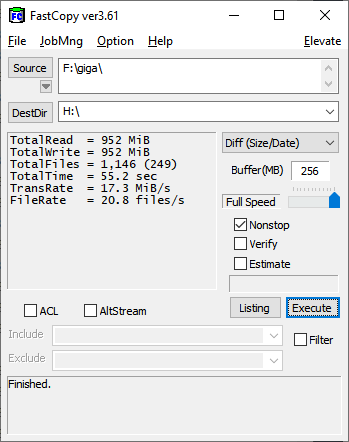
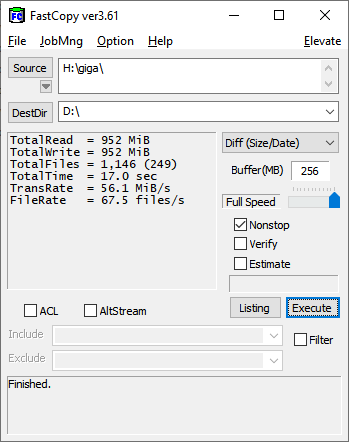
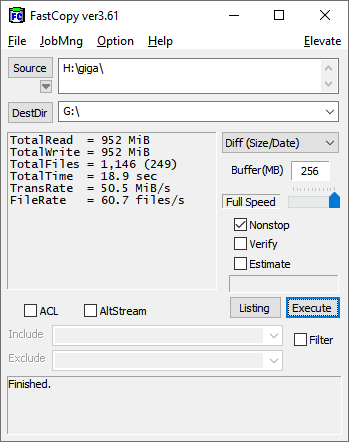
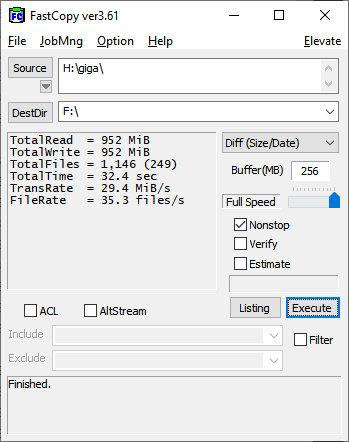
Now for some real world test. One big file test is pointless as the AS SSD sequential read and write benchmark already show each drive speed, SATA bandwidth is also 850 Evo limiting factor for big file test. I use 1146 files with various sizes in a folder, total size is 952MB, write and read it to RAM disk drive so that the other end will not be the limiting factor. I use FastCopy program as it is able to record time and transfer rate.

user posted image
Adata XPG SX8200 Pro 512GB read

user posted image
Samsung 850 Evo 250GB read

user posted image
Western Digital 3TB read

In these tests we can see SX8200 Pro read speed is faster than 850 Evo by about 0.5 seconds or 3%. Compared to Western Digital, SX8200 Pro is faster by 3 times. On to write speed.


user posted image
Adata XPG SX8200 Pro 512GB write

user posted image
Samsung 850 Evo 250GB write


user posted image
Western Digital 3TB write

On write speed SX8200 Pro is again faster than 850 Evo, by 2.9 second or about 10%. Compared to Western Digital, SX8200 Pro is faster by about 90%.


In conclusion, Adata XPG SX8200 Pro prove to be value for money compared to Samsung 970 Pro. It only loses out not by much yet it is a lot cheaper. It shows that you don’t need to have the most expensive drive to get good performance anymore unlike few years ago.

Against SATA SSD drive like Samsung 850 Evo, SX8200 Pro win by super wide margin when the data is big, but small file shows both have similar performance. The difference can only be felt when you’re dealing with bid data such as starting Windows or opening big application or copying large files. But when it’s just opening office files or image, both will feel just about the same.

This test also show why people should stop using HDD as their Windows or application drive, the speed and latency gap is just ridiculously big.

NVME SSD with read high speed of 3500MB/s and write speed of 2300MB/s before this usually reserved to the premium drive that have very high price tag. But now such speed also have arrive to those that want more value per ringgit on their purchase.

This post has been edited by xxboxx: Dec 25 2018, 06:51 PM
TSxxboxx
post Dec 25 2018, 06:35 PM

The mind is for having ideas, not holding them
*******
Senior Member
5,261 posts

Joined: Oct 2004
From: J@Y B33


Additional Info

Adata XPG SX8200 Pro doesn't come with it's own cloning software, but you can get free license for Acronis True image HD by registering your SSD.

Another thing is the drive doesn't have own NVME driver but instead rely on MS generic NVME driver. It's still work of course, just that it doesn't feel as premium as having own driver.

Unlike Samsung Magician program that look sleek, have useful function and can check for latest driver, Adata SSD Toolbox look amateur and you kind of doubt if it's utilities is actually working.

Update after use about 3 weeks vs Samsung Evo 850 SATA SSD previously:
-When open files and programs can feel it's faster, maybe the difference is just a second or two but still noticeable.

This post has been edited by xxboxx: Jan 13 2019, 11:20 AM
Vigilant
post Dec 26 2018, 03:04 AM

Be ever vigilant, but never suspicious
******
Senior Member
1,288 posts

Joined: Apr 2009
xxboxx Where can I get the NVME at RM440?
sHawTY
post Dec 26 2018, 07:37 AM

Frequent Reporter
********
All Stars
14,909 posts

Joined: Jul 2005

QUOTE(Vigilant @ Dec 26 2018, 03:04 AM)
xxboxx Where can I get the NVME at RM440?
Buy from this store:
https://shopee.com.my/ADATA-XPG-SX8200-PRO-...3299.1597395557

Do not buy from EIT STORE. Paid to them on 1 November, 12 November still hasn't shipped
No explanation whatsoever from the store & they never reply my chat messages eventhough they read it
Tired of waiting, I request for a refund directly with Lazada help center, luckily got a refund

Then I proceed to order with GT Mart on 12 November. 14 November my SSD already arrived thumbsup.gif
Vigilant
post Dec 26 2018, 08:42 AM

Be ever vigilant, but never suspicious
******
Senior Member
1,288 posts

Joined: Apr 2009
QUOTE(sHawTY @ Dec 26 2018, 07:37 AM)
Buy from this store:
https://shopee.com.my/ADATA-XPG-SX8200-PRO-...3299.1597395557

Do not buy from EIT STORE. Paid to them on 1 November, 12 November still hasn't shipped
No explanation whatsoever from the store & they never reply my chat messages eventhough they read it
Tired of waiting, I request for a refund directly with Lazada help center, luckily got a refund

Then I proceed to order with GT Mart on 12 November. 14 November my SSD already arrived thumbsup.gif
*
Actually the normal SRP is how much if want to get it from a physical store instead of online?
sHawTY
post Dec 26 2018, 09:29 AM

Frequent Reporter
********
All Stars
14,909 posts

Joined: Jul 2005

QUOTE(Vigilant @ Dec 26 2018, 08:42 AM)
Actually the normal SRP is how much if want to get it from a physical store instead of online?
Why do people still insist on buying from physical stores in this day & age? sweat.gif
Vigilant
post Dec 26 2018, 09:36 AM

Be ever vigilant, but never suspicious
******
Senior Member
1,288 posts

Joined: Apr 2009
QUOTE(sHawTY @ Dec 26 2018, 09:29 AM)
Why do people still insist on buying from physical stores in this day & age? sweat.gif
*
Well, to avoid something such as your case for instance, wait for a long time, then need to refund brows.gif

This post has been edited by Vigilant: Dec 27 2018, 02:52 AM
k town shit
post Dec 26 2018, 09:58 AM

Enthusiast
*****
Junior Member
771 posts

Joined: Jan 2009
QUOTE(xxboxx @ Dec 25 2018, 05:34 PM)
When it comes to NVME SSD, people always think about Samsung 970 Pro as the best NVME drive. But being the best also means the most expensive. Most seller is selling 512GB drive for almost RM1500. The cheapest I saw is from one seller for RM920. Is there any other drive that can give almost similar performance without paying that much? After reading around I think I found such drive. Enter Adata XPG SX8200 Pro. I bought it for RM440, that’s even less than half price compared to the cheapest seller of 970 Pro. But is it any good?

user posted image
NVME, 512GB size, M.2 2280 length, PCIe Gen 3x4 SSD

It promises read speed up to 3500MB/s and write speed up to 2300MB/s. Lets find out how it performs.
I’ll compare it to Samsung 850 Evo 250GB SATA SSD and Western Digital 3TB HDD. Both is connected on SATA 3 (6Gb/s speed)

*
is this a graphic card for GPU or hard disk for storage? Why it looks like plug into the graphic card port?
sHawTY
post Dec 26 2018, 11:04 AM

Frequent Reporter
********
All Stars
14,909 posts

Joined: Jul 2005

QUOTE(Vigilant @ Dec 26 2018, 09:36 AM)
Well, to avoid something such as your case for instance
That's why I gave the GT Mart link
The problemaitc seller is the EIT Store
QUOTE(k town shit @ Dec 26 2018, 09:58 AM)
is this a graphic card for GPU or hard disk for storage? Why it looks like plug into the graphic card port?
Baru keluar dari gua ke bang?
Its a solid state drive for storage

M.2 NVMe Solid State Drive has been available since 2013
TSxxboxx
post Dec 26 2018, 11:25 AM

The mind is for having ideas, not holding them
*******
Senior Member
5,261 posts

Joined: Oct 2004
From: J@Y B33


QUOTE(Vigilant @ Dec 26 2018, 03:04 AM)
xxboxx Where can I get the NVME at RM440?
*

Many online seller have it. Check around, good place to start is Shopee and Lazada
I don't want to name the seller as not only them have it, and important to read each seller rating so that you know what you're getting into.

QUOTE(k town shit @ Dec 26 2018, 09:58 AM)
is this a graphic card for GPU or hard disk for storage? Why it looks like plug into the graphic card port?
*

I don't know how to answer this question sweat.gif

I assume you know what is SATA SSD right? Go read about NVME at Wikipedia first, then read this review. Then you'll know what's each type of drive advantage is. Tho with NVME, SATA SSD is seem redundant now.
pandera999
post Jan 12 2019, 05:25 PM

모든 것​에는 정해진 때​가 있으니
*******
Senior Member
6,214 posts

Joined: Sep 2010
From: Busan, Kr | Kuching, Swk


whoa... great
nrw
post Jan 13 2019, 01:02 AM

Casual
***
Junior Member
398 posts

Joined: Jul 2014


u should compare speed with 50%/75%/90% of the drive being filled with data and u'll see what difference that makes wink.gif
TSxxboxx
post Jan 13 2019, 10:59 AM

The mind is for having ideas, not holding them
*******
Senior Member
5,261 posts

Joined: Oct 2004
From: J@Y B33


QUOTE(nrw @ Jan 13 2019, 01:02 AM)
u should compare speed with 50%/75%/90% of the drive being filled with data and u'll see what difference that makes wink.gif
*

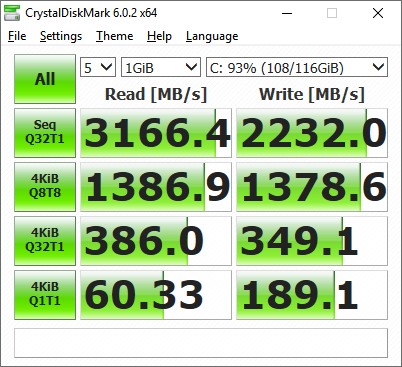
user posted image
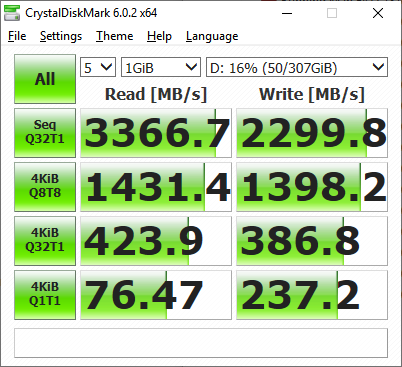
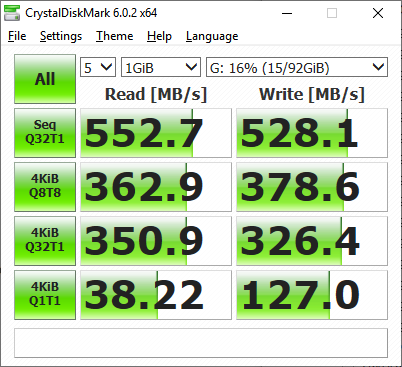
16% fill up

user posted image
93% fill up

Not much difference
TSxxboxx
post Jan 13 2019, 11:18 AM

The mind is for having ideas, not holding them
*******
Senior Member
5,261 posts

Joined: Oct 2004
From: J@Y B33


Update after use about 3 weeks vs Samsung Evo 850 SATA SSD previously:
-When open files and programs can feel it's faster, maybe the difference is just a second or two but still noticeable.
nrw
post Jan 13 2019, 12:43 PM

Casual
***
Junior Member
398 posts

Joined: Jul 2014


QUOTE(xxboxx @ Jan 13 2019, 10:59 AM)
Not much difference
*
is your partition or drive filled up 93%?
cuz ur testing a 512GB drive with 476GB net capacity and your screenshots are just showing a 116GB partition that is filled with 108GB.

TSxxboxx
post Jan 13 2019, 12:51 PM

The mind is for having ideas, not holding them
*******
Senior Member
5,261 posts

Joined: Oct 2004
From: J@Y B33


QUOTE(nrw @ Jan 13 2019, 12:43 PM)
is your partition or drive filled up 93%?
cuz ur testing a 512GB drive with 476GB net capacity and your screenshots are  just showing a 116GB partition that is filled with 108GB.
*

I partition it to 2 drive.
You mean both partition need to be 90% fill up?
Next time test then, need time to copy those files to fill up the drive.

Now I remember I also unallocated about 10% for over provisioning, so won't able to do 90% fill up test.

This post has been edited by xxboxx: Jan 13 2019, 12:55 PM
nrw
post Jan 13 2019, 03:43 PM

Casual
***
Junior Member
398 posts

Joined: Jul 2014


if you're free just do 75% then biggrin.gif

I have the same drive since late November.. while I agree it's a neat drive (I think the best for sale at this price point) you'll probably agree with my opinion that the more this ssd is filled the more ground it looses for example on the 970pro you tested above.

this unfortunately is the case with almost all ssd's but those adata's tend to take a bigger hit compared to lets say the samsung's.

No idea how much your drive is filled in total, but you can already see a 20% decreasement from your last screenshot in 4K random read already.

This post has been edited by nrw: Jan 13 2019, 03:44 PM
TSxxboxx
post Jan 13 2019, 04:05 PM

The mind is for having ideas, not holding them
*******
Senior Member
5,261 posts

Joined: Oct 2004
From: J@Y B33


QUOTE(nrw @ Jan 13 2019, 03:43 PM)
if you're free just do 75% then biggrin.gif

I have the same drive since late November.. while I agree it's a neat drive (I think the best for sale at this price point) you'll probably agree with my opinion that the more this ssd is filled the more ground it looses for example on the 970pro you tested above.

this unfortunately is the case with almost all ssd's but those adata's tend to take a bigger hit compared to lets say the samsung's.

No idea how much your drive is filled in total, but you can already see a 20% decreasement from your last screenshot in 4K random read already.
*

I didn't test 970 Pro, it's taken from guru3D review.

You got the link for 970 Pro benchmark when it's 50%/75%/90%?
nrw
post Jan 13 2019, 05:04 PM

Casual
***
Junior Member
398 posts

Joined: Jul 2014


QUOTE(xxboxx @ Jan 13 2019, 04:05 PM)
I didn't test 970 Pro, it's taken from guru3D review.

You got the link for 970 Pro benchmark when it's 50%/75%/90%?
*
couldn't find but I remembered https://www.anandtech.com/show/13112/the-ad...me-ssd-review/3 being posted in here so u'll have to take this for the moment.
this doesn't fully represent the above due to test details, however testing scenario will allow to transfer some of the findings to the issue of decreasing performance in relation to heavily utilized drive capacity.
nrw
post Jan 13 2019, 05:10 PM

Casual
***
Junior Member
398 posts

Joined: Jul 2014


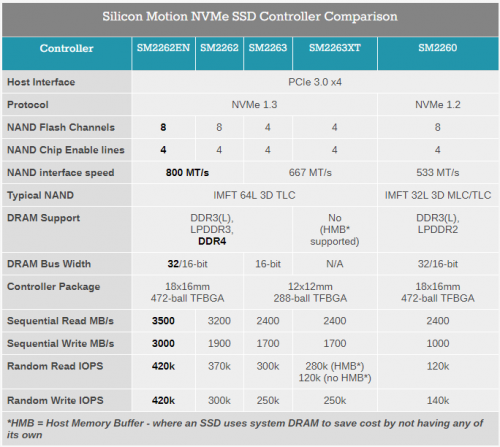
additional "The catch is that these drives using the SM2262 controller lose most of their performance advantage when the test is run on a full drive." (quoted from the anandtech review)
Note: The SX8200 which uses the SM2262 the SX8200 Pro is using the SM2262EN controller which however seems to be having similar issues.

user posted image

This post has been edited by nrw: Jan 13 2019, 09:42 PM
sHawTY
post Jan 20 2019, 11:56 AM

Frequent Reporter
********
All Stars
14,909 posts

Joined: Jul 2005

QUOTE(nrw @ Jan 13 2019, 03:43 PM)
those adata's tend to take a bigger hit compared to lets say the samsung's.
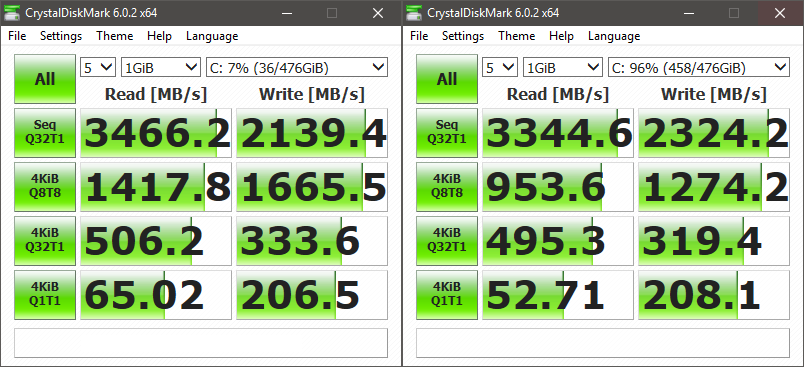
Although there is a speed decrease, it's not to a level where it goes down lower than SATA SSD speed
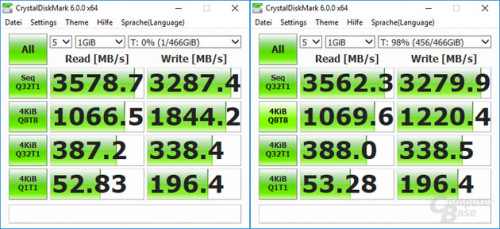
Below is my test results between 7% and 96%

user posted image

With the price difference between a Samsung 970 Pro 512GB at RM1K++ & ADATA SX8200 Pro 512GB at RM435, I'd take the ADATA anyday

This post has been edited by sHawTY: Jan 22 2019, 03:19 PM
caloyness
post Jan 22 2019, 03:13 PM

Getting Started
**
Junior Member
264 posts

Joined: Jan 2016
i bought this sx8200 pro last week and use it on my B450 board.
so far the performance is okay, but sometimes im getting
"BSOD : unexpected_Store_exception"

around 2 times happened in 1 week, in happens when monitor goes to sleep or pc when its idle for long time, then suddenly blue screen with this stop code.

this is running on a fresh win 10 pro after updating windows.

This post has been edited by caloyness: Jan 22 2019, 03:14 PM
sHawTY
post Jan 22 2019, 03:20 PM

Frequent Reporter
********
All Stars
14,909 posts

Joined: Jul 2005

QUOTE(caloyness @ Jan 22 2019, 03:13 PM)
i bought this sx8200 pro last week and use it on my B450 board.
so far the performance is okay, but sometimes im getting
"BSOD : unexpected_Store_exception"

around 2 times happened in 1 week, in happens when monitor goes to sleep or pc when its idle for long time, then suddenly blue screen with this stop code.

this is running on a fresh win 10 pro after updating windows.
Are you having the same issue if you use another SSD?
Can state the model of your motherboard
caloyness
post Jan 22 2019, 03:23 PM

Getting Started
**
Junior Member
264 posts

Joined: Jan 2016
QUOTE(sHawTY @ Jan 22 2019, 03:20 PM)
Are you having the same issue if you use another SSD?
Can state the model of your motherboard
*
Only happened since i switch to SX8200 pro as my main OS drive.

MSI b450 tomahawk with ryzen 2600
sHawTY
post Jan 22 2019, 03:48 PM

Frequent Reporter
********
All Stars
14,909 posts

Joined: Jul 2005

QUOTE(caloyness @ Jan 22 2019, 03:23 PM)
Only happened since i switch to SX8200 pro as my main OS drive.
Does that mean you have another SSD that doesn't have this issue?
caloyness
post Jan 22 2019, 03:58 PM

Getting Started
**
Junior Member
264 posts

Joined: Jan 2016
QUOTE(sHawTY @ Jan 22 2019, 03:48 PM)
Does that mean you have another SSD that doesn't have this issue?
*
yes, using 120GB sandisk ultra before upgrading.
TSxxboxx
post Jan 22 2019, 05:09 PM

The mind is for having ideas, not holding them
*******
Senior Member
5,261 posts

Joined: Oct 2004
From: J@Y B33


QUOTE(caloyness @ Jan 22 2019, 03:13 PM)
i bought this sx8200 pro last week and use it on my B450 board.
so far the performance is okay, but sometimes im getting
"BSOD : unexpected_Store_exception"

around 2 times happened in 1 week, in happens when monitor goes to sleep or pc when its idle for long time, then suddenly blue screen with this stop code.

this is running on a fresh win 10 pro after updating windows.
*

https://www.errorsolutions.tech/error/unexpected-store-exception-windows-10/
https://social.technet.microsoft.com/Forums...n10itprogeneral
https://answers.microsoft.com/en-us/windows...35-e1f3798b54c7

If don't want troubleshoot then maybe try reinstalling fresh Windows


Or can try use custom firmware. After I updated to 1809 windows can't read the drive's SMART info. I end up using Generic OFA NVMe driver v1.5.0.0 from Win-Raid forum to get back the SMART info.
caloyness
post Jan 22 2019, 05:16 PM

Getting Started
**
Junior Member
264 posts

Joined: Jan 2016
QUOTE(xxboxx @ Jan 22 2019, 05:09 PM)
https://www.errorsolutions.tech/error/unexp...ion-windows-10/
https://social.technet.microsoft.com/Forums...n10itprogeneral
https://answers.microsoft.com/en-us/windows...35-e1f3798b54c7

If don't want troubleshoot then maybe try reinstalling fresh Windows
Or can try use custom firmware. After I updated to 1809 windows can't read the drive's SMART info. I end up using Generic OFA NVMe driver v1.5.0.0 from Win-Raid forum to get back the SMART info.
*
thanks bro, will try.

below is per other user issue, almost same like mine. When leaving the PC idle for a long time.

QUOTE
I did this and still got an UNEXPECTED_STORE_EXCEPTION this morning. my screensaver had frozen overnight and when i went to use the machine, it was unresponsive until the BSOD.

TSxxboxx
post Jan 22 2019, 05:27 PM

The mind is for having ideas, not holding them
*******
Senior Member
5,261 posts

Joined: Oct 2004
From: J@Y B33


QUOTE(caloyness @ Jan 22 2019, 05:16 PM)
thanks bro, will try.

below is per other user issue, almost same like mine. When leaving the PC idle for a long time.
*

I think this is more likely Windows issue. Before I use this SSD I also always encounter BSOD after back from SLEEP, and I always encounter Win Defender notify it stop unauthorized program from making changes to the memory (sometimes even Win own program!) after come back from HIBERNATE, and sometimes BSOD too. It will never fail to happen every time I use SLEEP or HIBERNATE, I now end up only use SHUTDOWN every time. I upgrade from Win 7 to 10, then use migration tools to change SSD twice. So maybe too many broken files already.
nrw
post Jan 23 2019, 12:51 AM

Casual
***
Junior Member
398 posts

Joined: Jul 2014


QUOTE(sHawTY @ Jan 20 2019, 11:56 AM)
Although there is a speed decrease, it's not to a level where it goes down lower than SATA SSD speed
Below is my test results between 7% and 96%

user posted image

With the price difference between a Samsung 970 Pro 512GB at RM1K++ & ADATA SX8200 Pro 512GB at RM435, I'd take the ADATA anyday
*
user posted image
In comparison, new 970 Evo Plus. Note how good it is at keeping the speed. The only noticeable decreasement to be seen at 4KiB Q8T8.

However I agree with you (like I have said before) that at the current price point it is the best choice.
I merely wanted to point out the lack of this characteristic in your initial review which changes your conclusion abit, after all.
Thanks & cheers

This post has been edited by nrw: Jan 23 2019, 12:56 AM
j1122
post Jan 26 2019, 06:41 AM

Casual
***
Junior Member
320 posts

Joined: Jun 2009

Does this drive gets hot? Like after heavy benchmark etc
culain99
post Jan 27 2019, 05:57 PM

-----
*****
Junior Member
765 posts

Joined: Jun 2007
good price for performance
Marcion
post Jan 27 2019, 07:45 PM

Getting Started
**
Junior Member
247 posts

Joined: Feb 2010
want to ask why adata toolbox temperature display error?
TSxxboxx
post Jan 29 2019, 01:14 PM

The mind is for having ideas, not holding them
*******
Senior Member
5,261 posts

Joined: Oct 2004
From: J@Y B33


QUOTE(Marcion @ Jan 27 2019, 07:45 PM)
want to ask why adata toolbox temperature display error?
*

It's Windows driver issue. After I updated to 1809 windows can't read the drive's SMART info. I end up using Generic OFA NVMe driver v1.5.0.0 from Win-Raid forum to get back the SMART info.
Marcion
post Jan 29 2019, 07:34 PM

Getting Started
**
Junior Member
247 posts

Joined: Feb 2010
QUOTE(xxboxx @ Jan 29 2019, 02:14 PM)
It's Windows driver issue. After I updated to 1809 windows can't read the drive's SMART info. I end up using Generic OFA NVMe driver v1.5.0.0 from Win-Raid forum to get back the SMART info.
*
how install it to work?
TSxxboxx
post Jan 29 2019, 10:44 PM

The mind is for having ideas, not holding them
*******
Senior Member
5,261 posts

Joined: Oct 2004
From: J@Y B33


QUOTE(Marcion @ Jan 29 2019, 07:34 PM)
how install it to work?
*
On Device Manager, look for Disk drives > ADATA SX8200, right click > update driver > let me pick > Have Disk, browse to the folder that you extracted
Marcion
post Jan 30 2019, 08:03 PM

Getting Started
**
Junior Member
247 posts

Joined: Feb 2010
QUOTE(xxboxx @ Jan 29 2019, 11:44 PM)
On Device Manager, look for Disk drives > ADATA SX8200, right click > update driver > let me pick > Have Disk,  browse to the folder that you extracted
*
no wonder it still don't work mine is adata XPG GAMMIX S11 not SX8200
TSxxboxx
post Jan 31 2019, 02:25 PM

The mind is for having ideas, not holding them
*******
Senior Member
5,261 posts

Joined: Oct 2004
From: J@Y B33


QUOTE(Marcion @ Jan 30 2019, 08:03 PM)
no wonder it still don't work mine is adata XPG GAMMIX S11 not SX8200
*

Hahaha lol

Another way that I found while googling is to fresh install Windows. But this is on different computer with different nvme drive. So don't know iwill it work the same with ADATA.
sHawTY
post Feb 4 2019, 03:40 PM

Frequent Reporter
********
All Stars
14,909 posts

Joined: Jul 2005

QUOTE(xxboxx @ Jan 29 2019, 01:14 PM)
Generic OFA NVMe driver v1.5.0.0 from
OFA NVMe driver slows down the SSD performance
My SX8200 Pro read & write speed drops down a lot after using the OFA NVMe driver
TSxxboxx
post Feb 4 2019, 09:01 PM

The mind is for having ideas, not holding them
*******
Senior Member
5,261 posts

Joined: Oct 2004
From: J@Y B33


QUOTE(sHawTY @ Feb 4 2019, 03:40 PM)
OFA NVMe driver slows down the SSD performance
My SX8200 Pro read & write speed drops down a lot after using the OFA NVMe driver
*

Which driver you using now? SMART info can be displayed?
sHawTY
post Feb 5 2019, 04:17 AM

Frequent Reporter
********
All Stars
14,909 posts

Joined: Jul 2005

QUOTE(xxboxx @ Feb 4 2019, 09:01 PM)
Which driver you using now? SMART info can be displayed?
Generic Windows 10 NVMe driver
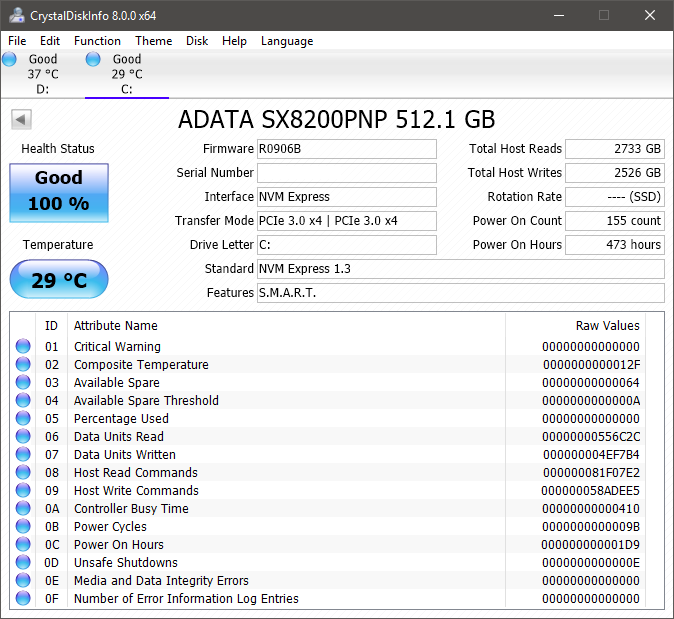
Yes, SMART information is displayed correctly in CrystalDiskInfo

Well except the temperature reading. I don't believe the temperature reading is correct since the SSD is sitting between 2 x RX 580. Even when gaming the temperature never exceeds 31°C

user posted image
TSxxboxx
post Feb 5 2019, 10:27 AM

The mind is for having ideas, not holding them
*******
Senior Member
5,261 posts

Joined: Oct 2004
From: J@Y B33


QUOTE(sHawTY @ Feb 5 2019, 04:17 AM)
Generic Windows 10 NVMe driver
Yes, SMART information is displayed correctly in CrystalDiskInfo

Well except the temperature reading. I don't believe the temperature reading is correct since the SSD is sitting between 2 x RX 580. Even when gaming the temperature never exceeds 31°C

user posted image
*

You already on 1809 when install this SSD? Or clean install 1809?

I after upgrade to 1809 the SMART info can't be displayed. But HWINFO still able to display the info.

My temp reading is around 39° when light workload and 45° when gaming.
sHawTY
post Feb 5 2019, 04:31 PM

Frequent Reporter
********
All Stars
14,909 posts

Joined: Jul 2005

QUOTE(xxboxx @ Feb 5 2019, 10:27 AM)
You already on 1809 when install this SSD? Or clean install 1809?
Clean install 1809
QUOTE(xxboxx @ Feb 5 2019, 10:27 AM)
My temp reading is around 39° when light workload and  45° when gaming.
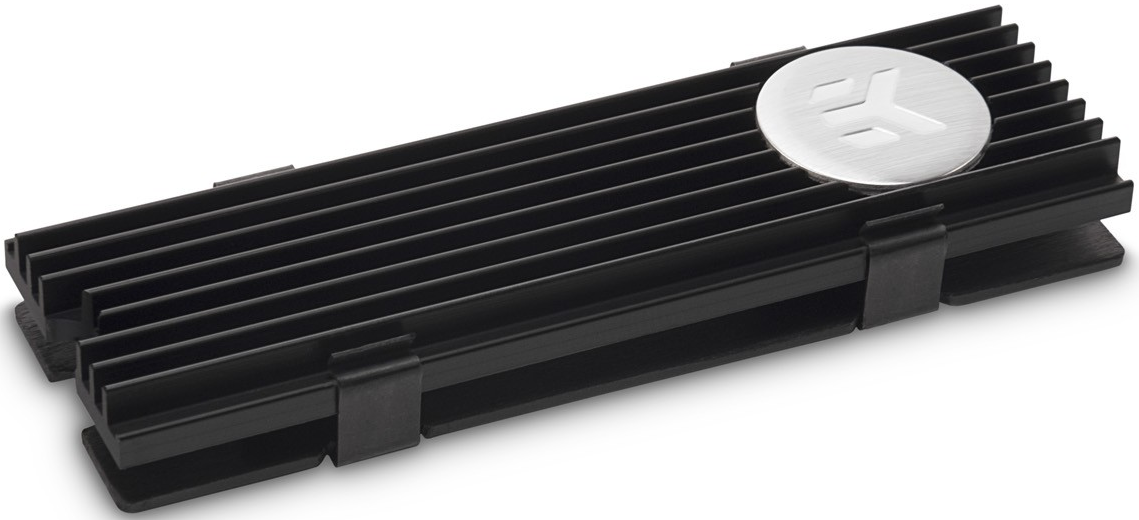
I'm using EK-M.2 NVMe Heatsink on the SX8200 Pro although I think the temperature is still incorrect

user posted image

This post has been edited by sHawTY: Feb 5 2019, 04:35 PM
TSxxboxx
post Feb 5 2019, 09:51 PM

The mind is for having ideas, not holding them
*******
Senior Member
5,261 posts

Joined: Oct 2004
From: J@Y B33


QUOTE(sHawTY @ Feb 5 2019, 04:31 PM)
Clean install 1809
I'm using EK-M.2 NVMe Heatsink on the SX8200 Pro although I think the temperature is still incorrect

user posted image
*

Thought so clean install. Haha the road that I unwilling to take.

For me OFA NVMe driver give similar speed.

Yours in air conditioning room? Mine is not. I also have thick heatsink as the MB comes with it. When gaming my GPU is 75° and CPU is 55°
sHawTY
post Feb 5 2019, 11:01 PM

Frequent Reporter
********
All Stars
14,909 posts

Joined: Jul 2005

QUOTE(xxboxx @ Feb 5 2019, 09:51 PM)
Yours in air conditioning room? Mine is not. I also have thick heatsink as the MB comes with it. When gaming my GPU is 75° and CPU is 55°
No air conditioner
My GPU is around 85°C at maximum load
Whereas my CPU never exceed 45°C because it's watercooled

Although the EK-M.2 heatsink does cool both the top & bottom part of the SSD, not like all M.2 motherboard heatsink that only cools the top of the SSD

This post has been edited by sHawTY: Feb 5 2019, 11:01 PM
TSxxboxx
post Feb 6 2019, 09:57 AM

The mind is for having ideas, not holding them
*******
Senior Member
5,261 posts

Joined: Oct 2004
From: J@Y B33


QUOTE(sHawTY @ Feb 5 2019, 11:01 PM)
No air conditioner
My GPU is around 85°C at maximum load
Whereas my CPU never exceed 45°C because it's watercooled

Although the EK-M.2 heatsink does cool both the top & bottom part of the SSD, not like all M.2 motherboard heatsink that only cools the top of the SSD
*

If in air conditioning room then maybe can get such temperature. Without it I don't think can get same like ambient temperature even with the 2 sides heatsink.
ngwoeijiang
post Mar 15 2019, 01:56 PM

New Member
*
Newbie
1 posts

Joined: Mar 2015
QUOTE(xxboxx @ Jan 22 2019, 05:09 PM)
https://www.errorsolutions.tech/error/unexp...ion-windows-10/
https://social.technet.microsoft.com/Forums...n10itprogeneral
https://answers.microsoft.com/en-us/windows...35-e1f3798b54c7

If don't want troubleshoot then maybe try reinstalling fresh Windows
Or can try use custom firmware. After I updated to 1809 windows can't read the drive's SMART info. I end up using Generic OFA NVMe driver v1.5.0.0 from Win-Raid forum to get back the SMART info.
*
Do you still keep the Driver because i cannot access the file anymore
TSxxboxx
post Mar 15 2019, 07:33 PM

The mind is for having ideas, not holding them
*******
Senior Member
5,261 posts

Joined: Oct 2004
From: J@Y B33


QUOTE(ngwoeijiang @ Mar 15 2019, 01:56 PM)
Do you still keep the Driver because i cannot access the file anymore
*

The account that created this link has been terminated due to multiple violations of our Terms of Service. sweat.gif

"pure" 32bit OFA NVMe driver v1.5.0.0 for Win10 x86 mod+signed
https://www.win-unattended.de/Benutzer/Fern...%20Fernando.rar

"pure" 64bit OFA NVMe driver v1.5.0.0 for Win10 x64 mod+signed
https://www.win-unattended.de/Benutzer/Fern...%20Fernando.rar

The driver I got it from here
https://www.win-raid.com/t29f25-Recommended...vers.html#msg61
It was signed by the website owner
BigSaver
post May 7 2019, 08:46 AM

v(^_^)V
******
Senior Member
1,029 posts

Joined: Apr 2008
From: Earth


Guys,

Has anyone facing this problem with SX8200 pro?

1) 1st time boot (everytime), bios said no bootable device, then need to restart pc to see the sx8200 drive
2) Leave my pc idle ( like >10 minute) then blue screen happened.

Ive done fresh window install for 2nd time already. Yet the problem still appear.

Something to do with adata driver?

Now thinking to switch to MX500, i know the speed cant match NVME, but the problem above is annoying.
caloyness
post May 7 2019, 11:26 AM

Getting Started
**
Junior Member
264 posts

Joined: Jan 2016
QUOTE(BigSaver @ May 7 2019, 08:46 AM)
Guys,

Has anyone facing this problem with SX8200 pro?

1) 1st time boot (everytime), bios said no bootable device, then need to restart pc to see the sx8200 drive
2) Leave my pc idle ( like >10 minute) then blue screen happened.

Ive done fresh window install for 2nd time already. Yet the problem still appear.

Something to do with adata driver?

Now thinking to switch to MX500, i know the speed cant match NVME, but the problem above is annoying.
*
Hi bro,

same with me, i already raise this issue in this forum before.
i leave idle for 1hr or so and then blue screen , stop code : storage something.
TSxxboxx
post May 7 2019, 05:04 PM

The mind is for having ideas, not holding them
*******
Senior Member
5,261 posts

Joined: Oct 2004
From: J@Y B33


QUOTE(BigSaver @ May 7 2019, 08:46 AM)
Guys,

Has anyone facing this problem with SX8200 pro?

1) 1st time boot (everytime), bios said no bootable device, then need to restart pc to see the sx8200 drive
2) Leave my pc idle ( like >10 minute) then blue screen happened.

Ive done fresh window install for 2nd time already. Yet the problem still appear.

Something to do with adata driver?

Now thinking to switch to MX500, i know the speed cant match NVME, but the problem above is annoying.
*

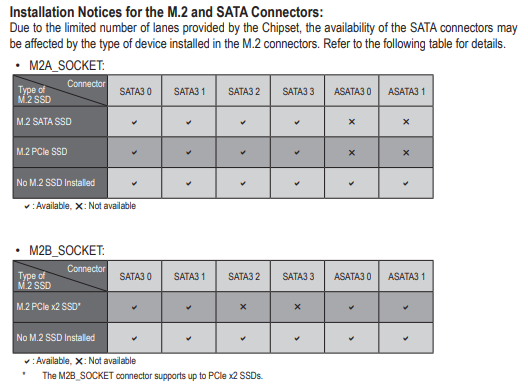
My system always shut down, and normal boot. Didn't encounter such issue. Maybe bios setting need to change, or motherboard got conflict as some is using the NVME data lane with some SATA port.
When leave your PC, does it go to sleep? Have you try after fresh install, then don't install other software first and see if the problem still persist.


Do you have fast boot enabled?
https://www.win-raid.com/t3975f46-Which-NVM...-related-6.html

You can try this generic OFA driver

32bit
https://www.win-unattended.de/Benutzer/Fern...%20Fernando.rar

64bit
https://www.win-unattended.de/Benutzer/Fern...%20Fernando.rar

This post has been edited by xxboxx: May 7 2019, 05:10 PM
TSxxboxx
post May 7 2019, 05:05 PM

The mind is for having ideas, not holding them
*******
Senior Member
5,261 posts

Joined: Oct 2004
From: J@Y B33


QUOTE(caloyness @ May 7 2019, 11:26 AM)
Hi bro,

same with me, i already raise this issue in this forum before.
i leave idle for 1hr or so and then blue screen , stop code : storage something.
*

Your problem still persist until now?
jimmylim85
post May 8 2019, 08:12 AM

iPhone world....
*******
Senior Member
7,828 posts

Joined: Jan 2003
From: Ipoh


QUOTE(BigSaver @ May 7 2019, 08:46 AM)
Guys,

Has anyone facing this problem with SX8200 pro?

1) 1st time boot (everytime), bios said no bootable device, then need to restart pc to see the sx8200 drive
2) Leave my pc idle ( like >10 minute) then blue screen happened.

Ive done fresh window install for 2nd time already. Yet the problem still appear.

Something to do with adata driver?

Now thinking to switch to MX500, i know the speed cant match NVME, but the problem above is annoying.
*
Didn't face this problem for me. Have you tried checking your motherboard for latest driver and BIOS update?

I don't think there is requirement from AData driver. Cause is more like plug n play.

I'm using two 8200pro, 256GB for my boot drive and 512mb for my steam games day to day usage on my Rog Strix Z390-E.

Do take note that 3500mb/sec read is available for 256GB to 1TB onwards, just the write speed varies eg. 256GB is 1200mb/sec and 512GB is 2300mb/sec.
BigSaver
post May 8 2019, 09:58 AM

v(^_^)V
******
Senior Member
1,029 posts

Joined: Apr 2008
From: Earth


QUOTE(caloyness @ May 7 2019, 11:26 AM)
Hi bro,

same with me, i already raise this issue in this forum before.
i leave idle for 1hr or so and then blue screen , stop code : storage something.
*
Yeah i notice your post in this thread regarding the blue screen. Have you found the solution?

QUOTE(xxboxx @ May 7 2019, 05:04 PM)
My system always shut down, and normal boot. Didn't encounter such issue. Maybe bios setting need to change, or motherboard got conflict as some is using the NVME data lane with some SATA port.
When leave your PC, does it go to sleep? Have you try after fresh install, then don't install other software first and see if the problem still persist.
Do you have fast boot enabled?
https://www.win-raid.com/t3975f46-Which-NVM...-related-6.html

You can try this generic OFA driver

32bit
https://www.win-unattended.de/Benutzer/Fern...%20Fernando.rar

64bit
https://www.win-unattended.de/Benutzer/Fern...%20Fernando.rar
*
Thanks for the driver! will try when reach at home.

Bios, i haven't change anything except XMP profile. Will try to play other setting. Any setting that i can refer? im using Giga B450 pro

Ive try with sleep and w/o sleep, still blue screen (forgot the code error but if not mistaken "system service exemption" need to check again). Best to do is not to leave my pc at all or just shutdown if afk. sad.gif

Why i suspect the problem come from my SX8200, 1st problem appear when bios said missing boot. i try startup repair, usb repair, cmd repair all wont work. Last choice fresh format

Then 2nd time appear when not detect bootable device even though i already set priory boot. Need to restart then can see the boot again. Also ive notice all my old windows (i keep my old windows when fresh format) files are missing. Supposedly it will remain.

QUOTE(jimmylim85 @ May 8 2019, 08:12 AM)
Didn't face this problem for me. Have you tried checking your motherboard for latest driver and BIOS update?

I don't think there is requirement from AData driver. Cause is more like plug n play.

I'm using two 8200pro, 256GB for my boot drive and 512mb for my steam games day to day usage on my Rog Strix Z390-E.

Do take note that 3500mb/sec read is available for 256GB to 1TB onwards, just the write speed varies eg. 256GB is 1200mb/sec and 512GB is 2300mb/sec.
*
I haven't check latest driver/bios after 2nd time fresh format. Just use typical windows auto update driver except GPU driver.

When google around, i found some ppl faced almost similar problem as mine. Could be bad lemon unit. sad.gif

This post has been edited by BigSaver: May 8 2019, 09:58 AM
caloyness
post May 8 2019, 10:08 AM

Getting Started
**
Junior Member
264 posts

Joined: Jan 2016
QUOTE(xxboxx @ May 7 2019, 05:05 PM)
Your problem still persist until now?
*
doesn't happen all the time, but issue still persist.
maybe once a week it happens.
sHawTY
post May 8 2019, 10:45 AM

Frequent Reporter
********
All Stars
14,909 posts

Joined: Jul 2005

QUOTE(caloyness @ May 7 2019, 11:26 AM)
same with me, i already raise this issue in this forum before.
You raise issue in here for what?
To see if other users has the same issue boleh la biggrin.gif
To get it fixed, speak directly with ADATA. Contact their technical support
TSxxboxx
post May 8 2019, 03:00 PM

The mind is for having ideas, not holding them
*******
Senior Member
5,261 posts

Joined: Oct 2004
From: J@Y B33


QUOTE(BigSaver @ May 8 2019, 09:58 AM)
Thanks for the driver! will try when reach at home.

Bios, i haven't change anything except XMP profile. Will try to play other setting. Any setting that i can refer? im using Giga B450 pro

Ive try with sleep and w/o sleep, still blue screen (forgot the code error but if not mistaken "system service exemption" need to check again). Best to do is not to leave my pc at all or just shutdown if afk.  sad.gif

Why i suspect the problem come from my SX8200, 1st problem appear when bios said missing boot. i try startup repair, usb repair, cmd repair all wont work. Last choice fresh format

Then 2nd time appear when not detect bootable device even though i already set priory boot. Need to restart then can see the boot again. Also ive notice all my old windows (i keep my old windows when fresh format) files are missing. Supposedly it will remain.
*

I assume no conflict with your M.2 and SATA port that being used on the motherboard?
user posted image

Last time I remember reading about RAID setting for M.2 need to be enable/disable (can't remember which one tongue.gif ), this is because of Windows issue.

There's also possibility you got a lemon unit. Can try using it on other PC to confirm it's really the SX8200 problem.

Old windows file missing I don't think SX8200 problem, maybe you got enable auto clean storage or when do disk cleanup you might also have selected the old windows file.
TSxxboxx
post May 8 2019, 03:05 PM

The mind is for having ideas, not holding them
*******
Senior Member
5,261 posts

Joined: Oct 2004
From: J@Y B33


QUOTE(caloyness @ May 8 2019, 10:08 AM)
doesn't happen all the time, but issue still persist.
maybe once a week it happens.
*

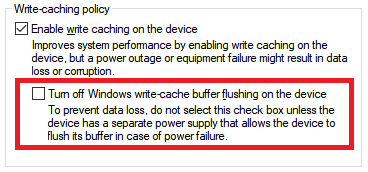
Do you have this setting on your SX8200 properties?
If got then make sure the red colour that I highlight is not selected

user posted image
caloyness
post May 8 2019, 04:28 PM

Getting Started
**
Junior Member
264 posts

Joined: Jan 2016
QUOTE(xxboxx @ May 8 2019, 03:05 PM)
Do you have this setting on your SX8200 properties?
If got then make sure the red colour that I highlight is not selected

user posted image
*
will check later, i didn't tweak anything so far all stock settings.
1024kbps
post May 8 2019, 10:32 PM

李素裳
*******
Senior Member
6,015 posts

Joined: Feb 2007


QUOTE(BigSaver @ May 8 2019, 09:58 AM)
Yeah i notice your post in this thread regarding the blue screen. Have you found the solution?
Thanks for the driver! will try when reach at home.

Bios, i haven't change anything except XMP profile. Will try to play other setting. Any setting that i can refer? im using Giga B450 pro

Ive try with sleep and w/o sleep, still blue screen (forgot the code error but if not mistaken "system service exemption" need to check again). Best to do is not to leave my pc at all or just shutdown if afk.  sad.gif

Why i suspect the problem come from my SX8200, 1st problem appear when bios said missing boot. i try startup repair, usb repair, cmd repair all wont work. Last choice fresh format

Then 2nd time appear when not detect bootable device even though i already set priory boot. Need to restart then can see the boot again. Also ive notice all my old windows (i keep my old windows when fresh format) files are missing. Supposedly it will remain.
I haven't check latest driver/bios after 2nd time fresh format. Just use typical windows auto update driver except GPU driver.

When google around, i found some ppl faced almost similar problem as mine. Could be bad lemon unit.  sad.gif
*
If you overclock, especially RAM, reset to default, don't troubleshooting with OC, you will going nowhere.

Post the BSOD and see which service or driver causing problem, check if it's the same driver causing bluescreen.

Recent Windows update is the problem i think, it's more sensitive to overclocking now, I had to revert the RAM overclock to make Win 10 usable.
sHawTY
post May 9 2019, 12:38 PM

Frequent Reporter
********
All Stars
14,909 posts

Joined: Jul 2005

Just received another unit of the 512GB today
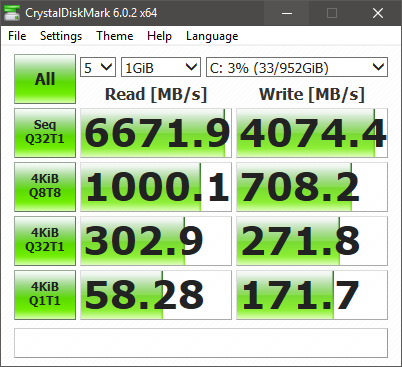
Can't wait to get back home and format my PC later tonight then see what kind of speed can I get with 2 units of ADATA SX8200 Pro 512GB on RAID 0 biggrin.gif

user posted image
TSxxboxx
post May 9 2019, 05:17 PM

The mind is for having ideas, not holding them
*******
Senior Member
5,261 posts

Joined: Oct 2004
From: J@Y B33


QUOTE(1024kbps @ May 8 2019, 10:32 PM)
If you overclock, especially RAM, reset to default, don't troubleshooting with OC, you will going nowhere.

Post the BSOD and see which service or driver causing problem, check if it's the same driver causing bluescreen.

Recent Windows update is the problem i think, it's more sensitive to overclocking now, I had to revert the RAM overclock to make Win 10 usable.
*

I overlooked that he got overclock the RAM. Yeah OC RAM definitely will cause stability issue.


QUOTE(sHawTY @ May 9 2019, 12:38 PM)
Just received another unit of the 512GB today
Can't wait to get back home and format my PC later tonight then see what kind of speed can I get with 2 units of ADATA SX8200 Pro 512GB on RAID 0 biggrin.gif

user posted image
*

Wah buy another one, is it cheap now? biggrin.gif

This post has been edited by xxboxx: May 9 2019, 05:18 PM
1024kbps
post May 9 2019, 09:19 PM

李素裳
*******
Senior Member
6,015 posts

Joined: Feb 2007


QUOTE(xxboxx @ May 9 2019, 05:17 PM)
I overlooked that he got overclock the RAM. Yeah OC RAM definitely will cause stability issue.
Wah buy another one, is it cheap now? biggrin.gif
*
After 5 years you can see him showing off this
user posted image

Joke aside, it was an Fusion IO workstation SSD, the company already sold to Sandisk and now WD.
sHawTY
post May 9 2019, 09:49 PM

Frequent Reporter
********
All Stars
14,909 posts

Joined: Jul 2005

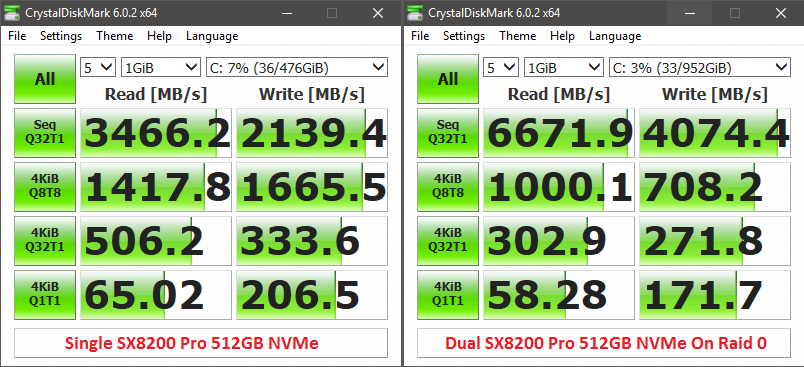
Something wrong. The 4KB speed is wayyyyyy too low
It's even slower than a single SX8200 Pro. Must be my RAID configuration. Or I should move the 2nd SX8200 Pro to another slot on my X399 board since Threadripper is dual die on a single processor unlike most processors

user posted image

This post has been edited by sHawTY: May 9 2019, 09:50 PM
TSxxboxx
post May 10 2019, 10:56 AM

The mind is for having ideas, not holding them
*******
Senior Member
5,261 posts

Joined: Oct 2004
From: J@Y B33


QUOTE(sHawTY @ May 9 2019, 09:49 PM)
Something wrong. The 4KB speed is wayyyyyy too low
It's even slower than a single SX8200 Pro. Must be my RAID configuration. Or I should move the 2nd SX8200 Pro to another slot on my X399 board since Threadripper is dual die on a single processor unlike most processors

user posted image
*

Could it be because of the access time?
https://www.tomshardware.com/reviews/ssd-ra...ark,3485-6.html

Also setting the block size too big will have adverse impact when reading/writing small size file.

But I feel as long as you use and feel there's improvement compared when you using single SSD then it's good enough. Your seq result so high. biggrin.gif
sHawTY
post May 10 2019, 11:20 AM

Frequent Reporter
********
All Stars
14,909 posts

Joined: Jul 2005

QUOTE(xxboxx @ May 10 2019, 10:56 AM)
Could it be because of the access time?
https://www.tomshardware.com/reviews/ssd-ra...ark,3485-6.html

Also setting the block size too big will have adverse impact when reading/writing small size file.

But I feel as long as you use and feel there's improvement compared when you using single SSD then it's good enough. Your seq result so high. biggrin.gif
Not quite sure what's causing these result
Sequential speed is not the whole story

The difference is too much sweat.gif

user posted image
TSxxboxx
post May 10 2019, 12:10 PM

The mind is for having ideas, not holding them
*******
Senior Member
5,261 posts

Joined: Oct 2004
From: J@Y B33


QUOTE(sHawTY @ May 10 2019, 11:20 AM)
Not quite sure what's causing these result
Sequential speed is not the whole story

The difference is too much sweat.gif

user posted image
*

Only the random 4KB big drop. In actual usage the difference is only in nanoseconds biggrin.gif

Is it both benchmark on the same CPU? I ask because Threadripper know for it's latency issue.

sHawTY
post May 10 2019, 12:22 PM

Frequent Reporter
********
All Stars
14,909 posts

Joined: Jul 2005

QUOTE(xxboxx @ May 10 2019, 12:10 PM)
Is it both benchmark on the same CPU? I ask because Threadripper know for it's latency issue.
Yeap. 2950x
TSxxboxx
post May 10 2019, 12:57 PM

The mind is for having ideas, not holding them
*******
Senior Member
5,261 posts

Joined: Oct 2004
From: J@Y B33


QUOTE(sHawTY @ May 10 2019, 12:22 PM)
Yeap. 2950x
*

Then maybe because of the CPU. Anyways it's very small and plenty of random files, so it does not affect much.
1024kbps
post May 10 2019, 03:10 PM

李素裳
*******
Senior Member
6,015 posts

Joined: Feb 2007


QUOTE(sHawTY @ May 10 2019, 11:20 AM)
Not quite sure what's causing these result
Sequential speed is not the whole story

The difference is too much sweat.gif

user posted image
*
hardware raid or software raid?
sHawTY
post May 10 2019, 09:57 PM

Frequent Reporter
********
All Stars
14,909 posts

Joined: Jul 2005

QUOTE(1024kbps @ May 10 2019, 03:10 PM)
hardware raid or software raid?
If by hardware you mean using a special PCI-e card, no
Loaded AMD RAID driver while installing Windows 10
1024kbps
post May 11 2019, 12:02 AM

李素裳
*******
Senior Member
6,015 posts

Joined: Feb 2007


QUOTE(sHawTY @ May 10 2019, 09:57 PM)
If by hardware you mean using a special PCI-e card, no
Loaded AMD RAID driver while installing Windows 10
*
That's hardware RAID with option ROM, try to tweak the settings, but you might have to recreate RAID array = reinstall Windows lol sweat.gif
As far as i know RAID on AMD desktop class mobo is only good for HDD, performance wise Intel might be better, or something like this http://highpoint-tech.com/USA_new/CS-product_nvme.htm
David_78
post May 11 2019, 12:11 AM

Getting Started
**
Junior Member
140 posts

Joined: Dec 2008
latest transcend 1TB NMVE also had same speed bro, even cheaper RM 600 for 1 TB, 3200 read 2500 write.
1024kbps
post May 11 2019, 02:00 AM

李素裳
*******
Senior Member
6,015 posts

Joined: Feb 2007


Probably related:
A Write-Through Cache Method to Improve Small Write Performance of SSD-Based RAID
https://ieeexplore.ieee.org/document/8026840
derthvadar
post May 14 2019, 06:27 PM

(ง •̀_•́)ง
******
Senior Member
1,794 posts

Joined: Feb 2016
From: Bikini Bottom
Just receive my package today. I will do clean install of Windows 10 this weekend.

user posted image


drool.gif
sHawTY
post May 14 2019, 08:14 PM

Frequent Reporter
********
All Stars
14,909 posts

Joined: Jul 2005

QUOTE(1024kbps @ May 11 2019, 02:00 AM)
A Write-Through Cache Method to Improve Small Write Performance of SSD-Based RAID
Done, but no major improvement
The 4KiB changed from 1000MB/s to about 1038MB/s
However the sequential read speed drops from 6600MB/s to 5200MB/s sweat.gif
1024kbps
post May 14 2019, 10:55 PM

李素裳
*******
Senior Member
6,015 posts

Joined: Feb 2007


QUOTE(sHawTY @ May 14 2019, 08:14 PM)
Done, but no major improvement
The 4KiB changed from 1000MB/s to about 1038MB/s
However the sequential read speed drops from 6600MB/s to 5200MB/s sweat.gif
*
You should use it for large cache for PS, or Video editing, RAID tends to increase latency with more drive added, also stock RAID controller does not offer much option compares to dedicated RAID card,
Pretty much like iGPU vs dedicated PCIE GPU analogy.

There should be more option to play, but i dont use it for ages since my raid HDD broken lol/

Also make sure you're using latest RAID driver, not the WHQL driver form microsoft.

user posted image
Samsung Rapid mode sweat.gif

This post has been edited by 1024kbps: May 14 2019, 11:11 PM
sHawTY
post May 15 2019, 09:02 AM

Frequent Reporter
********
All Stars
14,909 posts

Joined: Jul 2005

QUOTE(1024kbps @ May 14 2019, 10:55 PM)
There should be more option to play, but i dont use it for ages since my raid HDD broken lol/
Not much option in Asrock UEFI, only available option is the cache size, no block size option available
QUOTE(1024kbps @ May 14 2019, 10:55 PM)
Also make sure you're using latest RAID driver, not the WHQL driver form microsoft.
I'm using official AMD NVMe RAID driver
7cantona
post May 16 2019, 03:17 AM

On my way
****
Junior Member
586 posts

Joined: Apr 2019
thumbsup.gif a vry comprehensive review rclxms.gif
Donchay
post May 29 2019, 09:22 PM

Casual
***
Junior Member
324 posts

Joined: Feb 2012


Hi all, overall I'm new to PC and SSD.

So I bought the 256GB 3 weeks ago from lazada. Works perfectly fine until last weekend , which I find it to my horror after I came back from holiday.
All applications, boot up , browsers, even start windows button shows signs of delaying / lag.
Worst still, windows 10 automatic upgrade mine to 1903 version.

Format windows over 10 times to troubleshoot what could be the cause of the slow down.
until it hit my mind it could be the SSD...

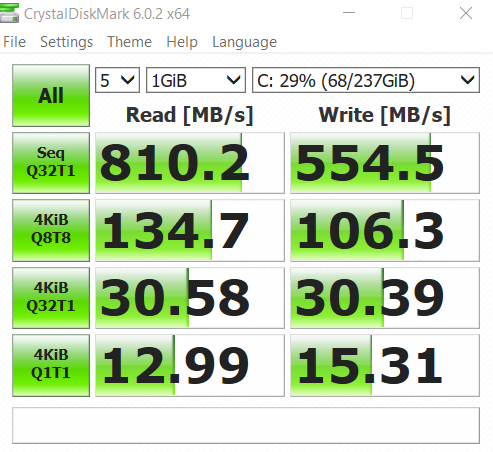
user posted image

Screenshot above, I'm thinking it could be the symptop of my SSD failing, although its just 3 weeks. What you guys think?

After typing this, I'm replacing my old SSD to check and compare.
TSxxboxx
post May 30 2019, 10:10 PM

The mind is for having ideas, not holding them
*******
Senior Member
5,261 posts

Joined: Oct 2004
From: J@Y B33


QUOTE(Donchay @ May 29 2019, 09:22 PM)
Hi all, overall I'm new to PC and SSD.

So I bought the 256GB 3 weeks ago from lazada. Works perfectly fine until last weekend , which I find it to my horror after I came back from holiday.
All applications, boot up , browsers, even start windows button shows signs of delaying / lag.
Worst still, windows 10 automatic upgrade mine to 1903 version.

Format windows over 10 times to troubleshoot what could be the cause of the slow down.
until it hit my mind it could be the SSD...

user posted image

Screenshot above, I'm thinking it could be the symptop of my SSD failing, although its just 3 weeks. What you guys think?

After typing this, I'm replacing my old SSD to check and compare.
*

That is super slow.

Install CrystalDiskMark and check for any SMART warning for the drive.
Donchay
post May 31 2019, 05:45 PM

Casual
***
Junior Member
324 posts

Joined: Feb 2012


QUOTE(xxboxx @ May 30 2019, 10:10 PM)
That is super slow.

Install CrystalDiskMark and check for any SMART warning for the drive.
*
That is done as well. No warnings no nothing. Health is at 100percent.

Could it be just bad luck I got a defective product?

One strange phenomenon, is that I take the ssd out and put it back , it went back straight to 3400 read speed, only to slow down to 800 after 15 to 20 minutes...
TSxxboxx
post May 31 2019, 08:51 PM

The mind is for having ideas, not holding them
*******
Senior Member
5,261 posts

Joined: Oct 2004
From: J@Y B33


QUOTE(Donchay @ May 31 2019, 05:45 PM)
That is done as well. No warnings no nothing. Health is at 100percent.

Could it be just bad luck I got a defective product?

One strange phenomenon, is that I take the ssd out and put it back , it went back straight to 3400 read speed, only to slow down to 800 after 15 to 20 minutes...
*

Weird, it can perform at full speed but then later on it looks like throttled. Have you check the temp? Maybe overheat?

Since the changes that you done recently is upgrading to 1903, got possibility of incompatibility? Maybe try reinstall 1809 windows and see if it's the same.
Donchay
post Jun 3 2019, 11:26 AM

Casual
***
Junior Member
324 posts

Joined: Feb 2012


QUOTE(xxboxx @ May 31 2019, 08:51 PM)
Weird, it can perform at full speed but then later on it looks like throttled. Have you check the temp? Maybe overheat?

Since the changes that you done recently is upgrading to 1903, got possibility of incompatibility? Maybe try reinstall 1809 windows and see if it's the same.
*
My old SSD ( non NVMe ) works fine with the existing windows and drivers.

And nope the SSD does not have heat issue, 33-36 degree celcius.

But it does nt matter now, currebtly processing 1 to 1 replacement.

Thanks for the troubleshooting idea 😀😀😀
Donchay
post Jun 5 2019, 12:13 PM

Casual
***
Junior Member
324 posts

Joined: Feb 2012


1 to 1 replacement is done, same situation..

Guess it could be the drivers sad.gif
TSxxboxx
post Jun 5 2019, 02:56 PM

The mind is for having ideas, not holding them
*******
Senior Member
5,261 posts

Joined: Oct 2004
From: J@Y B33


QUOTE(Donchay @ Jun 5 2019, 12:13 PM)
1 to 1 replacement is done, same situation..

Guess it could be the drivers sad.gif
*

Try install this driver and hopefully can fix it.

QUOTE(xxboxx @ Mar 15 2019, 07:33 PM)

"pure" 32bit OFA NVMe driver v1.5.0.0 for Win10 x86 mod+signed
https://www.win-unattended.de/Benutzer/Fern...%20Fernando.rar

"pure" 64bit OFA NVMe driver v1.5.0.0 for Win10 x64 mod+signed
https://www.win-unattended.de/Benutzer/Fern...%20Fernando.rar

The driver I got it from here
https://www.win-raid.com/t29f25-Recommended...vers.html#msg61
It was signed by the website owner
*
Donchay
post Jun 6 2019, 01:38 AM

Casual
***
Junior Member
324 posts

Joined: Feb 2012


QUOTE(xxboxx @ Jun 5 2019, 02:56 PM)
Try install this driver and hopefully can fix it.
*
Hi Thanks for the links and information.

I tried to follow the steps on installing the drivers via the 3rd link but I couldn't follow and lost.
Can you explain how do I do and what should I select?
TSxxboxx
post Jun 6 2019, 09:44 AM

The mind is for having ideas, not holding them
*******
Senior Member
5,261 posts

Joined: Oct 2004
From: J@Y B33


QUOTE(Donchay @ Jun 6 2019, 01:38 AM)
Hi Thanks for the links and information.

I tried to follow the steps on installing the drivers via the 3rd link but I couldn't follow and lost.
Can you explain how do I do and what should I select?
*

First you need to install the certificate that come together in the zip file. Double click it is enough to install it if not mistaken.

Then go find your NVME SSD in Device Manager, check it's properties and click update driver. Select have disk and browse to the extracted inf file.

Take note that SSD driver is very important file for Windows, make sure you really understand how to install it properly. If wrong file or something is wrong you'll end up with Windows cannot boot and have to clean install Windows. Backup your file before attempting to do install this.
warlove3
post Jun 25 2019, 09:25 PM

On my way
****
Senior Member
537 posts

Joined: Nov 2006


did anyone managed to upgrade the firmware using SSD Toolbox? It keeps bringing me back to the website itself
TSxxboxx
post Jun 26 2019, 12:35 AM

The mind is for having ideas, not holding them
*******
Senior Member
5,261 posts

Joined: Oct 2004
From: J@Y B33


QUOTE(warlove3 @ Jun 25 2019, 09:25 PM)
did anyone managed to upgrade the firmware using SSD Toolbox? It keeps bringing me back to the website itself
*

The firmware need to upgrade?

When I first got this SSD I install SSD Toolbox but after seeing how clumsy the software look like I uninstall it.
jamalnsx
post Jul 4 2019, 12:30 PM

Getting Started
**
Junior Member
141 posts

Joined: Nov 2005


I'm also getting this SSD 512GB. Will install Windows 10 tonight and see how it goes.

Anybody have use it with hackintosh and the sector size is 4kb or 512b?

This post has been edited by jamalnsx: Jul 4 2019, 12:31 PM
sHawTY
post Jul 8 2019, 03:24 PM

Frequent Reporter
********
All Stars
14,909 posts

Joined: Jul 2005

QUOTE(Donchay @ Jun 5 2019, 12:13 PM)
1 to 1 replacement is done, same situation..

Guess it could be the drivers sad.gif
If 1-to-1 is already done but the issue is still there, it's not the SSD nor the driver that's causing the issue
It's your system

Are you using it in a laptop or a desktop?
The best way to test if the SSD is working fine is try installing the SSD in another desktop / laptop
oro89
post Jan 4 2020, 12:12 PM

Getting Started
**
Junior Member
129 posts

Joined: Oct 2008
Any illegear z5 skylake user here is using this ssd? Pm me pls
Mushwashan
post Jan 11 2020, 11:11 AM

Getting Started
**
Junior Member
64 posts

Joined: Sep 2013
From: Perak


now it only rm300 will considering to buy for my hackintosh project
btw. brand nvme ape yg value for money utk 512GB

slaveone
post Jan 11 2020, 11:16 AM

Regular
******
Senior Member
1,231 posts

Joined: Jan 2003
QUOTE(Mushwashan @ Jan 11 2020, 11:11 AM)
now it only rm300 will considering to buy for my hackintosh project
btw. brand nvme ape yg value for money utk 512GB
*
this brand
sHawTY
post Jan 11 2020, 11:56 AM

Frequent Reporter
********
All Stars
14,909 posts

Joined: Jul 2005

QUOTE(Mushwashan @ Jan 11 2020, 11:11 AM)
brand nvme ape yg value for money utk 512GB
The SX8200 Pro
TSxxboxx
post Jan 11 2020, 12:36 PM

The mind is for having ideas, not holding them
*******
Senior Member
5,261 posts

Joined: Oct 2004
From: J@Y B33


QUOTE(Mushwashan @ Jan 11 2020, 11:11 AM)
now it only rm300 will considering to buy for my hackintosh project
btw. brand nvme ape yg value for money utk 512GB
*
That's cheap.
gengstapo
post Jan 11 2020, 12:57 PM

Retired enthusiast
********
All Stars
10,688 posts

Joined: Jan 2005
Has anyone tried where the nvme fixed on pci-e adapter?
Wonder about the performance
sHawTY
post Jan 11 2020, 08:02 PM

Frequent Reporter
********
All Stars
14,909 posts

Joined: Jul 2005

QUOTE(gengstapo @ Jan 11 2020, 12:57 PM)
Has anyone tried where the nvme fixed on pci-e adapter?
Wonder about the performance
I used it before on my Z97 motherboard, runs perfectly fine can get full speed
As long as your UEFI supports NVMe boot, you can run it just fine with PCI-e adapter
amco
post Jun 12 2020, 10:46 PM

Enthusiast
*****
Senior Member
785 posts

Joined: Jan 2003
This is 512GB formatted into Drive C&D

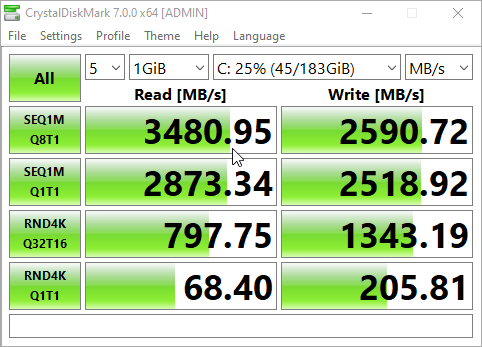
user posted image
TSxxboxx
post Jun 13 2020, 09:05 AM

The mind is for having ideas, not holding them
*******
Senior Member
5,261 posts

Joined: Oct 2004
From: J@Y B33


QUOTE(amco @ Jun 12 2020, 10:46 PM)
This is 512GB formatted into Drive C&D

user posted image
*
Similar with my 2 years old 512GB.
SUSkevin23
post Jul 11 2020, 03:01 PM

Regular
******
Senior Member
1,803 posts

Joined: Oct 2007


How is this ssd? Thinking of getting one

Still got BSOD?

Saw on shopee RM373 for 512GB

This post has been edited by kevin23: Jul 11 2020, 03:16 PM
moiskyrie
post Jul 11 2020, 07:01 PM

Look at all my stars!!
*******
Senior Member
3,217 posts

Joined: Dec 2006
From: City of Neko~~Nyaa~
Using 1tb on my thinkpad...
TSxxboxx
post Jul 11 2020, 08:06 PM

The mind is for having ideas, not holding them
*******
Senior Member
5,261 posts

Joined: Oct 2004
From: J@Y B33


QUOTE(kevin23 @ Jul 11 2020, 03:01 PM)
How is this ssd? Thinking of getting one

Still got BSOD?

Saw on shopee RM373 for 512GB
*
For me didn't get any BSOD
SUSkevin23
post Jul 11 2020, 08:09 PM

Regular
******
Senior Member
1,803 posts

Joined: Oct 2007


QUOTE(xxboxx @ Jul 11 2020, 08:06 PM)
For me didn't get any BSOD
*
Running latest windows 10 version?
sHawTY
post Jul 12 2020, 01:48 AM

Frequent Reporter
********
All Stars
14,909 posts

Joined: Jul 2005

QUOTE(kevin23 @ Jul 11 2020, 03:01 PM)
Still got BSOD?
Where did you see someone saying they got BSOD with the SX8200 Pro?
I've been using multiple SX8200 Pro in my systems:
2 x 256GB SX8200 Pro in my laptop
2 x 512GB SX8200 Pro in my server
2 x 1TB SX8200 Pro in my gaming PC

And 65 units of 512GB SX8200 Pro in my office where we just upgrade everyone computers to SSD which previously was using HDD
All of them is running Windows 10 version 2004 & none of them has had any BSOD

This post has been edited by sHawTY: Jul 12 2020, 03:43 AM
TSxxboxx
post Jul 12 2020, 03:21 AM

The mind is for having ideas, not holding them
*******
Senior Member
5,261 posts

Joined: Oct 2004
From: J@Y B33


QUOTE(kevin23 @ Jul 11 2020, 08:09 PM)
Running latest windows 10 version?
*
Now on build 1909
SUSkevin23
post Jul 12 2020, 09:08 AM

Regular
******
Senior Member
1,803 posts

Joined: Oct 2007


QUOTE(sHawTY @ Jul 12 2020, 01:48 AM)
Where did you see someone saying they got BSOD with the SX8200 Pro?
I've been using multiple SX8200 Pro in my systems:
2 x 256GB SX8200 Pro in my laptop
2 x 512GB SX8200 Pro in my server
2 x 1TB SX8200 Pro in my gaming PC

And 65 units of 512GB SX8200 Pro in my office where we just upgrade everyone computers to SSD which previously was using HDD
All of them is running Windows 10 version 2004 & none of them has had any BSOD
*
A simple google search and a few reported by members here

zaire103
post Aug 31 2020, 11:52 PM

New Member
*
Junior Member
26 posts

Joined: Oct 2011


Hi guys, need help,

Just wondering if this XPG SX8200 Pro 1tb x 2 can be used on Gigabyte B550M DS3H as a RAID 0, since there are 2 slots on board given.

i have failed to find QVL for this to be pair with as a RAID.
(the support list is oudated how can search for new/ updated one)

can sifu out there help please..
TSxxboxx
post Sep 1 2020, 12:27 AM

The mind is for having ideas, not holding them
*******
Senior Member
5,261 posts

Joined: Oct 2004
From: J@Y B33


QUOTE(zaire103 @ Aug 31 2020, 11:52 PM)
Hi guys, need help,

Just wondering if this  XPG SX8200 Pro 1tb x 2 can be used on Gigabyte B550M DS3H as a RAID 0, since there are 2 slots on board given.

i have failed to find QVL for this to be pair with as a RAID.
(the support list is oudated how can search for new/ updated one)

can sifu out there help please..
*
If follow on this listing your mobo should be able to support RAID
user posted image
https://www.newegg.com/gigabyte-b550m-ds3h/p/N82E16813145210

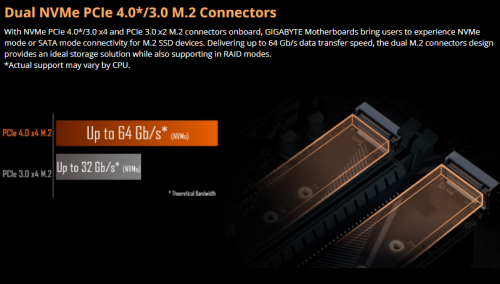
But one slot is PCIE 4/3 x4 while another slot is PCIE 3 x2, the second slot the fastest is half slower. Another drawback is random 4k read will be slower.
streakfreak
post Oct 8 2020, 11:06 AM

Getting Started
**
Junior Member
51 posts

Joined: Dec 2008
From: USJ 1


QUOTE(sHawTY @ Jul 12 2020, 01:48 AM)
Where did you see someone saying they got BSOD with the SX8200 Pro?
I've been using multiple SX8200 Pro in my systems:
2 x 256GB SX8200 Pro in my laptop
2 x 512GB SX8200 Pro in my server
2 x 1TB SX8200 Pro in my gaming PC

And 65 units of 512GB SX8200 Pro in my office where we just upgrade everyone computers to SSD which previously was using HDD
All of them is running Windows 10 version 2004 & none of them has had any BSOD
*
Yo Shawty, bagi satu la for me to play around. Anyway, with the current price, i think its a good deal even for the 512GB version given the performance it offered. rclxms.gif
soonwai
post Jan 15 2021, 07:46 PM


********
All Stars
11,459 posts

Joined: Oct 2007
From: KL


This thread has been a great source of info. I will be joining the club tonight when I order the SX8200 Pro. Will be using it with my Mac Mini M1.
enduser
post Jan 16 2021, 09:21 AM

Regular
******
Senior Member
1,282 posts

Joined: Jan 2003
QUOTE(soonwai @ Jan 15 2021, 07:46 PM)
This thread has been a great source of info. I will be joining the club tonight when I order the SX8200 Pro. Will be using it with my Mac Mini M1.
*
How much u get? Shoppe?

Looking for 1 also
soonwai
post Jan 16 2021, 01:24 PM


********
All Stars
11,459 posts

Joined: Oct 2007
From: KL


QUOTE(enduser @ Jan 16 2021, 09:21 AM)
How much u get? Shoppe?

Looking for 1 also
*
Yes, Shopee. Got it for RM973.50 less 3000 coins = RM943.50.
If I take into account the 3300 coins from a voucher, it's effectively: RM910.50

m.online.store
skytech188
etechpc
techcat.it.supply
jwgametech
sambalking
bananaitstore
M-dotatech

I don't have the link handy now but I bought from the first seller. Depending on the vouchers and coins available, the other stores can be cheaper.
TSxxboxx
post Jan 16 2021, 01:44 PM

The mind is for having ideas, not holding them
*******
Senior Member
5,261 posts

Joined: Oct 2004
From: J@Y B33


QUOTE(soonwai @ Jan 16 2021, 01:24 PM)
Yes, Shopee. Got it for RM973.50 less 3000 coins = RM943.50.
If I take into account the 3300 coins from a voucher, it's effectively: RM910.50

m.online.store
skytech188
etechpc
techcat.it.supply
jwgametech
sambalking
bananaitstore
M-dotatech

I don't have the link handy now but I bought from the first seller. Depending on the vouchers and coins available, the other stores can be cheaper.
*
https://www.tomshardware.com/news/adata-xpg...ntroller-change

They changed to slower controller. It's still fast, but not as fast as previously.
soonwai
post Jan 16 2021, 02:28 PM


********
All Stars
11,459 posts

Joined: Oct 2007
From: KL


QUOTE(xxboxx @ Jan 16 2021, 01:44 PM)
https://www.tomshardware.com/news/adata-xpg...ntroller-change

They changed to slower controller. It's still fast, but not as fast as previously.
*
I know, apparently both are still in the wild. Will update if I get the newer but slower G. I don't mind if it runs a bit slower but cooler since mine will be in an external enclosure.

This post has been edited by soonwai: Jan 16 2021, 02:30 PM
soonwai
post Jan 18 2021, 05:59 PM


********
All Stars
11,459 posts

Joined: Oct 2007
From: KL


QUOTE(xxboxx @ Jan 16 2021, 01:44 PM)
https://www.tomshardware.com/news/adata-xpg...ntroller-change

They changed to slower controller. It's still fast, but not as fast as previously.
*
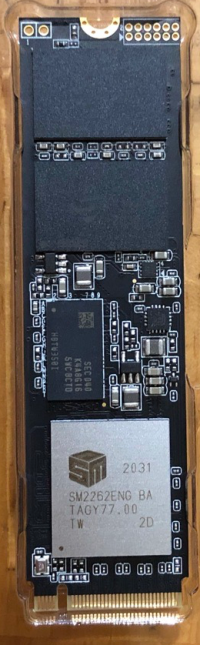
Received the 2TB SSD. It's the slower SM2262ENG.

Will give it a test run tonight on my PC.
TSxxboxx
post Jan 19 2021, 09:57 AM

The mind is for having ideas, not holding them
*******
Senior Member
5,261 posts

Joined: Oct 2004
From: J@Y B33


QUOTE(soonwai @ Jan 18 2021, 05:59 PM)
Received the 2TB SSD. It's the slower SM2262ENG.

Will give it a test run tonight on my PC.
*
How's the result? I think the slower 2TB is still faster than the old 512GB
soonwai
post Jan 19 2021, 10:58 AM


********
All Stars
11,459 posts

Joined: Oct 2007
From: KL


QUOTE(xxboxx @ Jan 19 2021, 09:57 AM)
How's the result? I think the slower 2TB is still faster than the old 512GB
*
Wanted to test last night. Opened the PC and saw that it only has x16 and x1. I had planned to test with an x4 adapter. However my Thunderbolt enclosure is out for delivery so will test it soon. Also I'll go check my other PC now.

This post has been edited by soonwai: Jan 19 2021, 11:09 AM
soonwai
post Jan 26 2021, 03:57 AM


********
All Stars
11,459 posts

Joined: Oct 2007
From: KL


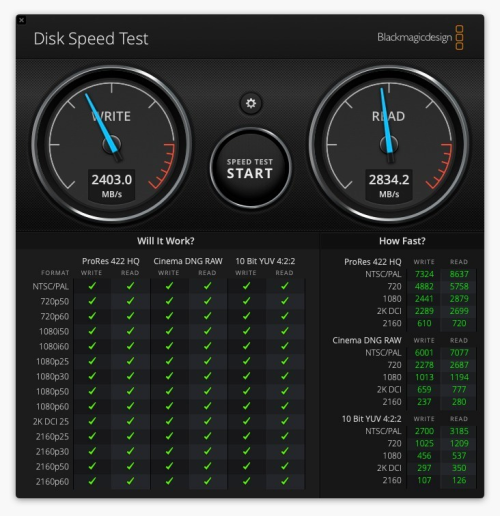
Been a bit busy with the new Mac. Finally found some time to post this. Tests were done on a Mac Mini M1 16/256. The Mac Mini has 2 Thunderbolt 3 USBC ports.

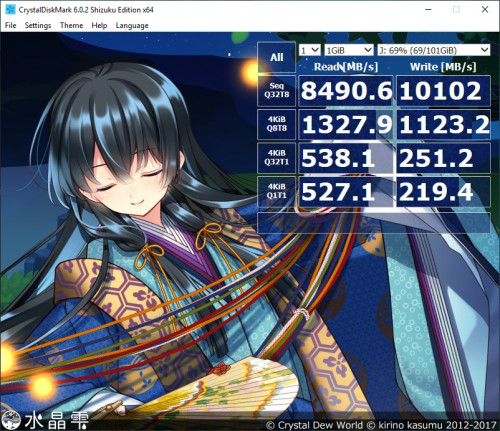
user posted image
My 2TB Adata SX8200 Pro has the SM2262ENG, the newer but lower clocked controller.

user posted image
SX8200 Pro in an Acasis Thunderbolt 3 40Gbps external enclosure. It has an Intel JHL6340 Thunderbolt 3 Controller. I thought it would be faster than this. sad.gif Will test it in a PC when I get the chance.

user posted image
For comparison, the speed of the onboard SSD in the Mac Mini M1.

Overall, I'm happy with it. For normal use, there's no discernible difference between the internal and external SSDs

This post has been edited by soonwai: Jan 26 2021, 04:05 AM
TSxxboxx
post Jan 26 2021, 03:47 PM

The mind is for having ideas, not holding them
*******
Senior Member
5,261 posts

Joined: Oct 2004
From: J@Y B33


Maybe the SSD incompatible with Thunderbolt 3 Controller. Looks like only running 20Gbps speed, or only 2 lanes of PCIE.
soonwai
post Jan 26 2021, 03:56 PM


********
All Stars
11,459 posts

Joined: Oct 2007
From: KL


QUOTE(xxboxx @ Jan 26 2021, 03:47 PM)
Maybe the SSD incompatible with Thunderbolt 3 Controller. Looks like only running 20Gbps speed, or only 2 lanes of PCIE.
*
I think you're right on the dot. Mac reports "Current Link Width: 0x2" Looks like only 2 lanes being used. I have another enclosure coming in with the JHL7440 controller. Will test that one later. The enclosure I tested with is a JHL6340. Might also borrow a different brand of SSD, maybe something with a Phison or Samsung controller, to test out.

Do you use any external Thunderbolt SSDs?

Mac System Info
Thunderbolt Bus 1:
Vendor Name: Apple Inc.
Device Name: Mac mini
Port:
Status: Device connected
Link Status: 0x0
Speed: Up to 40Gb/s x1
Current Link Width: 0x2
Receptacle: 1

Ash Creek:
Vendor Name: Intel
Device Name: Ash Creek
Vendor ID: 0x8086
Device ID: 0x2
Device Revision: 0x1
Route String: 1
Firmware Version: 41.1
Port (Upstream):
Status: Device connected
Link Status: 0x2
Speed: Up to 40Gb/s x1
Current Link Width: 0x2
Link Controller Firmware Version: 0.39.0

This post has been edited by soonwai: Jan 26 2021, 03:59 PM
TSxxboxx
post Jan 26 2021, 04:24 PM

The mind is for having ideas, not holding them
*******
Senior Member
5,261 posts

Joined: Oct 2004
From: J@Y B33


QUOTE(soonwai @ Jan 26 2021, 03:56 PM)
I think you're right on the dot. Mac reports "Current Link Width: 0x2" Looks like only 2 lanes being used. I have another enclosure coming in with the JHL7440 controller. Will test that one later. The enclosure I tested with is a JHL6340. Might also borrow a different brand of SSD, maybe something with a Phison or Samsung controller, to test out.

Do you use any external Thunderbolt SSDs?

Mac System Info
Thunderbolt Bus 1:
  Vendor Name: Apple Inc.
  Device Name: Mac mini
  Port:
  Status: Device connected
  Link Status: 0x0
  Speed: Up to 40Gb/s x1
  Current Link Width: 0x2
  Receptacle: 1

Ash Creek:
  Vendor Name: Intel
  Device Name: Ash Creek
  Vendor ID: 0x8086
  Device ID: 0x2
  Device Revision: 0x1
  Route String: 1
  Firmware Version: 41.1
  Port (Upstream):
  Status: Device connected
  Link Status: 0x2
  Speed: Up to 40Gb/s x1
  Current Link Width: 0x2
  Link Controller Firmware Version: 0.39.0
*
I don't have external Thunderbolt SSD.
You need it to run full 40Gbps?
Vincent6596
post Mar 13 2021, 08:53 PM

Casual
***
Junior Member
472 posts

Joined: Apr 2019
From: Penang


is this chip controller "Silicon Motion SM2262ENG" on my 2TB adata sx8200 pro still a good chip, coz i just purchase this nvme ssd last 2 week only.

TSxxboxx
post Mar 14 2021, 01:14 AM

The mind is for having ideas, not holding them
*******
Senior Member
5,261 posts

Joined: Oct 2004
From: J@Y B33


QUOTE(Vincent6596 @ Mar 13 2021, 08:53 PM)
is this chip controller "Silicon Motion SM2262ENG" on my 2TB adata sx8200 pro still a good chip, coz i just purchase this nvme ssd last 2 week only.
*
See post #121, soonwai have same model with same controller and he done speed test with it.

Unless you're transferring hundreds of GB constantly, you won't feel any difference in daily use.
Vincent6596
post Mar 14 2021, 02:04 AM

Casual
***
Junior Member
472 posts

Joined: Apr 2019
From: Penang


QUOTE(xxboxx @ Mar 14 2021, 01:14 AM)
See post #121, soonwai have same model with same controller and he done speed test with it.

Unless you're transferring hundreds of GB constantly, you won't feel any difference in daily use.
*
okay, understand biggrin.gif biggrin.gif
soonwai
post Mar 14 2021, 02:20 AM


********
All Stars
11,459 posts

Joined: Oct 2007
From: KL


QUOTE(Vincent6596 @ Mar 13 2021, 08:53 PM)
is this chip controller "Silicon Motion SM2262ENG" on my 2TB adata sx8200 pro still a good chip, coz i just purchase this nvme ssd last 2 week only.
*
Should be ok I guess, the original one is definitely faster. I can't really tell since I only have one and it's external. It's still plenty fast and at RM900 for 2TB, cheap.

Read this, apparently there're now 3 different versions of the SX8200 Pro.
https://www.tomshardware.com/news/adata-and...-swapping-parts
Vincent6596
post Mar 14 2021, 02:31 AM

Casual
***
Junior Member
472 posts

Joined: Apr 2019
From: Penang


QUOTE(soonwai @ Mar 14 2021, 02:20 AM)
Should be ok I guess, the original one is definitely faster. I can't really tell since I only have one and it's external. It's still plenty fast and at RM900 for 2TB, cheap.

Read this, apparently there're now 3 different versions of the SX8200 Pro.
https://www.tomshardware.com/news/adata-and...-swapping-parts
*
thx for the info bro, i brought it at rm950
MrSpeedy
post Mar 25 2021, 07:44 PM

Casual
***
Junior Member
460 posts

Joined: Jun 2012


Unfortunately I have XPG SX8200 and recently running into random BSOD with the error code:

WHEA_UNCORRECTABLE_ERROR

After reboot, the NVME drive undetected until I power cycle my PC.

And the BSOD constantly happened when I run chkdks /r and in the middle of the scan.

Is my NVME drive dead or Windows just being Windows?

Attached Image
TSxxboxx
post Mar 25 2021, 08:38 PM

The mind is for having ideas, not holding them
*******
Senior Member
5,261 posts

Joined: Oct 2004
From: J@Y B33


QUOTE(MrSpeedy @ Mar 25 2021, 07:44 PM)
Unfortunately I have XPG SX8200 and recently running into random BSOD with the error code:

WHEA_UNCORRECTABLE_ERROR

After reboot, the NVME drive undetected until I power cycle my PC.

And the BSOD constantly happened when I run chkdks /r and in the middle of the scan.

Is my NVME drive dead or Windows just being Windows?

Attached Image
*
What CPU you running? Do you OC the RAM?
Check on CrystalDiskInfo or HWiNFO how's the drive health is.
soonwai
post Mar 25 2021, 09:05 PM


********
All Stars
11,459 posts

Joined: Oct 2007
From: KL


QUOTE(MrSpeedy @ Mar 25 2021, 07:44 PM)
Unfortunately I have XPG SX8200 and recently running into random BSOD with the error code:

WHEA_UNCORRECTABLE_ERROR

After reboot, the NVME drive undetected until I power cycle my PC.

And the BSOD constantly happened when I run chkdks /r and in the middle of the scan.

Is my NVME drive dead or Windows just being Windows?

Attached Image
*
Oh wow, how old is the SX8200?
MrSpeedy
post Mar 25 2021, 10:38 PM

Casual
***
Junior Member
460 posts

Joined: Jun 2012


QUOTE(xxboxx @ Mar 25 2021, 08:38 PM)
What CPU you running? Do you OC the RAM?
Check on CrystalDiskInfo or HWiNFO how's the drive health is.
*
Ryzen 2200g
B450 Fatal1ty ITX bios v4.40
T-Force DELTA RGB DDR4 3200 MHz (Standard XMP @ 1.35V)
Sapphire Nitro+ RX580 with latest driver
XPG SX8200 Pro 512 GB

Attached Image

Attached Image

QUOTE(soonwai @ Mar 25 2021, 09:05 PM)
Oh wow, how old is the SX8200?
*
Completely assembled my PC since February 2020

Strange this is I can use no problem, even under stress mostly from gaming.
The BSOD is easily reproducible when running "chkdsk /r" and "CrystalDiskMark"

This post has been edited by MrSpeedy: Mar 25 2021, 10:45 PM
TSxxboxx
post Mar 26 2021, 07:30 AM

The mind is for having ideas, not holding them
*******
Senior Member
5,261 posts

Joined: Oct 2004
From: J@Y B33


QUOTE(MrSpeedy @ Mar 25 2021, 10:38 PM)
Ryzen 2200g
B450 Fatal1ty ITX bios v4.40
T-Force DELTA RGB DDR4 3200 MHz (Standard XMP @ 1.35V)
Sapphire Nitro+ RX580 with latest driver
XPG SX8200 Pro 512 GB

Attached Image

Attached Image
Completely assembled my PC since February 2020

Strange this is I can use no problem, even under stress mostly from gaming.
The BSOD is easily reproducible when running "chkdsk /r" and "CrystalDiskMark"
*
Your SSD still looks good.

Are you still using Win 10 version 20H2?
Have applied update?
There's a bug with that version that will caused windows files to be corrupted and damage windows partition if run chkdsk on SSD.
https://www.ghacks.net/2020/12/19/running-c...e-blue-screens/

If already update it, in theory you may be able to repair the damage by running chkdsk in offline mode. And don't use chkdsk on SSD anymore, SSD don't need it.
TSxxboxx
post Mar 26 2021, 07:32 AM

The mind is for having ideas, not holding them
*******
Senior Member
5,261 posts

Joined: Oct 2004
From: J@Y B33


Also do RAM testing using Testmem5 to make sure it's not because of the OC RAM.
MrSpeedy
post Mar 26 2021, 09:54 AM

Casual
***
Junior Member
460 posts

Joined: Jun 2012


QUOTE(xxboxx @ Mar 26 2021, 07:30 AM)
Your SSD still looks good.

Are you still using Win 10 version 20H2?
Have applied update?
There's a bug with that version that will caused windows files to be corrupted and damage windows partition if run chkdsk on SSD.
https://www.ghacks.net/2020/12/19/running-c...e-blue-screens/

If already update it, in theory you may be able to repair the damage by running chkdsk in offline mode. And don't use chkdsk on SSD anymore, SSD don't need it.
*
Yes, 20H2 with the latest update.
What do you meant by chkdsk in offline mode?

So the solution is to format Windows 10 and reinstall old version?

And yeah it's true, I never face any BSOD prior to 20H2 (except when I was trying testing undervolting my GPU, but then the error code is different and kernel dump was made. But this one no time dumping to be written as the SSD somehow like disconnected from MB).


Attached thumbnail(s)
Attached Image
TSxxboxx
post Mar 26 2021, 10:48 AM

The mind is for having ideas, not holding them
*******
Senior Member
5,261 posts

Joined: Oct 2004
From: J@Y B33


QUOTE(MrSpeedy @ Mar 26 2021, 09:54 AM)
Yes, 20H2 with the latest update.
What do you meant by chkdsk in offline mode?

So the solution is to format Windows 10 and reinstall old version?

And yeah it's true, I never face any BSOD prior to 20H2 (except when I was trying testing undervolting my GPU, but then the error code is different and kernel dump was made. But this one no time dumping to be written as the SSD somehow like disconnected from MB).
*
If you got run chkdsk when using 20H2 without the patch, it might have caused the file corruption.

Maybe offline chkdsk can fix it. Offline mode means check the drive when it is not running Win 10. Run CMD as Administrator, then type "CHKDSK C: /F", it will ask to schedule chkdsk when the PC restart. If still encounter BSOD then can try partition back the drive, format and reinstalling Win 10.

This is assuming the BSOD is because of file corruption. If because of other issue then have check some more.
SUSZzZzCcCc
post Mar 26 2021, 12:04 PM

New Member
*
Junior Member
46 posts

Joined: Jan 2021
QUOTE(MrSpeedy @ Mar 25 2021, 10:38 PM)
Ryzen 2200g
B450 Fatal1ty ITX bios v4.40
T-Force DELTA RGB DDR4 3200 MHz (Standard XMP @ 1.35V)
Sapphire Nitro+ RX580 with latest driver
XPG SX8200 Pro 512 GB

Attached Image

Attached Image
Completely assembled my PC since February 2020

Strange this is I can use no problem, even under stress mostly from gaming.
The BSOD is easily reproducible when running "chkdsk /r" and "CrystalDiskMark"
*
Cant trust those SSD health check punya , I had 10pc running same model NVME m2 , 8 out of 10 rosak less thn a year , 1 canot detect , few unit run windows random bsod , check health all ok then format some stuck on windows 10 installation , sometime thy will finish installation till random bsod in windows again . The chipset controller of NVME is the culprit . i replace all with normal 2.5" SSD settle , no more BSOD . It is every hard to find out what wrong if u only hv 1 pc , i hv 10 same spec pc thats y i can 100% confirm that stupid NVME problem .
rathishsiva
post Apr 29 2021, 06:43 PM

Casual
***
Junior Member
413 posts

Joined: Nov 2006
QUOTE(soonwai @ Jan 26 2021, 03:57 AM)
Been a bit busy with the new Mac. Finally found some time to post this. Tests were done on a Mac Mini M1 16/256. The Mac Mini has 2 Thunderbolt 3 USBC ports.

user posted image
My 2TB Adata SX8200 Pro has the SM2262ENG, the newer but lower clocked controller.

user posted image
SX8200 Pro in an Acasis Thunderbolt 3 40Gbps external enclosure. It has an Intel JHL6340 Thunderbolt 3 Controller. I thought it would be faster than this.  sad.gif Will test it in a PC when I get the chance.

user posted image
For comparison, the speed of the onboard SSD in the Mac Mini M1.

Overall, I'm happy with it. For normal use, there's no discernible difference between the internal and external SSDs
*
I am wonder how you get such high speeds with the Adata, or I am missing something.

I have the 2 TB version and using ORICO Thunderbolt 3 (SCM2T3-G40 model), and I am getting write speeds of max 800MBps and read speeds of 1600 MBps. Is it cause the enclosure comes with passive thunderbolt 3 cables instead of active?
soonwai
post May 2 2021, 03:15 AM


********
All Stars
11,459 posts

Joined: Oct 2007
From: KL


QUOTE(rathishsiva @ Apr 29 2021, 06:43 PM)
I am wonder how you get such high speeds with the Adata, or I am missing something.

I have the 2 TB version and using        ORICO Thunderbolt 3 (SCM2T3-G40 model), and I am getting write speeds of max 800MBps and read speeds of 1600 MBps. Is it cause the enclosure comes with passive thunderbolt 3 cables instead of active?
*
Not sure why yours would be slower. Though I use a different Acasis branded enclosure, it has the same Intel JHL6340 controller as your Orico. I'm also using the short passive TBT3 cables that came with the enclosure.

What computer are you using?
rathishsiva
post May 2 2021, 03:40 AM

Casual
***
Junior Member
413 posts

Joined: Nov 2006
QUOTE(soonwai @ May 2 2021, 03:15 AM)
Not sure why yours would be slower. Though I use a different Acasis branded enclosure, it has the same Intel JHL6340 controller as your Orico. I'm also using the short passive TBT3 cables that came with the enclosure.

What computer are you using?
*
MBA M1.

It’s a bit also puzzling because when I put it in my windows 10 desktop (on the nvme m.2 slot in the mobo), it’s blazing.
piscesguy
post May 2 2021, 07:46 AM

私の名前はりゅうです
*******
Senior Member
3,965 posts

Joined: Nov 2006
user posted image
soonwai
post May 2 2021, 01:45 PM


********
All Stars
11,459 posts

Joined: Oct 2007
From: KL


QUOTE(piscesguy @ May 2 2021, 07:46 AM)
user posted image
*
Adata also? What enclosure are you using?

This post has been edited by soonwai: May 2 2021, 01:45 PM
piscesguy
post May 2 2021, 02:29 PM

私の名前はりゅうです
*******
Senior Member
3,965 posts

Joined: Nov 2006
QUOTE(soonwai @ May 2 2021, 01:45 PM)
Adata also? What enclosure are you using?
*
Adata SX8200 Pro 512GB

It is an internal SSD. smile.gif
rathishsiva
post May 8 2021, 01:43 AM

Casual
***
Junior Member
413 posts

Joined: Nov 2006
Deleted

This post has been edited by rathishsiva: May 8 2021, 01:48 AM
omg7788
post Apr 17 2022, 03:34 PM

Kampung Style Information Technology
***
Junior Member
447 posts

Joined: May 2010
From: THE FUTURE


I am using the ADATA XPG SX8200 Pro 1TB, lately it is acting up screen just freeze & getting BSOD when i am playing games and transfer some files in the background. While doing backup sync in itunes for my phone i try to play some dota or just open dota(idle mode) and the screen just freeze and end up with BSOD. Once BSOD happens the NVME ssd will not be detected and i can't boot to windows with error msg " Reboot and Select proper boot device ". The only way to solve this is turn off the main plug for my pc and turn on again then only the pc can normaly boot into windows. I think i should do RMA before things get worst @.@

This post has been edited by omg7788: Apr 17 2022, 03:38 PM
MrSpeedy
post Jun 15 2022, 04:26 AM

Casual
***
Junior Member
460 posts

Joined: Jun 2012


QUOTE(omg7788 @ Apr 17 2022, 03:34 PM)
I am using the ADATA XPG SX8200 Pro 1TB, lately it is acting up screen just freeze & getting BSOD when i am playing games and transfer some files in the background. While doing backup sync in itunes for my phone i try to play some dota or just open dota(idle mode) and the screen just freeze and end up with BSOD. Once BSOD happens the NVME ssd will not be detected and i can't boot to windows with error msg " Reboot and Select proper boot device ". The only way to solve this is turn off the main plug for my pc and turn on again then only the pc can normaly boot into windows. I think i should do RMA before things get worst @.@
*
OMG this is exactly same issue that I'm currently facing.
After 2 years using SX8200, my PC getting more frequent BSOD.
Dear sifus please help me this.

I need to replace the Adata SX8200 Pro. Unfortunately I bought the infamous swapped nand controller, and now getting frequent BSOD and sometimes bios didn't detect the drive at all.

1. My mobo is itx, and only has nvme slot at the back of it. If can get the nvme the produce less heat.

2. Gen 3.0 is fine, my mobo won't support 4.0

3. Possible bang for buck 1TB nvme (or slightly above the price range of SX8200)?

This post has been edited by MrSpeedy: Jun 15 2022, 04:53 AM
TSxxboxx
post Jun 15 2022, 09:03 PM

The mind is for having ideas, not holding them
*******
Senior Member
5,261 posts

Joined: Oct 2004
From: J@Y B33


QUOTE(MrSpeedy @ Jun 15 2022, 04:26 AM)
OMG this is exactly same issue that I'm currently facing.
After 2 years using SX8200, my PC getting more frequent BSOD.
Dear sifus please help me this.

I need to replace the Adata SX8200 Pro. Unfortunately I bought the infamous swapped nand controller, and now getting frequent BSOD and sometimes bios didn't detect the drive at all.

1. My mobo is itx, and only has nvme slot at the back of it. If can get the nvme the produce less heat.

2. Gen 3.0 is fine, my mobo won't support 4.0

3. Possible bang for buck 1TB nvme (or slightly above the price range of SX8200)?
*
The swapped nand I thought only affect the speed, doesn't know it also caused bsod. Are you sure not due to other things such as OCed RAM?

If you want to get a SSD, things to check is the warranty period, tbw limit, read and write speed. Silicon Power A80 P34 spec looks decent. Kingston KC2500 also, but not the NV1, this one the spec are just terrible.
omg7788
post Jun 20 2022, 05:28 PM

Kampung Style Information Technology
***
Junior Member
447 posts

Joined: May 2010
From: THE FUTURE


QUOTE(MrSpeedy @ Jun 15 2022, 04:26 AM)
OMG this is exactly same issue that I'm currently facing.
After 2 years using SX8200, my PC getting more frequent BSOD.
Dear sifus please help me this.

I need to replace the Adata SX8200 Pro. Unfortunately I bought the infamous swapped nand controller, and now getting frequent BSOD and sometimes bios didn't detect the drive at all.

1. My mobo is itx, and only has nvme slot at the back of it. If can get the nvme the produce less heat.

2. Gen 3.0 is fine, my mobo won't support 4.0

3. Possible bang for buck 1TB nvme (or slightly above the price range of SX8200)?
*
I am lucky coz able to clone the drive to my new nvme gen 4 drive before i sent the SX8200 pro for RMA. They replaced a new one for me but i haven't tested it out yet, you should also go for RMA since the nvme got 5 years warranty, just need to pay extra service charge about rm30-40 if the drive is after 1 year warranty. Btw mine was acting up after 3years+ of using.
Blurzschyter
post Jan 4 2023, 05:06 AM

New Member
*
Junior Member
11 posts

Joined: Sep 2009
QUOTE(soonwai @ Jan 26 2021, 03:56 PM)
I think you're right on the dot. Mac reports "Current Link Width: 0x2" Looks like only 2 lanes being used. I have another enclosure coming in with the JHL7440 controller. Will test that one later. The enclosure I tested with is a JHL6340. Might also borrow a different brand of SSD, maybe something with a Phison or Samsung controller, to test out.

Do you use any external Thunderbolt SSDs?

Mac System Info
Thunderbolt Bus 1:
  Vendor Name: Apple Inc.
  Device Name: Mac mini
  Port:
  Status: Device connected
  Link Status: 0x0
  Speed: Up to 40Gb/s x1
  Current Link Width: 0x2
  Receptacle: 1

Ash Creek:
  Vendor Name: Intel
  Device Name: Ash Creek
  Vendor ID: 0x8086
  Device ID: 0x2
  Device Revision: 0x1
  Route String: 1
  Firmware Version: 41.1
  Port (Upstream):
  Status: Device connected
  Link Status: 0x2
  Speed: Up to 40Gb/s x1
  Current Link Width: 0x2
  Link Controller Firmware Version: 0.39.0
*
Have u tried the same adata nvme ssd with other enclosure? Does the speed test have the same result? Perhaps you can share the speed test result of the Acasis Thunderbolt 3 40Gbps external enclosure with other ssd nvme brand if u can.

I thinking of buying this acasis tb3 enclosure (model: fa-tb34), but not sure if it worth or not. I'm currently using mbp 16 m1 pro.
TSxxboxx
post Jan 10 2023, 03:52 PM

The mind is for having ideas, not holding them
*******
Senior Member
5,261 posts

Joined: Oct 2004
From: J@Y B33


QUOTE(Blurzschyter @ Jan 4 2023, 05:06 AM)
Have u tried the same adata nvme ssd with other enclosure? Does the speed test have the same result? Perhaps you can share the speed test result of the Acasis Thunderbolt 3 40Gbps external enclosure with other ssd nvme brand if u can.

I thinking of buying this acasis tb3 enclosure (model: fa-tb34), but not sure if it worth or not. I'm currently using mbp 16 m1 pro.
*
You need it to run 40Gbps constantly? NVME SSD max write speed is achieved by writing to the cache, once the cache filled up then it will only write at the actual SSD capability, some is only 500MBps. sweat.gif


Change to:
| Lo-Fi Version
0.1127sec    0.57    6 queries    GZIP Disabled
Time is now: 19th December 2025 - 05:48 AM