Outline ·
[ Standard ] ·
Linear+
Unifi Official TM UniFi High Speed Broadband Thread V36, READ 1ST PAGE FOR TURBO SPEED INFO!
|
imalmighty
|
 Nov 22 2018, 04:41 PM Nov 22 2018, 04:41 PM
|

|
QUOTE(hurricane21 @ Nov 22 2018, 04:25 PM) Just some tactic to buy your time, mine got same reply too, now already one and half month but still didn't get my Turbo upgrade. Live chat them regarding this, get closed case. MCMC portal no reply too. Seems like all of them just a bunch of useless piece of shit, dickheads. MCMC overwhelmed with complaints. U want fast and immediate result, better bug TMpoint directly. U pester and annoy them enuf, brainwash them until they see your face also know your particulars, camp there like sHawTY. Demand letter for word of assurance that your turbo demand will be fulfilled from supervisor/staff, else give rebate appropriately till then. Insist on not leaving until u get a resolution. Give them at most 1 week time to sort things out 4 u. Then they will prioritize u your turbo order. U go there not to rush things, but to get inside their head, implant your face onto them. |
|
|
|
|
|
imalmighty
|
Nov 22 2018, 04:48 PM
|
|
|
QUOTE(ijibang @ Nov 22 2018, 04:45 PM) Need help I was turbo-ed to 500Mbps a week plus back speed test on wire (cat 6 ; 1m away from router) is 500+ Mbps speed test on wifi (dual band usb eifi adaptor on laptop ; 1m away from router) yields about 50 to 60 Mbps for both 5GHz and 2.4BHz Questions : (1) I don't feel the "PUNCH" of a 500Mbps connection when surfing the net or watching youtube. There's not much differnce compared to the old timer 50Mbps (2) Why is there no speed difference when connecting to 5GHz wifi and 2.4GHz wifi (3) Is there a need to "TWEAK" the new profile before we can feel the "real speed"? FYI, the router is a brand new one provided by TM (D-Link DIR842). Test was done with only 1 connection (either on pc via cable or on laptop via wifi)/ Please shade some lights...........thank you very much! Networking equipment & setup limit Client devices limit Website servers limit 3 keys to look into to utilize your bandwidth fully. |
|
|
|
|
|
imalmighty
|
Nov 23 2018, 10:44 AM
|
|
|
QUOTE(olivur @ Nov 23 2018, 10:43 AM) hg8240h! doesn't match my all black aesthetics at all Nokia g240g is your ADHD answer, haha |
|
|
|
|
|
imalmighty
|
Nov 23 2018, 04:42 PM
|
|
|
QUOTE(ahbenggay @ Nov 23 2018, 02:29 PM) LoL.....i tried to downgrade my plan using the site last 2 days Today I received call from them and he told me he cant downgrade for me because I got upgraded to turbo 800mpbs. I asked him why cannot in which he replied , because i have to pay lower fee so he cant do it for me. I laugh so hard and said okay then. Is that a joke ? 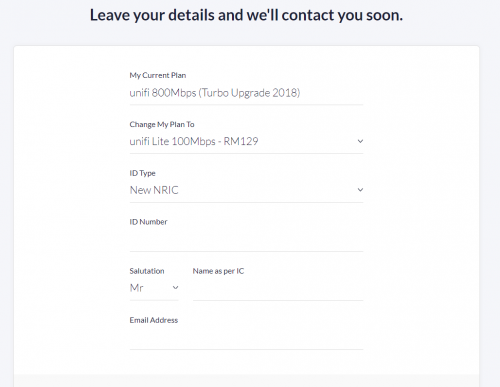 the leech trying to play dumb, camp at TMPOINT to get things done. They are denying your prerogative as a customer to choose. By stalling your downgrade application, they get another narrow escape. They earn more by sticking you to your 800M rather than getting only rm129 by supplying 100M. This is serious, this is nothing to be joked at. sHawTY got tutorial on how to camp |
|
|
|
|
|
imalmighty
|
Nov 23 2018, 09:55 PM
|
|
|
QUOTE(Hitman190 @ Nov 23 2018, 09:53 PM) 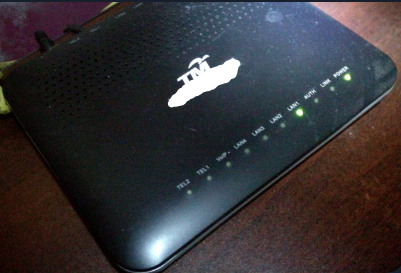 Just got my speed upgrade, should be going from 50Mbps to 500 but only can reach 100, I have an Asus AC68U which should be okay but I got this BTU, apparently it's pretty old, and I never needed to change it. Huawei hg850a? U r doomed. Lan port hard capped@100M |
|
|
|
|
|
imalmighty
|
Nov 24 2018, 02:20 PM
|
|
|
Im not sure if this has been asked before.. Let's say my neighbour next to me also subscribing unifi, and his fiber cable also comes out from the same fiber distribution box as mine. Assume he terminates his service, he login using my unifi pppoe credentials while cloning my BTU's settings, would he be able to connect? More importantly, can pppoe sessions be run on 2 BTUs and above simultaneuosly? I wonder..  taqu taqu Let's say I get a switch like yours, connect LAN1 of BTU to LAN1 of switch and insert 2 routers into LAN2 and LAN3 respectively, can I dial pppoe on the 2 routers and use internet simultaneously? This post has been edited by imalmighty: Nov 24 2018, 02:50 PM |
|
|
|
|
|
imalmighty
|
Nov 24 2018, 03:18 PM
|
|
|
QUOTE(lkoky @ Nov 24 2018, 03:02 PM) Bro, can be more psecific on which model to get? I know the first post got a list of model suggested.. but cant decided. Would appreciate anyone with real experience on the router to share their thought. I think all the routers listed are good for 100mbps to 300mbps; since I already requested to change to 100 mbps plan; so dont need those super high end router. Having said that, if paying extra 2-300 can get a faster one, i also ok. budget RM500, can max to RM800. priority of connect stability for mobile device at home. thanks. if u dont care about iptv, real easy. Mercury, tenda ac18, ac10, fg7008gr aztech and other chinese brand, u decide yourself. All of them below RM300, however, firmware support... U decide urself what u put more weight into, branding&reliability or high cost-perfromance ratio.  This post has been edited by imalmighty: Nov 24 2018, 03:18 PM This post has been edited by imalmighty: Nov 24 2018, 03:18 PM |
|
|
|
|
|
imalmighty
|
Nov 24 2018, 03:59 PM
|
|
|
QUOTE(kkm @ Nov 24 2018, 03:57 PM) Thanks for the info. I definitely don't need their router, just thinking I could take it and pass it on to a friend. But doesn't seem reasonable for them to offer me a 500mbps service which they don't provide me a compatible router... This is TM we r talking about, murphy law make sense on TM. |
|
|
|
|
|
imalmighty
|
Nov 27 2018, 09:41 AM
|
|
|
QUOTE(dino89 @ Nov 27 2018, 08:07 AM) Hi sifus, currently facing problem with setting up my tplink c2300 Cant setup the router, keep getting this problem: 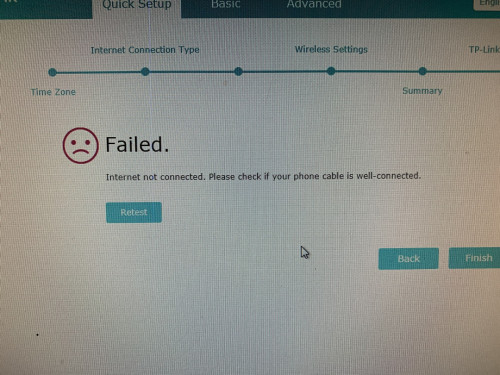 Cant be the cables bcos my old router have no problem and the TM technician DLink router also no problem connecting. Any ideas? This might be the culprit |
|
|
|
|
|
imalmighty
|
Nov 29 2018, 01:30 AM
|
|
|
QUOTE(yvliew @ Nov 29 2018, 01:19 AM) Where the sifus?? Any advice pls? If finished serving 24 months, maxis str8away if u have. Else, few pages back, some got 50M at RM129, some got 50M barebone internet at RM99. BEWARE, they wont give out price reduction without a catch, that is asking u to be handcuffed for another 2 years. Notice that those leeches force speed upgrade upon their customers to escape price reduction to maintain their ARPU? No unlimited data offering below rm100 even until now. It wont cost them much to give out speed upgrade, provided contention ratio permits and such. They definitely have the sufficient bandwidth. Edit: well, i dont wish to see subsribers with fiber infra actually believe the pilot testing nonsense and wait patiently like sitting ducks anymore... This post has been edited by imalmighty: Nov 29 2018, 01:34 AM |
|
|
|
|
|
imalmighty
|
Nov 29 2018, 08:43 PM
|
|
|
QUOTE(jutamind @ Nov 29 2018, 08:37 PM) Recently got turbo to 500mb and TM changed my decade old BTU modem to Hg8240h I think. I'm using Asus AC86U with latest firmware and plug in brand new Cat 5e LAN cable. Complaint to TM as I got max download 100Mbps for Chrome or 200Mbps for Firefox but can't reach anywhere near 500 using Lan with my laptop, but when TM technician came, they tried TM Speed test and for 400+ twice using their laptops (2 different laptops some more). So I dumb founded on why TM technician can get the speed on their laptops but not mine, even though NIC card in my laptop support gigabit. Any idea how I can further increase my download speed? This u might have to ask the forumer with black cat profile pic. R u on windows 10? I rmbr somewhere along the line he said that this is due to cpu clock or somethg... |
|
|
|
|
|
imalmighty
|
Nov 30 2018, 01:00 AM
|
|
|
QUOTE(lamode @ Nov 30 2018, 12:14 AM) like u said, cuz now still in contract, no bargain power. next month i can give 30 days notice to terminate without penalty. No need notice, scare tactic only. Tell them ill give u 5min notice to process my termination QUOTE(westlife @ Nov 30 2018, 12:35 AM) rm99 for 50Mbps not low enough?  Add on tax, beyond rm100 alr |
|
|
|
|
|
imalmighty
|
Nov 30 2018, 01:33 AM
|
|
|
QUOTE(westlife @ Nov 30 2018, 01:06 AM) all price without tax, no difference. comparing to the cheapest price plan in the market now (rm89 30Mbps unlimited quota plan), it is just rm10 more and speed is almost 2x more, which this is certinaly worth it. Some more it is unifi. True, they shud open this offer to all, in the public. But no, unless threatened, they wont give a dammn. If got maxis, str8away switch to it, dont look back. Maxis give 30M upload speed, more than TM's 20M upload speed for 50M download plan. Like u said previously, symmetric gives better experience. |
|
|
|
|
|
imalmighty
|
Nov 30 2018, 12:46 PM
|
|
|
QUOTE(mylinear @ Nov 30 2018, 11:43 AM) A few users here have got this package before. It seems it is only given to try to prevent you from terminating your service. It is not listed anywhere. And customer service will say they don't know about it. I think they want everyone to be at least on the RM129 100M package. If they had announced the RM99 50M, I think many 10M, 30M and 50M users would have switched to it. Maybe even some 100M users would have switched to it as you can save a lot in some cases if you don't need the higher speeds. They would have lost more revenue this way. If they bring out this package later on, one problem is that there may be a penalty fee to switch to it as it may be considered as downgrade for those already on 100M now. For example, a RM129 10M user may have been happy with RM99 50M, but already got turbo to RM129 100M. Then to switch back to RM99 50M may be considered a downgrade with penalty fee. Like me n u, haha. we like to keep our "no string attached" status [commitment period free] coz it gives flexibility n we can cucuk TM whenever we feel like. I have 100M, 600min free call n tv with stb inherited from vip days. Exact same value as other existing subscibers who downgraded. The difference is dat we can terminate whenever we feel like. Guess wat, it is only after turbo upgrade only i took out my stb from my store room n start watching. During vip, only basic channels, now got aneka/varnam/ruby. This post has been edited by imalmighty: Nov 30 2018, 12:50 PM |
|
|
|
|
|
imalmighty
|
Nov 30 2018, 12:57 PM
|
|
|
QUOTE(Iceman74 @ Nov 30 2018, 12:13 PM) Me also change to Oct-Dec 2018 Previous email, me on so call lucky few can get turbo starting from Aug Chat with them yesterday and u guess what he told me, in their system, my upgrade is next year Jan. he also said is schedule to turbo but dare not promise anything and was told to wait....  Really donno what to said, continue paying RM189 for 50Mbps cos still 1 more year contract or upgrade to 100Mbps RM129?  This has been said over n over again.. do u need 500M? How much are u willing to pay for wired internet.. I remember at 1 time, they stopoed offering vip plans and the 30M@179 or 199 used to be the cheapest plans. Now u have option to pay below rm149 and rm100. U be your own judge. Im pretty sure u were on 30M advance before, got migrated to 50M during thank you campaign |
|
|
|
|
|
imalmighty
|
Nov 30 2018, 06:09 PM
|
|
|
QUOTE(kentken12 @ Nov 30 2018, 05:49 PM) I also asking for the RM99 for 50mbps package through live chat just now and no luck they said TM didn't offer this package and only got Unifi basis and Unifi Lite. I want to them double confirm and still the same. I thinking who are willing to share the image and i can show them the proof............ Ehh, dont be this direct n str8forward n obvious. The key is, convince them, it is their loss eventually if they lose you, convince them they need u more than u need then. Pretend u r terminating, bring along your ONT, fish and bait them into asking y u want to terminate. Just bring out their competitor offer, ex:maxis got 30M symmetrical@rm89, which is unlimited below rm100, how come TM dont have? Haha. Dont be the active 1, let the TM staff be the active one... keep pestering them until they spill their mouth. |
|
|
|
|
|
imalmighty
|
Dec 1 2018, 01:31 PM
|
|
|
QUOTE(westlife @ Dec 1 2018, 12:19 PM) Indeed, if it is out of contract, certainly other better wifi router will be a better choice. In fact, good performance tp-link is quite cheap actually. [attachmentid=10126200] [attachmentid=10126202] Bro, where is this? C3150 for $200? Wat is the currency in your photo? Is it singapore? |
|
|
|
|
|
imalmighty
|
Dec 1 2018, 02:34 PM
|
|
|
QUOTE(westlife @ Dec 1 2018, 02:19 PM) I see thx |
|
|
|
|
|
imalmighty
|
Dec 2 2018, 08:54 PM
|
|
|
QUOTE(KL_menJERIT @ Dec 2 2018, 05:09 PM) can hack unifi line? if I terminate myunifi line. i know otherperson btu password and unifi id,same taman. if i have new btu,then setting otherperson btu password. exist router setting otherperson unifi id. 12am otherperson off their btu and router. so i can use otherperson unifi?? Whoa, careful wat u wish for! U r commiting a crime there... Tell u wat, u hack his wifi password even easier. The same unifi pppoe account cant login twice concurrently. Toggle logic. One connects, the other disconnects automatically. As long as from the same OLT (that is fiber distribution box iianm), your pppoe accounts can login from your neighbours address. That means subsribers of the same OLT can swap their pppoe accounts freely. U dont even have to exchange BTU for that, the settings are exactly the same across the same OLT. Btu/ont/onu/modem refer to the same thing. |
|
|
|
|



 Quote
Quote

 0.2326sec
 0.81
0.81
 7 queries
 GZIP Disabled