Welcome Guest ( Log In | Register )

Bump Topic Topic Closed RSS Feed
7 Pages « < 2 3 4 5 6 > » Bottom

Outline · [ Standard ] · Linear+

Unifi Official TM UniFi High Speed Broadband Thread V36, READ 1ST PAGE FOR TURBO SPEED INFO!

views
     
soonwai
post Jan 4 2019, 11:29 PM


********
All Stars
11,458 posts

Joined: Oct 2007
From: KL


QUOTE(dayojah @ Jan 4 2019, 07:14 PM)
I hope that is a business Unifi line. Not exactly "fair use" of a domestic package
*
Actually not that bad lah. I probably use around the same if not more apps, services, backups, etc... and that's before I count torrenting. Nowadays everything is in the cloud. Not very common yet but definitely the direction people are heading towards. My backup to my parents' house and their backup to mine probably accounts for a TB a month.
soonwai
post Jan 5 2019, 12:05 AM


********
All Stars
11,458 posts

Joined: Oct 2007
From: KL


QUOTE(devkamal @ Jan 4 2019, 08:50 PM)
anyone here using powerline adapter?  can comment on real life peformance.?
*
A few years ago, I tested Aztech AV500 Homeplugs with iPerf. Can get sustained 300-350Mbps. My house is single phase.

I was going to use it for HyppTV so not a big concern with speed. No longer using it.
soonwai
post Jan 5 2019, 12:51 PM


********
All Stars
11,458 posts

Joined: Oct 2007
From: KL


QUOTE(najminaruto @ Jan 5 2019, 09:50 AM)
do you mind showing the breakdown? no need to show bill. just like what I have shown.

have no idea the exact money you paid TM.
*
Mine is like that.

Summary:
RM179 Oct 2017 & before - Advance 50Mbps+Ruby
RM189 Nov 2017- Sep 2017 - RYE2017 100Mbps+STD20+Ultimate+Ruby
RM159 Oct 2017 - Nov 2017 - RYE2017 100Mbps+STD20+Ultimate
RM159 Dec 2017 - Present - Turbo 800Mbps+STD20+Ultimate

https://forum.lowyat.net/index.php?showtopi...post&p=91391086

Now is UnifiPro800 RM329 + Ultimate RM60 - discount RM230 = RM159

Previously was:
Oct and Nov 2018: UnifiPro100 RM299 + Ultimate RM60 - discount RM200 = RM159
Before that: UnifiPro100 RM299 + Ultimate RM60 + Ruby RM30 - discount RM200 = RM189

*STD20 is not itemised in my bill but is in the list of items in my account.

https://forum.lowyat.net/index.php?showtopi...post&p=91392812

QUOTE(SzeMeng76 @ Jan 5 2019, 11:06 AM)
Not downgradable. I remembered one of the tnc last time is remove ultimate will remove the extra discount.
Yes I had been turboed from 100 Mbps Rye2017 to 800 Mbps on 19th of Dec18.
*
Yes, same here, I remember TM stating that condition also.

This post has been edited by soonwai: Jan 5 2019, 01:18 PM
soonwai
post Jan 6 2019, 02:33 AM


********
All Stars
11,458 posts

Joined: Oct 2007
From: KL


QUOTE(dayojah @ Jan 6 2019, 12:04 AM)
Take a look at the wire colours in the cable connectors.
Calling the four colours A,B,C and D, they should be:
A+
A-
B+
C-
C+

B-
D+
D-
...
Get the pairing wrong in Ethernet and you will pass a continuity test with a Jalan Pasar cable tester, but you won't get 1Gbps

Some cables only have two pairs, no good either.
*
Close but no cigar. Correction in bold.

QUOTE(Spawny @ Jan 6 2019, 12:44 AM)
So which is the correct one i should be looking at, the one u mention that is supplied by TM?

Edit: I have used a CAT5E cable which I have found from my PC to the switch, still I'm getting max 100mbps
I'm also sharing my network properties, maybe I'm missing something that is not allowing me to pass 10mbps.
Highly suspect now is the cable from the BTU to the router, which is capping the speed.
*
This one, with correction. Better illustrated with biloxee’s diagram. You don’t have to follow the colors if you’re doing your own cable. Just have to be consistent. Good for confusing the next guy who looks at the cable.

Check the Ethernet link speeds before you diagnose further. Try one or 2 more cables.

Just realized that you posted the link speed which is 1Gbps so that’s good.

Anyway if you’re getting more than 100 over wifi then it can’t be the btu-router cable.
PC-switch also is good since you have 1Gbps link.
Check the cable from switch to router and ports link speeds.

This post has been edited by soonwai: Jan 6 2019, 02:54 AM
soonwai
post Jan 6 2019, 02:15 PM


********
All Stars
11,458 posts

Joined: Oct 2007
From: KL


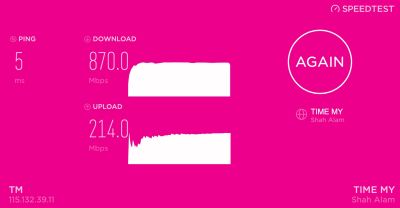
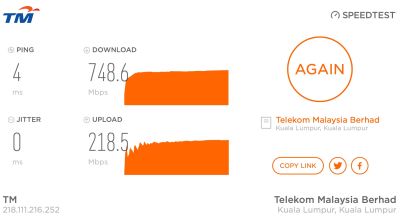
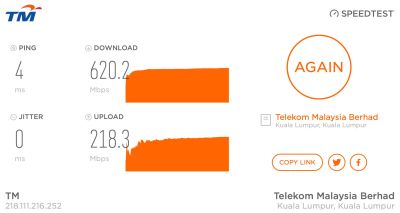
Anyone else on Turbo 800Mbps getting inconsistent speed tests from speedtest.tm.com.my? Both 210.187.84.114 & 58.26.239.30. Mine are fluctuating from 550-700, seldom goes above 800.

Tests with http://testyourspeed.time.com.my and speedtest.net OVH SG server are at consistent 850+-20Mbps.

Testing with Safari and speedtest desktop app. Router: Mikrotik hAP AC2. MTU/MRU: 1480.

user posted image
speedtest.net OVH Cloud Singapore

user posted image
http://testyourspeed.time.com.my

user posted image
http://speedtest.tm.com.my (58.26.239.30)

user posted image
http://speedtest.tm.com.my (210.187.84.114)

go626201 Were you having the same observations with TM speedtest servers?

This post has been edited by soonwai: Jan 6 2019, 03:01 PM
soonwai
post Jan 6 2019, 02:53 PM


********
All Stars
11,458 posts

Joined: Oct 2007
From: KL


QUOTE(ahlik1983 @ Jan 6 2019, 02:29 PM)
ahlik1983

Today, 12:44 AM
Post #6420

Hi, 
Just wanna know if want to re-do the fiber optic cable for outdoor into house, do i need to find outsource contractor or TM having the service?
*
If from FDB/pole to house FTB, TM has to do it. Cos outsiders not authorised to mess with the pole. FTB to FWS can be done by your hire or yourself.
soonwai
post Jan 6 2019, 08:14 PM


********
All Stars
11,458 posts

Joined: Oct 2007
From: KL


QUOTE(dayojah @ Jan 6 2019, 06:31 PM)
A detail, modern Ethernet devices don't care about the pair polarity. What does matter is getting the pair assignments to pins correct and the number of times I have seen the centre pairs shuffled is ridiculous.
*
Ok if you say so, thanks for the info. smile.gif
soonwai
post Jan 6 2019, 09:46 PM


********
All Stars
11,458 posts

Joined: Oct 2007
From: KL


QUOTE(go626201 @ Jan 6 2019, 08:26 PM)
Your Speed maximum limit should be high than me.
My best speed to any server can only run up to 850mbps and below.
For TM speedtest server,i think got 2 reason.
1st- should be too many people speedtest together,so speed cant max.
2rd pipe congestion, so some time all connection together cant utilize full 800+mbps.
Edit:
Maybe my pc --> AC66U(AP) not using good cable so speed cant run more than 840.
(But i think it just cause by account limitation by TM)
Since when rye 100mbps,some people can reach more than 110mbps same theory.

My network setup is
BTU(I-240G) > Mikrotik RB750Gr3 > Asus RT-AC66U(AP) > all floor 1 device(including my desktop pc)
*
Yeah, I think you're right about the congestion. Probably many people who got upgraded in Dec still doing Speedtests. Like me. LOL. Just tried a min ago and got 530Mbps on speedtest.tm.com.my.

Run an iperf test for "your pc --> AC66U(AP) --> another pc" to rule out the cable. I have a cable that would link at 1Gbps but could only achieve max 350Mbps on iperf. All this while I thought it was Cat5e because it linked at 1G but, on closer inspection, it turned out to be a Cat 5 cable. Good quality Cat5 though, I must say. LOL.

My setup changed a bit. The RB750Gr3 cannot handle the local vlans, its trunk and 800Mbps. Max it can go is about 640Mbps. At that speed, one of the CPUs maxes out at 99%. Fasttrack is on and working but the problem is bridge switch hw_offload is disabled due to the vlans. The RB750Gr3 only has 1Gbps from odd/even switch ports to CPU. Now going to test out hAP AC2 to see if it can handle this better. hAP AC2 has 2Gbps from switch to CPU.

This post has been edited by soonwai: Jan 6 2019, 10:32 PM
soonwai
post Jan 6 2019, 10:33 PM


********
All Stars
11,458 posts

Joined: Oct 2007
From: KL


QUOTE(borgyang @ Jan 6 2019, 09:16 PM)
Hi all, I would like to check if my old equipment can support 300Mbps turbo upgrade.

BTU: ONU-HUAWEI-HG8240w
Router: RG-DLINK-WBR2300

Where can I find the equipment specification? Anyone can advise on this?
*
BTU is OK, I was using the HG8240W at 500Mbps. So no worries there.

However some HG8240Ws, like fruitie's are set to 100Mbps ethernet port speeds. In that case TM will change it for you at no charge. Or reconfigure it, not sure.

Router, not familiar, but probably cannot. I think it's 100Mbps port speeds only.
soonwai
post Jan 6 2019, 11:09 PM


********
All Stars
11,458 posts

Joined: Oct 2007
From: KL


QUOTE(LickGuy @ Jan 6 2019, 10:59 PM)
tm technician came over to replace BTU ... unscheduled ... because he was fixing issues over next street so he just drop by and solve another case. end up he didn't provide the new equipment (router+cordless phone - because I have renewed 24m contract earlier), then I talk to online CS ... baka she haven't heard full story then kept insisting turbo upgrade only can change BTU if not supported. lazy to explain to her, just exit the chat, now waiting for another CS. sien
*
No new equipment for free Turbo upgrade. BTU exempted.

New equipment for contract renewal or contract renewal for new equipment should be treated as a separate case or else you end up confusing the CS and yourself.

You didn't get any new equipment for your 24m contract that was renewed earlier? What was it renewed for?
soonwai
post Jan 7 2019, 01:01 AM


********
All Stars
11,458 posts

Joined: Oct 2007
From: KL


QUOTE(Spawny @ Jan 7 2019, 12:54 AM)
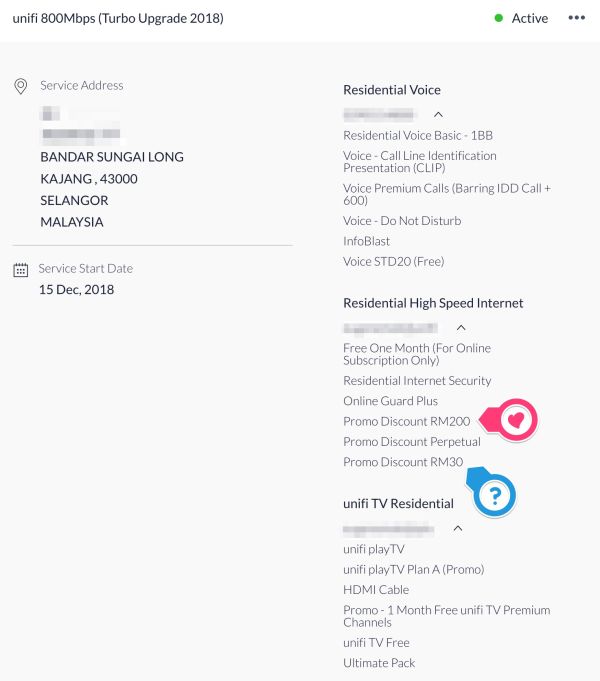
Just to clarify, on my unifi portal package i saw this under the "Residential High Speed Internet" section and I notice this "Promo Discount 24 Months". My Unifi was upgraded to 800Mbps last 2 days ago, what is the 24 months discount accounted for? Anyone else notice this on their unifi portal? Does this means what I'm paying is just staying for only 24 months?
*
Technically "Promo Discount 24 Months" is only for 2 years. After that the discount will hilang. Has your promo discount always said 24 months? What was it before the Turbo upgrade?

Mine is and has always been "Promo Discount Perpetual" since Advance 30 or 50.

user posted image

This post has been edited by soonwai: Jan 7 2019, 01:04 AM
soonwai
post Jan 7 2019, 01:22 AM


********
All Stars
11,458 posts

Joined: Oct 2007
From: KL


QUOTE(Spawny @ Jan 7 2019, 01:06 AM)
How much are you actually paying right now for your 800Mbps package?
Before the upgrade I was paying RM190 with SST for 100mbps, the contract was extended when I upgraded from 50Mbps on Dec 2017 but they never mentioned that the promo will last for 24 months and I clearly ask them about this.

There was a hidden promo for users on 50Mbps during a period where you just need to add an extra RM10 to your existing bill but it must be done thru the TM HQ at your specific area, so I went and did mine and all they did was add 10 bucks to the my bill and extended the contract to 2 years.

Anyone else has seen this?
*
Oh yeah, I remember that RM10 upgrade. Never received the SMS but I read about it here and did it entirely through 100.
https://forum.lowyat.net/index.php?showtopi...post&p=87059012

Anyway I'm paying RM159 for Turbo800 now. At one point you were actually paying less than me. I was paying RM189 for 100Mbps and you were paying RM179 for 100Mbps right? (all prices here without GST or SST). This is how I got here.

Summary:
RM179 Oct 2017 & before - Advance 50Mbps+Ruby
(Advance50 RM219 + Ruby RM30 - discount RM70)
RM189 Nov 2017- Sep 2018 - RYE2017 100Mbps+STD20+Jumbo+Ruby
(UnifiPro100 RM299 + Ultimate RM60 + Ruby RM30 - discount RM200)
The 10 dollar upgrade.
RM159 Oct 2018 - Nov 2018 - RYE2017 100Mbps+STD20+Ultimate
(UnifiPro100 RM299 + Ultimate RM60 - discount RM200)
Suddenly TM removed my redundant Ruby pack.
RM159 Dec 2018 - Present - Turbo 800Mbps+STD20+Ultimate
(UnifiPro800 RM329 + Ultimate RM60 - discount RM230)
Finally got Turbo'ed

*STD20 is not itemised in my bill but is in the list of items in my account.
**Sometime after the RYE2017 RM10 upgrade, early 2018, Jumbo was changed to Ultimate.

This post has been edited by soonwai: Jan 19 2019, 12:05 PM

soonwai
post Jan 7 2019, 03:28 AM


********
All Stars
11,458 posts

Joined: Oct 2007
From: KL


I was just reading back some old posts from Nov/Dec 2017 during the RYE2017 RM10 upgrades and came across this.

QUOTE(Zi-Tech @ Nov 28 2017, 11:58 PM)
hopefully next year 300mbps and 500mbps or 1gbps line will be introduce.... and give promo like this also to the 100mbps/pro..

better if give free upgrade....
*
Zi-Tech is clairvoyant!

Also comments such as "upgrade from from 50 to 100, do you need that speed?" Now is " do you need 800Mbps?" I wonder what this year's end will bring.

This post has been edited by soonwai: Jan 7 2019, 03:29 AM
soonwai
post Jan 8 2019, 06:03 PM


********
All Stars
11,458 posts

Joined: Oct 2007
From: KL


QUOTE(iamoracle @ Jan 8 2019, 03:09 PM)
Nice. Jasin is gonna be the most connected town in Malaysia. Digi also got 50 n 100 for RM95 n RM129.
soonwai
post Jan 9 2019, 08:38 PM


********
All Stars
11,458 posts

Joined: Oct 2007
From: KL


QUOTE(yakumo @ Jan 9 2019, 08:32 PM)
how are the test result to malaysia ,SG,US,EU? speed test result for 800Mbps , anyone care to share?
*
Here you go. SG

user posted image
speedtest.net OVH Cloud Singapore
Safari. Router: Mikrotik hAP AC2. MTU/MRU: 1480.

soonwai
post Jan 9 2019, 09:02 PM


********
All Stars
11,458 posts

Joined: Oct 2007
From: KL


QUOTE(yakumo @ Jan 9 2019, 08:45 PM)
mine like not consistent , i get like 630, 
the MTU setting important?
*
Not important. 1480 is the default for most routers. 1492 very very very slight increase in throughput but 1480 is safer. Less chance of fragmentation.

Many factors to consider too. Router? I got another router can only do max 640Mbps bcos its cpu is not fast enough. Your location? gos123456, sorry bro, forgot your actual id, gets 5ms from JB to SG. ipv6? ipv6 peering to SG not fully in place yet so it goes to HK and to SG. I just test with ipv4 for now.

This post has been edited by soonwai: Jan 9 2019, 09:05 PM
soonwai
post Jan 9 2019, 11:18 PM


********
All Stars
11,458 posts

Joined: Oct 2007
From: KL


QUOTE(cle900706 @ Jan 9 2019, 08:59 PM)
Hi guys, i have some questions to everyone here.
Did anyone get hardware upgrade free from unifi turbo?
When does tm started using innacomm rgx4400?

My situation is like this.
End of nov, i called tm to ask when my place will get turbo to 300mbps, they say around dec and will get free hardware upgrade because my hardware cannot support.
I am still using the huawei hg8240w and innatech rg4332 and so i waited.

...

So.... i only have the DO to justify but no mention of router. Sifus here have any suggestions on what should i do?
*
My cousin's case similar to yours. He turbo-ed to 500Mbps. His BTU is the HG8240W. Router is TRG212M.

So BTU is fine, that will support all the way to 800Mbps and beyond. The TRG212M is as bad if not worse than your RG4332. Won't go faster than 100Mbps due to Fast Ethernet ports.

Anyway, he went to TM Point and they gave him the standard contract renewal terms for new equipment. He didn't go for that.

He asked me for advice and I suggested to call 100. It works sometimes. He called up 100 and made a report that he was recently turbo-ed but is unable to achieve 500Mbps on wired LAN. According to 100, their records indicated that his equipment supports 500Mbps. Similar to you where they have you as having an RGX4400 which you don't. Anyway 100 says they will send a tech to check. Blah, blah RM53 service charge. The tech came and took one look at his TRG212M and gave him a new DIR-842. No service charge and no contract renewal.

To answer your other question, I first encountered the RGX4400 mid 2016.
https://forum.lowyat.net/topic/3994248

This post has been edited by soonwai: Jan 9 2019, 11:20 PM
soonwai
post Jan 9 2019, 11:22 PM


********
All Stars
11,458 posts

Joined: Oct 2007
From: KL


QUOTE(JohnLai @ Jan 9 2019, 09:46 PM)
Fark, my other house BTU is faulty. Probably power adapter damage. Neighbours are noisy again.

Should I bring the BTU to TMPoint or contact TM and request them to send it?
*
No spare 12V DC PSU? Sure it's just the PSU and not the BTU?

I'm lazy so I'll just call and wait for them to come over.
soonwai
post Jan 10 2019, 01:42 PM


********
All Stars
11,458 posts

Joined: Oct 2007
From: KL


QUOTE(naturalfool @ Jan 10 2019, 08:36 AM)
Are you sure no contract renewal???

I got turbo-ed to 800. Existing router is TRG212M. But I didn't get option to buy for RM188, change and renew contract or buy own router. 

Should I get them to come and change mine for free too  tongue.gif ? Then I can get a free DIR-842 for backup? Or use as repeater or whatnot to get better speed downstairs as my current router and modem are upstairs.
*
I can't be 100% sure but my cousin says no contract renewal. I also asked him the same thing a few times.

I think the key item in his case was that TM's record already indicated that he had a 500Mbps capable router. His TRG212M obviously wasn't capable. He was given that router for Advance30 back in Oct 2016.

soonwai
post Jan 10 2019, 02:35 PM


********
All Stars
11,458 posts

Joined: Oct 2007
From: KL


QUOTE(BladeRider88 @ Jan 10 2019, 11:51 AM)
Just got Turboed to 800M

Below is the Speedtest results for WIRED AC68U
*
Can you try with TIME or OVH Cloud Singapore?

I get fluctuating results with TM's Speedtest servers. Both 210.187.84.114 & 58.26.239.30. Fluctuating from 550-700, seldom goes above 800. Maybe their server overloaded.

Tests with http://testyourspeed.time.com.my and speedtest.net OVH SG server are at consistent 850+-20Mbps.

Testing with Safari and speedtest desktop app. Router: Mikrotik hAP AC2. MTU/MRU: 1480.

user posted image
speedtest.net OVH Cloud Singapore

user posted image
http://testyourspeed.time.com.my

user posted image
http://speedtest.tm.com.my (58.26.239.30)

user posted image
http://speedtest.tm.com.my (210.187.84.114)

This post has been edited by soonwai: Jan 10 2019, 02:36 PM

7 Pages « < 2 3 4 5 6 > » Top
Topic ClosedOptions
 

Change to:
| Lo-Fi Version
0.0284sec    0.34    7 queries    GZIP Disabled
Time is now: 13th December 2025 - 02:57 AM