QUOTE(Doraku @ Nov 22 2018, 06:10 PM)
try test speed via LAN between two pc using iperf instead on speedtest.net
» Click to show Spoiler - click again to hide... «
Pic A (Sender : Asus, Receiver : MSI)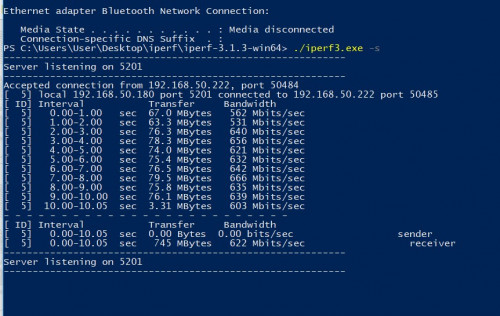 Pic B (Sender : MSI, Receiver : Asus)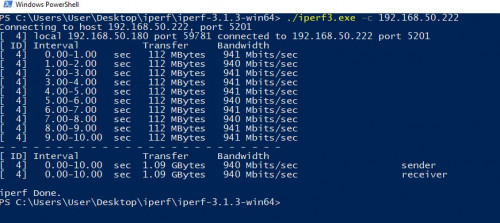
Finally I sort out how to speedtest using iperf3....
Here are some specs info for both of my laptop...
1. Asus
i5-3210M, 8GB DDR3, 250GB SATA SSD, Win10 64bit
2. MSI
i7-8750H, 16GB DDR4, 250GB NVME SSD, Win10 64bit
BTU : Huawei HG8420H
Router : Asus GT-AC5300
Cable : Dintek Cat 6 all round
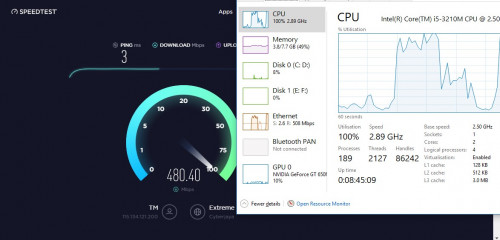
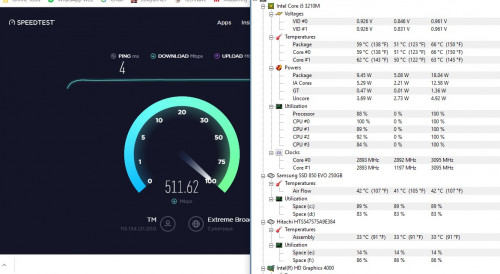
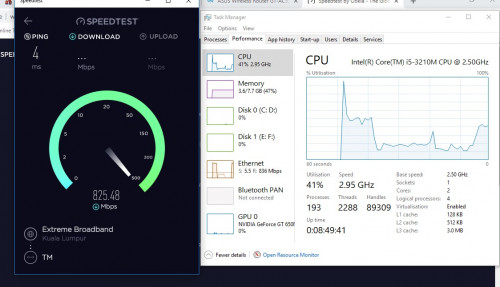
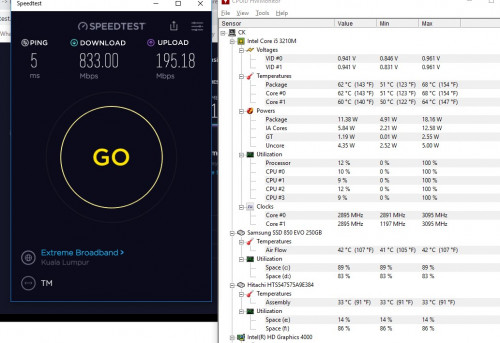
As you can see from Pic A, if using Asus as the Sender, it seems like the ipref3 speedtest couldn't achieve the maximum speed. If from Pic B, when MSI become the Sender, speed seems to be ok. In this situation, I believe the culprit is my Asus laptop is limiting my unifi speed. But I have follow
John Lai instruction to rectify the microcode issue. So I thought suppose to be ok... Anyway, I open up for recommendations and comments. Hopefully fellow sifus here can shred some lights on me....
I actually just receive my new laptop, and haven't go time to set it up since I think is better to setup my GT-AC5300 1st. So I can enjoy the max speed when I update the new laptop. And since I'm performing the iperf3 speedtest method, I also run a web based speedtest.net for my new MSI laptop, using LAN connection. And to my surprise, the DL speed can achieve up to 800Mbps (+- 2~3%). But the UL speed was horrible, it was LESS than 1Mbps. I tried with few servers like TM, INnet, but still the same...
The MSI laptop is just open box condition, not a single update has been perform yet. So any idea how come the UL speed will be so low???
This post has been edited by cskean: Nov 23 2018, 02:14 AM 

 Nov 20 2018, 02:10 PM


 Quote
Quote
 :sweat look amost same to me except new ui design



 0.2636sec
 0.43
0.43
 7 queries
 GZIP Disabled