Welcome Guest ( Log In | Register )

Bump Topic Topic Closed RSS Feed
10 Pages « < 4 5 6 7 8 > » Bottom

Outline · [ Standard ] · Linear+

Unifi Official TM UniFi High Speed Broadband Thread V36, READ 1ST PAGE FOR TURBO SPEED INFO!

views
     
JohnLai
post Nov 20 2018, 09:06 PM

Skeptical Cat
*******
Senior Member
3,669 posts

Joined: Apr 2006
QUOTE(cybercrew @ Nov 20 2018, 08:58 PM)
Hi guys,

It has been 2 weeks since got my 800Mbps turbo upgrade.
Below are my experience with the upgraded speed.

As mentioned in my previous post, I’m using ASUS RT-AC55UHP router which doesn’t allow me to enjoy full speed on wired connection. So updated the new beta firmware as suggested by some in the forum.

Just got my UGreen CAT 6 cable. Yes it does makes a difference compare to other cables in terms of speed.

So when i tested on my desktop which has a built in gigabit lan port. Able to hit 500 - 680 Mbps.
When perform the Speedtest using the same desktop on safe mode with networking, able to hit 820 Mbps. Now i admit the microcode problem as mentioned by one of the fellow forum member.

THis morning .i  tested  my Minix U9H android box with ugreen cat 6 lan cable and performed the speedtest.
To my surprise it can hit 845mbps max. Since my minix box is downstairs i usually use 5ghz WiFi to connect. SO max i can get is 135 - 140 Mbps.. But that is good enough for my streaming usage. However i realised that when plugged in to cable. .kodi movie streaming is flawless.

So i have few questions here..

Is there anyway we can address the microcode issue ? Patch or something ? So i can enjoy the full speed on desktop.
Noticed that most ASUS routers are super expensive if want to enjoy the max speed on wifi. Any suggestions of routers which will allow me to enjoy the speed on wifi ?  I was reading about tp link 3150 and many positive reviews about it.. any other routers that you ppl have tested so far ?
Else my last option is the pull a lan cable to living hall for my android box.

Looking forward for your suggestions . Thanks.
*
You sure it is microcode (not exactly a good idea to disable security stuff), overheating (it happens) or third party antivirus/firewall (eg:kaspersky) fault?

JohnLai
post Nov 20 2018, 09:21 PM

Skeptical Cat
*******
Senior Member
3,669 posts

Joined: Apr 2006
QUOTE(cskean @ Nov 20 2018, 09:11 PM)
The TR-069 is meant for remotely access to our router by Unifi right? For troubleshooting purposes only?
*
If only.
https://www.bleepingcomputer.com/news/secur...ordpress-sites/
JohnLai
post Nov 20 2018, 09:32 PM

Skeptical Cat
*******
Senior Member
3,669 posts

Joined: Apr 2006
QUOTE(BlueWind @ Nov 20 2018, 09:30 PM)
Yes I read that somewhere here, but even for direct download?
*
Back in the streamyx day, TM even throttled unencrypted direct data transfer for file extension ended with mp4, mkv, ogm, ogg, mp3, and avi.

Only zip and rar extension weren't affected last time.

JohnLai
post Nov 20 2018, 11:04 PM

Skeptical Cat
*******
Senior Member
3,669 posts

Joined: Apr 2006
QUOTE(kennytee @ Nov 20 2018, 10:32 PM)
had goes into safe mode, the speed seems the same, did run a quick test for all my available desktop, seems like the speed throttle back to 500mbps instead of 800 mbps range again, will test frequently and update
*
Try these speedtest servers: InNet, Extreme Broadband, Macrolynx and TIME.

Sometime TM speedtest server is overloaded.
JohnLai
post Nov 21 2018, 07:51 PM

Skeptical Cat
*******
Senior Member
3,669 posts

Joined: Apr 2006
QUOTE(lol0919 @ Nov 21 2018, 07:43 PM)
My Unifi tv got this error since 1 month ago, cannot watch tv at all
with the following error
[attachmentid=10117058]

Network test result.
[attachmentid=10117059]

any of you facing this problem before? how to fix it?
*
Set IGMP to V3 yet?
JohnLai
post Nov 21 2018, 08:00 PM

Skeptical Cat
*******
Senior Member
3,669 posts

Joined: Apr 2006
QUOTE(lol0919 @ Nov 21 2018, 07:56 PM)
no, how to set it????? i didn't modify anything yet
*
I don't know, I am not a seer or omniscient person.

Someone was posting stuff without any information.

EDIT:
Just saw your edit, from what you wrote, might be cable or port issue.

IGMP v2 normally results in black screen after turning it on from standby. Changing to V3 will fix the black screen, but i dont think this applies for your case.

This post has been edited by JohnLai: Nov 21 2018, 08:04 PM
JohnLai
post Nov 22 2018, 09:44 PM

Skeptical Cat
*******
Senior Member
3,669 posts

Joined: Apr 2006
QUOTE(fruitie @ Nov 22 2018, 09:25 PM)
Hmm. Others are paying RM 159 for the same thing. I'm paying much lower than RM 159 but mine cannot be made as a case reference.
Anyway, I may have missed this but well if this is shared earlier.
https://mindarakyat.blogspot.com/2018/11/ke...lah-tm.html?m=1

From what the author said, it seems the government cari pasal with TM. doh.gif To me, it wasn't initiated by the government. It was TIME that changed the whole game. laugh.gif

Anyway this link was shared by my friend who is working with TM..
*
QUOTE
Kerajaan PH dengan sikap populisnya menetapkan harga MSAP dan me-war warkan harga jalur lebar akan turun pada hujung tahun ,baca di sini [https://www.thestar.com.my/tech/tech-news/2018/10/08/gobind-on-streamyx/] (harga internet untuk semua , termasuk syarikat lain menyewa talian internet) sejak jun 2018 pada harga yang rendah , yang mana mereka tidak sedar dengan berbuat demikian syarikat yang satu satunya membantu kerajaan untuk mencapai metlamat high speed broadband tertekan kerana tak pulang modal.


Stopped after reading najib and the bolded part as quoted.

MSAP was signed by NAJIB GOVERNMENT doh.gif which TM didn't wanna follow and appeal for extension.
JohnLai
post Nov 23 2018, 01:36 AM

Skeptical Cat
*******
Senior Member
3,669 posts

Joined: Apr 2006
QUOTE(cskean @ Nov 23 2018, 01:10 AM)

As you can see from Pic A, if using Asus as the Sender, it seems like the ipref3 speedtest couldn't achieve the maximum speed. If from Pic B, when MSI become the Sender, speed seems to be ok. In this situation, I believe the culprit is my Asus laptop is limiting my unifi speed. But I have follow John Lai instruction to rectify the microcode issue. So I thought suppose to be ok... Anyway, I open up for recommendations and comments. Hopefully fellow sifus here can shred some lights on me....

*
.....except you haven't tell me if your 3210M has overheating issue........🤨
JohnLai
post Nov 23 2018, 11:10 AM

Skeptical Cat
*******
Senior Member
3,669 posts

Joined: Apr 2006
QUOTE(cskean @ Nov 23 2018, 02:04 AM)
» Click to show Spoiler - click again to hide... «


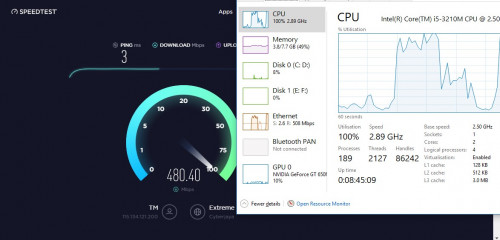
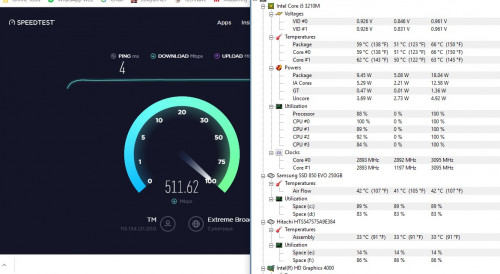
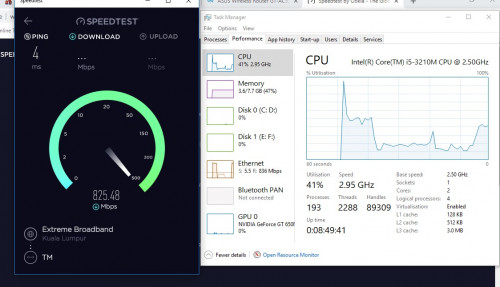
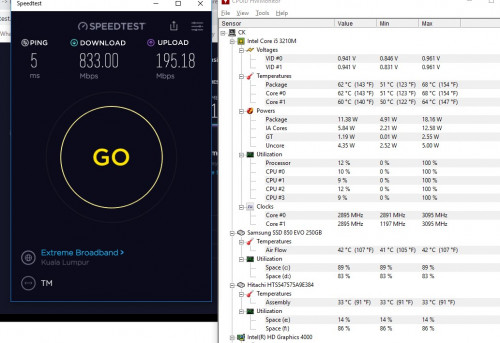
So sorry that I forgotten to reply your msg. Here are the screenshot of some of my speedtest with web based & window app. I'm not very sure how to read the ready. Which is why I take a screenshot and for you to see whether there is any overheating issue or not.

But I notice 1 thing, whenever I perform a speedtest over the web, the speed will always lower than the speedtest from window app. Both the DL and UL speed will some how slower than the window app speedtest. Is this normal?

I also notice that if I perform a speedtest over the web, my CPU utilization will become high till 100% for the DL speed, but when it comes to UL, it becomes normal back (ard 30-50%).... Again, is this normal? Or still affected by the microcode issue?
Btw, any idea how come my new laptop(i7-8750H) is having such slow UL speed?

All the test are run with Asus GT-AC5300, LAN cable connection~
*
Hmmm, temperature is normal, no clock throttling. I don't see any problem here.

The web version of speedtest normally has higher CPU utilization than app version. This is expected.
But I don't understand why you have 300Mbps difference. hmm.gif
If you use Microsoft Edge and Internet Explorer to run the web version, what are the results? (Checking if the fault lies with chrome......)


edit: eh? After re-reading, how come you connect to different server? One at Cyberjaya and one at Kuala Lumpur? doh.gif

This post has been edited by JohnLai: Nov 23 2018, 11:19 AM
JohnLai
post Nov 23 2018, 08:45 PM

Skeptical Cat
*******
Senior Member
3,669 posts

Joined: Apr 2006
As usual....no announcement from TM at all....

edit: oh wait....there is.


This post has been edited by JohnLai: Nov 23 2018, 08:48 PM
JohnLai
post Nov 25 2018, 01:29 AM

Skeptical Cat
*******
Senior Member
3,669 posts

Joined: Apr 2006
QUOTE(kevin916587 @ Nov 24 2018, 11:53 PM)
blasted it with the wind, not doing any goods

but i did try use USB bootable Ubuntu
the weird thing was in ubuntu, i gt 800Mbps speedtest in Mozila, but 400Mbps in Google Chrome (still higher anyway as compared to window 10)
*
Hmm, weird indeed.

As far as I know, mozilla firefox in ubuntu doesn't have GPU hardware acceleration enabled by default (I doubt you know how to enable it at about:config)
Meanwhile, there is partial gpu acceleration turned on by default for chrome in ubuntu. hmm.gif


JohnLai
post Nov 25 2018, 12:47 PM

Skeptical Cat
*******
Senior Member
3,669 posts

Joined: Apr 2006
QUOTE(kevin916587 @ Nov 25 2018, 09:10 AM)
haha, i also very confused.
but in window 10, both my chrome and firefox definitely wont see up to 400Mbps download
*
So...give up and live with it? laugh.gif
JohnLai
post Nov 25 2018, 04:00 PM

Skeptical Cat
*******
Senior Member
3,669 posts

Joined: Apr 2006
QUOTE(olivur @ Nov 25 2018, 02:53 PM)
I thought there's an option to either pay for the router or renew your warranty for 24 months?

because that's what the tech that dropped by my place told me
*
And I thought TM is supposed to introduce new router according to one of the trusted leaker........ innocent.gif
JohnLai
post Nov 26 2018, 07:07 PM

Skeptical Cat
*******
Senior Member
3,669 posts

Joined: Apr 2006
QUOTE(wanttobuylaptop @ Nov 26 2018, 07:04 PM)
-175mil, well, funny when they improve their offer, they suffered losses
if a company cannot improve their sheet while offering better things, they should go out of business
*
If they don't, TM gonna lose its customers to maxis.
Ironically, I heard Maxis revenue is expected to rise.....
JohnLai
post Dec 3 2018, 08:50 PM

Skeptical Cat
*******
Senior Member
3,669 posts

Joined: Apr 2006
QUOTE(Doraku @ Dec 3 2018, 08:33 PM)
Fuhh TNB fibre broadband now on pilot project :0

https://mobile.twitter.com/pos4you/status/1...537440551993344
*
Technically, it is 1Gbps line.

925Mbps = after some network overhead....
JohnLai
post Dec 5 2018, 07:30 PM

Skeptical Cat
*******
Senior Member
3,669 posts

Joined: Apr 2006
QUOTE(Doraku @ Dec 5 2018, 06:59 PM)
TP Link Archer C6? RM200+
*
Wonder how long is C6 startup time.......TM C1200 takes around 4 minutes to startup. dry.gif
JohnLai
post Dec 6 2018, 12:21 AM

Skeptical Cat
*******
Senior Member
3,669 posts

Joined: Apr 2006
TM fibre cable got cut again?
JohnLai
post Dec 6 2018, 12:34 AM

Skeptical Cat
*******
Senior Member
3,669 posts

Joined: Apr 2006
QUOTE(jai554 @ Dec 6 2018, 12:26 AM)
suddenly my GTA online dc
*
BBC News suddenly inaccessible for me.

Normally.....it only inaccessible if there is TM fibre cut as indicated by past events.... dry.gif
JohnLai
post Dec 6 2018, 02:49 PM

Skeptical Cat
*******
Senior Member
3,669 posts

Joined: Apr 2006
QUOTE(blacktubi @ Dec 6 2018, 02:38 PM)
Kinda fast actually

I think it is around 1 minute +
*
1 minute ++ ? Any random reboot issue?

ASUS 1300UHP only takes 20 - 22 seconds to bootup complete.
JohnLai
post Dec 7 2018, 01:11 AM

Skeptical Cat
*******
Senior Member
3,669 posts

Joined: Apr 2006
QUOTE(drunkonpiss @ Dec 7 2018, 01:06 AM)
Hey guys, was a Time user before and was using a DLINK 850L is it any better compared to DLINK DIR 842 router? Anyone got it to work with Unifi? Sucked that I had to put up with Unifi after using Time for the past 2 years but no choice since Unifi is the only option.
*
842 is better than 850L.

10 Pages « < 4 5 6 7 8 > » Top
Topic ClosedOptions
 

Change to:
| Lo-Fi Version
0.2390sec    0.75    7 queries    GZIP Disabled
Time is now: 4th December 2025 - 05:24 PM